How Subscriptions Work in ExtensionPay
======================================
This document explains how browser extension subscriptions work on [ExtensionPay](https://extensionpay.com).
* [Setup](#setup)
* [Subscription Lifecycle](#subscription-lifecycle)
+ [Payment Failures](#payment-failures)
+ [When a user cancels](#when-a-user-cancels)
+ [Example code that handles all subscription states](#example-code-that-handles-all-subscription-states)
* [Recommended Stripe Billing Settings](#recommended-stripe-billing-settings)
## Setup
To charge subscription payments for your extension, [register your extension](https://extensionpay.com/home/register-extension) and choose the subscription payment option.
When users successfully pay for your extension they will see a screen that looks like this:
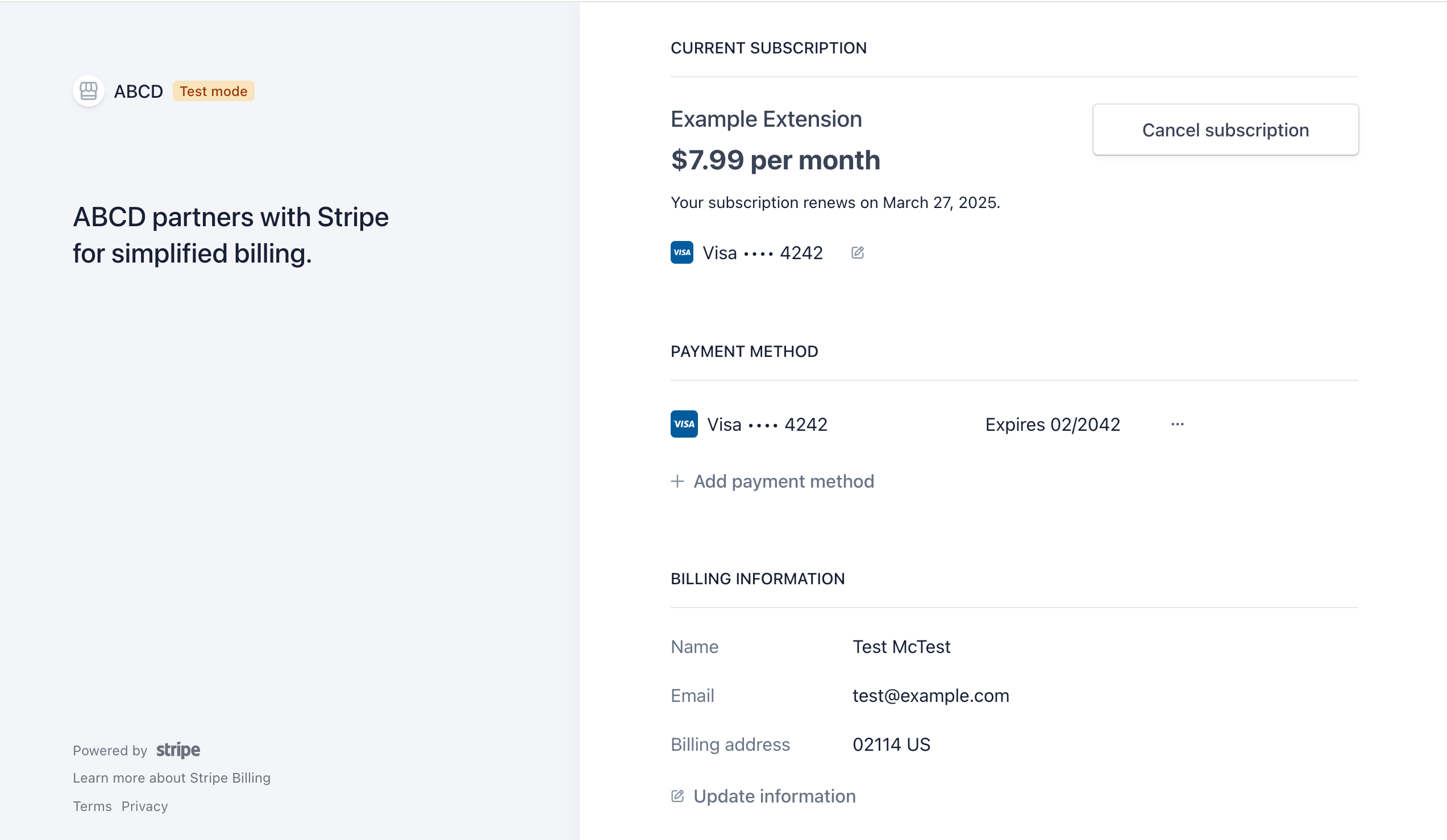 You can open this screen programmatically by running `extpay.openPaymentPage()` after the user has paid. You should allow the user to open this page from within your extension.
In development, you will see this page instead:
You can open this screen programmatically by running `extpay.openPaymentPage()` after the user has paid. You should allow the user to open this page from within your extension.
In development, you will see this page instead:
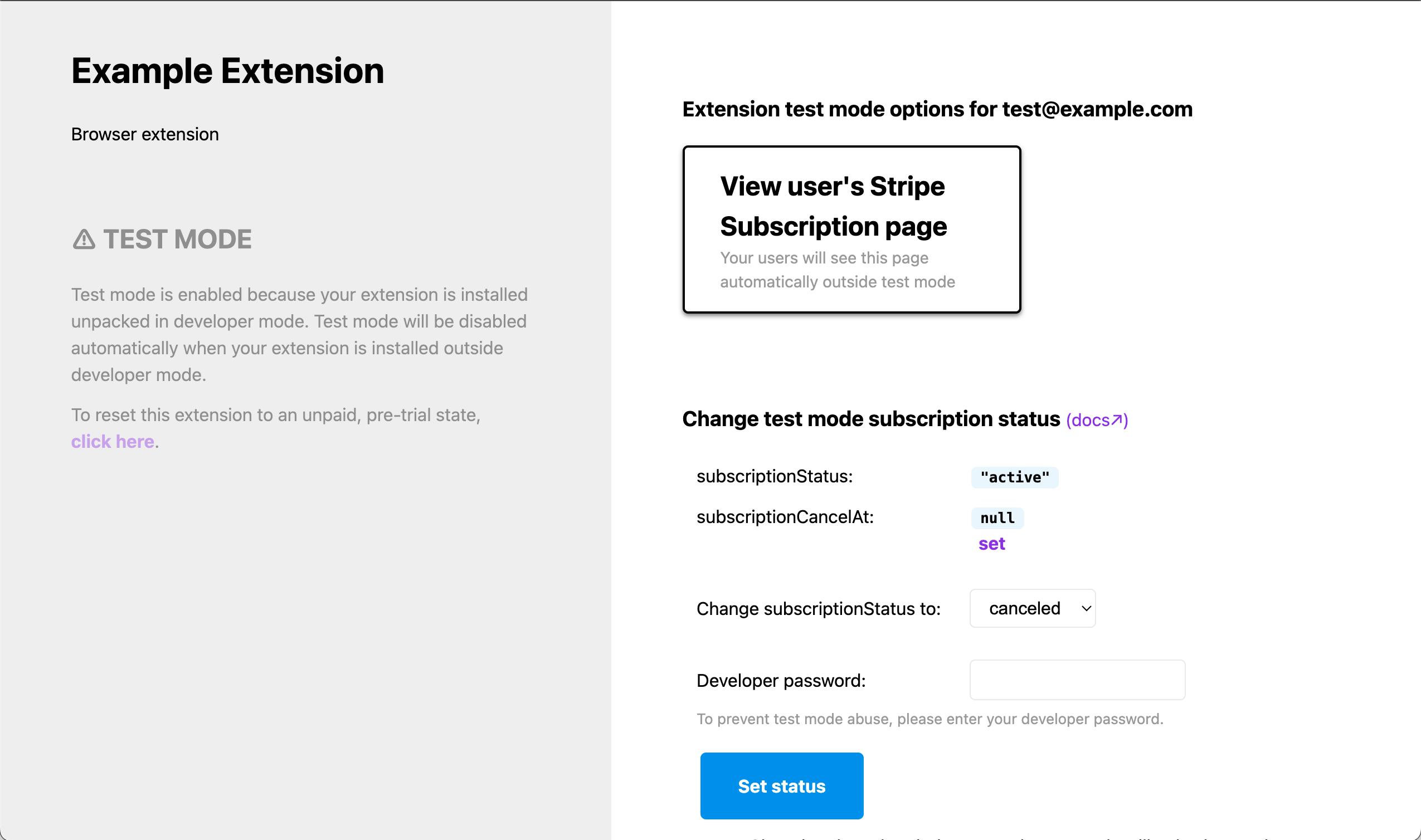 This will allow you to change the subscription status while testing your extension in development mode. You may also view the user's Stripe subscription management page if you like and test canceling / uncanceling from there.
## Subscription Lifecycle
When a user successfully pays for a subscription, their `subscriptionStatus` from [`extpay.getUser()`](../#4-use-extpaygetuser-to-check-a-users-paid-status) is set to **`active`** and `user.paid` is `true`.
At the end of their billing period (for example, 1 month later), their card will be automatically charged again. If the payment succeeds their `user.subscriptionStatus` will remain `active`.
### Payment Failures
If an automatic subscription payment fails (due to an expired card, insufficient funds, cosmic rays, etc), `user.subscriptionStatus` is set to **`past_due`** and `user.paid` is `false`.
In your [Stripe billing settings](https://dashboard.stripe.com/settings/billing/automatic) you can define what happens after that. By default, Stripe will automatically attempt to charge the user's card a few more times before setting their `subscriptionStatus` to `canceled`.
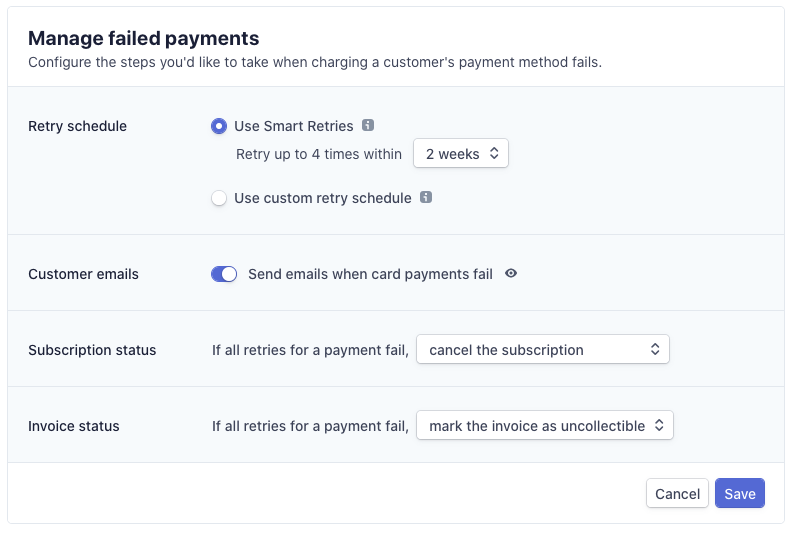
Ideally, the customer would be notified in your extension and/or emailed by Stripe ("Send emails when card payments fail" option in the screenshot below) to update their card information when a payment fails.
Below is a screenshot of recommended Stripe settings for failed payments:
This will allow you to change the subscription status while testing your extension in development mode. You may also view the user's Stripe subscription management page if you like and test canceling / uncanceling from there.
## Subscription Lifecycle
When a user successfully pays for a subscription, their `subscriptionStatus` from [`extpay.getUser()`](../#4-use-extpaygetuser-to-check-a-users-paid-status) is set to **`active`** and `user.paid` is `true`.
At the end of their billing period (for example, 1 month later), their card will be automatically charged again. If the payment succeeds their `user.subscriptionStatus` will remain `active`.
### Payment Failures
If an automatic subscription payment fails (due to an expired card, insufficient funds, cosmic rays, etc), `user.subscriptionStatus` is set to **`past_due`** and `user.paid` is `false`.
In your [Stripe billing settings](https://dashboard.stripe.com/settings/billing/automatic) you can define what happens after that. By default, Stripe will automatically attempt to charge the user's card a few more times before setting their `subscriptionStatus` to `canceled`.
Ideally, the customer would be notified in your extension and/or emailed by Stripe ("Send emails when card payments fail" option in the screenshot below) to update their card information when a payment fails.
Below is a screenshot of recommended Stripe settings for failed payments:
 ### When a user cancels
When a user cancels their subscription, it isn't canceled right away. Instead, `user.subscriptionStatus` remains `active` (and `user.paid` is `true`) through the end of the billing cycle.
However, **`user.subscriptionCancelAt`** is populated with the datetime their subscription will expire.
At the end of their billing cycle, `user.subscriptionStatus` will automatically switch to **`canceled`** and `user.paid` will be `false`. `user.subscriptionCancelAt` won't change.
Users who have canceled subscriptions cannot restart their subscriptions. They will have to create a new subscription by paying again.
### Example code that handles all subscription states
Below is example code that handles all the states a user's subscription can enter.
```js
const extpay = ExtPay('my-extension-id');
extpay.getUser().then(user => {
if (user.paid && !user.subscriptionCancelAt) {
console.log("You're paid!")
} else if (user.paid && user.subscriptionCancelAt) {
console.log("Your subscription will end at the next billing cycle")
} else if (user.subscriptionStatus === 'past_due') {
console.log("You need to update your card!");
extpay.openPaymentPage();
} else if (user.subscriptionStatus === 'canceled') {
console.log("We hope you enjoyed your subscription!")
} else {
console.log("You haven't paid yet :( ")
}
})
```
## Recommended Stripe Billing Settings
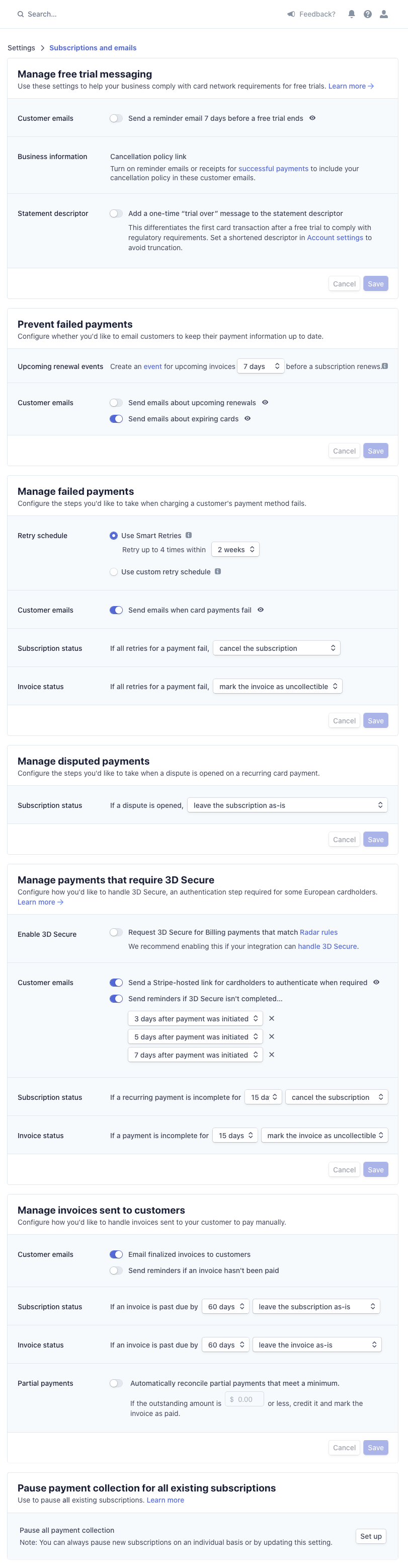
Below is a screenshot of all the recommended Stripe settings for subscription payments in ExtensionPay. You should tweak these settings only after you sign up for ExtensionPay and connect a Stripe account. (You can click the image below to view a larger, more readable version.)
### When a user cancels
When a user cancels their subscription, it isn't canceled right away. Instead, `user.subscriptionStatus` remains `active` (and `user.paid` is `true`) through the end of the billing cycle.
However, **`user.subscriptionCancelAt`** is populated with the datetime their subscription will expire.
At the end of their billing cycle, `user.subscriptionStatus` will automatically switch to **`canceled`** and `user.paid` will be `false`. `user.subscriptionCancelAt` won't change.
Users who have canceled subscriptions cannot restart their subscriptions. They will have to create a new subscription by paying again.
### Example code that handles all subscription states
Below is example code that handles all the states a user's subscription can enter.
```js
const extpay = ExtPay('my-extension-id');
extpay.getUser().then(user => {
if (user.paid && !user.subscriptionCancelAt) {
console.log("You're paid!")
} else if (user.paid && user.subscriptionCancelAt) {
console.log("Your subscription will end at the next billing cycle")
} else if (user.subscriptionStatus === 'past_due') {
console.log("You need to update your card!");
extpay.openPaymentPage();
} else if (user.subscriptionStatus === 'canceled') {
console.log("We hope you enjoyed your subscription!")
} else {
console.log("You haven't paid yet :( ")
}
})
```
## Recommended Stripe Billing Settings
Below is a screenshot of all the recommended Stripe settings for subscription payments in ExtensionPay. You should tweak these settings only after you sign up for ExtensionPay and connect a Stripe account. (You can click the image below to view a larger, more readable version.)