# ![Excalidraw Brute Export CLI][1]
![**Audience:** Developers][4] ![**Platform:** Linux][5]
🎇Features •
🏠Installation •
🚜Usage •
💻CLI
✅Requirements
•
🐳Docker
•
🚸Gotchas
![Top language][6] [![GitHub License][7]][8] [![npm - version][9]][10]
[![Node Version][24]][25]
**Export Excalidraw diagrams to SVG or PNG using a headless browser, using the
exact same export process as Excalidraw itself**
---
| | Status | Stable | Unstable | |
| ----------------- | --------------------------- | ------------------------- | ------------------------- | ------------------ |
| **[Master][11]** | [![Build and Test][13]][15] | [![since tagged][16]][18] | | ![last commit][22] |
| **[Develop][12]** | [![Build and Test][14]][15] | [![since tagged][17]][19] | [![since tagged][20]][21] | ![last commit][23] |
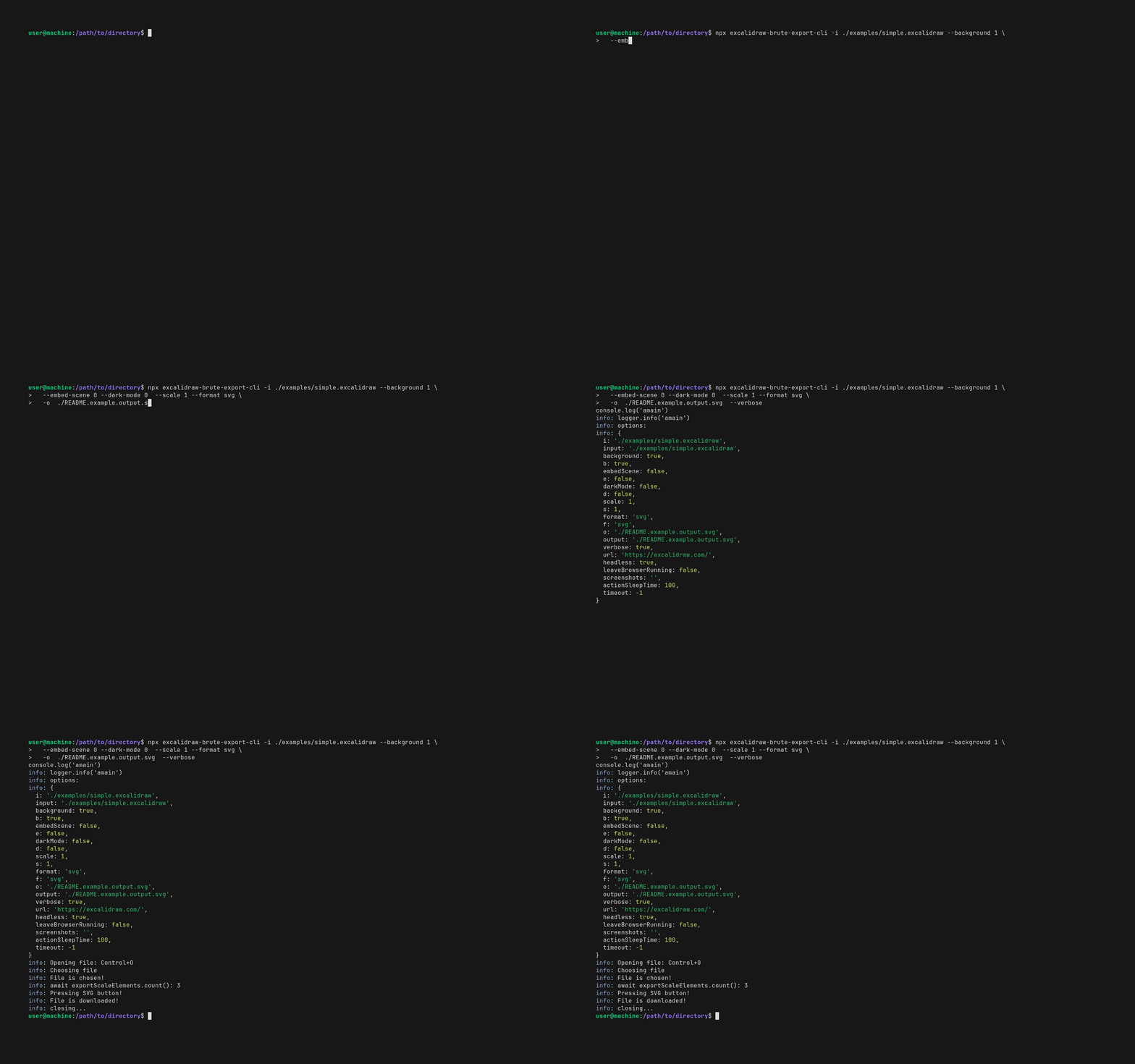 - ❔ What: Uses [🎭 playwright][2] to run a headless firefox browser to export
[Excalidraw][3] diagrams to svg/png files. Using a browser bypasses certain
bugs that happen with other projects that attempt to export by emulating the
DOM (without a browser).
- Why:
- To allow automated export of Excalidraw diagrams to svg/png files via the
command line.
- Currently, Excalidraw can only be exported by a human clicking on the
"Export image" button.
- Addresses/mitigates
[excalidraw/excalidraw#1261](https://github.com/excalidraw/excalidraw/issues/1261)
`excalidraw CLI #1261` which is an open feature request on the Excalidraw
project.
- Addresses/mitigates
[JRJurman/excalidraw-to-svg#6](https://github.com/JRJurman/excalidraw-to-svg/issues/6)
`Error rendering edge-labels. #6`.
- Addresses/mitigates
[Timmmm/excalidraw_export#6](https://github.com/Timmmm/excalidraw_export/issues/6)
`Error rendering edge-labels. #6`.
- 🤝 Related Projects
- ⭐⭐⭐⭐⭐
[JRJurman/excalidraw-to-svg](https://github.com/JRJurman/excalidraw-to-svg)
uses jsdom to simulate the DOM, then runs Excalidraw+react in nodejs, loads
the diagram files and exports them.
- Comparison: `JRJurman/excalidraw-to-svg` is faster and more efficient than
excalidraw-brute-export-cli. However, excalidraw-brute-export-cli is a "brute force"
approach to exporting Excalidraw diagrams, and in _some ways_ might be
more reliable.
- ⭐⭐⭐⭐⭐
[Timmmm/excalidraw_export](https://github.com/Timmmm/excalidraw_export)
similar to `JRJurman/excalidraw-to-svg` but simplifies the code and also
embeds SVG fonts.
- Comparison: `Timmmm/excalidraw_export` is faster and more efficient than
excalidraw-brute-export-cli. However, excalidraw-brute-export-cli is a "brute force"
approach to exporting Excalidraw diagrams, and in _some ways_ might be
more reliable.
## 🎇 Features
- Export Excalidraw diagrams to SVG or PNG using a headless browser, using the
exact same export process as Excalidraw itself.
- Can point to any excalidraw instance.
- Ability to change timeouts.
- Debugging: Ability to take screenshots at each step.
## 🏠 Installation
```bash
# Install globally from npm registry.
npm install -g excalidraw-brute-export-cli
# Or install globally, direct from GitHub:
npm install -g https://github.com/realazthat/excalidraw-brute-export-cli.git#v0.4.0
# Might prompt for root.
npx playwright install-deps
npx playwright install firefox
```
## 🚜 Usage
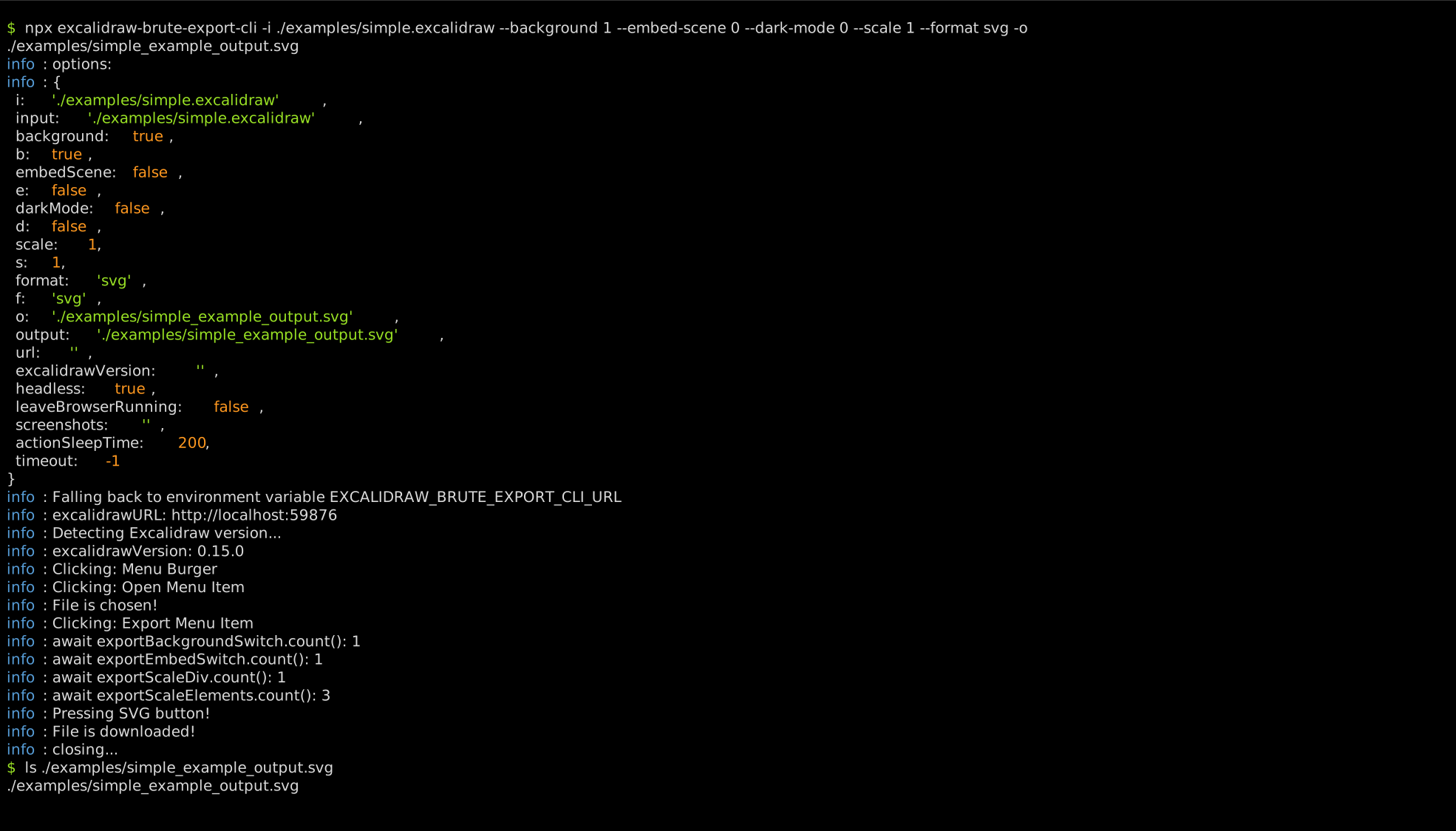
Example:
```bash
npx excalidraw-brute-export-cli \
-i ./examples/simple.excalidraw \
--background 1 \
--embed-scene 0 \
--dark-mode 0 \
--scale 1 \
--format svg \
-o "./examples/simple_example_output.svg"
ls "./examples/simple_example_output.svg"
```
- ❔ What: Uses [🎭 playwright][2] to run a headless firefox browser to export
[Excalidraw][3] diagrams to svg/png files. Using a browser bypasses certain
bugs that happen with other projects that attempt to export by emulating the
DOM (without a browser).
- Why:
- To allow automated export of Excalidraw diagrams to svg/png files via the
command line.
- Currently, Excalidraw can only be exported by a human clicking on the
"Export image" button.
- Addresses/mitigates
[excalidraw/excalidraw#1261](https://github.com/excalidraw/excalidraw/issues/1261)
`excalidraw CLI #1261` which is an open feature request on the Excalidraw
project.
- Addresses/mitigates
[JRJurman/excalidraw-to-svg#6](https://github.com/JRJurman/excalidraw-to-svg/issues/6)
`Error rendering edge-labels. #6`.
- Addresses/mitigates
[Timmmm/excalidraw_export#6](https://github.com/Timmmm/excalidraw_export/issues/6)
`Error rendering edge-labels. #6`.
- 🤝 Related Projects
- ⭐⭐⭐⭐⭐
[JRJurman/excalidraw-to-svg](https://github.com/JRJurman/excalidraw-to-svg)
uses jsdom to simulate the DOM, then runs Excalidraw+react in nodejs, loads
the diagram files and exports them.
- Comparison: `JRJurman/excalidraw-to-svg` is faster and more efficient than
excalidraw-brute-export-cli. However, excalidraw-brute-export-cli is a "brute force"
approach to exporting Excalidraw diagrams, and in _some ways_ might be
more reliable.
- ⭐⭐⭐⭐⭐
[Timmmm/excalidraw_export](https://github.com/Timmmm/excalidraw_export)
similar to `JRJurman/excalidraw-to-svg` but simplifies the code and also
embeds SVG fonts.
- Comparison: `Timmmm/excalidraw_export` is faster and more efficient than
excalidraw-brute-export-cli. However, excalidraw-brute-export-cli is a "brute force"
approach to exporting Excalidraw diagrams, and in _some ways_ might be
more reliable.
## 🎇 Features
- Export Excalidraw diagrams to SVG or PNG using a headless browser, using the
exact same export process as Excalidraw itself.
- Can point to any excalidraw instance.
- Ability to change timeouts.
- Debugging: Ability to take screenshots at each step.
## 🏠 Installation
```bash
# Install globally from npm registry.
npm install -g excalidraw-brute-export-cli
# Or install globally, direct from GitHub:
npm install -g https://github.com/realazthat/excalidraw-brute-export-cli.git#v0.4.0
# Might prompt for root.
npx playwright install-deps
npx playwright install firefox
```
## 🚜 Usage
Example:
```bash
npx excalidraw-brute-export-cli \
-i ./examples/simple.excalidraw \
--background 1 \
--embed-scene 0 \
--dark-mode 0 \
--scale 1 \
--format svg \
-o "./examples/simple_example_output.svg"
ls "./examples/simple_example_output.svg"
```
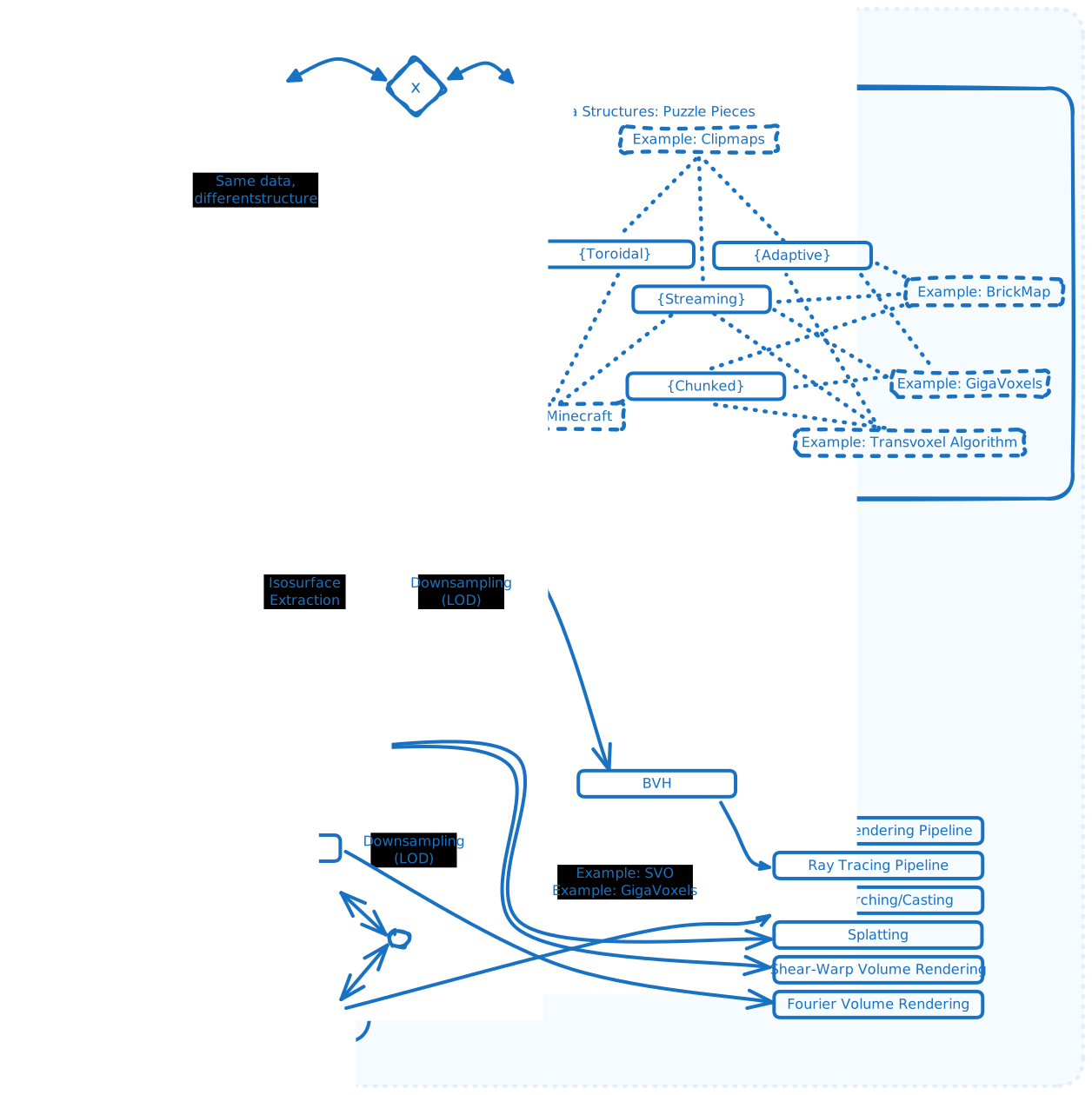
 And the resulting image (svg):
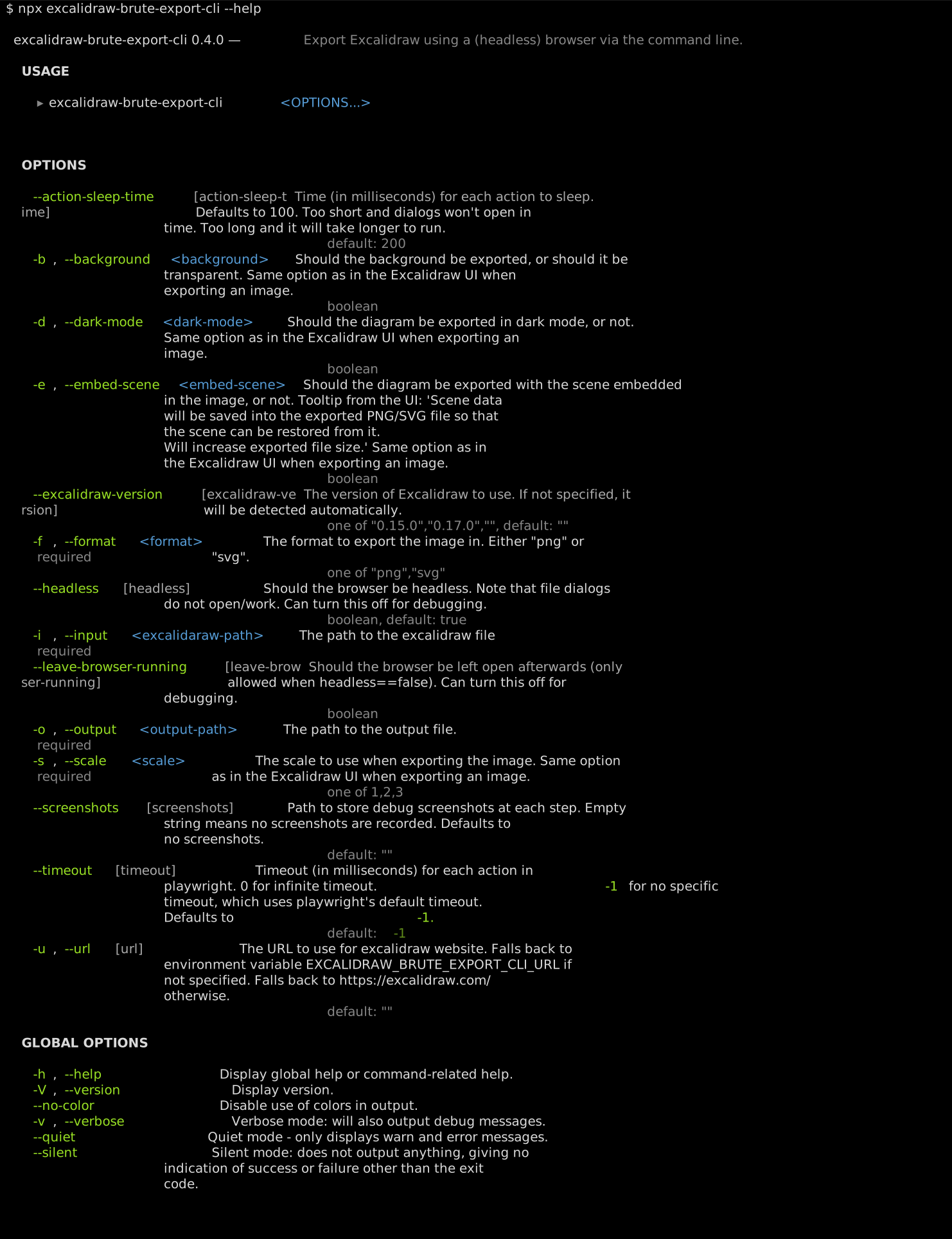
 ## 💻 Command Line Options
 ## 🐳 Running Excalidraw locally
- is a moving target as it gets updated. You can
alternatively run your own excalidraw at a specific git tag, and point to it
with the `--url` option, for more reproducible results.
- Unfortunately, as of `2024/05/05` the Excalidraw project doesn't regularly
update its docker image (See
,
[excalidraw/issues/7893](https://github.com/excalidraw/excalidraw/issues/7893),
[excalidraw/issues/7403](https://github.com/excalidraw/excalidraw/issues/7403)).
- Unfortunately, as of `2024/05/05` the Excalidraw project's Dockerfile is
frequently broken (See
[excalidraw/issues/7582](https://github.com/excalidraw/excalidraw/issues/7582),
[excalidraw/pull/7806](https://github.com/excalidraw/excalidraw/pull/7806),
[excalidraw/pull/7430](https://github.com/excalidraw/excalidraw/pull/7430),
[excalidraw/pull/7502](https://github.com/excalidraw/excalidraw/pull/7502)).
- According to
[excalidraw/issues/7582#issuecomment-1900651112](https://github.com/excalidraw/excalidraw/issues/7582#issuecomment-1900651112)
`v0.15.0` (from `2023/04/18`) is the last tag that builds.
- Here is how to run your own Excalidraw instance at Excalidraw tag
`v0.15.0`:
```bash
# First build the image. Do this once.
git clone https://github.com/excalidraw/excalidraw.git
cd excalidraw
git checkout "v0.15.0"
docker build -t "my-excalidraw-image:v0.15.0" .
# Now we'll run Excalidraw in a container instance.
# Delete the old instance if it exists.
docker rm -f "your-instance-name" || true
# Replace 59876 with your desired port.
docker run -dit --name "your-instance-name" -p 59876:80 "my-excalidraw-image:v0.15.0"
# Visit your instance at http://localhost:59876
# Use the --url option to point to your instance.
npx excalidraw-brute-export-cli \
...
--url "http://localhost:59876" \
...
# Or, set `EXCALIDRAW_BRUTE_EXPORT_CLI_URL` in your environment and leave out
# the --url option.
```
## ✅ Requirements
- Tested with latest version of as of `2024/05/05`, and
Excalidraw tag `v0.15.0` for more
consistent output, and testing.
- Supported Node versions: `>=18.0.0 <19.0.0 || >=20.0.0 <21.0.0 || >=21.0.0 <22.0.0 || >=22.0.0 <23.0.0` (See
[./package.json](https://github.com/realazthat/excalidraw-brute-export-cli/blob/v0.4.0/package.json)). These versions were chosen from
current supported and upcoming versions of node, from
[Node.js: Previous Releases](https://nodejs.org/en/about/previous-releases).
- Tested Node versions on GitHub Actions: `["18.20.2","20.12.1","21.7.3","22.0.0"]`.
### Tested on
- WSL2 Ubuntu 20.04, Node `v20.12.1` using Excalidraw at
tag `v0.15.0`.
## 🐳 Docker Image
Docker images are published to [ghcr.io/realazthat/excalidraw-brute-export-cli][49] at each
tag.
```bash
# Use the published images at ghcr.io/realazthat/snipinator.
# /data in the docker image is the working directory, so paths are simpler.
docker run --rm --tty \
-u "$(id -u):$(id -g)" \
-v "${PWD}:/data" \
ghcr.io/realazthat/excalidraw-brute-export-cli:v0.4.0 \
-i ./examples/simple.excalidraw \
--background 1 \
--embed-scene 0 \
--dark-mode 0 \
--scale 1 \
--format svg \
-o "./examples/simple_example_output.svg"
ls "./examples/simple_example_output.svg"
```
If you want to build the image yourself, you can use the Dockerfile in the
repository.
```bash
docker build -t my-excalidraw-brute-export-cli-image .
# /data in the docker image is the working directory, so paths are simpler.
docker run --rm --tty \
-u "$(id -u):$(id -g)" \
-v "${PWD}:/data" \
my-excalidraw-brute-export-cli-image \
-i ./examples/simple.excalidraw \
--background 1 \
--embed-scene 0 \
--dark-mode 0 \
--scale 1 \
--format svg \
-o "./examples/simple_example_output.svg"
ls "./examples/simple_example_output.svg"
```
## 🚸 Gotchas and Limitations
- Sometimes playwright times out.
- Mitigations:
- Increase the timeout with the `--timeout` option.
- Run the command again.
- If this is a persistent problem, please open an issue
[here](https://github.com/realazthat/excalidraw-brute-export-cli/issues/new)
and upload the diagram (zip it if necessary).
## 🤏 Versioning
We use SemVer for versioning. For the versions available, see the tags on this
repository.
## 🔑 License
This project is licensed under the MIT License - see the
[./LICENSE.md](https://github.com/realazthat/excalidraw-brute-export-cli/blob/v0.4.0/LICENSE.md) file for details.
## 🫡 Contributions
### Development environment: Linux-like
- For running `pre.sh` (Linux-like environment).
- From [./.github/dependencies.yml](https://github.com/realazthat/excalidraw-brute-export-cli/blob/v0.4.0/.github/dependencies.yml), which is used for
the GH Action to do a fresh install of everything:
```yaml
bash: scripts.
findutils: scripts.
grep: tests.
xxd: tests.
git: scripts, tests.
xxhash: scripts (changeguard).
rsync: out-of-directory test.
expect: for `unbuffer`, useful to grab and compare ansi color symbols.
jq: dependency for [yq](https://github.com/kislyuk/yq), which is used to generate
the README; the README generator needs to use `tomlq` (which is a part of `yq`)
to query `pyproject.toml`.
```
- Requires `pyenv`, or an exact matching version of python as in
[scripts/.python-version](https://github.com/realazthat/excalidraw-brute-export-cli/blob/v0.4.0/scripts/.python-version) (which is currently
`3.8.18 `).
- `jq`, ([installation](https://jqlang.github.io/jq/)) required for
[yq](https://github.com/kislyuk/yq), which is itself required for our
[./README.md](https://github.com/realazthat/excalidraw-brute-export-cli/blob/v0.4.0/README.md) generation, which uses `tomlq` (from the
[yq](https://github.com/kislyuk/yq) package) to include version strings from
[./scripts/pyproject.toml](https://github.com/realazthat/excalidraw-brute-export-cli/blob/v0.4.0/scripts/pyproject.toml).
- act (to run the GH Action locally):
- Requires nodejs.
- Requires Go.
- docker.
- Generate animation:
- docker
- Tests
- docker, to serve Excalidraw.
### Commit Process
1. (Optionally) Fork the `develop` branch.
2. If the [.github/demo.gif](https://github.com/realazthat/excalidraw-brute-export-cli/blob/v0.4.0/.github/demo.gif) will change, run
`bash ./scripts/generate-animation.sh`, this will generate a new
[.github/demo.gif](https://github.com/realazthat/excalidraw-brute-export-cli/blob/v0.4.0/.github/demo.gif).
- Sanity-check the animation visually!
- Unfortunately, every run will make a unique gif, please don't stage this
file unless it changes due to some feature change or somesuch.
3. Stage your files: e.g `git add path/to/file.py`.
4. `bash ./scripts/pre.sh`, this will format, lint, and test the code.
5. `git status` check if anything changed (generated
[README.md](https://github.com/realazthat/excalidraw-brute-export-cli/blob/v0.4.0/README.md) for example), if so, `git add` the changes,
and go back to the previous step.
6. `git commit -m "..."`.
7. Make a PR to `develop` (or push to develop if you have the rights).
## 🔄🚀 Release Process
These instructions are for maintainers of the project.
1. In the `develop` branch, run `bash ./scripts/pre.sh` to ensure
everything is in order.
2. In the `develop` branch, bump the version in
[package.json](https://github.com/realazthat/excalidraw-brute-export-cli/blob/v0.4.0/package.json), following semantic versioning
principles. Run `bash ./scripts/pre.sh` to ensure everything is in order.
- If anything got generated (e.g README or terminal output images), you will
have to stage those.
3. In the `develop` branch, commit these changes with a message like
`"Prepare release X.Y.Z"`. (See the contributions section
[above](#commit-process)).
4. Merge the `develop` branch into the `master` branch:
`git checkout master && git merge develop --no-ff`.
5. `master` branch: Tag the release: Create a git tag for the release with
`git tag -a vX.Y.Z -m "Version X.Y.Z"`.
6. Publish to NPM: Publish the release to NPM with
`bash ./scripts/deploy-to-npm.sh`.
7. Push to GitHub: Push the commit and tags to GitHub with
`git push && git push --tags`.
8. The `--no-ff` option adds a commit to the master branch for the merge, so
refork the develop branch from the master branch:
`git checkout develop && git merge master`.
9. Push the develop branch to GitHub: `git push origin develop`.
[1]: https://raw.githubusercontent.com/realazthat/excalidraw-brute-export-cli/v0.4.0/.github/logo-exported.svg
[2]: https://playwright.dev/
[3]: https://excalidraw.com/
[4]: https://img.shields.io/badge/Audience-Developers|Users-0A1E1E?style=plastic&logo=data:image/svg+xml;base64,PHN2ZyB4bWxucz0iaHR0cDovL3d3dy53My5vcmcvMjAwMC9zdmciIHdpZHRoPSIyNCIgaGVpZ2h0PSIyNCIgdmlld0JveD0iMCAwIDI0IDI0IiBmaWxsPSJub25lIiBzdHJva2U9ImN1cnJlbnRDb2xvciIgc3Ryb2tlLXdpZHRoPSIyIiBzdHJva2UtbGluZWNhcD0icm91bmQiIHN0cm9rZS1saW5lam9pbj0icm91bmQiIGNsYXNzPSJsdWNpZGUgbHVjaWRlLXVzZXJzIj48cGF0aCBkPSJNMTYgMjF2LTJhNCA0IDAgMCAwLTQtNEg2YTQgNCAwIDAgMC00IDR2MiIvPjxjaXJjbGUgY3g9IjkiIGN5PSI3IiByPSI0Ii8+PHBhdGggZD0iTTIyIDIxdi0yYTQgNCAwIDAgMC0zLTMuODciLz48cGF0aCBkPSJNMTYgMy4xM2E0IDQgMCAwIDEgMCA3Ljc1Ii8+PC9zdmc+
[5]: https://img.shields.io/badge/Platform-Node-0A1E1E?style=plastic&logo=data:image/svg+xml;base64,PHN2ZyB4bWxucz0iaHR0cDovL3d3dy53My5vcmcvMjAwMC9zdmciIHdpZHRoPSIyNCIgaGVpZ2h0PSIyNCIgdmlld0JveD0iMCAwIDI0IDI0IiBmaWxsPSJub25lIiBzdHJva2U9ImN1cnJlbnRDb2xvciIgc3Ryb2tlLXdpZHRoPSIyIiBzdHJva2UtbGluZWNhcD0icm91bmQiIHN0cm9rZS1saW5lam9pbj0icm91bmQiIGNsYXNzPSJsdWNpZGUgbHVjaWRlLWxhcHRvcC1taW5pbWFsIj48cmVjdCB3aWR0aD0iMTgiIGhlaWdodD0iMTIiIHg9IjMiIHk9IjQiIHJ4PSIyIiByeT0iMiIvPjxsaW5lIHgxPSIyIiB4Mj0iMjIiIHkxPSIyMCIgeTI9IjIwIi8+PC9zdmc+
[6]: https://img.shields.io/github/languages/top/realazthat/excalidraw-brute-export-cli.svg?&cacheSeconds=28800&style=plastic&color=0A1E1E
[7]: https://img.shields.io/github/license/realazthat/excalidraw-brute-export-cli?style=plastic&color=0A1E1E
[8]: https://github.com/realazthat/excalidraw-brute-export-cli/blob/v0.4.0/LICENSE.md
[9]: https://img.shields.io/npm/v/excalidraw-brute-export-cli?style=plastic&color=0A1E1E
[10]: https://www.npmjs.com/package/excalidraw-brute-export-cli
[11]: https://github.com/realazthat/excalidraw-brute-export-cli/tree/master
[12]: https://github.com/realazthat/excalidraw-brute-export-cli/tree/develop
[13]: https://img.shields.io/github/actions/workflow/status/realazthat/excalidraw-brute-export-cli/build-and-test.yml?branch=master&style=plastic
[14]: https://img.shields.io/github/actions/workflow/status/realazthat/excalidraw-brute-export-cli/build-and-test.yml?branch=develop&style=plastic
[15]: https://github.com/realazthat/excalidraw-brute-export-cli/actions/workflows/build-and-test.yml
[16]: https://img.shields.io/github/commits-since/realazthat/excalidraw-brute-export-cli/v0.4.0/master?style=plastic
[17]: https://img.shields.io/github/commits-since/realazthat/excalidraw-brute-export-cli/v0.4.0/develop?style=plastic
[18]: https://github.com/realazthat/excalidraw-brute-export-cli/compare/v0.4.0...master
[19]: https://github.com/realazthat/excalidraw-brute-export-cli/compare/v0.4.0...develop
[20]: https://img.shields.io/github/commits-since/realazthat/excalidraw-brute-export-cli/v0.4.0/develop?style=plastic
[21]: https://github.com/realazthat/excalidraw-brute-export-cli/compare/v0.4.0...develop
[22]: https://img.shields.io/github/last-commit/realazthat/excalidraw-brute-export-cli/master?style=plastic
[23]: https://img.shields.io/github/last-commit/realazthat/excalidraw-brute-export-cli/develop?style=plastic
[24]: https://img.shields.io/node/v/excalidraw-brute-export-cli?style=plastic&color=0A1E1E
[25]: https://www.npmjs.com/package/excalidraw-brute-export-cli
## 🐳 Running Excalidraw locally
- is a moving target as it gets updated. You can
alternatively run your own excalidraw at a specific git tag, and point to it
with the `--url` option, for more reproducible results.
- Unfortunately, as of `2024/05/05` the Excalidraw project doesn't regularly
update its docker image (See
,
[excalidraw/issues/7893](https://github.com/excalidraw/excalidraw/issues/7893),
[excalidraw/issues/7403](https://github.com/excalidraw/excalidraw/issues/7403)).
- Unfortunately, as of `2024/05/05` the Excalidraw project's Dockerfile is
frequently broken (See
[excalidraw/issues/7582](https://github.com/excalidraw/excalidraw/issues/7582),
[excalidraw/pull/7806](https://github.com/excalidraw/excalidraw/pull/7806),
[excalidraw/pull/7430](https://github.com/excalidraw/excalidraw/pull/7430),
[excalidraw/pull/7502](https://github.com/excalidraw/excalidraw/pull/7502)).
- According to
[excalidraw/issues/7582#issuecomment-1900651112](https://github.com/excalidraw/excalidraw/issues/7582#issuecomment-1900651112)
`v0.15.0` (from `2023/04/18`) is the last tag that builds.
- Here is how to run your own Excalidraw instance at Excalidraw tag
`v0.15.0`:
```bash
# First build the image. Do this once.
git clone https://github.com/excalidraw/excalidraw.git
cd excalidraw
git checkout "v0.15.0"
docker build -t "my-excalidraw-image:v0.15.0" .
# Now we'll run Excalidraw in a container instance.
# Delete the old instance if it exists.
docker rm -f "your-instance-name" || true
# Replace 59876 with your desired port.
docker run -dit --name "your-instance-name" -p 59876:80 "my-excalidraw-image:v0.15.0"
# Visit your instance at http://localhost:59876
# Use the --url option to point to your instance.
npx excalidraw-brute-export-cli \
...
--url "http://localhost:59876" \
...
# Or, set `EXCALIDRAW_BRUTE_EXPORT_CLI_URL` in your environment and leave out
# the --url option.
```
## ✅ Requirements
- Tested with latest version of as of `2024/05/05`, and
Excalidraw tag `v0.15.0` for more
consistent output, and testing.
- Supported Node versions: `>=18.0.0 <19.0.0 || >=20.0.0 <21.0.0 || >=21.0.0 <22.0.0 || >=22.0.0 <23.0.0` (See
[./package.json](https://github.com/realazthat/excalidraw-brute-export-cli/blob/v0.4.0/package.json)). These versions were chosen from
current supported and upcoming versions of node, from
[Node.js: Previous Releases](https://nodejs.org/en/about/previous-releases).
- Tested Node versions on GitHub Actions: `["18.20.2","20.12.1","21.7.3","22.0.0"]`.
### Tested on
- WSL2 Ubuntu 20.04, Node `v20.12.1` using Excalidraw at
tag `v0.15.0`.
## 🐳 Docker Image
Docker images are published to [ghcr.io/realazthat/excalidraw-brute-export-cli][49] at each
tag.
```bash
# Use the published images at ghcr.io/realazthat/snipinator.
# /data in the docker image is the working directory, so paths are simpler.
docker run --rm --tty \
-u "$(id -u):$(id -g)" \
-v "${PWD}:/data" \
ghcr.io/realazthat/excalidraw-brute-export-cli:v0.4.0 \
-i ./examples/simple.excalidraw \
--background 1 \
--embed-scene 0 \
--dark-mode 0 \
--scale 1 \
--format svg \
-o "./examples/simple_example_output.svg"
ls "./examples/simple_example_output.svg"
```
If you want to build the image yourself, you can use the Dockerfile in the
repository.
```bash
docker build -t my-excalidraw-brute-export-cli-image .
# /data in the docker image is the working directory, so paths are simpler.
docker run --rm --tty \
-u "$(id -u):$(id -g)" \
-v "${PWD}:/data" \
my-excalidraw-brute-export-cli-image \
-i ./examples/simple.excalidraw \
--background 1 \
--embed-scene 0 \
--dark-mode 0 \
--scale 1 \
--format svg \
-o "./examples/simple_example_output.svg"
ls "./examples/simple_example_output.svg"
```
## 🚸 Gotchas and Limitations
- Sometimes playwright times out.
- Mitigations:
- Increase the timeout with the `--timeout` option.
- Run the command again.
- If this is a persistent problem, please open an issue
[here](https://github.com/realazthat/excalidraw-brute-export-cli/issues/new)
and upload the diagram (zip it if necessary).
## 🤏 Versioning
We use SemVer for versioning. For the versions available, see the tags on this
repository.
## 🔑 License
This project is licensed under the MIT License - see the
[./LICENSE.md](https://github.com/realazthat/excalidraw-brute-export-cli/blob/v0.4.0/LICENSE.md) file for details.
## 🫡 Contributions
### Development environment: Linux-like
- For running `pre.sh` (Linux-like environment).
- From [./.github/dependencies.yml](https://github.com/realazthat/excalidraw-brute-export-cli/blob/v0.4.0/.github/dependencies.yml), which is used for
the GH Action to do a fresh install of everything:
```yaml
bash: scripts.
findutils: scripts.
grep: tests.
xxd: tests.
git: scripts, tests.
xxhash: scripts (changeguard).
rsync: out-of-directory test.
expect: for `unbuffer`, useful to grab and compare ansi color symbols.
jq: dependency for [yq](https://github.com/kislyuk/yq), which is used to generate
the README; the README generator needs to use `tomlq` (which is a part of `yq`)
to query `pyproject.toml`.
```
- Requires `pyenv`, or an exact matching version of python as in
[scripts/.python-version](https://github.com/realazthat/excalidraw-brute-export-cli/blob/v0.4.0/scripts/.python-version) (which is currently
`3.8.18 `).
- `jq`, ([installation](https://jqlang.github.io/jq/)) required for
[yq](https://github.com/kislyuk/yq), which is itself required for our
[./README.md](https://github.com/realazthat/excalidraw-brute-export-cli/blob/v0.4.0/README.md) generation, which uses `tomlq` (from the
[yq](https://github.com/kislyuk/yq) package) to include version strings from
[./scripts/pyproject.toml](https://github.com/realazthat/excalidraw-brute-export-cli/blob/v0.4.0/scripts/pyproject.toml).
- act (to run the GH Action locally):
- Requires nodejs.
- Requires Go.
- docker.
- Generate animation:
- docker
- Tests
- docker, to serve Excalidraw.
### Commit Process
1. (Optionally) Fork the `develop` branch.
2. If the [.github/demo.gif](https://github.com/realazthat/excalidraw-brute-export-cli/blob/v0.4.0/.github/demo.gif) will change, run
`bash ./scripts/generate-animation.sh`, this will generate a new
[.github/demo.gif](https://github.com/realazthat/excalidraw-brute-export-cli/blob/v0.4.0/.github/demo.gif).
- Sanity-check the animation visually!
- Unfortunately, every run will make a unique gif, please don't stage this
file unless it changes due to some feature change or somesuch.
3. Stage your files: e.g `git add path/to/file.py`.
4. `bash ./scripts/pre.sh`, this will format, lint, and test the code.
5. `git status` check if anything changed (generated
[README.md](https://github.com/realazthat/excalidraw-brute-export-cli/blob/v0.4.0/README.md) for example), if so, `git add` the changes,
and go back to the previous step.
6. `git commit -m "..."`.
7. Make a PR to `develop` (or push to develop if you have the rights).
## 🔄🚀 Release Process
These instructions are for maintainers of the project.
1. In the `develop` branch, run `bash ./scripts/pre.sh` to ensure
everything is in order.
2. In the `develop` branch, bump the version in
[package.json](https://github.com/realazthat/excalidraw-brute-export-cli/blob/v0.4.0/package.json), following semantic versioning
principles. Run `bash ./scripts/pre.sh` to ensure everything is in order.
- If anything got generated (e.g README or terminal output images), you will
have to stage those.
3. In the `develop` branch, commit these changes with a message like
`"Prepare release X.Y.Z"`. (See the contributions section
[above](#commit-process)).
4. Merge the `develop` branch into the `master` branch:
`git checkout master && git merge develop --no-ff`.
5. `master` branch: Tag the release: Create a git tag for the release with
`git tag -a vX.Y.Z -m "Version X.Y.Z"`.
6. Publish to NPM: Publish the release to NPM with
`bash ./scripts/deploy-to-npm.sh`.
7. Push to GitHub: Push the commit and tags to GitHub with
`git push && git push --tags`.
8. The `--no-ff` option adds a commit to the master branch for the merge, so
refork the develop branch from the master branch:
`git checkout develop && git merge master`.
9. Push the develop branch to GitHub: `git push origin develop`.
[1]: https://raw.githubusercontent.com/realazthat/excalidraw-brute-export-cli/v0.4.0/.github/logo-exported.svg
[2]: https://playwright.dev/
[3]: https://excalidraw.com/
[4]: https://img.shields.io/badge/Audience-Developers|Users-0A1E1E?style=plastic&logo=data:image/svg+xml;base64,PHN2ZyB4bWxucz0iaHR0cDovL3d3dy53My5vcmcvMjAwMC9zdmciIHdpZHRoPSIyNCIgaGVpZ2h0PSIyNCIgdmlld0JveD0iMCAwIDI0IDI0IiBmaWxsPSJub25lIiBzdHJva2U9ImN1cnJlbnRDb2xvciIgc3Ryb2tlLXdpZHRoPSIyIiBzdHJva2UtbGluZWNhcD0icm91bmQiIHN0cm9rZS1saW5lam9pbj0icm91bmQiIGNsYXNzPSJsdWNpZGUgbHVjaWRlLXVzZXJzIj48cGF0aCBkPSJNMTYgMjF2LTJhNCA0IDAgMCAwLTQtNEg2YTQgNCAwIDAgMC00IDR2MiIvPjxjaXJjbGUgY3g9IjkiIGN5PSI3IiByPSI0Ii8+PHBhdGggZD0iTTIyIDIxdi0yYTQgNCAwIDAgMC0zLTMuODciLz48cGF0aCBkPSJNMTYgMy4xM2E0IDQgMCAwIDEgMCA3Ljc1Ii8+PC9zdmc+
[5]: https://img.shields.io/badge/Platform-Node-0A1E1E?style=plastic&logo=data:image/svg+xml;base64,PHN2ZyB4bWxucz0iaHR0cDovL3d3dy53My5vcmcvMjAwMC9zdmciIHdpZHRoPSIyNCIgaGVpZ2h0PSIyNCIgdmlld0JveD0iMCAwIDI0IDI0IiBmaWxsPSJub25lIiBzdHJva2U9ImN1cnJlbnRDb2xvciIgc3Ryb2tlLXdpZHRoPSIyIiBzdHJva2UtbGluZWNhcD0icm91bmQiIHN0cm9rZS1saW5lam9pbj0icm91bmQiIGNsYXNzPSJsdWNpZGUgbHVjaWRlLWxhcHRvcC1taW5pbWFsIj48cmVjdCB3aWR0aD0iMTgiIGhlaWdodD0iMTIiIHg9IjMiIHk9IjQiIHJ4PSIyIiByeT0iMiIvPjxsaW5lIHgxPSIyIiB4Mj0iMjIiIHkxPSIyMCIgeTI9IjIwIi8+PC9zdmc+
[6]: https://img.shields.io/github/languages/top/realazthat/excalidraw-brute-export-cli.svg?&cacheSeconds=28800&style=plastic&color=0A1E1E
[7]: https://img.shields.io/github/license/realazthat/excalidraw-brute-export-cli?style=plastic&color=0A1E1E
[8]: https://github.com/realazthat/excalidraw-brute-export-cli/blob/v0.4.0/LICENSE.md
[9]: https://img.shields.io/npm/v/excalidraw-brute-export-cli?style=plastic&color=0A1E1E
[10]: https://www.npmjs.com/package/excalidraw-brute-export-cli
[11]: https://github.com/realazthat/excalidraw-brute-export-cli/tree/master
[12]: https://github.com/realazthat/excalidraw-brute-export-cli/tree/develop
[13]: https://img.shields.io/github/actions/workflow/status/realazthat/excalidraw-brute-export-cli/build-and-test.yml?branch=master&style=plastic
[14]: https://img.shields.io/github/actions/workflow/status/realazthat/excalidraw-brute-export-cli/build-and-test.yml?branch=develop&style=plastic
[15]: https://github.com/realazthat/excalidraw-brute-export-cli/actions/workflows/build-and-test.yml
[16]: https://img.shields.io/github/commits-since/realazthat/excalidraw-brute-export-cli/v0.4.0/master?style=plastic
[17]: https://img.shields.io/github/commits-since/realazthat/excalidraw-brute-export-cli/v0.4.0/develop?style=plastic
[18]: https://github.com/realazthat/excalidraw-brute-export-cli/compare/v0.4.0...master
[19]: https://github.com/realazthat/excalidraw-brute-export-cli/compare/v0.4.0...develop
[20]: https://img.shields.io/github/commits-since/realazthat/excalidraw-brute-export-cli/v0.4.0/develop?style=plastic
[21]: https://github.com/realazthat/excalidraw-brute-export-cli/compare/v0.4.0...develop
[22]: https://img.shields.io/github/last-commit/realazthat/excalidraw-brute-export-cli/master?style=plastic
[23]: https://img.shields.io/github/last-commit/realazthat/excalidraw-brute-export-cli/develop?style=plastic
[24]: https://img.shields.io/node/v/excalidraw-brute-export-cli?style=plastic&color=0A1E1E
[25]: https://www.npmjs.com/package/excalidraw-brute-export-cli