# ESLint Plugin Light


<p align="center">
  <img src="https://img.shields.io/npm/dw/eslint-plugin-light">
  <img src="https://img.shields.io/npm/unpacked-size/eslint-plugin-light">
  <img src="https://img.shields.io/npm/v/eslint-plugin-light">
  <img src="https://img.shields.io/npm/l/eslint-plugin-light">
  <img src="https://img.shields.io/badge/TypeScript-strict-blue?logo=typescript&logoColor=white" alt="TypeScript strict">
  <img src="https://img.shields.io/badge/created-2022--01-blue?logo=github&logoColor=white">
</p>

简单、易用的 ESLint 插件库。

## 1. 作者

**novlan1**

## 2. 安装

首先要安装 [ESLint](https://eslint.org/)。

```sh
pnpm i eslint -D
```

然后安装本插件 `eslint-plugin-light`。

```sh
npm i eslint-plugin-light -D
```

## 3. 使用

在 `.eslintrc` 配置文件的 `plugins` 中增加本插件 `eslint-plugin-light`，或者省略 `eslint-plugin-` 前缀。

```json
{
    "plugins": [
        "light"
    ]
}
```

然后配置你想使用的规则。

```json
{
    "rules": {
        "light/rule-name": 2
    }
}
```

也可以使用本工具提供的扩展。

```json
{
  "extends": ["plugin:light/recommended"],
}
```

## 4. 规则

### 4.1. valid-vue-comp-import

禁止从 `js` 文件中加载 `Vue` 组件。

比如，

1. 导入地址是`js/ts`文件

```js
import SomeComp from 'src/local-component/ui/pages/user/account-manage/index.js';

// 或者省略了js/ts文件后缀
import SomeComp from 'src/local-component/ui/pages/user/account-manage/index';
```

如果加了 `--fix`，会被转换为：

```js
import SomeComp from 'src/local-component/ui/pages/user/account-manage/xxx.vue';
```

注意上面的`xxx.vue`是从`index.js`中分析得到的原始文件路径。

2. 导入一个目录，但目录存在`index.js`，这时候不管存不存在`index.vue`，`uni-app`转换都会失败

```js
import SomeComp from 'src/local-component/ui/pages/user/account-manage';
```

可转换为：

```js
import SomeComp from 'src/local-component/ui/pages/user/account-manage/xxx.vue';
```

3. 具名导入

```js
import {
  AComp,
  BComp,
  CComp,
  DComp,
} from './comp';
```

可转换为：

```js
import AComp from 'src/local-component/module/tip-match/tip-match-schedule-tree-new/comp/a.vue';
import BComp from 'src/local-component/module/tip-match/tip-match-schedule-tree-new/comp/b.vue';
import CComp from 'src/local-component/module/tip-match/tip-match-schedule-tree-new/comp/c.vue';
import DComp from 'src/local-component/module/tip-match/tip-match-schedule-tree-new/comp/d.vue';
```

### 4.2. no-plus-turn-number

禁止在 `vue` 的 `template` 中用 `+` 号转换字符串为数字

比如：

```html
<ScheduleItem
  :child-id="+childId"
/>
```

如果加了 `--fix`，会被转化成：

```html
<ScheduleItem
  :child-id="parseInt(childId, 10)"
/>
```

### 4.3. no-complex-key

不要在`vue`模板中使用复杂的`key`。包括：

1. 字符串拼接，如：
  
```vue
:key="`hold` + index"`
```

2. 模板字符串，如：

```vue
:key="`hold-${index}`"
```

3. 将`key`提到一个函数中，如：

```vue
:key="getHoldKey(index)"

getHoldKey(index) {
  return `hold${index}`
}
```

最佳方式其实是提前处理好数据，这样性能会更好，也避免了`key`重复。

```ts
getData() {
  items = items.map((item,index) => ({
    ...item,
    key: `hold-${index}`
  }))
}
```

`uni-app`中，`key`重复的话，会造成挂载在组件上面的事件参数为`undefined`，从而不成功。


### 4.4. json-parse-try-catch

`JSON.parse` 应该加 `try catch`。

默认配置会排除下面情况：

```ts
JSON.parse(JSON.stringify(abc));
```

可以配置 `strict` 参数为 `true`，开启检查。

```js
// .eslintrc.js

module.exports = {
  plugins: [
    'light',
  ],
  rules: {
    'light/json-parse-try-catch': [2, { strict: true }],
  },
}
```

### 4.5. no-import-all-in-one-api

使用 `src/api` 子仓库时， 不应该导入全部接口，而应该按需引入。

Bad case:

```js
// bad
import { pubg_fateClient } from 'src/api/git.aow.com/itrpcprotocol/esport/esport_cgi/pubg_fate/pubg_fate.http';
```

Good case:

```js
// good
import { QueryGameListHomePageClient } from 'src/api/git.aow.com/itrpcprotocol/esport/esport_cgi/pubg_fate/pubg_fate/QueryGameListHomePage.http';
```

Usage:

```js
// .eslintrc.js

module.exports = {
  plugins: [
    'light',
  ],
  rules: {
    'light/no-import-all-in-one-api': 2,
  },
}
```

还可以配置 `excludes` 数组，指定排除哪些接口，不推荐使用。

```js
// .eslintrc.js

module.exports = {
  plugins: [
    'light',
  ],
  rules: {
    'light/no-import-all-in-one-api': [2, {
      excludes: [
        'src/api/git.aow.com/itrpcprotocol/esport/esport_cgi/pubg_fate/pubg_fate.http',
      ]
    }],
  },
}
```

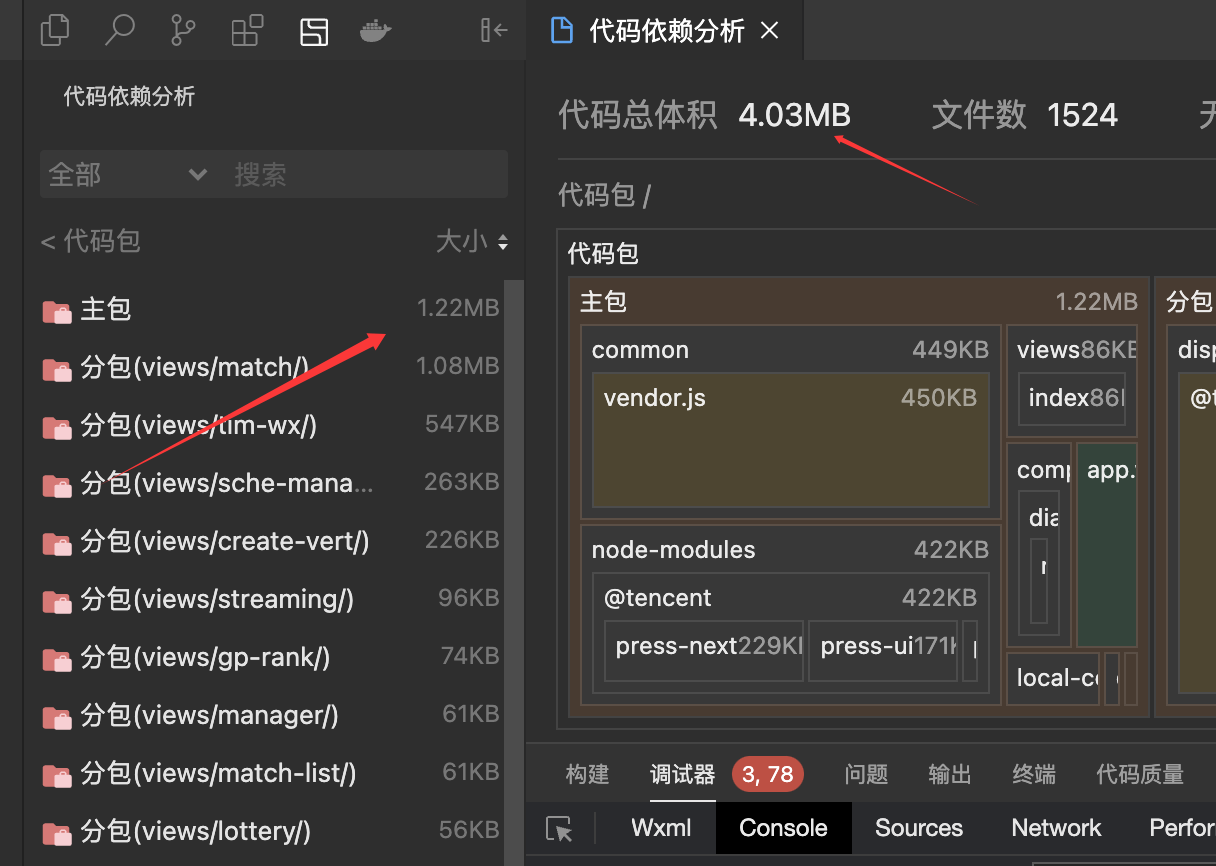
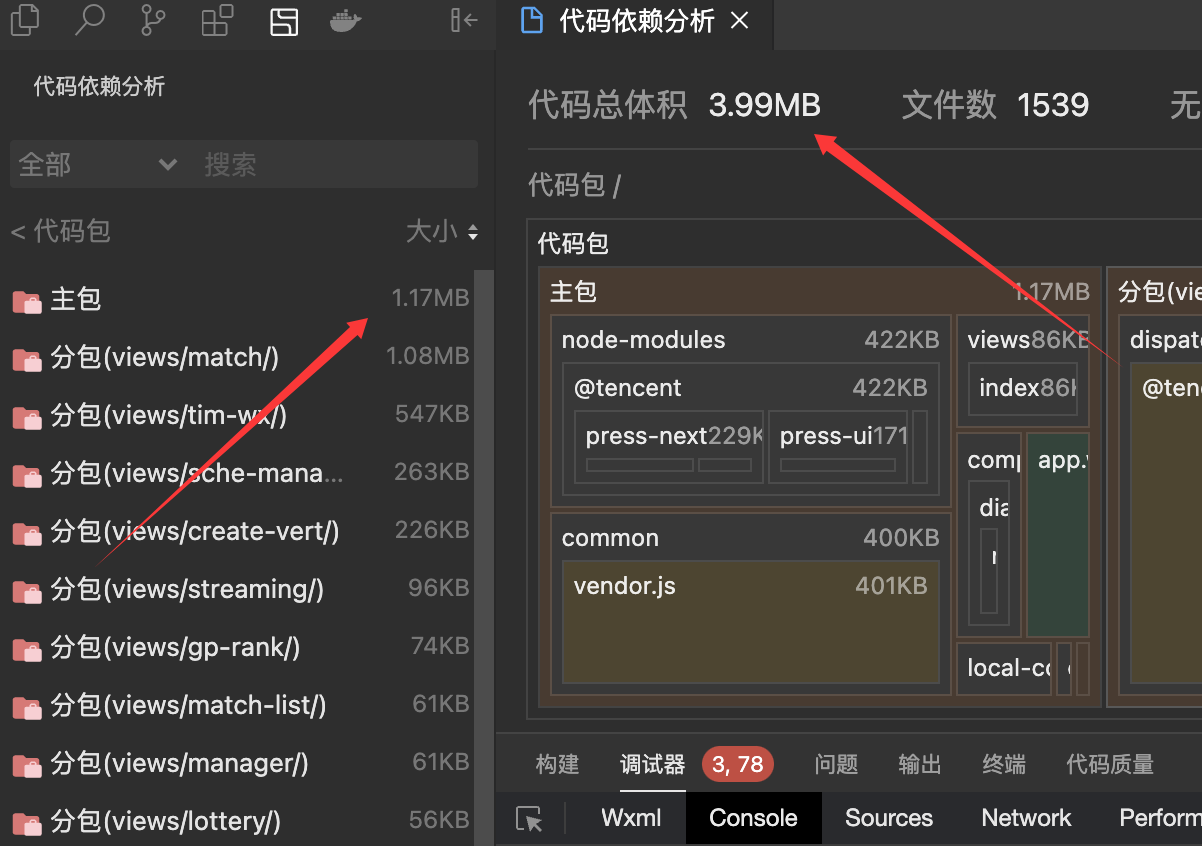
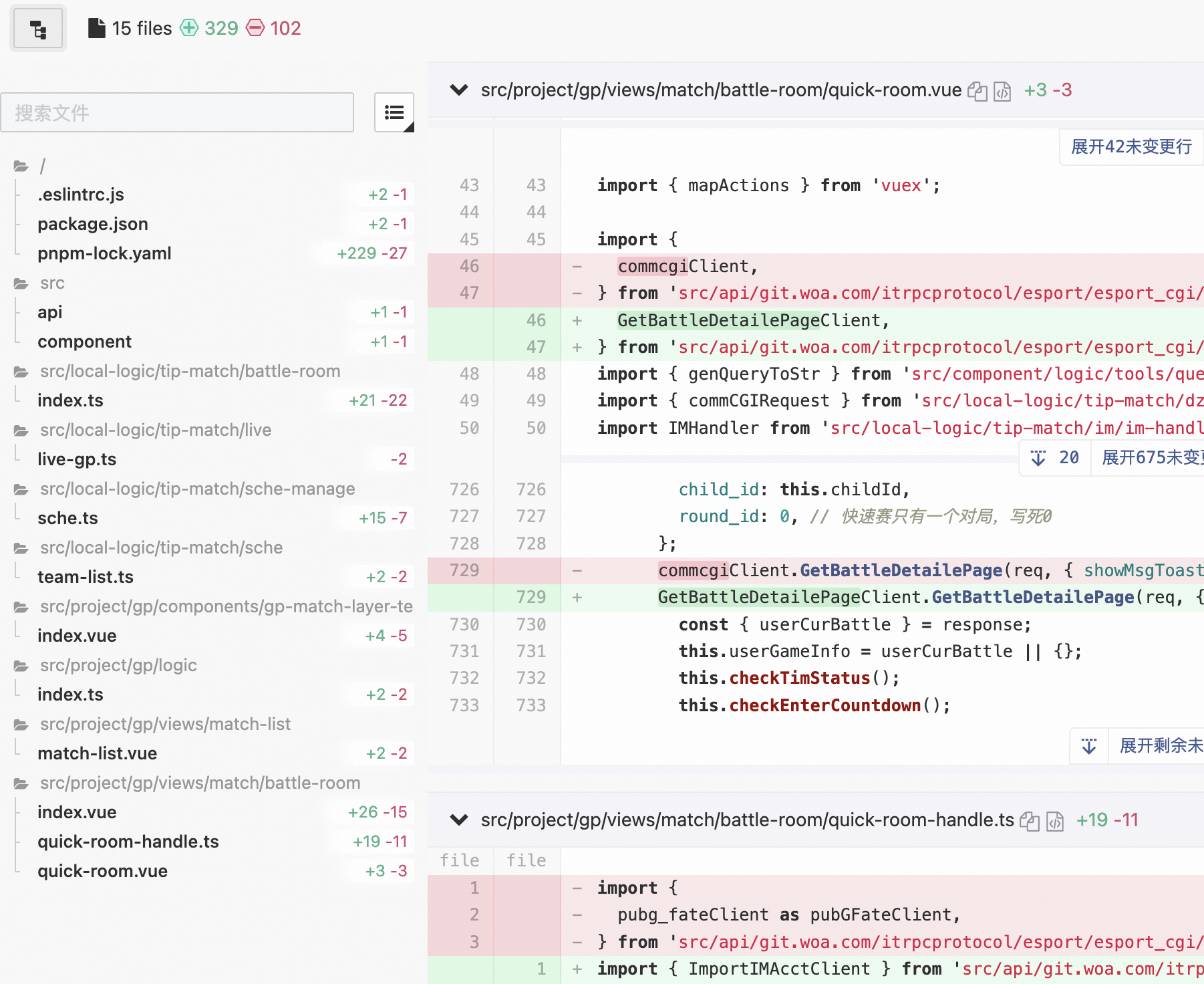
下面是一个案例，根据这个规则，对一个线上项目进行改造。仅仅改动了[几个文件的几行引入语句](https://git.aow.com/pmd-mobile/match/gp-next/commit/20e0050fe10ed767dcb5d77dca76a9b51c23820e)，就减少了主包 `50KB`，效果立竿见影。

之前：

<img src="https://mike-1255355338.cos.ap-guangzhou.myqcloud.com/article/2025/5/own_mike_p8Sr7F4zjtry4mtR.png" width="600">

之后：

<img src="https://mike-1255355338.cos.ap-guangzhou.myqcloud.com/article/2025/5/own_mike_MJ8Q5QXEyamnGZXz.png" width="600">

改动的几个文件：

<img src="https://mike-1255355338.cos.ap-guangzhou.myqcloud.com/article/2025/5/own_mike_rfMPwBYtZmhXrthT.png" width="600">

### 4.6. no-js-file

运行时文件不允许使用 `js/jsx`，只允许 `ts/tsx`。子工程的 `config.js` 会自动排除。

Usage:

```js
// .eslintrc.js

module.exports = {
  plugins: [
    'light',
  ],
  rules: {
    'light/no-js-file': 2,
  },
}
```

<img src="https://mike-1255355338.cos.ap-guangzhou.myqcloud.com/article/2025/5/own_mike_NKtdBjwwj23s5PNj.png" width="900">

配置选项：

| 字段    | 说明                    | 默认值                                                        |
| ------- | ----------------------- | ------------------------------------------------------------- |
| include | 检查的列表，`glob` 模式 | `['src/{project,local-component,local-logic}/**/*.{js,jsx}']` |
| exclude | 排除的列表，`glob` 模式 | `['src/project/*/config.js']`                                 |

### 4.7. valid-file-name

文件命名格式只允许使用 [kebab-case](https://developer.mozilla.org/en-US/docs/Glossary/Kebab_case)。子工程的 `App.vue` 会自动排除。

Usage:

```js
// .eslintrc.js

module.exports = {
  plugins: [
    'light',
  ],
  rules: {
    'light/valid-file-name': 2,
  },
}
```

<img src="https://mike-1255355338.cos.ap-guangzhou.myqcloud.com/article/2025/5/own_mike_SMwQBipYEP6kbykt.png" width="900">

<img src="https://mike-1255355338.cos.ap-guangzhou.myqcloud.com/article/2025/5/own_mike_hJwzQDXxrcRyQZPd.png" width="900">

配置选项：

| 字段    | 说明                    | 默认值                      |
| ------- | ----------------------- | --------------------------- |
| include | 检查的列表，`glob` 模式 | `['src/**/*']`              |
| exclude | 排除的列表，`glob` 模式 | `['src/project/*/App.vue']` |

### 4.8. no-multiple-script

禁止 Vue 文件中存在多个 `<script>`。

Usage:

```js
// .eslintrc.js

module.exports = {
  plugins: [
    'light',
  ],
  rules: {
    'light/no-multiple-script': 2,
  },
}
```

<img src="https://mike-1255355338.cos.ap-guangzhou.myqcloud.com/article/2025/5/own_mike_w7ADssRftSYE6myr.png" width="900">

### 4.9. valid-spelling

校验正确的拼写，比如不能用"帐号"，要使用"账号"，不能使用"登陆",要使用"登录"。

Usage:

```js
// .eslintrc.js

module.exports = {
  plugins: [
    'light',
  ],
  rules: {
    'light/valid-spelling': 2,
  },
}
```

配置选项：

| 字段     | 说明                     | 默认值                           |
| -------- | ------------------------ | -------------------------------- |
| spelling | 错误拼写和正确拼写的映射 | `{ 帐号: '账号', 登陆: '登录' }` |

### 4.10. valid-shaohou

校验正确的"稍候"和"稍后"，稍候后面不加词，稍后后面需要加词，比如"请稍候/请稍后再试"。

Usage:

```js
// .eslintrc.js

module.exports = {
  plugins: [
    'light',
  ],
  rules: {
    'light/valid-shaohou': 2,
  },
}
```

### 4.11. classname-per-line

限制 Vue 中每行只有`1`个CSS类名，可以配置阈值。

Usage:

```js
// .eslintrc.js

module.exports = {
  plugins: [
    'light',
  ],
  rules: {
    'light/classname-per-line': 2,
  },
}
```

配置选项：

| 字段   | 说明                             | 默认值 |
| ------ | -------------------------------- | ------ |
| counts | 检查阈值，小于阈值时，可以在一行 | `3`    |

### 4.12. img-v-lazy

强制 `img` 标签使用 `v-lazy` 而不是 `:src`，可用于 Vue 项目中。

Usage:

```js
// .eslintrc.js

module.exports = {
  plugins: [
    'light',
  ],
  rules: {
    'light/img-v-lazy': 2,
  },
}
```

### 4.13. no-direct-img-src

在 `jsx/tsx` 中禁止直接使用 `img src`，必须使用封装的 [`CdnImage` 组件](https://novlan1.github.io/docs/press-pix/zh-CN/cdn-image.html)，可用于 React 项目中。

与 [img-v-lazy 规则](#_4-12-img-v-lazy) 类似，都是为了防止直接使用 COS 图片，而不是 CDN 图片。

Usage:

```js
// .eslintrc.js

module.exports = {
  plugins: [
    'light',
  ],
  rules: {
    'light/no-direct-img-src': 2,

    // 传入参数
    'light/no-direct-img-src': [2, {
      componentName: 'MyCdnImage',
    }],
  },
}
```

配置选项：

| 字段          | 说明                   | 默认值     |
| ------------- | ---------------------- | ---------- |
| componentName | 提示词中的自定义组件名 | `CdnImage` |

### 4.14. no-todo-comment

不允许存在 TODO。可防止调试代码被意外带到线上。

Usage:

```js
// .eslintrc.js

module.exports = {
  plugins: [
    'light',
  ],
  rules: {
    'light/no-todo-comment': 2,
  },
}
```

配置选项：

| 字段    | 说明       | 默认值  |
| ------- | ---------- | ------- |
| keyword | 检查关键词 | `TODO:` |

### 4.15. no-non-index-import

限制只能从 `pmd-*` 包的 `lib` 目录下的模块第一层 `index` 引入，禁止从非 `index` 文件引入。

目的是为了保证模块导入的规范性，避免直接导入包内的具体实现文件，便于包的维护和重构。

允许的导入格式：

```js
// ✅ 直接导入模块（隐式index）
import Toast from 'pmd-widget/lib/toast';
import EventBus from 'pmd-tools/lib/e-bus';

// ✅ 显式导入index文件
import Toast from 'pmd-widget/lib/toast/index';
import EventBus from 'pmd-tools/lib/e-bus/index';

// ✅ 导入目录（隐式index）
import * as Utils from 'pmd-tools/lib/utils/';
```

禁止的导入格式：

```js
// ❌ 直接导入非index文件
import ToastComponent from 'pmd-widget/lib/toast/Toast.vue';
import helper from 'pmd-tools/lib/utils/helper.js';

// ❌ 多级目录的非index文件
import DeepComponent from 'pmd-widget/lib/toast/components/Modal.vue';
```

Usage:

```js
// .eslintrc.js

module.exports = {
  plugins: [
    'light',
  ],
  rules: {
    'light/no-non-index-import': 2,
  },
}
```

配置选项：

| 字段    | 说明                           | 默认值  |
| ------- | ------------------------------ | ------- |
| exclude | 排除的导入路径前缀数组         | `[]`    |

例如，排除特定包的检查：

```js
// .eslintrc.js

module.exports = {
  plugins: [
    'light',
  ],
  rules: {
    'light/no-non-index-import': [2, {
      exclude: [
        'pmd-special/lib',
      ]
    }],
  },
}
```

### 4.16. no-decimal-in-brackets

禁止在方括号类名中使用小数点。背景：

>小程序中不能使用 `pr-[.28rem]` 这种，可以使用 `pr-1.12`，同时在`tailwind.config.js` 中配置下 `theme.extend.padding = {1.12: '.28rem'}`。
>
>原因是`uni-app`会把`class`中的`[.`解析成`\[\`放到`wxss`中，导致编译错误。

Usage:

```js
// .eslintrc.js

module.exports = {
  plugins: [
    'light',
  ],
  rules: {
    'light/no-decimal-in-brackets': 2,
  },
}
```

配置选项：

| 字段   | 说明     | 默认值                              |
| ------ | -------- | ----------------------------------- |
| regexp | 匹配正则 | `/\[[^\](]*\.\d+[a-zA-Z]+[^\]]*\]/` |

### 4.17. valid-pmd-import

禁止在 `packages/xx` 目录下引入对应的 `pmd-xx` 包，需要使用相对路径。

这个规则主要用于 monorepo 项目中，防止包内部引入自己的发布版本，而是使用相对路径引入源码，避免循环依赖和版本不一致问题。

比如，在 `packages/components` 目录下：

```js
// ❌ 错误：引入自己的包名
import { Button } from 'pmd-components';
const utils = require('pmd-components/lib/utils');

// ✅ 正确：使用相对路径
import { Button } from '../src';
const utils = require('../../src/utils');
```

如果加了 `--fix`，会被自动转换为相对路径。

Usage:

```js
// .eslintrc.js

module.exports = {
  plugins: [
    'light',
  ],
  rules: {
    'light/valid-pmd-import': 2,
  },
}
```

配置选项：

| 字段    | 说明             | 默认值  |
| ------- | ---------------- | ------- |
| baseDir | 包源码的基础目录 | `'src'` |

例如，如果你的包源码不在 `src` 目录：

```js
// .eslintrc.js

module.exports = {
  plugins: [
    'light',
  ],
  rules: {
    'light/valid-pmd-import': [2, {
      baseDir: 'lib'
    }],
  },
}
```

该规则会检查以下导入方式：

- ES6 `import` 语句
- CommonJS `require()` 调用
- 动态 `import()` 表达式
- `export ... from` 语句

### 4.18. no-src-imports-in-components

#### 4.18.1. 规则说明

禁止在指定目录下使用特定前缀的导入路径，强制使用相对路径。这个规则主要用于确保某些目录（如 `src/components`）中的代码可以被独立发布为 npm 包，不依赖项目的绝对路径导入。

#### 4.18.2. 为什么需要这个规则？

当你的项目中某些目录（如 `src/components`）需要被发布为独立的 npm 包时，这些目录中的代码不应该使用项目特定的绝对路径（如 `src/...`），而应该使用相对路径。这样可以确保：

1. 代码的可移植性
2. 包的独立性
3. 避免发布后的路径解析问题

#### 4.18.3. 配置选项

```typescript
{
  restrictedPaths: string[],    // 需要限制的目录路径列表
  bannedPrefixes: string[],     // 禁止使用的导入路径前缀列表
  message?: string              // 自定义错误消息（可选）
}
```

#### 4.18.4. 使用示例

##### 4.18.4.1. 基本用法（使用默认配置）

```typescript
// .eslintrc.js
module.exports = {
  rules: {
    'light/no-src-imports-in-components': 'error',
  },
};
```

默认配置：

- `restrictedPaths`: `['src/components']`
- `bannedPrefixes`: `['src']`

##### 4.18.4.2. 自定义配置

```typescript
// .eslintrc.js
module.exports = {
  rules: {
    'light/no-src-imports-in-components': ['error', {
      // 指定多个需要限制的目录
      restrictedPaths: ['src/components', 'src/lib', 'packages/ui'],
      
      // 指定多个禁止的导入前缀
      bannedPrefixes: ['src', '@/', '~/'],
      
      // 可选：自定义错误消息
      message: '该目录将被发布为独立包，请使用相对路径导入',
    }],
  },
};
```

##### 4.18.4.3. 只检查特定目录

```typescript
// .eslintrc.js
module.exports = {
  rules: {
    'light/no-src-imports-in-components': ['error', {
      restrictedPaths: ['src/components'],
      bannedPrefixes: ['src'],
    }],
  },
};
```

#### 4.18.5. 错误示例

假设配置为：

```typescript
{
  restrictedPaths: ['src/components'],
  bannedPrefixes: ['src']
}
```

在 `src/components/Button/Button.tsx` 中：

```typescript
// ❌ 错误：使用了 src 开头的导入
import { back } from 'src/app/route/route';
import { utils } from 'src/utils/helper';

// ✅ 正确：使用相对路径
import { back } from '../../app/route/route';
import { utils } from '../../utils/helper';

// ✅ 正确：导入 npm 包
import React from 'react';
import { Button } from 'antd';
```

#### 4.18.6. 配置参数详解

##### 4.18.6.1. restrictedPaths

类型：`string[]`  
默认值：`['src/components']`

指定需要应用此规则的目录列表。规则会检查文件路径是否包含这些目录。

示例：

```typescript
restrictedPaths: ['src/components', 'src/lib', 'packages/ui']
```

##### 4.18.6.2. bannedPrefixes

类型：`string[]`  
默认值：`['src']`

指定禁止使用的导入路径前缀列表。任何以这些前缀开头的导入都会被标记为错误。

示例：

```typescript
bannedPrefixes: ['src', '@/', '~/']
```

##### 4.18.6.3. message

类型：`string`  
默认值：无（使用默认错误消息）

自定义错误消息。如果不设置，将使用默认消息模板。

示例：

```typescript
message: '该目录将被发布为独立的 npm 包，请使用相对路径导入'
```

### 4.19. no-complex-style-class

禁止在 Vue 模板的 `:style` 或 `:class` 绑定中**直接**使用函数调用、模板字符串等复杂表达式。

背景：

> uni-app Vue2 小程序中，`:style` 和 `:class` 的**顶层表达式**不支持函数调用和模板字符串等语法。例如 `:style="tool._style(xxx)"` 或 `:class="\`${prefix}-item\`"` 在小程序中会解析失败。
>
> 应使用计算属性或字符串拼接 `'' + xxx` 代替。
>
> 注意：在数组元素、对象属性值、条件表达式分支中使用函数调用是**允许**的，例如 `:class="[getClass(), 'base']"` 和 `:style="flag ? getStyle() : ''"` 在小程序中可以正常工作。

Usage:

```js
// .eslintrc.js

module.exports = {
  plugins: [
    'light',
  ],
  rules: {
    'light/no-complex-style-class': 2,
  },
}
```

错误示例：

```html
<!-- ❌ 顶层函数调用 -->
<div :style="tool._style(xxx)" />
<div :class="getClass(item)" />

<!-- ❌ 顶层模板字符串 -->
<div :style="`color: ${color}`" />
<div :class="`${prefix}-item`" />
```

正确示例：

```html
<!-- ✅ 变量引用 -->
<div :style="myStyle" />
<div :class="item.className" />

<!-- ✅ 对象表达式（值为变量） -->
<div :style="{ color: myColor }" />
<div :class="{ active: isActive }" />

<!-- ✅ 字面量数组 -->
<div :class="['a', 'b']" />

<!-- ✅ 条件表达式（值为变量） -->
<div :style="flag ? styleA : styleB" />

<!-- ✅ 数组元素中的函数调用 -->
<div :class="[utils.getClass(classPrefix, 'medium'), tClassImage]" />

<!-- ✅ 条件表达式分支中的函数调用 -->
<div :style="inChat ? imageStyle(item) : ''" />

<!-- ✅ 数组 + 条件混合 -->
<div :class="[classPrefix, inChat ? classPrefix + '--chatting' : '', getFileTypeClass(inChat, files)]" />

<!-- ✅ 对象属性值中的函数调用 -->
<div :style="{ color: getColor() }" />
```

### 4.20. no-barrel-import

禁止从指定包的入口（barrel / 桶文件）直接 `import`，必须按子路径引入。

背景：

> 从包入口直接 `import` 时，webpack 解析阶段会把整个包（含 `file-loader` 引入的图片资源）全量打入产物，tree-shaking 也无法消除这部分体积。按子路径引入可以只打包真正用到的子模块，显著减小产物体积。

默认目标包是 `press-pix`，其目录结构为：包根目录下直接是 kebab-case 组件目录，每个组件目录里有同名入口文件，并且是 `export default`。

错误示例：

```js
// ❌ 从 barrel 入口引入
import { CdnImage } from 'press-pix';
```

正确示例：

```js
// ✅ 按子路径引入
import CdnImage from 'press-pix/cdn-image/cdn-image';
```

如果加了 `--fix`，命名导入会被自动转换为子路径的默认导入：

```js
// 转换前
import { CdnImage, IconButton } from 'press-pix';

// 转换后
import CdnImage from 'press-pix/cdn-image/cdn-image';
import IconButton from 'press-pix/icon-button/icon-button';
```

Usage:

```js
// .eslintrc.js

module.exports = {
  plugins: [
    'light',
  ],
  rules: {
    'light/no-barrel-import': 2,
  },
}
```

配置选项：

| 字段 | 说明 | 默认值   |
| ------------- | -------- | --------- |
| packages | 受限的包名列表（barrel 入口） | `['press-pix']` |
| pathTemplate  | 子路径模板，支持 `{pkg}` 和 `{name}` 占位符                      | `'{pkg}/{name}/{name}'` |
| defaultExport | 子模块是否默认导出（`true` 时 `--fix` 会写成 default import）| `true` |
| mapping       | 个别命名的硬编码覆盖映射（`{ 导入名: 完整子路径 }`  | `{}` |

自定义配置示例：

```js
// .eslintrc.js

module.exports = {
  plugins: [
    'light',
  ],
  rules: {
    'light/no-barrel-import': [2, {
      packages: ['press-pix', 'some-other-pkg'],
      pathTemplate: '{pkg}/{name}/{name}',
      defaultExport: true,
      mapping: {
        // 对于命名不规则的子模块，可以单独指定路径
        SpecialIcon: 'press-pix/icons/special',
      },
    }],
  },
}
```

## 5. 更新日志

[点此查看](./CHANGELOG.md)