# EPD Optimize
[Interactive tool for optimizing and dithering](https://paperlesspaper.github.io/epdoptimize/)
A JavaScript library for reducing, tone-mapping, and dithering images for color e-paper displays.
E-paper displays have a much smaller reproducible color range than LCD/OLED screens. This library converts images into calibrated palette colors that better match the measured appearance of a target display, then maps those calibrated colors back to the native device colors needed for export.
We use it for our eInk picture frames at [paperlesspaper](https://paperlesspaper.de/en).
The library works in browser JavaScript with the Canvas API and in Node.js when used with [node-canvas](https://www.npmjs.com/package/canvas).
[Blog post](https://paperlesspaper.de/en/blog/dither-eink-tool-open-source)
You can order our Spectra 6 eInk picture frame [here](https://paperlesspaper.de/buy-7-inch-epaper-picture-frame).
[](https://github.com/paperlesspaper/epdoptimize/actions/workflows/npm-publish.yml)
## Supported Displays
- [Any Spectra 6 panel](https://www.eink.com/brand?bookmark=Spectra)
- [AcEP / Gallery](https://www.eink.com/brand/detail/Gallery)
- Custom palettes
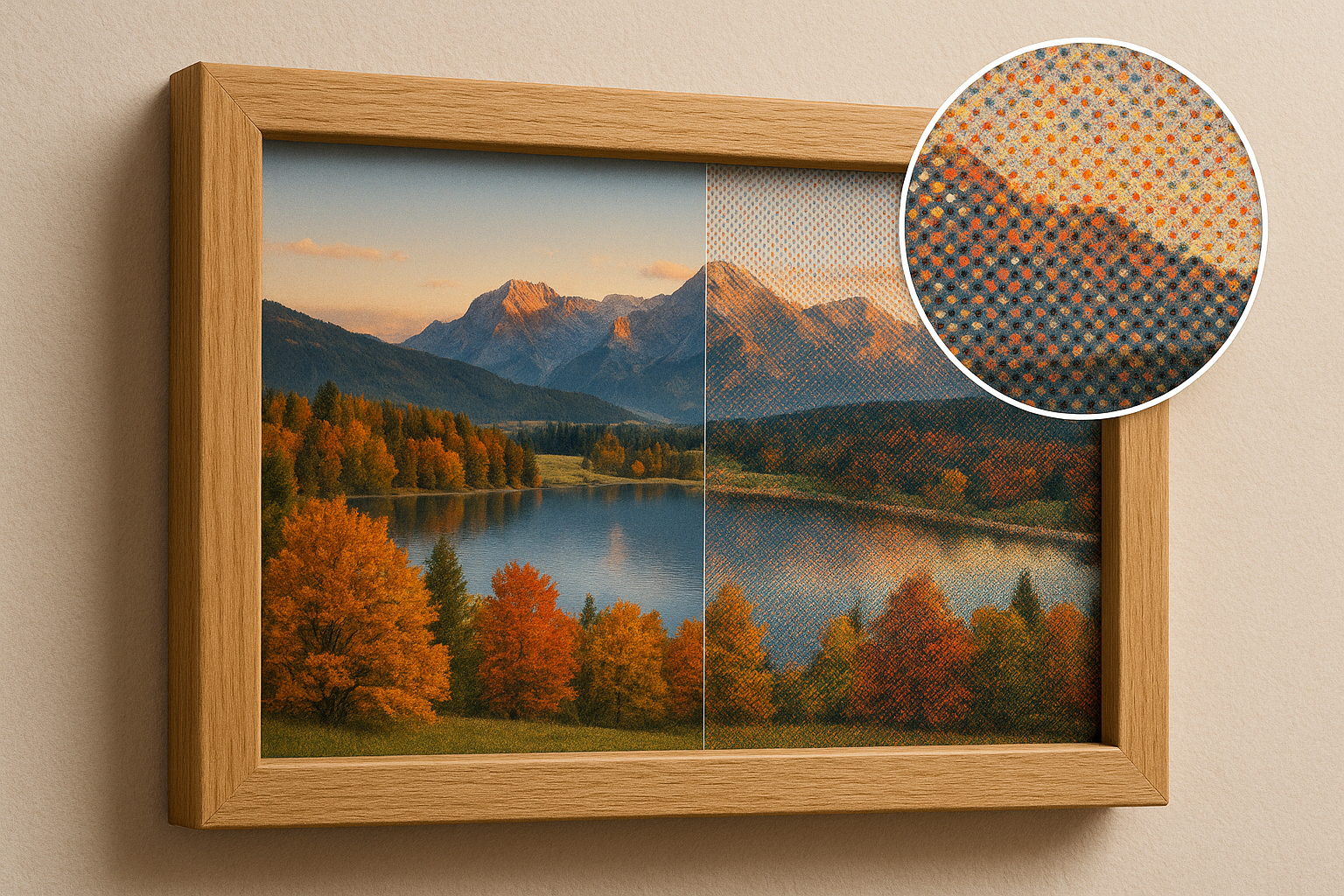
## What it does
### Calibrated display palettes
Dither against measured display colors, then export native device colors.
**Why?** eInk panels use fully saturated colors internally (for example red: #ff0000), but in reality they can't cover the full sRGB colorspace.
### Multiple dithering modes
Error diffusion, ordered dithering, random dithering, blue-noise/whole-image variants, and quantization-only conversion.
**Why?** Like offset print, most eInk panels can reproduce only a limited set of discrete colors. [Dithering](https://en.wikipedia.org/wiki/Dither) is therefore required to approximate all intermediate colors.
### Advanced tone mapping
Exposure, saturation, contrast, and S-curve controls inspired by [epaper-image-convert](https://github.com/aitjcize/epaper-image-convert).
**Why?** Source images are usually prepared for emissive screens, not reflective eInk. Tone controls make it possible to compensate for muted colors, low contrast, and the different perceived brightness of paper-like displays before dithering.
### Dynamic range compression
LAB lightness remapping into the target display range.
**Why?** eInk palettes have a narrower usable brightness range than the source image. Compressing lightness in LAB space helps preserve shadow and highlight detail instead of clipping it to the nearest available ink color.
### Color matching modes
RGB, LAB, or chroma-aware palette matching.
**Why?** The “nearest” color depends on how distance is measured. RGB matching is simple and predictable, LAB better reflects human perception.
### Experimental: Edge handling
Preserve hard line-art/text edges or smooth antialiased edge bands after dithering.
**Why?** ithering can make text, icons, and line art look noisy or fuzzy. Edge handling keeps sharp content readable while still allowing smoother treatment for photographic or antialiased areas.
### Automatic processing suggestions
Heuristically classify the image, score presets, and suggest dither options for the selected palette.
**Why?** Photos, screenshots, comics, and text-heavy images benefit from different conversion settings. Automatic suggestions provide a better starting point without requiring manual tuning for every image.

[Visit the dithering tool](https://paperlesspaper.github.io/epdoptimize/)
## Installation
```bash
npm install epdoptimize
```
## Quick Start
```html
```
```js
import {
ditherImage,
replaceColors,
aitjcizeSpectra6Palette,
} from "epdoptimize";
const inputCanvas = document.getElementById("inputCanvas");
const ditheredCanvas = document.getElementById("ditheredCanvas");
const deviceCanvas = document.getElementById("deviceCanvas");
await ditherImage(inputCanvas, ditheredCanvas, {
palette: aitjcizeSpectra6Palette,
processingPreset: "balanced",
ditheringType: "errorDiffusion",
errorDiffusionMatrix: "floydSteinberg",
serpentine: true,
});
replaceColors(ditheredCanvas, deviceCanvas, aitjcizeSpectra6Palette);
```
`ditherImage` uses each entry's calibrated `color` value. `replaceColors` then maps every matching `color` to its corresponding `deviceColor`.
## Automatic Processing
If you do not want to choose a preset manually, use the auto recommender. It analyzes the source image and target palette, then returns concrete `ditherOptions` plus the reasons behind the choice.
```js
import {
ditherImage,
replaceColors,
aitjcizeSpectra6Palette,
suggestCanvasProcessingOptions,
} from "epdoptimize";
const suggestion = suggestCanvasProcessingOptions(
inputCanvas,
aitjcizeSpectra6Palette,
);
await ditherImage(inputCanvas, ditheredCanvas, {
...suggestion.ditherOptions,
palette: aitjcizeSpectra6Palette,
});
replaceColors(ditheredCanvas, deviceCanvas, aitjcizeSpectra6Palette);
console.log(suggestion.imageKind);
console.log(suggestion.reasons);
```
The optional `intent` can steer the recommendation:
```js
const suggestion = suggestCanvasProcessingOptions(
inputCanvas,
aitjcizeSpectra6Palette,
{
intent: "readable",
},
);
```
Available intents are `natural`, `vivid`, `readable`, `faithful`, and `lowNoise`.
For editors, you can request the automatic values for each pipeline stage
separately. These helpers do not mutate your canvas or UI state; they only
return the calculated settings so you can apply them to your own image or
canvas controls.
```js
import {
aitjcizeSpectra6Palette,
ditherImage,
replaceColors,
suggestCanvasDitherOptions,
suggestCanvasImageAdjustmentOptions,
} from "epdoptimize";
// Selected image/item stage: copy these values into the selected image settings.
const imageAuto = suggestCanvasImageAdjustmentOptions(
selectedImageCanvas,
aitjcizeSpectra6Palette,
);
selectedImage.settings = {
...selectedImage.settings,
...imageAuto.adjustmentOptions,
};
// Canvas/export stage: copy these values into the global canvas dither settings.
const canvasAuto = suggestCanvasDitherOptions(
composedCanvas,
aitjcizeSpectra6Palette,
);
canvas.settings = {
...canvas.settings,
...canvasAuto.ditherOptions,
};
await ditherImage(composedCanvas, ditheredCanvas, {
...canvas.settings,
palette: aitjcizeSpectra6Palette,
});
replaceColors(ditheredCanvas, deviceCanvas, aitjcizeSpectra6Palette);
```
The split result shapes are:
```ts
type AutoImageAdjustmentOptions = {
clarity?: ClarityOptions;
toneMapping?: ToneMappingOptions;
dynamicRangeCompression?: DynamicRangeCompressionOptions | boolean;
levelCompression?: LevelCompressionOptions;
paperNormalization?: PaperNormalizationOptions;
};
type AutoCanvasDitherOptions = {
colorMatching?: ColorMatchingMode;
ditheringType?: DitheringType;
errorDiffusionMatrix?: string;
serpentine?: boolean;
};
```
`suggestCanvasDitherOptions` intentionally does not return
`processingPreset` inside `ditherOptions`, because presets can also imply image
tone and range defaults. The recommended preset is available as metadata on
`canvasAuto.presetName`.
For a Fabric.js editor integration with custom per-image filters and simplified
highlights/shadows controls, see [FABRIC_FILTER_README.md](FABRIC_FILTER_README.md).
## Palette Format
Palettes live in [src/dither/data/default-palettes.json](src/dither/data/default-palettes.json). Each palette is an array of entries:
```json
{
"spectra6": [
{ "name": "black", "color": "#1F2226", "deviceColor": "#000000" },
{ "name": "white", "color": "#B9C7C9", "deviceColor": "#FFFFFF" },
{ "name": "blue", "color": "#233F8E", "deviceColor": "#0000FF" },
{ "name": "green", "color": "#35563A", "deviceColor": "#00FF00" },
{ "name": "red", "color": "#62201E", "deviceColor": "#FF0000" },
{ "name": "yellow", "color": "#C1BB1E", "deviceColor": "#FFFF00" }
]
}
```
The fields mean:
- `name`: Stable role used to align palette colors with device colors.
- `color`: Calibrated display appearance used for dithering and color matching.
- `deviceColor`: Native output color sent to the display.
You can pass one combined palette to both `ditherImage` and `replaceColors`.
## Built-In Palettes
Built-in palettes are exported as combined palette entries, so the same import can be passed to both `ditherImage` and `replaceColors`.
```js
import {
ditherImage,
replaceColors,
aitjcizeSpectra6Palette,
} from "epdoptimize";
await ditherImage(inputCanvas, ditheredCanvas, {
palette: aitjcizeSpectra6Palette,
processingPreset: "dynamic",
});
replaceColors(ditheredCanvas, deviceCanvas, aitjcizeSpectra6Palette);
```
This is the same pattern used by the demo's generated JS example.
## Custom Palettes
For a display-ready conversion, define entries with both calibrated colors and native device colors:
```js
const myPalette = [
{ name: "black", color: "#1c1f22", deviceColor: "#000000" },
{ name: "white", color: "#d8d8d2", deviceColor: "#FFFFFF" },
{ name: "red", color: "#7f1d1d", deviceColor: "#FF0000" },
{ name: "yellow", color: "#c8b72c", deviceColor: "#FFFF00" },
];
await ditherImage(inputCanvas, ditheredCanvas, {
palette: myPalette,
colorMatching: "lab",
});
replaceColors(ditheredCanvas, deviceCanvas, myPalette);
```
If you only need a dithered preview and do not need device color replacement, `palette` can also be a plain hex array:
```js
await ditherImage(inputCanvas, ditheredCanvas, {
palette: ["#000000", "#FFFFFF", "#FF0000"],
});
```
## Demo Config
The demo exposes a compact JSON config and a matching JS example. The generated config keeps image adjustments separate from canvas dithering, and includes only values that differ from neutral/default behavior. Auto selections are resolved into concrete options.
```js
import {
ditherImage,
replaceColors,
aitjcizeSpectra6Palette,
} from "epdoptimize";
const config = {
palette: "aitjcizeSpectra6Palette",
imageAdjustmentOptions: {
toneMapping: {
mode: "scurve",
exposure: 0.07,
saturation: 0.3,
strength: 0.7,
shadowBoost: 0.05,
highlightCompress: -1.2,
midpoint: 0.5,
},
},
canvasDitherOptions: {
serpentine: true,
},
};
const palette = aitjcizeSpectra6Palette;
await ditherImage(inputCanvas, ditheredCanvas, {
...config.imageAdjustmentOptions,
...config.canvasDitherOptions,
palette,
});
replaceColors(ditheredCanvas, deviceCanvas, palette);
```
When the demo's **Auto** preset is active and the controls have not been
manually edited, the generated JS example recalculates the automatic values:
```js
import {
ditherImage,
replaceColors,
suggestCanvasDitherOptions,
suggestCanvasImageAdjustmentOptions,
aitjcizeSpectra6Palette,
} from "epdoptimize";
const palette = aitjcizeSpectra6Palette;
const imageAuto = suggestCanvasImageAdjustmentOptions(inputCanvas, palette);
const canvasAuto = suggestCanvasDitherOptions(inputCanvas, palette);
await ditherImage(inputCanvas, ditheredCanvas, {
...imageAuto.adjustmentOptions,
...canvasAuto.ditherOptions,
palette,
});
replaceColors(ditheredCanvas, deviceCanvas, palette);
```
For editors that need to render stages separately, the demo also includes a JS
advanced example using the same config:
```js
import {
applyImageAdjustments,
ditherCanvas,
replaceColors,
aitjcizeSpectra6Palette,
} from "epdoptimize";
const palette = aitjcizeSpectra6Palette;
const adjustedCanvas = document.createElement("canvas");
await applyImageAdjustments(inputCanvas, adjustedCanvas, {
...config.imageAdjustmentOptions,
palette,
});
await ditherCanvas(adjustedCanvas, ditheredCanvas, {
...config.canvasDitherOptions,
palette,
});
replaceColors(ditheredCanvas, deviceCanvas, palette);
```
## API
### `ditherImage(sourceCanvas, destinationCanvas, options)`
Reads pixels from `sourceCanvas`, processes and dithers them, then writes to `destinationCanvas`.
```js
await ditherImage(sourceCanvas, destinationCanvas, options);
```
For RGB error diffusion, an optional WASM engine is available:
```js
await ditherImage(sourceCanvas, destinationCanvas, {
processingEngine: "wasm",
colorMatching: "rgb",
ditheringType: "errorDiffusion",
});
```
Unsupported combinations currently fall back to the JavaScript implementation.
### `applyImageAdjustments(sourceCanvas, destinationCanvas, options)`
Runs only the image adjustment stage, including tone mapping, range fitting,
level compression, and paper normalization.
```js
await applyImageAdjustments(sourceCanvas, adjustedCanvas, {
toneMapping,
dynamicRangeCompression,
palette,
});
```
Use this for final-quality adjustment renders. It preserves the source canvas
size and uses the same adjustment quality as `ditherImage`.
### `applyImageDataAdjustmentsAsync(imageData, options)`
Asynchronously runs only the image adjustment stage on `ImageData`. This is the
recommended low-level API for interactive editors that already manage their own
canvas read/write cycle.
```js
import { applyImageDataAdjustmentsAsync } from "epdoptimize";
const previewImageData = await applyImageDataAdjustmentsAsync(imageData, {
adjustmentEngine: "auto",
preview: {
mode: "fast",
maxLongEdge: 1024,
maxPixels: 700_000,
},
toneMapping,
clarity,
dynamicRangeCompression: {
mode: "auto",
strength: 0.8,
quality: "fast",
},
});
```
`adjustmentEngine: "auto"` uses a browser Worker for larger images when one is
available, transfers the `ImageData` buffer to avoid copying, and falls back to
the JavaScript path in environments without Worker support. The `"wasm"`
adjustment engine is reserved for future adjustment kernels and currently falls
back to JavaScript.
For final output, request final mode or omit `preview`:
```js
const finalImageData = await applyImageDataAdjustmentsAsync(imageData, {
adjustmentEngine: "worker",
preview: { mode: "final" },
toneMapping,
clarity,
dynamicRangeCompression: {
mode: "auto",
strength: 0.8,
quality: "accurate",
},
});
```
### `applyImageAdjustmentsPreview(sourceCanvas, destinationCanvas, options)`
Convenience canvas helper for slider-driven previews. It reads from
`sourceCanvas`, applies adjustments asynchronously, and writes a preview-sized
result to `destinationCanvas`.
```js
import { applyImageAdjustmentsPreview } from "epdoptimize";
await applyImageAdjustmentsPreview(sourceCanvas, previewCanvas, {
adjustmentEngine: "auto",
preview: {
mode: "fast",
maxLongEdge: 900,
},
toneMapping,
dynamicRangeCompression: { mode: "auto", quality: "fast" },
});
```
Fast preview mode may downscale before processing, uses the faster luma dynamic
range path, and skips clarity by default because clarity is the most expensive
local operation. Final mode preserves dimensions and the existing high-quality
LAB behavior.
### `ditherCanvas(sourceCanvas, destinationCanvas, options)`
Runs only the canvas dither and color matching stage. This is useful when image
adjustments have already been applied per item or to an intermediate canvas.
```js
await ditherCanvas(adjustedCanvas, ditheredCanvas, {
ditheringType: "errorDiffusion",
errorDiffusionMatrix: "stucki",
palette,
});
```
### `replaceColors(sourceCanvas, destinationCanvas, palette)`
Maps dithered calibrated palette colors to native device colors.
```js
replaceColors(ditheredCanvas, deviceCanvas, palette);
```
The preferred `palette` argument is:
```ts
Array<{
name: string;
color: string;
deviceColor: string;
}>;
```
The legacy `{ originalColors, replaceColors }` form is still supported.
### `classifyImageStyle(imageData, options)`
Heuristically classifies image data as a photo or illustration and reports a
more specific `kind`, such as `lowContrastPhoto`, `flatIllustration`,
`textOrUi`, `lineArt`, or `pixelArt`. The result includes a confidence value
and the metrics used for the decision. It also returns `kindScores` so callers
can react to ambiguous images instead of relying only on the top label.
```js
import { classifyImageStyle } from "epdoptimize";
const result = classifyImageStyle(ctx.getImageData(0, 0, width, height));
if (result.style === "photo") {
// use photo-oriented processing
}
```
The metrics include color distribution (`topColorCoverage`, `paletteEntropy`),
edge structure (`edgeDensity`, `horizontalEdgeRatio`, `verticalEdgeRatio`), and
tile ratios (`photoTileRatio`, `flatTileRatio`, `textTileRatio`,
`gradientTileRatio`).
For canvas input, use `classifyCanvasImageStyle(canvas, options)`.
Convenience predicates `isPhotoImage(result)` and
`isIllustrationImage(result)` are also exported.
Result shape:
```ts
{
style: "photo" | "illustration" | "unknown";
kind:
| "photo"
| "lowContrastPhoto"
| "highContrastPhoto"
| "flatIllustration"
| "lineArt"
| "textOrUi"
| "pixelArt"
| "unknown";
kindScores: Record;
confidence: number;
photoScore: number;
metrics: ImageStyleMetrics;
}
```
### `suggestProcessingOptions(imageData, palette, options)`
Suggests processing options from the image classification and the target palette.
The result includes the classification, recommended `ditherOptions`, preset
scores, and human-readable reasons.
```js
import {
ditherImage,
replaceColors,
aitjcizeSpectra6Palette,
suggestCanvasProcessingOptions,
} from "epdoptimize";
const suggestion = suggestCanvasProcessingOptions(
inputCanvas,
aitjcizeSpectra6Palette,
);
await ditherImage(inputCanvas, ditheredCanvas, {
...suggestion.ditherOptions,
palette: aitjcizeSpectra6Palette,
});
replaceColors(ditheredCanvas, deviceCanvas, aitjcizeSpectra6Palette);
```
The optional `intent` can be `natural`, `vivid`, `readable`, `faithful`, or
`lowNoise`.
Result shape:
```ts
{
classification: ImageStyleClassification;
imageKind: ImageKind;
intent: AutoProcessingIntent;
strategy?: "legacy" | "layered";
ditherOptions: Partial;
reasons: string[];
scores: Record;
pipelineSteps?: ProcessingPipelineStep[];
}
```
For a staged recommendation that also describes the detection, preset,
adjustment, and output phases, use `suggestLayeredProcessingOptions(imageData,
palette, options)` or `suggestLayeredCanvasProcessingOptions(canvas, palette,
options)`. The ImageData variants of the split helpers are
`suggestImageAdjustmentOptions(imageData, palette, options)` and
`suggestDitherOptions(imageData, palette, options)`.
### Built-In Palette Exports
```js
import {
defaultPalette,
genericTwoColorEinkPalette,
genericFourGrayscalePalette,
trmnlSeeed16GrayscalePalette,
gameboyPalette,
spectra6legacyPalette,
spectra6Palette,
spectra6BoeberPalette,
spectra6OriginalPalette,
spectra6OriginalPreviewPalette,
aitjcizeSpectra6Palette,
acepPalette,
} from "epdoptimize";
```
Each export is an array of `{ name, color, deviceColor }` entries.
### Palette Helper Exports
Named palette imports are preferred for new code. The lower-level helpers remain available when you need raw color arrays:
```js
import {
getDefaultPalettes,
getDeviceColors,
getDeviceColorsForPalette,
} from "epdoptimize";
```
- `getDefaultPalettes(name)`: Returns calibrated `color` hex values.
- `getDeviceColors(name)`: Returns native `deviceColor` hex values.
- `getDeviceColorsForPalette(paletteName, deviceColorsName)`: Returns device colors aligned to another palette's role order.
### Processing Preset Helpers
```js
import {
getProcessingPreset,
getProcessingPresetNames,
getProcessingPresetOptions,
PROCESSING_PRESETS,
} from "epdoptimize";
```
- `getProcessingPreset(name)`: Returns the full preset definition.
- `getProcessingPresetNames()`: Returns preset names.
- `getProcessingPresetOptions()`: Returns `{ value, title, description }` options for UI controls.
- `PROCESSING_PRESETS`: Exposes the preset registry for callers that need the raw definitions.
## Dithering Options
| Option | Type | Default | Description |
| ------------------------- | ----------------------------------- | ------------------ | --------------------------------------------------------------------------------------------------------------------------------------------------------------------------------------------------------------------------------------------------------------------------------------------------------------------------------------------------------- |
| `palette` | string / string[] / palette entries | `"default"` | Palette to use for quantization. Prefer a built-in palette export or combined palette entries with `color` and `deviceColor`; plain hex arrays work for dither-only previews. |
| `processingPreset` | string | `undefined` | Preset name. Options: `balanced`, `dynamic`, `vivid`, `soft`, `grayscale`, `restore`, `posterScan`. Presets fill tone mapping, dynamic range compression, color matching, and diffusion defaults unless overridden. Use `suggestProcessingOptions` for automatic selection. |
| `ditheringType` | string | `"errorDiffusion"` | Main dithering mode. Options: `errorDiffusion`, `ordered`, `random`, `quantizationOnly`, `hueMix`, `blueNoise`, `simple2D`, `riemersma`, plus DitherIt-backed aliases `ditherItErrorDiffusion`, `ditherItOrdered`, `ditherItBlueNoise`, `ditherItSimple2D`, and `ditherItRiemersma`. `hueMix` is experimental and targets smooth synthetic hue gradients. |
| `processingEngine` | string | `"auto"` | Processing engine. Options: `js`, `wasm`, `auto`. WASM currently accelerates RGB error diffusion and falls back to JS for unsupported combinations. |
| `adjustmentEngine` | string | `"auto"` | Adjustment engine for async adjustment APIs. Options: `auto`, `js`, `worker`, `wasm`. `auto` uses a Worker for larger images when available; `wasm` is reserved for future adjustment kernels and currently falls back to JS. |
| `preview` | object | `undefined` | Preview controls for async adjustment APIs. Use `{ mode: "fast" \| "final", maxPixels?: number, maxLongEdge?: number }`. Fast mode can downscale and use cheaper adjustment paths; final mode preserves full dimensions and quality. |
| `errorDiffusionMatrix` | string | `"floydSteinberg"` | Error diffusion kernel. Options include `floydSteinberg`, `atkinson`, `falseFloydSteinberg`, `jarvis`, `jarvisJudiceNinke`, `stucki`, `burkes`, `sierra3`, `sierra2`, `sierra2-4a`, `fan`, `shiauFan`, `shiauFan2`. |
| `algorithm` | string | `undefined` | Backwards-compatible alias for `errorDiffusionMatrix`. |
| `serpentine` | boolean | `false` | Alternates scan direction on each row for error diffusion. |
| `orderedDitheringType` | string | `"bayer"` | Type of ordered dithering. Currently `bayer`. |
| `orderedDitheringMatrix` | [number, number] | `[4, 4]` | Size of the Bayer matrix for ordered dithering. Values are normalized to 2, 4, 8, or 16. |
| `randomDitheringType` | string | `"blackAndWhite"` | Random mode. Options: `blackAndWhite`, `rgb`. |
| `colorMatching` | string | `"rgb"` | Palette distance model. Options: `rgb`, `lab`, `chroma`. `chroma` is experimental and tries to keep saturated pastel colors from collapsing into white. |
| `paperNormalization` | object | `undefined` | Optional scan cleanup. `{ mode: "warmPaper" }` neutralizes warm low-saturation paper, anchors dark neutral ink, and preserves red poster ink before tone mapping. |
| `clarity` | object | `undefined` | Midtone local-contrast adjustment before tone and range fitting. Use `{ amount: -1..1, radius?: 1..4, midtone?: number }`; positive values sharpen local contrast and negative values soften it. |
| `toneMapping` | object | `undefined` | Exposure, saturation, contrast, or S-curve preprocessing. |
| `dynamicRangeCompression` | object / boolean | `undefined` | LAB lightness compression. Use `{ mode: "display" }`, `{ mode: "auto" }`, or `{ mode: "off" }`. `quality: "fast"` uses a faster luma approximation for previews; `quality: "accurate"` keeps the LAB path. Auto suggestions enable `preserveWhite` so p99/background-white pixels are not pushed below the palette white during range fitting. |
| `levelCompression` | object | `undefined` | Optional legacy/preprocessing range remap with `perChannel` or `luma` mode. |
| `edgePreservation` | object | `undefined` | Optional edge-core cleanup after dithering. Use `{ enabled: true, strength?: 0..1, threshold?: number, radius?: number }` to replace strong text/line-art edges with direct palette quantization. |
| `edgeAntialiasing` | object | `undefined` | Optional antialiased edge-band cleanup after dithering. Use `{ enabled: true, strength?: 0..1, threshold?: number, bandRadius?: number, localRadius?: number }` to constrain transition bands to nearby palette colors. |
| `sampleColorsFromImage` | boolean | `false` | Reserved for image-derived palettes. |
| `numberOfSampleColors` | number | `10` | Number of colors to sample when image-derived palettes are enabled. |
## Tone Mapping
Tone mapping runs before palette matching.
```js
await ditherImage(inputCanvas, ditheredCanvas, {
palette,
clarity: {
amount: 0.35,
radius: 2,
midtone: 1.2,
},
toneMapping: {
exposure: 0.14,
saturation: 0.4,
contrast: 0.08,
strength: 0.8,
shadowBoost: 0.1,
highlightCompress: -1.4,
midpoint: 0.5,
},
});
```
Tone mapping options:
- `mode`: Optional legacy selector. Use `off`, `contrast`, or `scurve` to force one behavior. Omit it to apply contrast and S-curve controls together.
- `exposure`: Exposure adjustment in stops. `0` is neutral, `1` doubles brightness, and `-1` halves it.
- `saturation`: Saturation adjustment. `0` is neutral, `0.4` means 1.4x, and `-1` removes saturation.
- `contrast`: Contrast adjustment. `0` is neutral and positive values increase
contrast linearly. Negative values reduce contrast more gently, so `-1`
keeps a `0.5x` contrast multiplier instead of collapsing to flat gray.
- `strength`: S-curve strength. Use `0` to disable S-curve shaping.
- `shadowBoost`: Lifts dark values when S-curve strength is active. The tone
mapper applies a `1.5x` internal shadow response to make shadow recovery more
visible at practical values.
- `highlightCompress`: Adjusts bright values when S-curve strength is active. Negative values pull highlights down; positive values lift them.
- `midpoint`: S-curve midpoint.
## Dynamic Range Compression
Dynamic range compression remaps LAB lightness into the display palette range. This can keep photos from crushing into black/white too early on limited-color e-paper displays.
```js
await ditherImage(inputCanvas, ditheredCanvas, {
palette,
dynamicRangeCompression: {
mode: "auto",
strength: 0.85,
lowPercentile: 0.01,
highPercentile: 0.99,
preserveWhite: true,
whitePreservePercentile: 0.99,
whitePreserveMinLuma: 150,
whitePreserveMaxSaturation: 0.18,
},
});
```
Modes:
- `off`: Disable dynamic range compression.
- `display`: Compress into the lightness range of the selected palette.
- `auto`: Uses percentile clipping before compression.
`preserveWhite` protects the brightest low-saturation/background-white source
pixels after range and level fitting. When enabled, low-saturation pixels at or
above `whitePreservePercentile` are snapped back to the palette white if
processing would make them darker than that white point.
`whitePreserveMaxSaturation` controls which source pixels are allowed to count
as background white. Auto suggestions enable this by default for active range
fitting.
## Dithering Algorithms
Dithering creates the impression of intermediate colors by distributing quantization errors across neighboring pixels.
| Algorithm | Description |
| --------------------- | ------------------------------------------------------------------------------------ |
| `floydSteinberg` | Classic Floyd-Steinberg error diffusion. Distributes error to four neighbors. |
| `atkinson` | Atkinson diffusion. Lighter diffusion pattern with a distinctive high-contrast look. |
| `falseFloydSteinberg` | Simplified Floyd-Steinberg. Faster, slightly different texture. |
| `jarvis` | Jarvis, Judice, and Ninke. Smooth gradients, more blur. |
| `jarvisJudiceNinke` | Jarvis-Judice-Ninke kernel from DitherIt v3. |
| `stucki` | Similar to Jarvis with different weights. Balances smoothness and sharpness. |
| `burkes` | Simplified Stucki. Fewer neighbors and less computation. |
| `sierra3` | Sierra-3. High quality with less blur than Jarvis. |
| `sierra2` | Reduced Sierra-3. Fewer neighbors and faster processing. |
| `sierra2-4a` | Sierra-2-4A variant for speed-sensitive conversions. |
| `fan` | Fan diffusion kernel from DitherIt v3. |
| `shiauFan` | Shiau-Fan diffusion kernel from DitherIt v3. |
| `shiauFan2` | Wider Shiau-Fan variant from DitherIt v3. |
| `simple2D` | Whole-image mode that splits error between the next pixel and next row. |
| `riemersma` | Whole-image mode that diffuses error along a Hilbert curve. |
| `blueNoise` | Threshold mode using a 64x64 high-frequency blue-noise style tile. |
## How It Works
1. Load pixels from the source canvas.
2. Apply optional tone mapping and dynamic range compression.
3. Quantize or dither pixels into the calibrated palette `color` values, with optional edge handling.
4. Use `replaceColors` to replace calibrated `color` values with native `deviceColor` values.
5. Export the device-color canvas as PNG or another format.
## Resources
- [paperlesspaper](https://paperlesspaper.de)
- [Interactive demo](https://paperlesspaper.github.io/epdoptimize/)
## Credits
- [DitherIt](https://ditherit.com/)
- [Dither me this](https://github.com/DitheringIdiot/dither-me-this)
- [Inkify](https://github.com/cmdwtf/Inkify)
- [epaper-image-convert](https://github.com/aitjcize/epaper-image-convert)
- [eInk Dither Tester](https://github.com/mattcarter11/eink-dithering-tester)
- [GuySie/opendithering](https://github.com/GuySie/opendithering)
---
Contributions and feedback are welcome :)