[](https://badge.fury.io/js/emojione-picker)
[](https://circleci.com/gh/tommoor/emojione-picker)
# Emoji Picker
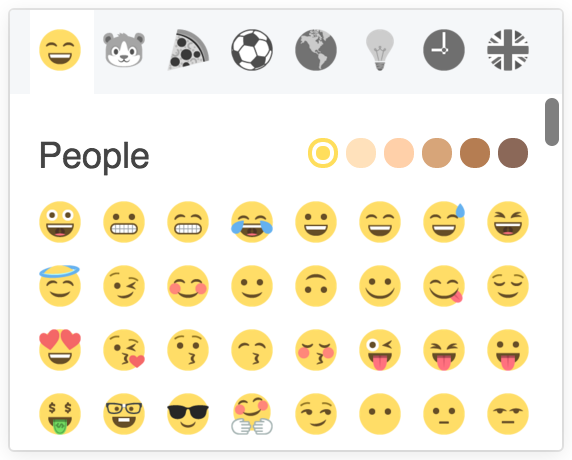
A friendly Emoji picker for Emojione written as a React component. It looks a
little something like this, but is easily customized:
 ## Installation
Install with your favorite package manager:
```
npm i emojione-picker --save
```
```
yarn add emojione-picker
```
### Webpack
The emoji strategy is read from a `json` file, as such you'll need to make sure
that the [json-loader](https://www.npmjs.com/package/json-loader) is included in
your loaders configuration, something like:
```javascript
loaders: [
{
test: /\.json$/,
loader: "json-loader"
}
]
```
## Usage
The module includes a transpiled version of the picker so you don't need
to run it through a JSX pipeline. Simply require the module like any other.
```javascript
var EmojiPicker = require('emojione-picker');
```
The module also includes CSS at `css/picker.css` which you can copy and edit or
ideally reference directly from within the node_modules directory. Let me know
if you're using this in production - i'd love to see it in action!
### Filtering
You can manually pass in a search term as a component prop to filter which
emoji's are displayed by default, for example:
```javascript
```
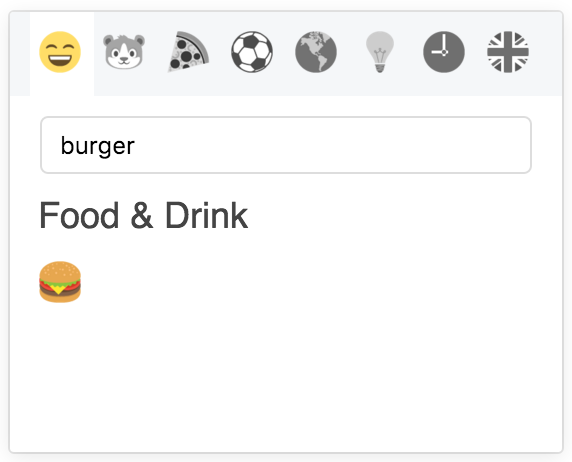
Or allow the user to search by passing a boolean true, this will enable a search
input within the picker:
```javascript
```
## Installation
Install with your favorite package manager:
```
npm i emojione-picker --save
```
```
yarn add emojione-picker
```
### Webpack
The emoji strategy is read from a `json` file, as such you'll need to make sure
that the [json-loader](https://www.npmjs.com/package/json-loader) is included in
your loaders configuration, something like:
```javascript
loaders: [
{
test: /\.json$/,
loader: "json-loader"
}
]
```
## Usage
The module includes a transpiled version of the picker so you don't need
to run it through a JSX pipeline. Simply require the module like any other.
```javascript
var EmojiPicker = require('emojione-picker');
```
The module also includes CSS at `css/picker.css` which you can copy and edit or
ideally reference directly from within the node_modules directory. Let me know
if you're using this in production - i'd love to see it in action!
### Filtering
You can manually pass in a search term as a component prop to filter which
emoji's are displayed by default, for example:
```javascript
```
Or allow the user to search by passing a boolean true, this will enable a search
input within the picker:
```javascript
```
 ### Customize Categories
You can easily customize the category icons by passing in alternatives to the
component constructor. The emoji strings come from the shortname value in `strategy.js`.
```javascript
var categories = {
people: {
title: 'People',
emoji: 'smile'
},
nature: {
title: 'Nature',
emoji: 'mouse'
},
food: {
title: 'Food & Drink',
emoji: 'burger'
}
}
```
### Spritesheets
You can make the picker use a spritesheet, however this requires a little extra
work. Emojione settings can be passed into the Picker component as below.
[Follow these instructions](https://github.com/Ranks/emojione#extras) to load the correct
spritesheets into your page.
```javascript
var settings = {
imageType: 'png',
sprites: true
};
```
### Content Security Policy
The picker uses _react-virtualized_, which creates an inlined style. Give the
picker a nonce and set `Content-Security-Policy` field in HTTP header
accordingly if your CSP requires this.
```javascript
```
```
Content-Security-Policy: style-src: 'self' 'nonce-NONCE_GENERATED_WHEN_TRANSMITTING'
```
## Development
```
yarn install
yarn start
```
Open `http://localhost:8080/examples` in a browser to see a preview of the picker.
## License
[MIT License](http://opensource.org/licenses/MIT)
Emojione is used under the [Creative Commons License (CC-BY 4.0)](http://emojione.com/licensing/) - If you use this component you should also include attribute to Emojione someone within your website or application to satisfy the terms of the license.
### Customize Categories
You can easily customize the category icons by passing in alternatives to the
component constructor. The emoji strings come from the shortname value in `strategy.js`.
```javascript
var categories = {
people: {
title: 'People',
emoji: 'smile'
},
nature: {
title: 'Nature',
emoji: 'mouse'
},
food: {
title: 'Food & Drink',
emoji: 'burger'
}
}
```
### Spritesheets
You can make the picker use a spritesheet, however this requires a little extra
work. Emojione settings can be passed into the Picker component as below.
[Follow these instructions](https://github.com/Ranks/emojione#extras) to load the correct
spritesheets into your page.
```javascript
var settings = {
imageType: 'png',
sprites: true
};
```
### Content Security Policy
The picker uses _react-virtualized_, which creates an inlined style. Give the
picker a nonce and set `Content-Security-Policy` field in HTTP header
accordingly if your CSP requires this.
```javascript
```
```
Content-Security-Policy: style-src: 'self' 'nonce-NONCE_GENERATED_WHEN_TRANSMITTING'
```
## Development
```
yarn install
yarn start
```
Open `http://localhost:8080/examples` in a browser to see a preview of the picker.
## License
[MIT License](http://opensource.org/licenses/MIT)
Emojione is used under the [Creative Commons License (CC-BY 4.0)](http://emojione.com/licensing/) - If you use this component you should also include attribute to Emojione someone within your website or application to satisfy the terms of the license.