**emoji-data-css** uses [emoji-data](https://github.com/iamcal/emoji-data) spritesheets to generate css files.

## Usage

Choose the emoji set

- Apple (ap)
- Google (gl)
- Twitter (tw)
- Emoji One (eo)

Choose the size (16, 20, 32, 64, all) and link in your html

```html
<link href="path/to/emoji-data-css/files/eo-32-emoji.css" media="all" rel="stylesheet" />  
<!-- this links to "emoji one" 32x32 css -->
```

Now you can add emoji classes in your code

```html
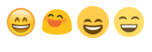
<div class="ap ap-smile"></div> <!-- apple smile emoji -->
<div class="gl gl-smile"></div> <!-- google smile emoji -->
<div class="tw tw-smile"></div> <!-- twitter smile emoji -->
<div class="eo eo-smile"></div> <!-- emoji one smile emoji -->
```

![emoji screenshot](https://raw.githubusercontent.com/juanfran/emoji-data-css/master/screenshot.png "emoji screenshot")

If you selected all the sizes file

```html
<div class="ap-32 ap-smile"></div> <!-- apple 32x32 smile emoji in ap-all-emoji.css -->
<div class="gl-64 gl-smile"></div> <!-- google 64x64 smile emoji in gl-all-emoji.css  -->
<div class="tw-16 tw-smile"></div> <!-- twitter 16x16 smile emoji in tw-all-emoji.css -->
<div class="eo-20 eo-smile"></div> <!-- emoji one 20x20 smile emoji in eo-all-emoji.css  -->
```

[full emoji list names](http://unicodey.com/emoji-data/table.htm)

### Graphics license

* Apple Emoji: Copyright &copy; Apple Inc. - OS X 10.11.1
* Android Emoji: Copyright &copy; [The Android Open Source Project](https://s3-eu-west-1.amazonaws.com/tw-font/android/NOTICE)
* Twitter Emoji Copyright &copy; Twitter, Inc.
* Emoji One Emoji: Copyright &copy; [Ranks.com Inc.](http://www.emojione.com/developers)