## Electron subprocess with administrative privileges
Run a subprocess with administrative privileges, prompting the user with a graphical OS dialog if necessary. Useful for background subprocesse which run native Electron apps that need sudo.
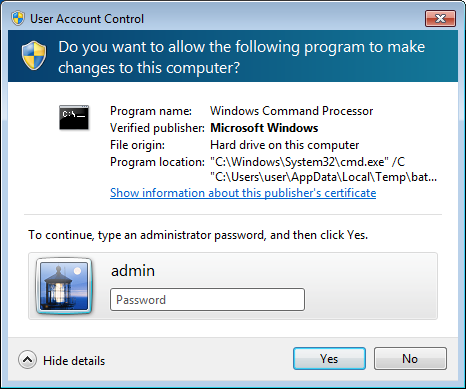
- `Windows`, uses [elevate utility](https://github.com/automation-stack/electron-sudo/tree/master/src/vendor/win32) with native `User Account Control (UAC)` prompt (no `PowerShell` required)
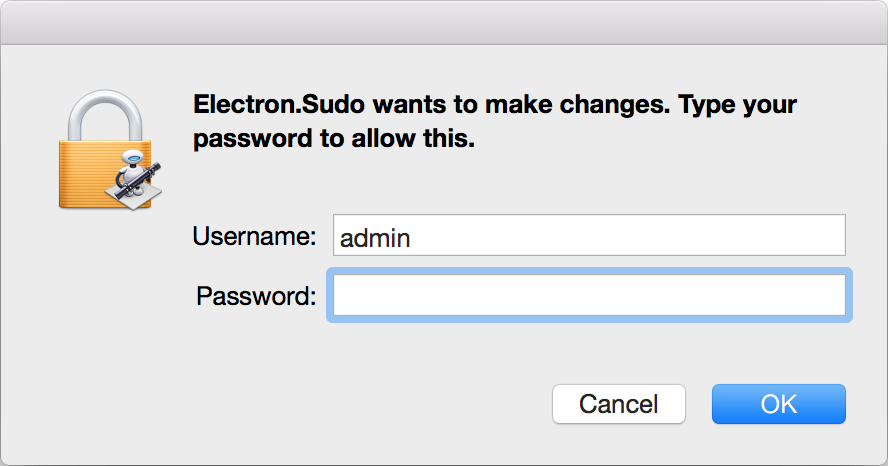
- `OS X`, uses bundled [applet](https://github.com/automation-stack/electron-sudo/tree/master/src/bin/applet.app) (inspired by [Joran Dirk Greef](https://github.com/jorangreef))
- `Linux`, uses system `pkexec` or [gksudo](http://www.nongnu.org/gksu) (system or bundled).
If you don't trust binaries bundled in `npm` package you can manually build tools and use them instead.
 ## Features
- Supports ```spawn``` and ```exec``` subprocess behavior
- Supports applications packaged as ```asar``` archive
- Separate password prompt for each call (use ```sh``` or ```bat``` script for single prompt)
- No external dependencies, does not depend on OS versions
## Installation
```
npm install electron-sudo
```
## Usage
**Note: Your command should not start with the ```sudo``` prefix.**
### Version 4.0.*
```js
import Sudoer from 'electron-sudo';
let options = {name: 'electron sudo application'},
sudoer = new Sudoer(options);
/* Spawn subprocess behavior */
let cp = await sudoer.spawn(
'echo', ['$PARAM'], {env: {PARAM: 'VALUE'}}
);
cp.on('close', () => {
/*
cp.output.stdout (Buffer)
cp.output.stderr (Buffer)
*/
});
/* Exec subprocess behavior */
let result = await sudoer.exec(
'echo $PARAM', {env: {PARAM: 'VALUE'}}
);
/* result is Buffer with mixed (both stdout and stderr) output */
/* Usage with Vanila JS */
var Sudoer = require('electron-sudo').default;
var sudoer = new Sudoer(options);
sudoer.spawn('echo', ['$PARAM'], {env: {PARAM: 'VALUE'}}).then(function (cp) {
/*
cp.output.stdout (Buffer)
cp.output.stderr (Buffer)
*/
});
```
### Version 3.0.* (deprecated)
```js
var sudo = require('electron-sudo');
var options = {
name: 'Your application name',
icns: '/path/to/icns/file' // (optional, only for MacOS),
process: {
options: {
// Can use custom environment variables for your privileged subprocess
env: {'VAR': 'VALUE'}
// ... and all other subprocess options described here
// https://nodejs.org/api/child_process.html#child_process_child_process_exec_command_options_callback
},
on: function(ps) {
ps.stdout.on('data', function(data) {});
setTimeout(function() {
ps.kill()
}.bind(ps), 50000);
}
}
};
sudo.exec('echo hello', options, function(error) {});
```
## Tests
```
npm i && npm test
```
## Usage with Webpack
Webpack config should contain ```__dirname``` equals ```true``` for work properly
```js
let nodeModules = fs.readdirSync('./node_modules')
.filter((module) => {
return module !== '.bin';
})
.reduce((prev, module) => {
return Object.assign(prev, {[module]: 'commonjs ' + module});
}, {});
export default {
...
target: 'electron',
node: {
/* http://webpack.github.io/docs/configuration.html#node */
__dirname: true
},
externals: nodeModules
};
```
## Features
- Supports ```spawn``` and ```exec``` subprocess behavior
- Supports applications packaged as ```asar``` archive
- Separate password prompt for each call (use ```sh``` or ```bat``` script for single prompt)
- No external dependencies, does not depend on OS versions
## Installation
```
npm install electron-sudo
```
## Usage
**Note: Your command should not start with the ```sudo``` prefix.**
### Version 4.0.*
```js
import Sudoer from 'electron-sudo';
let options = {name: 'electron sudo application'},
sudoer = new Sudoer(options);
/* Spawn subprocess behavior */
let cp = await sudoer.spawn(
'echo', ['$PARAM'], {env: {PARAM: 'VALUE'}}
);
cp.on('close', () => {
/*
cp.output.stdout (Buffer)
cp.output.stderr (Buffer)
*/
});
/* Exec subprocess behavior */
let result = await sudoer.exec(
'echo $PARAM', {env: {PARAM: 'VALUE'}}
);
/* result is Buffer with mixed (both stdout and stderr) output */
/* Usage with Vanila JS */
var Sudoer = require('electron-sudo').default;
var sudoer = new Sudoer(options);
sudoer.spawn('echo', ['$PARAM'], {env: {PARAM: 'VALUE'}}).then(function (cp) {
/*
cp.output.stdout (Buffer)
cp.output.stderr (Buffer)
*/
});
```
### Version 3.0.* (deprecated)
```js
var sudo = require('electron-sudo');
var options = {
name: 'Your application name',
icns: '/path/to/icns/file' // (optional, only for MacOS),
process: {
options: {
// Can use custom environment variables for your privileged subprocess
env: {'VAR': 'VALUE'}
// ... and all other subprocess options described here
// https://nodejs.org/api/child_process.html#child_process_child_process_exec_command_options_callback
},
on: function(ps) {
ps.stdout.on('data', function(data) {});
setTimeout(function() {
ps.kill()
}.bind(ps), 50000);
}
}
};
sudo.exec('echo hello', options, function(error) {});
```
## Tests
```
npm i && npm test
```
## Usage with Webpack
Webpack config should contain ```__dirname``` equals ```true``` for work properly
```js
let nodeModules = fs.readdirSync('./node_modules')
.filter((module) => {
return module !== '.bin';
})
.reduce((prev, module) => {
return Object.assign(prev, {[module]: 'commonjs ' + module});
}, {});
export default {
...
target: 'electron',
node: {
/* http://webpack.github.io/docs/configuration.html#node */
__dirname: true
},
externals: nodeModules
};
```