# Guard Mode
## Description
Guard mode is a special operating mode in Zilliqa. Guard mode is a safety feature that can be used at the start of the mainnet til mainnet is stable. Guard mode will ensure the following:
- Up to `n` (for instance, 2/3) nodes in DS committee are controlled by Zilliqa Research
- DS leader selection, in normal scenario and view change scenario, will only be done from nodes controlled by Zilliqa Research
- Up to `n` (for instance, 1/3) nodes across all shards are controlled by Zilliqa Research
**Guard mode is designed to be toggleable and does not interfere with standard protocol when not in guard mode.**
## Terminology
- DS guard - DS node controlled by Zilliqa Research
- Shard guard - Shard node controlled by Zilliqa Research
## Operation
1. To enable guard mode, set `GUARD_MODE` to `true` in `constants.xml`
1. Add `n` DS guard public keys to `ds_guard.DSPUBKEY` in `constants.xml`
1. Add `n` shard guard public keys to `shard_guard.SHARDPUBKEY` in `constants.xml`
## Design of DS guard and non-DS guard nodes
### Normal operation
DS guard is designed to be statically placed in the DS committee. The first `n` nodes in the DS committee will be designated as DS guards. These do not change or shift during each DS consensus or view change while in guard mode.
| 1...n = DS guards (controlled by Zilliqa Research) | n+1...m = non-guard nodes |
| -------------------------------------------------- | ------------------------- |
DS Leader is selected from DS guards, by doing `mod n` rather than `mod m`.
Non-guard node joins the DS committee via PoW (according to DS difficulty). It will be emplaced starting from `n+1` index. As per usual operation, the last few DS nodes (non-guards) will be ejected from the DS committee.
> Note: The DS reputation feature (starting v5.0.0) also impacts DS committee member placement. Please refer to both DS MIMO and DS Reputation documents for more information on how DS committee membership is managed.
### View change operation
When there is a view change, it is likely that a DS guard (leader) is faulty or the network failed to agree with what the DS guard (leader) proposed. In such a case, view change will happen. View change candidate leader will be selected from `1...n` DS guards by doing `mod n` rather than `mod m`.
Upon view change completion, there is no shifting of DS guard nodes. The DS guards stay in place. Shard nodes who receive the VC block will also not adjust the DS committee.
The DS committee updates `m_consensusLeaderID` to the new leader and the protocol resumes.
### Rebalancing for shards
In the event that there is a reduction in the number of shards, we ensure that the remaining shards will not be entirely made up of guards. To do this, we trim the overall number of shard guards to 2/3 of the expected population (e.g., 1200 out of 1800), and then complete the count with non-shard guards. In the case where there are insufficient non-guard nodes, shard guard nodes will fill up the remaining slots.
Keywords to look for in the logs:
```console
DS leader:
trimmedGuardCount: [some value] trimmedNonGuardCount: [some value] Total number of accepted soln: [some value]
Example:
trimmedGuardCount: 80 trimmedNonGuardCount: 40 Total number of accepted soln: 120
```
### Reducing shard guards
Reference: [PR 1508](https://github.com/Zilliqa/Zilliqa/pull/1508)
> Note: This section may need to be revised once shard guard reduction is planned for the mainnet.
When we need to reduce shard nodes, we will need to adjust the following constants which dictate the min % of shard guards per shard.
```console
0.334
```
The key idea to remove shard guard from shard is to remove `` from `constants.xml` during the upgrading.
For recovery and upgrading approach, you may follow the following testnet steps to conduct testing. The current steps remove 80 shard nodes (shard guards included).
```console
Baseline testnet (eg. current latest release).
Bootstrap one or skip this if you are getting from persistence from mainnet
./bootstrap.py -c -n 200 -d 50 --guard 34/102 -l 1 --host-network true --gentxn false --lookup-multiplier true --default-genesis 5 --extra-genesis 5 --port 33133
Upload persistence
./testnet.sh upload dev.k8s.z7a.xyz
Recover and upgrade to a smaller testnet
./bootstrap.py -c -n 120 -d 50 --guard 34/51 -l 1 --host-network true --gentxn false --lookup-multiplier true --default-genesis 5 --extra-genesis 5 --port 33133 --recover-from-testnet jh3420 --recover-from-cluster dev.k8s.z7a.xyz
```
### Best effort approach for electing shard guard as shard leader
Reference: [PR 1513](https://github.com/Zilliqa/Zilliqa/pull/1513)
A best effort approach for selecting shard guard as shard leader was introduced in the PR. Recall that whether or not we are in guard mode, the calculation of new shard leader is:
```console
Leader index = last block hash % shard size
```
The new calculation is as follows:
```console
Leader index = last block hash % shard size
while leader is not shard guard (iterate up to n times)
Hash = sha2(last block hash)
Leader index = Hash % shard size
n is defined in constant SHARD_LEADER_SELECT_TOL
```
### Runtime validation
Guard mode is designed to run when the following assumption holds:
- Number of new DS node injected into shard >= number of allowed non-guard shard nodes
Using a simple local run as an example:
- Number of nodes: 20
- DS nodes: 10
- Shard size: 5
- DS MIMO: 2
| 10 DS Node (8 guards) | Shard 1: 5 Nodes (4 guards) | Shard 2: 5 Nodes (4 guards) |
| --------------------- | --------------------------- | --------------------------- |
In such a case, when the network is reduced from 2 shards to 1 shard (due to some reason), the injection phase will inject more nodes than the shard limit. There is no good solution around it. Hence, `ValidateRunTimeEnvironment()` checks for such a condition and logs fatal if it happens.
| 10 DS Node (8 guards) | Shard 1: 6 Nodes (4 guards) | No longer exists |
| --------------------- | --------------------------- | ---------------- |
## Changing network information of DS guard node
### Purpose
Nodes (or, specifically, docker containers) can be terminated due to software or hardware reasons. Under normal operation without guard mode, faulty DS node(s) can be gracefully kicked out of the DS committee using regular shifting and view change if necessary. However, in guard mode, DS guards do not shift and stay in the DS committee indefinitely. As such, we can possibly lose a node forever as Kubernetes does not support static IP addressing.
As such, we have devised a simple protocol for the DS guard to rejoin and update the network about its new information.
### Updating mechanism
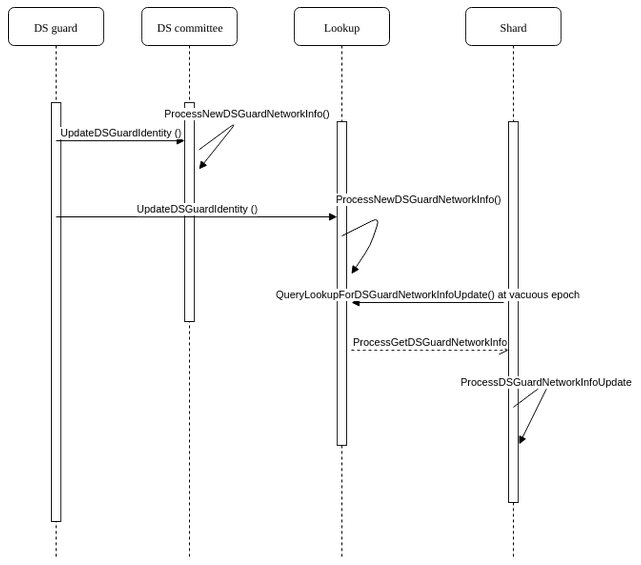
1. DS guard relaunches in a new pod
1. DS guard enters the DS guard rejoin stage and syncs with lookup
1. DS guard successfully enters `FinishRejoinAsDS()`
1. As part of the finish rejoin process, DS guard broadcasts its new network information and other relevant information to the lookup and gossips to DS committee (pubkey, network info and timestamp)
1. DS committee and lookup update their view of the DS committee
1. Lookup stores the updated information
1. At the next vacuous epoch, all shard nodes query the lookup for any new DS guard network update info, and set a flag to indicate that they are waiting for the new network information of DS guard
1. Lookup will not respond if there is no new information
1. Otherwise, lookup sends to requesting shard node the new DS guard network information. The lookup also signs the message.
1. Requesting shard node verifies the signature and proceeds to update its view of the DS committee.
### Testing procedures
1. Run 20 nodes testnet with guard mode enabled
1. Kill 2nd DS guard node
- netstat -antp | less
- Look for port 4002
- Get the process id
- kill -9 [pid]
1. Relaunch DS guard node 2 using `./tests/Node/test_node_rejoindsguardnode2`
1. Check that DS committee, lookup and shard nodes are aware of the DS guard's updated network information
- DS committee:
```console
[update ds guard] DS guard to be updated is at index
[indexOfDSGuard] [old network info] [new network info]
```
- Shards:
```console
[update ds guard][pubkey]new network info is [network info]
```
- Lookup:
- Received network info:
```console
[update ds guard] DS guard to be updated is at index
[indexOfDSGuard] [old network info] [new network info]
```
- Add to in-memory data structure:
```console
[update ds guard] No existing record found for dsEpochNumber [ds epoch number]. Adding a new record
Or
[update ds guard] Adding new record for dsEpochNumber [ds epoch number]
```
- Send to shard node:
```console
[update ds guard] Sending guard node update info to [requesting node]
```
### Sequence Diagram
## Design of shard guard and non-shard guard nodes
Shard guard is designed to ensure that across all shards there are sufficient Zilliqa-controlled nodes. These nodes are special as
- They do PoW with difficulty 1
- Their PoW submissions are given priority by DS committee over normal shard nodes' submissions
- They do not join DS committee
As per the Zilliqa protocol, shard nodes (guard and non-guard) perform PoW. A non-guard node may perform up to 2 rounds of PoW (one for DS and one for shard). **However, a shard guard only performs PoW to enter shard.**
After the PoW window is over, the DS committee will begin to compose the sharding structure. The DS leader, as per current protocol, will trim the sharding structure such that each shard has exactly `COMM_SIZE` number of shard nodes. During the trimming, shard guards are given priority, and non-shard guard nodes are trimmed from the structure first. With the trimmed list, the DS leader will then randomly assign each node (shard guard and non-shard guard) to its respective shard.
Inline code comments:
```console
If total num of shard nodes to be trim, ensure shard guards do not get
trimmed. To do it, a new map will be created to include all shard
guards and a subset of normal shard nods
Steps:
1. Maintain a map that called "FilteredPoWOrderSorter". It will
eventually contains Shard guards + subset of normal nodes
2. Maintain a shadow copy of "PoWOrderSorter" called
"ShadowPoWOrderSorter". It is to track non-guards node.
3. Add shard guards to "FilteredPoWOrderSorter" and remove it from
"ShadowPoWOrderSorter"
4. If there are still slots left, obtained remaining normal shard node
from "ShadowPoWOrderSorter". Use it to populate
"FilteredPoWOrderSorter"
5. Finally, sort "FilteredPoWOrderSorter" and stored result in
"PoWOrderSorter"
```
## Running in local test mode
Local scripts have been retrofitted and DS/shard guard node key pairs have been pre-generated in the python local script. To run guard mode, use `tests/Node/pre_run_guard.sh` instead of the regular `pre_run` script.
```console
cd build && tests/Node/pre_run_guard.sh && ./tests/Node/test_node_lookup.sh && ./tests/Node/test_node_simple.sh
```
## Test scenarios
1. Normal operation with guard mode
- Build as per normal
- Enable guard mode
1. Guard mode with view change at DS block consensus
- Build with VC1
- Enable guard mode
1. Guard mode with view change at final block consensus
- Build with VC3
- Enable guard mode
## Validating the results via sampling
1. Check a DS guard node (e.g., node 1) to see whether or not it stays in DS committee indefinitely with no shifting
2. Check a DS guard node to ensure DS leader is always among the DS guard nodes
3. Check a shard guard node to ensure it never joins the DS committee
4. Check a non-shard guard node to ensure it has the chance to join the DS committee
5. Check view change in guard mode doesn’t shift the DS committee
6. Check lookup for any abnormal behavior
## Future todos
1. How to gracefully transit out of guard mode? ([Issue 336](https://github.com/Zilliqa/Issues/issues/336))