---
id: dev-tools-ceres
title: Ceres
keywords:
- ceres
- local network
- isolated server
- testing
- faucet
- zilliqa
description: Guide on Building on Ceres
---
---
Ceres is a one-stop local development application for developers looking to
build on top of Zilliqa. It is a simple to use graphical interface that has
multiple Zilliqa development tools. Development tools that come with Ceres
currently are [Isolated server](#isolated-server), [Devex](#devex) developer
block explorer and [Scilla server](#scilla-server). Ceres allows developers to
run these tools locally on their machine which allows them to: run a local
Zilliqa blockchain network, deploy contracts locally, test their contracts using
a testing library and view these transactions on a network explorer.
## Installation
### System Requirements
| MacOS / Linux | Windows |
| ------------------------------------------------- | ------------------------------------------------- |
| **[NodeJS](https://nodejs.org/en/) v12 or newer** | **[NodeJS](https://nodejs.org/en/) v12 or newer** |
| **[Docker](https://www.docker.com/get-started)** | **[Docker](https://www.docker.com/get-started)** |
| | **WSL 2.0** |
You would also need the following ports to be free on your system:
- Ports 5555, 5556 for Isolated Server
- Port 5557 for Network Explorer
- Port 4000 for Scilla Server
### Download Ceres
You can download the Ceres application by clicking on the icon that matches your
operating system below.
| MacOS | Windows | Linux |
| --------------------------------------------------------------------------------------------------------------------------------------------------------------------------------------- | ------------------------------------------------------------------------------------------------------------------------------------------------------------------------------------------------------ | ------------------------------------------------------------------------------------------------------------------------------------------------------------------------------------------------- |
| [ ](https://github.com/Zilliqa/ceres/releases/download/v0.2.5/Ceres-0.2.5.dmg) | [
 ](https://github.com/Zilliqa/ceres/releases/download/v0.2.5/Ceres.Setup.0.2.5.exe) | [
 ](https://github.com/Zilliqa/ceres/releases/download/v0.2.5/Ceres-0.2.5.AppImage) |
Keep track of Ceres releases on github
[here](https://github.com/Zilliqa/ceres/releases).
## Available Services
### Isolated Server
Zilliqa Isolated Server is a test server for dApp developers to quickly test
their applications. It allows developers to spin up a simulated blockchain
locally where transactions are validated immediately, hence improving the
productivity for dApp developers.
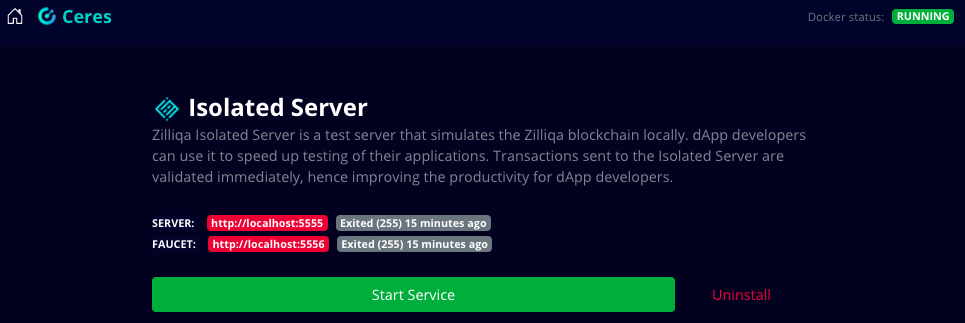
Isolated server runs 2 containers that are tied together:
1. Server Container ([http://localhost:5555](http://localhost:5555)) is the
local Zilliqa blockchain network and it comes with 10 pre-loaded accounts.
2. Faucet Container ([http://localhost:5556](http://localhost:5556)) is a faucet
for the above server, you can query the faucet to get $ZILs to an account.
To start the isolated server, you need to click on “Isolated server” from the
Ceres’ home screen and then click on “Download and install”. After downloading
is finished, you need to click on to Start Service - you have now successfully
started the isolated server and faucet.
#### Using Isolated server during dApp development
To interact with the local blockchain network with your dApp, you would need to
set the value of the RPC server URL when initialising a new Zilliqa object to
point to the isolated server.
`const zilliqa = new Zilliqa('http://localhost:5555'); //Example code in js`
Also, you would need to change the Chain ID to reflect the value relevant for
the isolated server i.e. 222.
Switching from testing on isolated server to pushing your dApp to production on
Zilliqa testnet or mainnet is simple, you just need to change the value of the
RPC server URL and Chain ID to the one specific to your network as mentioned
[here](https://dev.zilliqa.com/api/introduction/api-introduction/)
### Devex
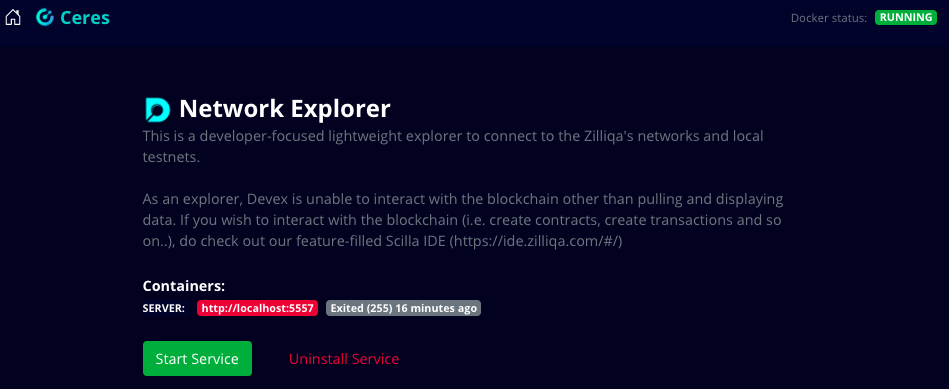
Devex is a developer-focused lightweight blockchain explorer that shows data on
the local blockchain network running on the isolated server. Devex runs on the
port 5557. You can access it from any browser on
[http://localhost:5557](http://localhost:5557).
To start the explorer, you need to click on “Network explorer” from the Ceres’
home screen and then click on “Download and install”. After downloading is
finished, you need to click on to Start Service - you have now successfully
started the network explorer.
### Scilla Server
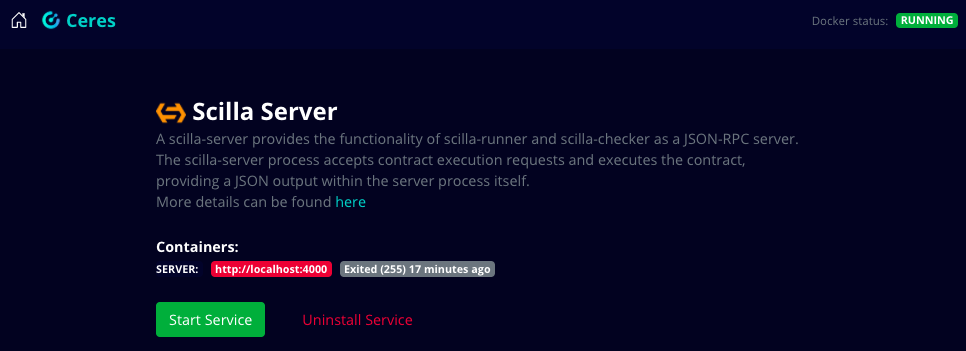
Scilla server runs Scilla binaries locally and exposes API endpoints for
`scilla-checker` and `scilla-runner`. The scilla-server provides the
functionality of `scilla-runner` and `scilla-checker` as a JSON-RPC server.
Scilla server accepts contract execution requests and executes them, providing a
JSON output within the server process itself.
Scilla Server runs on port 4000. You can call it's API on
[http://localhost:4000](http://localhost:4000).
To start the server, you need to click on “Scilla” from the Ceres’ home screen
and then click on “Download and install”. After downloading is finished, you
need to click on to Start Service - you have now successfully started the Scilla
server.
## Using Ceres with a dApp
After you are done with installation of Ceres and all the available services,
you can start using Ceres for your dApp development.
In this section, we will deploy a fungible token (ZRC-2) smart contract using
the Zilliqa IDE which would be connected to your local Zilliqa blockchain
network. We will also use the local faucet & network explorer in the process.
Note : Make sure that you have Isolated server and network explorer services of
Ceres running before proceeding further.
### Deploying contract on local network
Step 1 : Visit the [Scilla IDE](https://ide.zilliqa.com/), start a new file and
write your contract code in it. Alternatively, you can choose one of the already
available contracts from the left tab, in this example we will be selecting the
Fungible Token contract from the left tab.
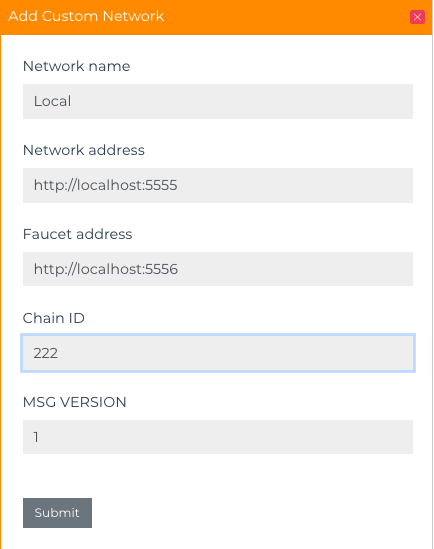
Step 2 : Go to the networks tab and click on “Add Network” to add your local
blockchain network to the IDE by filling in details of your network.
!!! note
Network ID for the isolated server is 222, refer[https://dev.zilliqa.com/docs/apis/api-blockchain-get-network-id/](https://dev.zilliqa.com/docs/apis/api-blockchain-get-network-id/)to
know about the id of your Zilliqa network.
Step 3: Select an account that you will eventually use to deploy the contract.
In this example, we are using a keystore file but you can use ledger or Zilpay,
which is a Zilliqa wallet available as a chrome extension similar to metamask.
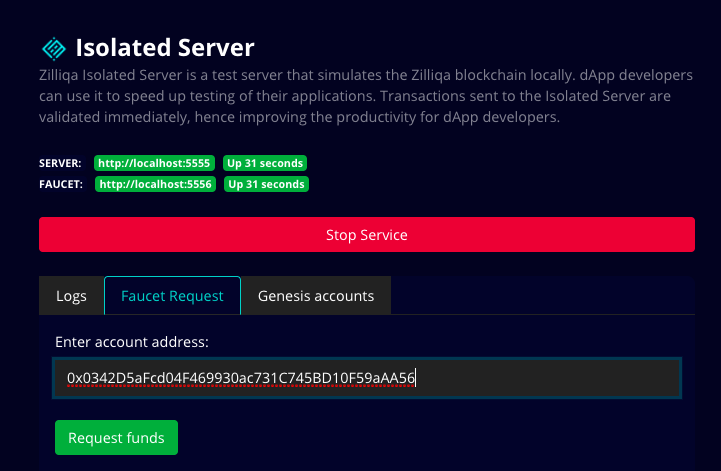
Step 4 : Paste your account address and request funds from the faucet available
on Ceres.
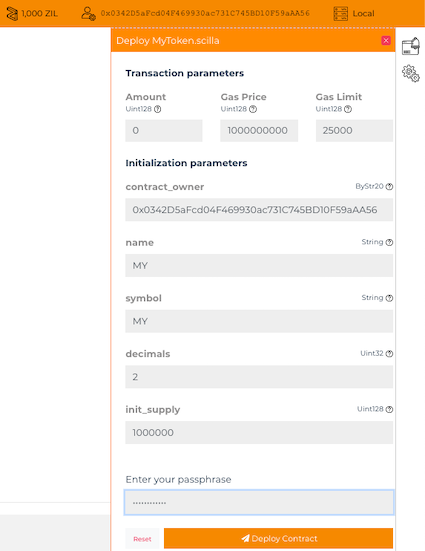
Step 5: Click on “Deploy”, enter the initialization params and finally deploy
the contract!
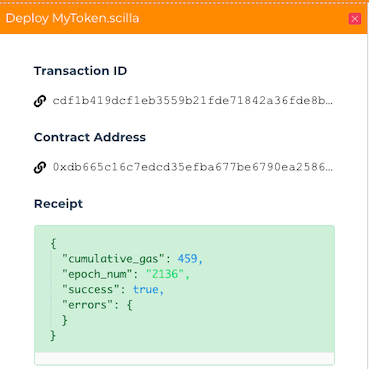
Step 6: You can click on the transaction ID link and you will be redirected to
Devex page, alternatively you can also visit
[http://localhost:5557](http://localhost:5557) (local network explorer) and you
will find your contract creation transaction there as well.
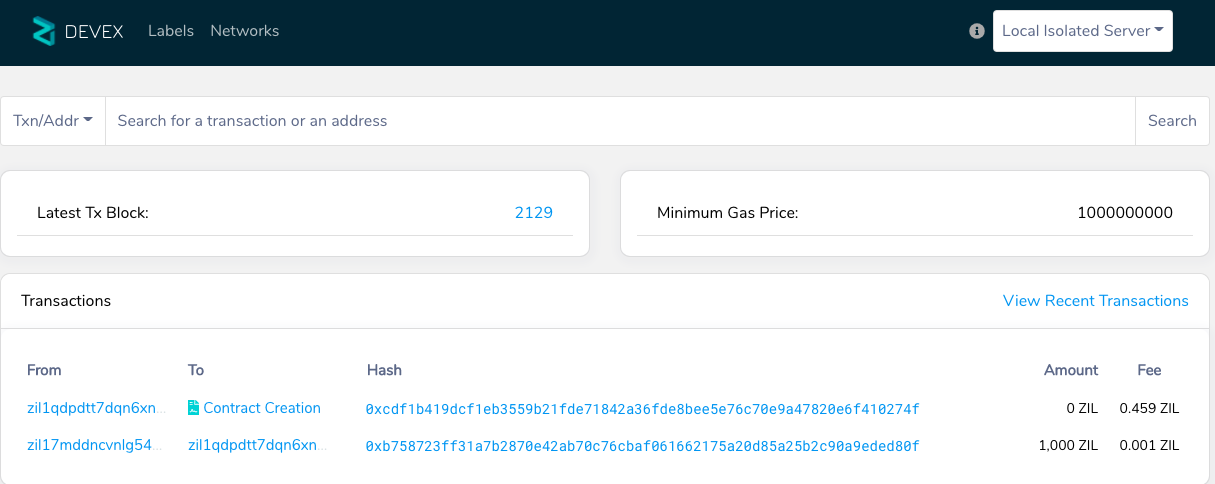
Voila! Your contract is now deployed on the local network and can be accessed
under the "Contracts" tab on the left side of the IDE.
](https://github.com/Zilliqa/ceres/releases/download/v0.2.5/Ceres-0.2.5.AppImage) |
Keep track of Ceres releases on github
[here](https://github.com/Zilliqa/ceres/releases).
## Available Services
### Isolated Server
Zilliqa Isolated Server is a test server for dApp developers to quickly test
their applications. It allows developers to spin up a simulated blockchain
locally where transactions are validated immediately, hence improving the
productivity for dApp developers.
Isolated server runs 2 containers that are tied together:
1. Server Container ([http://localhost:5555](http://localhost:5555)) is the
local Zilliqa blockchain network and it comes with 10 pre-loaded accounts.
2. Faucet Container ([http://localhost:5556](http://localhost:5556)) is a faucet
for the above server, you can query the faucet to get $ZILs to an account.
To start the isolated server, you need to click on “Isolated server” from the
Ceres’ home screen and then click on “Download and install”. After downloading
is finished, you need to click on to Start Service - you have now successfully
started the isolated server and faucet.

#### Using Isolated server during dApp development
To interact with the local blockchain network with your dApp, you would need to
set the value of the RPC server URL when initialising a new Zilliqa object to
point to the isolated server.
`const zilliqa = new Zilliqa('http://localhost:5555'); //Example code in js`
Also, you would need to change the Chain ID to reflect the value relevant for
the isolated server i.e. 222.
Switching from testing on isolated server to pushing your dApp to production on
Zilliqa testnet or mainnet is simple, you just need to change the value of the
RPC server URL and Chain ID to the one specific to your network as mentioned
[here](https://dev.zilliqa.com/api/introduction/api-introduction/)
### Devex
Devex is a developer-focused lightweight blockchain explorer that shows data on
the local blockchain network running on the isolated server. Devex runs on the
port 5557. You can access it from any browser on
[http://localhost:5557](http://localhost:5557).
To start the explorer, you need to click on “Network explorer” from the Ceres’
home screen and then click on “Download and install”. After downloading is
finished, you need to click on to Start Service - you have now successfully
started the network explorer.

### Scilla Server
Scilla server runs Scilla binaries locally and exposes API endpoints for
`scilla-checker` and `scilla-runner`. The scilla-server provides the
functionality of `scilla-runner` and `scilla-checker` as a JSON-RPC server.
Scilla server accepts contract execution requests and executes them, providing a
JSON output within the server process itself.
Scilla Server runs on port 4000. You can call it's API on
[http://localhost:4000](http://localhost:4000).
To start the server, you need to click on “Scilla” from the Ceres’ home screen
and then click on “Download and install”. After downloading is finished, you
need to click on to Start Service - you have now successfully started the Scilla
server.

## Using Ceres with a dApp
After you are done with installation of Ceres and all the available services,
you can start using Ceres for your dApp development.
In this section, we will deploy a fungible token (ZRC-2) smart contract using
the Zilliqa IDE which would be connected to your local Zilliqa blockchain
network. We will also use the local faucet & network explorer in the process.
Note : Make sure that you have Isolated server and network explorer services of
Ceres running before proceeding further.
### Deploying contract on local network
Step 1 : Visit the [Scilla IDE](https://ide.zilliqa.com/), start a new file and
write your contract code in it. Alternatively, you can choose one of the already
available contracts from the left tab, in this example we will be selecting the
Fungible Token contract from the left tab.
Step 2 : Go to the networks tab and click on “Add Network” to add your local
blockchain network to the IDE by filling in details of your network.

!!! note
Network ID for the isolated server is 222, refer[https://dev.zilliqa.com/docs/apis/api-blockchain-get-network-id/](https://dev.zilliqa.com/docs/apis/api-blockchain-get-network-id/)to
know about the id of your Zilliqa network.
Step 3: Select an account that you will eventually use to deploy the contract.
In this example, we are using a keystore file but you can use ledger or Zilpay,
which is a Zilliqa wallet available as a chrome extension similar to metamask.
Step 4 : Paste your account address and request funds from the faucet available
on Ceres.

Step 5: Click on “Deploy”, enter the initialization params and finally deploy
the contract!


Step 6: You can click on the transaction ID link and you will be redirected to
Devex page, alternatively you can also visit
[http://localhost:5557](http://localhost:5557) (local network explorer) and you
will find your contract creation transaction there as well.

Voila! Your contract is now deployed on the local network and can be accessed
under the "Contracts" tab on the left side of the IDE.