> Very customizable, extendable, fast and hackable json-editor (like
> [jdorn/json-editor](https://github.com/jdorn/json-editor)), to build your data-input-interface based on a json-schema
# Editron Core
> This is the core of the editron editor. It may be used to build a custom application (instead of using the default
> [editron](https://github.com/sueddeutsche/editron) application).
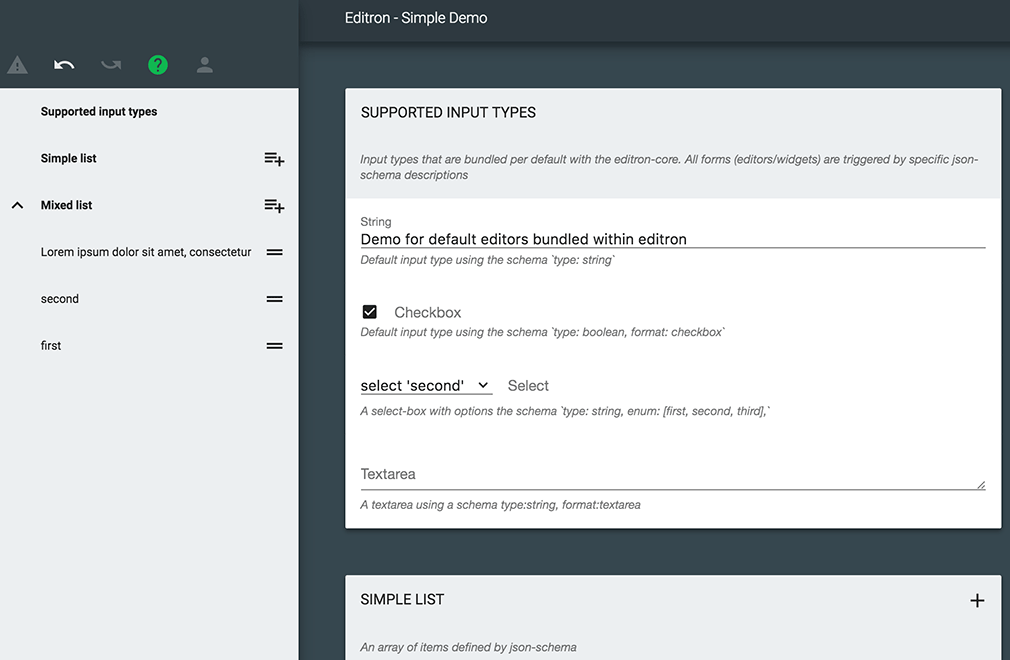
This is the base for building a complete [editron](https://github.com/sueddeutsche/editron) json-editor. Its Controller may be used to setup one or many input-forms, based on nested editors for each input-data. The core and the main app are still under development and the api has not yet settled. Still, it is flawlessly used in production for a CMS at the Süddeutsche Digitale Medien GmbH.
## Features
- Full [json-schema](http://json-schema.org/) draft04 support
- Basic editors supporting _objects_, _arrays_, _checkboxes_, _oneOf-selection_, _textarea_, _input_ and _selections_
- Additional editors currently available
- _editron-wysiwyg-editor_
- _editron-script-editor_
- _editron-overview-navigation_
- inline-validation
- undo/redo
- display only a specific data pointer or switch them, using [json-pointer-syntax](https://github.com/sagold/gson-pointer)
- collaborative editing using _editron-sync-service_
- optional styles, supporting custom styling
- customizable translations and error-messages
- add custom editors (aka widgets)
- basically independent of any frameworks ([mithriljs](https://mithril.js.org/) is used internally)
- access to all methods
- very flexible editors (requiring some knowledge of implementation details)
- build-helpers and integration tests
- independent builds, which enables simple plug&edit through an include-script
## Installation
`npm i editron-core --save`
Add the required fonts and rendering dependencies to your website
```html
```
And add the editron-core modules and their export (paths depend on your build-setup):
```html
```
## Usage
`editron-core.js` exposes a global object `editronCore` to the window object, which may be accessed to retrieve the main Controller, which is the basis of an editron-editor:
```js
// and create a new editor instance (referencing a unique json-schema and data)
const controller = new editronCore.Controller(myJsonSchema, myJsonData);
// create the editor within the selected DOM-Element
const main = controller.createEditor("#", document.querySelector("#editor"));
// create another form for the data-point at { header: ... }
const header = controller.createEditor("#/header", document.querySelector("#editor-header"));
// receive a notification when the data has changed
controller.data().observe("#", (event) => {
console.log("data has changed to", controller.data().get());
});
// access services for further functionality
const dataService = editor.data();
const schemaService = editor.schema();
const validationService = editor.validator();
```
for details on the services checkout [json-schema-services](https://github.com/sueddeutsche/json-data-services)
## Build your own application using webpack
> You may also build a custom application using webpack. Following the build steps of
> [webpack.build.js](https://github.com/sueddeutsche/editron-core/blob/master/webpack.build.js) should answer most
> questions.
```js
const Controller = require("editron-core").Controller;
// follow usage explanation above
```
 ## Features
- Full [json-schema](http://json-schema.org/) draft04 support
- Basic editors supporting _objects_, _arrays_, _checkboxes_, _oneOf-selection_, _textarea_, _input_ and _selections_
- Additional editors currently available
- _editron-wysiwyg-editor_
- _editron-script-editor_
- _editron-overview-navigation_
- inline-validation
- undo/redo
- display only a specific data pointer or switch them, using [json-pointer-syntax](https://github.com/sagold/gson-pointer)
- collaborative editing using _editron-sync-service_
- optional styles, supporting custom styling
- customizable translations and error-messages
- add custom editors (aka widgets)
- basically independent of any frameworks ([mithriljs](https://mithril.js.org/) is used internally)
- access to all methods
- very flexible editors (requiring some knowledge of implementation details)
- build-helpers and integration tests
- independent builds, which enables simple plug&edit through an include-script
## Installation
`npm i editron-core --save`
Add the required fonts and rendering dependencies to your website
```html
```
And add the editron-core modules and their export (paths depend on your build-setup):
```html
```
## Usage
`editron-core.js` exposes a global object `editronCore` to the window object, which may be accessed to retrieve the main Controller, which is the basis of an editron-editor:
```js
// and create a new editor instance (referencing a unique json-schema and data)
const controller = new editronCore.Controller(myJsonSchema, myJsonData);
// create the editor within the selected DOM-Element
const main = controller.createEditor("#", document.querySelector("#editor"));
// create another form for the data-point at { header: ... }
const header = controller.createEditor("#/header", document.querySelector("#editor-header"));
// receive a notification when the data has changed
controller.data().observe("#", (event) => {
console.log("data has changed to", controller.data().get());
});
// access services for further functionality
const dataService = editor.data();
const schemaService = editor.schema();
const validationService = editor.validator();
```
for details on the services checkout [json-schema-services](https://github.com/sueddeutsche/json-data-services)
## Build your own application using webpack
> You may also build a custom application using webpack. Following the build steps of
> [webpack.build.js](https://github.com/sueddeutsche/editron-core/blob/master/webpack.build.js) should answer most
> questions.
```js
const Controller = require("editron-core").Controller;
// follow usage explanation above
```
## Features
- Full [json-schema](http://json-schema.org/) draft04 support
- Basic editors supporting _objects_, _arrays_, _checkboxes_, _oneOf-selection_, _textarea_, _input_ and _selections_
- Additional editors currently available
- _editron-wysiwyg-editor_
- _editron-script-editor_
- _editron-overview-navigation_
- inline-validation
- undo/redo
- display only a specific data pointer or switch them, using [json-pointer-syntax](https://github.com/sagold/gson-pointer)
- collaborative editing using _editron-sync-service_
- optional styles, supporting custom styling
- customizable translations and error-messages
- add custom editors (aka widgets)
- basically independent of any frameworks ([mithriljs](https://mithril.js.org/) is used internally)
- access to all methods
- very flexible editors (requiring some knowledge of implementation details)
- build-helpers and integration tests
- independent builds, which enables simple plug&edit through an include-script
## Installation
`npm i editron-core --save`
Add the required fonts and rendering dependencies to your website
```html
```
And add the editron-core modules and their export (paths depend on your build-setup):
```html
```
## Usage
`editron-core.js` exposes a global object `editronCore` to the window object, which may be accessed to retrieve the main Controller, which is the basis of an editron-editor:
```js
// and create a new editor instance (referencing a unique json-schema and data)
const controller = new editronCore.Controller(myJsonSchema, myJsonData);
// create the editor within the selected DOM-Element
const main = controller.createEditor("#", document.querySelector("#editor"));
// create another form for the data-point at { header: ... }
const header = controller.createEditor("#/header", document.querySelector("#editor-header"));
// receive a notification when the data has changed
controller.data().observe("#", (event) => {
console.log("data has changed to", controller.data().get());
});
// access services for further functionality
const dataService = editor.data();
const schemaService = editor.schema();
const validationService = editor.validator();
```
for details on the services checkout [json-schema-services](https://github.com/sueddeutsche/json-data-services)
## Build your own application using webpack
> You may also build a custom application using webpack. Following the build steps of
> [webpack.build.js](https://github.com/sueddeutsche/editron-core/blob/master/webpack.build.js) should answer most
> questions.
```js
const Controller = require("editron-core").Controller;
// follow usage explanation above
```