

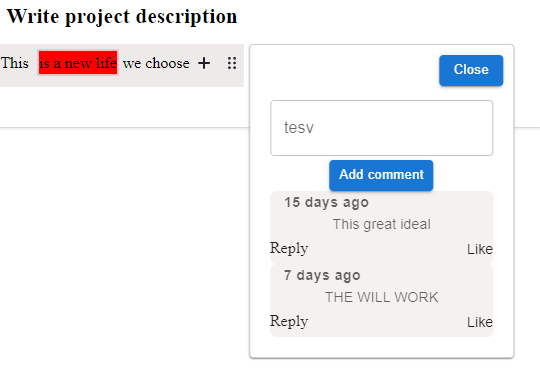
 ### Features
* support typescript
* using with HTML project
* using react (JSX.Element)
* other coming soon.
#### Limitation
For React component, `Hooks` will not work since is render outside of the component, a work around is using preact signal https://preactjs.com/guide/v10/signals/
```typescript
import { signal } from "@preact-signals/safe-react";
import { withTrackSignals } from "@preact-signals/safe-react/manual";
```
check the example for usage
## Installation
### Install via NPM
```sh
npm install editorjs-comment
```
### Load from CDN
```html
```
## Usage
```javascript
import Comment from 'editorjs-comment';
```
ediotrjs Comment must be used with the config. A function that returns a JSX.Element or HTML file must be passed to the config file `CommentConfig`. See the config interface.
##important interfaces
```typescript
export interface RenderBody {
commentBlockId: string | null;
blockId: string | null;
onClose: () => void;
addCommentBlockData: (data: CommentBlockData) => void;
removeBlockComments: () => void;
}
export interface CommentConfig {
markerColor?: string;
activeColor?: string;
editorjsId?: string;
renderBody: ({
commentBlockId,
blockId,
addCommentBlockData,
onClose,
removeBlockComments,
}: RenderBody) => HTMLElement | any //JSX.Element;
}
```
### Usage example
```Typescript
const EDITOR_JS_TOOL = {
....
comment: {
class: Comment,
inlineToolbar: true,
config: {
markerColor: "",
activeColor: "pink",
renderBody: ({
commentBlockId,
blockId,
onClose,
addCommentBlockData,
}: {
commentBlockId: string;
blockId: string;
onClose: () => void;
addCommentBlockData: (data: any) => void;
}) => {
return RenderItem({
onClose,
blockId,
commentId: commentBlockId,
setCommentBlockData: addCommentBlockData,
});
},
},
},
}
```
### RenderBody function
The renderBody is a function which is a required parameter by the config.
The function must accept the `RenderBody` interface as shown below
```typescript
export interface RenderBody {
commentBlockId: string | null;
blockId: string | null;
onClose: () => void;
addCommentBlockData: (data: CommentBlockData) => void;
removeBlockComments: () => void;
}
```
#### parameter
This parameters will be pass to the function were the developer can access then an use it.
| Field | Type | required |Description |
| -------- | -------- | -------- | -------- |
| `commentBlockId` | String| true | This is a unique string(id) that represent the section of the highlighted text that you want to add a comment. The developer is responsible for creating this id the first time an comment is created. For existing comment, this value will the pass to the renderBody function where developer can use this to get the comments for this comment section |
|blockId| string |true| This is the blockId from Editorjs block of where the comment is made. Is upto the developer if they need
|onClose | Func| true| Function use to manually close the opened comment section |
|addCommentBlockData| Func|true |this function will initialize comment section to the corresponding BlockData to the highlighted area when is called, it is recommended to be called first comment of any selected area is made.
|removeBlockComments |Func| true| This function should be called with caution, it will remove the comment section from the editorjs permanently.
## config parameter is `CommentConfig`
`CommentConfig` is the interface that is passed to the config option. only `renderBody` is required.
| Field | Type | required | default |Description |
| -------- | -------- | -------- | -------- | -------- |
| `markerColor` | String| false | null |The color of the marker showing the area of the comment |
| `activeColor` |string | false | Add underline text decoration to the text wrapped by the tooltip. Default is `false`. |
| `editorjsId` | String | -| editorjs| This is the container id for the editorjs, if you sed the default value `editorjs` then is not required but if you other name then is required|
| `renderBody` | Func| true | null | A function that return an HTML or JSX.Element; the function should accept the `RenderBody` interface. Check the usage or the example |
## case study
example using react and preact/signal
```typescript
//import { signal, computed, useSignal } from "@preact/signals";
import { signal } from "@preact-signals/safe-react";
import { withTrackSignals } from "@preact-signals/safe-react/manual";
import { CommentBlockData, RenderBody } from "editorjs-comment";
interface Comment {
commentBlockId: string;
blockId: string;
content: string
//... your custom fields
}
const comments = signal
### Features
* support typescript
* using with HTML project
* using react (JSX.Element)
* other coming soon.
#### Limitation
For React component, `Hooks` will not work since is render outside of the component, a work around is using preact signal https://preactjs.com/guide/v10/signals/
```typescript
import { signal } from "@preact-signals/safe-react";
import { withTrackSignals } from "@preact-signals/safe-react/manual";
```
check the example for usage
## Installation
### Install via NPM
```sh
npm install editorjs-comment
```
### Load from CDN
```html
```
## Usage
```javascript
import Comment from 'editorjs-comment';
```
ediotrjs Comment must be used with the config. A function that returns a JSX.Element or HTML file must be passed to the config file `CommentConfig`. See the config interface.
##important interfaces
```typescript
export interface RenderBody {
commentBlockId: string | null;
blockId: string | null;
onClose: () => void;
addCommentBlockData: (data: CommentBlockData) => void;
removeBlockComments: () => void;
}
export interface CommentConfig {
markerColor?: string;
activeColor?: string;
editorjsId?: string;
renderBody: ({
commentBlockId,
blockId,
addCommentBlockData,
onClose,
removeBlockComments,
}: RenderBody) => HTMLElement | any //JSX.Element;
}
```
### Usage example
```Typescript
const EDITOR_JS_TOOL = {
....
comment: {
class: Comment,
inlineToolbar: true,
config: {
markerColor: "",
activeColor: "pink",
renderBody: ({
commentBlockId,
blockId,
onClose,
addCommentBlockData,
}: {
commentBlockId: string;
blockId: string;
onClose: () => void;
addCommentBlockData: (data: any) => void;
}) => {
return RenderItem({
onClose,
blockId,
commentId: commentBlockId,
setCommentBlockData: addCommentBlockData,
});
},
},
},
}
```
### RenderBody function
The renderBody is a function which is a required parameter by the config.
The function must accept the `RenderBody` interface as shown below
```typescript
export interface RenderBody {
commentBlockId: string | null;
blockId: string | null;
onClose: () => void;
addCommentBlockData: (data: CommentBlockData) => void;
removeBlockComments: () => void;
}
```
#### parameter
This parameters will be pass to the function were the developer can access then an use it.
| Field | Type | required |Description |
| -------- | -------- | -------- | -------- |
| `commentBlockId` | String| true | This is a unique string(id) that represent the section of the highlighted text that you want to add a comment. The developer is responsible for creating this id the first time an comment is created. For existing comment, this value will the pass to the renderBody function where developer can use this to get the comments for this comment section |
|blockId| string |true| This is the blockId from Editorjs block of where the comment is made. Is upto the developer if they need
|onClose | Func| true| Function use to manually close the opened comment section |
|addCommentBlockData| Func|true |this function will initialize comment section to the corresponding BlockData to the highlighted area when is called, it is recommended to be called first comment of any selected area is made.
|removeBlockComments |Func| true| This function should be called with caution, it will remove the comment section from the editorjs permanently.
## config parameter is `CommentConfig`
`CommentConfig` is the interface that is passed to the config option. only `renderBody` is required.
| Field | Type | required | default |Description |
| -------- | -------- | -------- | -------- | -------- |
| `markerColor` | String| false | null |The color of the marker showing the area of the comment |
| `activeColor` |string | false | Add underline text decoration to the text wrapped by the tooltip. Default is `false`. |
| `editorjsId` | String | -| editorjs| This is the container id for the editorjs, if you sed the default value `editorjs` then is not required but if you other name then is required|
| `renderBody` | Func| true | null | A function that return an HTML or JSX.Element; the function should accept the `RenderBody` interface. Check the usage or the example |
## case study
example using react and preact/signal
```typescript
//import { signal, computed, useSignal } from "@preact/signals";
import { signal } from "@preact-signals/safe-react";
import { withTrackSignals } from "@preact-signals/safe-react/manual";
import { CommentBlockData, RenderBody } from "editorjs-comment";
interface Comment {
commentBlockId: string;
blockId: string;
content: string
//... your custom fields
}
const comments = signal