
<h1 align="center">Easy Invoice</h1>
<p align="center">A product by<br/><br/><a href="https://budgetinvoice.com" target="_blank" rel="noopener noreferrer"><img width="250" src="https://public.budgetinvoice.com/img/logo_en_original.png" alt="Easy Invoice logo"></a></p>

<h4 align="center">Build for Web and Backend 💪</h4>
<br/>
<p align="center">
  <a href="https://www.npmjs.com/package/easyinvoice"><img src="https://img.shields.io/npm/v/easyinvoice.svg" alt="Version"></a>
  <a href="https://github.com/dveldhoen/easyinvoice/actions?query=branch%3Amaster"><img src="https://github.com/dveldhoen/easyinvoice/workflows/build/badge.svg" alt="Build Status"></a>
  <a href="https://codecov.io/github/dveldhoen/easyinvoice"><img src="https://img.shields.io/codecov/c/github/dveldhoen/easyinvoice/master.svg" alt="Coverage Status"></a>  
  <br/>
  <a href="https://npmcharts.com/compare/easyinvoice?minimal=true"><img src="https://img.shields.io/npm/dm/easyinvoice.svg" alt="Downloads"></a>
  <a href="https://www.npmjs.com/package/easyinvoice"><img src="https://img.shields.io/npm/l/easyinvoice.svg" alt="License"></a>
  <a href="https://github.com/dveldhoen/easyinvoice"><img src="https://img.shields.io/badge/PRs-welcome-brightgreen.svg?style=flat-square" alt="Pull Request's Welcome"></a>
</p>

<p align="center">
<a href="https://apple.co/3ySZ5JY"><img height="45" src="https://public.budgetinvoice.com/img/appstore-badges/apple-appstore-us.png" alt=""/></a>
<a href="https://play.google.com/store/apps/details?id=nl.dashweb.factuursimpel"><img height="45" src="https://public.budgetinvoice.com/img/appstore-badges/google-play-us.png" alt=""/></a>
</p>

<p align="center">
If this package helped you out please star us on Github!
<br/>
Much appreciated!
<br/>
<br/>
<a href="https://github.com/dveldhoen/easyinvoice/"><img src="https://img.shields.io/github/stars/dveldhoen/easyinvoice.svg?style=social&label=Star" alt="Pull Request's Welcome"></a>
</p>

[//]: # (<span style="color: orange;">)

[//]: # (<h3>Important</h3>)

[//]: # (Please upgrade from v2.x to v3.x for important security updates. The update should be relatively effortless for most users. Note that support for Internet Explorer has been dropped from v3.x.)

[//]: # (</span>)

[//]: # (<br/>)

[//]: # (<br/>)

[//]: # (## EASY products)

[//]: # ()

[//]: # (| <b>Package</b> | Description          | Link                                                                                                                                                           |)

[//]: # (|----------------|----------------------|----------------------------------------------------------------------------------------------------------------------------------------------------------------|)

[//]: # (| Easy PDF    | Easy PDF Creator     | <a href="https://www.npmjs.com/package/easypdf-io"><img src="https://img.shields.io/badge/NPM-EasyPDF.io-blue" alt="Available on Composer"></a>  |)

[//]: # (| Easy Invoice   | Easy Invoice Creator | <a href="https://www.npmjs.com/package/easyinvoice"><img src="https://img.shields.io/badge/NPM-EasyInvoice-blue" alt="Available on Composer"></a> |)

## Important

1. Please note that this package is a wrapper for an API, so it's logic runs on external servers.
2. Your data is secure and will not be shared with third parties.
3. We try to keep the API up and running at all times, but we cannot guarantee 100% uptime. Please build in a retry
   mechanism in case the API is down for maintenance.
4. Make sure to upgrade your package to either >2.4.0 or >3.0.25 for apiKey support.

## Installation

Using npm:

```bash
$ npm install easyinvoice
```

Using yarn:

```bash
$ yarn add easyinvoice
```

Using PNPM:

```bash
$ pnpm install easyinvoice
```

## CDN

Using unkpg CDN:

```html

<script src="https://unpkg.com/easyinvoice/dist/easyinvoice.min.js"></script>
```

Using jsDelivr CDN:

```html

<script src="https://cdn.jsdelivr.net/npm/easyinvoice/dist/easyinvoice.min.js"></script>
```

## Platform support

| <b>Platform</b> | Repository | Supported | Link                                                                                                                                                                       |
|-----------------|------------|-----------|----------------------------------------------------------------------------------------------------------------------------------------------------------------------------|
| PHP             | Composer   | Yes!      | <a href="https://packagist.org/packages/budgetinvoice/easyinvoice"><img src="https://img.shields.io/badge/EasyInvoice%20on-Composer-blue" alt="Available on Composer"></a> |

| Javascript      | NPM        | Yes!      | <a href="https://www.npmjs.com/package/easyinvoice"><img src="https://img.shields.io/badge/EasyInvoice%20on-NPM-blue" alt="Available on NPM"></a>                          |
| Python          | PIP        | Yes!      | <a href="https://pypi.org/project/easyinvoice/"><img src="https://img.shields.io/badge/EasyInvoice%20on-PIP-blue" alt="Available on PIP"></a>                              |

<br/>

## Step-by-step guide

Read our step-by-step guide on Medium. <a href="https://medium.com/@dveldhoen/creating-invoices-in-nodejs-eaae01f0d3a4">
Click here!</a><br/>
And gives us a clap if it helped you! 😉
<br/>

## Demo

[JS Fiddle: Plain Javascript](https://jsfiddle.net/easyinvoice/rjtsxhp3/)
<br/>
[JS Fiddle: Vue](https://jsfiddle.net/easyinvoice/gpb1osav/)
<br/>
[JS Fiddle: React](https://jsfiddle.net/easyinvoice/qfs8dk0p/)
<br/>
[JS Fiddle: Angular](https://jsfiddle.net/easyinvoice/pmt3bs9q/)
<br/>

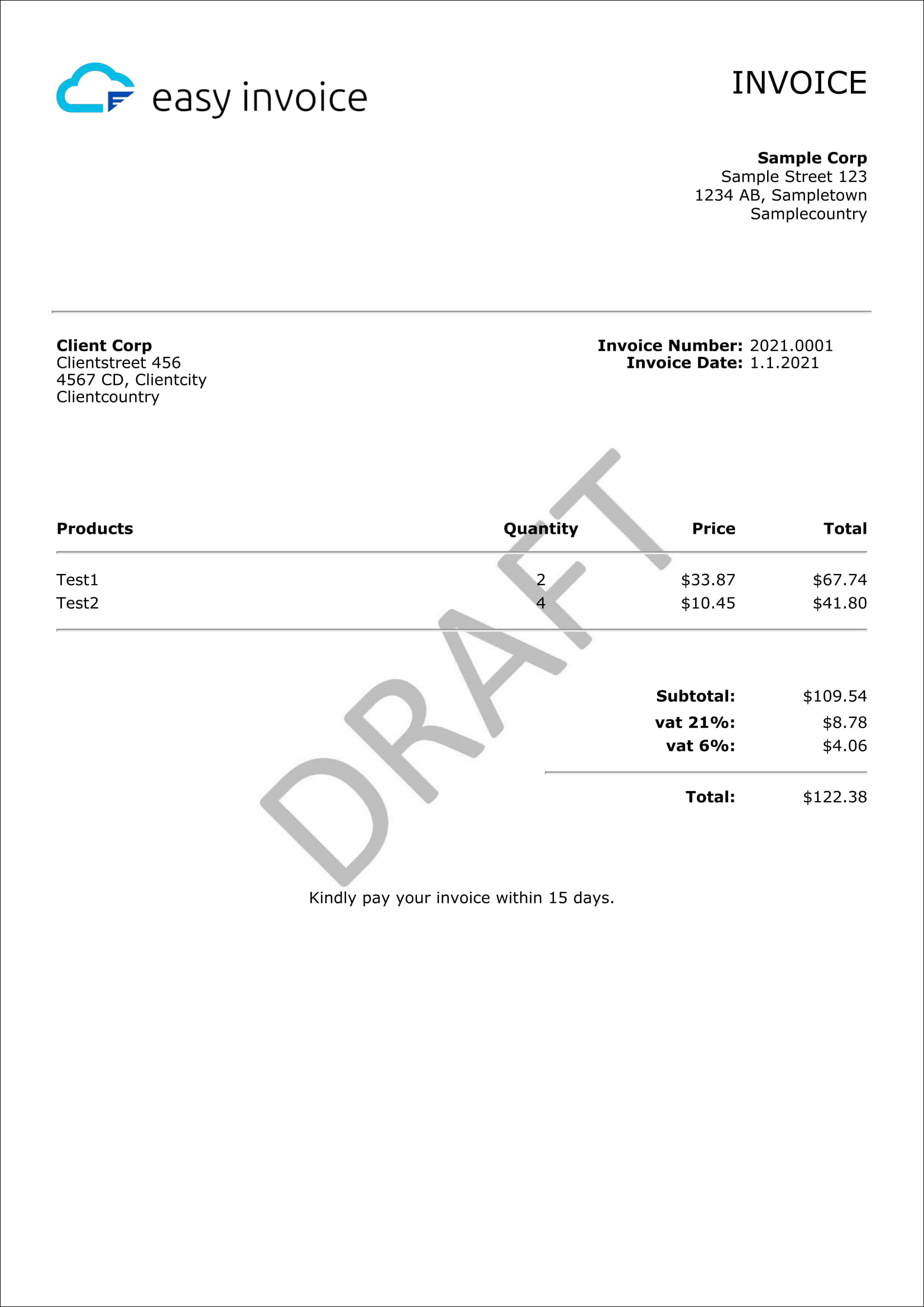
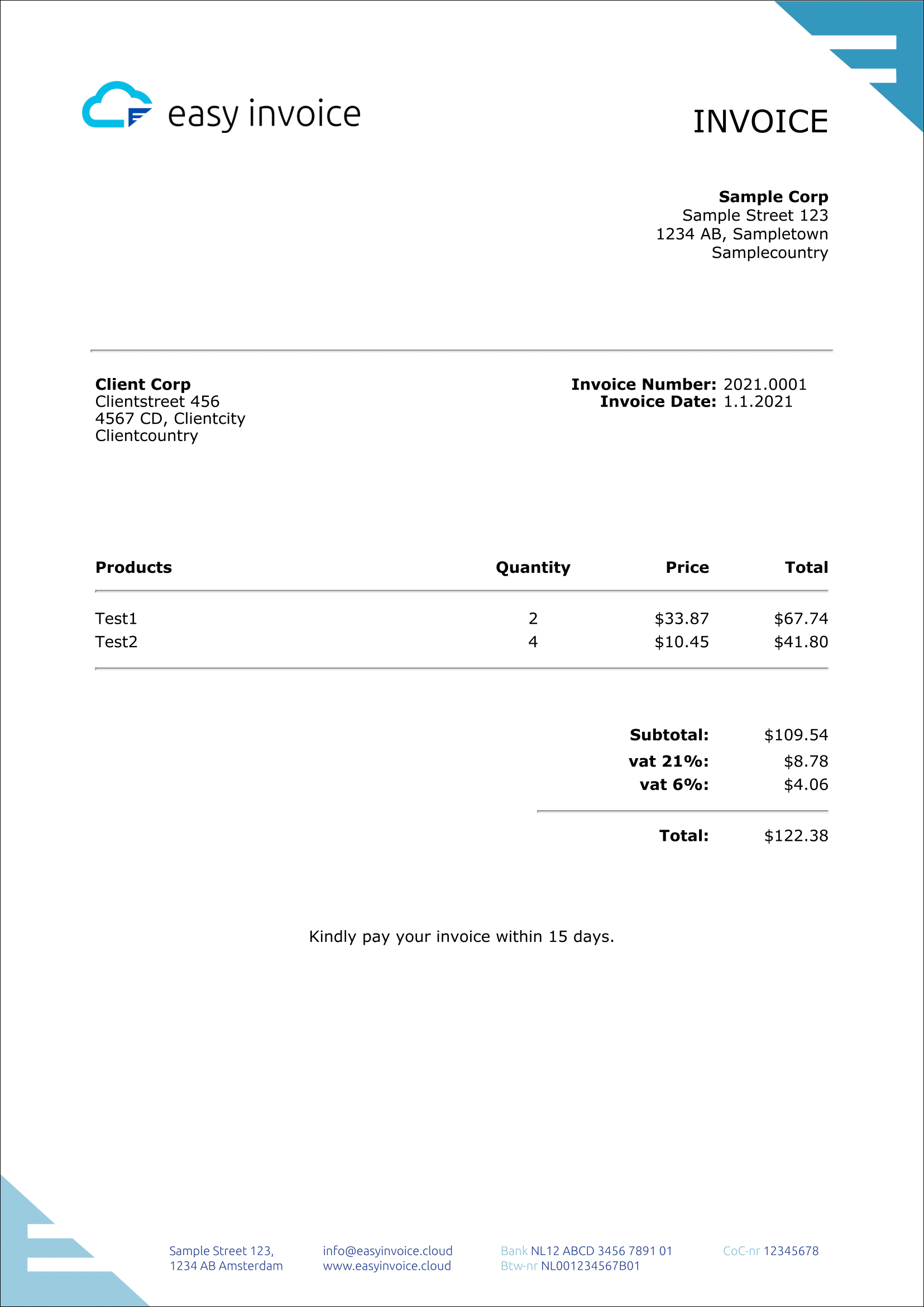
## Sample

<br/>
<div align="center">
    <img width="350" style="border: 1px black solid" src="https://public.budgetinvoice.com/img/sample-invoice.png" alt="Easy Invoice Sample Logo Only">
    <img width="350" style="border: 1px black solid" src="https://public.budgetinvoice.com/img/sample-invoice-background.png" alt="Easy Invoice Sample With Background">
</div>

### JSON Configs used for above samples:

- <a href="https://public.budgetinvoice.com/json/easyinvoice-sample.json">[View JSON] First Sample</a>
- <a href="https://public.budgetinvoice.com/json/easyinvoice-sample-background.json">[View JSON] Second Sample</a>
  <br/>

## Plans

| <b>Plan</b> | Rate                  | Price                                                                                                  | Link                                                                                                                                                                   |
|-------------|-----------------------|--------------------------------------------------------------------------------------------------------|------------------------------------------------------------------------------------------------------------------------------------------------------------------------|
| Free        | 25 invoices / 15 days | $0                                                                                                     | Not required to register                                                                                                                                               |
| Paid        | Unlimited             | - 30 day free trial<br/>- 1st month $1.99<br/>- $17.99 per month<br/><small>*Prices include VAT<small> | <a href="https://app.budgetinvoice.com/register" target="_blank"><img src="https://img.shields.io/badge/Register%20on-budgetinvoice.com-blue" alt="Register here"></a> |

<br/>

## To use paid

1. Register through:
    - Web: <a href="https://app.budgetinvoice.com/register" target="_blank">https://app.budgetinvoice.com/register</a>
    - iOS: https://apple.co/3ySZ5JY
    - Android: https://play.google.com/store/apps/details?id=nl.dashweb.factuursimpel
2. Create an API key through the app: settings -> API keys
3. Make sure to upgrade your package to either >2.4.0 or >3.0.25 for apiKey support.
4. Use the API Key as shown in the complete example below. Add the apiKey property to the data object.

Note: The GUI is not (yet) fully translated to English, though the path to getting an apiKey should mostly be in
English. Also this will allow you to use the in app purchase mechanism to pay for the subscription.
<br/>

## Development mode

When using the free version, you can set the mode to 'development' to make sure you are not running into rate limits
while testing this package or developing your invoices. The free version is limited to 25 invoices per 15 days. When
your
invoice looks good, you can switch to 'production' mode to create your production invoices. Production mode is activated
by either not setting the mode or setting the mode to 'production'.

## Direct REST API access

In case you don't want to use NPM, but you want to call our invoice creation api directly.

```shell
# HTTPS POST 
https://api.budgetinvoice.com/v2/free/invoices

# POST Data
Format: JSON
Structure: {
  "data": { # Parent parameter must be 'data'
    "mode": "development", # Production or development, defaults to production
    "products": [
      {
        "quantity": 2,
        "description": "Test product",
        "taxRate": 6,
        "price": 33.87
      }
    ],
  }
} 

# Optionally add your paid apiKey to the header 
Header: "Authorization": "Bearer 123abc" # Please register to receive a production apiKey: https://app.budgetinvoice.com/register
```

## Import

CommonJS

```js
var easyinvoice = require('easyinvoice');
```

ES6 =<

```js
import easyinvoice from 'easyinvoice';
```

## Getting Started - Basic Example

NodeJS

```js
// Import the library into your project
var easyinvoice = require('easyinvoice');

// Create your invoice! Easy!
var data = {
    apiKey: "free", // Please register to receive a production apiKey: https://app.budgetinvoice.com/register
    mode: "development", // Production or development, defaults to production
    products: [
        {
            quantity: 2,
            description: "Test product",
            taxRate: 6,
            price: 33.87
        }
    ]
};

easyinvoice.createInvoice(data, function (result) {
    // The response will contain a base64 encoded PDF file
    console.log('PDF base64 string: ', result.pdf);

    // Now this result can be used to save, download or render your invoice
    // Please review the documentation below on how to do this
});
```

Web

```html

<html>
<head>
    // Import the library into your project
    <script src="https://unpkg.com/easyinvoice/dist/easyinvoice.min.js"></script>
</head>
<body>
<script>
    // Create your invoice! Easy!
    var data = {
        apiKey: "free", // Please register to receive a production apiKey: https://app.budgetinvoice.com/register
        mode: "development", // Production or development, defaults to production
        products: [
            {
                quantity: 2,
                description: "Test product",
                taxRate: 6,
                price: 33.87
            }
        ]
    };

    easyinvoice.createInvoice(data, function (result) {
        // The response will contain a base64 encoded PDF file
        console.log('PDF base64 string: ', result.pdf);

        // Now this result can be used to save, download or render your invoice
        // Please review the documentation below on how to do this
    });
</script>
</body>
</html>
```

## High volume: asynchronous invoice creation

Our API is able to handle high volumes of requests. If you need to create a lot of invoices fast, make sure to create
them asynchronously. This will allow you to create multiple invoices at the same time.

Note: using async/await for this example

```js
// Import the library into your project
var easyinvoice = require('easyinvoice');

// Create a promises array to store all your promises
const promises = [];

// Use a loop to prepare all your invoices for async creation
for (let i = 0; i < 25; i++) {
    // Add your invoice data to the promise array
    promises[i] = easyinvoice.createInvoice({
        apiKey: "free", // Please register to receive a production apiKey: https://app.budgetinvoice.com/register
        mode: "development", // Production or development, defaults to production
    });
}

// Create all your invoices at the same time
const invoices = await Promise.all(promises);
```

## Complete Example (NodeJS)

```js
//Import the library into your project
var easyinvoice = require('easyinvoice');

var data = {
    apiKey: "free", // Please register to receive a production apiKey: https://app.budgetinvoice.com/register
    mode: "development", // Production or development, defaults to production   
    images: {
        // The logo on top of your invoice
        logo: "https://public.budgetinvoice.com/img/logo_en_original.png",
        // The invoice background
        background: "https://public.budgetinvoice.com/img/watermark-draft.jpg"
    },
    // Your own data
    sender: {
        company: "Sample Corp",
        address: "Sample Street 123",
        zip: "1234 AB",
        city: "Sampletown",
        country: "Samplecountry"
        // custom1: "custom value 1",
        // custom2: "custom value 2",
        // custom3: "custom value 3"
    },
    // Your recipient
    client: {
        company: "Client Corp",
        address: "Clientstreet 456",
        zip: "4567 CD",
        city: "Clientcity",
        country: "Clientcountry"
        // custom1: "custom value 1",
        // custom2: "custom value 2",
        // custom3: "custom value 3"
    },
    information: {
        // Invoice number
        number: "2021.0001",
        // Invoice data
        date: "12-12-2021",
        // Invoice due date
        dueDate: "31-12-2021"
    },
    // The products you would like to see on your invoice
    // Total values are being calculated automatically
    products: [
        {
            quantity: 2,
            description: "Product 1",
            taxRate: 6,
            price: 33.87
        },
        {
            quantity: 4.1,
            description: "Product 2",
            taxRate: 6,
            price: 12.34
        },
        {
            quantity: 4.5678,
            description: "Product 3",
            taxRate: 21,
            price: 6324.453456
        }
    ],
    // The message you would like to display on the bottom of your invoice
    bottomNotice: "Kindly pay your invoice within 15 days.",
    // Settings to customize your invoice
    settings: {
        currency: "USD", // See documentation 'Locales and Currency' for more info. Leave empty for no currency.
        // locale: "nl-NL", // Defaults to en-US, used for number formatting (See documentation 'Locales and Currency')        
        // marginTop: 25, // Defaults to '25'
        // marginRight: 25, // Defaults to '25'
        // marginLeft: 25, // Defaults to '25'
        // marginBottom: 25, // Defaults to '25'
        // format: "A4", // Defaults to A4, options: A3, A4, A5, Legal, Letter, Tabloid
        // height: "1000px", // allowed units: mm, cm, in, px
        // width: "500px", // allowed units: mm, cm, in, px
        // orientation: "landscape" // portrait or landscape, defaults to portrait
    },
    // Translate your invoice to your preferred language
    translate: {
        // invoice: "FACTUUR",  // Default to 'INVOICE'
        // number: "Nummer", // Defaults to 'Number'
        // date: "Datum", // Default to 'Date'
        // dueDate: "Verloopdatum", // Defaults to 'Due Date'
        // subtotal: "Subtotaal", // Defaults to 'Subtotal'
        // products: "Producten", // Defaults to 'Products'
        // quantity: "Aantal", // Default to 'Quantity'
        // price: "Prijs", // Defaults to 'Price'
        // productTotal: "Totaal", // Defaults to 'Total'
        // total: "Totaal", // Defaults to 'Total'
        // taxNotation: "btw" // Defaults to 'vat'
    },

    // Customize enables you to provide your own templates
    // Please review the documentation for instructions and examples
    // "customize": {
    //      "template": fs.readFileSync('template.html', 'base64') // Must be base64 encoded html 
    // }
};

//Create your invoice! Easy!
easyinvoice.createInvoice(data, function (result) {
    //The response will contain a base64 encoded PDF file
    console.log('PDF base64 string: ', result.pdf);
});
```

## Return values

| <b>Key</b>                                 | Value                                                      | Data Type     |
|--------------------------------------------|------------------------------------------------------------|---------------|
| <b>result.pdf</b>                          | <b>The PDF file as base64 string</b>                       | <b>String</b> |
| result.calculations.products               | Array of objects reflecting the products used in creation  | Array         |
| result.calculations.products[key].subtotal | Rounded price without tax per product                      | Number        |
| result.calculations.products[key].tax      | Rounded tax per product                                    | Number        |
| result.calculations.products[key].total    | Rounded price including tax per product                    | Number        |
| result.calculations.tax                    | Object containing total calculated tax per unique tax rate | Array         |
| result.calculations.tax[rate]              | Total tax for all products with same tax rate              | Number        |
| result.calculations.subtotal               | Rounded price without tax for all products                 | Number        |
| result.calculations.total                  | Rounded price with tax for all products                    | Number        |

<br/>

## Error handling

Callback

```js
var easyinvoice = require('easyinvoice');

var data = {
    apiKey: "free", // Please register to receive a production apiKey: https://app.budgetinvoice.com/register
    mode: "development", // Production or development, defaults to production
};

easyinvoice.createInvoice(data, function (invoice) {
    console.log(invoice);
}).catch((error) => {
    // Handle the error
    console.log(error);
});
```

Async/await

```js
var easyinvoice = require('easyinvoice');

var data = {
    apiKey: "free", // Please register to receive a production apiKey: https://app.budgetinvoice.com/register
    mode: "development", // Production or development, defaults to production
};

try {
    const invoice = await easyinvoice.createInvoice(data);
    console.log(invoice);
} catch (error) {
    // Handle the error
    console.log(error);
}
```

## Locales and Currency

Used for number formatting and the currency symbol:

```js
//E.g. for Germany, prices would look like 123.456,78 €
const data = {
    apiKey: "free", // Please register to receive a production apiKey: https://app.budgetinvoice.com/register
    mode: "development", // Production or development, defaults to production
    settings: {
        locale: 'de-DE',
        currency: 'EUR'
    }
};

//E.g. for US, prices would look like $123,456.78
const data = {
    apiKey: "free", // Please register to receive a production apiKey: https://app.budgetinvoice.com/register
    mode: "development", // Production or development, defaults to production
    settings: {
        locale: 'en-US',
        currency: 'USD'
    }
};
```

Formatting and symbols are applied through
the [ECMAScript Internationalization API](https://developer.mozilla.org/en-US/docs/Web/JavaScript/Reference/Global_Objects/Intl)

[Click here for a list of locale codes](https://datahub.io/core/language-codes/r/3.html)
<br/>
[Click here for a list of currency codes](https://www.iban.com/currency-codes)

Disclaimer: Not all locales and currency codes found in the above lists might be supported by the ECMAScript
Internationalization API.

## Logo and Background

The logo and background inputs accept either a URL or a base64 encoded file.

Supported file types:

- Logo: image
- Background: image, pdf

### URL

```js
const data = {
    apiKey: "free", // Please register to receive a production apiKey: https://app.budgetinvoice.com/register
    mode: "development", // Production or development, defaults to production
    images: {
        logo: "https://public.budgetinvoice.com/img/logo_en_original.png",
        background: "https://public.budgetinvoice.com/img/watermark_draft.jpg",
    }
};
```

### Base64

```js
const data = {
    apiKey: "free", // Please register to receive a production apiKey: https://app.budgetinvoice.com/register
    mode: "development", // Production or development, defaults to production
    //Note: Sample base64 string
    //Please use the link below to convert your image to base64
    images: {
        logo: "iVBORw0KGgoAAAANSUhEUgAAAAUAAAAFCAYAAACNbyblAAAAHElEQVQI12P4//8/w38GIAXDIBKE0DHxgljNBAAO9TXL0Y4OHwAAAABJRU5ErkJggg==",
        background: "iVBORw0KGgoAAAANSUhEUgAAAAUAAAAFCAYAAACNbyblAAAAHElEQVQI12P4//8/w38GIAXDIBKE0DHxgljNBAAO9TXL0Y4OHwAAAABJRU5ErkJggg=="
    }
};
```

### Local File (NodeJS only)

```js
//Import fs to be able to read from the local file system
var fs = require("fs");

//Use the code below to read your local file as a base64 string
const data = {
    apiKey: "free", // Please register to receive a production apiKey: https://app.budgetinvoice.com/register
    mode: "development", // Production or development, defaults to production
    images: {
        logo: fs.readFileSync('logo.png', 'base64'),
        background: fs.readFileSync('images/background.png', 'base64')
    }
};
```

[Click here for an online tool to convert an image to base64](https://base64.guru/converter/encode/image)

## Async/await support

```js
// Import the library into your project
var easyinvoice = require('easyinvoice');

// Create your invoice! Easy!
var data = {
    apiKey: "free", // Please register to receive a production apiKey: https://app.budgetinvoice.com/register
    mode: "development", // Production or development, defaults to production
};
const result = await easyinvoice.createInvoice(data);

// The response will contain a base64 encoded PDF file
console.log('PDF base64 string: ', result.pdf);
```

## To store the file locally (NodeJS)

```js
var fs = require('fs');

var data = {
    apiKey: "free", // Please register to receive a production apiKey: https://app.budgetinvoice.com/register
    mode: "development", // Production or development, defaults to production
};
const result = await easyinvoice.createInvoice(data);
await fs.writeFileSync("invoice.pdf", result.pdf, 'base64');
```

## Print your invoice (browser only)

```js
var data = {
    apiKey: "free", // Please register to receive a production apiKey: https://app.budgetinvoice.com/register
    mode: "development", // Production or development, defaults to production
};
const result = await easyinvoice.createInvoice(data);
easyinvoice.print(result.pdf);
```

## Download your invoice (browser only)

```js
var data = {
    apiKey: "free", // Please register to receive a production apiKey: https://app.budgetinvoice.com/register
    mode: "development", // Production or development, defaults to production
};
const result = await easyinvoice.createInvoice(data);
easyinvoice.download('myInvoice.pdf', result.pdf);
//	you can download like this as well:
//	easyinvoice.download();
//	easyinvoice.download('myInvoice.pdf');
```

## Render(view) your invoice (browser only)

html

```html
<!-- Only include when rendering is required -->
<script src="https://unpkg.com/pdfjs-dist@3.11.174/build/pdf.min.js"></script>
<script src="https://unpkg.com/pdfjs-dist@3.11.174/build/pdf.worker.min.js"></script>

<!-- Include pdfjs version 2.3.200 for Internet Explorer compatibility, no worker required -->
<!-- <script src="https://unpkg.com/pdfjs-dist@2.3.200/build/pdf.min.js"></script> -->

<!-- The pdf will be rendered within this div -->
<div id="pdf"></div>
```

css (optional)

```css
#pdf {
    text-align: center;
}

#pdf canvas {
    border: 1px solid black;
    width: 95%;
}
```

js

```js
var data = {
    apiKey: "free", // Please register to receive a production apiKey: https://app.budgetinvoice.com/register
    mode: "development", // Production or development, defaults to production
};
const elementId = 'pdf';
const result = await easyinvoice.createInvoice(data);
await easyinvoice.render(elementId, result.pdf);
```

## Template customization

Download our default template (
invoice-v2) <a href="https://public.budgetinvoice.com/templates/invoice-v2/index.txt" download>here</a> to have an
example which you can customize.

Supported file types:

- Base64
- URL (soon)

```js
// You are able to provide your own html template
var html = '<p>Hello world! This is invoice number %number%</p>';

const data = {
    apiKey: "free", // Please register to receive a production apiKey: https://app.budgetinvoice.com/register
    mode: "development", // Production or development, defaults to production
    customize: {
        // btoa === base64 encode
        template: btoa(html) // Your template must be base64 encoded
    },
    information: {
        number: '2022.0001'
    }
};

// This will return a pdf with the following content
// Hello world! This is invoice number 2022.0001
```

### Variable placeholders

The following placeholders can be put into your template. They will be replaced by their corresponding value upon
creation.

<table>
<tr>
<td><b>Placeholder</b></td> 
<td><b>Will be replaced by</b></td>
</tr>
<tr>
<td>%document-title%</td> 
<td>translate.invoice</td>
</tr>
<tr>
<td>%logo%</td> 
<td>images.logo</td>
</tr>
<tr>
<td>%company-from%</td> 
<td>sender.company</td>
</tr>
<tr>
<td>%address-from%	</td> 
<td>sender.address</td>
</tr>
<tr>
<td>%zip-from%	</td> 
<td>sender.zip</td>
</tr>
<tr>
<td>%city-from%</td> 
<td>sender.city</td>
</tr>
<tr>
<td>%country-from%</td> 
<td>sender.country</td>
</tr>
<tr>
<td>%sender-custom-1%</td> 
<td>sender.custom1</td>
</tr>
<tr>
<td>%sender-custom-2%</td> 
<td>sender.custom2</td>
</tr>
<tr>
<td>%sender-custom-3%</td> 
<td>sender.custom3</td>
</tr>
<tr>
<td>%company-to%</td> 
<td>client.company</td>
</tr>
<tr>
<td>%address-to%	</td> 
<td>client.address</td>
</tr>
<tr>
<td>%zip-to%	</td> 
<td>client.zip</td>
</tr>
<tr>
<td>%city-to%</td> 
<td>client.city</td>
</tr>
<tr>
<td>%country-to%</td> 
<td>client.country</td>
</tr>
<tr>
<td>%client-custom-1%</td> 
<td>client.custom1</td>
</tr>
<tr>
<td>%client-custom-2%</td> 
<td>client.custom2</td>
</tr>
<tr>
<td>%client-custom-3%</td> 
<td>client.custom3</td>
</tr>
<tr>
<td>%number-title%</td> 
<td>translate.number</td>
</tr>
<tr>
<td>%number%</td> 
<td>settings.number</td>
</tr>
<tr>
<td>%date-title%</td> 
<td>translate.date</td>
</tr>
<tr>
<td>%date%</td> 
<td>settings.date</td>
</tr>
<tr>
<td>%due-date-title%</td> 
<td>translate.dueDate</td>
</tr>
<tr>
<td>%due-date%</td> 
<td>settings.dueDate</td>
</tr>
<tr>
<td>%products-header-products%</td> 
<td>translate.products</td>
</tr>
<tr>
<td>%products-header-quantity%</td> 
<td>translate.quantity</td>
</tr>
<tr>
<td>%products-header-price%</td> 
<td>translate.price</td>
</tr>
<tr>
<td>%products-header-total%</td> 
<td>translate.productTotal</td>
</tr>
<tr>
<td>
A custom product row must be enclosed in products tags like:

```html

<products>
    <!-- Product row html -->
</products>
```

Don't leave out the product tags or your custom product row won't be iterable by the template parser and you will end up
with a single product row. Customize the html as you wish.
</td>
<td>products</td>
</tr>
<tr>
<td>

```html
Within:
<products></products>
```

%description%
</td> 
<td>products[].description</td>
</tr>
<tr>
<td>

```html
Within:
<products></products>
```

%quantity%
</td>  
<td>products[].quantity</td>
</tr>
<tr>
<td>

```html
Within:
<products></products>
```

%price%
</td>   
<td>products[].price</td>
</tr>
<tr>
<td>

```html
Within:
<products></products>
```

%row-total%
</td>    
<td>products[].quantity * products[].price (rounded)</td>
</tr>
<tr>
<td>%subtotal-title%</td> 
<td>translate.subtotal</td>
</tr>
<tr>
<td>%subtotal%</td> 
<td><b>Auto inserted:</b>
<br/>
Calculated total price excluding tax</td>
</tr>
<tr>
<td>
A custom tax row must be enclosed in tax tags like:

```html

<tax>
    <!-- Tax row html -->
</tax>
```

Don't leave out the tax tags or your custom tax row won't be iterable by the template parser and you will end up with a
single tax row. Customize the html as you wish.
</td>
<td>tax</td>
</tr>
<tr>
<td>

```html
Within:
<tax></tax>
```

%tax-notation%
</td>    
<td>translate.vat</td>
</tr>
<tr>
<td>

```html
Within:
<tax></tax>
```

%tax-rate%
</td>    
<td><b>Auto inserted:</b><br/>
Distinct tax rate used in products</td>
</tr>
<tr>
<td>

```html
Within:
<tax></tax>
```

%tax%
</td>    
<td><b>Auto inserted:</b><br/>
Calculated total tax for rate</td>
</tr>
<tr>
<td>%total%</td>    
<td><b>Auto inserted:</b><br/>
Calculated total price including tax</td>
</tr>
</table>