# Getting Started
> This article will lead you to create [dva](https://github.com/dvajs/dva) app quickly, and learn all new concepts.
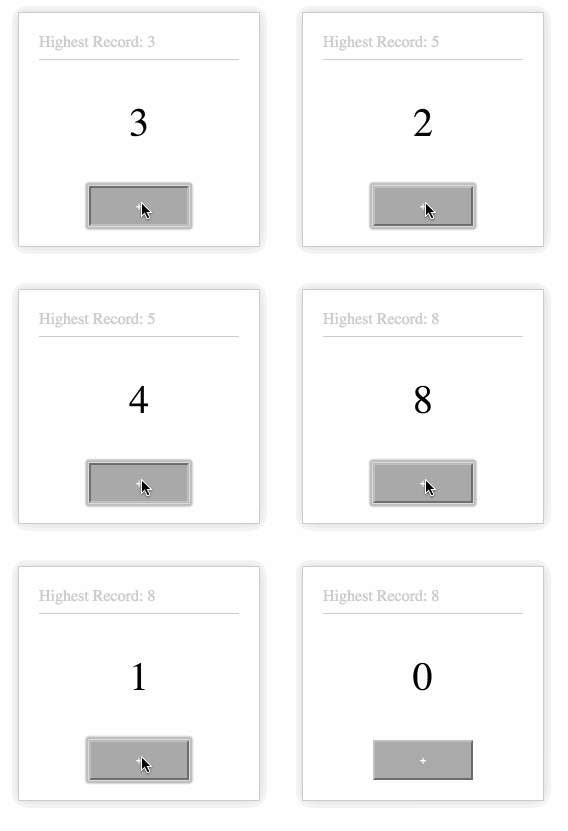
Final App.
This app is used to test click speed, by collecting click count within 1 second.
Some questions you may ask:
1. How to create the app?
2. How to organize the code after creating the app?
3. How to build, deploy and publish after development?
And somethings about code organization.
1. How to write the Component?
1. How to write CSS?
1. How to write the Model?
1. How to connect the Model and the Component?
1. How to update State after user interaction?
1. How to handle async logic?
1. How to config the router?
Also:
1. If I want to use localStorage to save Highest Record, what do I have to do?
2. If we want to support keyboard click rate tests, what do I have to do?
We can takes these questions to read this article. But don't worry, all the code we need is about 70 lines.
## Install dva-cli
dva-cli is the cli tool for dva, include `init`, `new`.
```bash
$ npm install -g dva-cli
```
After installed, you can check the version with `dva -v`, and view help info with `dva -h`.
## Create new App
After installing dva-cli, we can create a new app with it, called `myapp`.
```bash
$ dva new myapp --demo
```
Notice: the `--demo` option is only used for creating demo level apps. If you want to create a normal project, don't add this option.
`cd` myapp, and start it.
```bash
$ cd myapp
$ npm start
```
After a few seconds, you will get the following output:
```bash
Compiled successfully!
The app is running at:
http://localhost:8000/
Note that the development build is not optimized.
To create a production build, use npm run build.
```
(Press `Ctrl-C` if you want to close server)
Open http://localhost:8000/ in browser. If successful, you will see a page with "Hello Dva".
## Define models
When you get the task, you should not write code immediately. But it is recommended to do state design in `god mode`.
1. design models
2. design components
3. connect models and components
With this task, we define the model as this:
```javascript
app.model({
namespace: 'count',
state: {
record : 0,
current: 0,
},
});
```
`namespace` is the key where model state is in global state. `state` is the default data for the model. Then `record` presents `highest record`,and `current` presents current click speed.
## Write components
After designing the model, we begin to write the component. We recommend organizing the Component with [stateless functions](https://facebook.github.io/react/docs/reusable-components.html#stateless-functions) because we don't need state almost at all in dva architecture.
```javascript
import styles from './index.less';
const CountApp = ({count, dispatch}) => {
return (
Highest Record: {count.record}
{count.current}
);
};
```
Notice:
1. `import styles from './index.less';`, and then use `styles.xxx` to define css classname is the solution of [css-modules](https://github.com/css-modules/css-modules)
2. Two props are passed in,`count` and `dispatch`. `count` is the state in the model, which is bound with [connect](https://redux.js.org/docs/api/bindActionCreators.html). `dispatch` is used to trigger an action.
3. `dispatch({type: 'count/add'})` means trigger an action `{type: 'count/add'}`. View [Actions@redux.js.org](http://redux.js.org/basics/Actions.html) on what an action is.
## Update state
`reducer` is the only one that can update state. This makes our app stable, as all data modifications are traceable. `reducer` is a pure function, and accepts two arguments - `state` and an `action`, and returns a new `state`.
```javascript
(state, action) => newState
```
We need two reducers, `add` and `minus`. Please note that `add` will only be recorded if it is the highest.
> Note: `add` and `minus` don't need to add namespace prefixes in `count` model. But if it is outside the model, the action must prefix the namespace separated with `/`. e.g. `count/add`.
```diff
app.model({
namespace: 'count',
state: {
record: 0,
current: 0,
},
+ reducers: {
+ add(state) {
+ const newCurrent = state.current + 1;
+ return { ...state,
+ record: newCurrent > state.record ? newCurrent : state.record,
+ current: newCurrent,
+ };
+ },
+ minus(state) {
+ return { ...state, current: state.current - 1};
+ },
+ },
});
```
Note:
1. Confused with the `...` [spread](https://developer.mozilla.org/en-US/docs/Web/JavaScript/Reference/Operators/Spread_operator) operator? It's used to extend an Object, similar to `Object.extend`
2. `add(state) {}` is equal to `add: function(state) {}`
## Bind Data
> Remember `count` and `dispatch` props used in the Component before? Where do they come from?
After defining Model and Component, we need to connect them together. After connecting them, the Component can use the data from Model, and Model can receive actions dispatched from Component.
In this task, we only need to bind `count` .
```javascript
function mapStateToProps(state) {
return { count: state.count };
}
const HomePage = connect(mapStateToProps)(CountApp);
```
Note: `connect` is from [react-redux](https://github.com/reactjs/react-redux/blob/master/docs/api.md#connectmapstatetoprops-mapdispatchtoprops-mergeprops-options)。
## Define Router
> Which Component should be rendered after receiving a url? It's defined by the router.
This app has only one page, so we don't need to modify the router part.
```javascript
app.router(({history}) =>
);
```
Note:
1. `history` is default hashHistory with `_k` params. It can be changed to browserHistory, or remove `_k` params with extra configuration.
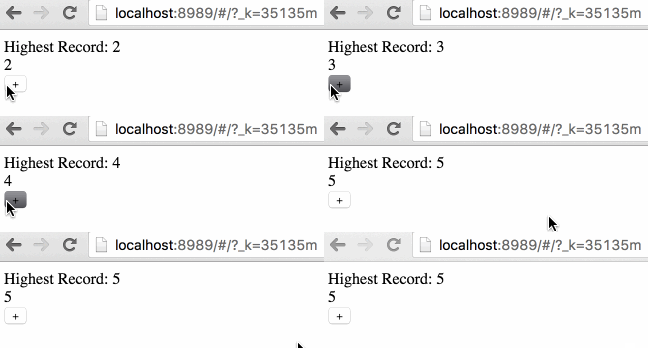
Refresh page in browser, if success, you will see page below.
## Add StyleSheet
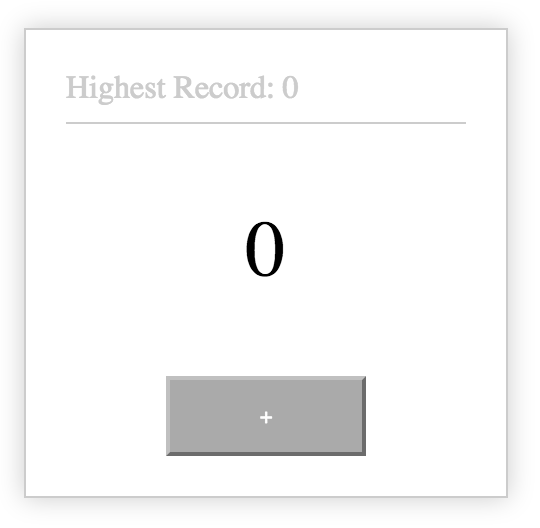
We define stylesheet in `css modules`, which doesn't have many differences from normal css. Because we have already hooked up the className in Component, at this moment, we only need to replace `index.less` with the follow content:
```css
.normal {
width: 200px;
margin: 100px auto;
padding: 20px;
border: 1px solid #ccc;
box-shadow: 0 0 20px #ccc;
}
.record {
border-bottom: 1px solid #ccc;
padding-bottom: 8px;
color: #ccc;
}
.current {
text-align: center;
font-size: 40px;
padding: 40px 0;
}
.button {
text-align: center;
button {
width: 100px;
height: 40px;
background: #aaa;
color: #fff;
}
}
```
Result.
## Async Logic
Prior to this, all of our operations were synchronous. When clicking on the + button, the value is incremented by 1.
Now we have to deal with async logic. dva processes side effects ( async logic ) with effects on model, which is executed based on [redux-saga](https://github.com/redux-saga/redux-saga), with generator syntax. [MDN documentation for generators](https://developer.mozilla.org/en-US/docs/Web/JavaScript/Guide/Iterators_and_Generators).
In this app, when the user clicks the + button, the value will increase by 1 and trigger a side effect, that is, subtract (decrease by) 1 after 1 second.
```diff
app.model({
namespace: 'count',
+ effects: {
+ *addThenMinus(action, { call, put }) {
+ yield put({ type: 'add' });
+ yield call(delay, 1000);
+ yield put({ type: 'minus' });
+ },
+ },
...
+function delay(timeout){
+ return new Promise(resolve => {
+ setTimeout(resolve, timeout);
+ });
+}
```
```diff
import styles from './index.less';
const CountApp = ({count, dispatch}) => {
return (
Highest Record: {count.record}
{count.current}
-
+
);
};
```
Note:
1. `*add() {}` is equal to `add: function*(){}`
2. `call` and `put` are effect commands from redux-saga. `call` is for async logic, and `put` is for dispatching actions. Besides these, there are commands such as `select`, `take`, `fork`, `cancel`, and so on. View more on [redux-saga documatation](http://redux-saga.github.io/redux-saga/docs/basics/DeclarativeEffects.html)
Refresh you browser, and if successful, it should have all the effects of the beginning gif.
## Subscribe Keyboard Event
> After implementing the mouse click speed test, how do you implement the keyboard click speed test?
There is a concept called `Subscription` from dva, which is from [elm 0.17](http://elm-lang.org/blog/farewell-to-frp).
Subscription is used to subscribe to a data source, then dispatch an action if needed. The data source could be current time, a websocket connection from server, a keyboard input, a geolocation change, a history router change, etc.
The subscription takes place in the model.
```diff
+import key from 'keymaster';
...
app.model({
namespace: 'count',
+ subscriptions: {
+ keyboardWatcher({ dispatch }) {
+ key('⌘+up, ctrl+up', () => { dispatch({type:'addThenMinus'}) });
+ },
+ },
});
```
Here, we don't need to install the `keymaster` dependency manually. When we write `import key from 'keymaster';` and save, dva-cli will install `keymaster` and save to `package.json`. The output looks like this:
```bash
use npm: tnpm
Installing `keymaster`...
[keymaster@*] installed at node_modules/.npminstall/keymaster/1.6.2/keymaster (1 packages, use 745ms, speed 24.06kB/s, json 2.98kB, tarball 15.08kB)
All packages installed (1 packages installed from npm registry, use 755ms, speed 23.93kB/s, json 1(2.98kB), tarball 15.08kB)
📦 2/2 build modules
webpack: bundle build is now finished.
```
## All Code Together
index.js
```javascript
import dva, { connect } from 'dva';
import { Router, Route } from 'dva/router';
import React from 'react';
import styles from './index.less';
import key from 'keymaster';
const app = dva();
app.model({
namespace: 'count',
state: {
record: 0,
current: 0,
},
reducers: {
add(state) {
const newCurrent = state.current + 1;
return { ...state,
record: newCurrent > state.record ? newCurrent : state.record,
current: newCurrent,
};
},
minus(state) {
return { ...state, current: state.current - 1};
},
},
effects: {
*addThenMinus(action, { call, put }) {
yield put({ type: 'add' });
yield call(delay, 1000);
yield put({ type: 'minus' });
},
},
subscriptions: {
keyboardWatcher({ dispatch }) {
key('⌘+up, ctrl+up', () => { dispatch({type:'addThenMinus'}) });
},
},
});
const CountApp = ({count, dispatch}) => {
return (
Highest Record: {count.record}
{count.current}
);
};
function mapStateToProps(state) {
return { count: state.count };
}
const HomePage = connect(mapStateToProps)(CountApp);
app.router(({history}) =>
);
app.start('#root');
// ---------
// Helpers
function delay(timeout){
return new Promise(resolve => {
setTimeout(resolve, timeout);
});
}
```
## Build
Now that we've written our application and verified that it works in development, it's time to get it ready to deploy to our users. To do so, run the following command:
```bash
$ npm run build
```
Output.
```bash
> @ build /private/tmp/dva-quickstart
> atool-build
Child
Time: 6891ms
Asset Size Chunks Chunk Names
common.js 1.18 kB 0 [emitted] common
index.js 281 kB 1, 0 [emitted] index
index.css 353 bytes 1, 0 [emitted] index
```
After build success, you can find compiled files in `dist` directory.
## What's Next
After completing this app, do you have answers to all of the questions in the beginning? Do you understand the concepts in dva, like `model`, `router`, `reducers`, `effects` and `subscriptions` ?
Next, you can view [dva official library](https://github.com/dvajs/dva) for more information.