# DUICE (Data-binding UI Component Element)
[](https://github.com/sponsors/chomookun)
[](https://ko-fi.com/chomookun)
[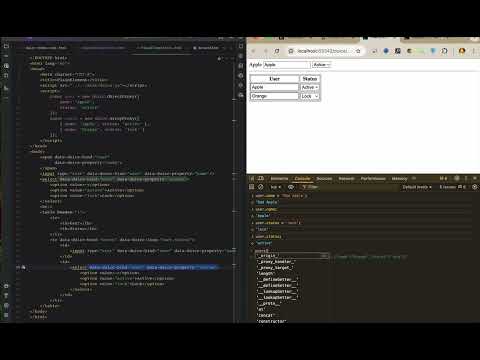](https://www.youtube.com/watch?v=Dke_mQblaMk)
---
## 🗒️ Conception
### 1. MVC Auto-Binding (Between Data and DOM)
Automatically synchronizes data and UI by binding JavaScript Object and Array to HTML DOM elements.
Changes to data are immediately reflected in the UI, and user input in the UI automatically updates the underlying data.
This bidirectional binding is powered internally by JavaScript Proxy and the Observer pattern.
### 2. Low Learning Curve (Just HTML + JavaScript)
If you know basic HTML and JavaScript, you’re ready to go.
No need to learn complex syntax or frameworks — just write standard HTML and bind data intuitively.
### 3. Pure JavaScript, No Dependencies
This library is built with pure vanilla JavaScript — no dependencies, no conflicts.
It’s lightweight, framework-agnostic, and can be seamlessly used alongside any other JavaScript libraries or frameworks.
---
## 🖥️ Demo site
### Website
[](https://duice.chomookun.org)
### Example project
[](https://gcp.duice-example.chomookun.org)
Plain HTML + Integrated with Vue/React examples
### Live Examples
[](https://gcp.arch4j-web.chomookun.org/admin)
[](https://gcp.fintics-web.chomookun.org)
Credentials: **developer/developer **
Because of cold start, Waits about 30 seconds to start the server.
---
## 🔗 References
### Git Repository
[](https://github.com/chomookun/duice)
### NPM Package
[](https://www.npmjs.com/package/duice)
### Plugin project
[](https://github.com/chomookun/duice-plugin)
Plugin project integrated with pagination, codemirror, marked, jsplumb ...
---
## 🏁 Getting Started
### CDN (jsdelivr.net)
```html
```
### CDN (unpkg.com)
```html
```
### NPM package
```shell
npm install duice
```
---
## 📁 Object Element
[](https://duice.chomookun.org/test/object-element-test.html)
Data binding example between **Object Proxy - HTML Element**.
### Javascript
```javascript
const user = new duice.ObjectProxy({
id: 'apple',
name: 'Apple'
});
```
### HTML
```html
```
### Attribute
| attribute | description |
|:-------------------------------------------|:--------------------------------------------------------------------|
| data-duice-bind="[object]" | Object name to bind |
| data-duice-property="[property of object]" | Object Property name to bind |
| data-duice-format="[data format clause]" | ex) string('###-###'), number(2), date('yyyy-MM-dd') |
| data-duice-if="[reutrn false to hiddne]" | javascript code for decide to hidden or not |
| data-duice-execute="[code to execute]" | javascript code to execute when element is updated |
### Event
```javascript
// Fires before property is changing.
duice.ObjectProxy.onPropertyChanging(user, event => {
console.log(event);
});
// Fires after property is changed.
duice.ObjectProxy.onPropertyChanged(user, event => {
console.log(event);
});
```
---
## 📁 Array Element
[](https://duice.chomookun.org/test/array-element-test.html)
Data binding example between **Array Proxy - HTML Element**.
### Javascript
```javascript
const users = new duice.ArrayProxy([
{id: 'apple', name: 'Apple'},
{id: 'monkey', name: 'Monkey'},
{id: 'orange', name: 'Orange'}
]);
```
### HTML
```html
no
name
name
```
### Attribute
| attribute | description |
|:--------------------------------------------------|:----------------------------------------|
| data-duice-bind="[array]" | Object name to bind |
| data-duice-foreach="[element name],[status name]" | element object and status variable name |
| data-duice-recursive="[id name],[parent id name]" | if recursive, id and parent id name |
| data-duice-if="[reutrn false to hiddne]" | javascript code for decide to hidden or not |
| data-duice-execute="[code to execute]" | javascript code to execute when element is updated |
### Event
```javascript
// Fires before property is changing.
duice.ObjectProxy.onPropertyChanging(users, event => {
console.log(event);
});
// Fires after property is changed.
duice.ObjectProxy.onPropertyChanged(users, event => {
console.log(event);
});
// Fires before item is selecting.
duice.ArrayProxy.onItemSelecting(users, event => {
console.log(event);
});
// Fires after item is selected.
duice.ArrayProxy.onItemSelected(users, event => {
console.log(event);
});
// Fires before item is moving.
duice.ArrayProxy.onItemMoving(users, event => {
console.log(event);
});
// Fires after item is moved.
duice.ArrayProxy.onItemMoved(users, event => {
console.log(event);
});
```
---
## 📁 Dialog(alert,confirm,prompt,custom dialog)
[](https://duice.chomookun.org/test/dialog/dialog-test.html)
Custom alert, confirm, prompt dialog example.
### Javascript
```javascript
// await style
async function confirmAwait() {
if(await duice.confirm('Hello~\nThis is confirm message!\nYes or No?')){
alert(true);
}else{
alert(false);
}
}
// then style
async function confirmThen() {
duice.confirm('Hello~\nThis is confirm message!\nYes or No?').then((result) =>{
if(result) {
alert(true);
}else{
alert(false);
}
});
}
// custom dialog from HTML Dialog Element
async function openDialog() {
duice.openDialog(document.getElementById('myDialog')).then(()=>{
alert('do next');
});
}
```
### HTML
```html
```