## Overview
Between Harness tasks, discover an “extraordinary” coworker relationship with the AI girls~(∠・ω< )⌒★
`dsh-whale-galgame` is a standalone multi-character Galgame interface plugin built for DeepSeek Harness Web and Desktop. By blending naturally into your daily workflow, it turns impersonal AI interactions into warm, lasting companionship:
- **Six AI girls with distinct personalities**: DeepSeek (Dafeiyu — 大肥鱼, “Big Fat Fish”), Claude, GPT, Gemini, Kimi, and Grok, each with independent sprites, affection, memories, and backgrounds.
- **Appearance and model are decoupled**: Like the Dafeiyu sprite but want an in-depth conversation with Claude or GPT? Mix and match the character image and underlying reply model freely.
- **Side Story mode**: Go beyond one-to-one Q&A with multi-character daily scenes, work-recap skits, and dedicated milestone stories.
- **A bond system that grows with you**: Daily interaction and accumulated work tokens both raise affection, unlocking more intimate dialogue styles and AI-generated commemorative CGs.
- **A lightweight, lovable desktop pet**: She lives in a corner of the screen, pulls out a laptop while you work, and dons her rice basin or begs for food when idle. Pick her up and put her anywhere; one click jumps into the Galgame view.
- **A pixel-art Deep Sea Workshop map**: Watch the AI girls work or relax, then click one to chat.

> The plugin interface is currently in Simplified Chinese. This page translates the installation and usage documentation.
## What it does
- Open “工坊地图” from the Galgame toolbar; dorms adapt to the models you've connected. Characters work, stroll or rest according to task status, and clicking one opens her dialogue.
- Four text speeds, dialogue history with recorded expressions, and H / right-click to hide the interface.
- Web Audio sound effects and BGM, with separate toggles and volume control; both are off by default.
- Replies informed by recent DSH task categories, the local date, and time since your last conversation.
- Editable character nicknames, forms of address, greetings, personalities, speaking styles, and CG appearance descriptions.
- Custom background and sprite uploads, with dialogue and settings continued across workspaces.
- One plugin for DeepSeek Harness Web and Desktop; Chinese, English, Japanese, and Korean documentation, with a Simplified Chinese interface.
See [mechanics](docs/mechanics.md) for relationship progression, task awareness, and generation rules (in Chinese).
## Bundled default art
DeepSeek · Dafeiyu
Claude · 克洛德
GPT · 小吉
Gemini · 双子
Kimi · 月见
Grok · 洛可
The six new role backgrounds are shown below. Claude, GPT, Gemini, Kimi, and Grok use their matching scene by default. Dafeiyu uses the daytime seaside study by default; the deep-sea palace (`palace-night.webp`) is a selectable built-in alternative.
DeepSeek · default
Claude
GPT
Gemini
Kimi
Grok
## Install
Install DeepSeek Harness first and make sure the `dsh` command is available.
### Web
Install into the `web` profile:
~~~sh
dsh plugin --profile web add dsh-whale-galgame
~~~
Stop the running Web profile, then start it again:
~~~sh
dsh --profile web
~~~
If your source installation uses `pnpm dsh`, keep the same arguments.
### Desktop
Open DeepSeek Harness Desktop once to initialize it, install its bundled command through **Application → Manage dsh Command**, then fully quit Desktop, including the tray:
~~~sh
dsh plugin --profile desktop add dsh-whale-galgame
~~~
Reopen Desktop, or install by package name from its **Plugins** page; Desktop uses the `desktop` profile. Web and Desktop use the same package and share saves when they use the same `DSH_HOME`.
### Update and remove
~~~sh
dsh plugin --profile web update dsh-whale-galgame
dsh plugin --profile web remove dsh-whale-galgame
~~~
Restart the Web profile afterward; for Desktop, replace `web` with `desktop`, fully quit before the operation, and reopen afterward.
### Install from GitHub
Follow the latest commit on `main`:
~~~sh
dsh plugin --profile web add github:JAdpp/dsh-whale-galgame#main
~~~
Git installs build locally; if pnpm reports `ERR_PNPM_GIT_DEP_PREPARE_NOT_ALLOWED`, add the full commit key it prints to that profile's `pnpm-workspace.yaml` as below, updating the key for each new commit; prebuilt npm releases need no such configuration:
~~~yaml
allowBuilds:
'dsh-whale-galgame@https://codeload.github.com/JAdpp/dsh-whale-galgame/tar.gz/': true
~~~
## Use
Open the `galgame` tab at the top of a DSH conversation, or click the pet in the lower-right corner. Choose a reply option or type your own message.
In the top bar, **Character source** (`角色来源`) selects the character and **Actual dialogue** (`实际对话`) selects the reply model. Characters can follow the workspace or stay pinned; replies can use the default `deepseek-v4-flash`, follow the workspace, or use a model from the DSH catalog.
The top-bar **Dialogue history** (`对话历史`) opens ordinary conversations, the Side Story archive keeps completed skits, and **CG gallery** (`CG图鉴`) collects generated images and lets you set a CG as the background.
### Shortcuts
| Action | Result |
| --- | --- |
| Click the line / Space / Enter | Reveal the full line; repeat after completion to advance in Side Story |
| H / right-click the background or sprite | Hide the interface to view the art |
| Click / H / Esc while hidden | Restore the interface |
| Scroll upward over the dialogue panel | Open history, including expressions recorded with each line |
### Display and images
The gear at the dialogue panel's upper-right controls text speed, font, ambient effects, sound effects, BGM, and volume; the literary font option uses fonts installed locally.
The dialogue box fades upward, with opacity adjustable in display settings.
Open **Personalization** (`个性化`) in the top bar, then **Background** (`背景图`) or **Character sprite** (`角色立绘`) to upload PNG, JPEG, WebP, or AVIF images; selecting a built-in background restores character-based scene switching. See [image details](docs/mechanics.md#舞台图片与显示设置) for size limits and default-background rules.
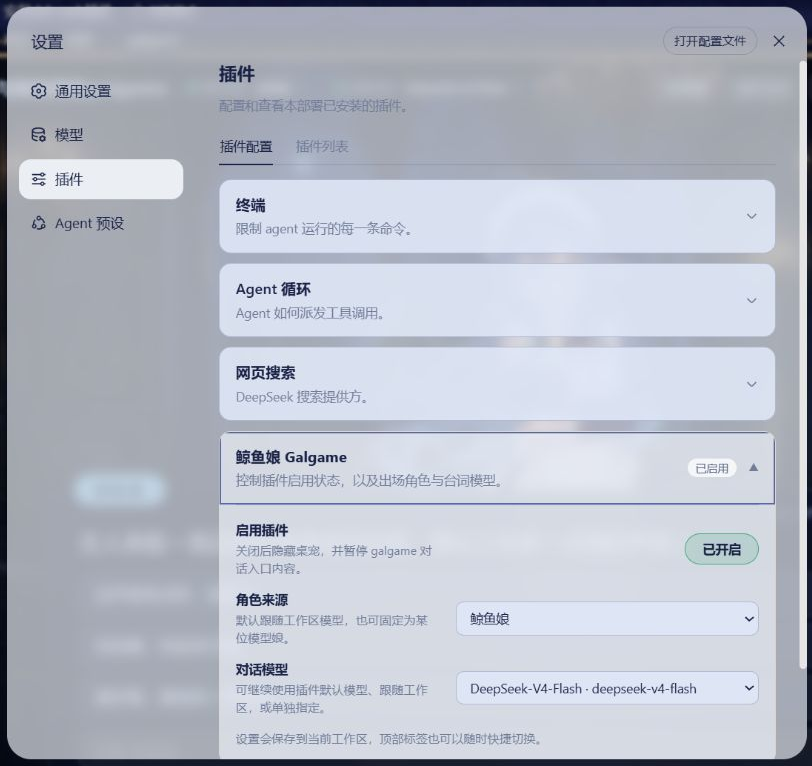
Under **Settings → Plugins → Dafeiyu** (`大肥鱼`), choose the default character and reply model, enable or disable the plugin, or toggle the pet. Disabling the plugin pauses dialogue and affection settlement while keeping saves.
### Custom character profiles
**Personalization → Character profile** (`个性化 → 角色设定`) edits the nickname, form of address, first greeting, personality, speaking style, and CG appearance description.
Each AI girl has her own default way of addressing you: Dafeiyu uses “主人” (master), Claude “您” (respectful you), GPT “小家伙” (little one), Gemini “旅人” (traveller), Kimi “执笔人” (the one holding the pen), and Grok “老板” (boss); you can change it per character.
Profiles are saved per character and shared across workspaces; **Restore defaults** resets only these six fields for the current character. Saving or restoring preserves affection, history, and custom sprites.
See [profile details](docs/mechanics.md#自定义角色设定) for greeting updates and existing-history behavior.
### Side Story
Click **Side Story** (`小剧场`) in the top bar for daily skits or work recaps; completed scenes can be read again in the Side Story archive.
Web sourcing is on by default; switch to **Local task categories only** (`只用本地任务类别`) under **Settings → Plugins → Dafeiyu → Skit sourcing** (`小剧场取材`) to turn off searches.
Group CGs are generated by clicking the archive button and use the same DashScope configuration as level-up CGs.

### Desktop pet
The pet is bundled and enabled by default; click it to enter Galgame. The top-bar pet toggle and **Show desktop pet** in plugin settings stay synchronized.
When hidden, the `galgame` tab remains available for opening the view and restoring the pet.
- While a session is running she works on a laptop; when it finishes she eats, and while it waits for you she waves.
- When idle she turns to watch the pointer, and now and then wears her steel basin as a helmet, holds it out to beg, or dozes off.
- Press and drag to pick her up and set her down anywhere (arrow keys move her too). The position is kept in this browser's local storage; **归位** (reset position) in settings returns her to the default corner.
- With the system's reduced-motion setting on, she only shows still poses.
### Optional level-up CGs
Level-up CGs need a valid DashScope key. Set `DASHSCOPE_API_KEY` in the local environment that starts DSH, for example:
~~~powershell
$env:DASHSCOPE_API_KEY = 'your-local-key'
dsh --profile web
~~~
~~~sh
DASHSCOPE_API_KEY='your-local-key' dsh --profile web
~~~
CG generation is optional: chat, affection, and custom images work without a key. Keep the real key in your local environment.
See [CG details](docs/mechanics.md#小剧场与-cg) for generation rules and how Side Story level-ups differ.
## Data and privacy
- Global state lives in `DSH_HOME/storages/dsh-whale-galgame/global.json`, workspace `.whale-girl-save.json` files hold source/migration markers, and display preferences use local `localStorage`.
- Task awareness classifies explicitly submitted Harness user messages locally, with tool names and status as cues; workspace file contents are not read, and raw text is not saved to Galgame.
- Galgame messages, relevant history, character profiles, and date/relationship cues go to the selected model; Harness context supplies only fixed task categories and status cues.
- Side Story searches use only model names and topic words; DashScope receives text prompts for CGs, while uploaded backgrounds and sprites stay local.
- To erase data, quit DSH, delete the global save, workspace markers and save copies, and clear plugin display preferences; **Restart** resets only levels and affection.
See [privacy details](docs/privacy.md) for storage format, legacy migration, search settings, Git ignore entries, and deletion steps (in Chinese).
## Development
~~~sh
npm ci
npm run sanitize:backgrounds
npm run embed:art
npm run export:art
npm run verify
~~~
`lib/`, `src/client/art.generated.ts` and `src/client/workshop.generated.ts` are untracked build outputs, generated by `prepare` during source installation. See [build details](docs/mechanics.md#美术清单与构建说明) for art-processing commands and package contents.
## License and credits
Code, the Galgame UI implementation, and documentation use [MIT](LICENSE.md). The 22 default images use [CC BY-NC-SA 4.0](https://creativecommons.org/licenses/by-nc-sa/4.0/) (noncommercial use, with adaptations under the same license); project-made AI-assisted images, including the redrawn pet atlas, are offered to the extent the maintainer holds applicable rights. Directly inherited pet code retains upstream MIT licensing.
Thanks to the creators and upstream projects:
- **上善** created the original whale girl, **ZipZipPipe** added DeepSeek elements in the maid redesign, and **Small-tailqwq / [dsh-deep-whale](https://github.com/Small-tailqwq/dsh-deep-whale)** supplied the reused sprite and deep-sea palace background; this project prepared the expression variants. [上善 Pixiv](https://www.pixiv.net/users/62155430) · [Bilibili](https://space.bilibili.com/4456176) · [ZipZipPipe Pixiv](https://www.pixiv.net/users/18604994) · [Bilibili](https://space.bilibili.com/4168597).
- **ZipZipPipe** drew the default Claude, GPT, and Grok sprites ([original post](https://www.bilibili.com/opus/1233069202138464289)); this project removed the white backgrounds, cropped the figures, and converted them to WebP.
- **f0909172434 / [dsh-deepseek-girl-pet](https://github.com/f0909172434/dsh-deepseek-girl-pet)** supplied the pet implementation, 16-direction pointer following with a 1.1-second reset, and atlas reference; the current atlas is a project redraw made with Codex's built-in image generator. See [NOTICE](NOTICE.md) for provenance and terms.
- The Gemini and Kimi sprites, six character backgrounds, and Galgame UI are unofficial AI-assisted work made for this project.
- The ten current workshop images (themed dorms, shared areas, the workshop office, residents, three walk-cycle sheets, leisure actions, workstations and outdoor decorations) were made with Codex's built-in image generator, which does not expose its exact model version. The earlier minimalist logo was made the same way and is now superseded by the wordmark described in the [brand notes](docs/brand/README.md). See the [workshop-art guide](assets/workshop/README.md) for references, licenses and historical asset records.
The [default-art guide](assets/default/README.md) preserves the full file list, sources, and hash information. See [NOTICE](NOTICE.md), the [third-party index](THIRD_PARTY_LICENSES.md), and [upstream license texts](assets/default/licenses/) for file-level licensing. All characters are unofficial fan designs; names and trademarks belong to their owners, with no affiliation, partnership, or endorsement.
Report plugin issues through [this repository's Issues](https://github.com/JAdpp/dsh-whale-galgame/issues).
## Related dsh Galgame projects
- [gal-view](https://github.com/Ayase34/gal-view) - A Galgame-style conversation view for the DSH Web GUI, with a visual editor for scene elements
- [dsh-galgame](https://github.com/Lanxing6480/dsh-galgame) - Galgame mode interface plugin
- [AutoWebUI](https://github.com/FynnReinhardt/deepseek-harness-galgame) - DSH Galgame mode