# dsh-tui-mcp-manager
[](https://github.com/0N3-0/dsh-tui-mcp-manager/actions/workflows/ci.yml)
[](https://www.npmjs.com/package/dsh-tui-mcp-manager)
[](LICENSE)
English | [中文](README.md)
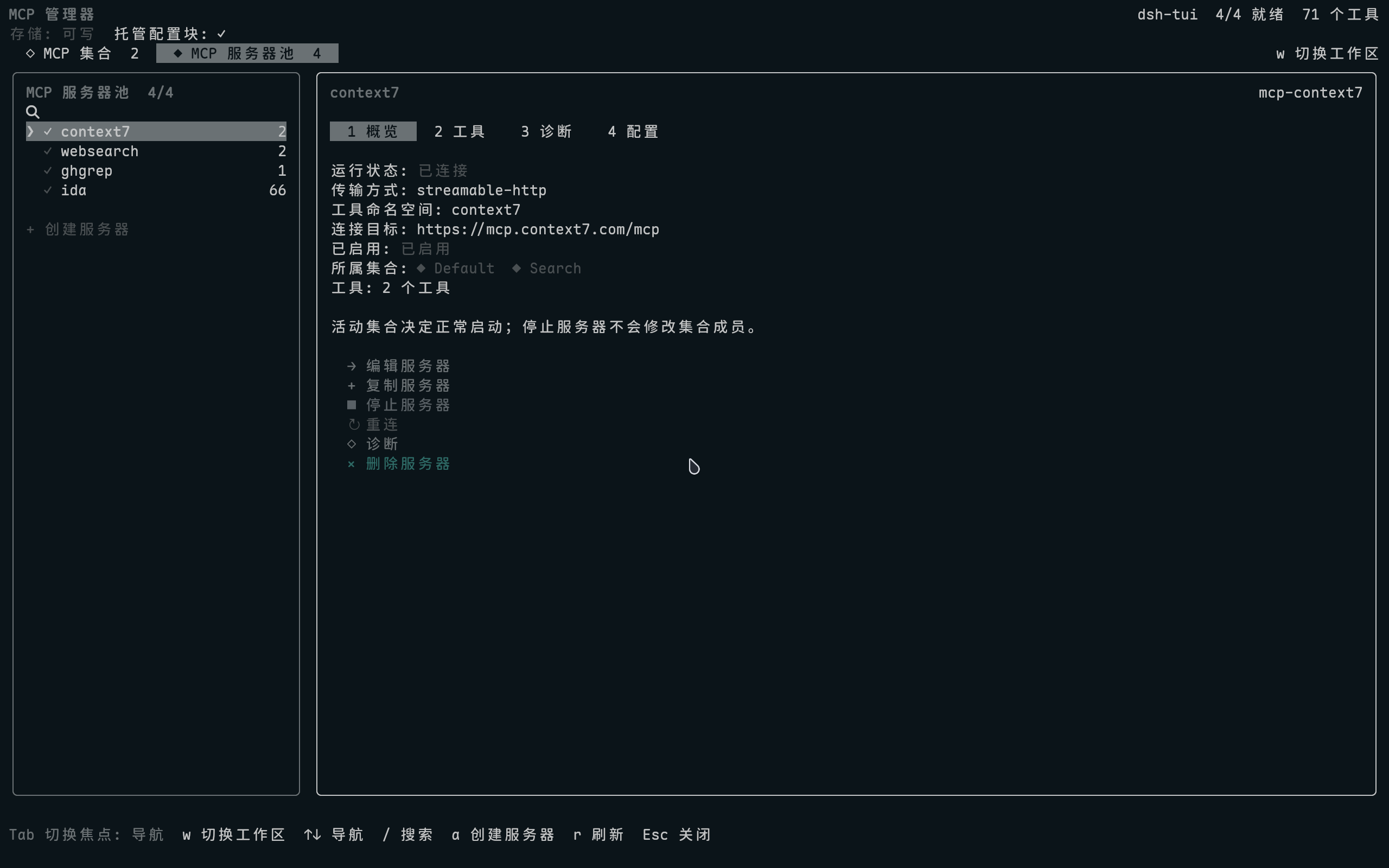
Manage MCP servers, Sets, tools, and runtime state inside [dsh-TUI](https://github.com/ccch1mneyyy/dsh-TUI).
Run `/mcp-manager` to open the full-screen interface without leaving the terminal.
## Install
Requires Node.js `^22.19 || >=24` and dsh-TUI `>=0.9.3 <0.11.0`.
```sh
dsh plugin --profile dsh-tui add dsh-tui-mcp-manager
dsh --profile dsh-tui
```
Run `/mcp-manager` inside the TUI. The interface follows dsh-TUI's language setting; use `/lang zh` or `/lang en` to switch.
## Preview
More screenshots
[Set management](https://raw.githubusercontent.com/0N3-0/dsh-tui-mcp-manager/main/docs/images/mcp-manager-sets.png) ·
[Tools and schemas](https://raw.githubusercontent.com/0N3-0/dsh-tui-mcp-manager/main/docs/images/mcp-manager-tools.png) ·
[Create a Set](https://raw.githubusercontent.com/0N3-0/dsh-tui-mcp-manager/main/docs/images/mcp-manager-set-editor.png) ·
[Create a server](https://raw.githubusercontent.com/0N3-0/dsh-tui-mcp-manager/main/docs/images/mcp-manager-server-editor.png)
## Highlights
| Area | Capabilities |
| --- | --- |
| Server pool | Create, duplicate, edit, stop, reconnect, and globally delete servers |
| MCP Sets | Organize members, control runtime and startup state, and deduplicate shared servers |
| Tools | Inspect descriptions and input schemas; search by name or description |
| Diagnostics | Automatically check configuration, connectivity, runtime state, and tools |
| Credentials | Reference sensitive environment variables and headers through DSH credentials |
Server, Set, and tool lists all support `/` search. Server overviews list every containing Set: `◆` is active and `◇` is inactive.
### How Sets work
The effective server list is the union of all active Sets. Shared members start only once:
```text
Set A: context7, websearch
Set B: websearch, ghgrep
Run: context7, websearch, ghgrep
```
On first use, a `Default` Set is created from existing MCP servers; after saving, it is an ordinary Set. Stopping a server affects only the current process and never changes Set membership. Resume it in place at any time.
## Controls
| Key | Action |
| --- | --- |
| `Tab` | Switch focus between navigation and details |
| `↑` / `↓` | Select a node, action, field, or tool |
| `←` / `→` | Switch detail tabs or move the input cursor |
| `Enter` | Open, edit, or confirm |
| `/` | Search the current list |
| `w` | Switch between Sets and the server pool |
| `Esc` | Go back or cancel |
## Configuration and Safety
- Server configuration is read from and written to the active profile's `cordis.patch.yml`; there is no second database.
- Sets live in `mcp-manager.sets.yml` beside the patch and contain only Set metadata and server IDs.
- Writes use a sidecar lock, `fsync`, and atomic rename; content outside the managed block is preserved.
- Globally deleting a server also removes its references from every Set.
- Sensitive values go only to the credentials provider; configuration stores references.
Diagnostics and runtime behavior
The Diagnostics tab checks Loader/Fiber state, executable or URL, working directory, credentials, connectivity, and tool count. A server outside the active Set union temporarily enables its existing Loader configuration for the handshake, reads its state, and stops immediately afterward without changing Sets or files.
**Stop server** also disables only the in-memory Loader row. A configuration or profile reload clears that temporary state.
Managed configuration and credential references
The plugin modifies only the block between these markers in `cordis.patch.yml`. Legacy markers, row prefixes, and metadata keys remain compatible.
```yaml
# >>> dsh-mcp-manager: managed MCP server rows >>>
# managed MCP server rows
# <<< dsh-mcp-manager: managed MCP server rows <<<
```
Sensitive fields leave only a reference in the patch:
```yaml
secretHeaders:
api-key:
ref: MY_CONTEXT7_KEY
prefix: ''
```
Values never appear in server summaries, profile patches, or RPC snapshots.
## Update and Uninstall
Run the install command again to update. To uninstall:
```sh
dsh plugin --profile dsh-tui remove dsh-tui-mcp-manager
```
Develop from source
```sh
git clone https://github.com/0N3-0/dsh-tui-mcp-manager.git
cd dsh-tui-mcp-manager
pnpm install --frozen-lockfile
pnpm check
dsh plugin --profile dsh-tui add .
```
Common release checks:
```sh
pnpm check
npm pack --dry-run
pnpm smoke:package
```
Local `add .` is only for development. Regular users do not need to clone or build the repository.
## Compatibility
dsh-TUI 0.10.1 with dsh 0.1.5-rc.2 is the current build and runtime baseline. The package is pure ESM, MIT licensed, and published through GitHub Actions OIDC Trusted Publishing.
The plugin runs in the host process. Manifest permissions are audit and policy declarations, not an operating-system sandbox.
## License
[MIT](LICENSE) © 2026 0N3-0