# dsh-subagent-library
**[中文](./README.md) | English**



## Overview
A named subagent roster plugin for the [DeepSeek Harness](https://github.com/deepseek-ai/deepseek-harness) (DSH) Web GUI: turn your recurring roles (code review, red team, multimodal understanding…) into a persistent named roster (model + persona + tool filter). Then **just tell the main agent "do this with xxx"** — the model picks and dispatches through two tools by itself:
- `list_subagents` — lists roster entries (id / role description / model) so the model can pick a suitable one;
- `delegate` — dispatches work by `library_id`: foreground wait, background one-shot, or a continuable (resumable) subagent, per the entry's configuration.
Available in every conversation (any agent preset), **no slash command needed**; the `/subagent` command is only for humans to peek at the roster in the command palette.
Adding entries needs no hand-written YAML either: ask the main agent to do it (it edits `$DSH_HOME/settings.yaml`, hot-reloaded), or edit visually in the settings page.
> Distinction from the official capabilities: the official `subagent` tool dispatches ad-hoc tasks (you describe the task each time), and the official `list_agents` lists *running* child instances; this plugin maintains a **persistent named roster** (edited visually in a settings page, hot-reloaded). The model picks an entry with `list_subagents` and dispatches by id with `delegate`.
## Screenshots
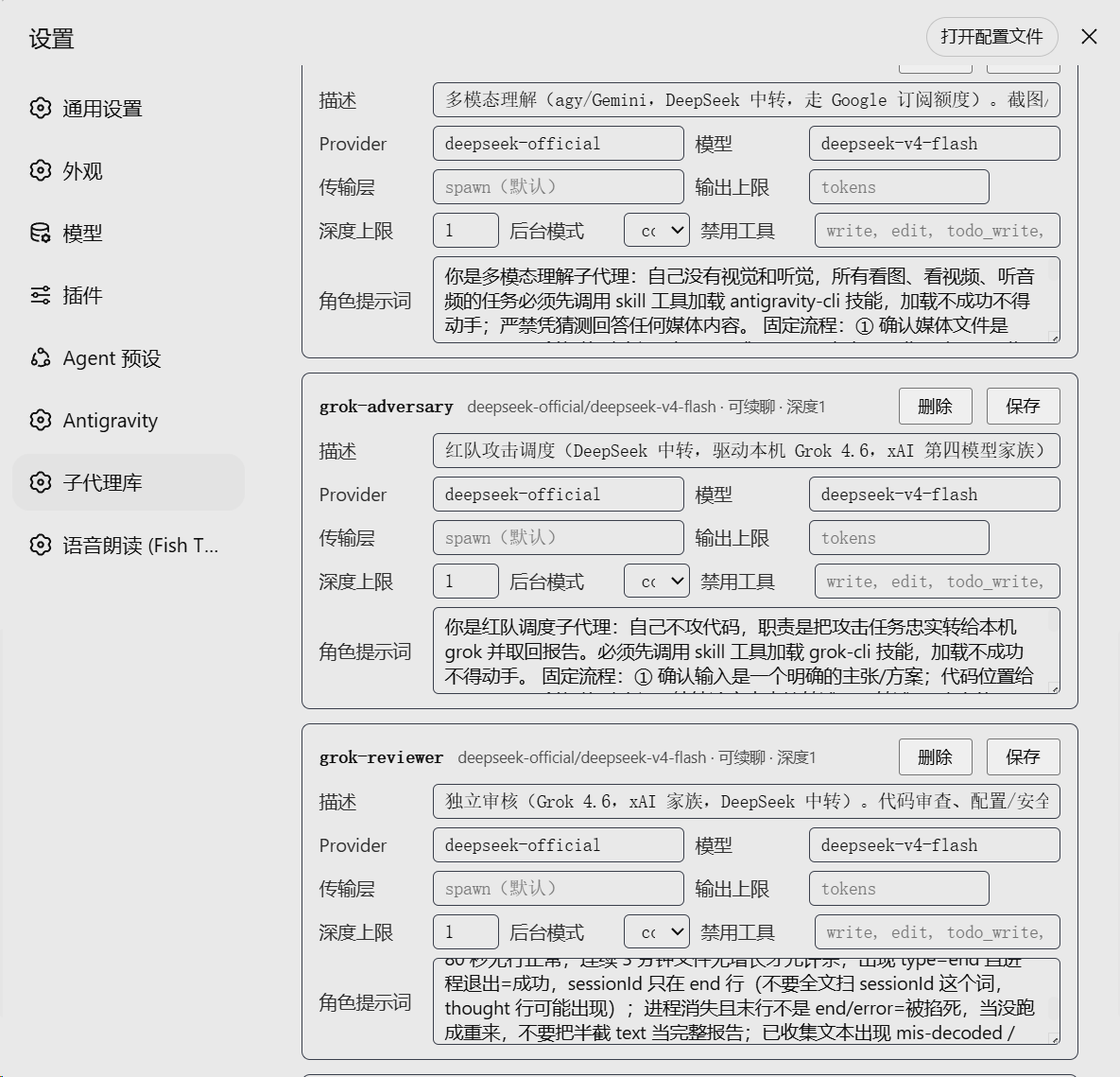
The Subagent Library settings card: add/edit/remove entries visually (model / transport / depth / denied tools / persona)
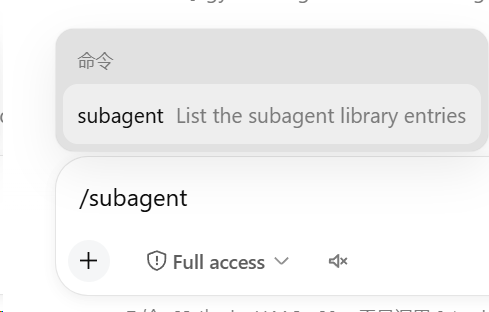
The /subagent command (quick roster viewer)

Roster output example: one-line role description + model route + continuable marker per entry
## Configuration
`$DSH_HOME/settings.yaml` (hot-reloaded, no restart needed):
```yaml
subagent-library:
entries:
k3-reviewer:
description: Independent read-only review on Kimi K3-256K, with image walkthroughs
provider: kimi-coding
model: k3-256k
persona: |
You are an independent review agent running on Kimi K3-256K…
toolFilter:
deny: [write, edit, todo_write, create_goal, update_goal, subagent, subagent_fork, send_message, interrupt_agent, workflow, ralph, list_subagents, delegate]
maxDepth: 1
backgroundMode: continuable
```
Entry fields:
| Field | Required | Notes |
|---|---|---|
| `id` (dict key) | yes | `[a-z0-9][a-z0-9-]*`, e.g. `k3-reviewer` |
| `description` | yes | Role description, shown to the model by `list_subagents` |
| `provider` | no | **LLM route** (e.g. `deepseek-official`, `kimi-coding`); defaults to the caller's default |
| `model` | no | LLM model id; defaults to the caller's session model |
| `subagentProvider` | no | **Subagent transport** (a `ctx.subagents` provider such as `spawn`); defaults to the plugin-level default `spawn` |
| `maxTokens` | no | Subagent output cap |
| `persona` | no | Subagent system prompt. Personas go through strict `{{…}}` template interpolation (same semantics as deployment personas) — an unregistered variable (e.g. `{{user}}`) fails child activation |
| `toolFilter` | no | `allow`/`deny` tool-name lists (deny write-class tools for read-only roles). **Read-only/restricted roles should also deny `list_subagents`/`delegate`** so children are not taught by the global prompt to re-delegate in a chain. Names are resolved against the **calling session's restrictable set** at delegation (not "visibility"): names that session cannot apply are ignored and annotated with the reason (`本会话不存在` / `本会话专属工具`) in the delegate result and the `list_subagents` catalog — one shared entry never fails a whole delegation because a session lacks a tool. **An `allow` list that no name applies to refuses the delegation** (otherwise "keep only these" would silently become "keep nothing"). Registries without `view()` fall back to visibility, where scope-local names still make delegation fail loudly. Saves are not pre-validated |
| `maxDepth` | no | Delegation depth cap; **when unset, defaults to 3 when the transport supports depthLimit** (aligned with the official subagent tool to prevent chained recursive delegation; the harness itself has no global depth cap). Transports without depthLimit stay uncapped |
| `backgroundMode` | no | `one-shot` (default) / `continuable` (resumable) |
> Mind the two provider concepts: `provider` is the LLM route (`agentOptions.provider`),
> while `subagentProvider` is the subagent transport (`ctx.subagents` registration name, e.g. `spawn`/`fork`/`acp`).
## Install
One command, from npm (recommended):
```sh
npx @deepseek-ai/dsh plugin --profile web add dsh-subagent-library
```
Then **restart `dsh web`** (stop the process, run `dsh web` again) and refresh the page.
Other install sources:
```sh
# From GitHub (git-hosted plugin; lib/ build artifacts are committed, no local build needed)
npx @deepseek-ai/dsh plugin --profile web add github:MaRi23333/dsh-subagent-library
# From a local checkout
git clone https://github.com/MaRi23333/dsh-subagent-library.git
cd dsh-subagent-library
pnpm install && pnpm run build
npx @deepseek-ai/dsh plugin --profile web add /absolute/path/to/dsh-subagent-library
```
> The repo commits `lib/` build artifacts, so git installs need no local build; after
> changing sources run `pnpm run build` and restart.
> Adding/removing/editing roster entries (`$DSH_HOME/settings.yaml`) is **hot-reloaded** — no restart.
## Settings page
A **Subagent Library** card appears under Settings: visually add/edit/remove entries
(description / provider / model / subagentProvider transport / maxTokens / denied tools /
depth / background mode / persona), written back to `$DSH_HOME/settings.yaml`, hot-reloaded.
The add card offers the same fields as an entry card (ID / description / provider / model /
transport / output cap / denied tools / depth / background mode / persona), so a role is
fully configured in one step.
> **Security note:** the roster settings endpoint (`/subagent-library/api`) follows the
> DSH Web Host's local trust boundary — the plugin itself adds no separate authentication
> layer. If you bind DSH Web to a LAN, the public internet, or a reverse proxy, put proper
> authentication and access control in front of it; do not expose this endpoint to
> untrusted clients — subagent personas and configuration may contain internal working rules.
## Design notes
- Tools register on the **host plane**: no dependency on any agent preset, and switching presets never loses them;
- Dispatch goes through the standard `ctx.subagents` seam (providers such as `spawn`), so subagents keep harness semantics: approval pinned to never, sandbox inherited from the parent session, depth caps, continuable support;
- Entries are re-resolved from settings on every operation — hot edits take effect immediately.
## Development
```sh
pnpm install
pnpm run typecheck
pnpm run build # host: lib/index.js; client: lib/client.js
```
- Dev dependencies remain pinned to DSH `0.1.0-rc.6` (see package.json devDependencies); the user has verified the plugin on the latest DSH `0.1.2-rc.1`. If the interfaces drift on other versions, adjust against the corresponding tag of the [deepseek-harness repo](https://github.com/deepseek-ai/deepseek-harness).
## License
[MIT](./LICENSE). Third-party license notices for code inlined into the build artifacts are in [THIRD_PARTY_NOTICES.md](./THIRD_PARTY_NOTICES.md).
This is an independent community project, not affiliated with or endorsed by DeepSeek; the `DeepSeek Harness` name is used only to identify the compatible platform.