`).
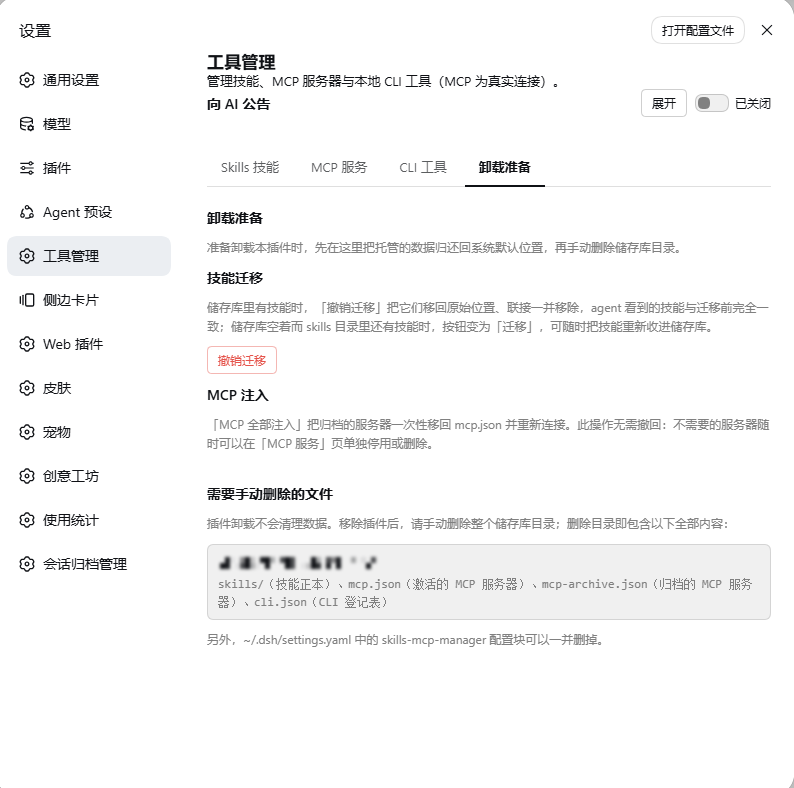
- **Uninstall prep** — the escape hatch before removing the plugin. "撤销迁移" (red) moves every stored skill back to its original location; when the store is empty but skills still sit in the skills directories, the same button turns into a green "迁移" to bring them back into the store — **reversible in both directions**. "MCP 全部注入" moves every archived server back into `mcp.json` in one pass and reconnects it. The page also lists exactly which store directory and config block must be removed by hand.
- **UI** — fully bilingual copy (zh / en, 160 keys each; an English shell renders no Chinese); the announce section folds its long explanation behind an inline toggle, collapsed by default; destructive actions use two-step confirmation.
## 🧭 Independent implementation
**Since 0.5.0 the codebase has been rebuilt from the ground up — it is an independent implementation today.** The early 0.1.x line was an exploratory adaptation built on a then-existing implementation of the same idea; that code line no longer exists, the two generations share no implementation, and this project has no upstream relationship with any other project.
| Version | What was rebuilt |
|---|---|
| **0.5.0** | The unified store `~/.dsh/S-M-C` and its junction semantics: "enabling" a skill / MCP server / CLI became a real filesystem action (inject or remove a link, move a definition document) instead of editing user files |
| **0.6.0** | The Uninstall-prep page: reversible skill migration, one-click restore of archived MCP servers, and the manual-cleanup checklist |
| **0.6.2** | The entire infrastructure layer — MCP document I/O and connection convergence, skill frontmatter parsing, HTTP client, route fences |
- This is a **standalone repository** on GitHub (not a fork, no upstream), with a single-commit history.
- Everything under `src/` is written for this project; only unavoidable boilerplate is shared with the early code (e.g. the `*.module.css` wildcard type declaration required by CSS Modules).
- Runtime dependencies are Node's standard library, the official dsh `@deepseek-ai/*` packages, and one general-purpose utility (`schemastery`).
> Early releases are deprecated on npm; this README describes **0.6.x** behaviour.
## 📷 Screenshots
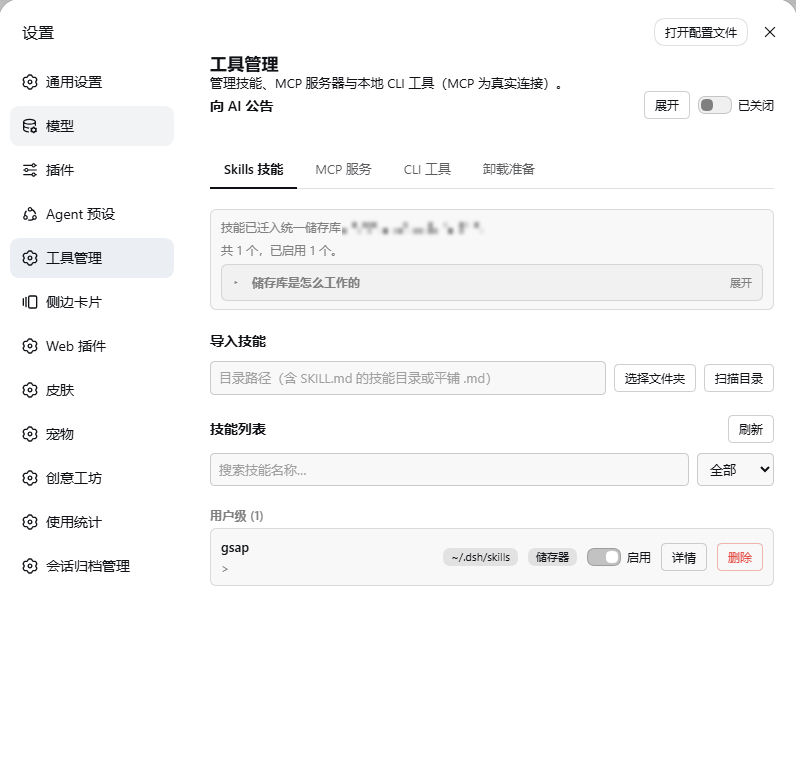
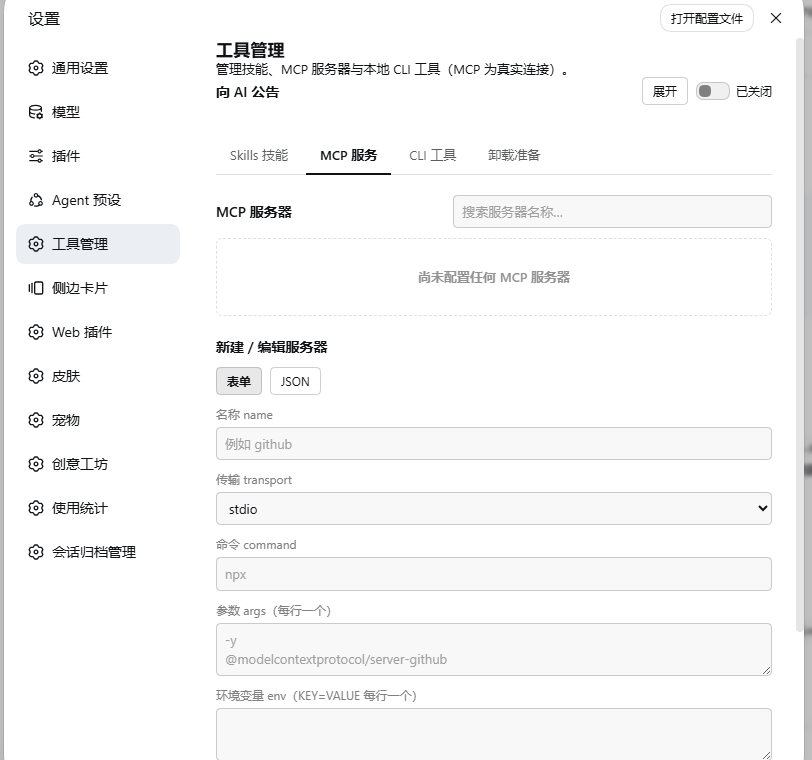
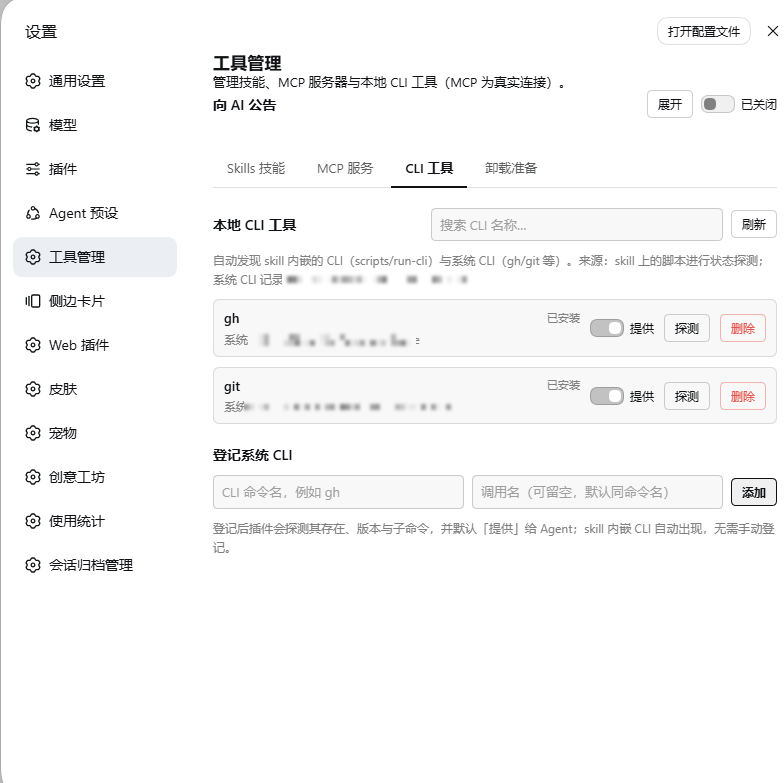
The four tabs: Skills (unified store + junctions), MCP (real connections), CLI (discover / probe / register), and Uninstall prep (reversible migration + the manual cleanup checklist). Personal paths are mosaicked.
## 🏗️ Architecture
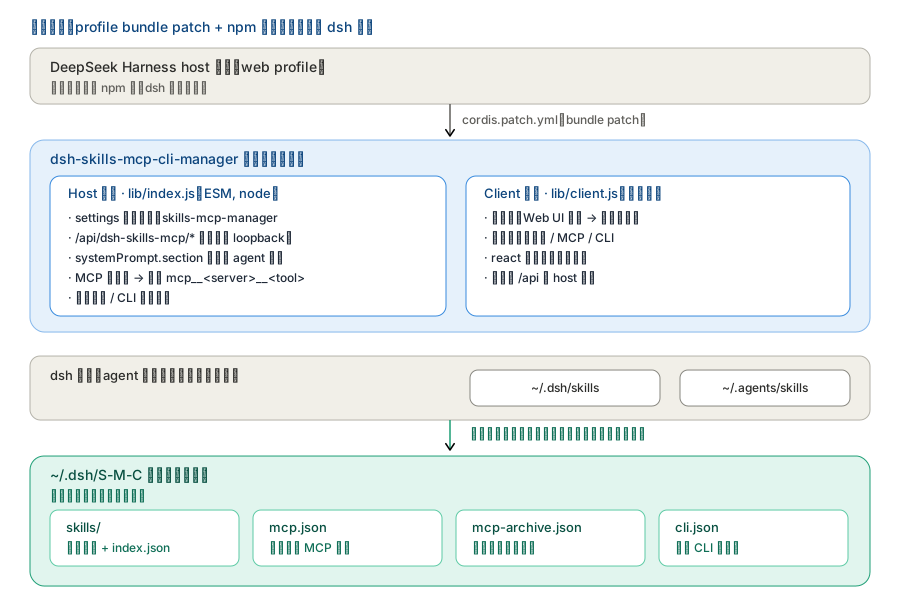
**Mounting & the two halves** — the plugin is just an npm package plus one profile bundle
patch line; zero changes to dsh source:
Labels are in Chinese (file names, routes and API paths are verbatim): the host half registers the routes, announces every agent and really connects MCP; the client half only renders the settings page. They talk over /api/dsh-skills-mcp/*.
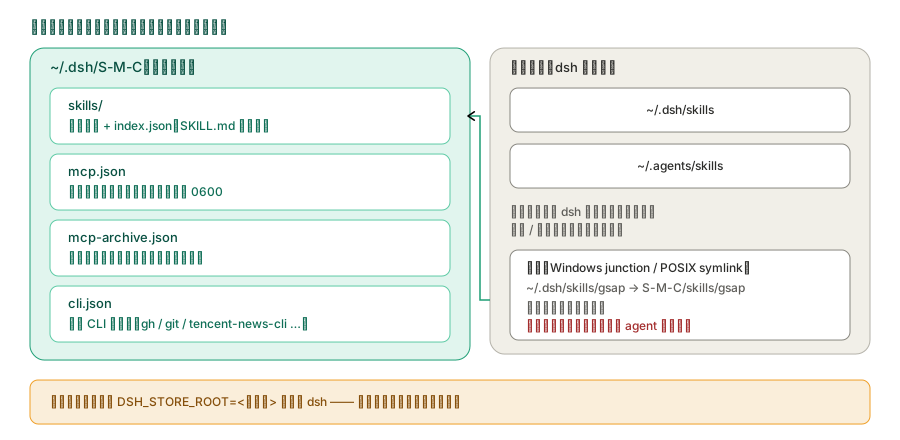
**Store layout** — everything the plugin owns lives in `~/.dsh/S-M-C`; the two directories dsh
scans deliberately stay outside it (the plugin only injects / removes links inside them):
The canonical copy of a skill always lives in the store; the entry under ~/.dsh/skills is just a link pointing at it.
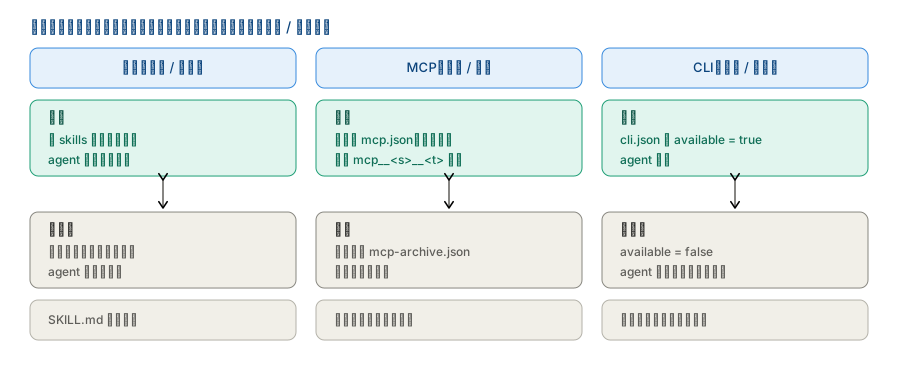
**What the three switches actually do on disk** — not a config field, but real file / connection
changes:
Skills = add/remove a link; MCP enable/archive = move the definition between mcp.json and mcp-archive.json; CLI = visibility only.
## 🚀 Install
> **Requires**: DeepSeek Harness **`>= 0.1.2-alpha.2`** (all `@deepseek-ai/*` packages are released
> in lockstep). Verified end-to-end on **`0.1.5-rc.2`**; every API this plugin uses was checked to
> exist with a matching signature from `0.1.2-alpha.2` onwards.
> **Install as a normal package — do NOT link it via a junction.** A junction makes dependencies
> fail to resolve upward (e.g. `schemastery` / `react`) and desyncs the package name from
> `cordis.patch.yml`; both break DSH startup.
> **npm release note**: for personal reasons on the author's side, **0.6.3 will not reach npm until
> after September 17**. The npm package still carries the older `0.6.1`; to get 0.6.3 today, install
> from source or from the tarball below.
```sh
# From npm: https://www.npmjs.com/package/dsh-skills-mcp-cli-manager
# Note: 0.6.3 follows on npm after Sep 17 (personal reasons); npm currently has 0.6.1
dsh plugin --profile web add dsh-skills-mcp-cli-manager
# or: npm install dsh-skills-mcp-cli-manager
# From source (this repo / after cloning)
dsh plugin --profile web add
# Or the built tarball
dsh plugin --profile web add /dsh-skills-mcp-cli-manager-.tgz
# Or the convenience scripts
bash scripts/install.sh # macOS / Linux / Git Bash
powershell -ExecutionPolicy Bypass -File scripts/install.ps1 # Windows
```
After installing, **restart DSH and hard-refresh the browser** (Cmd/Ctrl+Shift+R). Then open
「设置 → Web UI 插件 → **工具管理**」 (Settings → Web UI Plugins → Tool Manager).
> **No restart needed to update**: once the plugin is installed, later upgrades **should not require
> restarting DSH** — overwrite the files and hard-refresh the browser. (Only changes that touch
> Host-side routes or backend logic need a DSH restart; UI-only changes take effect on refresh.)
## ⚙️ Configuration
```yaml
# This plugin's own settings namespace (dsh settings)
skills-mcp-manager:
enabled: true # master switch (routes, MCP connections, CLI probes)
announceToAgent: true # announce the plugin to every agent's system prompt
```
Runtime state:
- **Unified store**: everything this plugin owns lives in `~/.dsh/S-M-C/` (**S**kills / **M**CP / **C**LI) — `skills/`, `mcp.json`, `mcp-archive.json`, `cli.json`. Old locations are migrated on first start; the whole store can be relocated with `DSH_STORE_ROOT` (the plugin rebuilds the junctions for you).
- MCP: active servers in `S-M-C/mcp.json`, archived ones in `S-M-C/mcp-archive.json` (credentials/headers stored **plaintext** — keep both files at `0600`).
- CLI registry: `S-M-C/cli.json`.
## 🗂️ Repository structure
```
dsh-skills-mcp-cli-manager/
├── src/ # TypeScript source (host + client halves)
│ ├── index.ts # host entry (plug-in load, settings namespace, agent announcement)
│ ├── skills.ts # skills filesystem engine
│ ├── mcp.ts # MCP config store + real connection manager
│ ├── cli.ts # CLI discovery / probe / registry + cli-state parsing
│ ├── routes.ts # /api/dsh-skills-mcp route family
│ ├── protocol.ts # shared types + API paths
│ └── client/ # browser half (entry, SettingsCard, manager, api, locales, css)
├── lib/ # built plugin (host: index.js; client: client.js; types/*)
├── cordis.patch.yml # DSH bundle patch (package name must match package.json)
├── dsh.plugin.json # DSH plugin manifest (id / version / main / client.main)
├── package.json # npm package (dsh.bundle.patch + dsh.client)
├── LICENSE # MIT
├── README.md / README.zh.md
├── docs/
│ ├── 功能介绍.md # full feature guide (zh)
│ ├── development.md # dev notes (build, tests, store layout)
│ ├── arch-*.svg # architecture diagrams (used above)
│ ├── social-preview.png # repo social preview card (set in repo settings)
│ └── shots/ # UI screenshots (used above)
└── scripts/install.* # one-click install into a DSH profile
```
## 🛠️ Development
See [`docs/development.md`](./docs/development.md) for the two-half build (`tsdown`, reconstructs
`lib/index.js` + `lib/client.js`), type-checking, and the test suite.
## 📄 License
[MIT](./LICENSE).
---
*Chinese version: [`README.zh.md`](./README.zh.md).*