# dsh-skill-mcp-panel
**Manage DSH skills and MCP servers right from the DSH web sidebar, plus the unified `dsh-panel` CLI**
[](https://www.npmjs.com/package/dsh-skill-mcp-panel)
[](https://www.npmjs.com/package/dsh-skill-mcp-panel)
[](https://github.com/Fishquito7/dsh-skill-mcp-panel/releases)
[](https://github.com/Fishquito7/dsh-skill-mcp-panel)
[](LICENSE)
[English](README.en.md) · [简体中文](README.md)
---
A DSH plugin that brings **skill** and **MCP server** management into the DSH web home sidebar — click Skill / MCP in the left column and the center main area switches to a full panel (not a modal, not a tab in the Settings dialog), and changes take effect immediately. The package also ships the unified `dsh-panel` command: everything the panels can do, plus cross-profile upgrades.
- 🗂️ **Skill management** — list and preview installed skills, search, workspace split and group filters, expand a card to read the full content, hot enable/disable and delete, plus `.md` / `.zip` / skill-folder adding and batch migration
- 🔌 **MCP server management** — own every MCP server in the profile's `cordis.patch.yml` (form + raw YAML), with Stdio / HTTP transports, connection tests, and hot reload through DSH HMR after saving
- 🧩 **Full panels, not modals** — the same slot mechanism as the host's built-in Plugins page; clicking the left column swaps the center main area, and each panel carries a “← Back to session” arrow
- ⌨️ **The `dsh-panel` CLI** — `dsh-panel skill …` and `dsh-panel mcp …` expose everything the two panels can do
- 📦 **Works out of the box** — both the npm package and the Release tarball ship prebuilt artifacts
> **Profile note**: the `mcp` sub-commands **require** an explicit `--profile `, and the name must already exist — a typo is rejected rather than creating a profile. The `skill` sub-commands are not split per profile (skills live under the user root / workspace), so they need no `--profile`. `dsh-panel update` without `--profile` updates every profile that has the plugin installed (`desktop` is owned by the desktop app and is skipped automatically).
**Contents**: [Screenshots](#screenshots) · [Install](#install) · [Features](#features) · [CLI](#cli) · [How it works](#how-it-works) · [Development](#development) · [Uninstall](#uninstall) · [Changelog](#changelog) · [Links](#links) · [License](#license)
## Screenshots
> The panels live in the home sidebar, right below Plugins (moved there from the Settings dialog in v2.1.0). Clicking Skills/MCP swaps the center main area to that panel, and each panel's top-left “← Back to session” arrow returns you to the session you were reading.
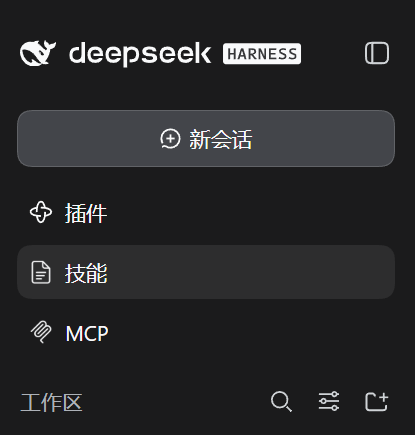
Entry · Skill / MCP in the home sidebar (one merged row since v2.1.5, label always in English)
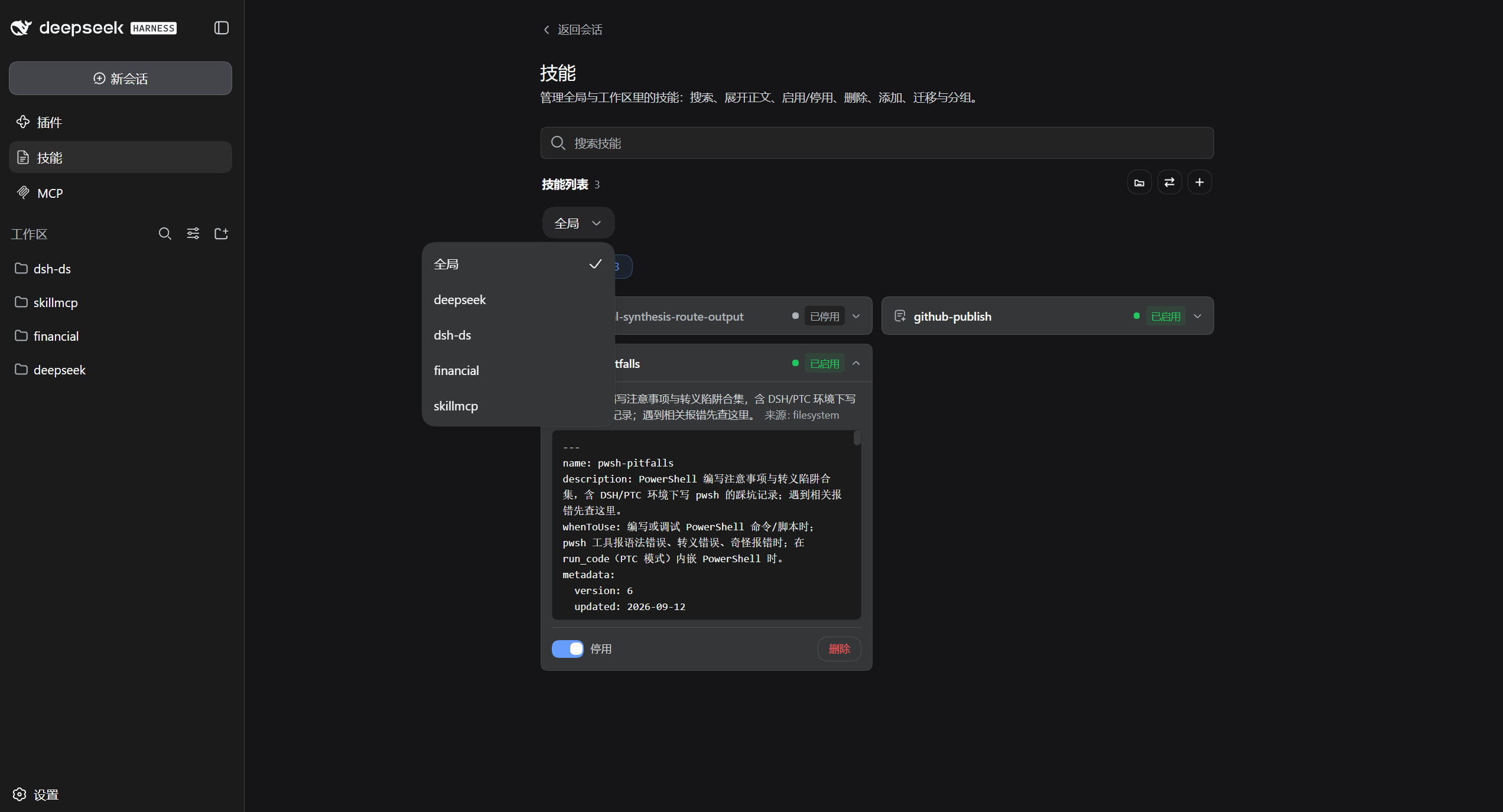
Skills panel · three-column layout (workspaces / groups / content) · search / bulk enable-disable / show-plugin-skills switch
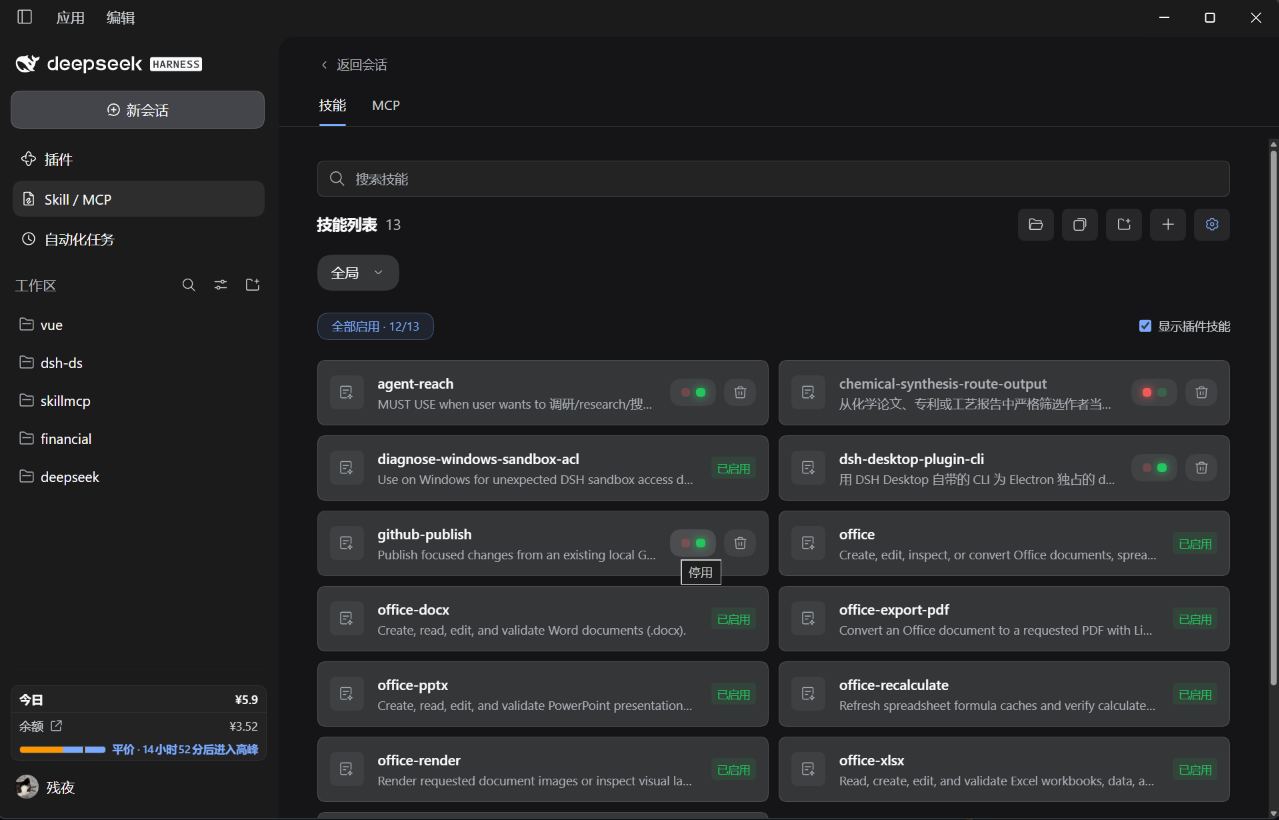
Skills panel · compact layout (toggle at the far right of the toolbar) · side columns collapsed / workspace dropdown / two skills per row
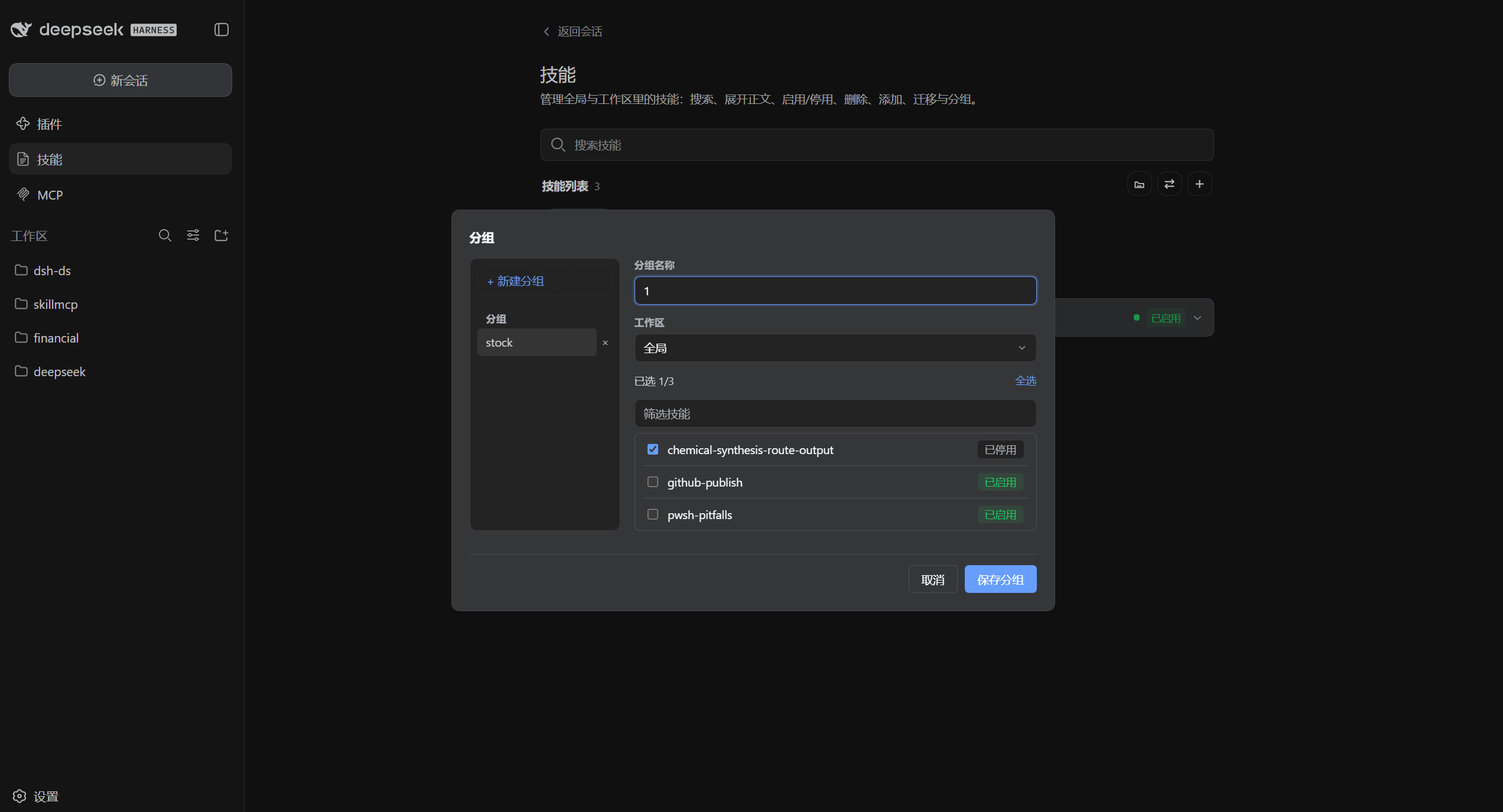
Skill groups · create / rename / batch-select members
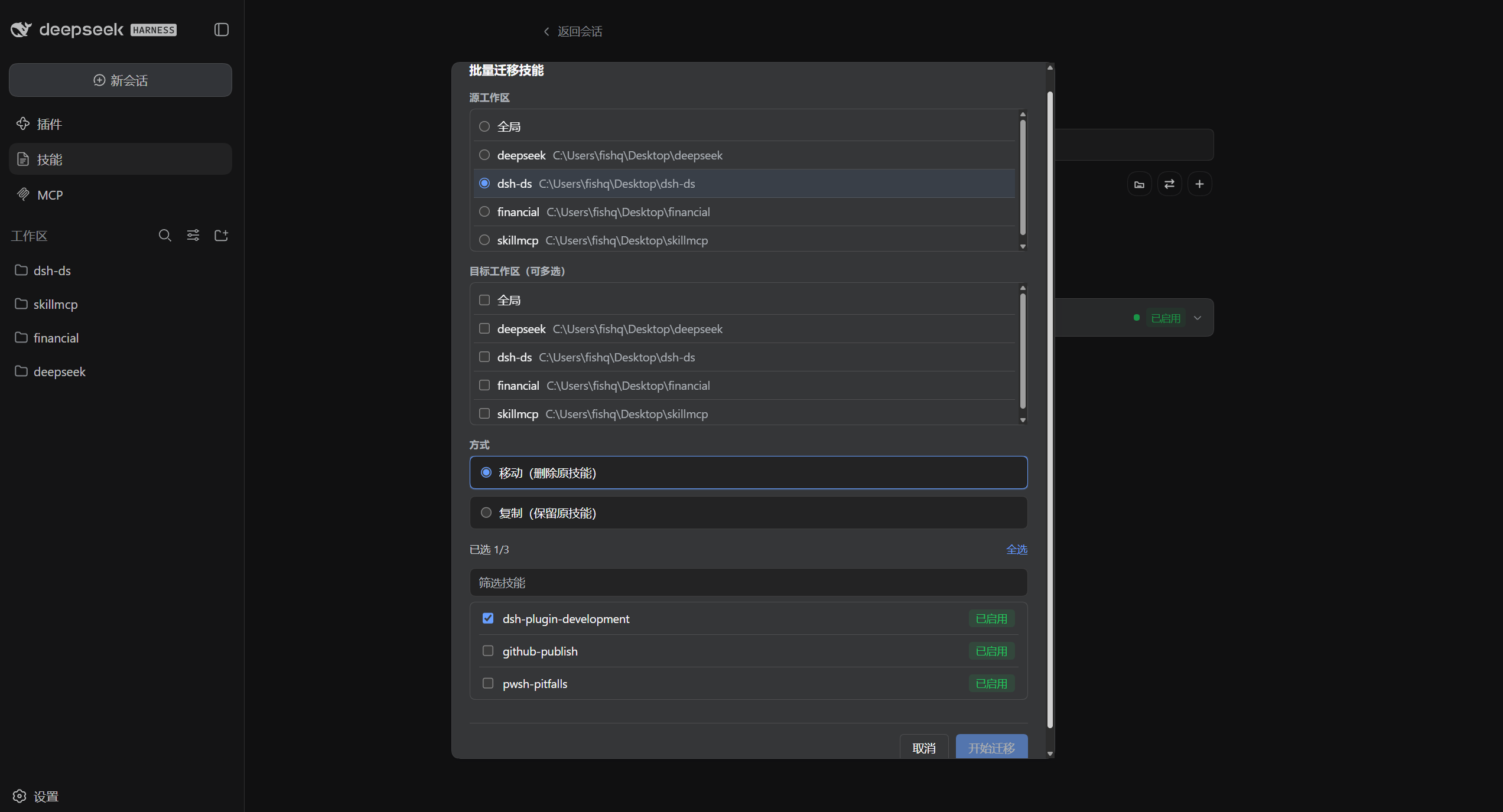
Batch migration · source / multi-target / copy or move
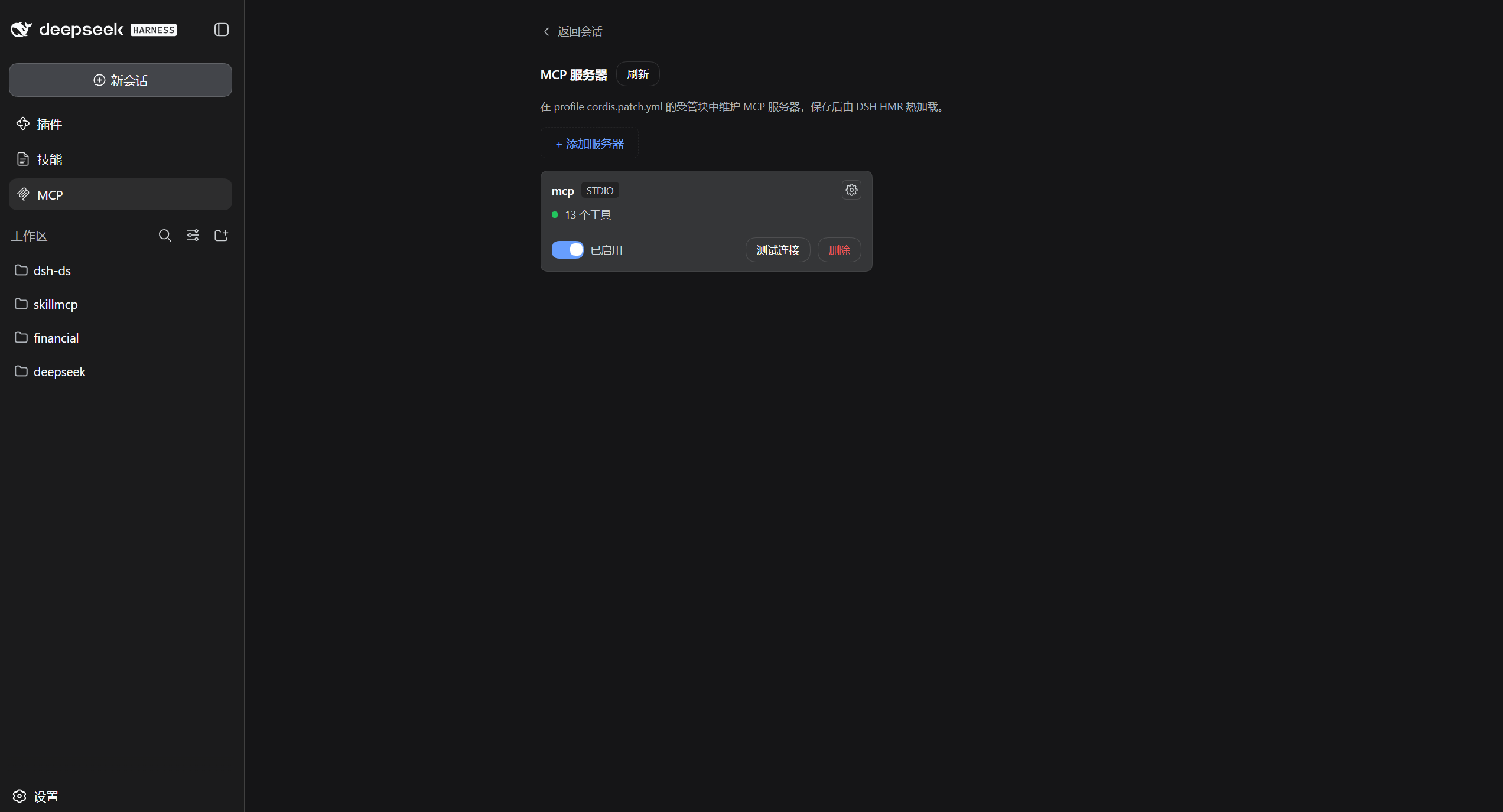
MCP panel · how-it-works note / server card / tool count / enable / test connection
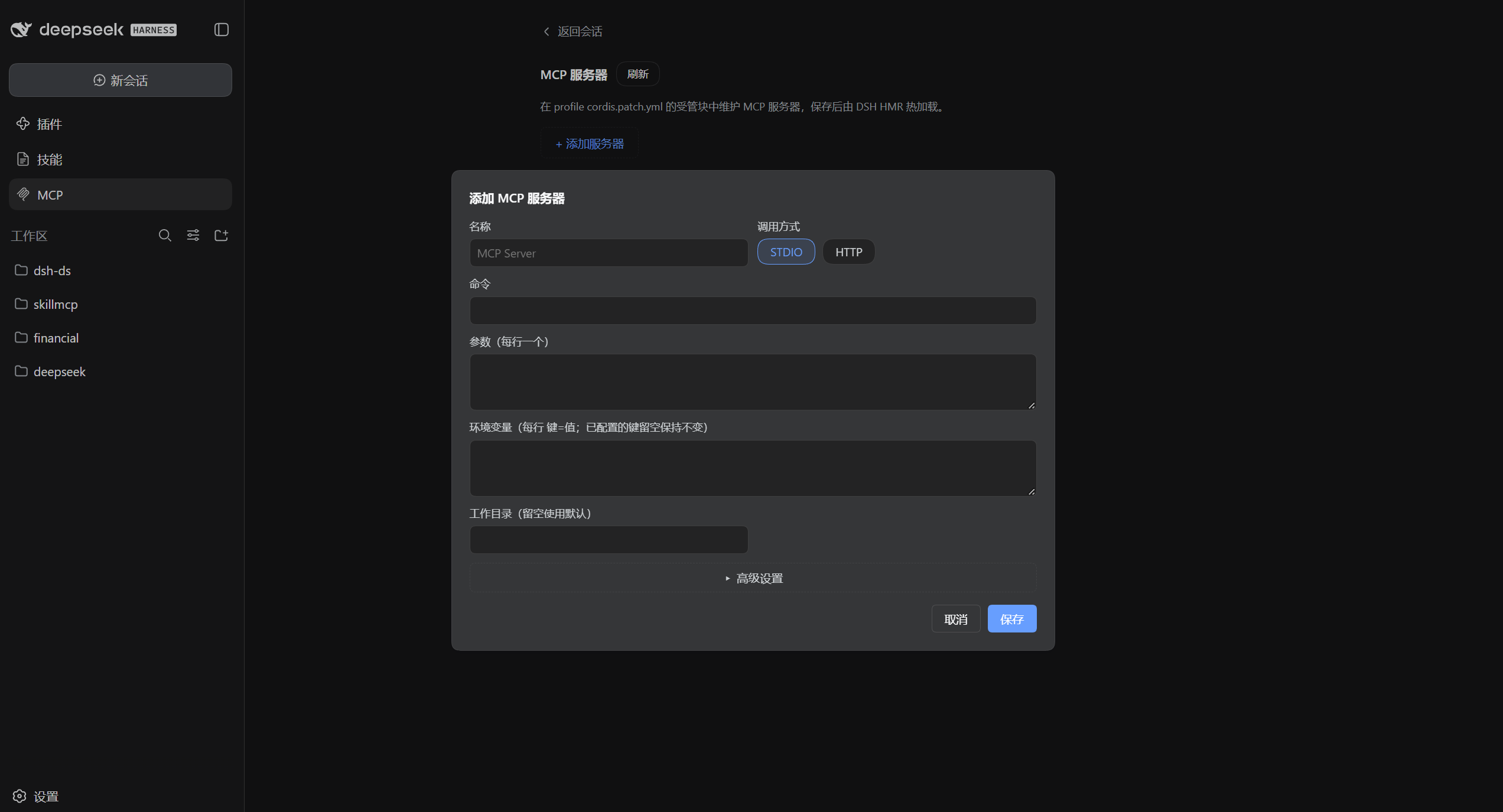
Add MCP server · STDIO / HTTP transports
## Install
1. Install the package (its bundle layer auto-mounts it — no config editing). Pick either:
**Option 1: GitHub Release tarball** (recommended — always the latest)
```bash
dsh plugin --profile web add https://github.com/Fishquito7/dsh-skill-mcp-panel/releases/latest/download/dsh-skill-mcp-panel.tgz
```
This is the **version-less stable link**: every release uploads both the `dsh-skill-mcp-panel.tgz` alias (always
pointing at the latest build) and a versioned `dsh-skill-mcp-panel-.tgz`, so this command never
needs editing. To pin a specific version, swap `latest/download/dsh-skill-mcp-panel.tgz` for
`download/v/dsh-skill-mcp-panel-.tgz`.
**Option 2: npm (prebuilt, same channel as the plugin marketplace)**
```bash
dsh plugin --profile web add dsh-skill-mcp-panel
```
> Both install prebuilt artifacts — no local build needed. Installing from git also works
> (git-hosted dependencies are blocked from running their prepare build scripts by default; if you see
> `git-hosted plugins build on install...`, add the key pnpm printed under `allowBuilds` in the profile's
> `pnpm-workspace.yaml` and re-run):
>
> ```bash
> dsh plugin --profile web add github:Fishquito7/dsh-skill-mcp-panel
> ```
2. Restart the gateway
```bash
dsh-restart
```
Then refresh the page: right below Plugins the left column lists a single merged **Skill / MCP** row — clicking it swaps the center main area to the panel, and tabs inside the panel switch between Skills and MCP.
## Features
The panel works exactly like the host's built-in Plugins page: a single **Skill / MCP** row in the left column swaps the center main area to the panel — no Settings tab, no dialog. Tabs inside the panel switch between Skills and MCP and remember the page you left; **← Back to session** takes you back to where you were.
### Skills panel
- **List and cards** — search by name and expand a card for the full content; split by workspace (global / each workspace) and filter by group or by origin
- **Enable, disable, delete** — the switch is hot (it renames `SKILL.md` on disk) and delete is undoable; skills shipped by plugins can be hidden with one checkbox
- **Add** — use "+" or drop files, archives or skill folders straight onto the page: `.md`, `.zip` and whole folders all work, and a folder holding several skills imports in one go; invalid items and same-name items **within the target scope** are skipped with a reason
- **Migrate** — copy or move skills in bulk to several workspaces; one failure never aborts the rest
- **Groups** — create, rename and delete groups and batch-check members; groups live only in the plugin's own display config, skill directories are never touched
### MCP panel
- **Server management** — **Stdio** and **HTTP** transports: add, edit, enable/disable, delete and test connections; saving is hot-reloaded by DSH HMR, no gateway restart. Every `@deepseek-ai/dsh-mcp-client` row can be operated on, inside or outside the managed block, whatever its id. The form edits ordinary fields and keeps ones it does not model yet; **Raw** edits that one entry byte for byte. Rows that are not MCP servers (including foreign rows inside the block) stay byte-for-byte untouched
- **Secrets** — `env` / `headers` are redacted in the UI and in RPC, an omitted key keeps its old value, and `${NAME}` in a value reads that environment variable
- **Disable individual tools** — turn tools off by name; a disabled tool disappears from the model-facing tool list instead of being merely refused at call time, so the context saving is real
- **OAuth sign-in** — one click for a remote `streamable-http` server that supports it (RFC 8414 / OIDC / RFC 9728 discovery, dynamic client registration, authorization code + PKCE + RFC 8707 resource); the token is written back into that row and hot-reloaded, and it can be disconnected at any time
### DSH version compatibility
Only **DSH `0.2.x`** is supported (peer declaration `>=0.2.0-rc.1 <0.3.0-0`). DSH checks that declaration at install time and again at profile startup, refusing to load and printing the exact-version exemption when it does not match — no silent breakage. The upper bound is `<0.3.0-0` because the check runs with `includePrerelease`, so `<0.3.0` would let `0.3.0-rc.1` through.
If you really need it on an older host, grant the exemption the host prints:
```bash
dsh plugin --profile web allow-version dsh-skill-mcp-panel@2.3.7 --dsh-version --accept-risk
```
## CLI
The unified parent command is `dsh-panel`.
> **Global shim**: at startup the host writes `dsh-panel` into the npm global bin directory. On Windows that is three files — `dsh-panel.cmd` (CMD), `dsh-panel.ps1` (PowerShell) and an **extension-less** `dsh-panel` sh script (what Git Bash / MSYS2 / Cygwin look for; without it bash says `command not found`, which is what v2.1.5 fixed); on macOS / Linux it is a single executable `dsh-panel`. All of them point at the plugin copy of whichever profile started last.
The `mcp` sub-commands **require** an explicit `--profile `, and the name must already exist (a profile is a directory with a `package.json` under `$DSH_HOME/profiles/`). A typo exits with code 2 — it will **not** silently create a profile the way `dsh plugin` does. The `skill` sub-commands do **not** need it: skills live under the user root / workspace and are not split per profile. `dsh-panel update` without `--profile` updates every profile that has the plugin installed.
### Profile overview
```bash
dsh-panel profiles # installed version / bundle mount / install spec for every profile
```
The first line is the **current dsh-panel entry point** and its version. That matters: `dsh-panel` is a single global shim, written by whichever profile booted last (`src/global-shim.ts`), so it has no necessary relationship to any row in that table.
### Skill sub-commands
```bash
dsh-panel skill --help
dsh-panel skill list # list skills (with scope: global / workspace)
dsh-panel skill add # add to global (.md file, bundle dir, or .zip archive)
dsh-panel skill add --workspace D:\projA # add directly into a workspace
dsh-panel skill scope --global # migrate one skill to global
dsh-panel skill scope --workspace D:\projA # migrate one skill into a workspace (--copy to copy)
dsh-panel skill migrate --from --to [--copy] [--yes]
dsh-panel skill disable # disable
dsh-panel skill enable # enable
dsh-panel skill delete # delete (asks for confirmation)
```
Skill files are **shared globally** (`~/.dsh/skills` and `/.dsh/skills`) and are not split per profile, so the `skill` sub-commands need no `--profile`. Passing it optionally confirms that profile exists and warns you when it has not mounted this plugin in `dsh.profile.bundles` (such a profile simply will not show the panels).
### MCP sub-commands
```bash
dsh-panel mcp list [--ids] --profile web
dsh-panel mcp add --name --stdio --command [--args ...] [--env KEY=VALUE ...] [--cwd ] --profile web
dsh-panel mcp add --name --http --url [--header KEY=VALUE ...] --profile web
dsh-panel mcp enable|disable [--id ] --profile web
dsh-panel mcp remove [--id ] [--yes] --profile web
dsh-panel mcp raw [--id ] [--set ] --profile web
dsh-panel mcp test [--id ] --profile web
```
Write `${NAME}` in a value to read that environment variable (it is formatted into a `!!js` expression in `cordis.patch.yml`, evaluated by DSH at load time); a `!!js` prefix passes a raw JS expression through:
```bash
dsh-panel mcp add --name github --stdio --command npx --args -y --args @modelcontextprotocol/server-github \
--env 'GITHUB_TOKEN=${GITHUB_TOKEN}' --profile web
dsh-panel mcp add --name web --http --url https://example.com/mcp \
--header 'Authorization=Bearer ${MCP_TOKEN}' --profile web
# advanced: a raw JS expression, stored inside a !!js tag
dsh-panel mcp add --name web2 --http --url https://example.com/mcp \
--header 'Authorization=!!js `Bearer ${process.env.MCP_TOKEN}`' --profile web
```
```bash
dsh-panel mcp add --name github --stdio --command npx --args -y --args @modelcontextprotocol/server-github \
--env 'GITHUB_TOKEN=!!js process.env.GITHUB_TOKEN' --profile web
dsh-panel mcp add --name web --http --url https://example.com/mcp \
--header 'Authorization=!!js `Bearer ${process.env.MCP_TOKEN}`' --profile web
```
New MCP servers are appended to the managed block in the target profile's `cordis.patch.yml`. Every existing `@deepseek-ai/dsh-mcp-client` row — including hand-written ones, **with or without an `id`** — can be `enable`d, `disable`d and `remove`d, and `dsh-panel mcp raw` prints or `--set` replaces that one entry. Raw editing may change that entry's content but not its indentation or placement (an `insert` member cannot become a top-level entry), and comments that belong to neighbouring rows are never touched. Changes hot-reload while the gateway is online.
Two rows sharing a `serverName` cannot be addressed by name alone: `dsh-panel mcp list --ids` prints each row's `entryId`, `--id ` targets exactly one of them, and `raw --set` can then rename one of them. A file that already contains duplicates is not blocked from saving — only **newly introduced** duplicates are rejected. The block is delimited by `# >>> dsh-skill-mcp-panel:mcp:begin` / `# <<< ...end`; leave non-MCP rows inside it alone.
### Updating the plugin
```bash
dsh-panel update # update every profile that has the plugin installed
dsh-panel update --yes # same, without prompting
dsh-panel update --profile web # update only web
dsh-panel mcp update # same as dsh-panel update
```
- The comparison baseline is the version **each profile has installed in its own `node_modules`**, not the version of whichever CLI copy happens to be running.
- Updates **stay on the channel that profile was installed from**: a tarball install updates from the versioned
tarball URL, an npm install updates from npm pinned to that version, and a git (or unknown) install keeps
using `github:Fishquito7/dsh-skill-mcp-panel#v`.
- Profiles already on the latest version are skipped, never reinstalled.
- `desktop` is owned exclusively by the DSH desktop app — the host rejects `dsh plugin --profile desktop`; it is skipped with an explanation during an automatic sweep, and exits with code 2 when named explicitly.
- After an update: client bundles hot-swap (just refresh the page); server-side changes need that profile's gateway restarted.
The CLI only scans the cwd-anchored project roots and the user roots; add `--cwd ` to manage a different workspace's skills. If a skill name exists in several scopes, `enable`/`disable`/`delete` require `--global`/`--project`/`--workspace` to pick which copy to operate on.
`add` is not in that set: as long as the target scope has no skill of that name, adding one that already exists elsewhere succeeds and only prints a notice (v2.1.7).
## How it works
### Skills
Every action in the page or via `dsh-panel skill` ends up as a change to the skill files on disk (`SKILL.md`), and DSH's own file watcher notices immediately — that is why enable/disable, add/delete and migration are all hot, with no gateway restart.
- A skill's entity lives directly in its workspace's skill folder: global = `~/.dsh/skills`, workspace = `/.dsh/skills` — no hidden store, no junctions: after uninstalling the plugin the skills are plain files DSH keeps discovering
- Disable = rename `SKILL.md` to `SKILL.md.disabled`; enable = rename it back
- Changing where a skill lives = physically copying/moving the files into the target folder (validated first, rolled back on failure)
- Deployment-bundled skills are read-only: they cannot be disabled or deleted
### MCP
The plugin maintains every `@deepseek-ai/dsh-mcp-client` row in the profile's `cordis.patch.yml`; the actual connection and tool registration are done by the official DSH plugin @deepseek-ai/dsh-mcp-client, loaded automatically through DSH HMR.
## Development
The source is TypeScript under `src/`; the compiled `lib/*.js` is committed with the repo (so git installs keep working).
After editing the source, run `pnpm build`: `tsc` compiles to `lib/` and strips the extra module marker from the browser bundle.
When publishing, `npm pack` rebuilds automatically through prepack — no manual compile step.
## Uninstall
```bash
dsh plugin --profile web remove dsh-skill-mcp-panel
```
## Changelog
Only version notes that **change how you use the plugin**; see [Releases](https://github.com/Fishquito7/dsh-skill-mcp-panel/releases) for the full history.
- **v2.3.7** — **narrow-screen support** (#71, thanks to @2532316972 for the screenshots): below **820px** (window *or* panel width) the page switches to the compact layout automatically, so the three-column shell no longer squeezes the list into a strip of icons, clips its right-hand side, or pushes the layout switch off screen. The automatic switch is display-only: it does not override your manual choice and does not write the browser preference, so widening the window restores the layout you picked; while the space is narrow the three-column / compact switch is not rendered at all (clicking it would only be overruled by the width). The check looks at the **viewport** and at the **panel's own width** — the panel lives in the host's main area, so window width differs from panel width once the session sidebar takes a slice. The MCP page also collapses to a single column (cards and form) on narrow screens, and its toolbar may wrap
- **v2.3.6** — the MCP page owns **every** `@deepseek-ai/dsh-mcp-client` row in `cordis.patch.yml` (#67 / PR #70): enable, form edit, delete and OAuth no longer depend on the managed block or a `panel-mcp-*` id. The form keeps fields it does not model yet (for example `maxInstructionBytes`) and an existing `disabled`; **Raw** on the card (CLI: `dsh-panel mcp raw`) edits that one entry byte for byte. Existing configs need no migration, and non-MCP foreign rows stay preserved per ADR-0003. Fixes from hands-on testing after the merge: **hand-written rows without an `id` can be toggled** (the `disabled` key is inserted with that row's own indentation, and form save no longer invents an id); a `!!js` `disabled` is evaluated by the host, so the card is badged “By expression” and its switch is disabled instead of offering a click that can only fail; deleting the last row of the managed block removes both markers cleanly instead of swallowing content after the block; comments after an entry are no longer eaten by form save or delete; CRLF files no longer gain bare-LF lines; **duplicate `id` / duplicate `serverName` no longer toggle the wrong row** — every operation resolves by `serverName` + `entryId`, the CLI gained `--id ` and `list --ids`, a duplicated file can be repaired entry by entry with Raw, and the panel only rejects **newly introduced** duplicates; Raw editing may not change the entry's indentation/placement (an `insert` member cannot become a top-level entry). OAuth discovery (PR #72) now prefers the RFC 9728 path form, accepts a PRM-declared `resource` only on the same origin, and requires an exact issuer match for PRM-driven discovery; see ADR-0007
- **v2.3.5** — fixes **the host freezing after disabling any MCP tool (#59 / #62)**. The cause was our own listener: the host's `ScopedLayers.effect()` emits `tools/change` synchronously both after a restriction is applied **and when it is undone**, while the plugin listened to that event and called `undo()` / `restrict()` from the listener — so it triggered itself and recursed synchronously; the `RangeError` from the exhausted stack was swallowed by an empty `catch`, so the process did not crash, it just kept burning 100% of the main thread. Reproduced against the host's real `@deepseek-ai/dsh-scope`: one event amplified into **887 `restrict` calls / 1774 `view` calls / 458 levels of recursion**. Now `tools/change` is owned by the controller alone and guarded against re-entry, each plugin's `sync()` only re-applies when the **denied set actually changes** (unchanged sets cost one `view`), agents still mounting are skipped via `mounting`, and every previously silent `catch` reports to the logger so this class of failure leaves a trace; the same issue's “Show plugin skills” checkbox is remembered in the browser now instead of resetting to checked
- **v2.3.4** — fixes the “Open folder” bug where only the Documents folder opened (a regression from 2.3.3). `explorer.exe` on Windows does not accept forward slashes: the panel normalised the skill root into `C:/Users/.../.dsh/skills`, explorer treated that as an invalid target and silently opened its own default location, so every workspace showed “Documents”. The host now converts the path to native separators before handing it to the system, and the notice echoes that same path, so it can be pasted straight into Explorer. Two edge cases fixed along the way: the drive root `C:/` is no longer trimmed to `C:`, and a redundant trailing `\` is collapsed. The preview screenshots are refreshed with the two layouts (three-column / compact)
- **v2.3.3** — the skills page gains a **three-column / compact layout switch** (#50): compact hides both side columns, turns the workspace picker into a collapsed dropdown and the groups into a chip row, and shows two cards per row; the button sits at the far right of the toolbar and the choice is remembered in the browser. The MCP page's “foreign rows in the managed block” notice can now actually be resolved: **[Move out of block]** copies those rows verbatim outside the markers (meaning unchanged), and **[How this works]** explains why a row lands there and why leaving it is harmless. **“Open folder” is fixed and really opens the file manager** (the host launches the platform's file manager, and creates the skill root first when it does not exist yet). The sidebar entry label is now `Skill / MCP`. Also merged two community PRs: `@deepseek-ai/cordis` moved to peerDependencies (no more shared-host-package-dependency warning from dshmarket) and panel rows outside the managed block are badged “Outside block”
- **v2.3.1** — fixes **#51: the per-tool disabling panel would not open** (`remote[method] is not a function`). The cause is blunt: the browser bundle carries its own Remote method list, and the client only knows methods mounted from that list — v2.2.0 added `listTools` / `getToolFilter` / `setToolFilter` plus the OAuth trio to the host-side list only, so clicking “Tools” always threw. The card's **OAuth sign-in / disconnect** buttons had the same root cause and are fixed too. A new `test-client-contribution.mjs` compares both lists in both directions so this cannot slip again
- **v2.3.0** — **DSH `0.2.x` only** (peer raised to `>=0.2.0-rc.1 <0.3.0-0`; every 0.1.x compatibility branch is gone: icons no longer fall back to the pixel-suffixed names, and the strict codec dropped its `schema` field); DSH `0.2.1` support: the protocol dependency is pinned to `@deepseek-ai/dsh-typert-protocol@^0.2.1-rc.1` and its peer `@deepseek-ai/cordis` is now declared explicitly (the old `^0.1.0-rc.6` installed a pre-0.2 protocol into the profile, which DSH 0.2.1 rejected with “strict definition withdrawn” and took both pages down; a missing `cordis` peer broke even the import — issue #48); the two pure helpers we used from `dsh-home-paths` / `dsh-subprocess` are inlined so their peer chains disappear; MCP cards gain **OAuth sign-in / sign-in again / disconnect** buttons (the CLI capability, now in the panel: open the authorization page, poll until done)
- **v2.2.0** — frontend rebuilt to the new design (three columns: workspaces, groups, content; batch select + migrate; undoable deletes); **#46** fixed: foreign rows inside the managed block are preserved (a save used to roll back every dsh-market update, see ADR-0003); MCP gains **per-tool disabling** (a real context saving, see ADR-0005) and **OAuth sign-in** (`dsh-panel mcp oauth`); the skills page gains **grouping by origin** and a scrollable workspace rail (#42); `dsh-panel skill add` narrows its name check to the target scope (ADR-0002)
- **v2.1.7** — the name-conflict test in “Adding skills” is narrowed to the **target scope**: it used to reject an add whenever the same name existed anywhere on the machine (another workspace, the global root), now only a same name *inside the target scope* is skipped; a same name in another scope is added and reported as a notice (`dsh-panel skill add` behaves the same). See ADR-0002: DSH resolves duplicate names by root rank, a workspace's discovery roots are resolved from the session cwd (other workspaces are not on that chain), and every other row-level operation already keys on (name + scope)
- **v2.1.6** — the add flow is fixed: the folder picker no longer drops the selected folder’s own name (until now, picking any valid bundle was answered with a bogus “missing a top-level SKILL.md”); all three entry points (files / folder·ZIP / drag & drop) classify through one rule — a selection that directly contains `SKILL.md` is a single **skill bundle** (top-level dependency `.md` files plus `references/`, `scripts/` are payload and are no longer validated as skills), otherwise every skill found inside is discovered recursively and **flattened to the first level** of the skill root, so a folder holding several skills imports in one go (ZIP included); invalid, duplicate and conflicting items are skipped with a reason, and only a total failure is an error. `dsh-panel skill add` matches the panel
- **v2.1.5** — the sidebar’s Skills and MCP rows merge into one “Skill / MCP” row (with a new merged-entry icon) plus tabs inside the panel (the tab you left is remembered); a new “show plugin skills” switch; MCP environment variables accept the intuitive `${NAME}` form (the panel/CLI formats them into `!!js`, and they read back as `${NAME}` instead of being flattened into a literal), a new “How it works” note on the MCP page, and grey examples on empty fields; an extension-less bash shim on Windows; `dsh-panel update` stays on each profile’s original install channel (tarball / npm / git) and the README install guide uses the version-less stable tarball link
- **v2.1.3** — DSH `0.2.0` support (peer upper bound raised to `<0.3.0-0`, without which the host denies the whole row at profile startup); an illegal MCP server name no longer answers with a bare gateway error
- **v2.1.2** — `mcp` sub-commands require an explicit `--profile`, a typo is rejected instead of creating a profile; `dsh-panel update` updates every profile; new `dsh-panel profiles`
- **v2.1.1** — DSH `0.1.7` support for the host's renamed icon exports, so the Skills page renders again
- **v2.1.0** — the panels moved from the Settings dialog to the home sidebar, each with a “← Back to session” arrow
- **v2.0.0** — the MCP panel
## Links
- npm package: [dsh-skill-mcp-panel](https://www.npmjs.com/package/dsh-skill-mcp-panel)
- Releases: [github.com/Fishquito7/dsh-skill-mcp-panel/releases](https://github.com/Fishquito7/dsh-skill-mcp-panel/releases)
- Issues: [github.com/Fishquito7/dsh-skill-mcp-panel/issues](https://github.com/Fishquito7/dsh-skill-mcp-panel/issues)
- Chinese docs: [README.md](README.md)
## License
MIT