# dsh-skill-fuzzy
English | [中文](./README.md)
Fuzzy search + description preview for the `/` skill menu in the DeepSeek Harness (dsh) Web UI.
## See it in one picture
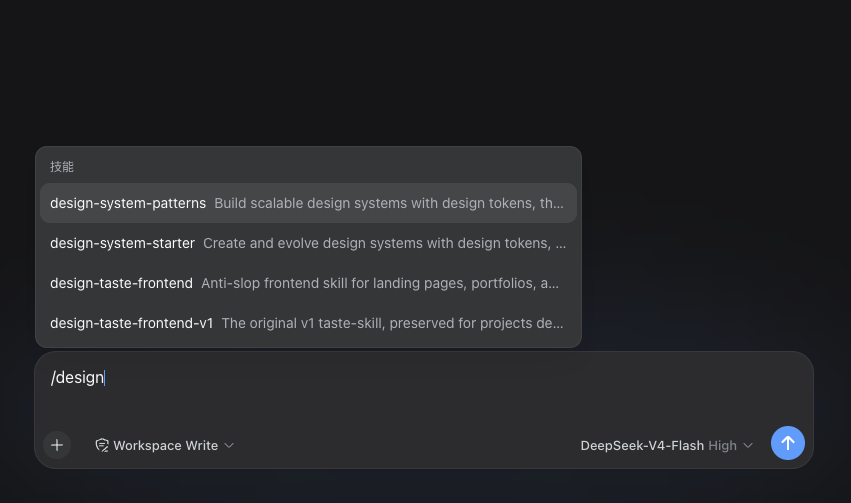
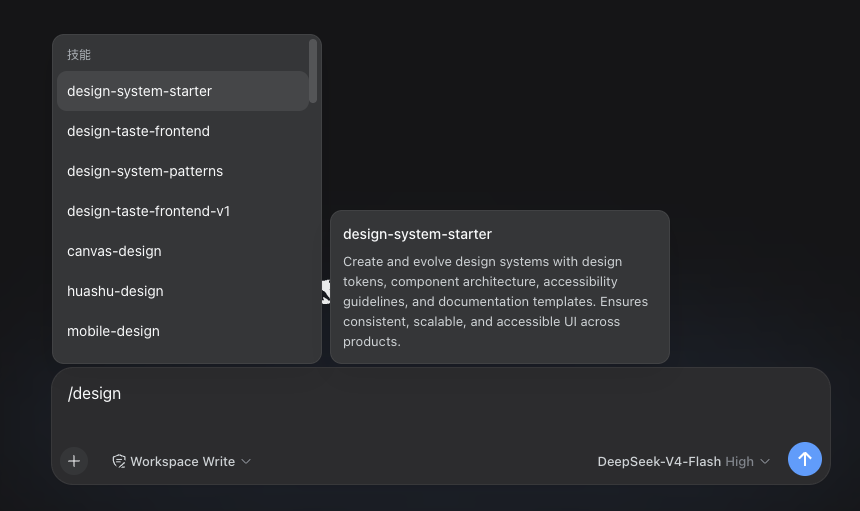
Both screenshots typed the same `/design`:
**Before** — prefix matching only: 4 results, descriptions truncated with `...`:
**After** — fuzzy matching finds 7 results (including `canvas-design` and `mobile-design`, which a prefix match can never reach), full names with no truncation, and a side panel previewing the full description of the highlighted entry:
## The problem it solves
The built-in `/` skill menu in dsh matches by **prefix**: to use `baoyu-markdown-to-html` you must remember to type `/baoyu-…` — typing `/markdown` finds nothing. With hundreds of skills installed, the menu is effectively unsearchable.
With this plugin it works like a modern editor's command palette:
- `/markdown` — every skill whose name contains those letters (`baoyu-markdown-to-html`, `web-to-markdown`, `markitdown`, …)
- `/mdhtml`, `/bmth` — letter-subsequence queries work too
- ↑↓ to select; the right panel previews the full description live; Enter inserts
## Install
Prerequisite: dsh installed (`npm i -g @deepseek-ai/dsh`).
```bash
dsh plugin --profile web add dsh-skill-fuzzy
```
Restart dsh (`dsh --profile web`), type `/`, and enjoy.
> 💡 Your other plugins, sessions, and settings are untouched. This plugin takes over the skill menu only — command entries like `/compact` and `/plan` behave exactly as before.
## Uninstall
```bash
dsh plugin --profile web remove dsh-skill-fuzzy
```
Restores the stock dsh behavior.
## FAQ
**Q: Nothing changed after installing?**
Make sure you launched the profile you installed into (e.g. `dsh --profile web`) and refreshed the browser page.
**Q: What happens when I pick a skill?**
Identical to the built-in behavior: the literal `/skill-name ` text is inserted, and dsh loads the skill body when sending. Skills with `disable-model-invocation` remain manually invocable.
**Q: Does it support the TUI (terminal UI)?**
Not yet — Web UI only. The TUI currently offers no completion extension point for plugins.
**Q: Case sensitivity? CJK?**
Matching is case-insensitive; CJK characters match as subsequences too.
## For developers
How it works
Every module of the dsh Web UI is itself a plugin. Through dsh's official bundle layering, this plugin disables the built-in skill-menu plugin (`ui-skill`, prefix matching) and registers a drop-in replacement: same per-session catalog caching, same pick behavior — only the filter becomes a fuzzy-scoring ranker, plus a new preview-panel overlay entry that follows the menu highlight.
Develop from source
```bash
git clone https://github.com/Kevoyuan/dsh-skill-fuzzy.git
cd dsh-skill-fuzzy
pnpm install && pnpm build && pnpm test
dsh plugin --profile web add . # install from the local directory
```
- `pnpm watch` for incremental builds; restart dsh after changes
- `pnpm check` for type checking
Upgrading dsh
Roughly 20KB of upstream UI code is reproduced here (MIT, credited in LICENSE). If the skill tool row breaks after a major dsh upgrade, rebuild first; if that does not help, sync the copied files against upstream (see the repo README). Minor upgrades are unaffected.
## License
MIT — includes code from [deepseek-harness](https://github.com/deepseek-ai/deepseek-harness) (MIT); see [LICENSE](./LICENSE) for attribution.