<div align="center">
  🌏 <a href="./README.zh.md">中文</a> · <b>English</b>
</div>

<h1 align="center">Three-in-One Console · dsh-s-m-c-center</h1>

<div align="center">
  <b>One DeepSeek Harness (DSH) settings page for the agent's three kinds of tools —<br />skills, MCP servers and local CLIs — plus per-conversation skill injection.</b>
  <br /><br />
  <i>Skill linking · Session injection · Shadow catalog · Real MCP connections · CLI probes · Bilingual · Zero source patching</i>
  <br /><br />
  <a href="https://github.com/YpipaQ/dsh-s-m-c-center/releases"><img alt="release" src="https://img.shields.io/github/package-json/v/YpipaQ/dsh-s-m-c-center?style=flat-square&amp;label=release&amp;color=fe7d37&amp;labelColor=555" /></a>
  <a href="https://github.com/YpipaQ/dsh-s-m-c-center/stargazers"><img alt="stars" src="https://img.shields.io/github/stars/YpipaQ/dsh-s-m-c-center?style=flat-square&amp;label=stars&amp;color=f0a01e&amp;labelColor=555" /></a>
  <a href="https://github.com/YpipaQ/dsh-s-m-c-center/forks"><img alt="forks" src="https://img.shields.io/github/forks/YpipaQ/dsh-s-m-c-center?style=flat-square&amp;label=forks&amp;color=2b8df5&amp;labelColor=555" /></a>
  <a href="https://www.npmjs.com/package/dsh-s-m-c-center"><img alt="npm" src="https://img.shields.io/npm/v/dsh-s-m-c-center?style=flat-square&amp;label=npm&amp;color=cb3837&amp;labelColor=555" /></a>
  <a href="https://www.npmjs.com/package/dsh-s-m-c-center"><img alt="total downloads" src="https://img.shields.io/badge/dynamic/json?url=https%3A%2F%2Fapi.npmjs.org%2Fdownloads%2Fpoint%2F2026-08-26%3A2030-01-01%2Fdsh-s-m-c-center&amp;query=%24.downloads&amp;label=total%20downloads&amp;style=flat-square&amp;color=2ea44f&amp;labelColor=555" /></a>
  <a href="./LICENSE"><img alt="license: MIT" src="https://img.shields.io/badge/license-MIT-blue.svg?style=flat-square&amp;labelColor=555" /></a>
  <a href="./package.json"><img alt="dsh" src="https://img.shields.io/badge/dsh-%3E%3D0.1.2--alpha.2-4d6bfe?style=flat-square&amp;labelColor=555" /></a>
  <a href="./package.json"><img alt="node" src="https://img.shields.io/node/v/dsh-s-m-c-center?style=flat-square&amp;labelColor=555" /></a>
  <br /><br />
  <a href="#-what-it-is">What it is</a> · <a href="#-screenshots">Screenshots</a> · <a href="#-features">Features</a> · <a href="#-two-channels-linking-vs-injection">Two channels</a> · <a href="#-two-tools-for-the-agent">Agent tools</a> · <a href="#️-architecture">Architecture</a> · <a href="#-install">Install</a> · <a href="#️-configuration">Configuration</a> · <a href="#-permissions-and-dependency-disclosure">Permissions</a> · <a href="#️-repository-layout">Repository</a> · <a href="#️-development">Development</a> · <a href="#-license">License</a>
</div>

<br />

<div align="center">
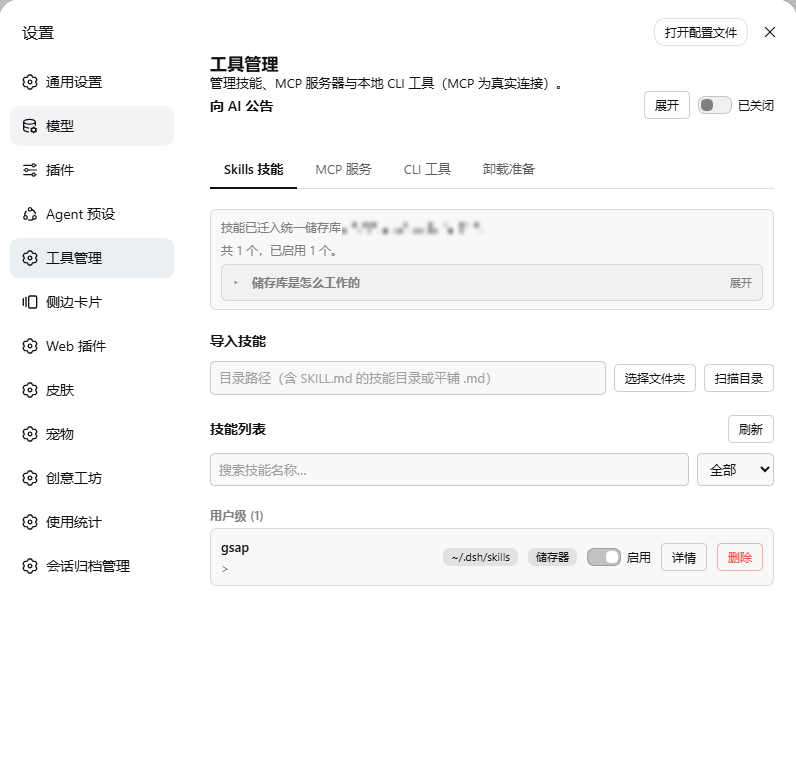
  <a href="https://raw.githubusercontent.com/YpipaQ/dsh-s-m-c-center/main/docs/shots/shot-skills.png"><img src="https://raw.githubusercontent.com/YpipaQ/dsh-s-m-c-center/main/docs/shots/shot-skills.png" alt="Tool manager settings page: Skills tab" width="86%" /></a>
  <p><i>Settings → Web UI plugins → Tool manager: the unified store, skill linking and the session default, with one tab per tool family.</i></p>
</div>

> [!NOTE]
> **As of 0.1.2 the skill catalog is served by this plugin (shadow catalog)**: catalog membership follows the conversation's injection selection exactly; a catalog change publishes one replacement frame instead of re-appending every step; container directories (DESCRIPTION.md only) are injectable and loadable. Verified by a three-round external test run (16/16 pass).

## ✨ What it is

> Chinese name: **三合一工具台** (three-in-one console) ｜ UI entry: Settings → Web UI Plugins → Tool Manager ｜ Aliases: 工具管理, 工具中心, 技能管理, MCP 服务器管理, CLI 工具管理, Skills / MCP / CLI manager

A self-contained DSH web plugin: it adds one first-class **settings page** for the agent's **three kinds of tool** (skills / MCP servers / local CLI tools), plus a **per-conversation skill injection layer**; a guide tab explains how each of the three works and, at the bottom, hands everything back cleanly on uninstall.

| Capability | Native dsh web | With this plugin |
|---|---|---|
| Skill browsing / toggling | Edit skill directories by hand | One-click linking / unlinking in the settings page; canonical copies go into the store; `SKILL.md` is never touched |
| Per-conversation skill sets | — | Session default + sidebar panel + `skill_select`; each conversation stores only its difference from the default |
| Skill catalog (AI view) | Static directory scan | **Shadow catalog**: follows the conversation selection exactly, with one `smc-skill-index` index row |
| MCP servers | Hand-edit `mcp.json` | Form / JSON creation + one-off connection test + activate / archive switches |
| Local CLIs | — | Auto-discovery of skill-wrapped CLIs, system CLI registry, probes for installed / version / subcommands / API key |
| Intrusiveness | — | **Zero source changes**: one npm package + one profile bundle patch line |

| Tab | Manages | Under the hood |
|---|---|---|
| **Skills** | Browse / enable / disable / delete / import skills; the **session default** decides what a new conversation starts with | User level: canonical copies in `~/.dsh/S-M-C/skills` + directory junctions. Project level: frontmatter rewritten in place |
| **MCP servers** | Create / edit / test / activate / archive / delete MCP servers | Real `@deepseek-ai/dsh-mcp-client` connections (`mcp__<server>__<tool>`); archiving moves definitions into `S-M-C/mcp-archive.json` |
| **CLI tools** | Discover / probe local CLI tools; register system CLIs | Skill-embedded `scripts/run-cli` + `S-M-C/cli.json` |
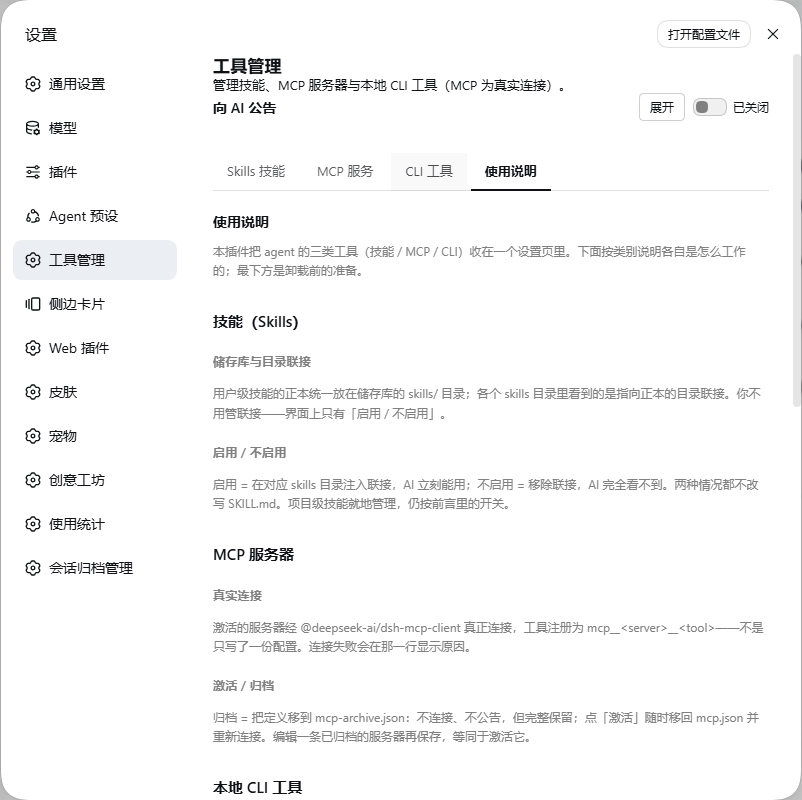
| **Guide** | How each of the three kinds works, and what to do before uninstalling | Explanation lives here; the uninstall preparation sits at the bottom |

> Full documentation: [`docs/功能介绍.md`](./docs/功能介绍.md) and [`docs/架构.md`](./docs/架构.md) (Chinese).

## 📷 Screenshots

| | |
|---|---|
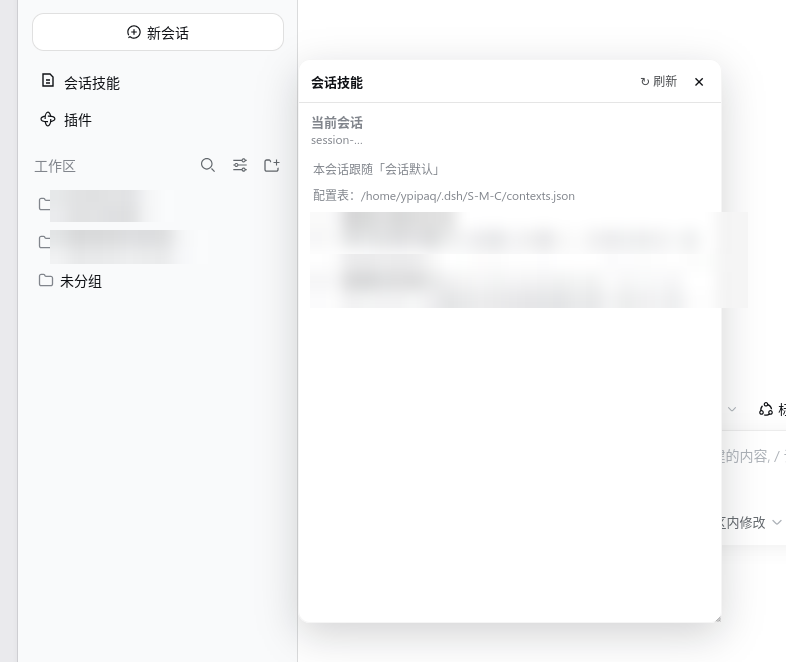
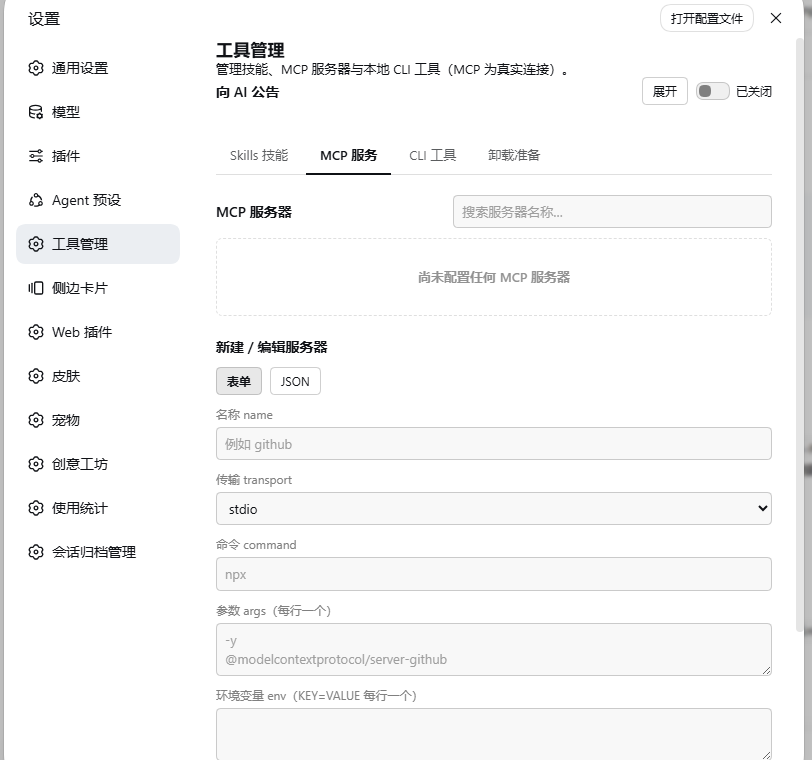
| **Conversation skills panel** ｜ adjust this conversation's injection from the sidebar | **MCP servers** ｜ real connections, one activate / archive switch each |
| <a href="https://raw.githubusercontent.com/YpipaQ/dsh-s-m-c-center/main/docs/shots/shot-session.png"><img src="https://raw.githubusercontent.com/YpipaQ/dsh-s-m-c-center/main/docs/shots/shot-session.png" alt="Sidebar conversation skills panel" width="98%" /></a> | <a href="https://raw.githubusercontent.com/YpipaQ/dsh-s-m-c-center/main/docs/shots/shot-mcp.png"><img src="https://raw.githubusercontent.com/YpipaQ/dsh-s-m-c-center/main/docs/shots/shot-mcp.png" alt="MCP servers tab" width="98%" /></a> |
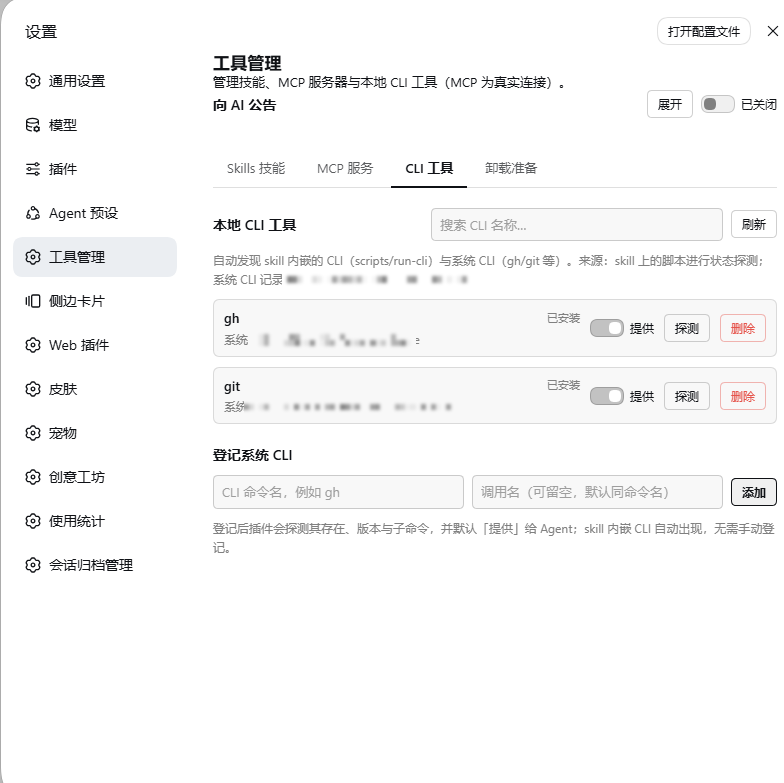
| **CLI tools** ｜ discover / probe / register local CLIs | **Guide** ｜ how the three kinds work + uninstall escape hatch |
| <a href="https://raw.githubusercontent.com/YpipaQ/dsh-s-m-c-center/main/docs/shots/shot-cli.png"><img src="https://raw.githubusercontent.com/YpipaQ/dsh-s-m-c-center/main/docs/shots/shot-cli.png" alt="CLI tools tab" width="98%" /></a> | <a href="https://raw.githubusercontent.com/YpipaQ/dsh-s-m-c-center/main/docs/shots/shot-guide.png"><img src="https://raw.githubusercontent.com/YpipaQ/dsh-s-m-c-center/main/docs/shots/shot-guide.png" alt="Guide tab" width="98%" /></a> |

<p align="center"><i>Skill names, descriptions and MCP server details are redacted in the screenshots.</i></p>

## 💡 Features

- **Skills**: grouped by project / user level and by source (`.dsh/skills`, `.agents/skills`, `~/.dsh/skills`, `~/.agents/skills`). User-level skills are adopted into the **unified store** `~/.dsh/S-M-C/skills`; "enable" injects a directory junction in the skill root, "disable" removes it (`SKILL.md` is never touched). Project-level skills are managed in place through their frontmatter. Deletion is a two-step, physical delete — and it **only ever deletes the store's own canonical copy** (see below). Open a row for details (description / whenToUse / body); import by scanning any directory.
- **Session default and per-conversation injection**: the session default is what a brand-new conversation starts with; each conversation can also carry its own differences (one skill turned off, another added). The agent can flip its own skills in-conversation (written to that conversation's own file), and a small "conversation skills" panel in the sidebar lets you adjust them by hand at any time — both switches list **linked** skills only. See the next section.
- **MCP**: two sub-tabs — "manage" gives each server one **activate / archive** switch (plus delete), "create" offers a form or raw JSON with a one-off **connection test** before saving. Activating connects for real and registers `mcp__<server>__<tool>`; archiving disconnects and moves the definition to `S-M-C/mcp-archive.json`, fully preserved. Live status: connecting / running / failed / stopped.
- **CLI**: discovers skill-wrapped CLIs (`scripts/run-cli.*` / `cli-state.*`) and registers system CLIs (`gh`, `git`, … in `S-M-C/cli.json`). Each entry is probed for installed / version / needs-update / API-key state / subcommands, and the row shows where it came from and where it lives. The **announce / hide** switch only decides whether the CLI is written into the announcement handed to the agent — the plugin cannot start or stop a system-installed CLI, so entries default to hidden.
- **Guide**: explains all three kinds and holds the pre-uninstall escape hatch. "Undo migration" moves stored skills back to their original paths; when the store is empty and the skill roots still hold skills, the same button turns into a green "Migrate" — **reversible both ways**. "Inject all MCP" moves every archived server back and reconnects. The page also lists the directories and config blocks to remove manually after uninstalling.
- **Interface**: fully bilingual zh / en (200 keys each; English UI renders no Chinese); destructive actions take two confirmations and reset when you click elsewhere.

## 🧠 Two channels: linking vs injection

| | **Enable (linking)** | **Injection (conversation selection)** |
|---|---|---|
| Carrier | A directory junction at `~/.dsh/skills/<slug>` | One row per conversation in the session table `~/.dsh/S-M-C/contexts.json` |
| Scope | **Global**: every conversation, every workspace, sub-agents included | **This conversation only** |
| Maintained by | The "enable / disable" button on the skills tab | The session default, the sidebar panel, and the model's own `skill_select` |
| Seen by | dsh's own filesystem scan | This plugin's conversation injection |

**How a conversation stores its choice**: the file keeps the **difference from the default** (`overrides: { on, off }`), and the effective set is `default ∪ on \ off`. Editing the default therefore reaches every conversation that never configured itself, while a skill you turned off in one conversation stays off.

## 🤖 Two tools for the agent

| Tool | What it does |
|---|---|
| `skill_select` | Enable or disable one skill for **this conversation**; writes the conversation's own difference and applies immediately. Accepts every linked row — container directories too (their DESCRIPTION.md is the loadable body). |
| `skill_query` | **Read-only** view of the skills visible in this workspace (name / description / group / linked? / injected in this conversation?), computed at call time, with keyword and group filters. |

The skill catalog itself is also served by this plugin (**shadow catalog**): the catalog the AI sees is generated here and carries one extra line, `smc-skill-index` — an **index skill** whose body is the complete list of this workspace's skills in the catalog's own shape. Skills that are not injected cannot be loaded ("not enabled in this conversation"); the `/skill-name` gesture is unaffected.

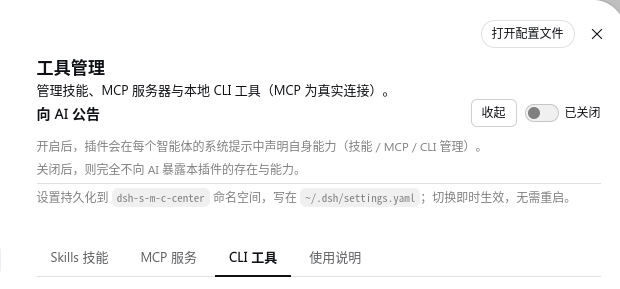
The guide tab can also switch on **announce to agent**, which describes the plugin and the current state of all three tool families in every agent's system prompt —
<div align="center">
  <a href="https://raw.githubusercontent.com/YpipaQ/dsh-s-m-c-center/main/docs/shots/shot-announce.png"><img src="https://raw.githubusercontent.com/YpipaQ/dsh-s-m-c-center/main/docs/shots/shot-announce.png" alt="Announce to agent" width="72%" /></a>
  <p><i>Announce to agent: expanded, it declares the plugin's capabilities; the setting persists in the <code>dsh-s-m-c-center</code> namespace and applies immediately.</i></p>
</div>

## 🧱 Architecture

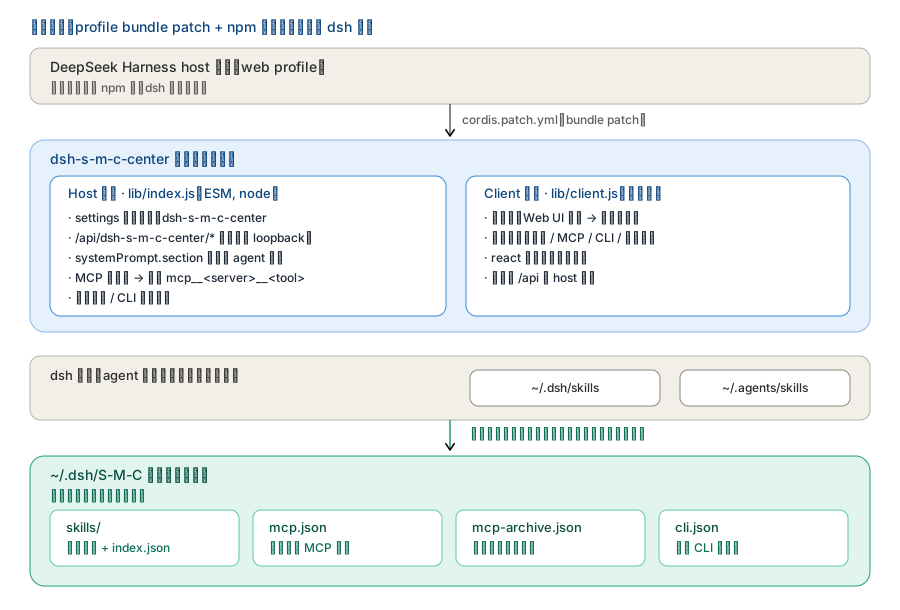
**Mounting and the dual-face structure** — the plugin is one npm package plus one profile bundle patch; dsh source is untouched:

<div align="center">
  <img src="./docs/arch-overview.svg" alt="Mounting and dual-face architecture" width="88%" />
</div>
<p align="center"><i>The host half registers routes, announces to agents and connects MCP for real; the client half only provides the settings page. They talk over <code>/api/dsh-s-m-c-center/*</code>.</i></p>

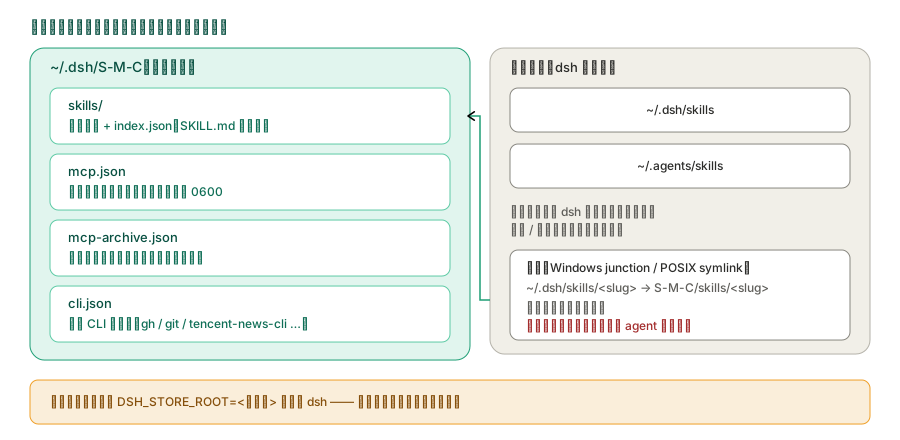
**Store layout** — every artefact lives under `~/.dsh/S-M-C`, while the two directories dsh scans deliberately stay outside it (the plugin only injects and removes junctions there):

<div align="center">
  <img src="./docs/arch-store.svg" alt="Unified external store layout" width="88%" />
</div>
<p align="center"><i>A skill's canonical copy always lives in the store; the entry under <code>~/.dsh/skills</code> is only a junction pointing at it.</i></p>

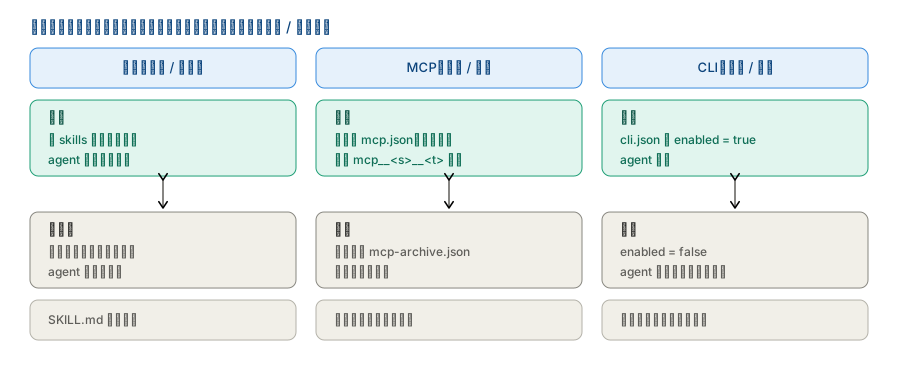
**What the three switches really do on disk** — not a config field, but files and connections that actually move:

<div align="center">
  <img src="./docs/arch-lifecycle.svg" alt="What the three switches do" width="88%" />
</div>
<p align="center"><i>Skills: create/remove a junction. MCP activate/archive: the definition moves between <code>mcp.json</code> and <code>mcp-archive.json</code>. CLI: visibility only.</i></p>

## 🚀 Install

> **Requirements**: DeepSeek Harness **`>= 0.1.2-alpha.2`** (all `@deepseek-ai/*` packages release together); Node `^22.19.0 || >=24`.
> Status: **fully tested on `0.1.6-alpha.1`, `0.1.6-alpha.2` and `0.1.5-rc.2`**; every API used has been checked for existence and signature since `0.1.2-alpha.2`.

> **Install it as a normal package — never as a junction.** A junction breaks resolution of dependencies (`schemastery` / `react` and friends) and makes the package name disagree with `cordis.patch.yml`; either one stops DSH from starting.

```sh
# From npm
dsh plugin --profile web add dsh-s-m-c-center
# or: npm install dsh-s-m-c-center

# From source (this repository / after cloning)
dsh plugin --profile web add <absolute path to this folder>

# Or from a packed tarball
dsh plugin --profile web add <path>/dsh-s-m-c-center-0.2.0.tgz

# Or the one-shot scripts
bash scripts/install.sh                                        # macOS / Linux / Git Bash
powershell -ExecutionPolicy Bypass -File scripts/install.ps1   # Windows
```

After the first install, **restart DSH and hard-refresh the browser** (Cmd/Ctrl+Shift+R), then open "Settings → Web UI plugins → **Tool manager**".

> **Upgrading**: for UI-only changes, overwrite the files and hard-refresh. Changes on the host side (routes / engines / tools) need one DSH process restart.

## ⚙️ Configuration

```yaml
# The plugin's own settings namespace (dsh settings)
dsh-s-m-c-center:
  enabled: true        # master switch (routes, MCP connections, CLI probing)
  announceToAgent: true # describe the plugin in every agent's system prompt
```

Runtime state:

- **Unified external store**: `~/.dsh/S-M-C/` (**S**kills / **M**CP / **C**LI) — `skills/` (canonical copies plus `index.json` manifest), `skills-links.json` (junction ledger), `skills-registry.json` (registered external skills), `mcp.json`, `mcp-archive.json`, `cli.json`. The old locations are migrated in on first start; the whole store can move elsewhere with `DSH_STORE_ROOT` (the plugin rebuilds the junctions).
- **Conversation selections**: one table for the whole machine at `~/.dsh/S-M-C/contexts.json` — `default` is the session default and `sessions.<sessionId>` holds that conversation's difference from it (`on` / `off`). **No workspace is involved**: the key is the session id, so the settings page and the sidebar read the same document. An older version kept one file per workspace; those are folded in once, on the first mount with the table missing.
- MCP: active definitions in `S-M-C/mcp.json`, archived ones in `S-M-C/mcp-archive.json` (credentials and headers are stored in plain text — keep both files `0600`).
- CLI registry: `S-M-C/cli.json`.

## 🔒 Permissions and dependency disclosure

The plugin runs with the DSH process's privileges and uses four kinds of capability — files, network, commands and credentials:

| Capability | What it does | Scope and limits |
|---|---|---|
| **Files** | Reads and writes the store `~/.dsh/S-M-C/**`; creates / removes directory junctions in the skill roots; reads and writes the session table `~/.dsh/S-M-C/contexts.json` (plus any legacy `<workspace>/.dsh/S-M-C/contexts/*.json`, read once by the import); reads `SKILL.md` and skill-embedded scripts | Only the store and the four skill roots dsh scans; in-place skills only get their frontmatter rewritten; no other paths are read or written |
| **Network** | Connects to the MCP servers the user configured (stdio through a subprocess, streamable-http over HTTP) | Only the addresses typed into the manager page; the plugin has **no** built-in external service, **no** telemetry, and reports nothing anywhere |
| **Commands** | Probes local CLI tools: runs their `--help` / `--version` or the command declared in `cli-state` | Only commands inside the registry and visible on the manager page; nothing the user did not register is executed |
| **Credentials** | Stores MCP env / headers / API keys, reads CLI `cli-state` | Plain text under `~/.dsh/S-M-C/*.json`, local only, never sent out; keep those files at `0600` |

**External dependencies**: the only runtime dependency is `schemastery` (settings validation); `@deepseek-ai/*` and `react` are peer dependencies provided by DSH; no native modules, and **no** postinstall / prepare lifecycle scripts.

**Failure boundaries**: a failed scan or route degrades to an empty list and a placeholder; a failed migration is recorded in `failures` and ignored, never blocking DSH startup; a failed MCP connection only changes the status line and touches no files; a failed conversation injection never vetoes the conversation and only explains itself in the log. None of them can stop DSH from starting.

**Known risks**: skill deletion is physical and irreversible (and **only the store's copy is ever deleted**: a `native` skill must be migrated into the store first, a `registered` one is unregistered, and "delete junction" only unlinks and never touches its target); MCP credentials are stored in plain text; enabling / disabling a skill works through a directory junction, so moving the store by hand breaks the junctions (use `DSH_STORE_ROOT` instead and the plugin rebuilds them).

<details>
<summary><b>🗂️ Expand repository layout</b></summary>

```text
dsh-s-m-c-center/
├── src/
│   ├── index.ts            # host composition root (mount, settings, announcement, tools)
│   ├── routes.ts           # route assembly (one entry per feature)
│   ├── setup.ts            # identity constants + the agent-facing guidance text
│   ├── shared/             # cross-cutting primitives: paths / fs-utils / frontmatter / http / protocol
│   ├── features/           # vertical slices, each owning manager + routes + index barrel
│   │   ├── skills/         #   roots / scanner / linking / links / registry /
│   │   │                   #   adopt / delete / migration / store-index / catalog
│   │   ├── mcp/            #   document / manager / routes
│   │   ├── cli/            #   probe / registry / manager / routes
│   │   ├── context/        #   engine / apply / tools / routes
│   │   ├── announce/       #   system-prompt announcement
│   │   └── settings/       #   the plugin's settings namespace
│   └── client/             # browser half
│       ├── shell/          #   settings-card shell, sidebar "conversation skills" panel
│       ├── shared/         #   api / ui / locales (zh+en) / format / css module
│       └── features/       #   one panel + hook per tab
├── lib/                    # build output (host index.js; client client.js; types/*)
├── tests/                  # vitest (13 files)
├── cordis.patch.yml        # DSH bundle patch (package name must match package.json)
├── dsh.plugin.json         # DSH plugin manifest (id / version / main / client.main)
├── package.json            # npm package (dsh.bundle.patch + dsh.client + compatibility)
├── LICENSE                 # MIT
├── README.md / README.zh.md
├── docs/
│   ├── 功能介绍.md / 架构.md / development.md
│   ├── arch-*.svg          # architecture diagrams (referenced above)
│   ├── social-preview.png  # repository social preview
│   └── shots/              # UI screenshots (referenced above)
└── scripts/install.*       # one-shot installers into a DSH profile
```

</details>

## 🧰 Development

See [`docs/development.md`](./docs/development.md): dual-half builds (`tsdown` rebuilds `lib/index.js` + `lib/client.js`), type checking (`tsc --noEmit`) and the test suite (`vitest`, 13 files / 193 cases).

## 📄 License

[MIT](./LICENSE).

---

*中文：[`README.zh.md`](./README.zh.md).*