# dsh-rewind

> [!WARNING]
> **Install a `v0.9.x` release on DSH `0.1.2-rc.1` as early as possible, and run `/dsh-rewind-fix` to update old sessions' rewind markers** ([update guide](docs/rewind-fix.md)).

Conversation rewind for DeepSeek Harness: **rewind the conversation to any earlier user message in one click, in the same window** — no new branch, no window switch, with optional workspace-file restore (full Claude Code `/rewind` semantics).

[![npm version](https://img.shields.io/npm/v/dsh-rewind-plugin.svg)](https://www.npmjs.com/package/dsh-rewind-plugin)
[![npm downloads](https://img.shields.io/npm/dt/dsh-rewind-plugin.svg)](https://www.npmjs.com/package/dsh-rewind-plugin)
[![tests](https://img.shields.io/endpoint?url=https%3A%2F%2Fgist.githubusercontent.com%2FSiriLee%2Fdb3b9260351c2b26eb3d201c2ed29df1%2Fraw%2Fbadge.json)](https://github.com/SiriLee/dsh-rewind/actions/workflows/ci.yml)

> English | [中文](README.md)

A deliberately focused plugin with one job: **rewind to any user message, no matter how far back, in place** — and conveniently **restore the files it changed** along the way.

- **Rewinding is time-travel** — the target message and everything after it (agent replies, tool calls) are withdrawn from the model context *and* the rendered transcript at once, with no new session and no window switch; the target's text is offered back in the composer so you can edit and re-send it — **truly seamless and convenient by design**.
- **Lightweight workspace backup** — Claude Code-aligned behavior: tracks files edited by the write-class tools, and external changes to **already-tracked** files are restorable too. Selective tracking, before-write backup, store only on change. One lightweight plugin gives you a **complete** agentic rewind capability.
- **Privacy-first** — the plugin never deletes or rewrites the session log (append-only) and never actually deletes any of your conversation; backups live in the plugin's own snapshot directory; restores draw only from those backups. Full security model: [SECURITY.md](SECURITY.md).
- **A complete test system** — unit, probe, and end-to-end host verification, covering compatibility probing, log replay, resume, cross-restart and other scenarios; maintained continuously as the harness evolves to ensure feature stability.

## Preview

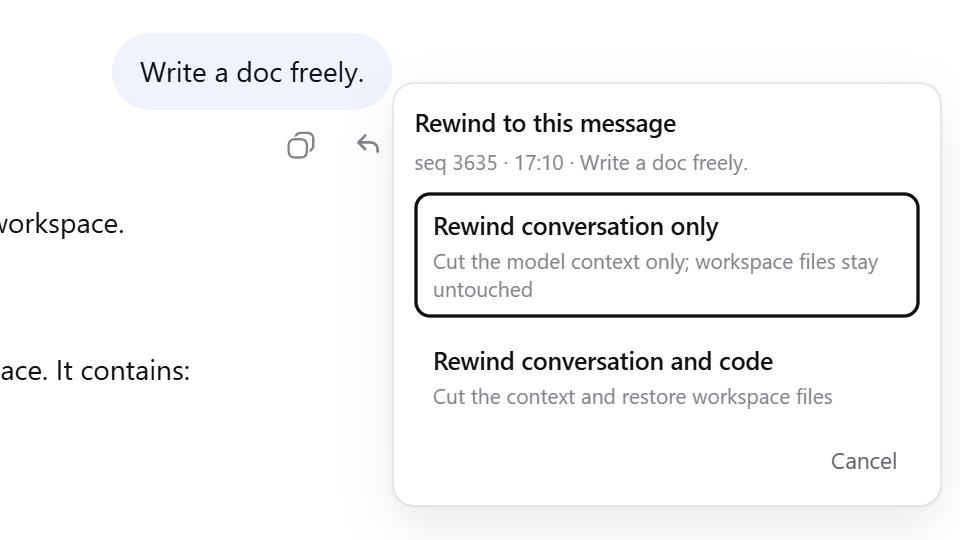
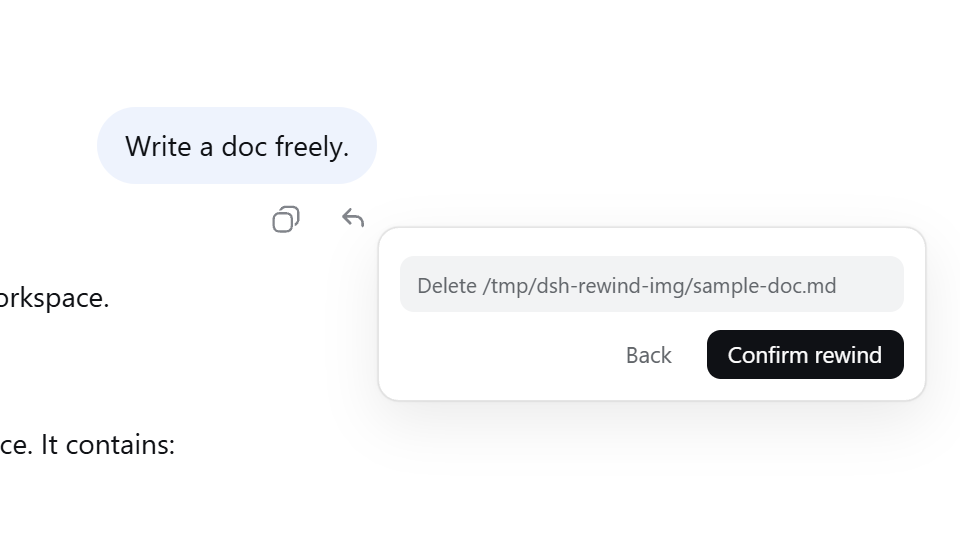
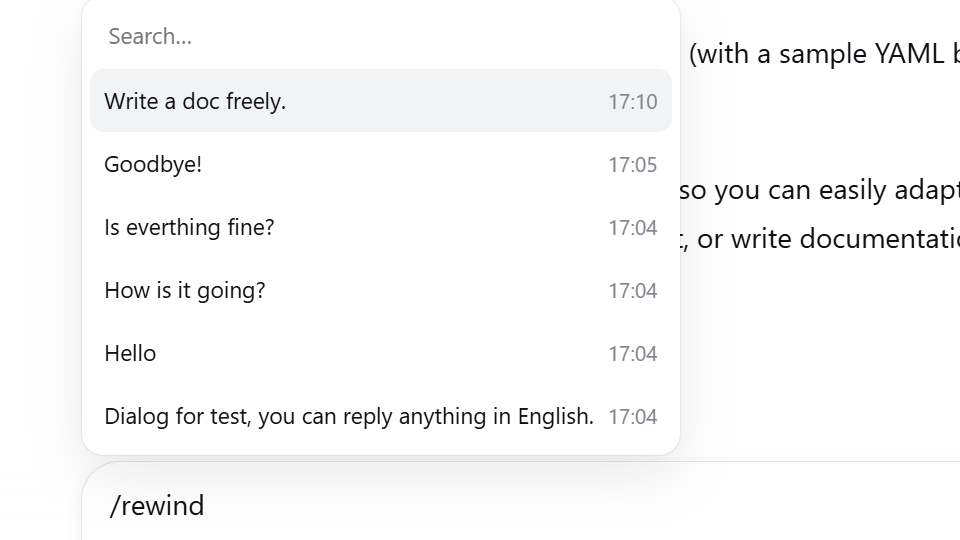
Every user message carries a **↶ rewind** button in its action row. Clicking it opens a mode-selection popover — "**rewind conversation only**" or "**rewind conversation and code**", the latter showing the file-change list for confirmation first. You can also rewind conveniently via the **`/rewind` command** or a **keyboard shortcut**.

<table>
  <tr>
    <td align="center"><img src="assets/screenshots/rewind-button.png" width="440" alt="Per-message ↶ rewind button"><br><sub>Per-message ↶ rewind button</sub></td>
    <td align="center"><img src="assets/screenshots/mode-popover.png" width="440" alt="Mode-selection popover"><br><sub>Mode-selection popover</sub></td>
  </tr>
  <tr>
    <td align="center"><img src="assets/screenshots/impact-list.png" width="440" alt="Impact list"><br><sub>"Conversation and code" impact list</sub></td>
    <td align="center"><img src="assets/screenshots/rewind-candidates.png" width="440" alt="/rewind candidate picker"><br><sub>/rewind candidate picker</sub></td>
  </tr>
</table>

## Install

Check your local DSH version, then find the matching plugin version in
[Releases](https://github.com/SiriLee/dsh-rewind/releases).

```sh
dsh plugin --profile web add dsh-rewind-plugin@<version>
```

> ⚠️ The npm name `dsh-rewind` belongs to another author's package — install with `dsh-rewind-plugin`.

## Usage

1. Find the user message you want to rewind to in the conversation, or type `/rewind` (or its alias `/undo`) to open the candidate picker.
2. **Select it.** A small popover offers the two modes — "conversation only" or "conversation and code".
3. The rewind takes effect immediately: the conversation returns to how it looked at the target message, and the target message's text is filled back into the composer — edit and re-send.

**Keyboard**: both the candidate picker and the mode popover support ↑↓ to move, Enter to confirm, Esc to cancel/back.

<details>
<summary><b>Edge notes</b></summary>

- Rewinds can be repeated — with no limit on stage or count.
- A rewind itself **cannot be undone**, but the withdrawn content stays in the session log.
- **Interruptions rewind too** — a `steering` message the model hasn't read yet is also a valid rewind target, and withdrawing it does not interrupt the current run.
- **Rewinding a read message interrupts the running turn** — to ensure the rewind runs safely.

</details>

## Snapshot management

Snapshots (the before-write backups) are stored under `<dsh home>/rewind-snapshots/`
(the default is `~/.dsh/rewind-snapshots/`). For the **same session**, the plugin
deduplicates snapshots by content and keeps the newest 100 anchor groups.
**Deleting that directory manually** only clears the file backups (chat rewinds are
unaffected) and the plugin rebuilds them automatically.

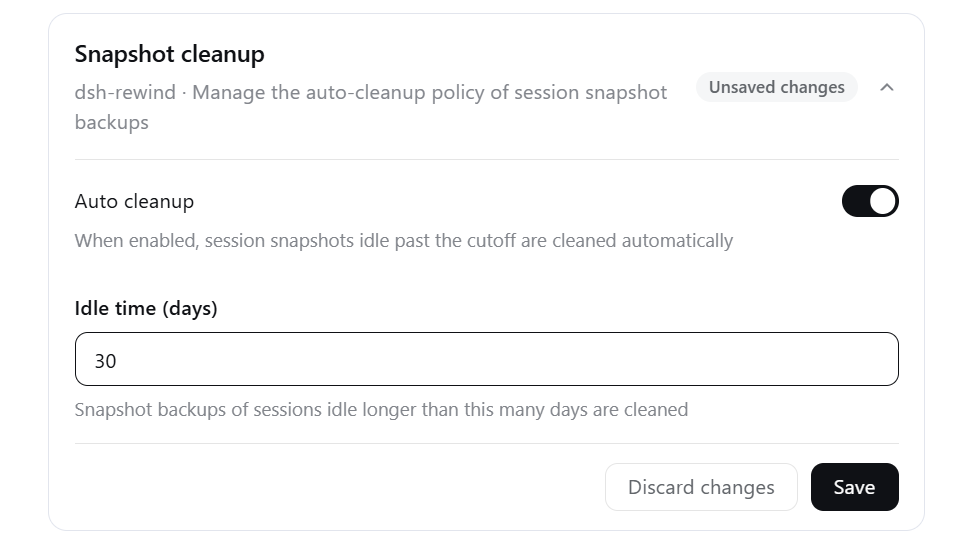
A **global auto-cleanup** (off by default) removes the snapshot directories of
long-inactive sessions, leaving the active session and chat log untouched. Configure
and review it in the **Settings &gt; Plugins &gt; Plugin configuration &gt; Snapshot
cleanup** panel (the auto-cleanup switch and the idle-day cutoff), or use the
`/snapshot-auto-cleanup` command to **view, configure, and run** it. See:
[Snapshot cleanup](docs/snapshot-auto-cleanup.md).

<img src="assets/screenshots/cleanup-setting.png" alt="Snapshot cleanup settings: auto-cleanup and idle days" width="600">

## Uninstall

```sh
# Uninstall the plugin
dsh plugin --profile web remove dsh-rewind-plugin

# To also delete local data
rm -rf <dsh home>/rewind-snapshots
rm <dsh home>/snapshot-cleanup-last-sweep.json
```

The plugin's auto-cleanup settings live in the settings document
(`<dsh home>/settings.yaml`). To remove them completely, delete the key manually.

## Why it stands out

Compared with the common approaches, here is the trade-off this plugin makes on "rewind":

| Dimension | Common approach | This plugin |
| --- | --- | --- |
| Conversation rewind | Fork / branch a new conversation | **In-place rewind** — no new session, no window switch |
| File restore | No restore feature / git-managed or whole-tree snapshot | **Lightweight before-backups** — auto-captured before writes, one-click restore |
| Dependencies | Often needs a Git repo or a full snapshot engine | **None** — no git required, works on any directory |
| Storage footprint | Whole-tree snapshots take space | **Lightweight** — nothing is stored unless it changed, and only files touched by write tools are tracked |

## How it works

The whole design rests on two principles, simple but deliberate: **the conversation half "masks, never deletes"**, using DSH's native "hide + replace" mechanism; **the file half "partial tracking, lightweight before-write backup"**, following Claude Code's checkpoint semantics.

### 1. Conversation rewind: a single "mask", not a delete

`append-only` is a hard rule: the session log only grows and is never rewritten — the foundation of auditability and privacy. A rewind never touches history; it makes a single move: append **one "empty message" marker** to the end of the log and use it to "mask + replace" everything after the target message, so the model and the UI see only the part before it.

- **One and the same log** — the append happens only in the current session's log: no new session, no new branch, so no residue or copy is left behind;
- **The marker is canonical** — the same "hide + replace" as the official `/compact`: `/compact` compresses a span of history into a summary, while `/rewind` swaps in an "empty message" marker. Because it is canonical, DSH's log replay, compaction, and resume preflight all recognize it and never mistake it for a real message;
- **The replacement is imperceptible** — the model ignores the marker, with no effect (verified empirically). Together with the plugin's UI handling, what you and the model see is exactly how the conversation looked at the target;
- **Content is preserved** — because this is "masking, not deleting", the withdrawn content stays in the log — auditable, traceable, and in principle manually recoverable.

> **Design highlight**: the entire conversation rewind is **a single append**. It's deterministic, auditable, and — because the log was never broken — a "clean" time-travel. Minimal action, complete semantics. The compatibility subtleties with DSH (replicating `/compact`, the empty-message mask) are where this plugin is genuinely professional.

### 2. File restore: lightweight checkpointing, "before-write backup"

The file half follows Claude Code's checkpoint semantics — **partial tracking + before-write backup, plus a re-scan of tracked files at each message**, not a whole-tree snapshot. This trade-off saves space, and it's actually more complete:

- **Before-write backup**: tracks only the write-class tools (`write`, `edit`) — backs up the original content before a write and records/tracks the files it touches; it never backs up the whole workspace, so it's lightweight.
- **External changes count too**: at every user-message boundary the plugin re-checks all tracked files — external changes such as a command run or a manual edit are recorded as well and restored by a later rewind. "Lightweight" but not "incomplete".
- **Unchanged-not-recorded**: an entry is written only when something changed — at the message-boundary re-check, an unchanged file is never backed up (no record); at before-write time, when the new content matches the path's prior record, only a **link to it** (`ref`) is stored instead of a copy.
- **Accurate restore**: backups are the sole standard, checked against the real disk — **only files that actually differ are touched**: modified files restored, newly created files deleted, deleted files recovered. Backups are stored byte for byte, so the restored result matches the backups exactly, with no "ghost impact".
- **Safety and integrity**: paths are sanitized so nothing ever escapes the backup root; symlinks / hard links are skipped so one restore can't clobber another name of the same file; a per-file failure never aborts the pass; backups and the restore journal are written atomically and kept across restarts, so a half-applied restore after a crash can be continued or rolled back.

> **Design highlight**: this checkpoint's light footprint comes from **recording only what was actually touched and really changed** — before-write backup makes it restorable, unchanged-not-recorded and content-as-link drop the repetition; only the files that differ are touched at restore time.

## What it deliberately does NOT do

This plugin deliberately stays lightweight and focused on one thing — "conversation rewind". The following are **out of its scope**:

- **Whole-tree / Git-level snapshots** — only write-class tool edits plus external changes to already-tracked files are backed up; files never touched by a tool are not restored. For a worktree-level full snapshot rollback, use a more specialized snapshot tool (git).
- **Subagent edits** — not tracked, and no rewind inside a subagent session (same as Claude Code): a subagent runs its own session, so its backups could never be restored by a rewind of the parent session, and none are kept for one.
- **Fork / branch rewind** — DSH already provides this ("branch in new chat"); no need to reinvent the wheel.

## Compatibility

- Node.js `^22.19.0 || >=24.0.0`.
- Compatibility definition, verification method, and version alignment: see [docs/compat/audit.md](docs/compat/audit.md); supported DSH versions are declared by `package.json` `peerDependencies`.

> [!WARNING]
> This project and DeepSeek Harness are both in developer preview. Pin exact
> versions in reproducible environments and review the behavior notes above.

## Client contract

Third-party DOM plugins that need to know which transcript rows a rewind
withdrew should consume the stable, locale-independent helpers exported from
`dsh-rewind-plugin/client` — never parse
`outcome.text`. The `data-dsh-rewind-hidden` attribute marks withdrawn rows
(observational only). Details: [docs/contract/client-contract.md](docs/contract/client-contract.md).

## Known issues

1. **Exported logs are complete** — a rewind only removes messages from the model context and the view; the exported session log (`/export`) still contains **withdrawn messages**. This plugin cannot alter exports.
2. **Lightweight file rewind has a cost** — in specific cases not all changes can be rewound. Consistent with Claude Code. See: [File-rewind tracking boundary](docs/compat/tracking-boundary.md).
3. **The turn-rail shows rewound turns** — the right-side rail added in DSH `v0.1.2` keeps ticks for withdrawn messages, and hovering shows the withdrawn text. Only a display difference; no functional impact.
4. **The system prompt is re-displayed after a rewind** — in DSH `v0.1.2`, rewinding and resending a message shows the "System prompt" component again, just like `/compact`. Only a display difference; no functional impact.
5. **Old rewind markers are no longer compatible** — DSH `v0.1.3` rejects the rewind markers from the old plugin (≤ 0.8.0). The new version resolves this and provides an in-session update. See the [update guide](docs/rewind-fix.md).

> [!NOTE]
> Browser diagnostics are available; see [Browser diagnostics](docs/compat/diagnostics.md).

## Security

This plugin only appends rewind-marker events to the session log; it never deletes or rewrites logged history. Workspace files are written only when you choose "conversation and code"; backups are stored under `<dsh home>/rewind-snapshots/`; restores draw only from those backups. It never touches your git repository, makes no network requests, and accesses no credentials. For sessions you've left inactive for a long time, a global auto-cleanup (off by default) can remove their snapshot directory in whole, leaving the active session and the chat log untouched. Full security model: [SECURITY.md](SECURITY.md).

## Development

```sh
npm install            # devDeps from the npm registry
npm run check          # one-shot full gate: typecheck + test + build + verify:host + pack --dry-run
npm run typecheck      # tsc on all three surfaces (host + client + client-test)
npm test               # vitest: all unit and compatibility suites
npm run build          # esbuild: lib/index.js (host ESM) + lib/client.js (loader closure) + .d.ts
node scripts/verify-host.mjs   # end-to-end verification of the built artifact
```

`prepare` runs the full build, so git installs and `npm pack` / `npm publish` always produce a complete `lib/` and the `LICENSE`.

Maintainers: the module map and harness interface reference live in [docs/harness-reference.md](docs/harness-reference.md).

Contributing guide: [CONTRIBUTING.md](CONTRIBUTING.md).

## Release

Releases go out through GitHub Actions Trusted Publishing (OIDC, no stored `NPM_TOKEN`): push a `v<version>` tag and CI publishes with Sigstore provenance.

```sh
npm version patch && git push origin <branch> --tags
```

One-time npm-side setup and the full workflow details: [docs/release/release.md](docs/release/release.md).

## License

[MIT](LICENSE)