
# dsh-qingagent
**QingAgent inside DeepSeek Harness**
A plugin built to the DSH spec: one command to install or remove, and you can write and review documents with QingAgent right inside DSH.
[](https://www.npmjs.com/package/dsh-qingagent)
[](./LICENSE)
[QingAgent repo](https://github.com/void2anything/qingagent) · [qingagent.com](https://qingagent.com) · [Feature board](https://qingagent.com/feedback/plugin) · [中文](./README.md)
---
## What is this
DeepSeek Harness (DSH) is DeepSeek's open-source "everything is a plugin" agent framework. Install dsh-qingagent and DSH gains a pen:
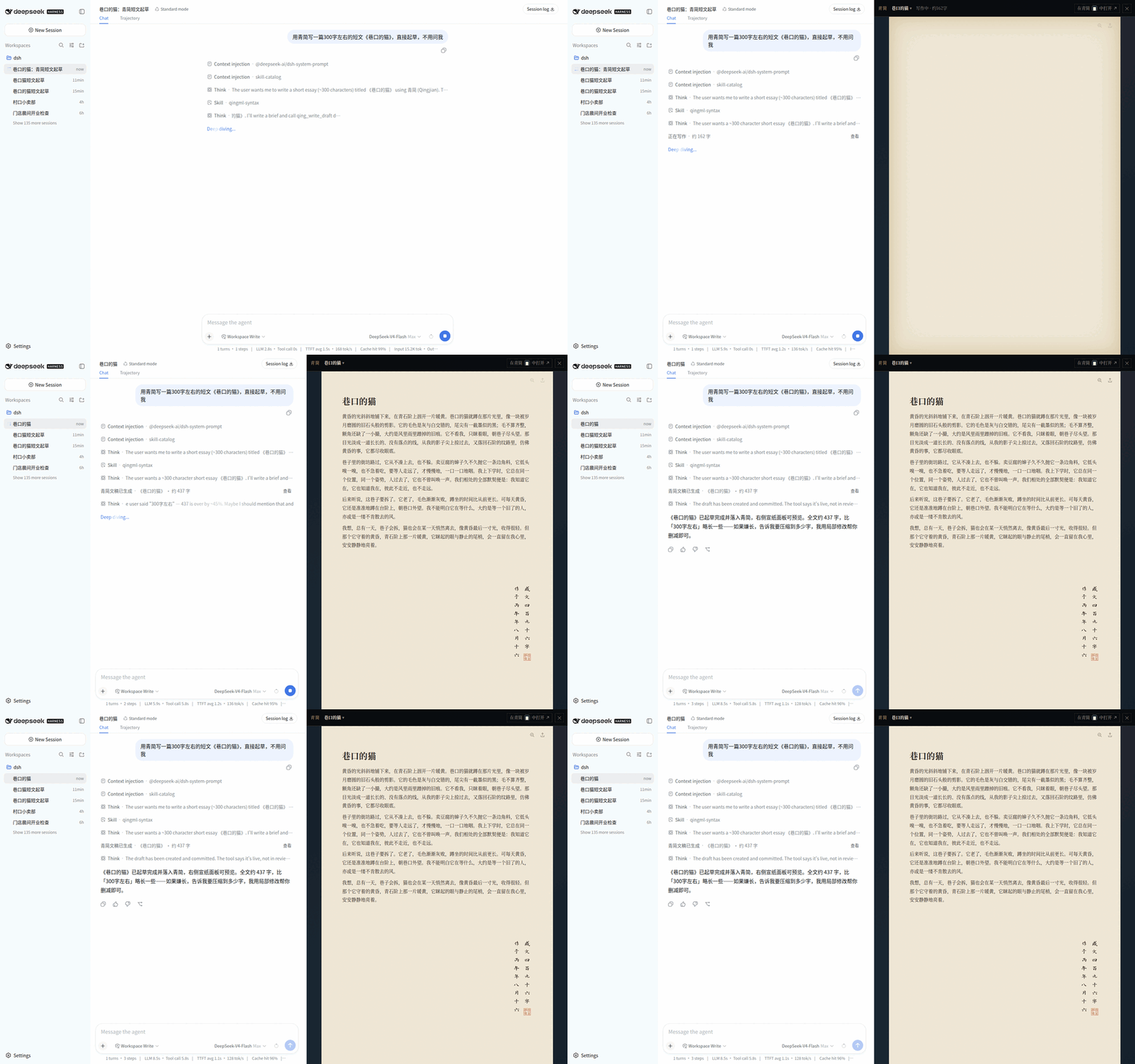
Describe what you want in the conversation, and the agent drafts, edits and submits reviews through the QingAgent engine. A **paper panel** grows on the right — rendering from the same source as the QingAgent desktop app: serif type, warm paper, square corners, with formulas, Mermaid, draw.io, tables, footnotes and a seal-stamped colophon.
**The chat keeps a summary; the manuscript is the real thing.**
### What you can do
- **Draft from one sentence**: the agent writes the finished piece into the paper panel; while the page is still empty you get QingAgent's own "qing character diffusion" loading animation;
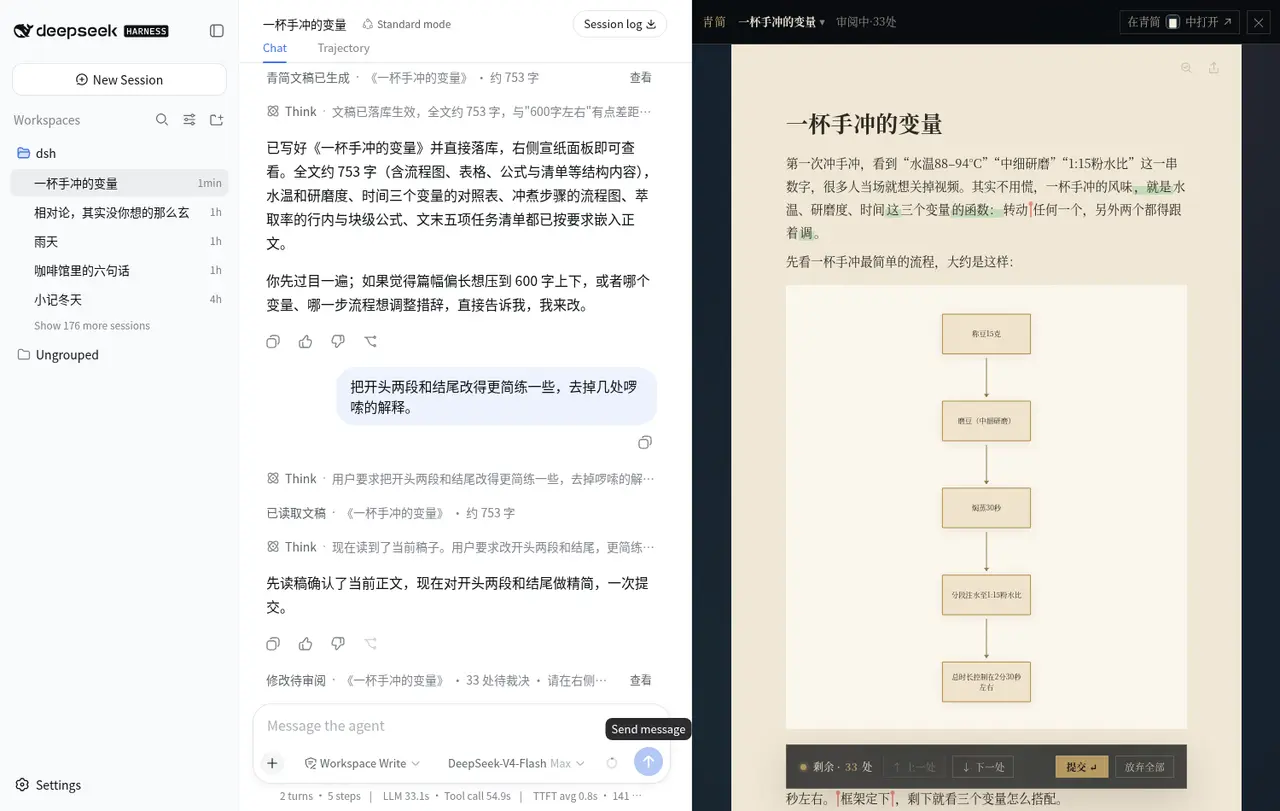
- **Per-change verdicts**: every AI edit is a candidate — walk through them on the page, accept or reject, commit to land. When the change ratio is high it switches to a full-document old/new comparison;
- **Annotation carousel**: review annotations sit in place on the page and can be flipped through one by one;
- **Selection chips**: select text on the page and it becomes a "selection" chip in the input box — multiple chips supported, hover for the full quote, and sent messages render them as chips too;
- **Review and export live on the page**: export to PDF / Word / HTML / Markdown / TXT and download directly;
- **Several drafts per session**: `qing_list_docs` / `qing_focus_doc` switch the preview on the right;
- **"Open in QingAgent"**: a deep link launches the desktop client so you can keep editing — same local library.
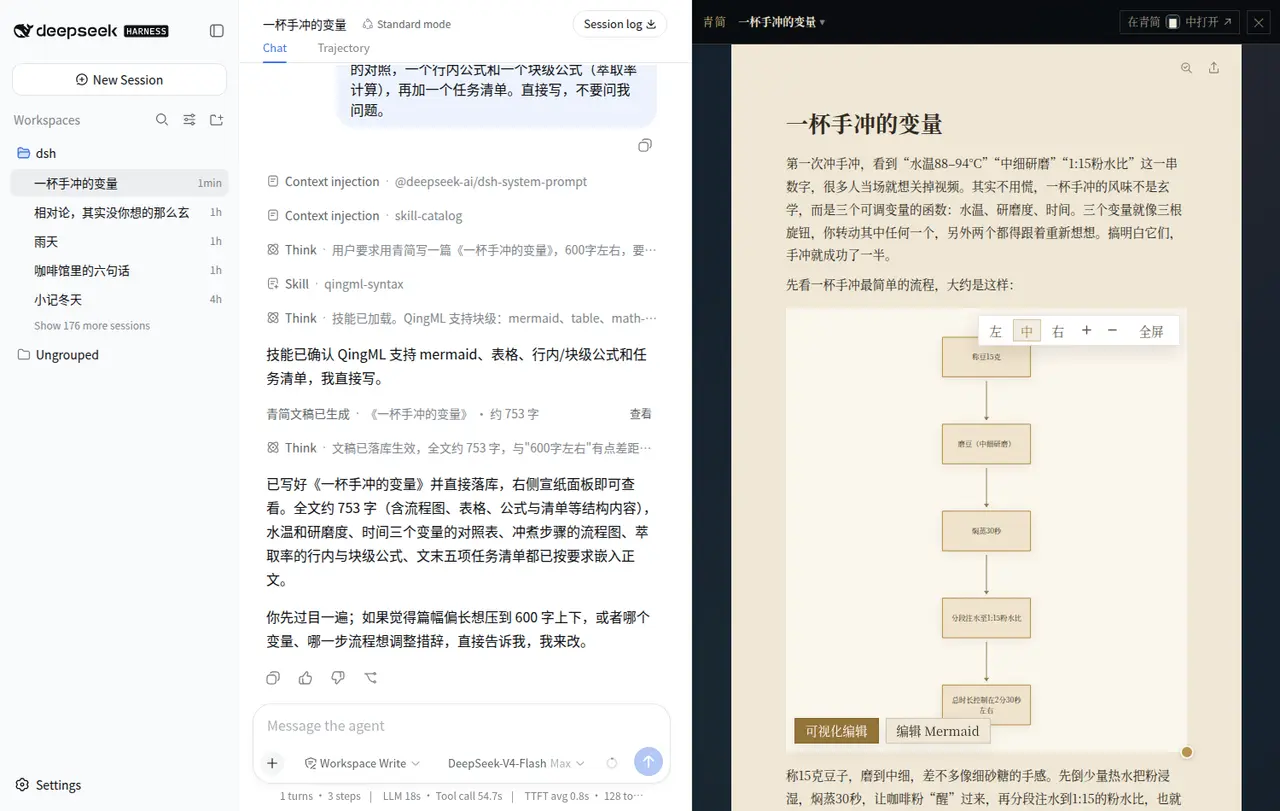
### In action: writing a piece with diagrams, tables and formulas inside DSH
| | |
|---|---|
|  |
| 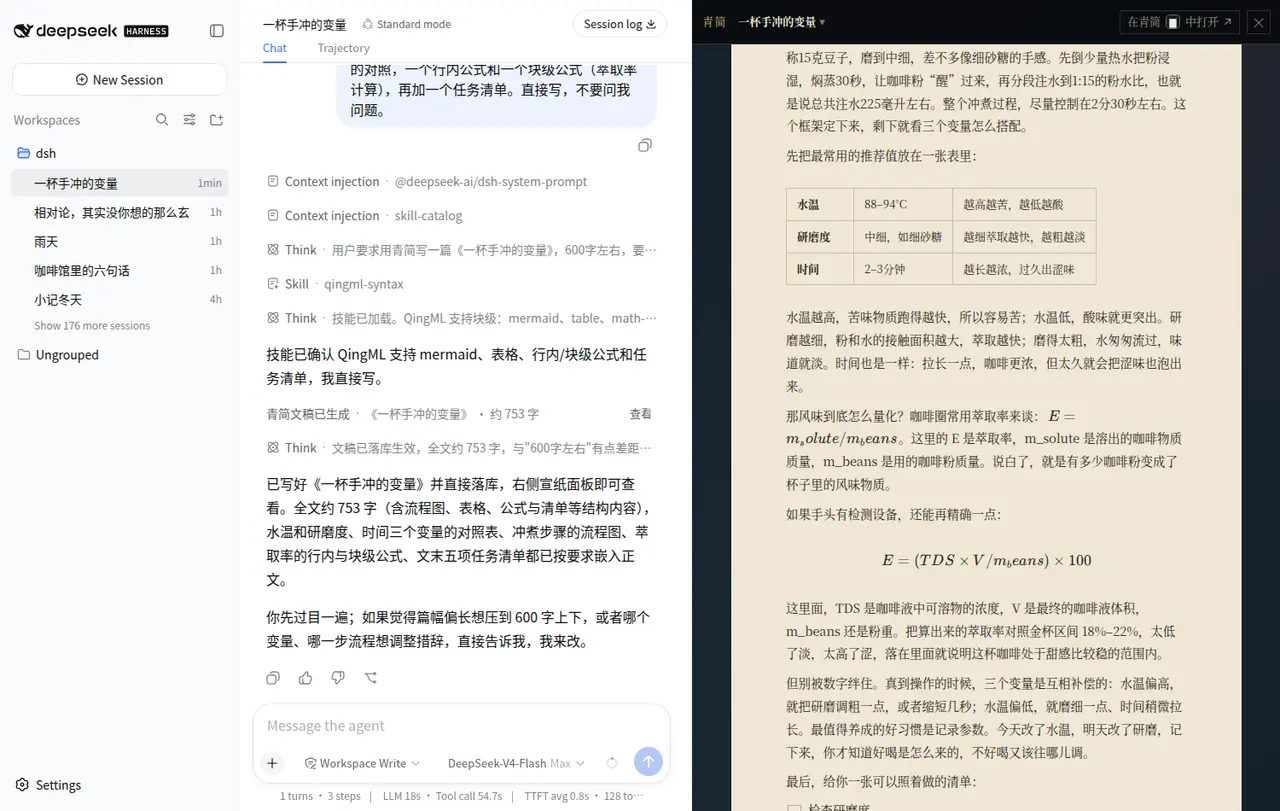 |
| **Chat on the left, manuscript on the right** — state the requirement once and the agent writes through the QingAgent engine while the paper panel fills in; Mermaid diagrams carry "visual edit / edit Mermaid" buttons and drawio drawings open on double-click | **Full typesetting** — tables, inline and block math (KaTeX), task lists and code blocks, rendered exactly as in the QingAgent desktop app |
|
|
| **Chat on the left, manuscript on the right** — state the requirement once and the agent writes through the QingAgent engine while the paper panel fills in; Mermaid diagrams carry "visual edit / edit Mermaid" buttons and drawio drawings open on double-click | **Full typesetting** — tables, inline and block math (KaTeX), task lists and code blocks, rendered exactly as in the QingAgent desktop app |
|  |
| 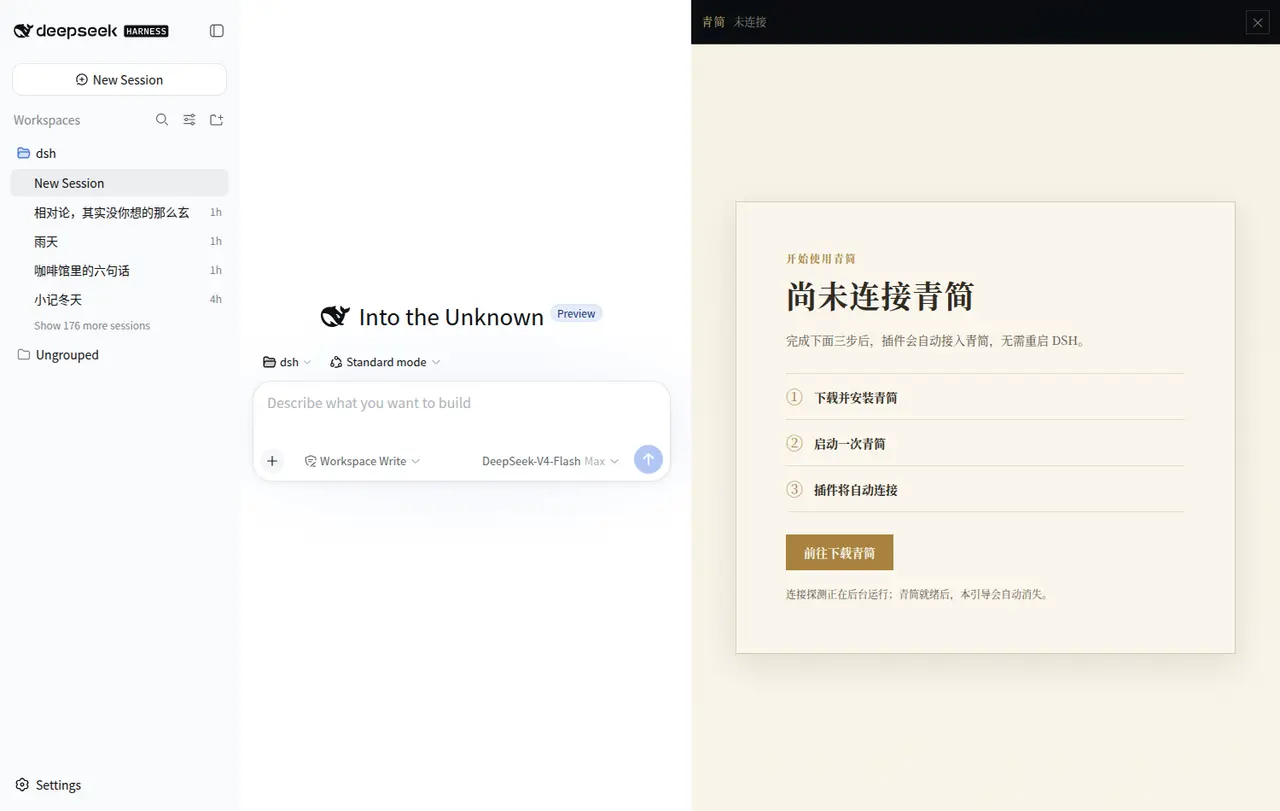 |
| **Per-change verdicts** — the header shows "reviewing · N changes", additions and deletions are marked in the text, and the bottom bar offers previous / next / commit / discard all | **Three-state onboarding** — not installed, installed but not running, or handshake failed, each with the right guidance; once QingAgent is up the plugin recovers without restarting DSH |
---
## Relationship with the QingAgent repo
This plugin is the DSH frontend of [**QingAgent**](https://github.com/void2anything/qingagent), not a standalone product.
**Because of the plugin's own complexity — the paper rendering is deeply coupled with the manuscript engine, and documents and versions live in a local database — the QingAgent desktop client must be installed first for the plugin to work.** The client hosts the engine and the local library; the plugin wires it into DSH's conversation and UI.
That coupling buys you something: **a draft written in DSH can be opened and edited in the QingAgent client**, and vice versa — one local library, not two copies.
---
## Install (three steps)
**① Start DeepSeek Harness** (Node.js 20+)
```bash
npx @deepseek-ai/dsh web
```
**② Install the QingAgent plugin**
```bash
npx @deepseek-ai/dsh plugin --profile web add dsh-qingagent@latest
```
Restart `dsh web` afterwards.
**③ Download and launch QingAgent once**
Get it from [qingagent.com](https://qingagent.com/#download) or [QingAgent Releases](https://github.com/void2anything/qingagent/releases). Launching it once starts the engine and writes credentials to `~/.qingagent/instance.json`; the plugin connects automatically.
> If QingAgent is missing or not running, the panel shows an onboarding card: **not installed** → download instructions; **installed but not running** → a one-click "Launch QingAgent"; **handshake failed** → the specific reason (a corrupted `instance.json`, for example). Once QingAgent is up the plugin recovers on its own — no need to restart DSH.
Requirements: DSH `0.1.0-rc.6` as the baseline (peer dependency `^0.1.0-rc.6`), with a profile that already composes the storage hub, storage-domain and a KV backend (usually `@deepseek-ai/dsh-storage-json`).
---
## Supported setups
**Officially supported: dsh running on Windows with the Windows QingAgent desktop client, same machine and same user.**
The implementation also includes macOS client detection (`mdfind` with an Applications-directory fallback), but it has not been fully validated — issues welcome.
**WSL and cross-OS setups are not supported**: the plugin reads `~/.qingagent/instance.json` from the current system's home directory, so dsh in WSL cannot see a client installed on Windows and cannot reach the engine.
---
## Capabilities
### Host tools (callable by the agent)
| Tool | Parameters | Purpose |
|---|---|---|
| `qing_write_draft` | `qingml` required; `title?` `requirements?` `docRef?` | Directly submit the complete QingML authored by the main model. Length requirements only produce a status and gap; the tool never rewrites internally. Without `docRef` it creates a new draft; with a `docRef` bound to this session it rewrites the whole piece (requires explicit user authorisation) |
| `qing_edit_draft` | `docRef?`; `ops[]` required | Atomically submit a batch of structured local edits; refused while a review is in progress |
| `qing_read_draft` | `docRef?`; `mode` defaults to `outline` | Tiered reads: `outline` / `full` / `base` (committed baseline) / `lines` (numbered Markdown) / `blocks` (block ids) |
| `qing_review_commit` | `docRef?`; `action: accept_all \| reject_all` | Accept or reject the pending review wholesale; hard-limited to one call per turn |
| `qing_list_docs` | `scope: session \| library` | List drafts bound to this session; `library` lists recent documents from the whole QingAgent library (max 50) |
| `qing_focus_doc` | `docRef` required | Switch the paper panel; unbound documents can be adopted by engine id or an exact unique title |
The eight `qing_edit_draft` operations:
| `kind` | Semantics |
|---|---|
| `strReplace` | `old` → `new`, optionally the `nth` match |
| `markText` | Add / remove inline marks on matches: `bold`, `italic`, `strike`, `underline`, `code`, `highlight(color)`, `textColor(color)`, `link(href,title?)`; supports `all`, `isRegex`, `withinRef` |
| `insertAfterLine` | Insert after line N of the committed Markdown |
| `insertAfterBlock` | Insert a block after a top-level block, or a sibling item after a list item |
| `appendSection` | Append a section |
| `deleteBlock` | Delete a whole top-level block |
| `deleteListItem` | Delete a list / task item; the engine cleans up the parent list after the last one |
| `setTitle` | Change the metadata title, leaving the body untouched |
> Request-level `opId` idempotency applies only to `deleteBlock`, `deleteListItem` and `insertAfterBlock`; every proposal also carries a random `clientMutationId`.
### The paper panel (client)
QingAgent's web editor is compiled straight into the plugin from the `vendor/qingagent` submodule, so the look matches the desktop app:
- **Per-change verdicts**: `DocumentSnapshotView` takes the patch set; the PatchNav at the bottom handles previous/next, reject-all and settlement. After settlement a structured review-result message flows back **only when something was rejected**;
- **Whole-document review**: a high change ratio switches to old/new navigation with "apply new" / "revert to old";
- **Annotation carousel**: external annotations become the product's `AnnotationGroup`, decorated into ProseMirror and rendered with QingAgent's native carousel; annotations hide themselves while body patches are under review;
- **Selection chips**: the selected text plus block coordinates go through the bridge and become an input-box reference — multiple, de-duplicated, with full quotes on hover;
- **Diagrams and export**: double-click a draw.io block to open the offline editor and write back; export supports PDF / DOCX / HTML / Markdown / TXT;
- **Deep link**: `qingjian://open?engineSessionId=
|
| **Per-change verdicts** — the header shows "reviewing · N changes", additions and deletions are marked in the text, and the bottom bar offers previous / next / commit / discard all | **Three-state onboarding** — not installed, installed but not running, or handshake failed, each with the right guidance; once QingAgent is up the plugin recovers without restarting DSH |
---
## Relationship with the QingAgent repo
This plugin is the DSH frontend of [**QingAgent**](https://github.com/void2anything/qingagent), not a standalone product.
**Because of the plugin's own complexity — the paper rendering is deeply coupled with the manuscript engine, and documents and versions live in a local database — the QingAgent desktop client must be installed first for the plugin to work.** The client hosts the engine and the local library; the plugin wires it into DSH's conversation and UI.
That coupling buys you something: **a draft written in DSH can be opened and edited in the QingAgent client**, and vice versa — one local library, not two copies.
---
## Install (three steps)
**① Start DeepSeek Harness** (Node.js 20+)
```bash
npx @deepseek-ai/dsh web
```
**② Install the QingAgent plugin**
```bash
npx @deepseek-ai/dsh plugin --profile web add dsh-qingagent@latest
```
Restart `dsh web` afterwards.
**③ Download and launch QingAgent once**
Get it from [qingagent.com](https://qingagent.com/#download) or [QingAgent Releases](https://github.com/void2anything/qingagent/releases). Launching it once starts the engine and writes credentials to `~/.qingagent/instance.json`; the plugin connects automatically.
> If QingAgent is missing or not running, the panel shows an onboarding card: **not installed** → download instructions; **installed but not running** → a one-click "Launch QingAgent"; **handshake failed** → the specific reason (a corrupted `instance.json`, for example). Once QingAgent is up the plugin recovers on its own — no need to restart DSH.
Requirements: DSH `0.1.0-rc.6` as the baseline (peer dependency `^0.1.0-rc.6`), with a profile that already composes the storage hub, storage-domain and a KV backend (usually `@deepseek-ai/dsh-storage-json`).
---
## Supported setups
**Officially supported: dsh running on Windows with the Windows QingAgent desktop client, same machine and same user.**
The implementation also includes macOS client detection (`mdfind` with an Applications-directory fallback), but it has not been fully validated — issues welcome.
**WSL and cross-OS setups are not supported**: the plugin reads `~/.qingagent/instance.json` from the current system's home directory, so dsh in WSL cannot see a client installed on Windows and cannot reach the engine.
---
## Capabilities
### Host tools (callable by the agent)
| Tool | Parameters | Purpose |
|---|---|---|
| `qing_write_draft` | `qingml` required; `title?` `requirements?` `docRef?` | Directly submit the complete QingML authored by the main model. Length requirements only produce a status and gap; the tool never rewrites internally. Without `docRef` it creates a new draft; with a `docRef` bound to this session it rewrites the whole piece (requires explicit user authorisation) |
| `qing_edit_draft` | `docRef?`; `ops[]` required | Atomically submit a batch of structured local edits; refused while a review is in progress |
| `qing_read_draft` | `docRef?`; `mode` defaults to `outline` | Tiered reads: `outline` / `full` / `base` (committed baseline) / `lines` (numbered Markdown) / `blocks` (block ids) |
| `qing_review_commit` | `docRef?`; `action: accept_all \| reject_all` | Accept or reject the pending review wholesale; hard-limited to one call per turn |
| `qing_list_docs` | `scope: session \| library` | List drafts bound to this session; `library` lists recent documents from the whole QingAgent library (max 50) |
| `qing_focus_doc` | `docRef` required | Switch the paper panel; unbound documents can be adopted by engine id or an exact unique title |
The eight `qing_edit_draft` operations:
| `kind` | Semantics |
|---|---|
| `strReplace` | `old` → `new`, optionally the `nth` match |
| `markText` | Add / remove inline marks on matches: `bold`, `italic`, `strike`, `underline`, `code`, `highlight(color)`, `textColor(color)`, `link(href,title?)`; supports `all`, `isRegex`, `withinRef` |
| `insertAfterLine` | Insert after line N of the committed Markdown |
| `insertAfterBlock` | Insert a block after a top-level block, or a sibling item after a list item |
| `appendSection` | Append a section |
| `deleteBlock` | Delete a whole top-level block |
| `deleteListItem` | Delete a list / task item; the engine cleans up the parent list after the last one |
| `setTitle` | Change the metadata title, leaving the body untouched |
> Request-level `opId` idempotency applies only to `deleteBlock`, `deleteListItem` and `insertAfterBlock`; every proposal also carries a random `clientMutationId`.
### The paper panel (client)
QingAgent's web editor is compiled straight into the plugin from the `vendor/qingagent` submodule, so the look matches the desktop app:
- **Per-change verdicts**: `DocumentSnapshotView` takes the patch set; the PatchNav at the bottom handles previous/next, reject-all and settlement. After settlement a structured review-result message flows back **only when something was rejected**;
- **Whole-document review**: a high change ratio switches to old/new navigation with "apply new" / "revert to old";
- **Annotation carousel**: external annotations become the product's `AnnotationGroup`, decorated into ProseMirror and rendered with QingAgent's native carousel; annotations hide themselves while body patches are under review;
- **Selection chips**: the selected text plus block coordinates go through the bridge and become an input-box reference — multiple, de-duplicated, with full quotes on hover;
- **Diagrams and export**: double-click a draw.io block to open the offline editor and write back; export supports PDF / DOCX / HTML / Markdown / TXT;
- **Deep link**: `qingjian://open?engineSessionId=