# dsh-project-manager

**A project board for DeepSeek Harness that treats project memory as a first-class job: every session opened from a card starts with the project's complete, up-to-date landfill memory (STATE + required sub-docs) and card details; say "落盘项目" and the progress is written back by the rules, so you can pick up the work in another session, another CLI, or days later.**
[**中文**](README.md) · [Releases](https://github.com/hoyyang/dsh-project-manager/releases) · [Changelog](CHANGELOG.md)
## Install
```sh
dsh plugin add dsh-project-manager
```
Alternative (straight from GitHub):
```sh
dsh plugin add github:hoyyang/dsh-project-manager
```
**Zero config, works out of the box**: restart dsh after installing. No account, API key or settings. Landfill memory lives in `~/.ai` by default (all writes go through the bundled `ai-memory`, which needs python3; on Windows this part is turned off and the board still works). See "Configuration" to change the data directory or permission mode.
| Environment | Version | Status |
|---|---|---|
| dsh CLI (`@deepseek-ai/dsh`, `dsh web`) | `0.2.0-rc.2` | Tested (0.20.1) |
| DSH Desktop | `2.0.17` (bundles dsh `0.2.0-rc.2`) | Tested (0.20.1) |
| peerDependencies | `@deepseek-ai/cordis >=4.0.1 <5`, `@deepseek-ai/dsh-tools >=0.1.5-rc <2`, `@deepseek-ai/dsh-client-ui-slots >=0.1.5-rc <2`, `@deepseek-ai/schemastery ^3.18.1` | Declared range; other versions in range not individually tested |
Needs the dsh web UI (`dsh web` or DSH Desktop). Sidebar enhancements (project hub counts, nesting, "+" takeover, blank-session rows) rely on the workspace list's page structure; if a dsh update changes it they simply stop showing, and the board, sessions and landfill keep working.
## What it does
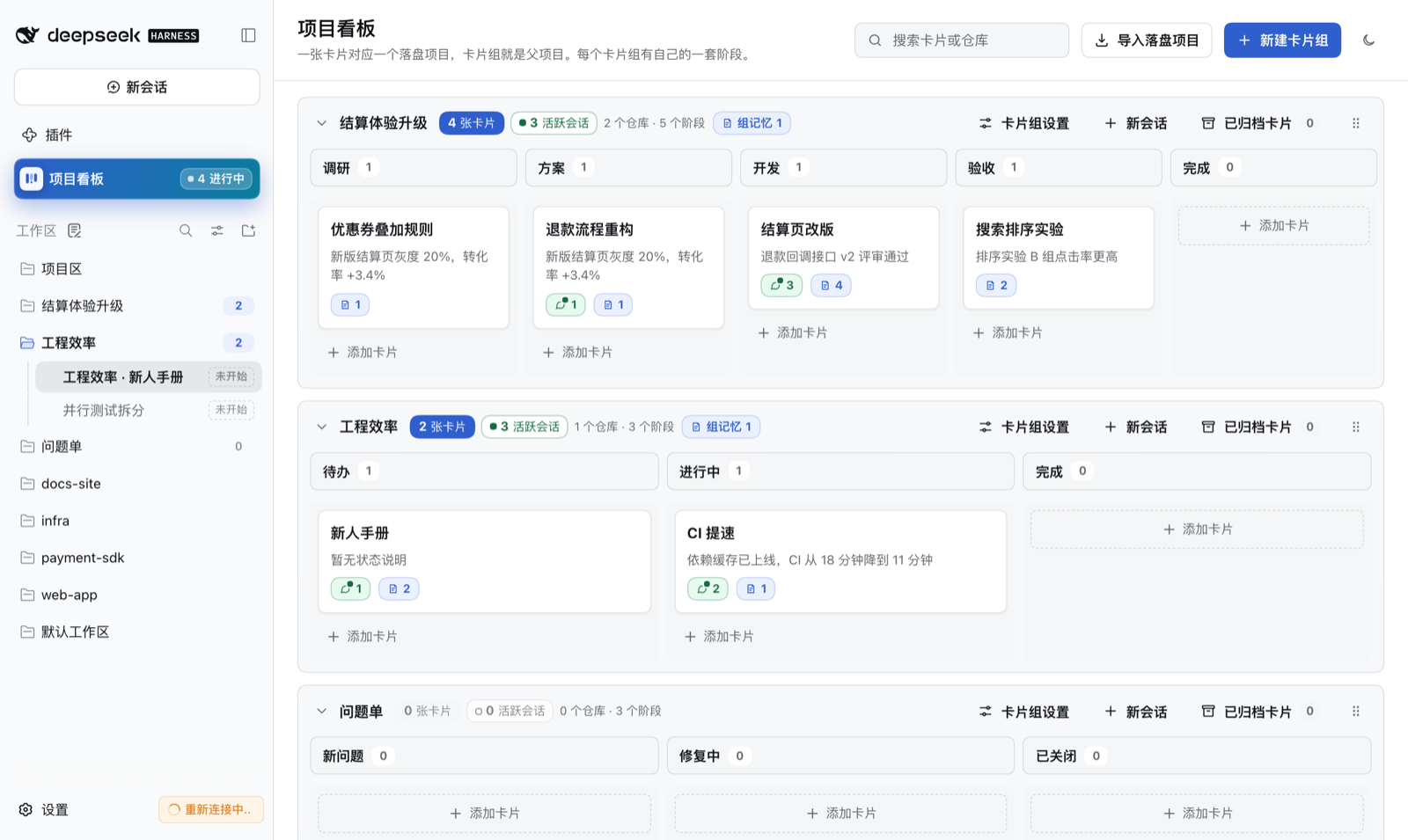
### Sessions start with the complete, latest project memory
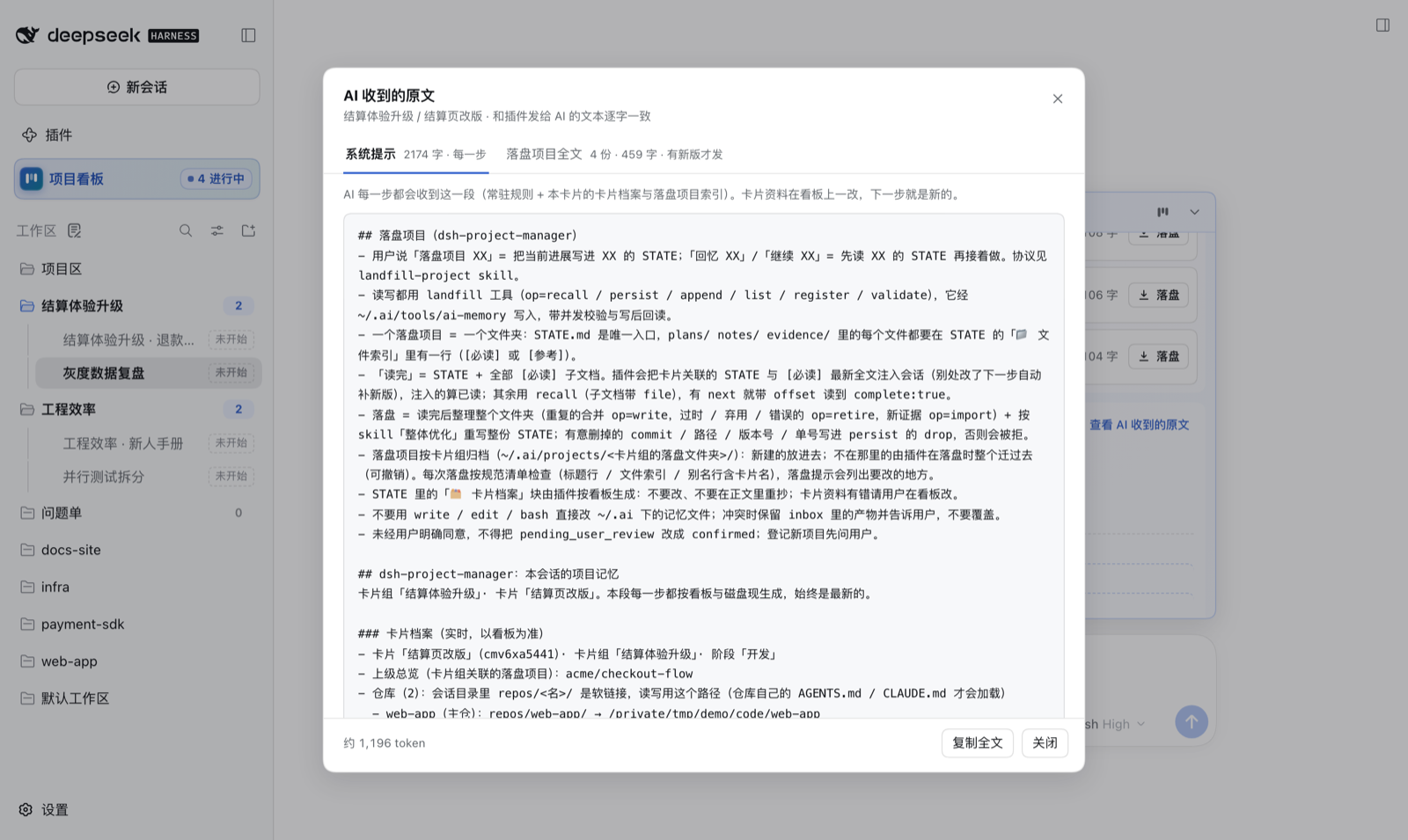
- **Open a session from a card and the context is already there**: the plugin puts the **full text** of the card's landfill projects (STATE plus sub-docs tagged `[必读]`, "required") into the session, and the system prompt carries a live "card archive" (repos, subtasks, notes, links, files). No need to say "recall" first.
- **Always the latest, never duplicated**: when another session or another CLI (Codex, Claude Code, ...) changes the STATE, the next step gets the new version (marked with which version it replaces and who wrote it); after compaction the text is re-injected; each version goes in once, your own writes are not echoed back, forks inherit.
- **See exactly what the AI receives**: "查看 AI 收到的原文" in the session card shows the system prompt and injected text verbatim, with versions, whether it is already in this session, and an approximate token count.
### Say "落盘项目" and progress is written back by the rules
- **One sentence**: "落盘项目 XX" writes progress into XX's STATE; "回忆 XX" / "继续 XX" reads it fully before continuing. Trigger words come from the project names and aliases already in `~/.ai`. Only command-style phrasing triggers, so talking about the feature does not; in plan mode it only reminds.
- **Facts are not lost**: no write without a full read; a draft that drops commit hashes, paths, versions or issue IDs without declaring them is rejected; every write is read back and reports size before/after and removed sections. If the user asked and the turn did not do it, the model is pulled back before the turn ends.
- **One project, one folder**: `STATE.md` is the single entry; every file in `plans/` (approved plans are saved here), `notes/` and `evidence/` has a line in the "📁 文件索引" (file index). Each persist rewrites the whole STATE and tidies the folder (merges duplicates, retires stale files to a recycle area).
- **Card archive inside STATE**: the plugin generates a "🗂 卡片档案" block from the board (the AI never writes it), so other tools reading the STATE see the card details too.
- **No bypassing**: direct `write` / `edit` / `bash` edits to memory files under `~/.ai` are refused; writes only go through `ai-memory` (file locks + optimistic concurrency), safe to share with other CLIs.
### Session card: which card this session belongs to, and what it carries

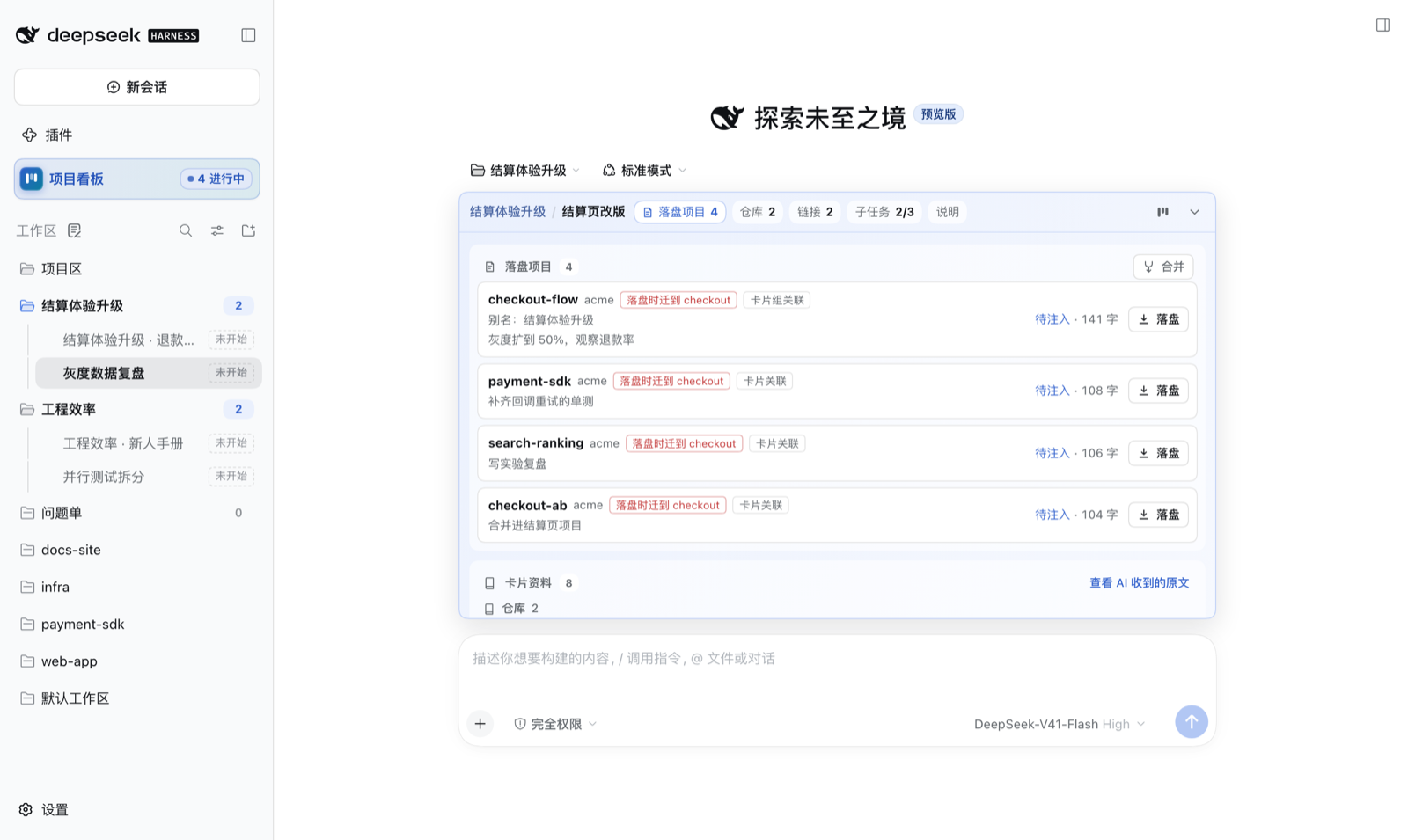
- **One line above the input box**: group / card, number of landfill projects, repo / link / subtask / note pills, and a jump to this card on the board. Light blue when linked, light grey when not.
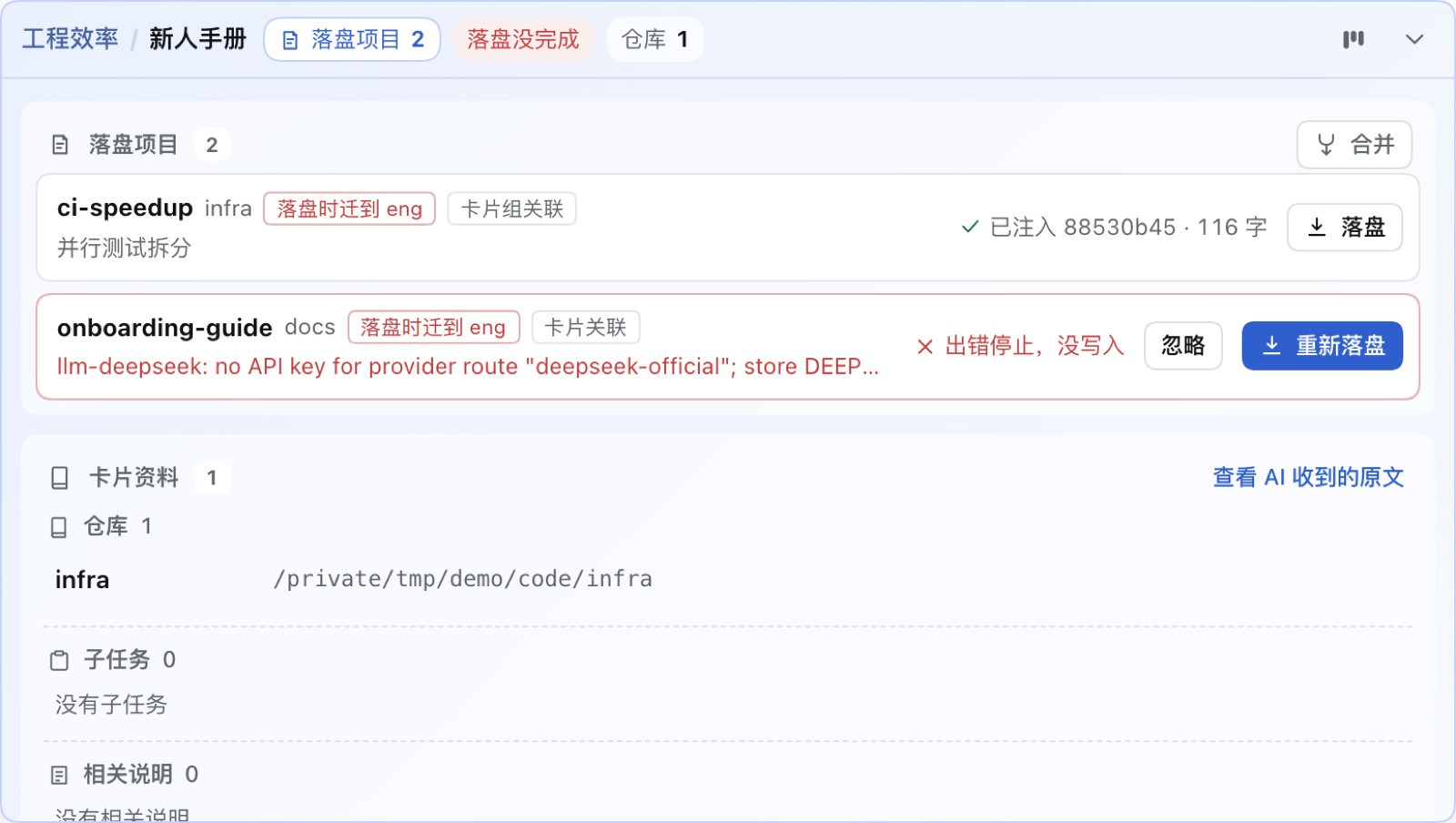
- **Expand for everything**: one row per landfill project (project, aliases, next_action, injected or not, size) with its own "落盘" (persist) button; card details below.
- **Persist outcomes shown as they are**: after you persist from the card, the round ends with "落盘完成" (done) when written; if you stopped it, it failed, or the AI is asking you something, the card says so and offers "重新落盘 / 忽略" (retry / dismiss) instead of spinning forever.
### Same-name detection: one project never becomes two
- **Hints before you type**: when the card has no landfill project, existing projects whose alias equals the card title are offered as "可能就是这个" (maybe this one).
- **Exact name match cannot be created again**: if the file name or an alias matches an existing project, the main button becomes "关联并落盘" (link and persist) with a rename suggestion; near matches are only hinted.
- **Each candidate is clear**: size, last update, which cards already link it, and whether persisting will move it; link only, or link and persist.


### Filed by card group, migrated by the rules
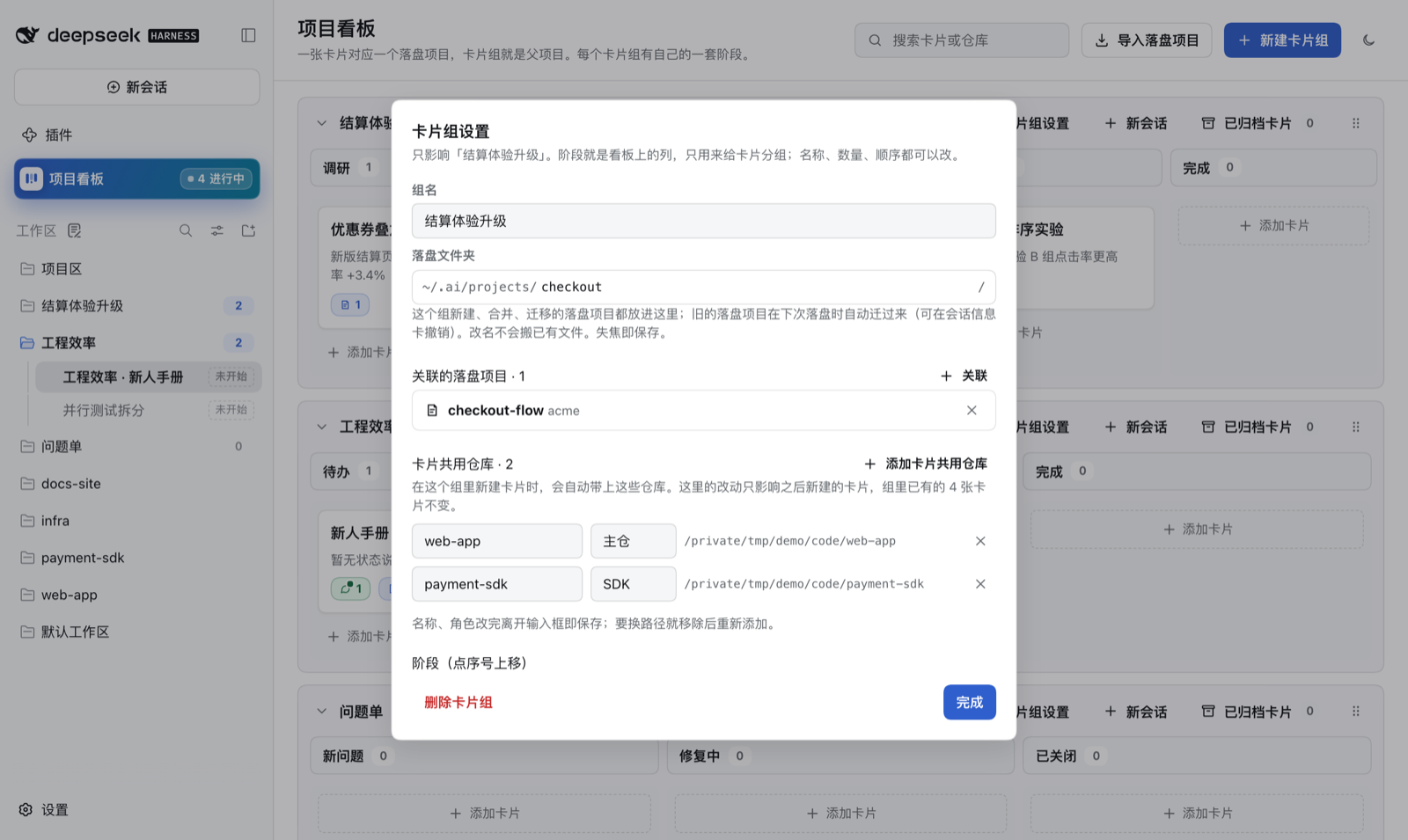
- **Each card group has its own landfill folder** `~/.ai/projects//`. The first persist in a group asks you once to confirm a folder (suggested from the group name, editable); it can also be changed in group settings. New and merged landfill projects go there.
- **The spec is a versioned checklist** checked on every persist, so a STATE written under any older spec is brought up to date on its next persist. A project in the wrong place is moved **as a whole folder** by the plugin (sub-docs moved, old paths inside rewritten, references under `~/.ai` repointed, card links switched, old folder to the recycle area); the title line, file index and alias line are fixed by the persisting AI per the checklist, and a non-conforming draft is refused.
- **Told in advance, undoable afterwards**: the session card marks "落盘时迁到 xxx" (moves to xxx on persist) beforehand; afterwards an "已按规范迁移" card lets you undo (move back, no more auto-moves) or delete the old folder. Projects shared by several groups stay with the first one linking them; nothing is migrated in bulk, only on persist.
### Merge landfill projects
- **Several into one**: projects linked to the same card can be merged (pick which). The AI reads each in full, writes key points first, then rewrites one STATE; the plugin checks key facts from every source survive, then files everything into the merged folder by the rules (identical files once, files outside `~/.ai` copied into `evidence/`).
- **Old names become aliases**: "recall + old name" still works; card links and references under `~/.ai` are updated.
- **Undo, delete, nest**: sources go to the recycle area; undo one step or delete permanently; merged results can be merged again.

### Board: groups are parent projects, cards are tasks
- **See everything by project**: one lane per group; stages (columns) can be renamed, added, reordered; drag cards within a stage (Alt+↑/↓) or to another stage to advance; groups can be dragged and collapsed.
- **Group header stats**: card count in a blue pill (grey at 0) and "● N active sessions" (sessions of this group's cards that are not archived, live); repo and stage counts in small grey text.
- **Add cards anywhere**: every stage has an "add card" box (Enter to keep adding); or import from landfill projects in bulk.
- **Two small badges per card**: session badge (green with active sessions, grey when all archived) and landfill count.
- **Card archive**: archive icon or drag into "archived cards"; read-only detail, "restore" returns it to its stage.
- **The agent can edit the board too**: `card_manage` / `repo_manage` / `phase_move` / `task_manage`; without `card` they act on the session's card.
- **Dark theme**: follows dsh, one-click toggle on the board.

### Card detail

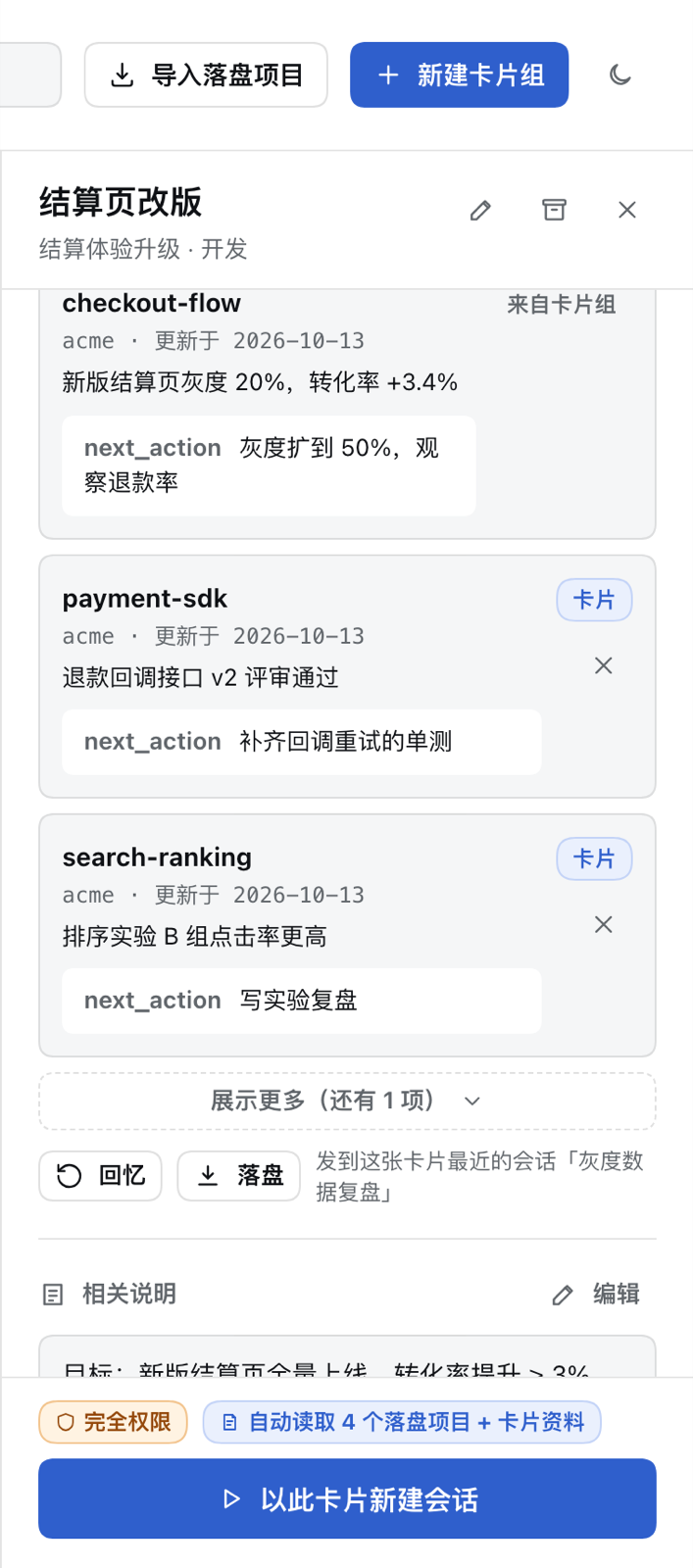
- **New session from this card**: the button switches to "正在新建会话…" (creating) and locks at once, a placeholder row appears in the sidebar, and the finished row reads "card title · not started". Sessions default to full access and are titled after the card.
- **This card's sessions on top**: active first, archived after, each by update time; open, archive (confirm "stop and archive" when running, undoable), restore to the original place, unlink; sessions with no conversation yet can be deleted (needs [dsh-manage-sessions](https://github.com/hoyyang/dsh-manage-sessions)).
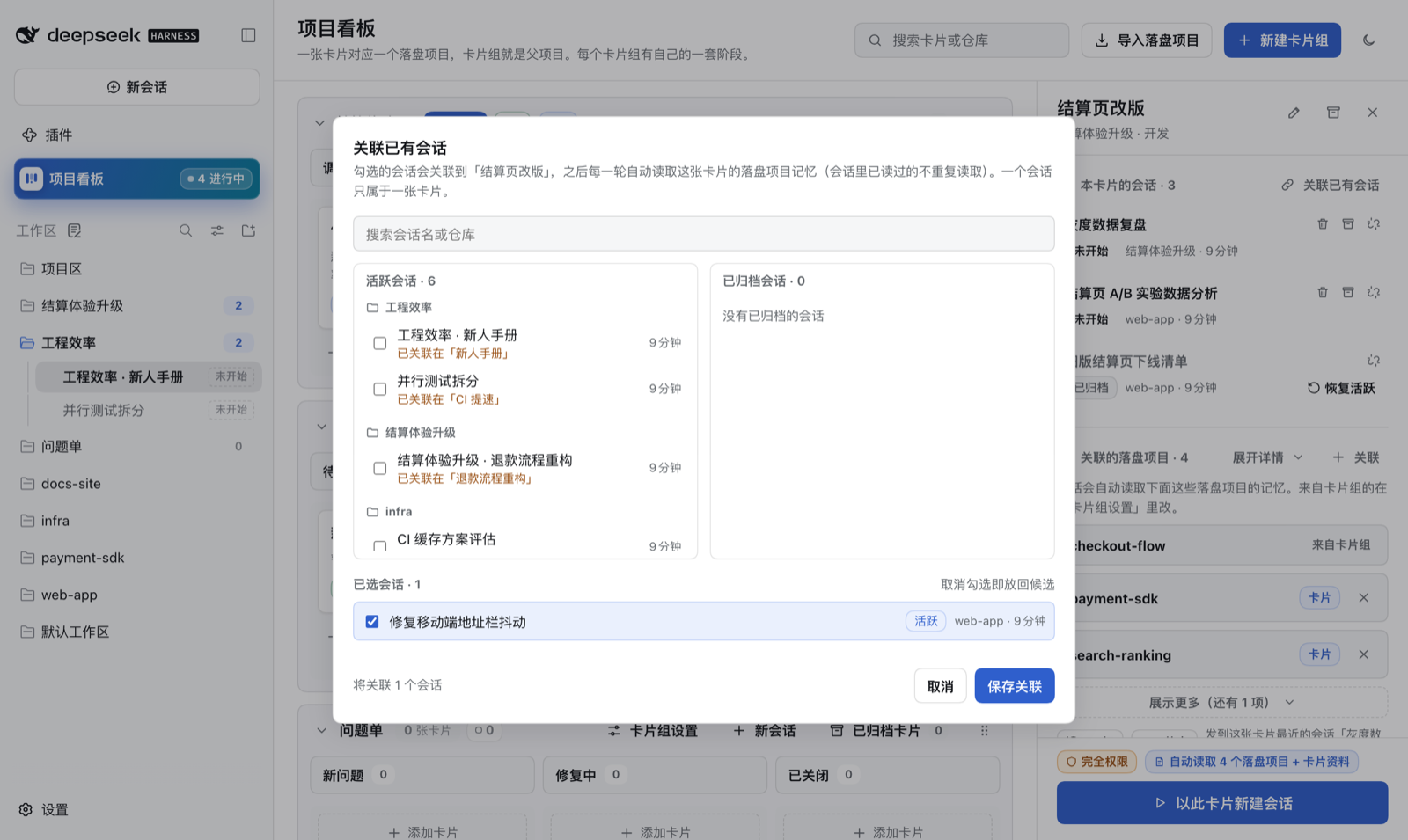
- **Link existing sessions**: search by name or repo, active / archived columns grouped by repo, save in one go; a session belongs to one card, forks follow their source.
- **Linked landfill projects**: titles by default, "展开详情" expands all (project, date, status, next_action); "回忆" / "落盘" buttons send to the card's latest session.
- **Notes / links / files**: unlimited notes with clickable URLs and folding; links with text, type (global, add/rename/reorder in "管理类型") and URL, bulk add, always-visible edit / delete, drag to reorder, copy; files via the system picker or "paste paths" (each line checked: exists / folder / missing / already linked).
- **Stages and subtasks**: click the stepper to move stage; tick, delete, add subtasks.

### Repos
- **Shared repos + card repos**: repos in group settings are shared by cards (copied into new cards); cards can add their own. Candidates come from dsh workspaces and repos added anywhere, or "选择文件夹…".
- **One path in project sessions**: repos are symlinked under `repos//` in the session directory with an AGENTS.md listing them; reading through that path loads the repo's own AGENTS.md / CLAUDE.md. Same name, different path becomes "name-2".

### Sidebar "项目区" (project hub)
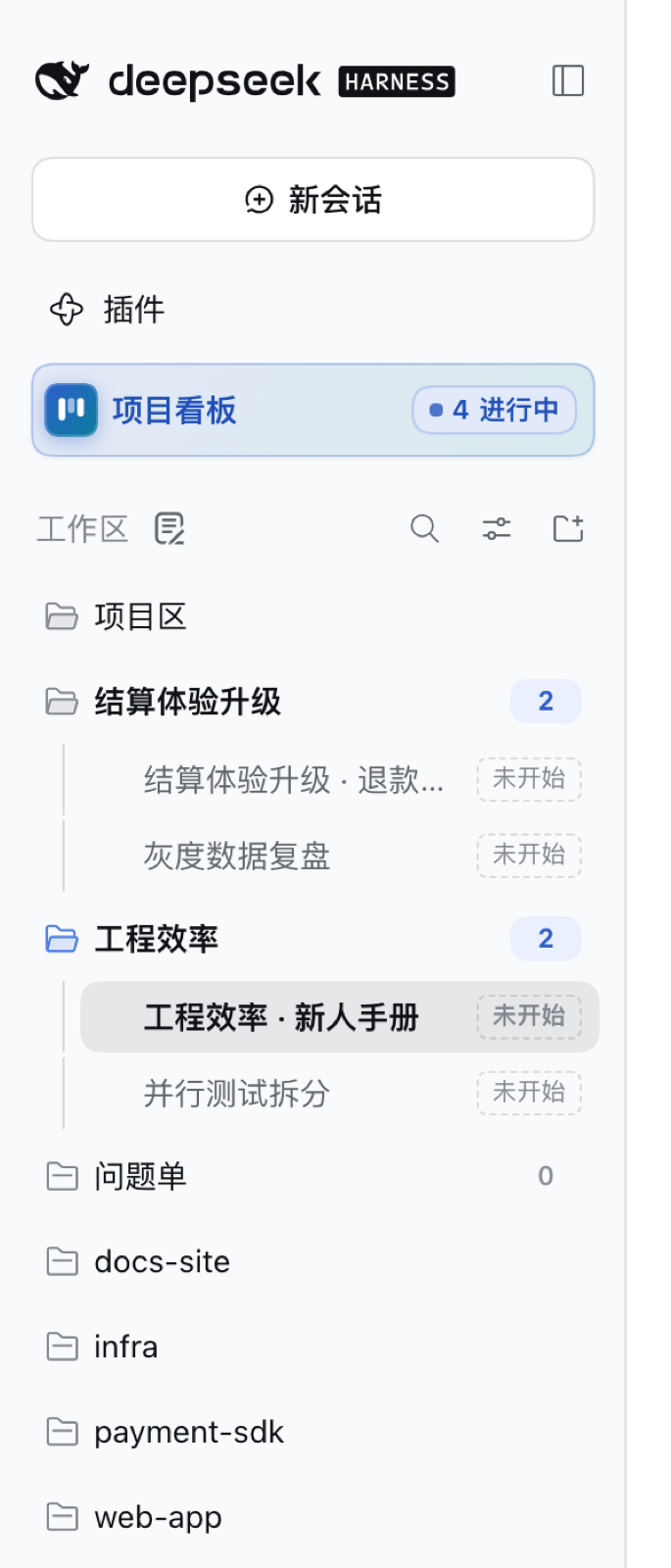
- **Project hub workspace** pinned on top, each group a child workspace (nested with "group by workspace tree"); project sessions live here.
- **Active counts + nesting**: each group row shows unarchived sessions (grey at 0, bumps on change); sessions are indented behind a guide line.
- **Blank sessions show up too**: dsh hides sessions with no conversation; the plugin draws them as "card title · not started" rows (including the one you have open), deletable in place.
- **Auto-expand from the board**: opening or creating a session from the board expands its collapsed group and scrolls to it.
- **"+" picks a card first**: the hub or group "+" opens a card picker (stage, memory count, session count), then a new or existing session.
- **"项目看板" button** next to "Plugins", with an "N in progress" badge (unarchived cards with at least one unarchived session).

**How it differs**: most board plugins track to-dos per workspace. This one only does the chain "project → landfill memory → repos → sessions", and builds reading, writing, spec, migration and merging of that memory into the plugin: a card is a project, and its sessions inherit the complete, latest project context.
## Quick start (30 seconds)
1. Click "项目看板" under "Plugins" in the sidebar, then "新建卡片组" (new group), type a name, Enter.
2. Click "添加卡片" (add card) at the bottom of any stage, type a title, Enter.
3. Open group settings, add repos under "卡片共用仓库"; set the "落盘文件夹" (landfill folder) if you like.
4. In card detail click "以此卡片新建会话": the session appears under this group in the project hub, with card details attached.
5. After some work, say "落盘项目" (or click "新建并落盘" in the session card); the next session from this card has the memory automatically.
| Action | Result |
|---|---|
| New session from card | Button shows "creating" immediately; sidebar row "card title · not started"; group count +1 |
| Say "落盘项目" in the session | STATE written into the group's landfill folder with the card archive block, read back, card says "done" |
| Click "Stop" mid-persist | Card shows "stopped, nothing written" with retry / dismiss |
| Type an existing project's name in the card | Button becomes "link and persist", tag says "exists", rename suggested |
| Persist a project in an old location | Whole folder moves to the group's folder, "migrated" card appears, undoable |
| Another CLI changes the STATE | Next step receives the new full text, marked with the replaced version and writer |
| Draft drops a commit hash from the old STATE | Rejected (`DROPPED_ANCHORS`) naming what is missing |
| Drag a card to another stage | Card moves; `events.jsonl` gets a move record |
Let the agent drive the board (without `card` it acts on the session's card):
```text
> Move this card to "验收" and add a subtask "补回归用例"
phase_move { "status": "verify" } → {"ok":true,"event":{"kind":"move","from":"开发","to":"验收"}}
task_manage { "op": "add", "text": "补回归用例" } → {"ok":true,"tasks":[…,{"text":"补回归用例","done":false}]}
```
Read and write landfill projects (the `landfill` tool the plugin registers; the model calls it per the bundled skill):
```text
landfill { "op": "recall" } → STATE + [必读] in chunks until complete:true
landfill { "op": "persist", "content": "…", "drop": ["a1b2c3d"] } → {"key":"checkout/checkout-flow","verified":true,"migrated":{…}}
```
## Use cases
- **Long-running projects**: persist today, open a new session from the card tomorrow; status, decisions and next_action are already in context.
- **One memory across CLIs**: persist in DSH, Codex / Claude Code read the same STATE in `~/.ai`; when they write, DSH picks up the new version on the next step.
- **One feature across several repos**: mount frontend, SDK and infra repos on a group; read and write them via `repos//` in project sessions.
- **Clean up scattered memory**: merge duplicates into one with old names as aliases; misplaced projects move into the group's folder on the next persist.
- **Gather scattered sessions**: link earlier discussions to the same card.
- **Start the day with the big picture**: card and active-session counts per group, session badges per card.
- **Hand-offs**: a card's landfill projects, notes, links, files and sessions are the hand-off list.
- **Let the agent advance work**: the agent moves stages and ticks subtasks; every change is audited.
- **One card per ticket**: title the card with the ticket ID and the landfill project gets it as an alias; "recall + ticket ID" in any session finds the analysis again.
- **Spec upgrades without manual migration**: STATEs written under older specs need no bulk cleanup; whichever project is persisted next moves into the group folder and gets the missing spec items.
## What you'll see
- Sessions from a card carry the STATE and `[必读]` full text from the first step; the system prompt has one "project memory" section (card archive + landfill index).
- After persisting, STATE lives at `~/.ai/projects//memory/designs//STATE.md` with the card archive block, file index and alias line.
- The session card shows each persist round's outcome live; same-name candidates appear as you type.
- Each group row under the project hub shows its active-session count; new blank sessions show the card title.
- Every move, link, mount and migration is appended to `events.jsonl` (who, when, what).
- After a merge, the merged folder holds STATE.md, notes/ (key points from each source) and evidence/; the sources sit in each project's `inbox/retired/`.
- After a migration, the old folder sits in `inbox/retired/





