<p align="center"><a href="README.md">中文</a> · <strong>English</strong></p>

<div align="center">
  <img src="https://raw.githubusercontent.com/OMSociety/dsh-ppt-maker/main/docs/logo.png" alt="PPT Maker" width="160">
  <h1>PPT Maker (dsh-ppt-maker)</h1>
  <p>A DeepSeek Harness plugin for creating, editing, reverse-engineering, checking and exporting presentations — a local, pure-TypeScript engine builds the final .pptx directly.</p>
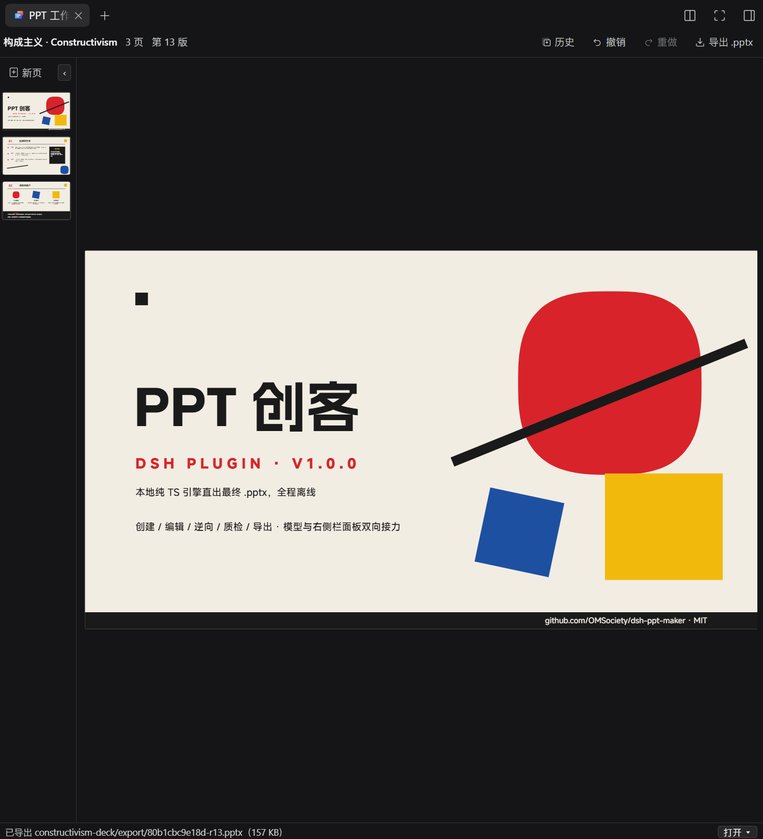
  <p>The model works through eleven <code>ppt_*</code> tools while you follow along and edit in the right-hand workbench — double-click to edit text in place, drag to reorder pages, and open the exported file with one click.</p>

  <p>
    <a href="https://www.npmjs.com/package/dsh-ppt-maker"><img src="https://img.shields.io/npm/v/dsh-ppt-maker?color=4f6ef7&label=version" alt="Version"></a>
    <a href="https://github.com/deepseek-ai/dsh"><img src="https://img.shields.io/badge/DSH-%3E%3D0.2.0--rc.2_%3C0.3.0--0-4f6ef7" alt="DSH"></a>
    <a href="LICENSE"><img src="https://img.shields.io/github/license/OMSociety/dsh-ppt-maker?color=4f6ef7" alt="License"></a>
    <a href="https://github.com/OMSociety/dsh-ppt-maker/stargazers"><img src="https://img.shields.io/github/stars/OMSociety/dsh-ppt-maker?color=4f6ef7" alt="Stars"></a>
    <a href="https://github.com/OMSociety/dsh-ppt-maker/issues"><img src="https://img.shields.io/github/issues/OMSociety/dsh-ppt-maker?color=4f6ef7" alt="Issues"></a>
  </p>
</div>

## What This Is

**PPT Maker** is a presentation toolchain that lives inside DeepSeek Harness: the model creates, edits, reverse-engineers, checks and exports decks through eleven `ppt_*` tools, while you work alongside it in the right-hand workbench — panel and model read and write the same PPTD project.

The intermediate format is **PPTD**, a self-defined contract in YAML (`deck.pptd` + `pages/*.page`): self-contained per page and WYSIWYG, with two dialects (generate / reverse superset). The full spec is in [`docs/pptd-spec.md`](docs/pptd-spec.md).

## Key Features

| Feature | Description |
|---|---|
| **Eleven model tools** | Registered with raw JSON-Schema: create / edit / undo / redo / render / check / export / import / open / surgical patch. The engine `@office-kit/pptx@0.24.0` builds the final .pptx locally in pure TypeScript — no Python in the main pipeline |
| **Two-way workflow** | `ppt_import` reverse-engineers an existing .pptx into a PPTD project (charts / SmartArt / OLE become gray placeholders that are re-inserted); `ppt_patch` performs surgical edits on a .pptx (text / image / page order) without a PPTD round-trip, and library-level L1 passthrough preserves parts the library doesn't model |
| **PPTD contract** | A YAML DSL (`deck.pptd` + `pages/*.page`), self-contained per page and WYSIWYG; generate / reverse dialects, editable by hand and by machine |
| **Right-hand workbench** | A custom three-pane editor (thumbnails + canvas + inspector): double-click to edit text in place, drag to reorder pages, one-click image replacement, undo / redo, version history with live snapshot preview and one-click restore, 409 conflict protection and a "modified externally" banner |
| **Layered QA** | Rule layer (text overflow / out-of-bounds / overlap / contrast / structure / missing fonts) blocks export; AI layer on demand (`ppt_check ai:true`) sends rendered page PNGs to a multimodal model to review color and layout — suggestions only, never blocking; results are recorded in `manifest.qaReport`, traceable per revision |
| **Font embedding** | Export embeds the fonts actually used (EOT-wrapped `fntdata` + `embeddedFontLst`), so machines without the fonts installed render without falling back; subset / whole-font / off tiers (`export.fontEmbed`), with a per-font fsType license gate |
| **Transitions & animations** | Page-level transitions (fade by default / none / auto curated rotation) and 95 element animation presets, written natively by the local pipeline |
| **Revisions & snapshots** | Single-writer manifest + append-only snapshots (the cursor model makes undo/redo natural) + baseRevision optimistic locking (409) |
| **Design system** | Five preset theme families — academic / consulting / finance / promotion / work; picking a theme keeps the whole deck's layout, color and hierarchy consistent |
| **Locally rendered preview** | The canvas and thumbnails render PPTD pages directly to the DOM (vector, instant, same coordinate system as the selection boxes); PNG previews for export and QA rasterize the final pptx via `@deepseek-ai/libreoffice-kit`, disk-cached per (page, revision) |

## In Action


<table>
<tr>
<td width="66%" align="center"><img src="https://raw.githubusercontent.com/OMSociety/dsh-ppt-maker/main/docs/workbench.jpg" alt="The workbench in action: thumbnail strip on the left, canvas in the middle, inspector on the right" width="560"></td>
<td width="34%" align="center"><a href="https://raw.githubusercontent.com/OMSociety/dsh-ppt-maker/main/docs/panel-empty.jpg"><img src="https://raw.githubusercontent.com/OMSociety/dsh-ppt-maker/main/docs/panel-empty.jpg" alt="The empty panel before any deck is opened" width="240"></a></td>
</tr>
<tr>
<td align="center">The workbench in action: thumbnail strip on the left, canvas in the middle, inspector on the right; after a successful export the footer status bar offers an "Open with" menu (system associated app / show in folder)</td>
<td align="center">The empty panel before any deck is opened; after the model calls <code>ppt_open</code> / <code>ppt_import</code>, the panel focuses the corresponding project automatically</td>
</tr>
</table>

## Installation

**Install from npm**

```powershell
# Stop the running DSH first (a running service locks dependencies; start it again afterwards)
dsh plugin --profile <profile> add "dsh-ppt-maker"
```

> **Tip:** after installing, refresh the browser page and open "PPT Maker" from the right-hand rail — restarting the host alone is not enough, the client bundle is fetched when the page loads.

> **Dependencies:** the main pipeline is pure TypeScript with no Python; `@deepseek-ai/libreoffice-kit@0.1.2`, used by `ppt_render` and QA, is a hard dependency (about 183MB per platform, installed with the package). The Python scripts under `skills/ppt-maker/scripts/` are an escape hatch only — see the "Python escape hatch" section in SKILL.md.

**Getting started**

1. Say "make me a presentation" in the chat (or explicitly invoke the `ppt-maker` skill) → the eleven `ppt_*` tools come in
2. The model creates a project with `ppt_create`, or reverse-engineers an existing .pptx into a project with `ppt_import` → the workbench pops open in the right-hand rail
3. Double-click to edit text in the panel, drag to reorder pages, click "Export .pptx" → the file lands in the project directory under `export/` (file name includes the version number)
4. Have the model run `ppt_check` for QA and `ppt_render` for per-page PNGs; if the model edits the same project in another session, the panel shows a 409 conflict banner instead of overwriting your edits
5. Click "Open" in the footer status bar → open the result with the system associated app, or choose "Show in folder"

## Model Tools

| Tool | What it does | Key parameters |
|---|---|---|
| `ppt_create` | Create a new PPTD project | `dir` · `title` · `size` · `designSystem` · `theme` |
| `ppt_themes` | List design systems and themes (five preset families) | `designSystem` (optional) |
| `ppt_edit` | Atomic editing: an ops array of page/element additions, removals and updates, with baseRevision optimistic locking | `dir` · `ops` · `baseRevision` |
| `ppt_undo` / `ppt_redo` | Undo / redo (cursor moves; consecutive edits within the merge window count as one step) | `dir` · `steps` (1–20, default 1) |
| `ppt_render` | Render per-page PNG previews (rasterization of the final pptx) | `dir` · `pages` · `dpi` (default 96) |
| `ppt_check` | Rule-based QA (default) + AI visual QA (suggestions only, never blocking) | `dir` · `pages` · `ai` |
| `ppt_export` | Export .pptx (rule blockers stop it; `skipCheck` bypasses) | `dir` · `out` · `skipCheck` |
| `ppt_import` | .pptx → full PPTD reverse engineering (dropped / degraded two-level report + placeholder re-insertion) | `source` · `targetDir` · `mode` (`full` / `surgical`) · `open` |
| `ppt_open` | Have the right-hand workbench open a project | `dir` |
| `ppt_patch` | Surgical edits on a .pptx: set_text / replace_image / move_page | `source` · `ops` · `out` |

The model's standard sequence is **`ppt_create` (or `ppt_import`) → `ppt_edit` iterations → `ppt_check` → `ppt_export`**; the `ppt-maker` skill (registered with the plugin) documents the design-system selection and editing discipline, which the model reads on demand. For light edits to an existing .pptx (text / image / page order), use `ppt_patch` — no PPTD round-trip involved.

> **Tip:** when export is blocked by a rule blocker, fix the `issues` returned by `ppt_check` one by one, or force it with `skipCheck:true` (not recommended). If `ppt_check ai:true` returns `ai.performed:false` plus a list of PNG paths, the current route's model doesn't accept image input — the main model can review those PNGs itself with `read_image`.

## The Workbench

"PPT Maker" in the right-hand rail is a three-pane editor: thumbnail strip + canvas + inspector.

- **The canvas is the DOM**: the canvas and thumbnails render the PPTD page AST directly to the DOM (`client/components/PptdView.tsx`) — instant, no libreoffice cold start; elements, selection boxes and the in-place editor share one coordinate system and stay aligned. Elements that can't render yet (table / chart / icon / SmartArt) show gray placeholders.
- **Collapsible side panes**: the left page list is expanded by default and can be collapsed; the right inspector only expands when an element is selected. Collapsed panes leave only an edge handle.
- **Edit in place**: double-click to edit text / drag to reorder pages / duplicate, delete and add pages / replace images / "Export .pptx" lands in the project directory under `export/` (file name includes the version number).
- **Version history**: the "History" drawer renders any snapshot live on the canvas and restores it with one click.
- **Footer status bar**: "Saving…" and operation feedback (export destination, failure reasons) live in a permanent bottom bar that doesn't eat canvas height.
- **Conflict protection**: every write carries `baseRevision`; if the model edits the same project in another session the server returns 409 — the panel only shows a conflict banner and never overwrites your edits; the "modified externally" banner works the same way.
- **Polling and focus**: state is polled every 3s to watch manifest.revision; after the model finishes `ppt_open` / `ppt_import`, the panel focuses the corresponding project automatically.

## Development

```powershell
npm install          # install dependencies
npm test             # full regression suite (set a 12GB heap and run serially, see below)
npm run typecheck    # two tsconfigs: src/ and client/
npm run build        # rebuild lib/index.js and lib/client.js (required after touching src/ or client/; commit the artifacts)
npm run check:build  # verify lib/ matches git
npm run check:mounts # mount declaration check
```

> **Tip:** the full test suite needs a large heap and serial execution (the default heap runs out of memory): set `$env:NODE_OPTIONS='--max-old-space-size=12288'` first, then `npm test -- --no-file-parallelism`. The full acceptance criteria and the don'ts are in [`AGENTS.md`](AGENTS.md).

Directories and where to make changes:

```text
src/index.ts       host entry: registers the skill + lazily expands the 11 tools + webServer prefix routes
src/core/          engine: pptd contract / officekit builder / project store & snapshots / reverse / QA / font embedding
src/tools/         raw JSON-Schema contracts of the 11 tools
client/            right-hand workbench source (TSX → esbuild bundles lib/client.js)
plugin/            loading shell + host routes (plain JS, core injected via deps.core)
skills/ppt-maker/  the ppt-maker skill: design-system reference and generation discipline (the model reads it on demand)
tests/             host contract / tool e2e / reverse / fonts / bundle guards (corpus .pptx not committed)
docs/              PPTD spec / decision log / fallback font table
lib/               build artifacts (committed; dsh plugin add installs without building)
```

## Changelog

See [CHANGELOG.md](CHANGELOG.md).

## Support & Acknowledgements

- If this plugin helps you, a star is much appreciated; for questions and suggestions please open an [Issue](https://github.com/OMSociety/dsh-ppt-maker/issues) or a [Pull Request](https://github.com/OMSociety/dsh-ppt-maker/pulls). Development conventions are in [`AGENTS.md`](AGENTS.md).
- Built on the [DeepSeek Harness](https://github.com/deepseek-ai/dsh) plugin / skill system.
- Engine [@office-kit/pptx](https://www.npmjs.com/package/@office-kit/pptx) (pinned at 0.24.0) and preview [@office-kit/pptx-preview](https://www.npmjs.com/package/@office-kit/pptx-preview); rasterization via [@deepseek-ai/libreoffice-kit](https://www.npmjs.com/package/@deepseek-ai/libreoffice-kit) (MPL-2.0 — its API / CLI is invoked only, no source linking or modification).

## License & Author

[MIT](LICENSE). © 2026 [OMSociety](https://github.com/OMSociety).