
# dsh-plugin-workbench




[中文](./README.md) | **English**
> ## ⛔ This plugin is no longer maintained (2026-09-11)
>
> **As of DSH `0.1.5`, the official build ships a workspace file tree and document
> preview out of the box** (built-in bundles
> `@deepseek-ai/dsh-client-ui-sidebar-files`: right-sidebar file tree with lazy
> directory listing; `@deepseek-ai/dsh-client-ui-sidebar-documentpreview`:
> Markdown / highlighted code / image / PDF / HTML / plain-text previews), which
> covers this plugin's core capabilities as a first-party implementation — no
> layout patch, no reliance on unofficial host APIs, upgraded automatically with
> dsh. This plugin is therefore **discontinued**: no further maintenance or
> releases. Existing users are advised to uninstall it and use the built-in
> features:
>
> ```powershell
> dsh plugin --profile web remove dsh-plugin-workbench
> # Optional: restore the layout bundle to the pristine official version
> node node_modules/dsh-plugin-workbench/scripts/patch-layout.mjs --restore
> # Restart dsh web to take effect
> ```
>
> Published versions remain installable (tested against DSH `0.1.5-rc.1`), but
> bugs will not be fixed and newer dsh versions will not be adapted. Thanks to
> every user and every star ⭐.
**A VS Code-style workbench that edits files directly** — not a read-only preview: file tree + editable code preview
(syntax highlighting, tabs, line-number gutter) + right-click file operations (new / rename / delete / copy / cut /
paste / open in system / reveal in file explorer) + inline image preview, with state saved independently per workspace.
Once installed, the DSH web GUI becomes a lightweight code editor.
> ✅ **Works out of the box**: since 0.0.9 the layout patch is fully automated — it takes effect right after install and
> restart; if a DSH upgrade overwrites the bundle, the plugin patches it back automatically, with no manual steps
> required (manual action is only needed if the anchors break, see the "Configuration" section).
> Since 0.0.15 both build flavors — the npm build and the DSH Desktop bundled build — are detected automatically, so
> **DSH Desktop works out of the box** too.
What you'll see after installing:
- A **file tree sidebar** on the left (lazy loading + 2-second auto-refresh, expansion state kept per workspace);
- `@relative-path` mentions in messages turn into **clickable links** that open a preview in the workbench;
- **Drag files from the left panel into the chat area** and the path is inserted into the input box automatically.
## Screenshot
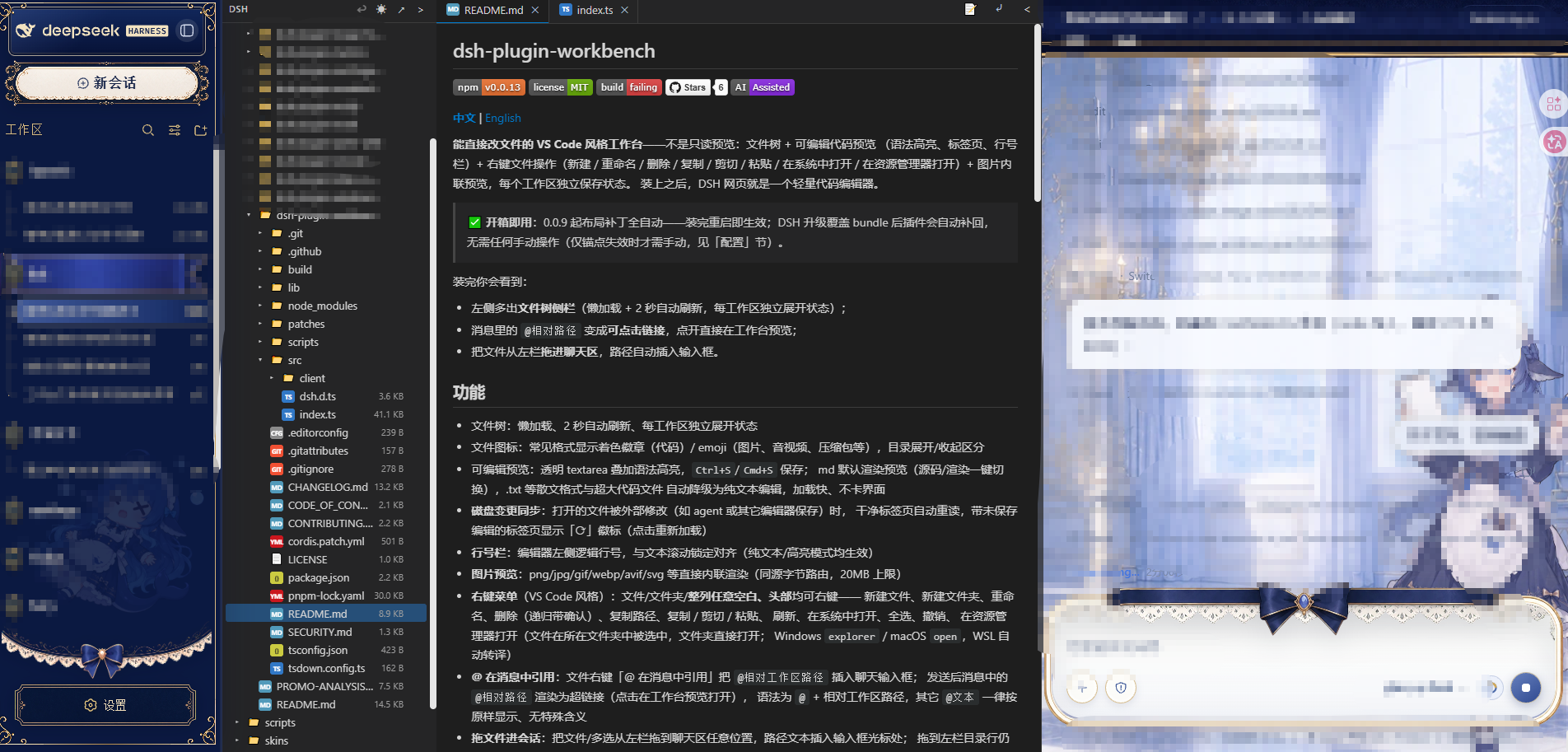
> Real Web GUI screenshot.
## Features
- File tree: lazy loading, 2-second auto-refresh, expansion state kept per workspace
- File icons: colored badges for common code formats / emoji for images, audio & video, archives, etc.; expanded and
collapsed directories are visually distinguished
- Editable preview: transparent textarea layered over syntax highlighting, save with `Ctrl+S`/`Cmd+S`;
Markdown renders a preview by default (one-click switch between source and rendered view); prose formats like
.txt and very large code files automatically fall back to plain-text editing — fast to load, no UI jank
- **Disk change sync**: when an open file is modified externally (e.g. saved by an agent or another editor),
clean tabs reload automatically, while tabs with unsaved edits show a "⟳" badge (click to reload); if a watched
directory is deleted or access-restricted, the watcher degrades gracefully (state cleaned up, retry allowed) and
never crashes the host process
- **Line-number gutter**: logical line numbers along the editor's left edge, locked in alignment with text scrolling
(works in both plain-text and highlighted modes)
- **Image preview**: png/jpg/gif/webp/avif/svg and more render inline directly (same-origin byte route, 20MB limit)
- **Context menu** (VS Code style): right-click on files, folders, **any blank space in the panel, or the panel
header** — new file, new folder, rename, delete (recursive, with confirmation), copy path, copy / cut / paste,
refresh, open in system, select all, undo,
reveal in file explorer (a file is revealed selected in its folder, a folder opens directly;
Windows `explorer` / macOS `open`, automatically translated under WSL)
- **Reference files with @ in messages**: the file context-menu item "Reference with @" inserts
`@workspace-relative-path` into the chat input box; once sent, `@relative-path` mentions in the message render as
hyperlinks (click to open a preview in the workbench). The syntax is `@` + a workspace-relative path; any other
`@text` is always displayed as-is and has no special meaning
- **Drag files into the conversation**: drag a file or a multi-selection from the left panel anywhere into the chat
area and the path text is inserted at the input box cursor; dropping onto a directory row in the left panel is
still a move operation
- **Click anywhere to deselect**: clicking anywhere outside the tree (conversation / other panels / left panel
header) clears the selection
- **Copy / cut / paste**: Ctrl/Cmd+C/X/V (or the context menu), with cross-workspace paste support;
when the target already contains an item with the same name you are asked whether to overwrite, just like the
system file manager; the clipboard is cleared automatically after a successful cut (move)
- **Batch operations**: Ctrl/Cmd+click and Ctrl+A multi-select, delete selected items in bulk via the context menu or
the Delete key, drag the whole group to move it
- **Undoable operations**: the "↩" button at the top right or Ctrl+Z undoes the most recent operation (kept per
workspace, up to 30 entries): copy (removes the copy), cut/drag move (moves back to the original place), rename,
create, delete; deletion is an undoable delete (files are moved instantly into a hidden `.dsh-trash`, no bytes
copied)
- **Reveal in file explorer**: a context-menu item (equivalent to VS Code's Reveal in File Explorer) that locates the
file/folder in the system file manager (Windows Explorer, macOS Finder, etc.), executed via the `reveal` endpoint of
the loopback RPC
- Word wrap: one-click soft-wrap toggle in the tab bar (wrapping at the display layer only, file content untouched) or
horizontal scrolling for long lines; the preference persists
- Tabs: multiple files, drag to reorder, collapse/pop out; one-click light/dark theme switching
- Syntax highlighting: highlight.js (JS/TS, Python, JSON, HTML, CSS, Shell, and more;
Markdown renders a preview by default, switchable to source)
- Markdown rendering: markdown-it (raw HTML is always escaped, never executed); relative-path images are displayed
inline via the same-origin route `/dsh-plugin-files/raw/`
- Disk changes: the host watches open files with `fs.watch` (watching the parent directory, surviving atomic renames);
changes are pushed over SSE at `/dsh-plugin-files/events`, and clean tabs sync automatically
## Configuration
No environment variables or config files needed; the layout patch is fully automated (the plugin automatically detects
and re-runs `scripts/patch-layout.mjs` at startup — idempotent, non-blocking; since 0.0.15 both build flavors of the
same version are detected automatically — the npm build and the DSH Desktop bundled build; anchors are byte-coupled to
the compiled output, so a DSH upgrade that breaks them requires anchor updates):
- **Behavior preferences** (word wrap, light/dark theme, tab layout, file tree expansion state) persist per workspace
and need no manual configuration;
- **File operation channel**: via the loopback RPC `/dsh-plugin-files`; write operations are executed explicitly under
`danger-full-access`, with no external configuration options.
## Installation
> Layout-patch anchors are byte-coupled to the DSH compiled output; a DSH upgrade that breaks them requires anchor
> updates. Since 0.0.15 both build flavors (npm / DSH Desktop) are detected automatically and the patch re-applies at
> startup (see the "Configuration" section for details).
```powershell
# npm (recommended)
dsh plugin --profile web add dsh-plugin-workbench
# or GitHub
dsh plugin --profile web add github:Pasumao/dsh-plugin-workbench
```
Install from source (local development / debugging):
```bash
git clone https://github.com/Pasumao/dsh-plugin-workbench.git
cd dsh-plugin-workbench
pnpm install
pnpm run build # produces lib/index.js and lib/client.js
# mount into the profile via link:
```
After installing, apply the layout patch and restart:
```powershell
node node_modules/dsh-plugin-workbench/scripts/patch-layout.mjs
# restart dsh web
```
> Since 0.0.9 the plugin automatically detects and re-applies the layout patch at startup — no need to run it manually
> after DSH upgrades; run the command above manually only if the automatic re-patching fails (broken anchors).
## Development
```powershell
pnpm install
pnpm run build # produces lib/index.js (host) and lib/client.js (browser)
pnpm run typecheck
```
## Uninstall
```powershell
dsh plugin --profile web remove dsh-plugin-workbench
# optional but recommended: restore the layout bundle to the stock dsh file
node node_modules/dsh-plugin-workbench/scripts/patch-layout.mjs --restore
# restart dsh web
```
> Skipping `--restore` is fine too: since 0.0.18 the layout patch is adaptive —
> the explorer column auto-collapses (width 0) whenever no plugin contributes to
> the `explorer` / `explorer.preview` slots, so an uninstall leaves no empty
> column behind. `--restore` simply returns the bundle to its pristine,
> unpatched state. The script has two safety guards: it refuses to restore when
> the target already looks like a newer pristine bundle (just-upgraded dsh) or
> when the backup belongs to an older dsh version (`--force` overrides).
## Notes
- The `/dsh-plugin-files` RPC channel is loopback-only; write operations are executed explicitly under
`danger-full-access`; the context menu's create/rename/delete go through the same channel too (loopback trust,
same as saving in the editor); all HTTP routes mounted by this plugin (RPC / raw images / SSE) uniformly pass the
connection-layer auth fence (`connection.requestRejection`, Host/Origin + browser auth checks)
- Image preview goes through the same-origin route `/dsh-plugin-files/raw/`: it only responds to image
extensions, resolves the path via `ctx.fs.resolve → stat` first (sandbox-consistent path resolution) before reading
bytes, with a 20MB limit
- DSH upgrades overwrite the layout bundle; since 0.0.9 the plugin detects and re-applies the patch automatically at
startup, so there is no need to re-run it manually; if the anchors break, `scripts/patch-layout.mjs` must be updated
(since 0.0.15 the anchor table carries two build variants auto-detected per target — npm and desktop-ci, the latter
stored in `scripts/layout-anchors.desktop-ci.json`)
- This repository does not include DSH build artifacts
## Contributing
See [CONTRIBUTING](./CONTRIBUTING.md) and [CODE_OF_CONDUCT](./CODE_OF_CONDUCT.md); the changelog is in
[CHANGELOG](./CHANGELOG.md).
## Compatibility
- Tested on DSH `0.1.2-rc.1` (since 0.0.16 the layout patch anchors are adapted to that
version: the detailsCol border style changed from `1px/--dsw-alias-border-l2` to
`.5px/--dsw-alias-border-l3`, and the DetailsColumn children gained a `SessionProvider`
wrapper); for 0.1.1-rc.2 and earlier, use the 0.0.15 anchor table.
- Since 0.0.9 the plugin re-applies the layout patch automatically at startup, so DSH
upgrades normally need no manual action; on anchor mismatch the startup log shows
`ui-layout patch exited 1` — upgrading this plugin fixes it.
## Related plugins
This plugin is part of **Pasumao's dsh plugin ecosystem**; the published plugins in the same series can be used
alongside it:
| Plugin (npm) | GitHub | Description |
|---|---|---|
| [dsh-notify](https://www.npmjs.com/package/dsh-notify) | [GitHub repo](https://github.com/Pasumao/dsh-plugin-notify) | Native Windows notifications + system tray |
| [dsh-plugin-choice-refresh](https://www.npmjs.com/package/dsh-plugin-choice-refresh) | [GitHub repo](https://github.com/Pasumao/dsh-plugin-choice-refresh) | Choice enhancements: regenerate options / more options |
| [dsh-plugin-dev-kb](https://www.npmjs.com/package/dsh-plugin-dev-kb) | [GitHub repo](https://github.com/Pasumao/dsh-plugin-dev-kb) | Plugin development knowledge base (full mirror of the official docs + skill) |
| [dsh-plugin-image-tools](https://www.npmjs.com/package/dsh-plugin-image-tools) | [GitHub repo](https://github.com/Pasumao/dsh-plugin-image-tools) | Image choice cards + inline images in replies + image intake for text-only models |
| [dsh-plugin-table-zoom](https://www.npmjs.com/package/dsh-plugin-table-zoom) | [GitHub repo](https://github.com/Pasumao/dsh-plugin-table-zoom) | Floating window for long chat tables + one-click Markdown copy |
| [dsh-plugin-windows-guard](https://www.npmjs.com/package/dsh-plugin-windows-guard) | [GitHub repo](https://github.com/Pasumao/dsh-plugin-windows-guard) | Windows environment safeguards: guideline skills + mojibake detection / dangerous-write interception / encoding diagnosis & repair |
| [dsh-plugin-context-trim](https://www.npmjs.com/package/dsh-plugin-context-trim) | [GitHub repo](https://github.com/Pasumao/dsh-plugin-context-trim) | Per-session injection gate: trim skills / tools / prompt sections per session |
| [dsh-plugin-workbench](https://www.npmjs.com/package/dsh-plugin-workbench) | [GitHub repo](https://github.com/Pasumao/dsh-plugin-workbench) | This plugin: VS Code-style workspace file tree + editable preview, turning the web page into a lightweight code editor |
> For the remaining plugins in the series, see [Pasumao · dsh plugins](https://github.com/Pasumao); if you find them useful, a ⭐ on GitHub is always welcome.
## AI generation statement
Part of the source code and documentation was generated with AI assistance (DeepSeek Harness) and has been
human-reviewed and verified on a live system; permission-related logic has been re-reviewed against the principle of
least privilege.
## License
[MIT](./LICENSE)