


<p align="center">
  <img src="docs/images/banner-en.png" alt="Tool Management — one click swaps the entire environment" width="100%">
</p>

<p align="center">
  <a href="https://www.npmjs.com/package/dsh-plugin-tool-management"><img src="https://img.shields.io/npm/v/dsh-plugin-tool-management?logo=npm&color=cb3837&style=flat-square" alt="npm"></a>
  <a href="LICENSE"><img src="https://img.shields.io/badge/license-MIT-blue?style=flat-square" alt="MIT"></a>
  <img src="https://img.shields.io/badge/DSH-0.2.2-4f7cf7?style=flat-square" alt="DSH 0.2.2">
  <a href="https://github.com/ouli-1242/dsh-plugin-tool-management"><img src="https://img.shields.io/badge/GitHub-ouli--1242-181717?logo=github&style=flat-square" alt="GitHub"></a>
</p>

<p align="center">
  <a href="https://dsh.market/"><img src="https://raw.githubusercontent.com/2BingLing/dsh-market/master/assets/readme/badge-listed-en.svg" height="20" alt="DSH Market"></a>
  <a href="https://awesome-dsh-plugin.com"><img src="https://img.shields.io/badge/awesome--dsh--plugin-listed-3fb950?style=flat-square" alt="awesome-dsh-plugin"></a>
  <a href="https://dshfind.com/en/plugins/ouli-1242/dsh-plugin-tool-management"><img src="https://dshfind.com/api/badge/ouli-1242/dsh-plugin-tool-management?lang=en" alt="dshfind"></a>
  <a href="https://github.com/0xsline/awesome-deepseek-harness"><img src="https://img.shields.io/badge/0xsline-listed-3fb950?style=flat-square" alt="0xsline"></a>
</p>

<p align="center">
  <a href="README.md">简体中文</a> · <b>English</b> · <a href="CHANGELOG.md">Changelog</a> · <a href="docs/UPDATE.md">Release overview</a>
</p>

MCP servers, skills, subagents, prompts, memories and archived sessions for DeepSeek Harness — all in one panel. Bundle them into a **scene**, swap the whole environment with one click, and roll back to the pre-entry snapshot when you leave.

```sh
dsh plugin --profile web add dsh-plugin-tool-management@latest      # web
dsh plugin --profile desktop add dsh-plugin-tool-management@latest  # desktop
```

Hard-refresh the browser after installing for web (Cmd/Ctrl+Shift+R), or restart the desktop app — then open **Settings → Tools Management**. For desktop, open the app once and quit it completely before running the command. An older version usually means registry lag or pnpm's `minimumReleaseAge` — install an exact version (`@0.X.X`) instead.

---

## Highlights

<table>
<tr>
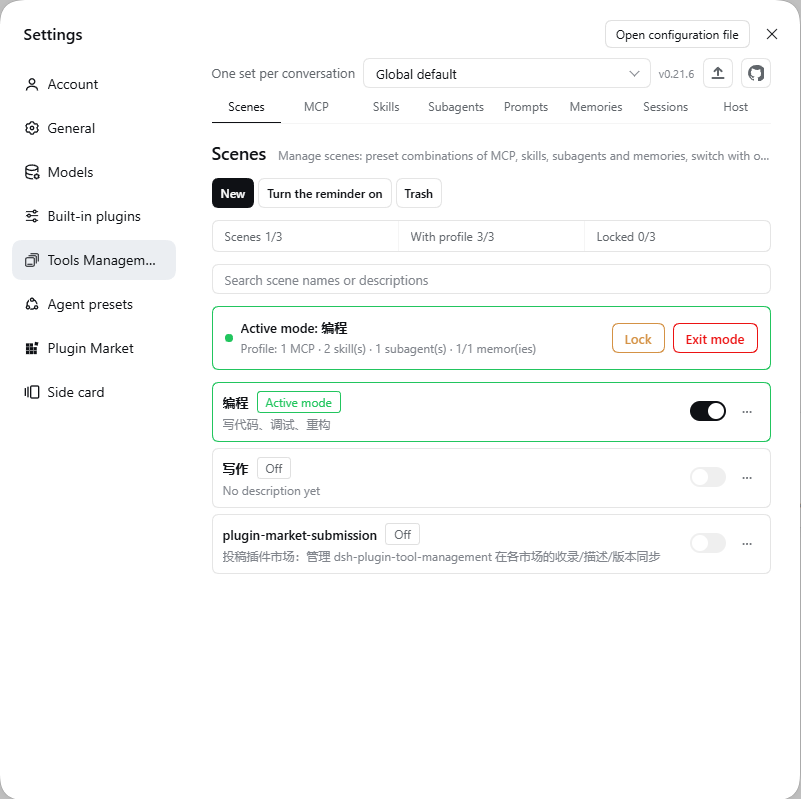
<td width="33%" valign="top"><b>One-click scene switch</b><br>Each scene stores a full profile: MCP, skills, subagents, memories, quick prompts, a prompt preset and a model-tool table. Enter it and the whole stack switches; leave it and the pre-entry snapshot comes back.</td>
<td width="33%" valign="top"><b>Control from the chat</b><br>Type <code>/</code> for a “Tools” section: enter or leave a scene, toggle any of the six domains. The menu stays open and leaves no command text in the composer.</td>
<td width="34%" valign="top"><b>Three scopes</b><br>All global / per workspace / per conversation. By default every conversation has its own settings — two conversations in the same project can run two different environments at once.</td>
</tr>
<tr>
<td valign="top"><b>The agent can drive it</b><br>26 model tools across six domains: list, read, create, update, delete, toggle, enter scenes, apply prompts, run personas. Writes ask for confirmation; disabled tools are not in the schema at all.</td>
<td valign="top"><b>The Host page is a control center</b><br>Version and capability checks, access token, scope mode, per-domain injection switches, the model-tool table and the sidebar entry — all on one page.</td>
<td valign="top"><b>One panel, eight tabs</b><br>Scenes / MCP / Skills / Subagents / Prompts / Memories / Sessions / Host — no more hunting through six different settings pages.</td>
</tr>
</table>

## Demo

<video controls width="100%" src="https://github.com/user-attachments/assets/ff3111c3-4228-45b7-9e28-b85dc60fb6b3"></video>

Player refuses to start (browsers with a stricter CSP sometimes block the inline embed)? [Watch the same file directly](https://github.com/user-attachments/assets/ff3111c3-4228-45b7-9e28-b85dc60fb6b3). 

Every interface shown is a real screenshot of the running product. 

Music: Kevin MacLeod「Limit 70」, [CC BY 4.0](https://creativecommons.org/licenses/by/4.0/).

## Screenshots

|                                                                              |                                                                                |
|:----------------------------------------------------------------------------:|:------------------------------------------------------------------------------:|
| <img src="docs/images/1-EN.png" alt="Scenes" width="100%"><br>**Scenes**     | <img src="docs/images/2-EN.png" alt="MCP" width="100%"><br>**MCP**             |
| <img src="docs/images/3-EN.png" alt="Skills" width="100%"><br>**Skills**     | <img src="docs/images/4-EN.png" alt="Subagents" width="100%"><br>**Subagents** |
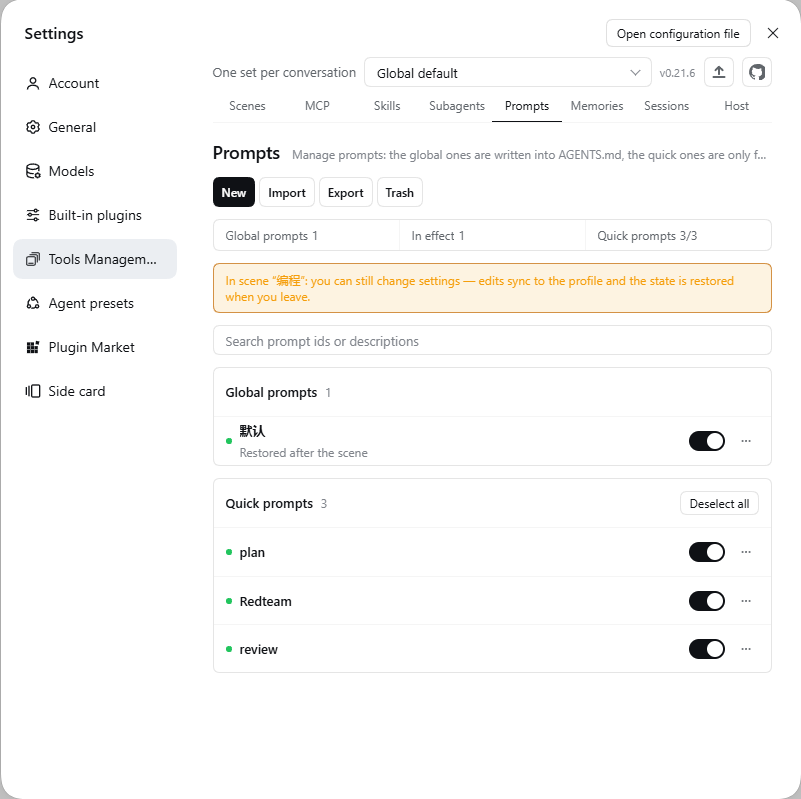
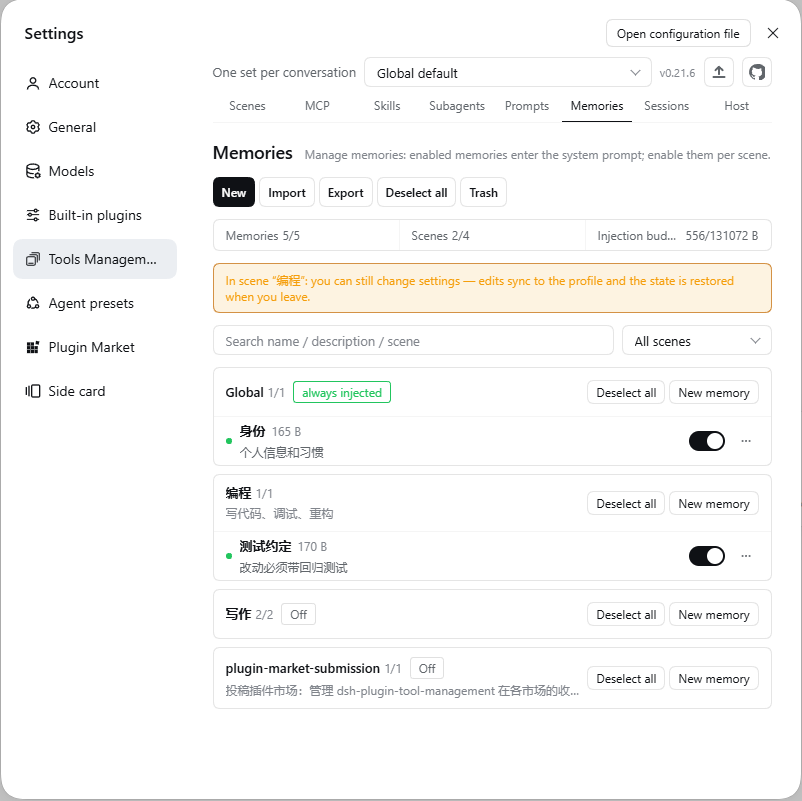
| <img src="docs/images/5-EN.png" alt="Prompts" width="100%"><br>**Prompts**   | <img src="docs/images/6-EN.png" alt="Memories" width="100%"><br>**Memories**   |
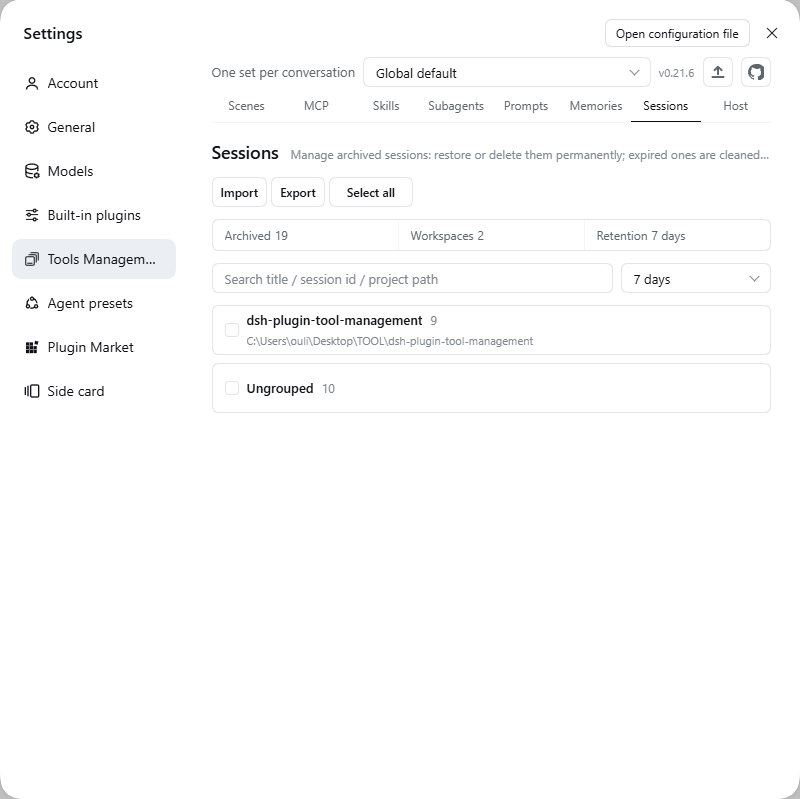
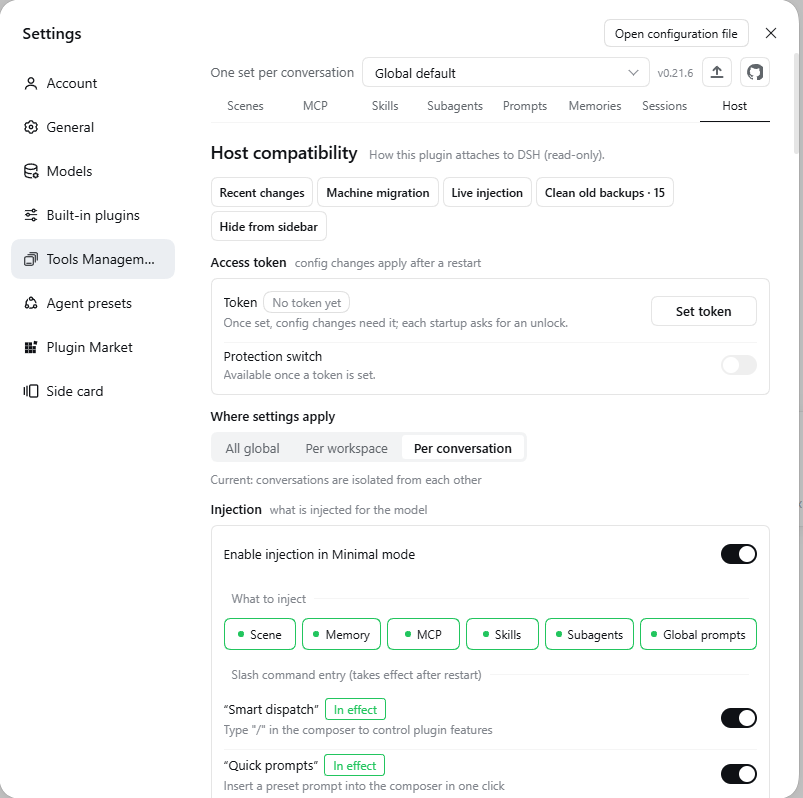
| <img src="docs/images/7-EN.png" alt="Sessions" width="100%"><br>**Sessions** | <img src="docs/images/8-EN.png" alt="Host" width="100%"><br>**Host**           |

## Three scopes

Every conversation gets its own settings by default. Switch once on the **Host page → Scope**, and the whole panel plus every model tool follows that layer:

|                          | All global                                     | Per workspace                              | Per conversation (default)                 |
|:------------------------ |:---------------------------------------------- |:------------------------------------------ |:------------------------------------------ |
| **Who shares one set**   | Every conversation                             | Conversations in the same workspace        | Each conversation separately               |
| **Best for**             | One person, one machine, consistent everywhere | One project, one environment               | Parallel tasks in one project              |
| **Lost when switching?** | —                                              | Nothing is deleted; switch back to restore | Nothing is deleted; switch back to restore |

The selector at the top of the panel jumps to a specific conversation or workspace and shows its own copy; when that layer is locked, the unlock button sits on the same row. Within a layer, every switch resolves top-down: **this layer's edit > entered scene > creation snapshot > global**.

Scenes work in all three scopes. Under per-conversation, conversation A can sit in “Coding” while B stays in “Writing”, each with its own MCP servers, skills and personas.

## What each tab does

<table>
<tr><th width="15%" align="left">Tab</th><th align="left">What it does</th></tr>
<tr><td><b>Scenes</b></td><td>Save the whole environment as a profile; enter and leave with one click; lock it against edits; bind a prompt preset and a model-tool table; deleting it sends its memories to the recycle bin too.</td></tr>
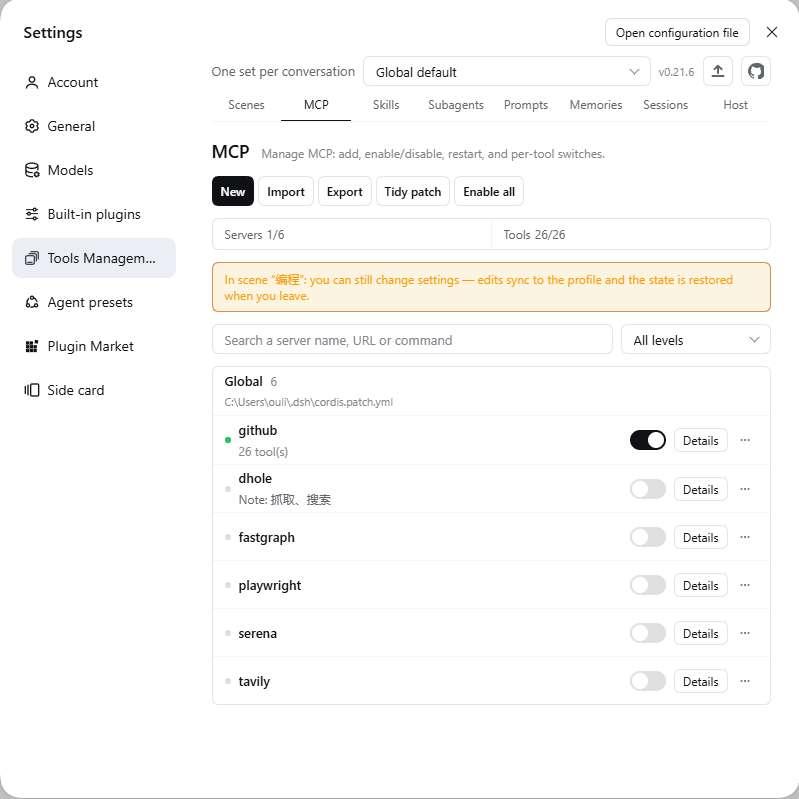
<tr><td><b>MCP</b></td><td>Add, edit and remove servers; toggle individual tools; write a note the model sees; inspect the last-known tool list while a server is stopped; import/export with automatic backups.</td></tr>
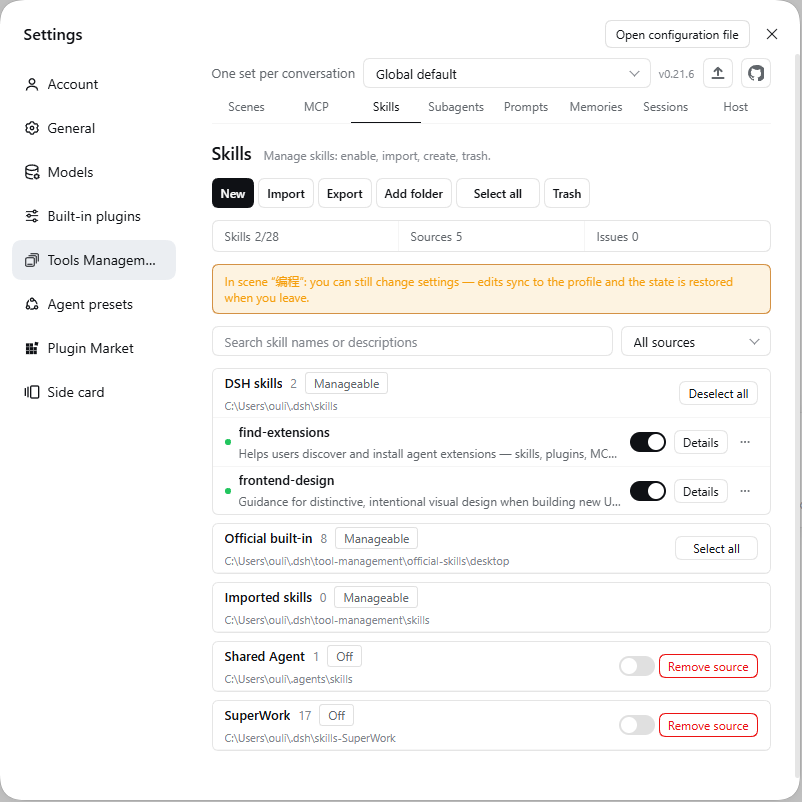
<tr><td><b>Skills</b></td><td>Grouped by source; enable, remove, import, edit; same-name skills show which copy is in effect; external directories stay read-only.</td></tr>
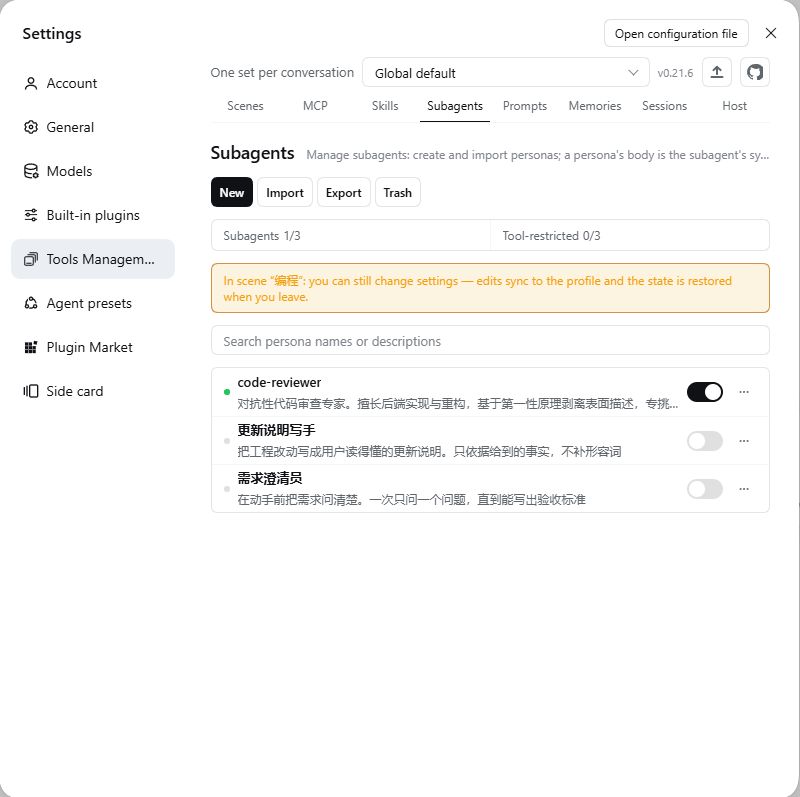
<tr><td><b>Subagents</b></td><td>One <code>.md</code> per persona; delegate work, limit tools, pick a model; only the result comes back, never into your History.</td></tr>
<tr><td><b>Prompts</b></td><td>Multiple <code>AGENTS.md</code> baselines with one-click apply/undo and five generations of backups; quick prompts paste into the composer from <code>/</code>.</td></tr>
<tr><td><b>Memories</b></td><td>A scene is the folder; <code>.md</code> bodies are injected automatically; import/export, recycle bin, injection budget.</td></tr>
<tr><td><b>Sessions</b></td><td>Archived by project, searchable, batch restore; import Claude Code / Cursor / Codex transcripts; export Markdown / JSONL.</td></tr>
<tr><td><b>Host</b></td><td>Version and capability checks, access token, scope mode, injection switches, model-tool table, sidebar entry, backup cleanup.</td></tr>
</table>

## Let the agent drive it

Six domains, **26 model tools**: list, read, create, update, delete, toggle, enter or leave a scene, apply a prompt, run a persona.

- **Only 6 ship enabled** (~1.6k tokens/turn); the other 20 stay off. Off means **not in the schema at all** — the model cannot see them, let alone call them.
- **Scoped writes**: the model writes to the current layer by default and the receipt says which one; `scope: "global"` is required to touch everything.
- **Confirmation cards**: stopping servers, deleting, machine-wide toggles and similar writes ask first; recovery actions (restart, restore, undo apply) go straight through.
- **Per-tool control**: the model-tool table on the Host page adjusts visibility per layer. All 26 on is ~6.2k tokens/turn; profiles can be saved per task and switched together with a scene.

## The Host page

More than a version number:

- **Checks**: host version, the plugin build actually loaded this run, and whether each action is native / adapted / unavailable, with reasons. If an upgrade quietly breaks something, it shows up here.
- **Access token**: set / disable / change / delete; writes and plaintext secrets go through it.
- **Scope**: all global / per workspace / per conversation.
- **Injection**: per-domain switches, minimal-preset fallback, the two slash-menu entries, sidebar entry.
- **Model tools**: per-tool visibility for all 26, saved per layer.
- **Maintenance**: old-backup cleanup, feature overview, recent changes.

<details>
<summary><b>Where data lives · security boundaries</b></summary>

| Content                                                        | Location                                                                     |
|:-------------------------------------------------------------- |:---------------------------------------------------------------------------- |
| MCP definitions                                                | `~/.dsh/cordis.patch.yml` (the only file the plugin writes; backed up first) |
| Skill policy / custom directories                              | `~/.dsh/tool-management/skills-state.json`                                   |
| Skills / memories / personas / presets                         | `~/.dsh/tool-management/{skills,memories,subagents,prompts}/`                |
| Memory index / scenes / profiles                               | `~/.dsh/tool-management/memories-index.json`                                 |
| Recycle bins (skills / memories / personas / presets / scenes) | `~/.dsh/tool-management/trash/<domain>-trash/`                               |
| Archive ledger / retention                                     | `~/.dsh/tool-management/history-*.json`                                      |
| MCP sidecars (disabled tools / known tools / notes / settings) | `~/.dsh/tool-management/mcp-*.json`                                          |
| Injection settings (six domain switches)                       | `~/.dsh/tool-management/inject-settings.json`                                |
| Model-tool table / scope overrides                             | `~/.dsh/tool-management/tool-table.json` · `scope-overrides.json`            |
| Runtime log / patch backups                                    | `~/.dsh/tool-management/tool-management.log` · `backups/`                    |

- **Only its own files**: skill sources are never touched; MCP changes go to `cordis.patch.yml`, with five backups per patch file.
- **Token**: once set, every write and every plaintext secret requires `x-dsh-token`; browser reads and writes use cookies, but plaintext still needs the token.
- **Process-level boundary is the token**: writes normally sit behind the host's browser auth; when the host fence is absent the route falls back to a loopback-only check, which any local process can pass — only the access token gives you a process-level boundary.
- **Plaintext on disk**: masking happens in the UI only. MCP `env` / `headers` and the plugin `token` stay plaintext in the patch file, and backups are neither encrypted nor rotated. The token gate cannot stop disk reads — file permissions are the boundary.
- **Deletes are recoverable**: skills / memories / personas / presets / scenes go to the recycle bin (permanent session deletion excepted), with an optional retention period (keep forever by default).

</details>

## FAQ

| Symptom                                 | Fix                                                                                                                                                      |
|:--------------------------------------- |:-------------------------------------------------------------------------------------------------------------------------------------------------------- |
| No panel after installing               | Hard-refresh the browser; if that fails, restart DSH.                                                                                                    |
| The model cannot call a tool            | Host page → “Model tools”, make sure the right conversation / workspace is selected (20 tools are off by default). The panel and scripts are unaffected. |
| Actions unavailable after a DSH upgrade | Check the reason on the Host page; run `node scripts/doctor.mjs`, then `node scripts/host-deps.mjs --fix`.                                               |
| Version mismatch                        | Supports DSH **0.2.2** only (`>=0.2.2-rc.1 <0.2.3`); cross-generation upgrades wait for the plugin to catch up. Install 0.21.x for older hosts.          |
| Duplicate MCP tab                       | Remove the old loader line from `cordis.patch.yml` and restart.                                                                                          |
| DSH won't start after a bad edit        | Restore the newest `cordis.patch.yml.*.bak-*` from `~/.dsh/tool-management/backups/`.                                                                    |

Full troubleshooting guide: [docs/TROUBLESHOOTING.md](docs/TROUBLESHOOTING.md).

## Docs

| Doc                                                            | When to read it                                                                                           |
|:-------------------------------------------------------------- |:--------------------------------------------------------------------------------------------------------- |
| [Troubleshooting](docs/TROUBLESHOOTING.md)                     | Missing panel, duplicate tab, actions unavailable after an upgrade, broken sidecars                       |
| [Architecture](docs/ARCHITECTURE.md)                           | How content reaches the model, why one toggle differs between conversations, which file a change lands in |
| [Compatibility matrix](docs/COMPATIBILITY.md)                  | Capability matrix per DSH version (verified / untested / unavailable)                                     |
| [Changelog](CHANGELOG.md) · [Release overview](docs/UPDATE.md) | What changed in each version                                                                              |

## Development

```bash
npm install
npm run build        # tsc + sync client
npm test             # build + i18n + contract tests
npm run doctor       # host compatibility check
```

`lib/` is not committed — run `npm run build` after cloning, and restart `dsh web` to pick up changes. Runtime dependencies are only `fflate` and `js-yaml` (lazy-loaded); every `@deepseek-ai/*` package uses the host's copy.

## License

MIT