
# dsh-plugin-image-tools




[中文](./README.md) | **English**
**The only plugin in the dsh market supporting image choice cards**: it adds image
capabilities to the DeepSeek Harness Web GUI, with three tools covering three scenarios —
the model has you pick images among options, displays images in the reply body, and you
send images to a blind model. All rendered locally with zero tokens:
| Tool | Scenario | Effect |
|---|---|---|
| `ask_user_choice` | Model asks the user to pick an image among **options** | The Web GUI renders image choice cards, zoomable; the answer protocol is identical to the native one |
| `show_images` | Model displays images in the **reply body** | Images render mixed with text in the chat; click to zoom |
| `save_received_images` | User **sends images to a blind model** (an adapter without vision input) | Images are saved as workspace files the model can download/analyze |
Three image sources are uniformly supported: **local paths** (relative to the session
workspace or absolute, including ComfyUI output), **http(s) URLs** (fetched and re-served
by the server), and **base64 data URIs**. Pure plugin implementation — no core package changes.
## Screenshots
### Image choice card (ask_user_choice)
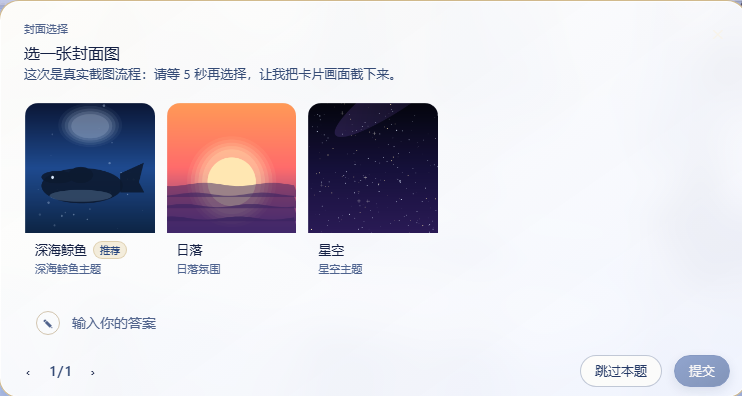
The model asks you to "pick a cover"; each option carries an image, and you choose by
clicking the card (or the magnifier).
### Inline images in replies (show_images)
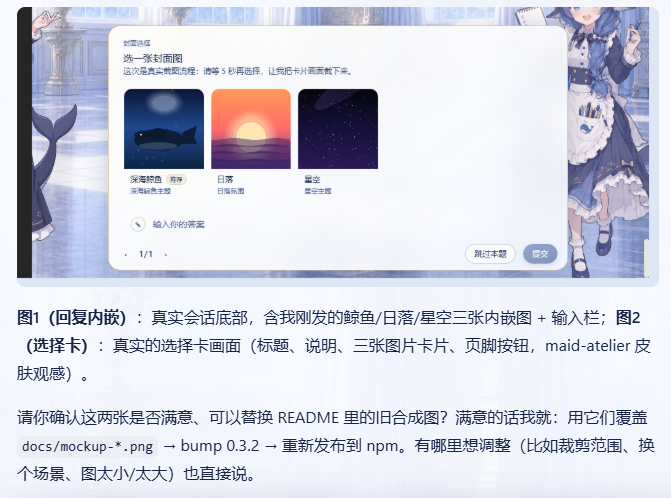
The model calls `show_images` in its reply and pastes the returned markdown snippets into
the body, so the images appear alongside the text.
> Both screenshots are real Web GUI captures (maid-atelier skin).
## Features
- **`ask_user_choice`** (image / mixed image+text options):
- Each option can carry one image (`path` / `url` / `data`); pure-image, pure-text, and
image+text options can be mixed within the same question;
- Supports multi-question pagination, single/multi select, custom answers, skip, and
recommended markers (a `(Recommended)` / `(推荐)` suffix on the label);
- Clicking a thumbnail (or the magnifier button) opens a Lightbox with the full image;
Esc / clicking the overlay / the close button dismisses it.
- **`show_images`** (inline images in replies):
- Shows 1–9 images at a time, each with an optional `caption`;
- The tool returns markdown image snippets with absolute URLs; the model pastes them
verbatim into the reply body and they render alongside the text;
- The client plugin automatically enhances these images: rounded corners, captions on
hover, click to zoom, and graceful fallback on load failure.
- **`save_received_images`** (images received by blind models → files):
- When the user sends images into the chat, an `agent/pre-step` listener rewrites the
image content blocks in the message into text placeholders (`dshimg:`) —
text-only adapters (such as DeepSeek) no longer fail with `UNSUPPORTED_CONTENT` over
image blocks, and the turn proceeds as usual;
- In the user's message bubble, the client enhancer replaces the placeholder with a
zoomable image echo (attachment bytes are served through the
`/dsh-plugin-image-tools/attachment/` route);
- Seeing the placeholder, the model calls `save_received_images` to save the images as
workspace files by attachmentId (default directory `received/`), where file/command
tools can then analyze them (dimensions, pixels, hashes, etc.);
- Saved filenames prefer the attachment's own safe filename, otherwise they are
generated as `image--.`;
- The `dir` parameter accepts only **relative paths inside the workspace**
(default `received/`); absolute paths and paths containing `..` are rejected
(security hardening, preventing writes outside the workspace).
- Text-only questions without images are passed straight through to the native UI
automatically; the two never interfere.
## Directory structure
```
lib/index.js Server: three tool registrations + pre-step rewrite + image/attachment registry + web routes (zero runtime dependencies)
lib/client.js Client: composer chain entry + image choice UI + inline/received-image enhancement (browser module loader format, build-free)
scripts/selfcheck.mjs Pure-function self-check (node scripts/selfcheck.mjs)
scripts/smoke-server.mjs Server integration smoke test (a fake ctx runs the full tools → routes → pre-step rewrite → disk persistence chain)
scripts/smoke-client.mjs Client smoke test (real react rendering of the choice card + pure-function enhancement)
cordis.patch.yml Bundle patch (mount lines)
docs/ Screenshots (for README display)
```
## Configuration
No configuration needed — install and it works:
- Reads no environment variables, needs no API Key / token, writes no config files;
- All three image source forms (local path / http(s) URL / base64 data URI) work directly,
with no whitelist configuration;
- Inline image previews go through a same-origin byte route (loopback), with no external
service dependencies;
- The package ships with `cordis.patch.yml` mount lines, applied automatically via
`dsh.profile.bundles` — no manual configuration changes needed.
## Installation
```powershell
# npm (recommended)
dsh plugin --profile web add dsh-plugin-image-tools
# or GitHub
dsh plugin --profile web add github:Pasumao/dsh-plugin-image-tools
```
Install from source (local development / debugging):
```bash
git clone https://github.com/Pasumao/dsh-plugin-image-tools.git
cd dsh-plugin-image-tools
npm install
# Mount into the profile via link:
```
After installing, restart dsh (launcher) and then refresh the browser page. The package
ships with `cordis.patch.yml` mount lines, applied automatically via `dsh.profile.bundles`
(same mechanism as dsh-notify) — no manual configuration changes needed.
## Model usage examples
### ask_user_choice: pick an option by image
```jsonc
{
"questions": [
{
"id": "cover",
"question": "Pick a cover image",
"header": "Cover choice",
"options": [
{ "label": "Deep-sea whale (Recommended)", "image": { "path": "novel/assets/covers/whale.png" } },
{ "label": "Starry sky",
"image": { "url": "https://example.com/stars.png" } },
{ "label": "Hand-drawn style",
"image": { "data": "data:image/png;base64,iVBORw0KGgo..." } },
{ "label": "None of these, I'll type my own", "description": "Select this to enter a custom answer below" }
],
"multi_select": false
}
]
}
// Returns: { "answers": [ { "id": "cover", "selected": ["Deep-sea whale (Recommended)"] } ] }
```
### show_images: show images in a reply
```jsonc
// Call show_images
{
"images": [
{ "image": { "path": "novel/assets/covers/whale.png" }, "caption": "Deep-sea whale cover" },
{ "image": { "url": "https://example.com/stars.png" }, "caption": "Starry sky" }
]
}
// Returns: { "markdown": ["", ""], "note": "..." }
```
The model pastes the snippets from the `markdown` array **verbatim**, line by line, into
the reply body, and the images appear alongside the text:
```markdown
Here are the cover candidates generated for you:

Let me know if you'd like the colors or composition adjusted.
```
## Implementation notes (why a plugin instead of core changes)
When the browser side consumes the `question/requested` frame it parses it strictly with a
zod schema, and unknown fields on option objects are stripped; assistant message content is
generated from model text and offers no channel for structured image blocks either. So
images **cannot** be stuffed into the option / content fields. Instead, this plugin:
1. The server normalizes image bytes into an in-memory registry and serves the bytes
directly through custom web routes:
`/dsh-plugin-image-tools//` (choice cards),
`/dsh-plugin-image-tools/show//` (inline in replies), and
`/dsh-plugin-image-tools/attachment/` (echo of images received from the
user), loaded as same-origin `![]() `;
2. Choice cards: an invisible HTML comment marker `` is
written at the start of the question's `detail` (a standard string field passed through
verbatim), carrying the pickId and the indexes of image-bearing options; the client
plugin registers an entry in the `conversation.composer` slot chain (smaller priority
value, so it takes precedence over the native one) and renders the image choice card
once it recognizes the marker; questions without the marker go to the native UI;
3. Inline in replies: `show_images` returns absolute URLs (host origin derived from
`ctx.webServer.host/port`); the model pastes them into the body and the core markdown
renderer displays them natively; the client then progressively enhances images whose
src starts with `/dsh-plugin-image-tools/show/` (discovery via MutationObserver +
single-node style/event injection, pure DOM, no intrusion into the React render tree);
4. Images received by blind models: an `agent/pre-step` waterfall listener is registered
(same mechanism as agent-instructions / time-context) and rewrites the image blocks in
the message batches entering the LLM step into text placeholders (registering the
attachment refs in a TTL registry), keeping session logs/UI plain-text safe; the client
enhancer recognizes `dshimg:` placeholders in user bubble text and replaces them
with zoomable images; `save_received_images` fetches the attachment bytes via
`ctx.attachments.readImage` and writes them to disk.
See `设计说明.md` for details.
## Security and limitations
- Image bytes live only in process memory: choice-card images are freed as soon as the
question is answered/canceled; inline images and attachment echoes rely on a 30-minute
TTL cleanup (they must survive until reply rendering completes).
- **Browser cache as a safety net**: image route URLs are content-addressed (pickId/showId
are UUIDs, attachmentId is a content hash) and the bytes never change, so responses are
sent with `Cache-Control: private, max-age=2592000, immutable` (30 days). Once an image
has loaded successfully in the browser, its bytes stay in the browser's local cache —
afterwards, even if the source file is deleted/overwritten, the server-side TTL cleans
up, or dsh restarts, refreshing the page or revisiting history hits the local cache
directly and the images remain visible (no further requests to the server).
- Each image is capped at 20 MiB; only PNG / JPEG / WebP / GIF are supported (validated by
magic numbers; a mismatch with the declared type raises an error).
- Image routes are plain same-origin HTTP routes (same trust level as the GUI) with no
extra authentication.
- The markdown URLs of inline images are absolute addresses (`http://host:port`, derived
from the server's listening configuration); if the GUI is accessed through a reverse
proxy or on a different port, image addresses in historical messages may break (same
limitation as choice cards).
## Compatibility
- Tested on DSH `0.1.2-rc.1` (since 0.6.5 the choice-card entry is adapted to that
version's new protocol: the `conversation.composer` chain selector receives a single
`pendingInteraction` (the native `PendingQuestion`), and answers go through
`.answer({answers})` / `.cancel()`); since 0.6.6 the tests bundle their own
react/react-dom and no longer depend on the host installation layout.
- The `data-chat-flow` container, the `dshimg:` placeholder protocol, and the lightbox —
all anchors the chat image zoom relies on — were verified one by one against
`dsh-client-ui-chat` in 0.1.2-rc.1.
- Plain-text questions are unaffected (handed to the native UI or
`dsh-plugin-choice-refresh`).
- Depends on the client services `slots` / `locale`.
## Related plugins
This plugin is part of **Pasumao's dsh plugin ecosystem**; the published plugins in the
series can be used together:
| Plugin (npm) | GitHub | Description |
|---|---|---|
| [dsh-notify](https://www.npmjs.com/package/dsh-notify) | [GitHub repo](https://github.com/Pasumao/dsh-plugin-notify) | Native Windows notifications + system tray |
| [dsh-plugin-choice-refresh](https://www.npmjs.com/package/dsh-plugin-choice-refresh) | [GitHub repo](https://github.com/Pasumao/dsh-plugin-choice-refresh) | Choice enhancements: regenerate options / more options |
| [dsh-plugin-dev-kb](https://www.npmjs.com/package/dsh-plugin-dev-kb) | [GitHub repo](https://github.com/Pasumao/dsh-plugin-dev-kb) | Plugin development knowledge base (full mirror of the official docs + skill) |
| [dsh-plugin-table-zoom](https://www.npmjs.com/package/dsh-plugin-table-zoom) | [GitHub repo](https://github.com/Pasumao/dsh-plugin-table-zoom) | Floating viewer for long chat tables + one-click copy as Markdown |
| [dsh-plugin-windows-guard](https://www.npmjs.com/package/dsh-plugin-windows-guard) | [GitHub repo](https://github.com/Pasumao/dsh-plugin-windows-guard) | Windows environment safeguards: rules skills + garbled-text detection / dangerous-write blocking / encoding diagnosis & repair |
| [dsh-plugin-workbench](https://www.npmjs.com/package/dsh-plugin-workbench) | [GitHub repo](https://github.com/Pasumao/dsh-plugin-workbench) | VS Code-style file explorer + editable preview |
| [dsh-plugin-context-trim](https://www.npmjs.com/package/dsh-plugin-context-trim) | [GitHub repo](https://github.com/Pasumao/dsh-plugin-context-trim) | Per-session injection gate: trim skills / tools / prompt sections per session |
> For the rest of the series, see [Pasumao · dsh plugins](https://github.com/Pasumao);
> if you find them useful, feel free to give a ⭐ on GitHub.
## AI generation disclosure
The code and documentation were generated with AI assistance (DeepSeek Harness), and all
of it has undergone human review and verification on a live instance
(`npm run smoke`: selfcheck + full server-side pipeline with a fake ctx + fake client
rendering).
## License
[MIT](./LICENSE)
`;
2. Choice cards: an invisible HTML comment marker `` is
written at the start of the question's `detail` (a standard string field passed through
verbatim), carrying the pickId and the indexes of image-bearing options; the client
plugin registers an entry in the `conversation.composer` slot chain (smaller priority
value, so it takes precedence over the native one) and renders the image choice card
once it recognizes the marker; questions without the marker go to the native UI;
3. Inline in replies: `show_images` returns absolute URLs (host origin derived from
`ctx.webServer.host/port`); the model pastes them into the body and the core markdown
renderer displays them natively; the client then progressively enhances images whose
src starts with `/dsh-plugin-image-tools/show/` (discovery via MutationObserver +
single-node style/event injection, pure DOM, no intrusion into the React render tree);
4. Images received by blind models: an `agent/pre-step` waterfall listener is registered
(same mechanism as agent-instructions / time-context) and rewrites the image blocks in
the message batches entering the LLM step into text placeholders (registering the
attachment refs in a TTL registry), keeping session logs/UI plain-text safe; the client
enhancer recognizes `dshimg:` placeholders in user bubble text and replaces them
with zoomable images; `save_received_images` fetches the attachment bytes via
`ctx.attachments.readImage` and writes them to disk.
See `设计说明.md` for details.
## Security and limitations
- Image bytes live only in process memory: choice-card images are freed as soon as the
question is answered/canceled; inline images and attachment echoes rely on a 30-minute
TTL cleanup (they must survive until reply rendering completes).
- **Browser cache as a safety net**: image route URLs are content-addressed (pickId/showId
are UUIDs, attachmentId is a content hash) and the bytes never change, so responses are
sent with `Cache-Control: private, max-age=2592000, immutable` (30 days). Once an image
has loaded successfully in the browser, its bytes stay in the browser's local cache —
afterwards, even if the source file is deleted/overwritten, the server-side TTL cleans
up, or dsh restarts, refreshing the page or revisiting history hits the local cache
directly and the images remain visible (no further requests to the server).
- Each image is capped at 20 MiB; only PNG / JPEG / WebP / GIF are supported (validated by
magic numbers; a mismatch with the declared type raises an error).
- Image routes are plain same-origin HTTP routes (same trust level as the GUI) with no
extra authentication.
- The markdown URLs of inline images are absolute addresses (`http://host:port`, derived
from the server's listening configuration); if the GUI is accessed through a reverse
proxy or on a different port, image addresses in historical messages may break (same
limitation as choice cards).
## Compatibility
- Tested on DSH `0.1.2-rc.1` (since 0.6.5 the choice-card entry is adapted to that
version's new protocol: the `conversation.composer` chain selector receives a single
`pendingInteraction` (the native `PendingQuestion`), and answers go through
`.answer({answers})` / `.cancel()`); since 0.6.6 the tests bundle their own
react/react-dom and no longer depend on the host installation layout.
- The `data-chat-flow` container, the `dshimg:` placeholder protocol, and the lightbox —
all anchors the chat image zoom relies on — were verified one by one against
`dsh-client-ui-chat` in 0.1.2-rc.1.
- Plain-text questions are unaffected (handed to the native UI or
`dsh-plugin-choice-refresh`).
- Depends on the client services `slots` / `locale`.
## Related plugins
This plugin is part of **Pasumao's dsh plugin ecosystem**; the published plugins in the
series can be used together:
| Plugin (npm) | GitHub | Description |
|---|---|---|
| [dsh-notify](https://www.npmjs.com/package/dsh-notify) | [GitHub repo](https://github.com/Pasumao/dsh-plugin-notify) | Native Windows notifications + system tray |
| [dsh-plugin-choice-refresh](https://www.npmjs.com/package/dsh-plugin-choice-refresh) | [GitHub repo](https://github.com/Pasumao/dsh-plugin-choice-refresh) | Choice enhancements: regenerate options / more options |
| [dsh-plugin-dev-kb](https://www.npmjs.com/package/dsh-plugin-dev-kb) | [GitHub repo](https://github.com/Pasumao/dsh-plugin-dev-kb) | Plugin development knowledge base (full mirror of the official docs + skill) |
| [dsh-plugin-table-zoom](https://www.npmjs.com/package/dsh-plugin-table-zoom) | [GitHub repo](https://github.com/Pasumao/dsh-plugin-table-zoom) | Floating viewer for long chat tables + one-click copy as Markdown |
| [dsh-plugin-windows-guard](https://www.npmjs.com/package/dsh-plugin-windows-guard) | [GitHub repo](https://github.com/Pasumao/dsh-plugin-windows-guard) | Windows environment safeguards: rules skills + garbled-text detection / dangerous-write blocking / encoding diagnosis & repair |
| [dsh-plugin-workbench](https://www.npmjs.com/package/dsh-plugin-workbench) | [GitHub repo](https://github.com/Pasumao/dsh-plugin-workbench) | VS Code-style file explorer + editable preview |
| [dsh-plugin-context-trim](https://www.npmjs.com/package/dsh-plugin-context-trim) | [GitHub repo](https://github.com/Pasumao/dsh-plugin-context-trim) | Per-session injection gate: trim skills / tools / prompt sections per session |
> For the rest of the series, see [Pasumao · dsh plugins](https://github.com/Pasumao);
> if you find them useful, feel free to give a ⭐ on GitHub.
## AI generation disclosure
The code and documentation were generated with AI assistance (DeepSeek Harness), and all
of it has undergone human review and verification on a live instance
(`npm run smoke`: selfcheck + full server-side pipeline with a fake ctx + fake client
rendering).
## License
[MIT](./LICENSE)