<div align="center">

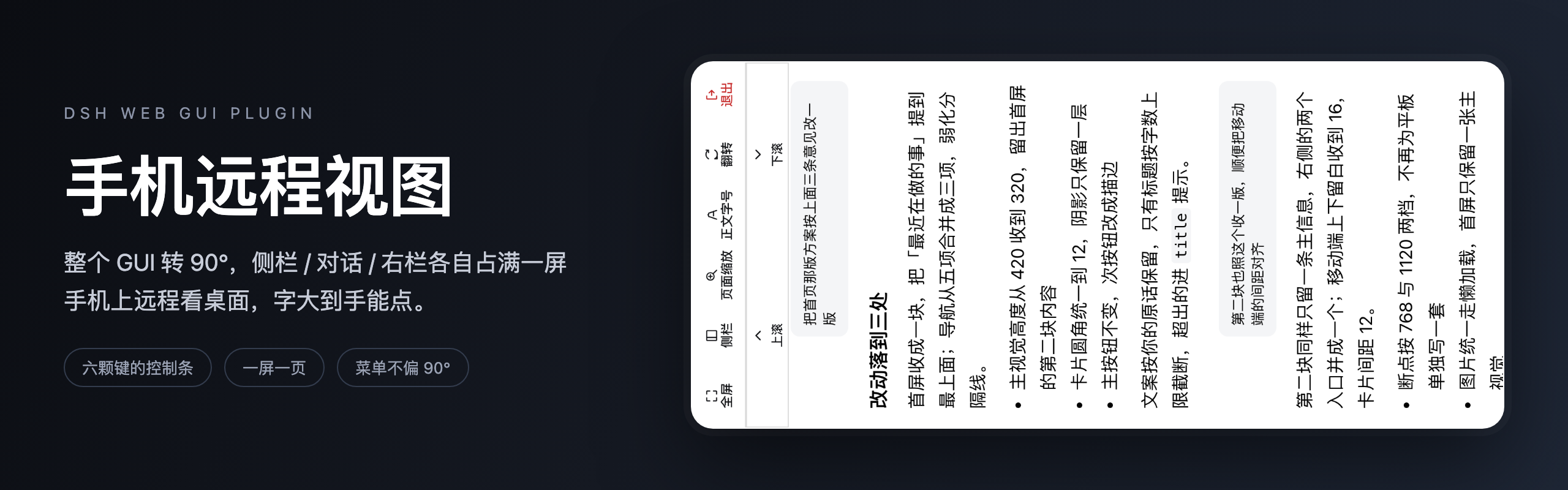
<img src="https://raw.githubusercontent.com/RonnyJung2021/dsh-mobile-remote-view/main/assets/banner.png" alt="dsh-mobile-remote-view — turn the DSH Web GUI a quarter turn, one region per screen" width="100%">

# dsh-mobile-remote-view

Turn the DSH Web GUI a quarter turn so **the sidebar, the conversation and the right panel each fill a screen** — a phone driving a desktop DSH gets text you can actually tap.

English / [中文](README.md)

[What it solves](#what-it-solves) · [What it looks like](#what-it-looks-like) · [Install](#install) · [Configuration](#configuration) · [How it works](#how-it-works) · [Development](#development)

<p>
  <img src="https://img.shields.io/badge/license-MIT-blue" alt="license">
  <img src="https://img.shields.io/badge/version-0.1.0-blue" alt="version">
  <img src="https://img.shields.io/badge/DSH-0.2.0--rc.2-8b5cf6" alt="DSH">
  <img src="https://img.shields.io/badge/tests-49%20passing-brightgreen" alt="tests">
  <img src="https://img.shields.io/badge/node-%3E%3D22.19-339933" alt="node">
  <img src="https://img.shields.io/badge/dependencies-0%20runtime-orange" alt="dependencies">
</p>

</div>

***

## What it solves

DSH runs on your computer and you are somewhere else, looking at that landscape desktop through a
phone: the remote tool squeezes the whole width into a portrait screen, the three columns crowd
together, and the body text shrinks past the point of tapping.

This plugin rotates the entire GUI a quarter turn so it lays itself out for the portrait box instead,
and turns "one region at a time" into page switching.

- **Who it is for**: anyone driving a desktop DSH from a phone, and anyone using the desktop build in a
  small window.
- **What it fixes**: one region per screen with body text from 19px; send and approval buttons at 48px;
  no more zooming the page sideways to find a button.
- **What it does not do**: it does not restructure the shell or choose sessions for you — the page key
  only decides which block you are looking at.

## What it looks like

### The way in lives in the sidebar
<p align="center">
  <img src="https://raw.githubusercontent.com/RonnyJung2021/dsh-mobile-remote-view/main/assets/entry.png" alt="A mobile remote mode row between the logo row and the new-session button" width="100%">
</p>

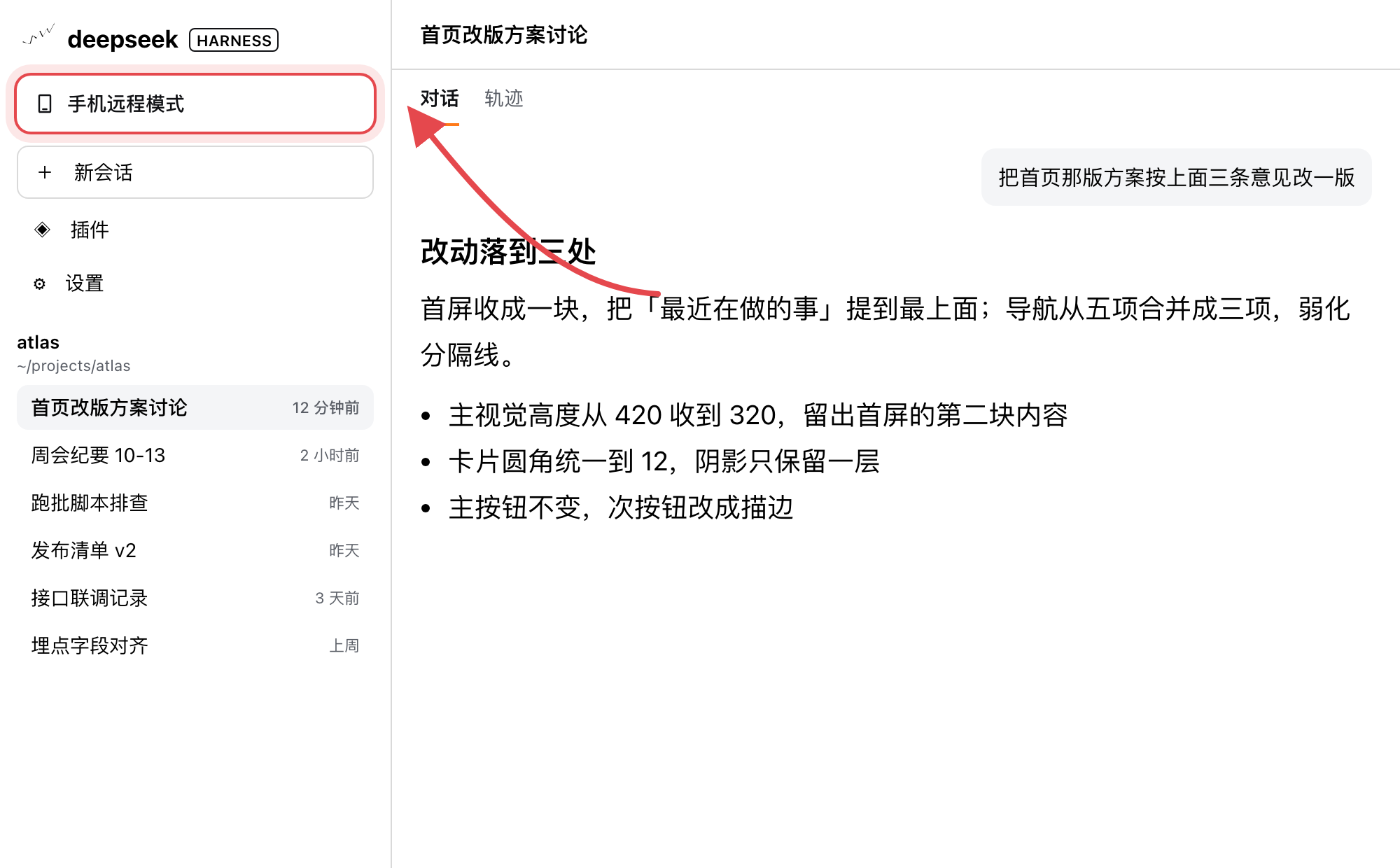
**One row, 「手机远程模式」**, sits between the logo row and the new-session button, as wide as
new-session itself. After installing, this is the only way in — tick one box on the plugin card if you
want it to enter on its own (see [Configuration](#configuration)).

### One region per screen, controls along an edge

<p align="center">
  <img src="https://raw.githubusercontent.com/RonnyJung2021/dsh-mobile-remote-view/main/assets/hero.png" alt="The conversation page in mobile remote mode: the whole picture has turned 90°, with the bar and strip along one edge" width="46%">
</p>

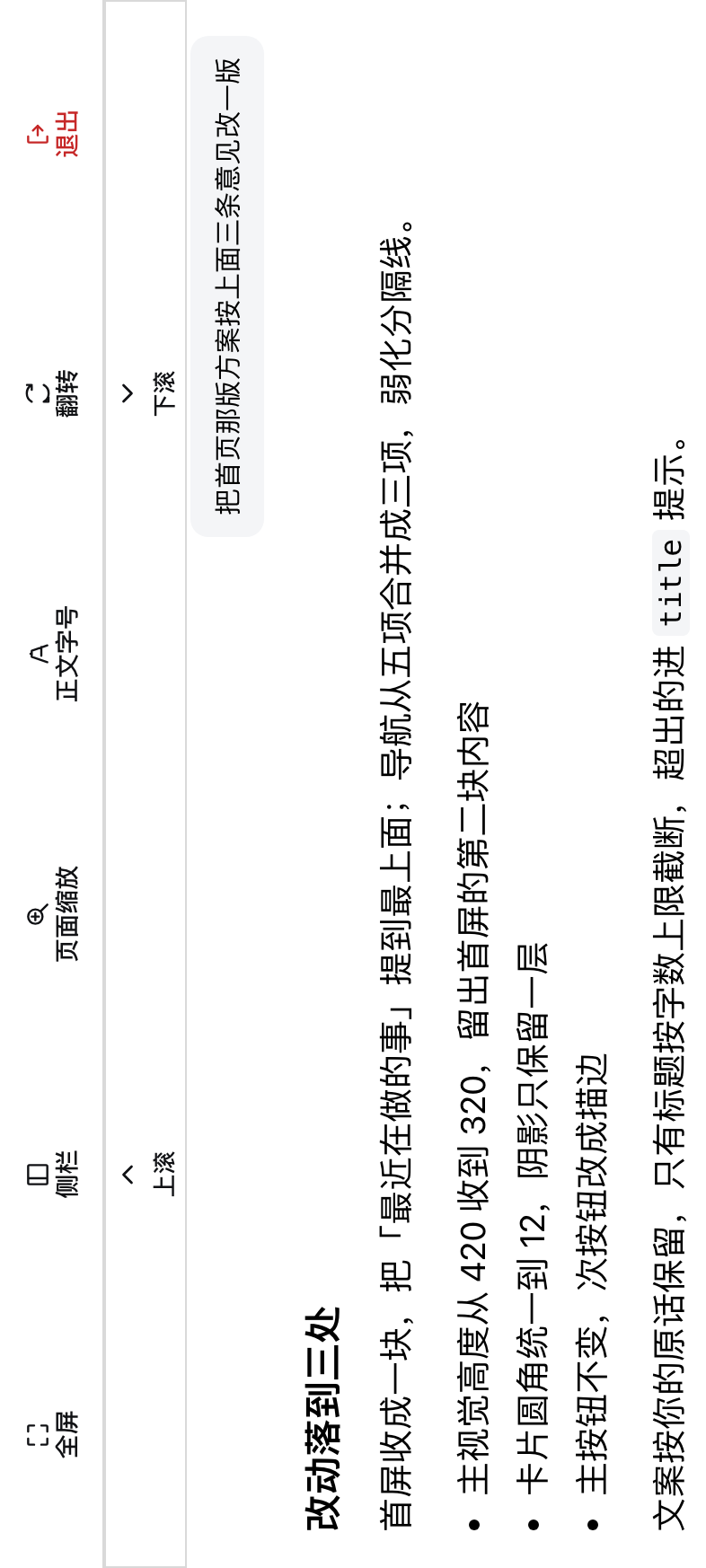
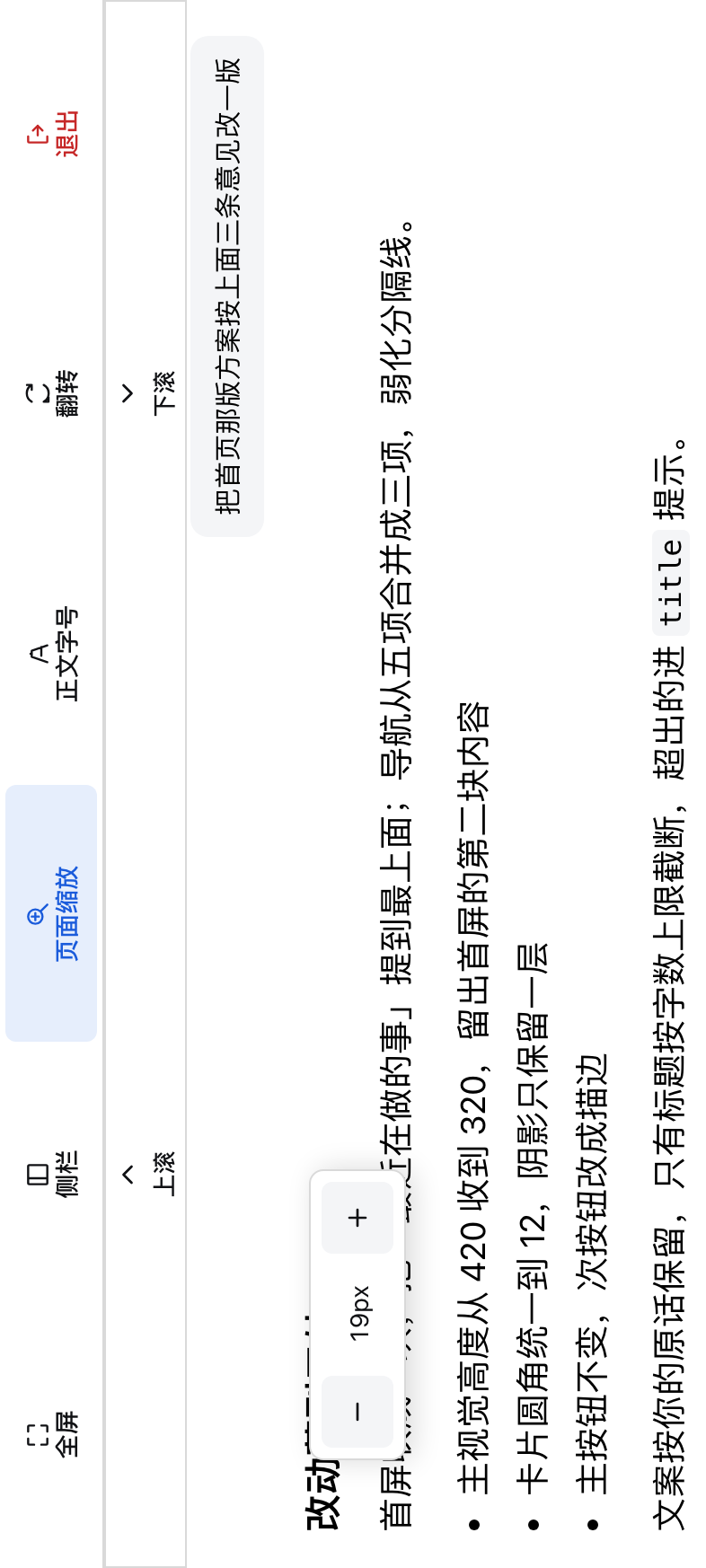
**The whole GUI has turned** — this is what the phone screen shows: the picture is a quarter turn
sideways, six keys (fullscreen / page / zoom / font size / flip / exit) and the scroll strip run along one
edge, and the conversation is re-laid out for the phone's shape, one block filling the screen.

### The sidebar page: the whole column, taller rows

<p align="center">
  <img src="https://raw.githubusercontent.com/RonnyJung2021/dsh-mobile-remote-view/main/assets/sidebar-page.png" alt="The sidebar page filling the screen, with taller rows" width="46%">
</p>

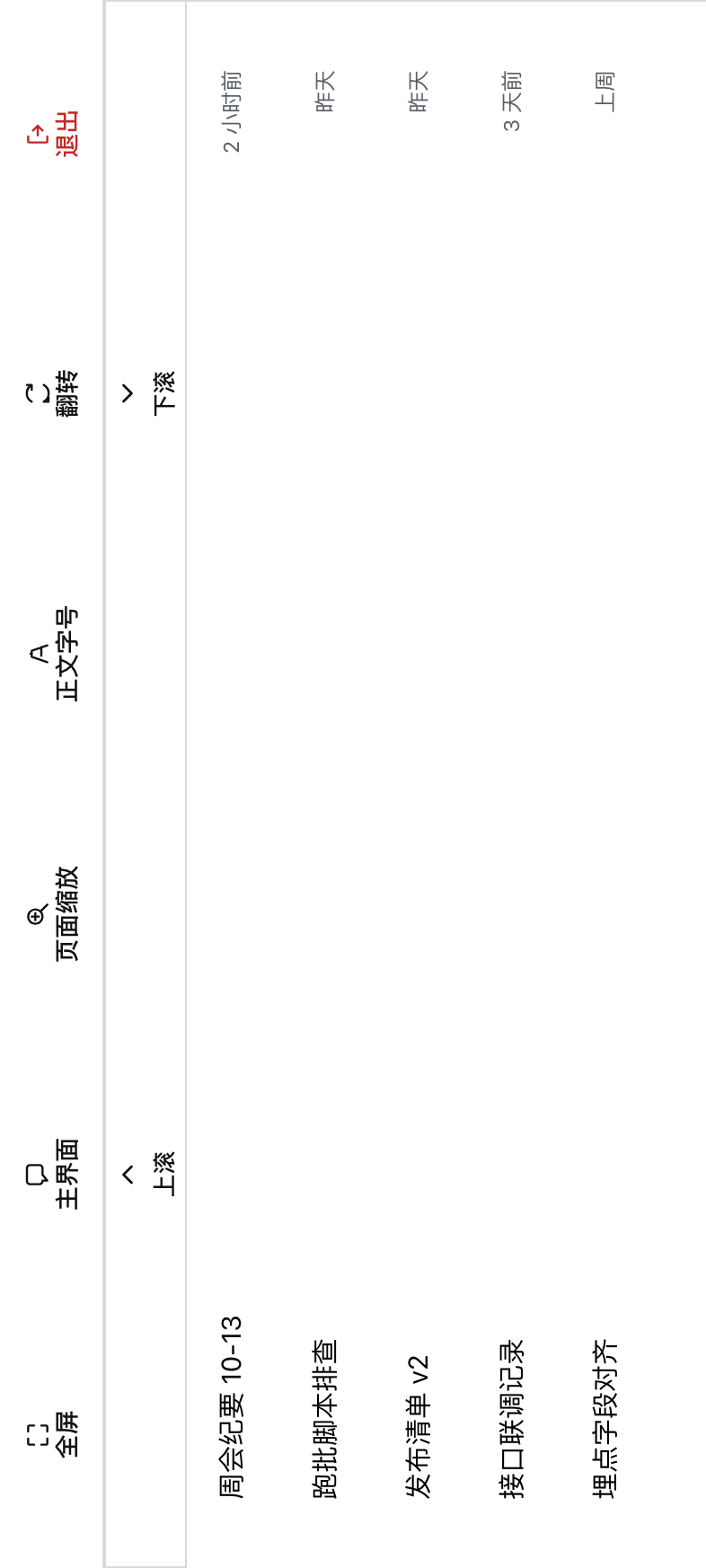
**The page key switches to the sidebar**: the column the shell keeps at 280px stretches to the screen,
session rows grow to 48px and panel rows to 44px. Tapping a session row or a panel row such as
「插件」 takes you back to the conversation page.

### The right panel becomes a page of its own

Open a right panel and it becomes a page by itself; close it and you land back on the conversation.
While it is open the page key reads 「关闭右栏」 — one tap closes it.

### Zoom and font size, each behind its own popover

<p align="center">
  <img src="https://raw.githubusercontent.com/RonnyJung2021/dsh-mobile-remote-view/main/assets/popover-scale.png" alt="Zoom popover: − 115% +" width="46%">
  <img src="https://raw.githubusercontent.com/RonnyJung2021/dsh-mobile-remote-view/main/assets/popover-font.png" alt="Font-size popover: − 19px +" width="46%">
</p>

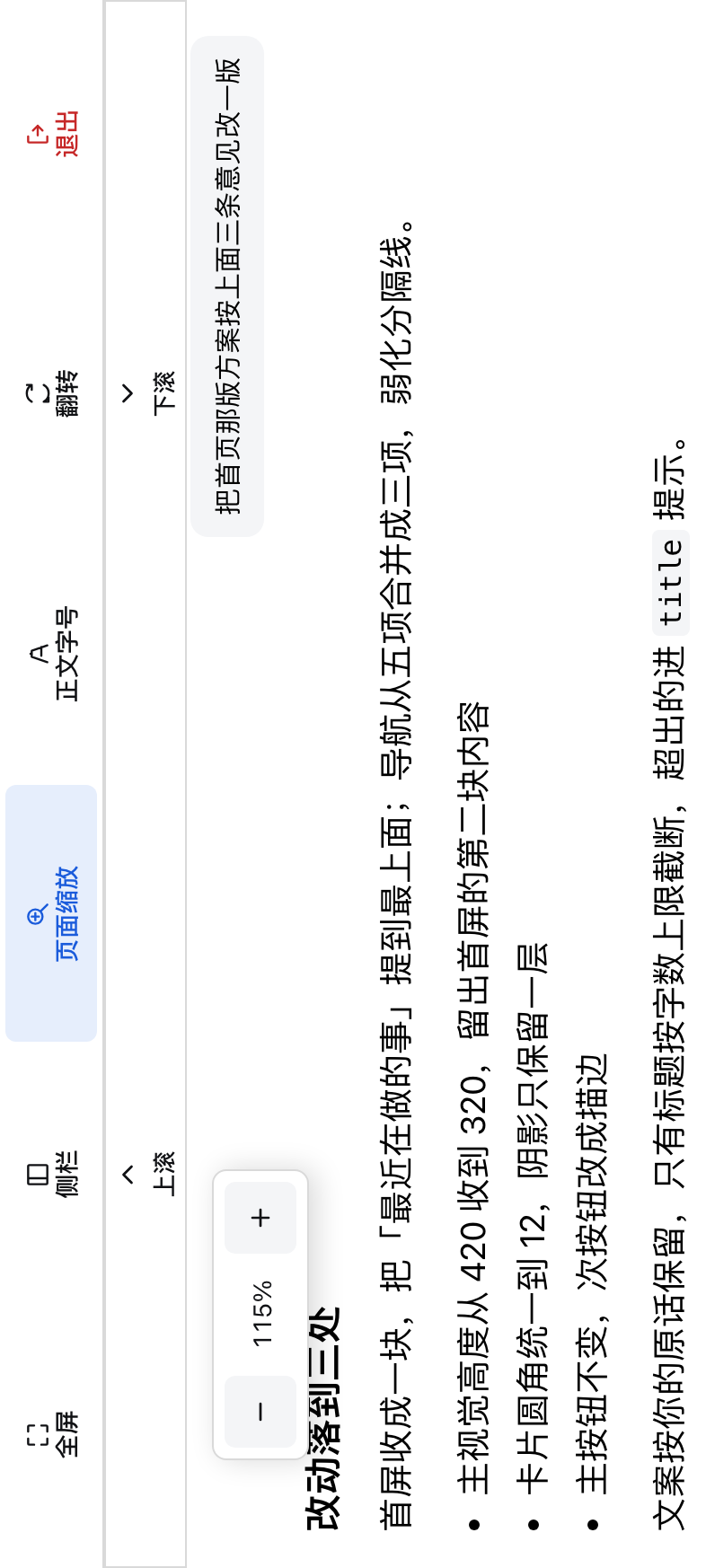
**Tap to open, tap to close.** The popover stays open while you tap `+` `−`, so you can keep adjusting;
a change applies at once and is written to both the profile config and local storage.

### Seven knobs on the plugin card

<p align="center">
  <img src="https://raw.githubusercontent.com/RonnyJung2021/dsh-mobile-remote-view/main/assets/card.png" alt="The mobile remote view card under Plugins, with its seven knobs" width="100%">
</p>

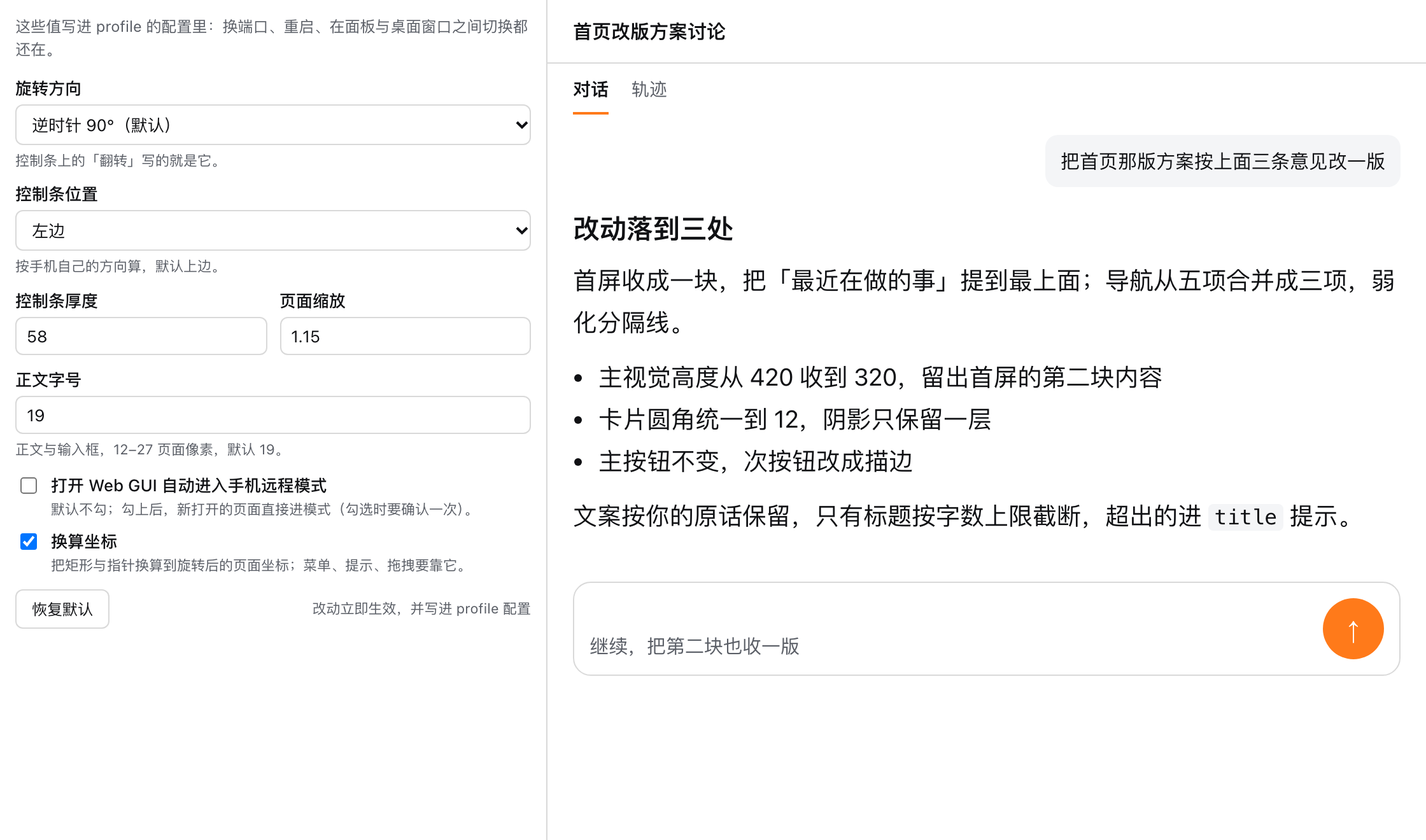
**Sidebar → Plugins → 手机远程视图**: rotation, bar edge and thickness, page zoom, font size,
auto-enter, coordinate layer. They live in the profile, so a new port, a restart or another window
keeps them.

### Against "just look at the desktop remotely"

<table>
<tr>
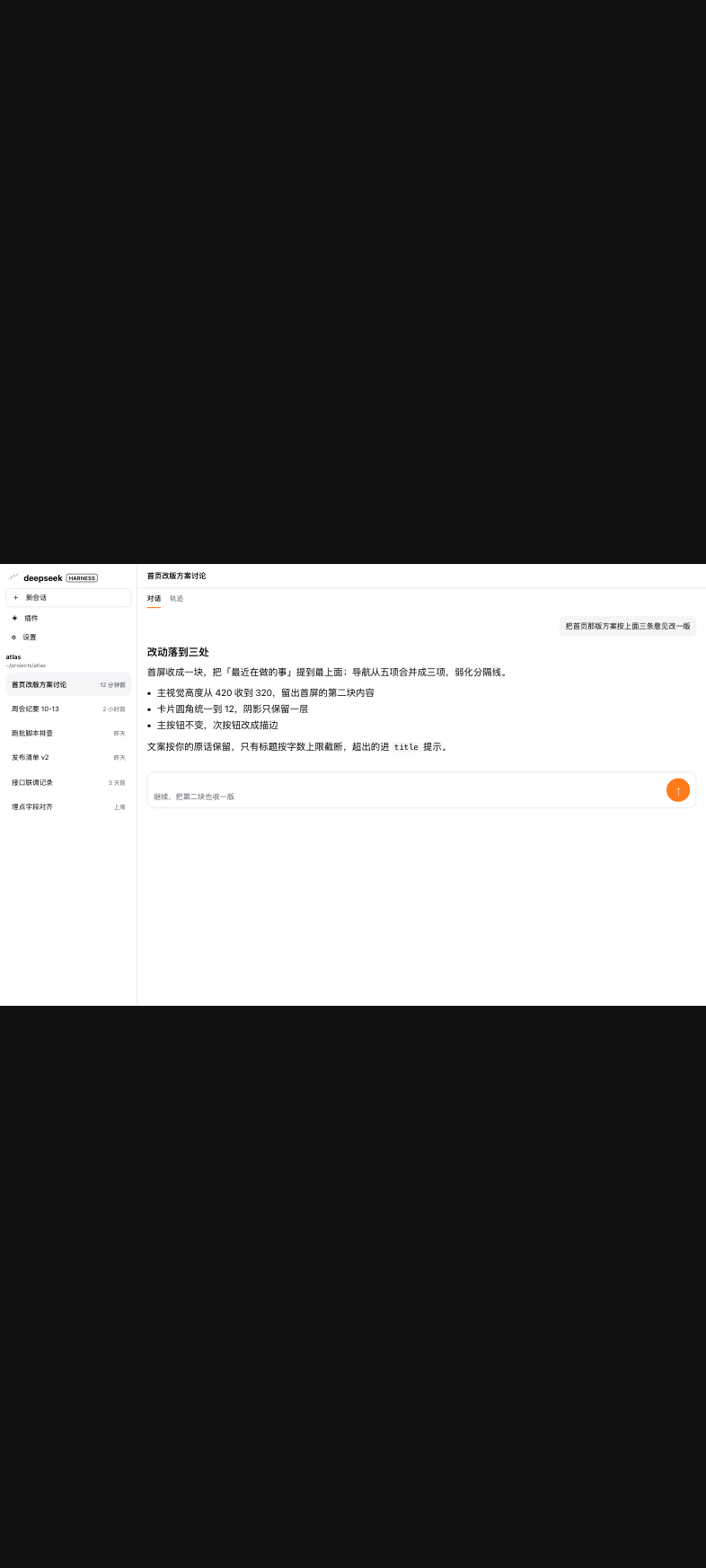
<td width="50%" align="center"><img src="https://raw.githubusercontent.com/RonnyJung2021/dsh-mobile-remote-view/main/assets/before.png" alt="The whole desktop squeezed into the phone: three columns crowded together" width="100%"></td>
<td width="50%" align="center"><img src="https://raw.githubusercontent.com/RonnyJung2021/dsh-mobile-remote-view/main/assets/hero.png" alt="Mobile remote mode: one region per screen" width="100%"></td>
</tr>
<tr>
<td align="center">Viewing it directly: the whole desktop squeezed in, body ≈ 8px</td>
<td align="center">Mobile remote mode: one region per screen, body from 19px</td>
</tr>
</table>

> Every screenshot above was taken from a real engine in a real browser (rendering this plugin's own
> stylesheet). The session names, workspace path and conversation text were invented for the shots.

## Features

### One thing per screen

The conversation, the sidebar and the right panel are never visible together; each fills the screen.
The page key names where a tap goes — 「侧栏」 on the conversation page, 「主界面」 on the sidebar page.

### Thumb-sized targets

Body and composer text runs 12–27px (19px by default); send / stop and approval buttons are 48px touch
targets; sidebar rows are 48px.

### Two big keys for scrolling

The page's vertical axis lies across the phone, so a swipe up or down scrolls nothing; a scroll strip
sits beside the bar and moves 70% of a screen per tap.

### Menus, tooltips and drags stay put

After the rotation every measurement API answers in the page's own coordinates, so overlays still hug
their trigger. The layer can be switched off (menus then land a quarter turn away).

### The interface follows the language

The bar, the strip, the entry row, the popovers and the card all ship Chinese and English copy and follow the shell's language setting live; the English side stays short enough for the narrowest key (Full / Sidebar / Chat / Close / Zoom / Font / Flip / Exit).

### Leaving gives it all back

Exit turns the layout back and restores the sidebar to the state it had before you entered; the
attributes, styles and coordinate layer the plugin wrote on the page are withdrawn with it.

***

## Install

### Requirements

| Item | Requirement |
| --- | --- |
| DSH | `0.2.0-rc.2` (every contract was checked against the frozen base) |
| Node | ≥ 22.19 (build and install only) |
| Runtime dependencies | none; the schema the host half needs is inlined into the artifact |
| Shell | the official web profile (provides `layout`) |

### Command line

```bash
cd /path/to/dsh-mobile-remote-view
node scripts/install-profile.mjs --dry-run   # show which files would change
node scripts/install-profile.mjs             # install into $DSH_HOME's web profile (per-file backups)
```

### From the Plugins page

Once installed as a bundle, 侧栏 → Plugins → Installed shows the plugin's card, with the host's own
enable/disable switch on the right. A local package still needs the script the first time.

### Restart the engine itself afterwards

The host half loads once, when the engine process starts: reloading an editor window or restarting the
desktop build only re-attaches to the same live engine. Browser-half changes just need a page refresh.

## First run

1. A **「手机远程模式」** row appears at the top of the sidebar — click it.
2. The page turns 90°, the control bar and scroll strip appear, and you land on the conversation; the
   page key switches to the sidebar, and an opened right panel becomes a page on its own.
3. 「退出」 turns the layout back.

## Uninstall

```bash
node scripts/install-profile.mjs --uninstall
```

The dependency, the `dsh.profile.bundles` entry and the `node_modules` symlink go away together, and
every edited file is restored from its backup — nothing is left behind.

***

## How it works

Three sentences cover the shape of it; the rest lives in the code.

**The rotated element is `document.documentElement`**: the shell portals its menus, tooltips and dialogs
into `document.body`, so rotating anything smaller would leave them unrotated. The app box is
`screen height ÷ scale × screen width ÷ scale`, the bar and the strip take one edge, and the rest goes to
the content.

**Two coordinate systems, reconciled by one layer**: after the rotation the browser still answers
`getBoundingClientRect`, pointer positions and `innerWidth` in screen terms while the page lays itself
out in app terms. On entering the mode the plugin makes those measurement APIs answer in app
coordinates, and restores every original on exit (`virtualizeCoordinates: false` switches it off).

**Three regions behind one page key, with the sidebar still owned by the shell**: the key toggles the
conversation and the sidebar; when a right panel is open it becomes 「关闭右栏」 and closes the panel
through the shell's own control, treating the disappearance of `data-sidebar-right-open` as success.
Expanding and collapsing the sidebar goes through the shell's `layout.toggleSidebar()`, recording the
state on entry and restoring it on exit.

### Configuration

| Field | Type | Default | Meaning |
| --- | --- | --- | --- |
| `rotate` | `-90` \| `90` | `-90` | Rotation direction; the bar's 「翻转」 writes it |
| `barEdge` | `top` \| `bottom` \| `left` \| `right` | `left` | Which screen edge the bar sits on (in the phone's own terms) |
| `barSize` | 40–120 | `58` | Bar thickness in page pixels |
| `scale` | 0.6–2.5 | `1.5` | Overall page zoom |
| `contentFontSize` | 12–27 | `19` | Body and composer font size in page pixels |
| `autoEnter` | boolean | `false` | Enter the mode when the GUI opens (asking once when you tick it) |
| `virtualizeCoordinates` | boolean | `true` | The coordinate layer |
| `globalName` | string | `__DSH_MOBILE_REMOTE_VIEW__` | Global the host writes into the page |

```yaml
# $DSH_HOME/profiles/web/cordis.patch.yml
- id: dsh-mobile-remote-view
  name: dsh-mobile-remote-view
  config:
    rotate: -90
    barEdge: left
    scale: 1.15
```

The browser keeps exactly two things: `dsh-mobile-remote-view:v1` in `sessionStorage` (whether the mode
is on and which page is showing — it survives a refresh, not a closed tab) and
`dsh-mobile-remote-view:prefs` in `localStorage` (a local copy of zoom and font size, used as the
starting value only when the engine serves no settings transport).

### Directory layout

```text
src/
├── index.ts                    # host entry: only what the Loader may see
├── constants/  enums/  types/  utils/   # ranges and defaults, enums, shared types, geometry, storage
├── host/                       # host half: schema, publishing, apply
└── client/                     # browser half
    ├── index.ts                # assembly: controller + settings form + plugin card
    ├── components/             # control bar, scroll strip, popovers, entry button, toast, card
    ├── services/               # the state machine, the fullscreen face
    ├── utils/                  # region discovery, coordinate layer, page-key faces
    └── styles.ts               # the mode's stylesheet
locale/                         # zh.json / en.json: the UI copy, its `meta` block naming the plugin
assets/                         # the screenshots used by this document (invented content)
test/                           # 49 node:test unit tests (bundle smoke test included)
scripts/install-profile.mjs      # install as a profile bundle / restore
```

### Known limits

- 「全屏」 relies on the document's own Fullscreen API; iOS Safari refuses element fullscreen and the key
  does not appear there.
- Soft-keyboard occlusion is out of scope; typing follows the browser's native behaviour.
- `Selection` / `Range` rects are not translated, so overlays built on them sit 90° off.
- Session rows are detected through both `data-session-id` and `data-row-key="session:…"`; a third
  spelling would need a third rule.

## Development

```bash
npm install          # esbuild + typescript + schemastery (build time)
npm run build        # lib/index.js (host) + lib/client.js (browser half, module-table dialect)
npm run watch        # rebuild on change
npm run typecheck    # tsc --noEmit, strict, covering both halves
npm test             # 49 unit tests: geometry, config narrowing, storage, schema, publishing, the coordinate layer, page-key faces, shell contracts, stylesheet, bundle smoke test
```

The shortest local loop: `npm run build`, then refresh the page (browser-half changes take effect at
once). A host-half change needs the engine restarted.

***

## FAQ

**Installed it and nothing happens?** Check that the profile's `dsh.profile.bundles` lists it and that
the `node_modules` symlink points here, then check that you restarted **the engine itself** — reloading
a window is not enough.

**The card is read-only?** The note at the top of the card says which case it is. No knobs in the
injected payload means the engine still runs an older host half: restart the engine. Knobs present but
no settings transport means this engine genuinely has no such service — the bar still works, but a
choice applies to the current page only.

**Menus appear a quarter turn away from their trigger?** The coordinate layer is off; turn
「换算坐标」 back on.

**Tapping the sidebar no longer returns to the conversation?** The shell changed how it marks session
rows. This version recognises two spellings; a new one needs the rule updated.

## Roadmap

- **0.1.0 (done)**: whole-page rotation, three pages behind one key, right-panel following, control bar
  and scroll strip, zoom and font popovers, the coordinate layer, thumb-sized targets, the seven-knob
  card, installation as a profile bundle.
- **Planned**: landscape-tablet bar presets, soft-keyboard handling, and an end-to-end script (throwaway
  `DSH_HOME` plus headless Chromium).

## Contributing

An issue should carry three things: the DSH version, the steps to reproduce, and the behaviour you
expected; UI reports are much easier to act on with a screenshot and the zoom/rotation in use. Keep a
pull request to one intent, run `npm run typecheck && npm test` first, and add a test that runs on its
own for any new behaviour.

Outside contributions need a signed CLA before they can be merged — without that step this project
could not be dual-licensed or relicensed later.

## License

MIT — see [LICENSE](LICENSE).

The host artifact inlines `@deepseek-ai/schemastery` (MIT); keep the notice in
[THIRD_PARTY_NOTICES.md](THIRD_PARTY_NOTICES.md) with any redistribution.

About the screenshots: every image under `assets/` was rendered in a browser from this plugin's own
stylesheet; the session names, workspace path and conversation text were invented for the shots and
belong to no real account or machine.