# dsh-message-rewind
[简体中文](README.md) | **English**
Edit and delete your own messages in [DeepSeek Harness](https://github.com/deepseek-ai/deepseek-harness).
- Typo in a sent prompt? Fix it, and the conversation continues from the edited text — no need to start over.
- Said something you regret? Delete that message and every turn after it disappears with it.
- Files changed during that turn? Optionally roll them back to the state before the message.
---
## What it does
| You want to | What the plugin does |
| --- | --- |
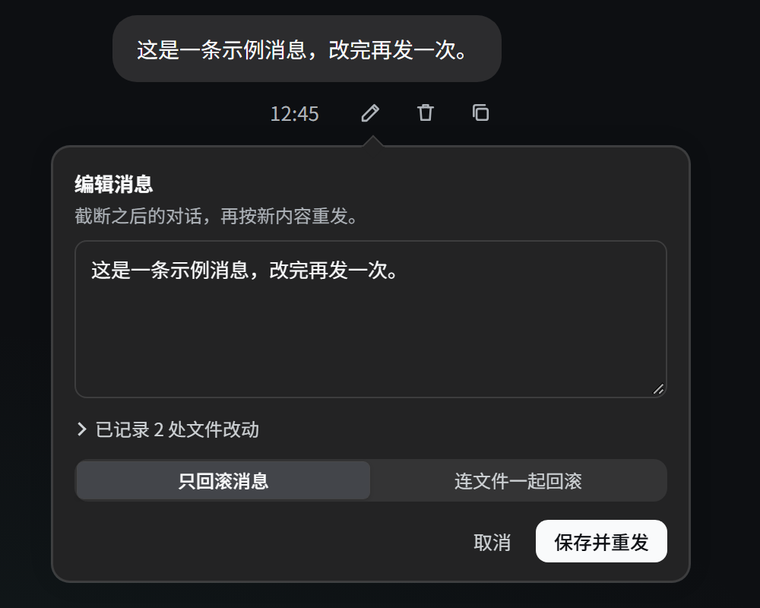
| Change a sent message | Click the pencil under your bubble, edit the text, then click **Save and resend**. Everything after that message is truncated and the conversation restarts from your edited text. |
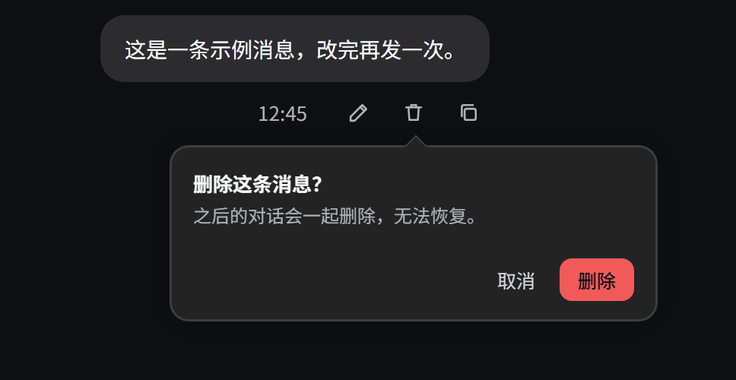
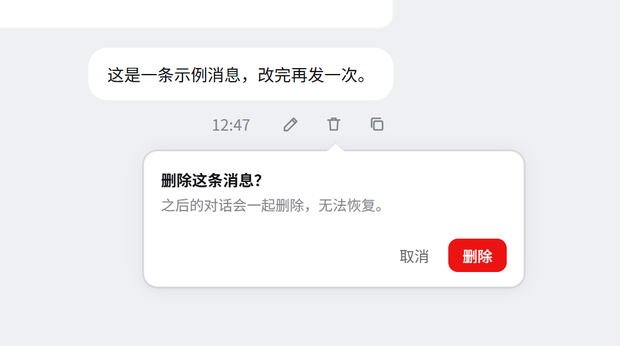
| Drop an out-of-line message | Click the trash icon and confirm. That message and every following turn are deleted. |
| Restore files too | When deleting or editing, if that turn recorded file changes, the popover lets you choose **messages only** or **messages and files**. |
| Stay out of a running task | The action is refused while a turn is still running, so it never races the agent's writes. |
Only messages you sent have these buttons. The **Copy** button is still there, in the same position.
## Screenshots
Your own messages get **edit / delete / copy** buttons under the bubble:
 The popover opens right under the button you clicked and points at it with a small arrow; click outside or press Esc to dismiss it. The editor reads the file changes recorded after that message as soon as it opens — collapsed into one **N file changes recorded** line unless you expand it — and a two-way switch decides whether files are restored too:
| Edit popover | Delete confirmation |
| :---: | :---: |
|
 |
 |
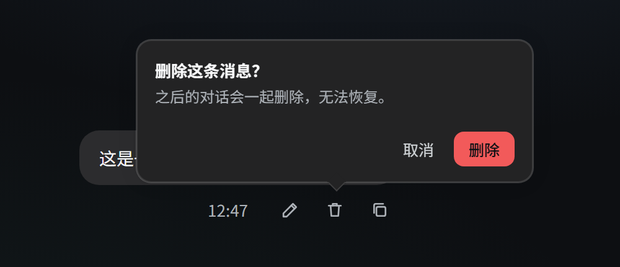
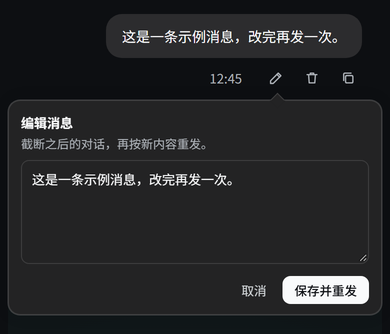
The popover follows its button: it flips above when there is no room below, narrows to the screen width on small viewports, and keeps the same layering in the light theme:
| Flips above near the bottom | Narrow screen (390px) | Light theme |
| :---: | :---: | :---: |
|
 |
 |
 |
Snapshot and Git-worktree limits are shown in the popover itself, not after a failed operation.
## Install
Requires DSH 0.2.1-rc.3 or newer (0.2.x) and Node.js ≥ 20; verified on 0.2.1-rc.5. DSH validates `engines.dsh` at startup and refuses to load the plugin on an older host.
### From npm (recommended)
Published on npm as [dsh-message-rewind](https://www.npmjs.com/package/dsh-message-rewind), and listed in the [plugin market](https://awesome-dsh-plugin.com/p/xCube007/dsh-message-rewind/).
One command:
```bash
dsh plugin --profile web add dsh-message-rewind
```
Or install from inside DSH: **Settings → Plugins → search `dsh-message-rewind`**.
If you prefer editing the profile yourself, the manual route is the same three steps:
1. Add the dependency to your profile's `package.json` (`~/.dsh/profiles//package.json`):
```json
{
"dependencies": {
"dsh-message-rewind": "^1.2.0"
}
}
```
2. Register the plugin in the same profile's `cordis.patch.yml`:
```yaml
- insert:
- id: message-rewind
name: 'dsh-message-rewind'
```
3. Run `pnpm install` in that profile directory, then restart DSH (or enable it under **Settings → Plugins**).
### From source (if you want to change the code)
```bash
git clone https://github.com/xCube007/dsh-message-rewind.git D:/Code/dsh-message-rewind
```
Use a link dependency; the remaining steps are the same:
```json
"dsh-message-rewind": "link:D:/Code/dsh-message-rewind"
```
### After installing
The DSH startup log lists `message-rewind` as active. Refresh the page and your own message bubbles get **edit / delete / copy** buttons.
## Usage
1. Click the pencil → a popover opens under the button; change the text and click **Save and resend**.
2. Click the trash icon → click **Delete** to remove that message and every following turn.
3. The popover reads the file changes recorded after that message as soon as it opens and keeps them collapsed into one line; when files changed it also offers a two-way **Rollback scope**:
- **Messages only** (default) — leave files untouched;
- **Messages + files** — restore files to their content before that message;
- pick the scope, then click **Save and resend** or **Delete**.
Lost snapshots, queued prompts, and non-Git workspaces are called out in one-line notes inside the popover.
## File rollback: what can and cannot be restored
**Can be restored:** creating, modifying, and deleting text files — including combinations within one turn, such as "create then delete".
**When it cannot, the plugin fails loudly instead of skipping silently:**
| Situation | Result |
| --- | --- |
| Binary file | Cannot be restored (only text diffs are recorded) |
| Workspace is not a Git repository and the file was changed by a shell command | Not recorded, so it cannot be restored. Run `git init` in that directory to record everything. |
| Session restarted or released, so earlier snapshots expired | You are told some snapshots are unavailable; messages-only rollback still works |
| The file was changed again after being recorded (by you or another tool) | Rollback is **refused** rather than overwriting your later changes |
| The conversation has no workspace | Messages-only rollback |
## FAQ
**Q: Does the sidebar get an extra conversation after a rollback?**
No — there is always just one conversation with the same name. The underlying session ID does change, though: DSH session logs are append-only and have no "delete a middle chunk" API, so the plugin forks a truncated branch, archives the original out of the sidebar, and deletes its log directory. If you referenced that session ID elsewhere, fetch it again.
**Q: Can the original record be recovered?**
Normally it is deleted. Only when its log directory is still held open and cannot be removed does the original stay in the archive.
**Q: Why can't messages with attachments be edited?**
Attachments are stored as part of the message content, and editing only supports plain-text messages. Messages with attachments can still be deleted.
**Q: The button says a turn is still running?**
Stop the running task first. Also note that queued prompts are discarded together with the deleted record — the popover warns you about this.
**Q: I don't see the buttons.**
Check that the plugin is enabled under **Settings → Plugins** and that you refreshed the page. Only messages you sent have these buttons.
## Uninstall
Remove the `dsh-message-rewind` dependency from your profile's `package.json`, delete the matching `insert` entry from `cordis.patch.yml`, run `pnpm install`, and restart DSH.
## Feedback
Found a bug or want a feature? Open an [issue](https://github.com/xCube007/dsh-message-rewind/issues).
## Development
To change the code or cut a release, see [CONTRIBUTING.md](https://github.com/xCube007/dsh-message-rewind/blob/main/CONTRIBUTING.md) (in Chinese).
## License
MIT