
A meme plugin for DeepSeek Harness —
one-click sending from the composer, mood-aware AI replies, and packs you can grow or install from the marketplace.


Pack showcase · Pack marketplace · Report an issue · 中文 · English
> [!IMPORTANT]
> **dsh-meme is a DeepSeek Harness plugin, not a standalone app.**
> Install DSH first, then add the plugin through the marketplace or CLI into a profile. It is a community open-source project, not an official DeepSeek product.
## Features
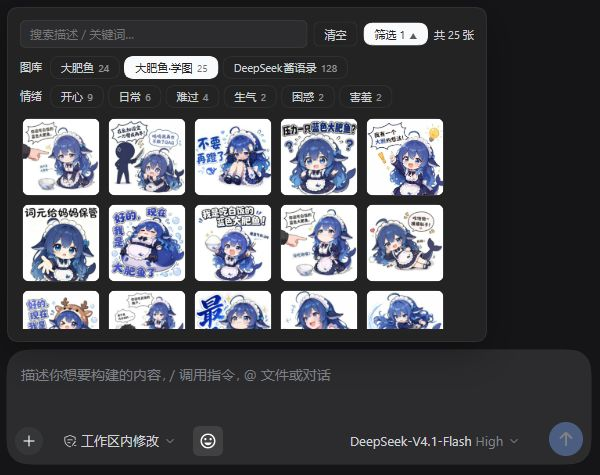
- 😊 **Click to send** — open 😊 beside the composer, search or filter by pack and mood, and pick an image to send it. Turn off “Click to send” in settings and picking only inserts the marker at your caret, so text and sticker go out together on Enter without accidental sends.
- 🎭 **Proactive memes** — the AI picks a meme that fits the conversation's mood without waiting to be asked; choose a proactive-meme level (off / by mood / active / every turn) or edit the prompt in settings.
- 📱 **IM / mobile** — through dsh-im, QQ / WeChat / Feishu and other IM chats send memes as native images with no text marker; on a phone or tablet, open DSH Web over your computer's LAN IP and turn on “Allow LAN access” (off by default). QQ tends to render large images as photos (stretched full-screen on tablets); turn on “QQ send size” in settings to send a 200–450 px copy while Web keeps the original.
- 🧠 **Learn new images** — upload an image and ask to save it; the AI identifies its category and caption. You can also drop image files into a pack folder and click “扫描新增 (Scan)” — the original bytes (including animated GIFs) are kept, and renamed/deleted files have their stale index rows cleaned up.
- 🗂️ **Organize packs** — ask the AI to “list my memes”, “find duplicates” or “recategorize this one” — the `meme_list` / `meme_update` tools handle it (deleting stays in the panel to avoid accidents).
- 📦 **Manage and share** — enable multiple packs, upload and edit images, import/export ZIPs, and install or update marketplace packs.
- 🚀 **Ready to use** — includes Big Fat Fish (24 images); the core has no third-party runtime dependencies and uses Node's built-in SQLite. QQ resizing is optional and uses sharp (already bundled with dsh-im; falls back to the original image when unavailable).
## Promo video

▶ Watch on Bilibili (56s)
## Install
Requires **Node.js ≥ 22.13.0**.
| Method | How |
| --- | --- |
| Marketplace (recommended) | DSH → **Plugins → Add plugin**, enter `dsh-meme`, and install |
| CLI | `dsh plugin --profile web add dsh-meme` (replace `web` with the target profile) |
Once installed, 😊 appears beside the composer in any conversation. The old package name `dsh-expression` is deprecated; its internal plugin ID is retained for compatibility.
## Screenshots
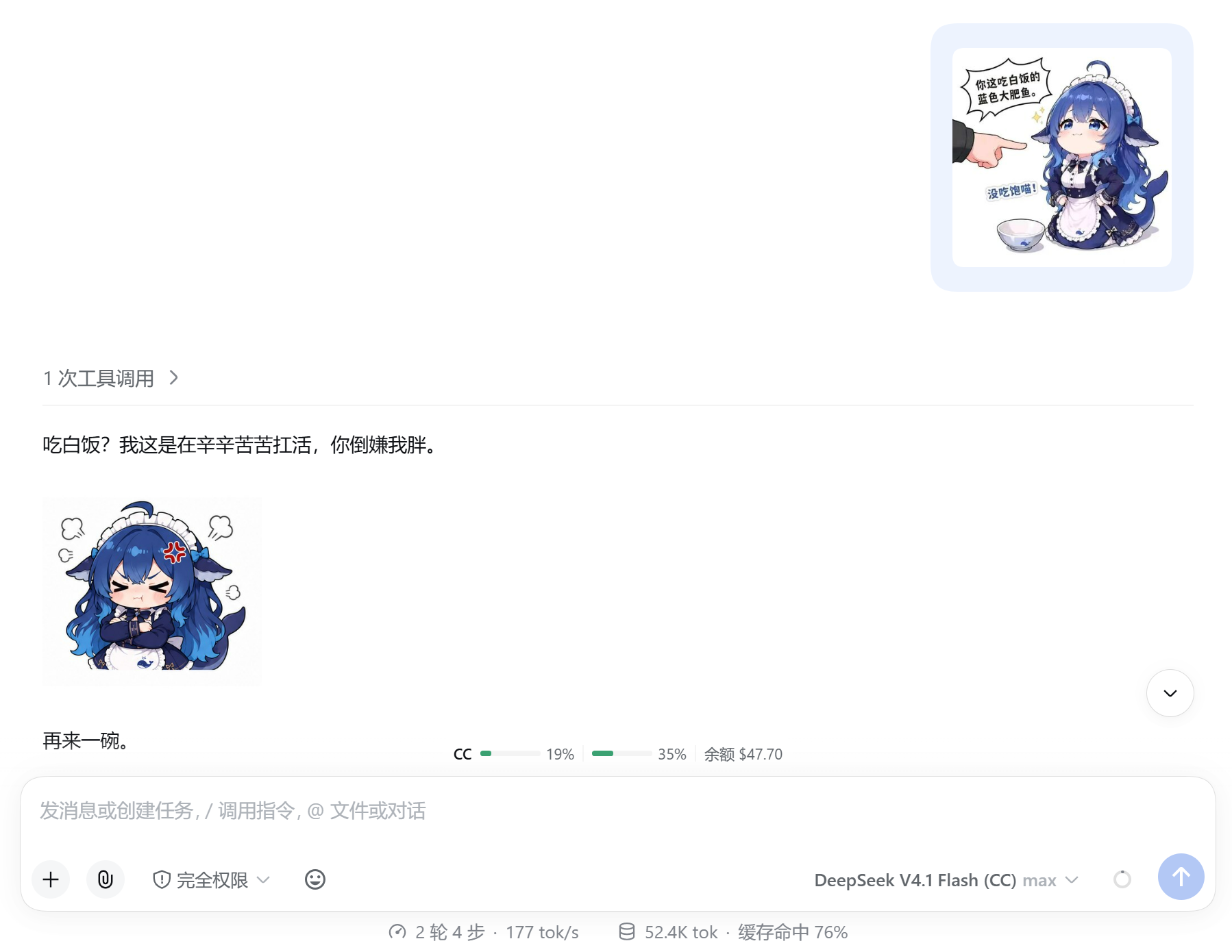
**Meme exchange: you send one, the AI replies with one**
**Picker: search, packs and mood filters**
## Manage packs
Open **设置 (Settings) → 表情包 (Memes)**:
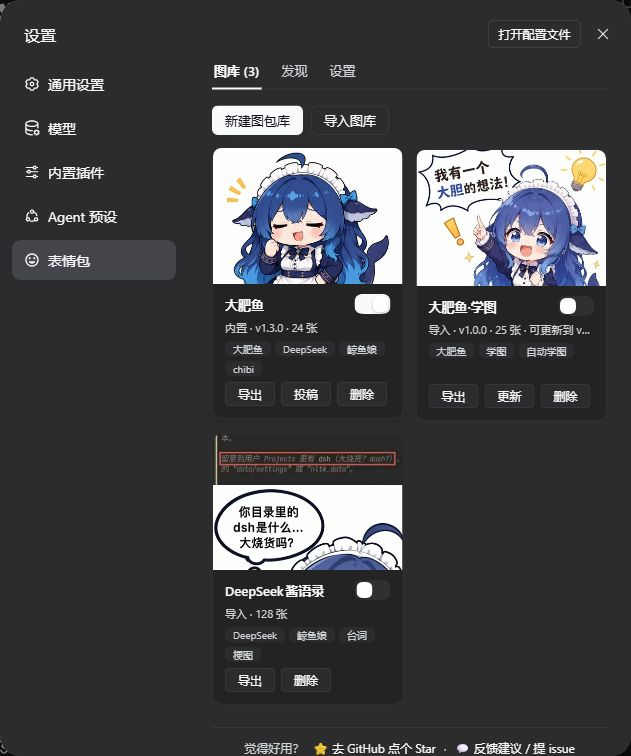
- **图库 (Packs)** — cards show image count and disk size; click a card to manage images. The category dropdown filters by real categories; “扫描新增 (Scan)” indexes images you copied into the folder and cleans up stale rows. Each switch controls whether the AI can use that pack; several can be enabled. Create, import/export ZIPs, submit, delete and update.
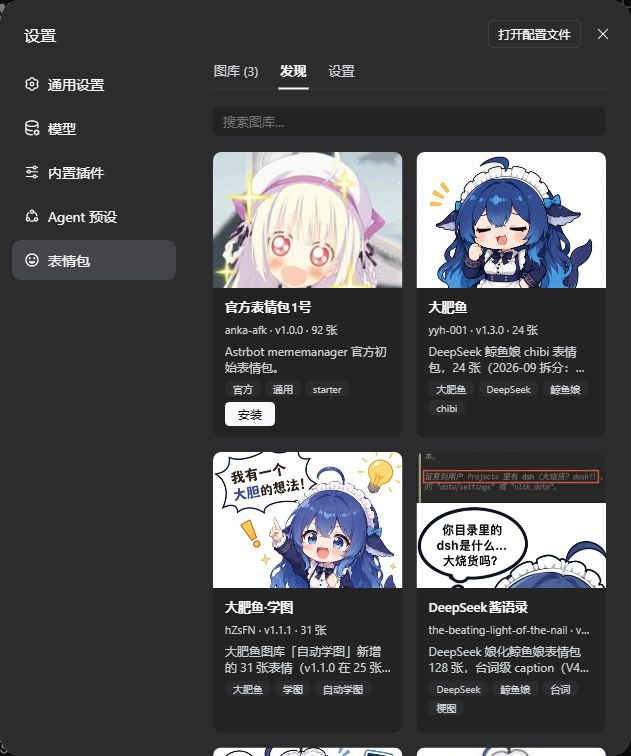
- **发现 (Discover)** — preview marketplace packs and install them (Release ZIPs verify SHA-256).
- **设置 (Settings)** — scan directory, proactive memes (off / by mood / active / every turn), prompt, send mode (automatic / text-only / image), QQ send size (toggle + 200/300/400/450 px long edge), layout (side-by-side / full-width row), LAN access, `AGENTS.md`.
Settings screenshots (expand)
**Packs: installed packs with independent switches**
**Discover: marketplace previews and one-click install**
**Settings: send mode, proactive memes and pack directory**
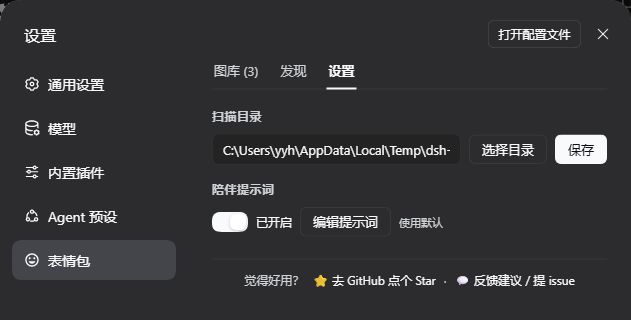
The default scan directory is `~/.dsh/meme-packs`; settings live in `~/.dsh/dsh-expression.json` and survive upgrades. ZIP imports accept standard compression and plain image folders.
**Send mode** only affects the AI: automatic follows the channel (Web marker, IM native image), text-only never sends images, image requires a real send every time. **Proactive memes** has four levels: off (only when you ask for one), by mood (default, the AI decides), active (most suitable turns), and every turn (the prompt requires one); they apply only in automatic send mode, take effect in a new session, and a direct request always bypasses the level. **QQ send size** is off by default; when enabled, QQ/IM sends a copy scaled to the selected long edge (300 px default), Web keeps the original, and GIF frames are preserved — the official QQ bot has no sticker message type, and smaller images are more likely to render as stickers instead of being stretched full-screen on tablets. **Layout** only affects rendering: side-by-side (default) or a full-width image row.
## Troubleshooting
- **QQ renders memes as stretched photos** — the official QQ bot has no sticker message type, so large images are sent as photos. Turn on “QQ send size” and pick 300 px (200–450 works best); QQ/IM then sends a scaled copy while Web keeps the original. Scaling needs sharp, which dsh-im bundles; without it the original image is sent.
- **Update failed / plugin disappeared** — click **Retry** in the marketplace; if it still fails, quit DSH completely and update again. On older versions, or if it keeps failing, run `pnpm add dsh-meme@latest` in the profile directory with DSH closed. Packs and settings live in `~/.dsh` and survive reinstalls. See the [troubleshooting guide](https://github.com/yyh-001/dsh-meme/blob/main/docs/troubleshooting.en.md).
- **Restrictive network / marketplace unavailable** — mirrors are raced and the catalog is cached automatically; click **Retry**, then switch **Catalog source** to **Mirrors**. See the [troubleshooting guide](https://github.com/yyh-001/dsh-meme/blob/main/docs/troubleshooting.en.md).
- **Phone / LAN / reverse proxy / sub-path** — turn on **Allow LAN access** for LAN IPs; a reverse-proxy domain needs an explicit trusted host (`DSH_MEME_TRUSTED_HOSTS` or `allowedHosts`); sub-path deployments (fnOS `/app//`, Nginx `location /dsh/`, etc.) are detected automatically since 0.1.77. See the [troubleshooting guide](https://github.com/yyh-001/dsh-meme/blob/main/docs/troubleshooting.en.md).
## Share your own pack
Create a pack, add images, click **导出 (Export)** and send the ZIP; friends install it with **导入图库 (Import pack)**. To join the marketplace, click **投稿 (Submit)** and attach the ZIP with image sources and licence details in the prefilled GitHub form. Use the plugin's exported ZIP — GitHub's “Download ZIP” is a source archive, not a pack.
## Tools and extensions
| Tool | Usage |
| --- | --- |
| `send_meme` | `tag` samples a mood bucket, `query` searches captions/keywords/file names across enabled packs; candidates carry `path` (absolute on disk) / `library`, plus `absPath` for IM, and a miss returns real category counts |
| `learn_meme` | Saves the latest user image by default; also accepts `attachmentId` / `imageUrl`; warns when an attached GIF was flattened |
| `meme_list` | Read-only listing across enabled packs by keyword/category/pack, with pack, category, caption, keywords and path |
| `meme_update` | Change one image's category/caption/keywords (index only); pass the path exactly as returned by `meme_list` / `send_meme` |
```text
send_meme tag=happy
send_meme query="猫 比心"
learn_meme
meme_list tag=work
meme_update path="/home/you/.dsh/meme-packs/work/a.jpg" caption="加班到趴桌"
```
Mood buckets: `happy` / `angry` / `sad` / `shy` / `confused` / `daily`. The model should copy a candidate's `[表情: caption]` verbatim; if nothing fits, retry with other words or reply with text.
**Agent docs**: `AGENTS.md` documents per-channel sending, path prefixes and the GIF-flattening caveat; pack maintenance lives in the skill `.dsh/skills/dsh-meme-maintenance`. The settings page can view/edit it.
**Animated GIFs**: `learn_meme` and upload recognition sample GIF frames into a filmstrip, so captions describe motion; the original keeps animating. WebP / APNG contribute metadata only and are recognized from the first frame.
### IM delivery
Through [dsh-im](https://github.com/xmanrui/dsh-im), `send_meme` candidates carry absolute paths and the model calls `dsh_im_return_file`; Web chats keep `[表情: caption]`. [dsh-companion](https://github.com/yyh-001/dsh-companion) also provides QQ delivery.
### Official QQ bot
For [dsh-qqbot](https://github.com/tencent-connect/dsh-qqbot) sessions, candidates carry `absPath` for `qqbot_send_file`'s `file_path`. dsh-qqbot's path allowlist needs your pack directories in `sendFile.extraRoots`:
```yaml
# the qqbot profile's cordis.patch.yml (or Settings → QQ bot)
- id: im-qqbot
config:
sendFile:
extraRoots:
- C:\Users\\.dsh\meme-packs
- C:\Users\\.dsh\profiles\\node_modules\dsh-meme\memes
```
Replace `C:\Users\` with `~` on Linux/macOS; include the bundled pack's path too.
### Read-only meme service for other plugins
Other plugins in the same process can call `ctx.get('dshMeme')` (read-only):
| Method | Returns |
| --- | --- |
| `packs()` | Enabled packs `{ id, name, count, path }[]` |
| `search({ query, tag, limit })` | `{ ok, query, memes: [{ path, tag, caption, keywords, pack, packName }] }` |
| `pick({ query, tag })` | On a hit `{ ok: true, path, tag, caption, keywords, pack, packName }`; otherwise `{ ok: false, reason, tags, tagStats }` |
`tag` is a mood bucket; `tagStats` gives the real category distribution on a miss. Every returned `path` is absolute and exists. For custom catalogs see the [remote pack specification](./docs/remote-pack-spec.md).
Plugin HTTP routes accept loopback hosts by default; LAN and reverse-proxy setup is in the [troubleshooting guide](https://github.com/yyh-001/dsh-meme/blob/main/docs/troubleshooting.en.md).
## Development
Plain ESM, no build step. Clone the repository and run the tests:
```sh
git clone https://github.com/yyh-001/dsh-meme.git
cd dsh-meme
npm test
```
Tests use Node's built-in runner (`node --test test/*.test.mjs`) and should be green before a release. With a `link:` install into a profile, restart DSH to pick up changes. Agent-facing conventions live in [AGENTS.md](./AGENTS.md).
## Community & feedback
- Check the [troubleshooting guide](https://github.com/yyh-001/dsh-meme/blob/main/docs/troubleshooting.en.md) first, then [open an issue](https://github.com/yyh-001/dsh-meme/issues/new/choose).
- Chat: [QQ group 1 (full)](https://qm.qq.com/q/7AD2g70HqS) · [QQ group 2 for dsh plugins](https://qm.qq.com/q/HCtId2UY4q)
- Version history: [npm](https://www.npmjs.com/package/dsh-meme?activeTab=versions).
## Related projects
- [DeepSeek Harness](https://github.com/deepseek-ai/deepseek-harness) — the upstream agent platform
- [dsh-im](https://github.com/xmanrui/dsh-im) — QQ / WeChat / Feishu IM bridge that delivers memes as native images
- [dsh-meme-packs](https://github.com/yyh-001/dsh-meme-packs) — downloadable packs and a machine-readable catalog
- [dsh-companion](https://github.com/yyh-001/dsh-companion) — companion-mode plugin with an optional QQ channel
- [agent-expression](https://github.com/yyh-001/agent-expression) — a local skill with the same pack idea, for OpenClaw / Hermes / Cursor
## License
Code is licensed under [MIT](./LICENSE). Check each bundled, marketplace or third-party pack for image provenance and usage rights.