
# 🎨 dsh-media-skills ### *A 创作 page in the DSH sidebar — generate images, keep the gallery, and never let a key leave your machine.* [](LICENSE) [](https://www.npmjs.com/package/dsh-media-skills) [](https://python.org) [](https://github.com/topics/dsh-plugin) [](README.md#-the-创作-page) [](README.md#-keys--privacy) [](docs/lang/README_ZH.md)
On desktop **0.2.1+** a plugin can own a page of its own, so this bundle ships one: **创作**, a sidebar page next to your conversations. Type a prompt, pick a model, a ratio and a canvas size, and the picture comes back with its own frame number, spec line and actions. Everything you make stays in a contact sheet you can click through. Under that page sits the same `scripts/generate.py` the agent uses, so **the panel and the `media-tools` skill are one engine, not two**. The bundle also still carries `vision-review` for reading images and screenshots. No bundled keys, no relay server, no account, no telemetry. Your prompts go from a local Python process straight to the provider you picked. [Why](#-why) · [The page](#-the-创作-page) · [Quick start](#-quick-start) · [Keys & privacy](#-keys--privacy) · [Skills](#-using-the-skills) · [FAQ](#-faq) [**English**](README.md) · [**简体中文**](docs/lang/README_ZH.md) · [**繁體中文**](docs/lang/README_ZH_TW.md) · [**日本語**](docs/lang/README_JA.md) · [**한국어**](docs/lang/README_KO.md) · [**Español**](docs/lang/README_ES.md) · [**Deutsch**](docs/lang/README_DE.md) · [**Português**](docs/lang/README_PT.md) · [**Русский**](docs/lang/README_RU.md)
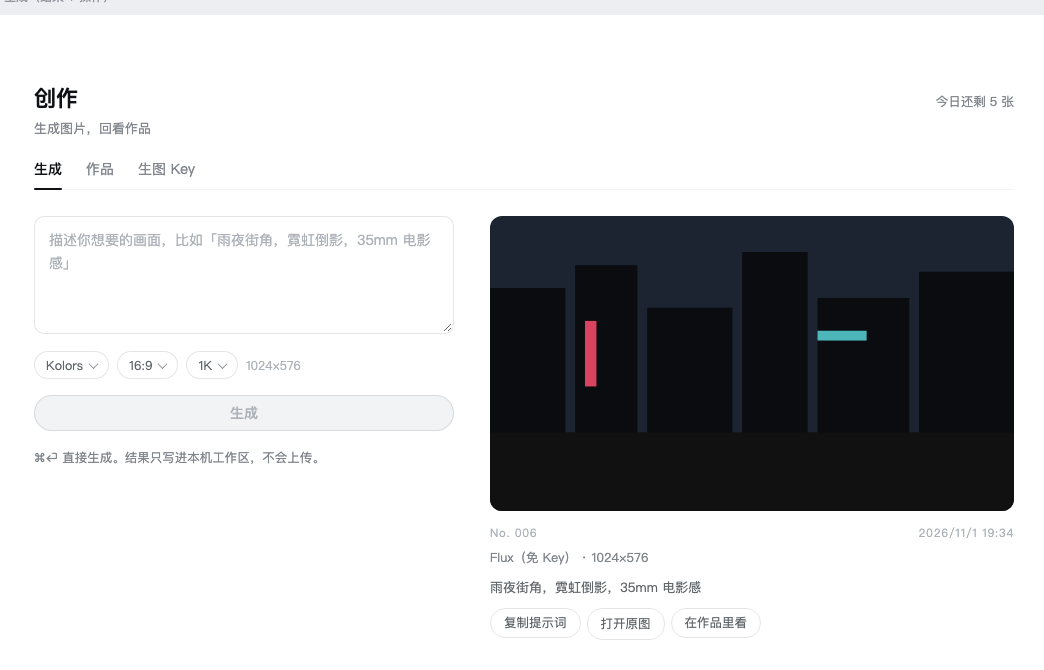 **生成** — type a prompt (⌘⏎ also works), then pick:
- **Model** — one row per model, not per provider: `Kolors`, `Qwen-Image`, `Z-Image`, `Z-Image Turbo`, `SenseNova U1 Fast`, `Flux (keyless)`, plus anything your own endpoint exposes. Rows carry a short description and a checkmark; the panel remembers what you picked last time.
- **Ratio** — 智能 / 1:1 / 9:16 / 16:9 / 3:4 / 4:3 / 2:3 / 3:2 / 9:21 / 21:9, drawn as a grid of little canvases.
- **Canvas** — 1K / 2K / 4K long edge. A tier above a model's own ceiling is greyed out with the ceiling written on it, instead of being silently ignored.
The result lands on the right as **one proof card**: the picture, a frame number (`No. 006`), the date, `model · pixels`, the full prompt, and what you can do with it. While it renders you get a skeleton in the shape you asked for.
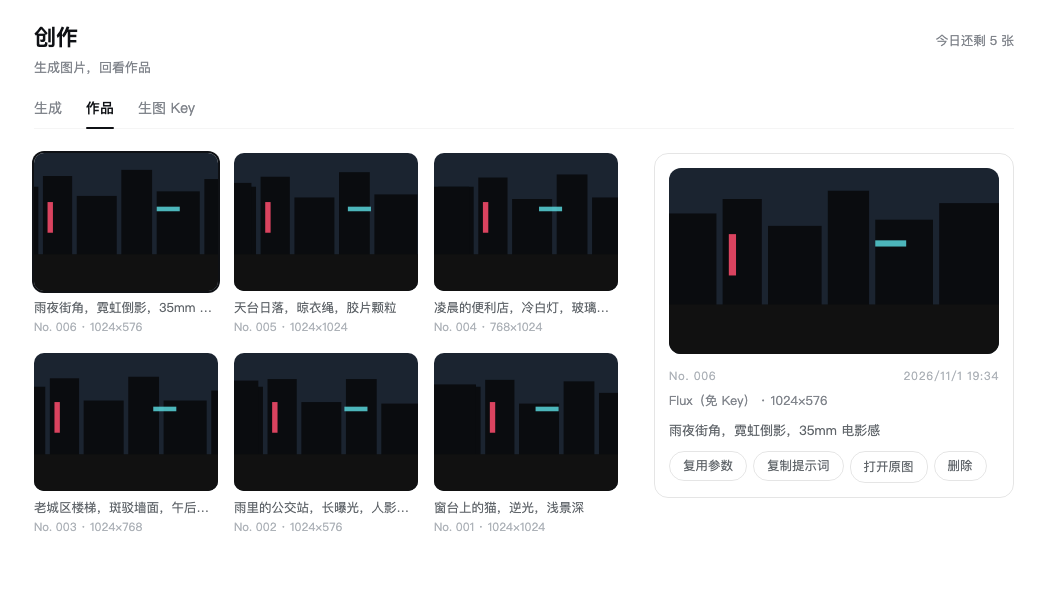 **作品** — everything generated in this workspace, as a contact sheet with frame numbers and the spec line. Click a tile and the card on the right shows the prompt and four actions: **复用参数** (put the prompt, model, ratio and tier back into the input), **复制提示词**, **打开原图**, **删除** (two-step, and it deletes the file too). Click the picture itself to zoom; `Esc` closes.
**生图 Key** — one row per provider, plus any OpenAI-compatible endpoint you want to add. What you type is written to `~/.dsh/secrets/media-tools.env` with mode 600 by the plugin, and never appears anywhere else. Existing keys show as `••••abcd` with an eye to reveal them.
### No key at all
| Provider | What you get | Catch |
|---|---|---|
| **Pollinations** | Flux, right now, zero setup — it is already in the model list | One image per IP every 45 seconds, ≤768×768, a small logo in the corner |
| **Cloudflare Workers AI** | Roughly **170 flux-1-schnell images a day** on the free plan (10,000 neurons/day) | Needs a Cloudflare account and a Workers AI token; endpoint is per-account (see the FAQ) |
| **ModelScope** | Qwen-Image / Z-Image series | Needs a ModelScope token and a bound Alibaba Cloud account |
The other built-in rows (SenseNova, SiliconFlow) are free-tier-or-cheap third-party APIs: they work the moment you paste a key, and fail with a plain-language message when the account has no credit left.
## ⚡ Quick start
**1. Install — in the app, no terminal.** Four clicks:
> **插件** → **添加插件** → 包名 `dsh-media-skills` → **安装**
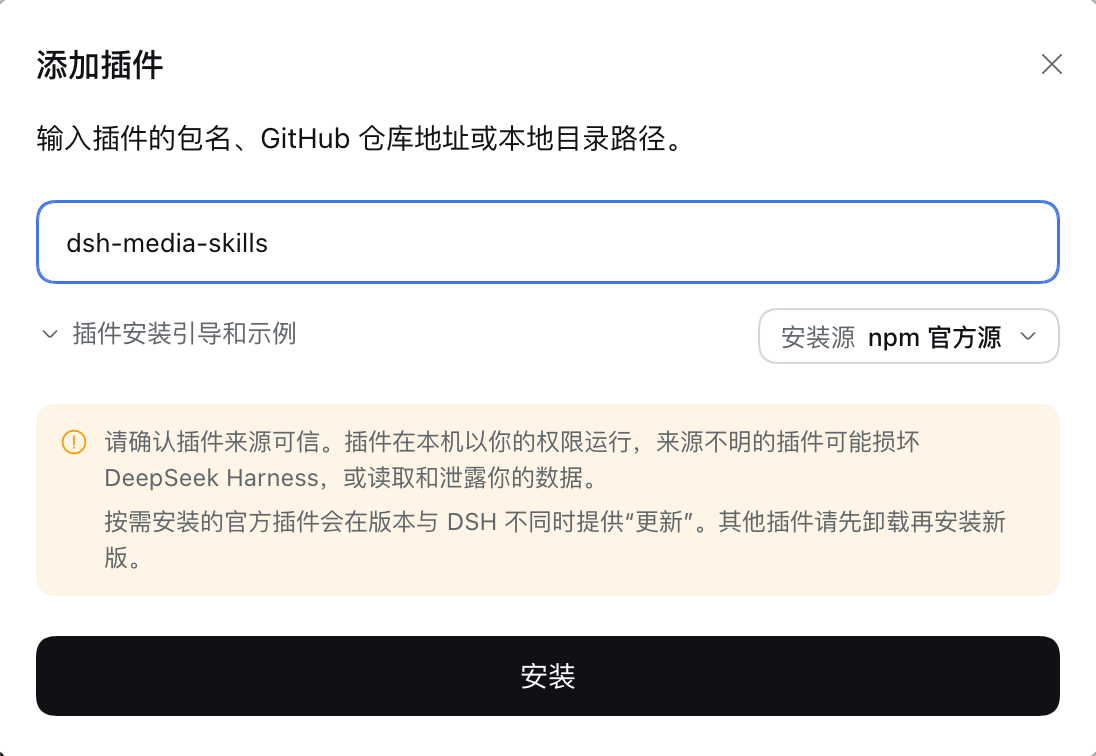 1. Sidebar → **插件** (Plugins)
2. Top right → **添加插件** (Add plugin) — the dialog above opens
3. Type `dsh-media-skills` into the package field, then click **安装** (Install) — pnpm fetches it, a few seconds
4. It ends with 「请重启 DSH 使更改生效。」 — that is the normal ending, not an error
Same thing from a terminal, if you prefer:
```sh
dsh plugin --profile desktop add dsh-media-skills
```
`latest` is the current release; pin a version (`dsh-media-skills@0.6.4`) if you need to. The GitHub form still works: `add github:MJorgin/dsh-media-skills`.
**2. Restart the app** (⌘Q, then open it again). Plugins load at boot — a newly installed page will not appear until you restart. The sidebar then shows a new row: **创作**.
**3. Open 创作** in the sidebar and generate something. With no key configured, pick **Flux(免 Key)** and it will just work.
**4. Add a key later** if you want better models: **生图 Key** tab → paste → 保存. `已配置` on the row means the plugin can see a key; `未配置` means it cannot.
The agent side needs nothing extra: once the bundle is installed, `media-tools` and `vision-review` show up in the skill list.
## 🔑 Keys & privacy
**Short version: a key you paste never leaves your machine except as the `Authorization` header of the request you asked for.**
| Question | Answer |
|---|---|
| Where is the key stored? | `~/.dsh/secrets/media-tools.env`, written by the plugin with mode `600`. The panel never sends it anywhere else, and it is never written into this repo or into a prompt. |
| Does it get uploaded to the author / a relay? | **No.** There is no relay and no account. The generation request is made by a local Python process (`scripts/generate.py`) straight to the provider's HTTPS endpoint. |
| Can a website call these routes? | No. The panel's routes live inside your local DSH server and are same-origin checked: a request must carry a `Host` header, and its `Origin`/`Referer` host must match it. |
| Can the file routes read anything on disk? | No. They resolve the path first and refuse anything that is not inside `uploads/media` — `../../package.json` gets a 403. |
| Is there telemetry? | No. No analytics, no ping, no update check. |
| What actually leaves the machine? | The prompt, the model name and the size — to the provider you selected. Nothing else. Generated files stay in your workspace. |
| Does 删除 really delete? | Yes — the file is removed from disk, not just hidden from the list. |
Keys are read in this order: environment variables → `~/.dsh/secrets/media-tools.env` → `~/.codex/secrets/media-tools.env` (legacy fallback).
> **One honest caveat:** a provider's free tier comes with that provider's data-use terms. Google's free Gemini tier may use requests to improve its products; Pollinations is a free public service; Cloudflare's free plan has its own terms. For sensitive images (IDs, internal docs, customer data), read the terms of whichever provider you picked, or keep it local.
## 🚀 Using the skills
The page is the comfortable path; the skills are for the agent and for scripts.
| Way | How | When |
|---|---|---|
| **A. The page** | Sidebar → 创作 | Everyday generation, browsing what you made |
| **B. Chat** | "Generate an image of a rainy street at night" → `media-tools` | Quick one-offs inside a conversation |
| **C. Direct** | `python3 skills/media-tools/scripts/generate.py "prompt" out.png 1024x576` | Automation, loops, your own pipeline |
The script takes a size as `16:9`, `1024x576` or nothing at all, and honours `MEDIA_PROVIDER` / `MEDIA_MODEL` / `MEDIA_API_URL` / `MEDIA_API_KEY` when you want to point it somewhere specific. See [skills/media-tools/SKILL.md](skills/media-tools/SKILL.md).
## ❓ FAQ
**Do I need a key to try it?**
No. Install, restart, open 创作, pick **Flux(免 Key)** (Pollinations). It is rate-limited and has a logo, but it is zero setup.
**I pasted a free Cloudflare / SiliconFlow key and generation fails.**
The panel maps provider errors to plain language: `402` means the account has no credit, `401` means the key is wrong, `404` means the address or model name is off, `429` means too many requests. A SiliconFlow account with a zero balance returns 402 even on models that are advertised as free.
**How do I use Cloudflare Workers AI?**
Create an API token with the **Workers AI** template, find your Account ID, then add a custom provider with the address `https://api.cloudflare.com/client/v4/accounts/

 The vision test card — title, two buttons, four bar values and a footer note:
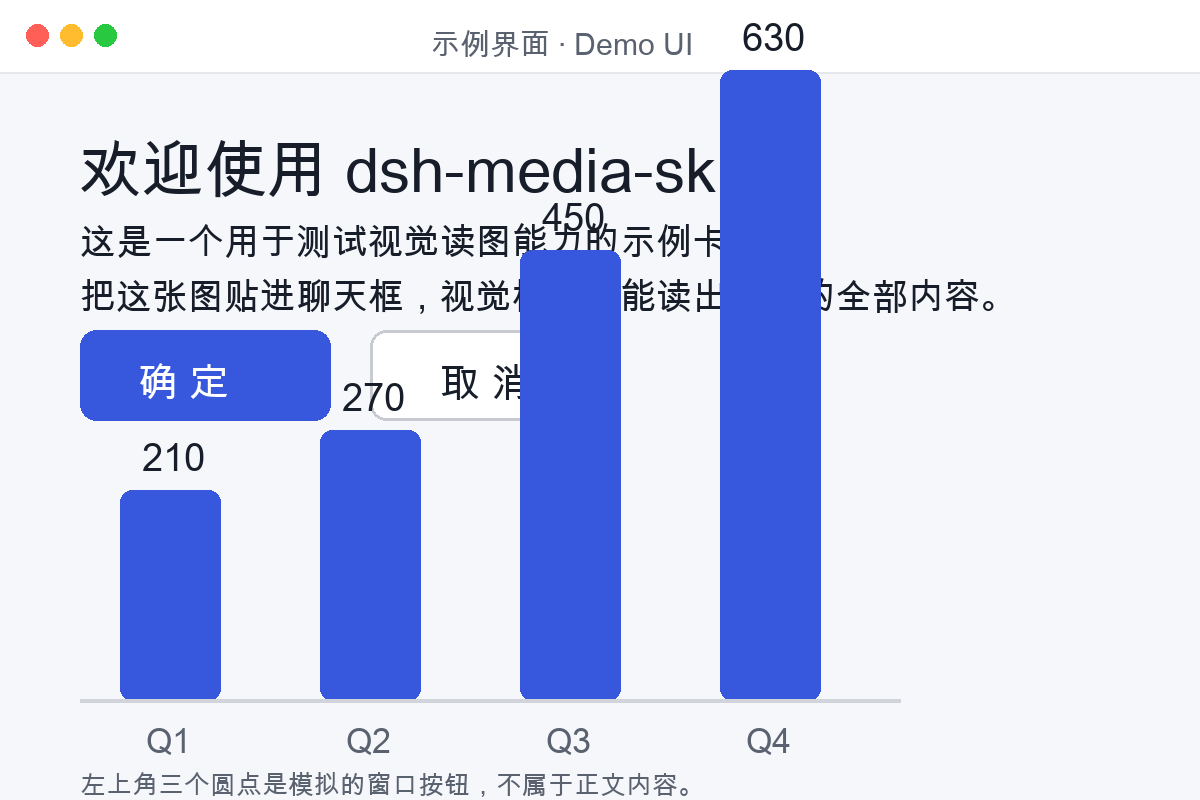 → [examples/README.md](examples/README.md)
## 🗺️ Layout
```
dsh-media-skills/
├── package.json # dsh.bundle + dsh.client manifest
├── cordis.patch.yml # plugin layer
├── index.js # skills + the /media/* routes the page talks to
├── client.js # the 创作 page (sidebar entry + panel UI, no build step)
├── skills/
│ ├── media-tools/ # image generation (generate.py)
│ └── vision-review/ # image reading
├── scripts/
│ ├── check-panel.mjs # provider/model resolution tests
│ ├── check-routes.mjs # route, same-origin and path-traversal tests
│ └── generate.py # the one engine both the page and the skill use
├── examples/ # sample images + vision test card
└── docs/
├── screenshots/ # panel and demo images
├── SETUP_VISION_EN.md # detailed setup guide (English)
├── SETUP_VISION.md # 详细配置指南(中文)
└── lang/ # READMEs in 9 languages
```
## 🧩 Using ModLens alongside?
This bundle and [ModLens](https://github.com/liustack/modlens) can be installed together, but desktop 0.2 does **not** provide the old api-proxy auto-transcription fallback. Choose one paste behavior deliberately: keep ModLens paste-to-path interception for file-path tool workflows, or set `pasteToPath: false` so DSH uses native image attachments with an image-capable route. See [docs/COMPARE_MODLENS.md](docs/COMPARE_MODLENS.md) (中文).
## 🤝 Join the DSH plugin ecosystem
DeepSeek Harness developer preview is still evolving; core plugins and base APIs will keep iterating.
- [dsh-plugin topic](https://github.com/topics/dsh-plugin)
- [Quickstart](https://deepseek-harness.github.io/deepseek-harness/guide/quickstart)
- [DeepSeek Harness repo](https://github.com/deepseek-ai/deepseek-harness)
- [dsh-agent-conductor](https://github.com/MJorgin/dsh-agent-conductor) — 同作者的指挥家:在 DSH 里派活给 11 种外部 agent CLI(Codex / Claude Code / TraeCode…)
> This repo is tagged [`dsh-plugin`](https://github.com/topics/dsh-plugin) and listed in the [awesome-dsh-plugin](https://github.com/awesome-dsh-plugin/awesome-dsh-plugin) curated list. PRs, issues and translations are welcome.
## 📄 License
[MIT](LICENSE)