
<div align="center">

<img src="assets/logo.png" alt="dsh-loupe" width="140" />

# dsh-loupe

**Lightweight DSH word/sentence explainer**

[简体中文](README.md) | English

Select a word or a sentence in a DSH conversation and the floating window explains it. Fast, light, no extra session pollution.

>For **heavy follow-up questions that need long context**, use my other plugin
[**dsh-tree-view**](https://github.com/Rice00/dsh-tree-view)to ask along a tree of branches.

[![npm](https://img.shields.io/npm/v/dsh-loupe?color=2f7de1)](https://www.npmjs.com/package/dsh-loupe)
[![License: MIT](https://img.shields.io/badge/License-MIT-2f7de1.svg)](./LICENSE)
[![Platform: DSH web](https://img.shields.io/badge/platform-DSH%20web-334eac.svg)](#install)
[![Zero config](https://img.shields.io/badge/setup-zero%20config-1c7a54.svg)](#faq)
[![PRs: welcome](https://img.shields.io/badge/PRs-welcome-7096d1.svg)](#contributing)
[![GitHub stars](https://img.shields.io/github/stars/Rice00/dsh-loupe?style=flat&label=stars&color=7096d1)](https://github.com/Rice00/dsh-loupe/stargazers)

</div>

---

Select a word and the panel appears:
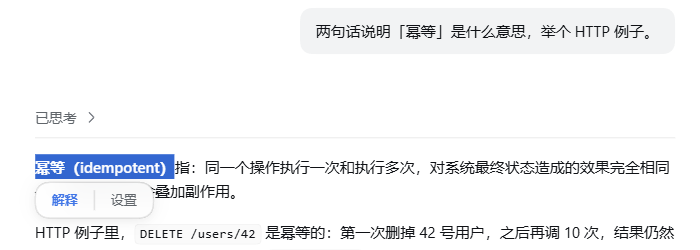
![After selecting "幂等（idempotent）", "Explain / Settings" appear below the selection](assets/screenshot-select.png)

Click "Explain" and the floating window starts asking right away:
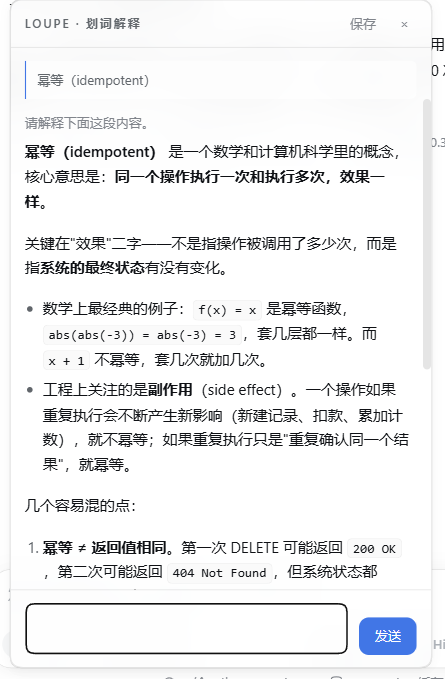
![The floating window answers, with the selected sentence pinned at the top and timing stats at the bottom](assets/screenshot-window.png)

## Features

| | |
|---|---|
| 🖱️ **Select and it pops** | Select any text in a message body and two entries, "Explain / Settings", appear below the selection. |
| 🪟 **Answers in a window** | Not a sidebar. Single instance, multi-turn follow-ups, streaming markdown, draggable, position remembered. |
| 🔌 **No session created** | One model request only: no session log, no tool registration, the left-hand list never gets dirty. |
| 📚 **Brings its own context** | Uses the plugin's own `context.md` instead of dragging in the agent's full context — faster and cheaper. |
| 🔁 **Accumulates on its own** | After each explanation it keeps "what was selected → what came out", so the same word sharpens with use. |
| 🗂️ **Everything archived** | Every exchange goes into history, searchable by keyword and paged; click one and it is restored into the window for more questions. |
| 📌 **Pinnable as a session** | An explanation worth keeping: pick a target workspace, save it, and it becomes a real session in the left-hand list, auto-named "Selection · <word>". |
| 🌐 **Bilingual UI** | Interface and prompt in Chinese or English; `auto` uses the host's language preference (`locale.preference`), falling back to the browser language, and can be pinned. |
| 🧠 **Collapsible reasoning** | The model's own reasoning is folded away by default; expand it when you want it, and it survives a restore from history. |
| 🌗 **Follows the theme** | Light/dark and skin follow the host; when the host ships no design tokens it falls back to the OS preference. |
| 🔑 **Zero config** | Borrows the host's `llm` service; there is no API key to fill in. |
| 🫧 **Glass look** | Translucent + background blur, switchable off in Settings. |

## Plugin traits

**Fast.** By the time you click "Explain" it is already asking — the window submits on open, so there is no second send to press. The reasoning level defaults to `off`, and three measured runs gave a first token at **503ms / 544ms / 634ms**, with a full answer in 1.7–2.5 seconds. It also does not drag the agent's full context in: it sends only the sentence you selected plus a small notebook, and the notebook sits at a fixed spot in the prompt so it still hits the host's prompt cache.

**Precise.** Three things go to the model: the text you selected, the message it sits in (only that one by default), and `context.md` (capped at 2200 characters). None of the main conversation's hundreds of thousands of tokens come along, so nothing unrelated can pull the explanation off course. `context.md` is where a glossary and your own usage preferences go; auto-accumulation also writes "what was selected → what came out" back into it, so the second time you ask about a word it fits your context better than the first.

**Light.** The host half imports only `node:fs` / `node:os` / `node:path` / `node:crypto` — zero third-party dependencies; the UI half is a hand-written module-loader module with no build output to keep in sync. It creates no session, writes no session log and registers no tool — running it leaves two files behind: `context.md` and `history.jsonl`.

**One job only.** It does not chat, summarise or edit code; it explains the selected passage. One exchange, read it, close it — when you really want a long discussion, click "Save" and hand it back to the main conversation.

## Install

### Local checkout (recommended)

```bash
git clone https://github.com/Rice00/dsh-loupe.git
dsh plugin --profile <profile> add link:/abs/path/to/dsh-loupe
```

The patch inserts one row (`loupe`) into the profile. **Then restart that profile** — host plugin modules are cached in-process, so a running harness will not read the new row. UI-only changes just need a browser refresh.

`link:` is a live link, so a source edit takes effect immediately; the cost is that the folder must not move once installed. Use `file:` to copy the files along instead, and then every change needs a reinstall.

### From npm or GitHub

```bash
dsh plugin --profile <profile> add dsh-loupe                    # npm
dsh plugin --profile <profile> add github:Rice00/dsh-loupe      # GitHub
```

### Let an AI assistant do it

```
Please install the DSH plugin dsh-loupe:

1) Into the web profile, from any of three sources:
     from npm:
       dsh plugin --profile web add dsh-loupe
     from GitHub:
       dsh plugin --profile web add github:Rice00/dsh-loupe
     or from a local checkout (put the absolute path of this folder here):
       dsh plugin --profile web add link:<absolute path>
2) Restart that profile — host plugin modules are cached in-process, so the new row is only read at startup.
   (UI-only changes just need a browser refresh.)
3) Verify: open any conversation and select a sentence in the message body.
   "Explain / Settings" should appear below the selection; clicking "Explain" should open the
   floating window and stream an answer, with a stats line at the bottom
   (N chars · first token …ms · total …ms).
4) If it does not work, open the fourth tab of the Settings page, "Diagnostics": it lists the
   host llm service, model resolution, context.md writability, drag-event counters and the
   workspace probe result, one per line.
```

## FAQ

**Will it pollute my main conversation?**
No. One model request only: no session, no session log, no tool registration.

**Do I need an API key?**
No. It goes through the host's existing `llm` service and follows `agent-default-model` by default.

**How is it different from a side conversation?**
A side conversation forks the entire history of the main conversation, hundreds of thousands of tokens; this plugin takes only the sentence you selected and a small notebook.

**Why is the reasoning level `off` by default?**
Explaining one passage does not need high reasoning. On the same question the first token took **544ms** at `off` and **2806ms** at `low`. If the answer feels shallow, raise it to `low` in Settings.

**If I close the window, is the content still there?**
Yes. It is all in `history.jsonl`, and clicking an entry under Settings → "History" restores it so you can keep asking.

**The window will not drag?**
The "Diagnostics" tab in Settings carries drag-event counters — drag once and see whether the numbers move, and you know whether the events reach the host half.

**The glass look does nothing?**
It needs browser support for `color-mix`. Without it the window falls back to a solid background and everything else keeps working.

**Can I switch the interface to English?**
Yes — pick `en` under "Language" in Settings and the interface and the prompt switch immediately. `auto` uses the host's language preference, falling back to the browser language (the host page's `lang` attribute is a static template value). The theme needs no switch: it follows the host.

## Settings

Change these in the Settings page, under "Params"; the next explanation picks them up.

| Setting | Default | Notes |
|---|---|---|
| Reasoning level | `off` | `off` / `low` / `high` / `max`. Explaining one passage does not need high reasoning. |
| Neighbouring messages | `0` | `0` / `1` / `2` / `4`. How many messages before and after the selection go into the prompt. 0 = only the message the selection sits in. |
| Glass look | `on` | `on` / `off`. Translucent + background blur; off is a solid background, which drags more smoothly. |
| Auto-accumulation | `on` | `on` / `off`. Keeps each conclusion in `context.md`. |
| Context cap | `2200` | `800` / `2200` / `4000` / `8000` characters. How much of `context.md` gets injected. |
| Language | `auto` | `auto` / `zh` / `en`. `auto` uses the host's language preference (`locale.preference`), falling back to the browser language (the host page's `lang` attribute is a static template value and is never used). Only the interface and the prompt are translated. |

## Data and routes

<details>
<summary>For anyone editing the code or wiring it up</summary>

Data lands in `~/.dsh/loupe/` (it follows `DSH_HOME` when that is set):

```
context.md     plugin context (the hand-written part + the tagged auto-accumulated block)
history.jsonl  every exchange (append-only, never rewritten; above 8MB only the tail is read)
```

Routes provided by the host half:

```
GET  /plugins/dsh-loupe/probe     diagnostics: host capabilities / model resolution / context writability / drag events / workspace probe
POST /plugins/dsh-loupe/explain   the explain call (SSE: meta / thinking / reasoning / first / delta / done / error)
GET  /plugins/dsh-loupe/history   history (newest first; ?limit= &offset= &q= for search and paging)
GET  /plugins/dsh-loupe/context   read the context
POST /plugins/dsh-loupe/context   write the context (64 KB cap)
POST /plugins/dsh-loupe/pin       save into a real session (fallback when the client session service is unavailable)
```

Code layout:

```
lib/index.js       host half — routes / prompt assembly / stream parsing / disk writes (imports Node built-ins only)
lib/client.js      UI half — selection / bubble / window / four tabs (hand-written module, no build step)
cordis.patch.yml   the patch
docs/              implementation and fix records, including a post-mortem of the "save" path
```

The host half does not hot-reload (editing `lib/index.js` needs a profile restart); the UI half just needs a refresh.

</details>

## Uninstall

```bash
dsh plugin --profile <profile> remove dsh-loupe
```

`~/.dsh/loupe/` is not removed with it. Delete that folder by hand if you want it gone for good.

## Roadmap

- [x] Selection bubble (explain / settings)
- [x] Floating window: multi-turn follow-ups, streaming markdown, draggable, position memory
- [x] Independent channel: no session, no session log
- [x] Context of its own + auto-accumulation
- [x] History archive and one-click restore
- [x] Save into a real session (workspace of your choice)
- [x] Glass look toggle
- [x] Auto-naming the saved session
- [x] History search and paging
- [x] Collapsible reasoning
- [x] Published to npm
- [x] English README

## Contributing

Issues and pull requests are welcome.

## License

[MIT](./LICENSE)

<div align="center">
<sub>loupe = the watchmaker's eyepiece, for looking closely at one detail.</sub>

MIT License © dsh-loupe contributors
</div>

