# DSH Image Viewer
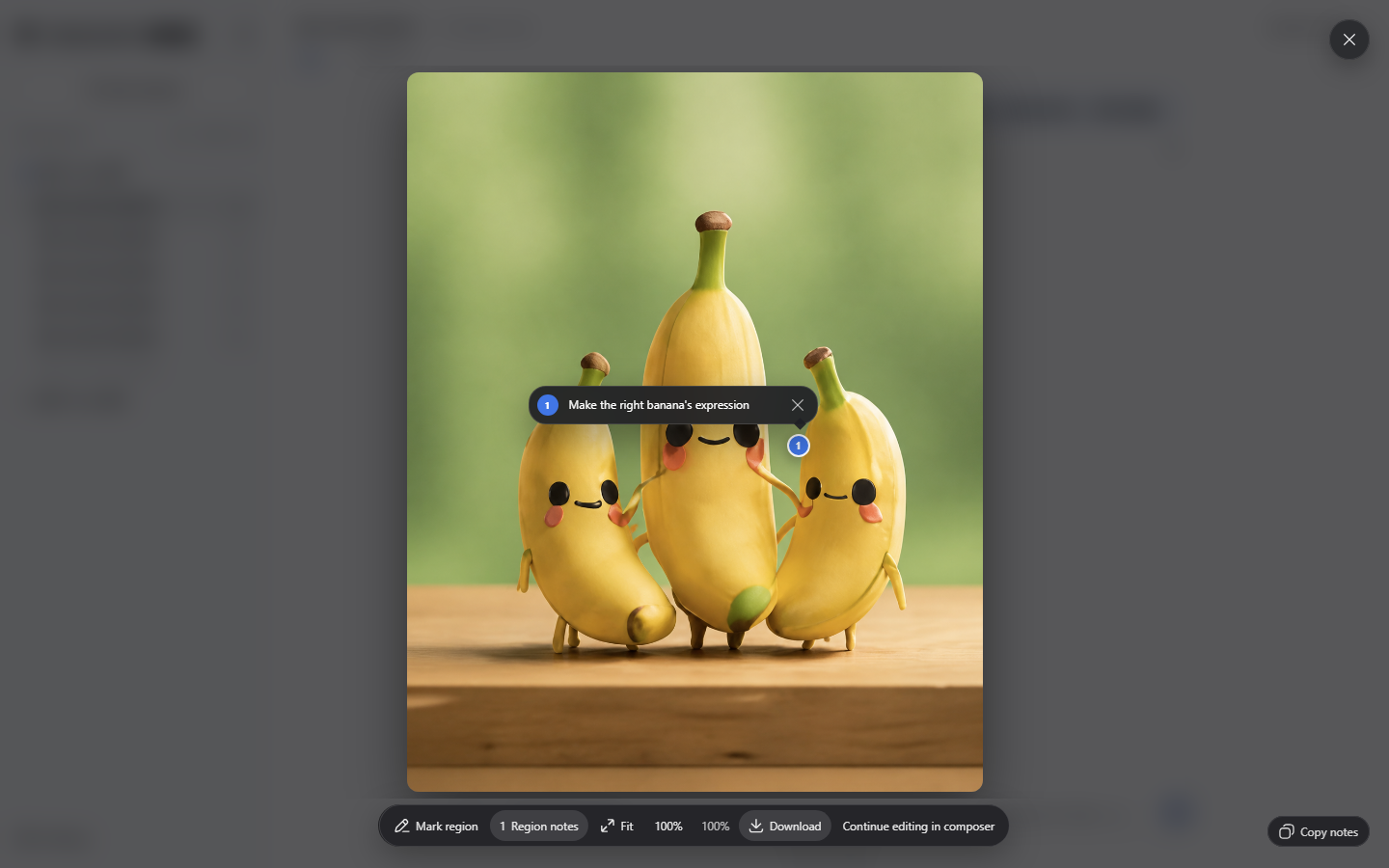
A lightweight viewer for zooming, browsing, downloading, and annotating images already shown by DSH.
[](https://github.com/WSL043/dsh-image-viewer/actions/workflows/ci.yml)
[](https://www.npmjs.com/package/dsh-image-viewer)
[](https://www.npmjs.com/package/dsh-image-viewer)
[](#install)
[](LICENSE)
[](https://github.com/WSL043/dsh-image-viewer/stargazers)
[中文](README.md) · [Install](#install) · [Privacy](#privacy)
## Features
- Pointer-centered zoom, drag, touch pinch, double-click 100%, fit/original-size controls, keyboard navigation, and multi-image galleries.
- Shows filenames, dimensions, and scale; large images can reach 100% and stay visible when the window is resized.
- Original-file downloads show available progress and can be cancelled or retried; switching images or closing the viewer cancels a download.
- Clear loading and retryable error states; image changes reset gestures and keep annotations separate.
- Mark image regions and edit notes beside their numbered markers. Enter saves; Shift+Enter adds a line.
- Closing an annotated native DSH image adds its numbered PNG and notes to the current draft without sending or duplicating them; failures remain retryable.
- DSH light/dark themes, responsive layout, focus containment, and reduced-motion support.
## Install
**[DSH-Portable](https://github.com/WSL043/DSH-Portable) ships with this plugin preinstalled.** Enable or uninstall it on the Plugins page; other DSH users can install it below.
### Plugin page (recommended)
1. Open **Plugins → Add plugin** in DSH.
2. Paste this line into **Package name or address**, then select Install:
```text
dsh-image-viewer@0.1.19
```
3. Follow the result shown on the page; refresh or restart only when requested.
**Version 0.1.19 supports DSH cores `0.2.2-alpha.3`, `0.2.2-alpha.2`, `0.2.1-rc.5`, `0.2.1-rc.4`, and `0.2.1-rc.3`.**
### Terminal (optional)
For official DSH Desktop, install its bundled command through **Manage dsh Command…**; after initialization, fully quit the app before using `--profile desktop`. DSH-Portable 0.x and the Web profile use `--profile web`.
```sh
dsh plugin --profile desktop add dsh-image-viewer@0.1.19
dsh plugin --profile web add dsh-image-viewer@0.1.19
```
After a terminal operation, restart the corresponding profile as prompted by the host.
## Update and uninstall
Update or uninstall from the **Plugins** page. If no update action is offered, enter the target `package@version` under **Add plugin**. To uninstall from a terminal, run `dsh plugin --profile web remove dsh-image-viewer`; for official Desktop, quit the app and use the `desktop` profile as described above.
Uninstalling restores DSH's built-in image viewer and does not delete conversations or images.
## Privacy
The plugin reads only image URLs already rendered by DSH; it does not call a model or read provider credentials. Annotations use DSH's attachment and draft APIs, leaving the decision to send with the user. Reopening an image in the current page may retain its note; this does not mean it was sent or permanently stored.
## Support
Use the [bug report form](https://github.com/WSL043/dsh-image-viewer/issues/new?template=bug-report.yml) with the plugin/DSH versions, operating system, image location, and failed action. Do not include private images, credentials, or full session logs. Report security issues privately through [GitHub Security Advisories](https://github.com/WSL043/dsh-image-viewer/security/advisories/new).
## License and quality
[MIT](LICENSE). Each declared core is checked in the live interface.
## Developers
When calling `nativeImageViewer.open()`, `download.onInvoke` receives `{ item, src, signal, onProgress }`. Pass `signal` to the download request and report bytes with `onProgress({ loaded, total })`; omit `total` when the size is unknown. Custom transfers must honor `signal` to support cancellation. Download authorization and original-file checks remain the image provider's responsibility.
[简体中文](README.md) · [Awesome DSH listing](https://github.com/awesome-dsh-plugin/awesome-dsh-plugin/blob/main/data/plugins/WSL043__dsh-image-viewer.yml) · [Chat Manager](https://github.com/WSL043/dsh-chat-manager)