# DSH GitHub Flow (`dsh-github-flow`)




Give DeepSeek Harness Agents native hands and feet to operate GitHub, crafting an immersive collaboration cockpit for developers.
Natively reuses host gh CLI login credentials to eliminate Personal Access Token (PAT) leaks; deeply bridges local Git workspaces with remote GitHub collaboration, equipped with 9 core domain Agent tools, human slash commands, Web UI visual cockpits, and cross-platform one-click seamless upgrades.
简体中文 | English
---
## 🎯 Why `dsh-github-flow`?
When using AI Agents for collaborative coding, developers frequently hit these fragmentation friction points:
| Collaborative Scenario | Traditional Approach (Friction-Heavy) | `dsh-github-flow` (Native Experience) |
| :--- | :--- | :--- |
| **Agent PRs & Code Review** | Manually push branch in browser, click through GitHub web pages to open PRs, breaking autonomous loops. | **Autonomous PRs & Reviews**: Just tell the Agent *"Create a PR for this branch"*; Agent calls `github_pr` to publish and review diffs automatically. |
| **CI / Actions Failure Debugging** | Sifting through pages of Actions logs in a browser, copying stack traces to chat for debugging. | **Pinpoint Error Extraction**: Tell the Agent *"Why did CI fail?"*; Agent calls `github_run(log_failed)` to grab failed step logs and patch code instantly. |
| **Security & Token Management** | Pasting plain-text Personal Access Tokens (PATs) in plugin configs, risking token leaks and permission sprawl. | **Zero Token Exposure**: Directly reuses local `gh auth login` credentials via native OS Keychains/Keyrings securely. |
| **Context Switching Overhead** | Jumping back and forth between VS Code, browser GitHub tabs, and DSH chat windows. | **Immersive Dual Cockpit**: Live PR status, Actions pipelines, and 3D issue matrices right inside DSH. |
| **First-Screen Latency & Loading** | Staring at full-screen spinners for 8~15s while waiting for heavy background `gh` processes. | **SWR 0ms Instant Render**: Instantly displays local persistent snapshots; dedicated settings modal to switch between SWR auto-sync and manual mode. |
| **Plugin Upgrades & Maintenance** | Manually checking npm registry versions, complicated commands, fear of breaking configs. | **Idle Silent Detection + One-Click Upgrade**: Dual-registry acceleration, auto macOS/Windows adaptation, upgrade with one click. |
---
## 🚀 Installation Guide
### Step 1: Prerequisites
Ensure GitHub CLI (`gh`) is installed and authenticated:
```bash
# Windows
winget install --id GitHub.cli
# macOS
brew install gh
# Login (one-time setup)
gh auth login
```
### Step 2: Install into DSH
Run in your DSH environment:
```bash
# Scenario A: DSH Desktop Edition (Desktop Profile)
dsh plugin --profile desktop add dsh-github-flow
# Scenario B: DSH Web / CLI Environment (--profile is required by the official CLI; fill in your actual profile name)
dsh plugin --profile web add dsh-github-flow
```
> 💡 **Notice (24-Hour Supply-Chain Security Lock Window)**:
> DSH's bundled package manager enforces a supply-chain safety policy (`minimum-release-age = 24h`) by default to mitigate malicious package takeovers. Within **24 hours** of a new version release, running bare-name install commands without a version suffix will automatically fall back to the preceding stable version that has matured past 24 hours. To **install a newly released version immediately**, append the explicit version tag:
> ```bash
> dsh plugin --profile desktop add dsh-github-flow@
> ```
> Once 24 hours have passed since release, the standard bare-name command will resolve to the latest version automatically.
---
## 🤖 Core Agent Tools: Equipping Agents with Native GitHub Powers
Consolidates scattered GitHub endpoints into **9 core domain tools (76+ actions covering PR/Issue/Actions workflow governance/clone-free file reads/secrets & variables)**, featuring **Token Budget Protection (default 24KB intelligent truncation)**, **High-density Native Markdown Rendering (70%+ list output token reduction)** and **Zero-argument CWD auto-binding**.
### 1. `github_pr`: Pull Request Lifecycle & Automated Code Review
> **Example Agent Prompts**:
> - *"Check if there are any open PRs awaiting my review in this repository."*
> - *"Create a PR for the current branch titled 'feat: add dark mode' with a brief summary of changes."*
> - *"Review code diffs in PR #12 and provide security and refactoring suggestions."*
> - *"Did CI checks pass for PR #8? If so, squash merge it and delete the source branch."*
* **Supported Actions**:
* `list`: List open PRs with author, review decisions, and CI status (`state` / `author` / `limit` filters);
* `view`: Inspect PR description, metadata, and mergeability;
* `diff`: Retrieve complete code diffs (`stat_only` for file-change overview, safely truncated against token limits);
* `checks`: Audit CI gate status (pass/fail/skip category badges, owning workflow, and detail links);
* `create`: Auto-create PRs (supports draft mode & `--dry-run`);
* `checkout`: 🆕 Check out PR code to a local branch for sandboxed testing;
* `status`: 🆕 Inspect merge conflict status (`CLEAN` / `CONFLICT`) for the current branch's PR;
* `review`: Submit code reviews (`APPROVE`, `REQUEST_CHANGES`, `COMMENT`);
* `merge`: Merge pull requests (`squash` / `merge` / `rebase`, optional `delete_branch`; requires `confirm: true`);
* `ready`: 🆕 Toggle Draft ↔ Ready (`undo: true` converts back to Draft — fully reversible);
* `revert`: 🆕 Create a revert commit (generates a new revert PR on the remote; requires `confirm: true`);
* `update_branch`: 🆕 Sync the latest base-branch commits into the PR branch — the self-healing action for "branch is out-of-date" CI gate failures;
* `view_images`: 🆕 Download PR discussion screenshots (body + comments; `image_urls` targeting with budget-overflow resume list).
---
### 2. `github_run`: Actions CI Pipeline & Failure Diagnostics (Agent Auto-Fix Core)
> **Example Agent Prompts**:
> - *"Why did the latest Actions workflow fail? Extract failed step logs and fix the code."*
> - *"Show me the status of the last 5 CI runs in this repository."*
> - *"Rerun the failed workflow from earlier."*
* **Supported Actions**:
* `log_failed` (🔥 **Killer Feature**): **Optimized for Agents**; automatically extracts isolated error logs from failed steps for instant root-cause analysis;
* `list`: View recent workflow runs and conclusions (`branch` / `status: failure` filters to pin down broken builds);
* `view`: Inspect jobs and steps for a specific run ID;
* `trigger`: 🆕 Manually dispatch `workflow_dispatch` workflows to verify fixes immediately;
* `workflow_list`: 🆕 List workflows (active only by default; `all: true` includes disabled — when diagnosing "why didn't my workflow run", the disabled state itself is the answer);
* `workflow_view`: 🆕 Workflow details (locate by name/ID/filename, with recent runs);
* `workflow_enable` / `workflow_disable`: 🆕 Toggle workflows (disable explicitly warns "the next trigger will fail silently");
* `download`: 🆕 Download build artifacts to a plugin-managed directory (isolated per repo and run, returns file manifest; older gh versions get a security upgrade note);
* `rerun`: Re-trigger failed CI runs;
* `cancel`: Cancel in-progress workflows.
---
### 3. `github_issue`: Issue Tracking & Closed-Loop Tasks
> **Example Agent Prompts**:
> - *"File an issue for the memory leak we just reproduced, labeled 'bug' and 'backend'."*
> - *"List all open issues assigned to me."*
> - *"Comment on Issue #45: 'Fixed on master branch, awaiting verification'."*
> - *"Close Issue #45."*
* **Supported Actions**:
* `list`: Query issues with flexible filters (`state` / `labels` / `assignees` / `limit`);
* `view`: Read issue body and discussion history;
* `create`: Create new issues (title, body, labels, assignees);
* `edit`: 🆕 Update title, body, and add/remove labels;
* `develop`: 🆕 Create a linked development branch from an issue and check it out locally;
* `comment`: Append debugging updates or notes;
* `close` (requires `confirm: true`) / `reopen`: Manage issue lifecycle states;
* `delete`: 🆕 **Permanently delete** an issue (requires `confirm: true`; the number is gone forever and comments are destroyed — fundamentally different from close, which can be reopened);
* `transfer`: 🆕 Transfer an issue to another repository (requires `confirm: true`; original URL 301-redirects, ownership cannot be silently reverted);
* `pin` / `unpin`: 🆕 Toggle issue pinning (reversible state flag);
* `lock` / `unlock`: 🆕 Lock/unlock conversation (`lock_reason` supports off_topic/resolved/spam/too_heated);
* `status`: 🆕 Account-level assigned-issues panel (Assigned / Mentioning sections);
* `view_images`: 🆕 Download issue attachment screenshots (body + comments; `image_urls` targeting with resume list).
---
### 4. `github_repo`: Repository Exploration & Cross-Repo Code Search
> **Example Agent Prompts**:
> - *"Search for usages of 'createPrTool' across this repository."*
> - *"Search GitHub for popular open-source repositories related to 'dsh-plugin'."*
> - *"Show repository metadata and star count for cli/cli."*
* **Supported Actions**:
* `view`: View repository metadata (default branch, stars, description, topics & license);
* `readme`: 🆕 Read repository README raw content (branch-selectable; relative-path screenshots auto-resolved and downloaded);
* `sync`: 🆕 One-click fork sync with upstream to fix stale-fork CI gate failures;
* `search_code`: Search code symbols in current or specified repositories;
* `search_repos`: Search open-source GitHub repositories globally;
* `search_issues` / `search_prs` / `search_commits`: 🆕 Global search over issues / PRs / commits (qualifiers go inline in the query, e.g. `repo:o/r state:open`; commits require search text);
* `read_file`: 🆕 **Clone-free single-file read at any path** (native on gh ≥2.95; older versions auto-degrade to the contents API with an explicit degraded-path note; binary files are rejected with `github_api` guidance);
* `read_dir`: 🆕 Clone-free directory listing (dirs first + file sizes, same degradation path).
---
### 5. `github_api`: Low-Level Escape Hatch
> **Example Agent Prompts**:
> - *"Call GitHub API to fetch latest releases of current repository and parse tag names with jq."*
* **Core Strength**: Call any GitHub REST or GraphQL API using local credentials with `--jq` filtering, `raw` text mode, and `paginate` auto-aggregation.
---
### 6. `github_release`: Version Releases & Build Asset Delivery 🆕
> **Example Agent Prompts**:
> - *"Publish v0.2.0 for this repository with auto-generated release notes."*
> - *"Upload dsh-github-flow-0.2.0.tgz to the v0.2.0 release."*
* **Supported Actions**:
* `list` / `view`: Browse release history and per-version details (assets, notes);
* `create`: Create releases (`generate_notes` auto-notes, `draft` / `prerelease` flags, attach assets directly);
* `upload` / `download`: Upload `.tgz` build artifacts or download assets by glob pattern;
* `delete` (requires `confirm: true`): Delete a release, optionally cleaning up its tag.
---
### 7. `github_secret`: CI/CD Secrets & Variables Management 🆕
> **Example Agent Prompts**:
> - *"Update the NPM_TOKEN secret for this repository."*
> - *"Show which secrets are configured for this repo."*
> - *"Set the DEPLOY_ENV variable to staging and read it back to confirm."*
* **Supported Actions**:
* `list`: Show secret/variable names and update times (the GitHub API never exposes secret values);
* `set`: Set/update secret values — **passed via subprocess stdin, never on the command line (ps-safe), never echoed in output**;
* `delete` (requires `confirm: true`): Remove a secret.
* Switch to **Actions plaintext variables** via `kind: 'variable'`: `set` passes the value directly as a flag and `get` can echo it back (that's the design difference from secrets — secrets are encrypted GitHub-side after write and physically unreadable); the two security semantics are physically isolated in the rendering layer.
* Supports repository / organization (`org`) / environment (`env`) scopes across `actions` / `codespaces` / `dependabot` / `agents` apps.
---
### 8. `github_skill`: Cross-Agent Open-Source Skills Discovery 🆕
> **Example Agent Prompts**:
> - *"Search GitHub for an Agent Skill about code review."*
> - *"Preview that skill's content, then install it to this project if it looks good."*
* **Supported Actions**:
* `search`: Search open-source `SKILL.md` skills across GitHub (Code Search based, ranked by stars);
* `preview`: Read-only preview of skill content before installing — nothing touches disk;
* `install` (requires `confirm: true`): Install to local agent hosts (Claude Code / Cursor / Copilot and 50+ others), `project` or `user` scope;
* `list`: List all skills installed on this machine.
* Requires the official `gh skill` preview feature in GitHub CLI 2.9x+.
---
### 9. `github_help`: Meta Guide & Troubleshooting Hub 🆕
> **Example Agent Prompts**:
> - *"I'm not sure which GitHub tool to use for this task."*
> - *"How do I write advanced GitHub search syntax?"*
* **Core Capabilities**:
* Task-routing navigation across all 9 tools;
* Official advanced search syntax cheat sheet (date ranges, status qualifiers, code search scopes);
* Self-healing recipes for common errors (403 rate limits, 422 missing params, stale forks, outdated CLI);
* Direct passthrough to the official `gh help ` offline manual.
---
## 🛡️ Safety Guardrails
* **Destructive-action double confirmation**: `merge`, `close`, `release delete`, clobber uploads, `secret delete`, and `skill install` require an explicit `confirm: true` parameter; without it, only an impact assessment is returned — nothing executes. This prevents accidental merges or deletions from model hallucinations.
* **Secret stdin channel**: Secret values travel via subprocess stdin — never on the command line (ps / task-manager safe), never persisted, never echoed; gh encrypts locally with the repository public key before uploading.
* **Command-injection immunity**: All gh invocations use `execFile` array-argument isolation with zero shell string concatenation.
---
## 🖥️ Native Web UI Workspace & Settings Center
No more window switching! Seamlessly integrated into DSH with DSW design tokens and instant light/dark theme adaptation.
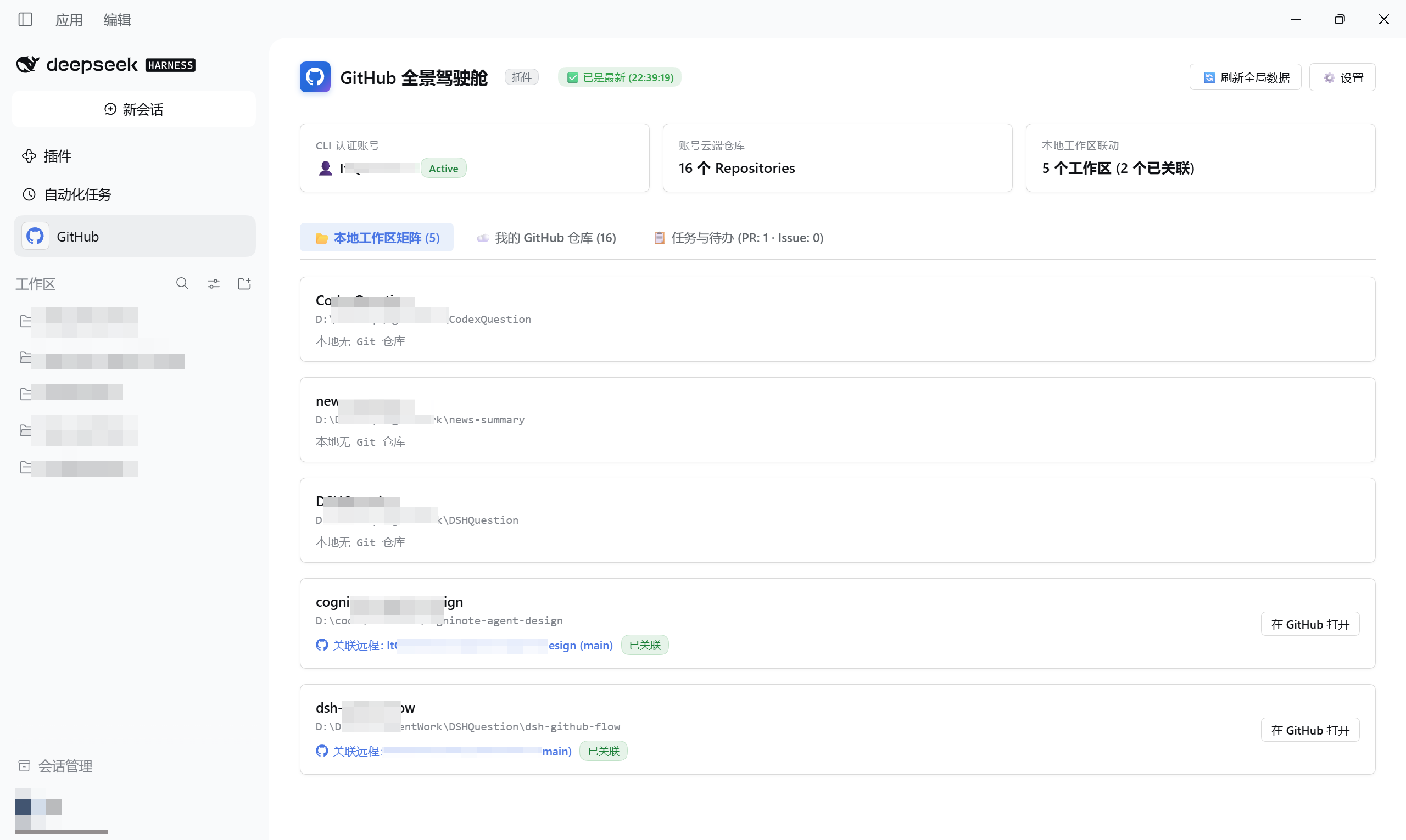
### 1. Global Cockpit (Main Navigation Slot)
Access via the GitHub icon in the main left navigation:
* **⚡ 0ms Instant Render (SWR Persistent Cache)**: Powered by local snapshot persistence; say goodbye to full-screen 8~15s spinner freezes and enjoy instant dashboard loading;
* **📦 Live Freshness Status Pill**: Transparently communicates data freshness right next to the title (`[📦 Local Snapshot (21m ago)]` ➔ `[⏳ Syncing in background...]` ➔ `[✅ Up to date (15:30)]` ➔ `[⚠️ Timeout, cached data preserved]`);
* **Account-Wide Overview**: Live view of all cloud repositories, default branches, and star counts;
* **Local Workspace Matrix**: Automatically detects open projects and bridges local directories with remote repos;
* **3D Issue Governance Matrix**: Categorizes issues into *"📥 User Reported"*, *"🎯 Assigned to Me"*, and *"✍️ Created by Me"* with responsive pill filters;
* **Update Notification Banner**: Smoothly glides down when an update is available with one-click automated upgrade.
### 2. Session Right Sidebar Panel (Workspace Drawer)
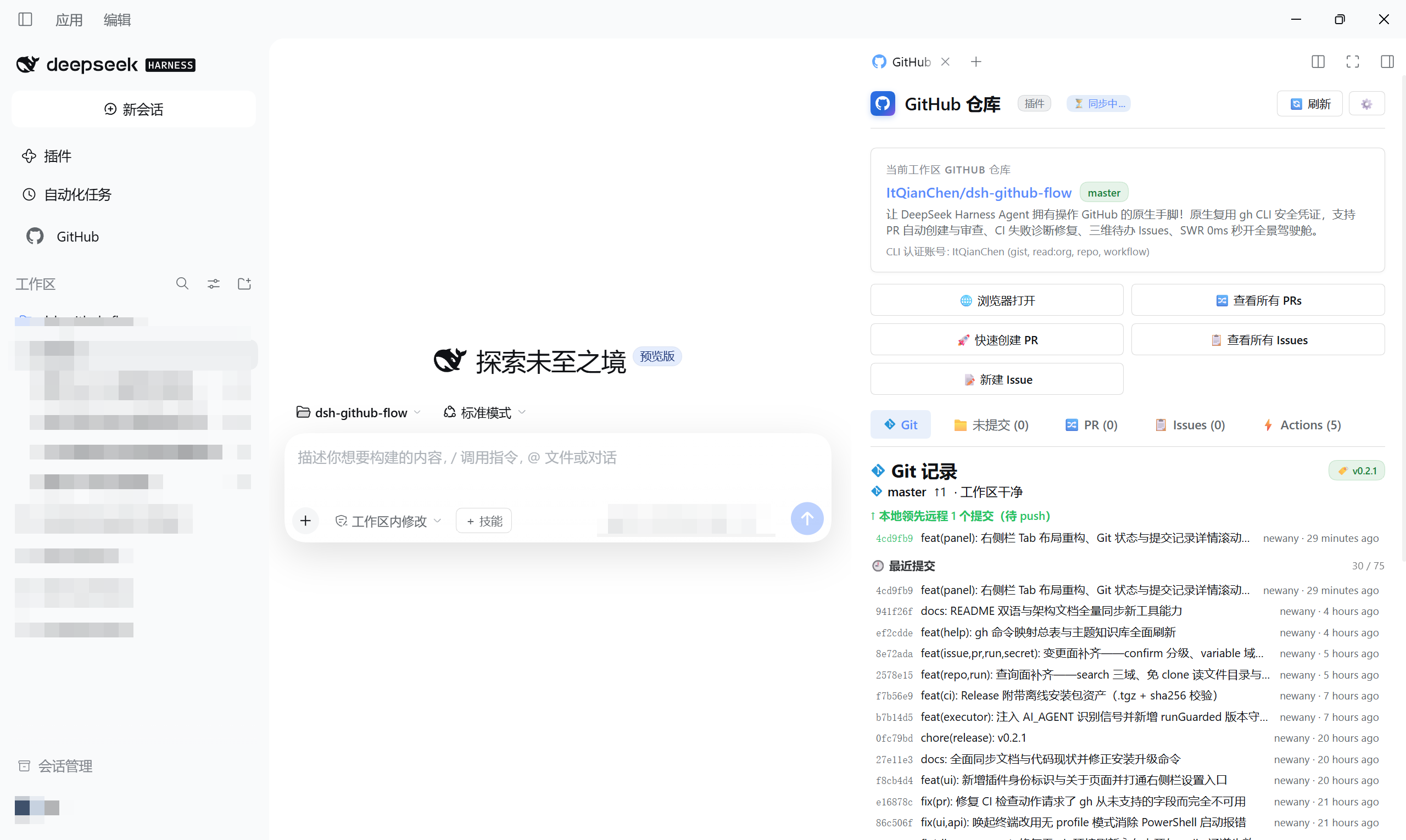
Located in the right drawer of every chat workspace, seamlessly bridging your local Git workspace with remote GitHub repositories:
* **Context Auto-Binding**: Automatically locks onto the active Git repository of the current session;
* **Freshness Pill Alignment**: Compact indicator `[📦 Local Snapshot (2m ago)]` with live `[🔄 Refresh]` button, 100% aligned with global rules for an instant 0ms first render;
* **Quick Action Grid**: Open repo in browser, jump to Issues/PRs, create PRs with one click;
* **Five Mutually Exclusive Tabs**: Compact tabbed navigation directly below the quick action grid, reducing vertical scrolling:
* **Git Records (`Git`)** (Default tab):
* Branch & Remote Sync: Real-time branch indicator (e.g. `master`) with tracking sync status (`✓ Up to date` or `↑N to push` / `↓N to pull`);
* Three-Section Commit View: Unpushed commits (ahead of remote), unpulled commits (behind remote), and recent commit history;
* 15 commits displayed by default, with **infinite scroll loading** when scrolling to the bottom (with live `15 / 74` progress counter and click trigger);
* Latest Release badge (`🏷️ v0.2.1`) anchored in the top right with hover details and direct release link;
* **Commit Detail Modal**: Click any commit row to open a clean modal dialog centered within the right sidebar (scoped inside drawer boundaries without overflowing full-screen), featuring smooth vertical scrolling, full 40-char SHA, author email, date, multi-line commit message body, and file diff stat table (`--stat`); pure local 0ms instant display, closable via `Esc`, close button, or backdrop click;
* **Uncommitted Changes (`📁 Uncommitted (N)`)**: Full-width list of uncommitted files with color-coded status codes (`??` untracked, `M` modified, `D` deleted, `R` renamed) and change counts;
* **Pull Requests (`🔀 PR (N)`)**: Open PR inspection with 3-state CI check rollup (`✅ CI Passed` / `❌ CI Failed` / `⏳ CI Pending`), merge conflict detection, review decisions (`✔ Approved` / `✋ Changes Requested` / `👀 Review Required`), Draft pills, and humanized relative timestamps;
* **Workspace Issues (`📋 Issues (N)`)**: Direct issue task review with assignees, labels, and category pills;
* **Actions Pipeline (`⚡ Actions (N)`)**: Real-time CI workflow status tracking with trigger event badges (`push`/`schedule`/`manual`/`PR`), relative time, and self-healing diagnostic notes for failed runs (embedding `run_id` for Agent one-click log inspection);
* **Official Git Vector Icon**: High-definition Git diamond vector icon (`#1296db` SVG) across all Git and branch labels;
* **⚙️ Full Settings Access**: Dedicated settings button reusing the same settings modal as the cockpit (all four sections: Sync / Proxy / Update Source / About) — no need to switch back to the main page.
### 3. Settings Center (Settings Modal)
Click **`[⚙️ Settings]`** in the top right of the Cockpit (or the ⚙️ button in the right sidebar) to open the sectioned settings modal (left-side navigation, independently scrolling content; collapses to horizontal tabs on narrow screens):
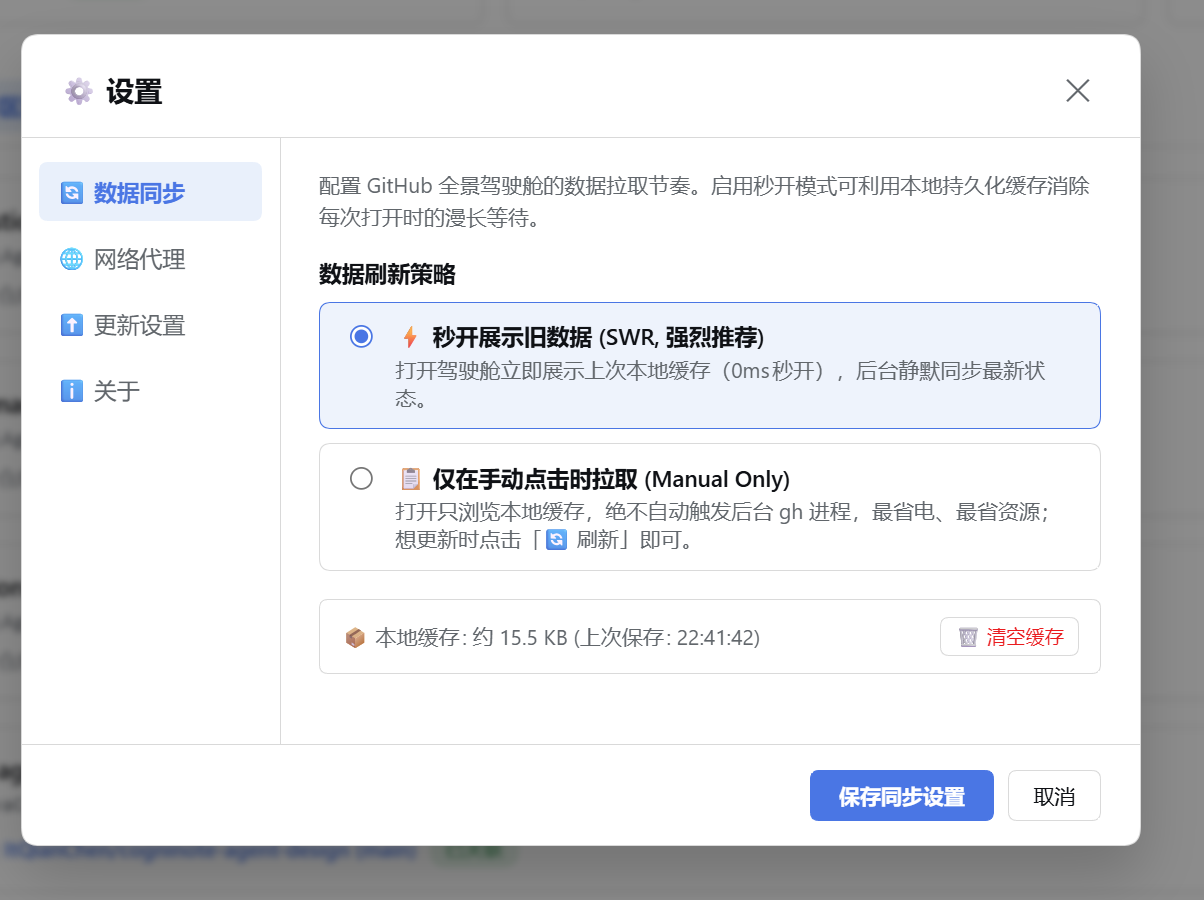
**🔄 Data Sync Section** — tune data fetching rhythm:
* **Two Sync Strategies**:
* **⚡ Instant Render (SWR, Recommended)**: Instantly displays local cache (0ms), then silently syncs the latest state within 300ms — no matter how stale the cache is, opening the panel self-heals to fresh data;
* **📋 Manual Only (Energy Saver)**: Browse local cache only; zero background `gh` processes triggered; click `[🔄 Refresh]` whenever you want updates.
* **Visual Cache Management**: Real-time snapshot size and timestamp visibility with one-click `[🗑️ Clear Cache]`.
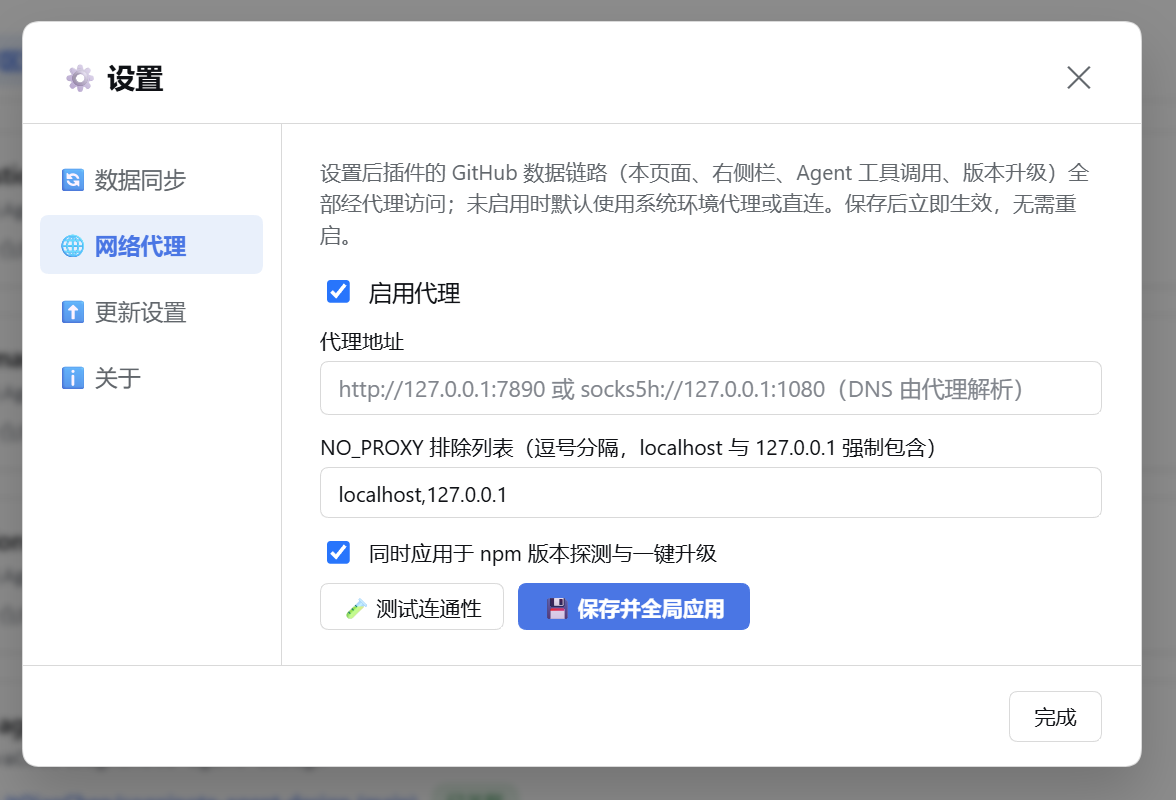
**🌐 Network Proxy Section** — route all plugin traffic through your proxy:
* **Global Scope**: Once configured, the cockpit, right-sidebar panel, all 9 Agent tool invocations, and one-click upgrades route through the proxy; when disabled, system environment proxies (`HTTPS_PROXY` etc.) or direct connections apply;
* **Protocol Support**: `http://` / `https://` / `socks5://` / `socks5h://` (gh and npm chains natively support SOCKS5; `socks5h` delegates DNS resolution to the proxy for stronger pollution resistance; the npm version probe uses Node fetch which does not support SOCKS — it stays direct and the UI states this honestly);
* **`[🧪 Test Connectivity]`**: One-click latency probe against the GitHub API through the current proxy;
* **Instant Effect**: Persisted to `~/.dsh/data/dsh-github-flow/proxy.json` (auto-restored on DSH restart) — no restart, no plugin reload;
* **Visibility**: A `🌐 Proxy` badge appears in the cockpit title bar while active; hover to inspect the current proxy URL;
* **NO_PROXY Exclusions**: `localhost` and `127.0.0.1` are forcibly included — loopback Web API requests are never hijacked by the proxy.
**⬆️ Update Source Section** — choose which npm registry checks for new versions:
* **Three options**: 🌍 npm official registry (default — new releases visible immediately) / 🇨🇳 npmmirror (fast in China; minutes-level sync delay) / ⛔ No update checks (only silences the upgrade banner; `/gh upgrade` and one-click upgrade remain available);
* **Strict single-source**: the selected source is never silently swapped — probe failures are reported honestly;
* **Detection & upgrade traffic follows the global proxy setting** (socks5 boundary stated honestly in the UI);
* **One-click upgrade installs from the selected source** — consistent with version detection;
* **Verify on save**: switching sources immediately probes the new registry and shows the latest version.
**ℹ️ About Section** — plugin identity & project info:
* Current running version, project description, GitHub repository, npm package page, and MIT license;
* Star card — if the plugin helps your workflow, a Star on the repo powers continued iteration.
> 🏷️ **Plugin Identity Badge**: Panel titles (cockpit & right sidebar) carry a small "Plugin" badge, clearly marking the UI as provided by the third-party plugin `dsh-github-flow` (not a DSH / GitHub official feature). Click the badge to open the About page.
| 🔄 Data Sync Section | 🌐 Network Proxy Section |
| :---: | :---: |
|  |  |
---
## ⚡ Smart Upgrades & Cross-Platform Engine
Never miss an update! Built-in industrial-grade update management:
1. **Parallel Detection, Zero gh-Dependency**:
- Update checks fire **in parallel with the gh environment chain** (install/login/business data) on mount — never serialized behind gh overviews; gh failures never block upgrade banners;
- Server-side `inFlightPromise` merging + 24h cache keeps multi-panel mounting storm-free.
2. **Selectable Update Source** (see the "⬆️ Update Source" settings section):
- Defaults to the **npm official registry** (new releases visible immediately), or switch to **npmmirror** (minutes-level sync delay);
- Auto checks can be disabled entirely (only silences prompts — `/gh upgrade` and one-click upgrade stay available).
3. **Cross-Platform One-Click Upgrade**:
- **Click to Upgrade**: Click **`[⚡ Upgrade]`** in the UI to update in the background;
- **Auto OS Adaptation**: Differentiates macOS and Windows; auto-injects Homebrew PATH variables on macOS GUI launches;
- **Registry Follows Setting**: One-click upgrades install from the source selected in Update Source settings;
- **Source Protection**: Automatically aborts npm overwrites when running in local Git linked development mode (`link:`);
- **Restart Guidance**: Clearly notifies users to restart DSH service to reload backend tools, with instant web refresh options.
---
## ⏱️ SWR Instant Render & Sync Rhythm Control
Why did the Global Cockpit take several seconds to load in earlier releases? Because it concurrently executes a dozen `gh` processes scanning multiple repositories and workspaces. This plugin integrates the **Stale-While-Revalidate (SWR)** caching pattern, putting total control back in your hands:
```
Initial Mount (0ms) ──────────> Instantly render local persistent snapshot
│
├── SWR Mode: Idle 300ms delay, silently revalidate in background
└── Manual Mode: Browse offline snapshot, only fetch on click [🔄 Refresh]
```
### Strategy Comparison & Recommendations:
| Sync Strategy | Mechanism | Recommended Use Case |
| :--- | :--- | :--- |
| **⚡ Instant Render (SWR, Default)** | **0ms instantaneous mount** from local cache, silently revalidating in background within 300ms — however stale the snapshot, opening the panel self-heals to fresh data. | **Recommended for all developers**. Eliminates spinner freezes, delivering seamless UX. |
| **📋 Manual Only (Energy Saver)** | Browse local cache only; zero automated background `gh` processes. | **Battery-powered laptops, low-spec hardware, or metered networks**. Zero background waste. |
* **Offline Resilience (Fail-Safe)**: Even when disconnected or hitting network timeouts, **your dashboard preserves the complete snapshot for searching, navigation, and review—zero blank screens or crash popups!**
---
## 💬 Human Slash Commands
Type directly into the DSH chat box:
* `/gh status`: Diagnostics for GitHub account authentication, scopes, repository binding, and plugin version;
* `/gh upgrade`: Check latest npm version with platform-adapted upgrade commands;
* `/gh help`: View command usage and Agent prompt examples.
---
## ⚙️ Configuration (`cordis.patch.yml`)
Works out of the box, with optional tweaks in `cordis.patch.yml` or your profile:
```yaml
- insert:
- id: github-flow
name: dsh-github-flow
config:
ghPath: 'gh' # GitHub CLI executable path
defaultTimeoutMs: 30000 # Command timeout in milliseconds (default 30s)
maxOutputChars: 24000 # Safe output character ceiling (Token protection)
maxOutputBytes: 96000 # Safe UTF-8 byte ceiling (default maxOutputChars * 4)
defaultListLimit: 20 # Default list size for pr/issue/run/release/skill queries
cacheTtlMs: 15000 # Repository overview cache TTL (default 15s)
checkUpdate: true # Enable automatic update checks (default true)
agentEnvInjection: true # Inject AI_AGENT=dsh identity into gh (auto agent-friendly output on gh ≥2.99; false restores native gh behavior)
updateCheckIntervalMs: 86400000 # Check interval in ms (default 24h)
registryUrl: '' # Custom private npm registry URL
proxyUrl: '' # Preset proxy default (e.g. 'http://127.0.0.1:7890'; only applies before the cockpit setting is saved — UI setting takes precedence)
```
---
## 🔌 Ecosystem Extensibility (Cordis Service)
Provides standard Cordis service `ctx.github`. Other plugins can reuse it directly:
```typescript
import type { Context } from '@deepseek-ai/cordis';
export const inject = ['github'];
export function apply(ctx: Context) {
const auth = await ctx.github.checkAuth();
const repo = await ctx.github.getRepoMetadata();
const prs = await ctx.github.run(['pr', 'list', '--json', 'number,title']);
}
```
---
## 📚 Documentation
- [npm Publishing & Automated CI Guide](./docs/npm-publish-guide.md)
- [Architecture & Technical Specifications](./docs/architecture.md)
---
## Friendship links
- [LINUX DO - A new ideal community](https://linux.do/)
## 📄 License
Open-sourced under the [MIT License](./LICENSE). Contributions, PRs, and Issues are welcome!