<div align="center">

<img src="https://raw.githubusercontent.com/RonnyJung2021/dsh-fast-pills/main/assets/banner.png" alt="dsh-fast-pills — the capsule row above the composer" width="100%">

# dsh-fast-pills

A **fast-pills plugin** for the DSH Web GUI — keep the lines you retype above the composer, splice one into the draft with a single press, and let the presses build a usage ledger. DeepSeek can suggest new capsules from your own transcripts.

English / [中文](README.md)

[Demo](#demo) · [Features](#features) · [Install](#install) · [First run](#first-run) · [Configuration](#configuration) · [Development](#development)

<p>
  <a href="LICENSE"><img src="https://img.shields.io/badge/license-FSL--1.1--ALv2-blue" alt="license"></a>
  <img src="https://img.shields.io/badge/version-0.2.0-blue" alt="version">
  <img src="https://img.shields.io/badge/DSH-Web%20%3E%3D0.1.5--rc.2-8b5cf6" alt="DSH">
  <img src="https://img.shields.io/badge/tests-161%20passing-brightgreen" alt="tests">
  <img src="https://img.shields.io/badge/node-%3E%3D22.19-339933" alt="node">
  <img src="https://img.shields.io/badge/dependencies-0%20runtime-orange" alt="dependencies">
</p>

</div>

***

## What this is

In DSH Web you keep typing the same lines: "continue", "write this change up as a Spec", "clarify the last two weeks of bugs one by one". This plugin stores them as **capsules** right above the composer. One press splices the body in at the caret, and the press is written to a ledger — so "how many times today, and which capsule" has an answer too.

- **Who it is for**: anyone who hands DSH the same kinds of instructions every day.
- **What it solves**: typing them again, and losing track of which ones you actually use.
- **What it does not do**: it does not restructure the page or decide for you — whether the spliced text is edited or sent is still your call.

## Demo

<p align="center">
  <img src="https://raw.githubusercontent.com/RonnyJung2021/dsh-fast-pills/main/assets/row.png" alt="The capsule row above the composer" width="100%">
</p>

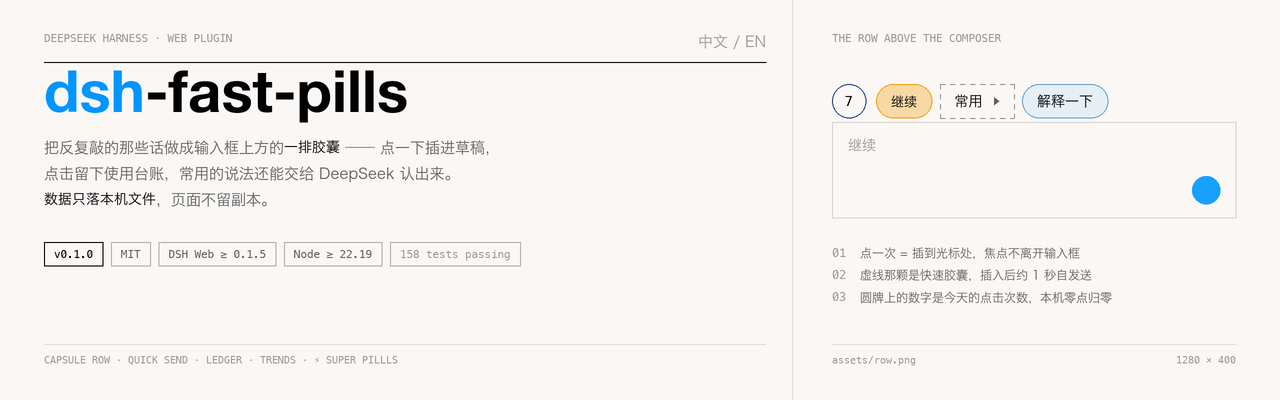
**One row, right above the composer**: the round board at its head is today's press count (cut at local midnight), the hollow ⚡ beside it is quick add, the solid amber one is a quick capsule, and the dashed one is a group. A group's fold grows above the group itself, to the left and right together, and only wraps once the row is full; pressing anywhere else — or any capsule inside it — puts it away.

<p align="center">
  <img src="https://raw.githubusercontent.com/RonnyJung2021/dsh-fast-pills/main/assets/ledger.png" alt="Today's capsule ledger" width="100%">
</p>

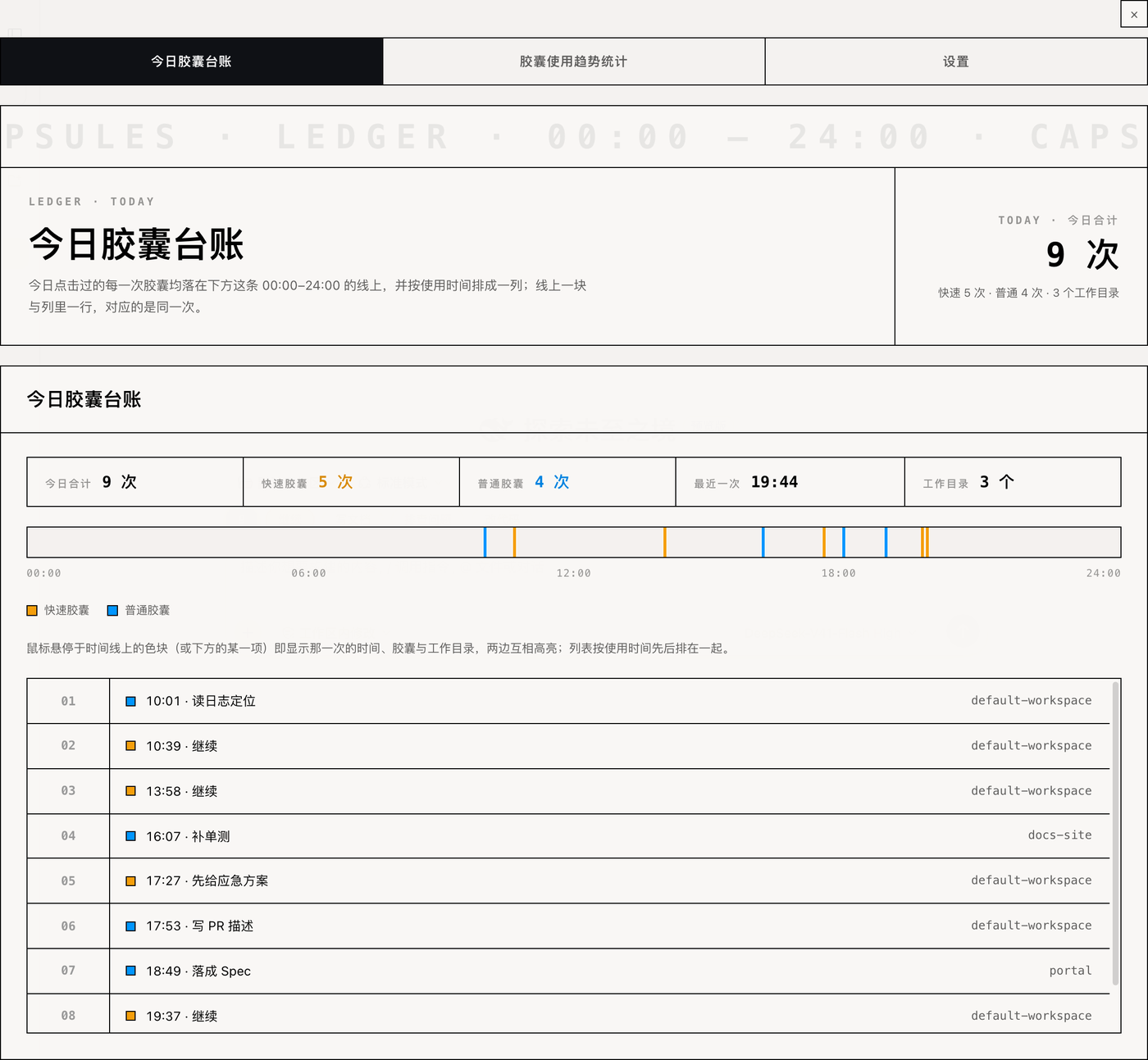
**Today's capsule ledger**: a strip of figures, a 00:00–24:00 line and a list of presses in time order. Hover a mark or a row and the two highlight each other.

<p align="center">
  <img src="https://raw.githubusercontent.com/RonnyJung2021/dsh-fast-pills/main/assets/trend.png" alt="Capsule usage trends" width="100%">
</p>

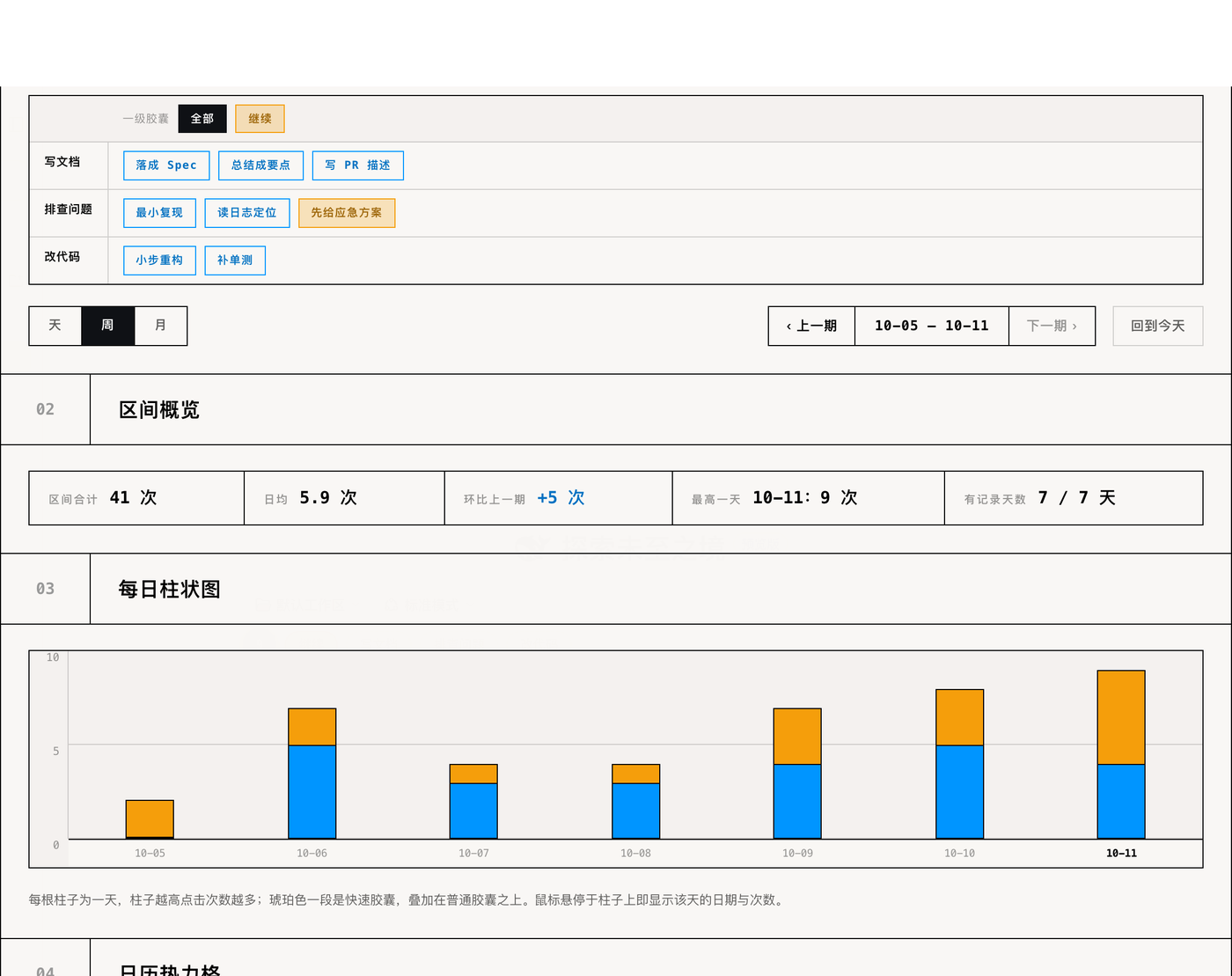
**Capsule usage trends**: a small table picks the range and the capsule, with day / week / month, a range overview, daily bars, a calendar heat grid and a daily breakdown.

<p align="center">
  <img src="https://raw.githubusercontent.com/RonnyJung2021/dsh-fast-pills/main/assets/tree.png" alt="The capsule tree editor" width="100%">
</p>

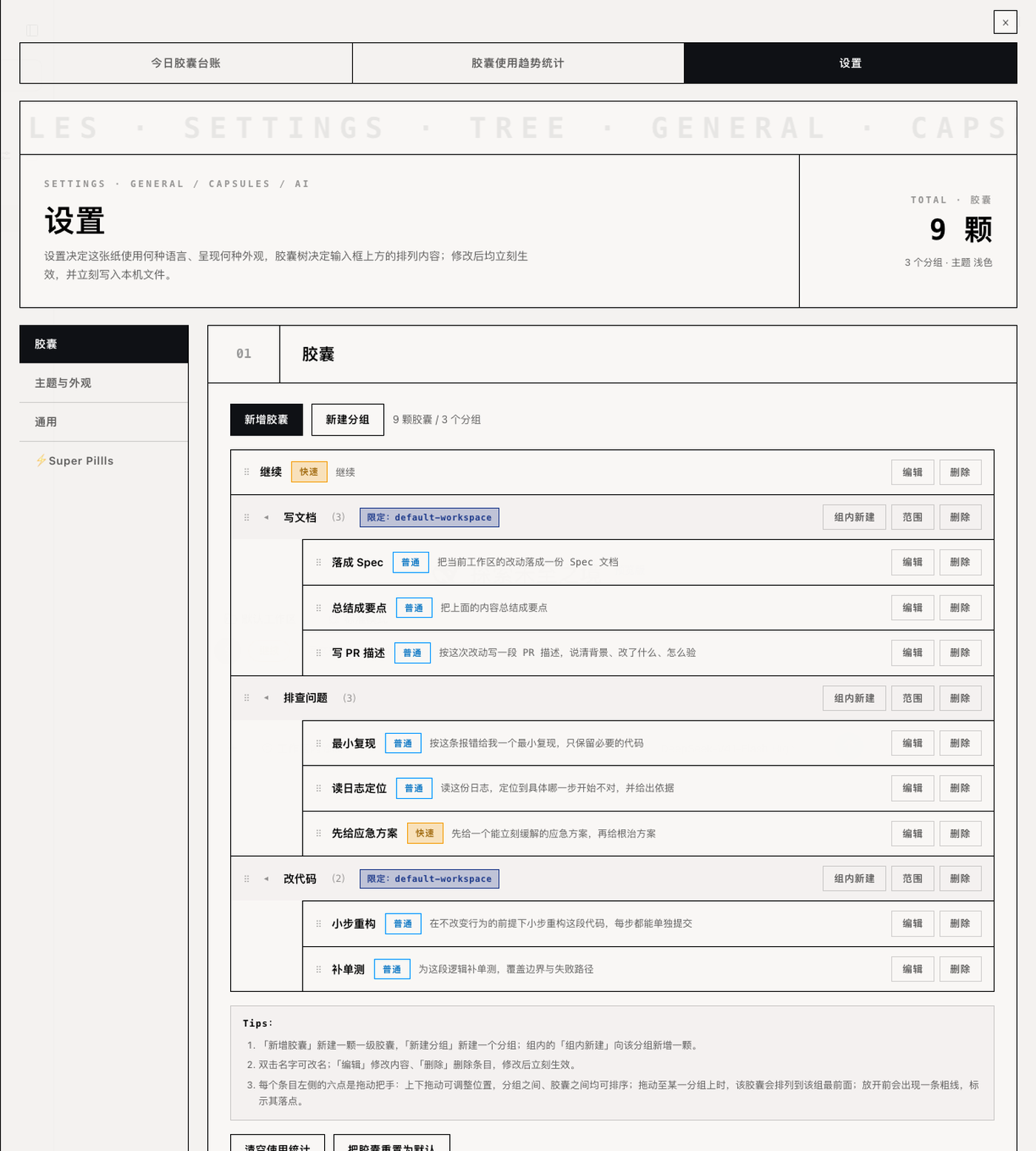
**The capsule tree editor**: add, rename in place, drag to reorder, drag in and out of groups — one row says where a capsule shows up and what a press writes.

<p align="center">
  <img src="https://raw.githubusercontent.com/RonnyJung2021/dsh-fast-pills/main/assets/form.png" alt="The new-capsule form" width="100%">
</p>

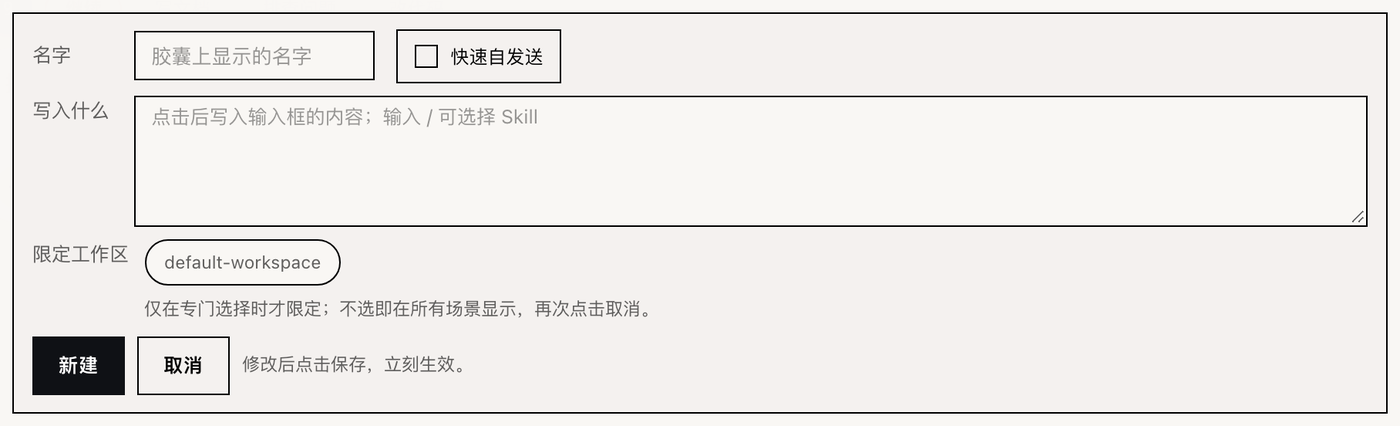
**A new capsule**: the name is the button's label, "what it writes" is the text a press splices in (typing `/` picks a skill), and the chips at the bottom pick the workspaces it is limited to.

<p align="center">
  <img src="https://raw.githubusercontent.com/RonnyJung2021/dsh-fast-pills/main/assets/ai-preview.png" alt="What a Super Pillls send would carry" width="50%">
  <img src="https://raw.githubusercontent.com/RonnyJung2021/dsh-fast-pills/main/assets/ai-result.png" alt="Super Pillls suggestions" width="50%">
</p>

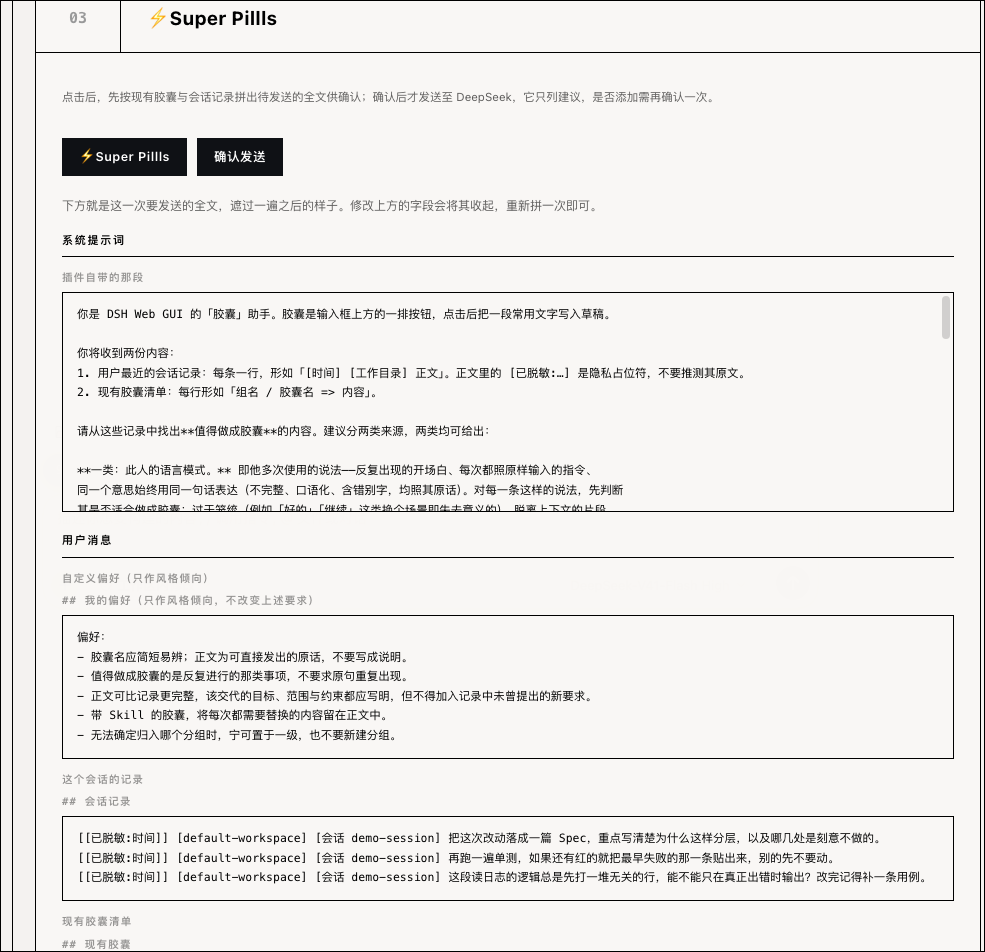
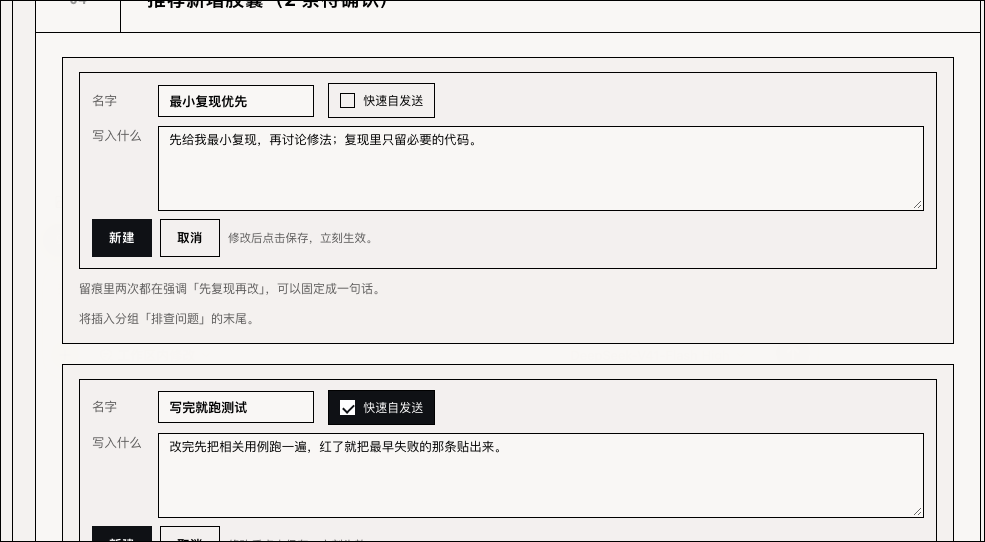
**⚡Super Pillls**: on the left, the whole request shown before it is sent (system prompt / your preference / the session records / the current capsules, already masked once); on the right, the model's suggestions, each one a form that joins the tree only when you press "create".

> Every picture above is a screenshot of a real engine in a real browser, not a mock-up; the capsules in them were made up for the shoot.

## Features

### One press, at the caret

A press splices the text in at the caret (insert, not replace), **the focus stays in the composer**, and one insertion is one undo step. A capsule with a skill writes `/skill-name body `; one without writes the body alone.

### Quick capsules send themselves

A capsule marked "quick" submits the **whole draft** about a second after the press (whatever was already in the box goes with it), drawn as a solid amber pill — good for lines like "continue", where you were going to press enter anyway. The wait is set under Settings → General to 0.5 / 1 / 2 / 3 seconds.

### Groups and workspace limits

A first-level entry is either a pressable capsule or a foldable group. A group holds capsules only and nests two levels at most. **Pressing a group only opens or closes it** and writes nothing; the open state is not stored, so a reload comes back fully folded. The open fold sits directly above its own group — the two share one midline — and grows to the left and right together, wrapping only once the row is full. It is a "pick one" moment: pressing anywhere else, the group again, or any capsule inside it (after the text has landed) puts it away.

Capsules and groups can both be **limited to workspaces**: the capsule then shows only in the chosen workspaces (and their subdirectories), and choosing none means everywhere. The choices are the workspaces the page already knows — one chip each, no typing a path. A group's limit and a capsule's own limit are unioned: either one matching shows the capsule.

### Quick add: keeping the line you just wrote

The hollow **⚡** beside the round board saves a capsule. Its press opens the new-capsule form — the same one the settings page uses — with two things already carried in: the line the composer is holding goes into "what it writes" (a leading `/` is still split off as a skill), and the current workspace is already picked in the workspace list. Name it, press "create", and the capsule lands **first** in the row, inside no fold. Hovering the ⚡ shows a black tooltip reading 快捷新增胶囊.

### Today's capsule ledger

A strip of figures (today / quick / plain / latest / workspace), a 00:00–24:00 line, and a list of presses in time order. Every workspace shares one line, and two colours separate quick from plain — nothing else is marked.

### Capsule usage trends

A small table picks the range and the capsule: the first row is "all" plus the capsules that stand on their own, folds start on the second row, and a capsule inside a fold is offered there once. **Day** is cut at local midnight, **week** starts on Monday, **month** is the natural month, with "‹ previous / this period / next ›".

On **day** the body is that day's ledger (a single bar says nothing about one day); on **week** and **month** it is four cards: range overview, daily bars, a calendar heat grid and a daily breakdown.

### The capsule tree editor

Each row shows its display name and what it writes. Double-click a name to rename it in place; press the blank part of a row to open its editor; drag to reorder, with the landing drawn as a 5px ink line, and drag a capsule in or out of a group. Deleting a group asks whether its capsules go too or move up to the first level, and an empty group is deleted without a question. A Tips block (1 / 2 / 3) under the tree spells the gestures out once.

### Paper and ink

The drawer and the plugin card are one surface: square corners, one-pixel rules, monospaced figures, whole-block inversion on hover. There is a light sheet and a dark sheet, and Settings → Theme & appearance also moves four colour families — **plain capsules / quick capsules / style tint / scope mark**. You pick one colour per family; hover, wash and both text colours are derived from it (with the real contrast ratio shown). Every change takes effect at once and is written to the local settings file.

> The row above the composer is not part of that surface; it keeps the product's own round pills, because it stands beside the composer's own controls.

### ⚡Super Pillls: let DeepSeek find capsules

Every prompt you submit is recorded (assistant replies never are). Recognition then reads the transcript and the current capsules, masks them, assembles the whole request for you to inspect, and sends it only when you press "confirm send". The model answers with 1–3 suggestions, each one a "new capsule" form that joins the tree only when you press "create".

- **Two masking passes**: one **before** a record is written, one **before** anything leaves the machine. Both mask your own content (transcript / current capsules / custom prompt); the bundled system prompt passes through untouched.
- **The key stays in the host process**: the page sees presence and a fingerprint (the first 8 characters of a SHA-256), and no route can hand back the value.
- **No dependency on the rest of DSH**: DeepSeek's official Messages endpoint only, with the model, endpoint, prompt and sampling all configured on that page.

### Turn it off

The card under **Plugins → dsh-fast-pills** carries one switch: off means the whole row (the round board included) stops drawing, and that page is where it comes back. The card also carries a three-step guide with pictures.

## Install

### Requirements

| Item | Requirement |
| --- | --- |
| DSH | Web GUI ≥ `0.1.5-rc.2` (a build that can install a profile bundle); this repo was accepted on `0.2.0-rc.2` |
| Node.js | `>= 22.19` (needed only to build locally) |
| OS | Whatever DSH Web runs on: macOS / Windows / Linux; this repo was accepted on macOS |
| Optional | A DeepSeek API key — only ⚡Super Pillls needs one |

### Option 1: the command line

```bash
# from npm
dsh plugin --profile web add dsh-fast-pills

# or straight from GitHub: the repo carries the built lib/, so nothing is built locally
dsh plugin --profile web add https://github.com/RonnyJung2021/dsh-fast-pills
```

> **A GitHub install works off the `lib/` committed here; do not turn it into "install, then build".** pnpm refuses to run a git dependency's build scripts unless the machine allowlists the package in the profile's `pnpm-workspace.yaml` (`ERR_PNPM_GIT_DEP_PREPARE_NOT_ALLOWED`). So the build output is committed and the build is hung off `prepack`: a git install needs neither a build nor an allowlist entry.

Then **restart `dsh web`**: the host half is loaded when the engine starts, so a page refresh alone will not show the new routes.

### Option 2: the Plugins page

Sidebar → **Plugins** → **Add bundle** → `dsh-fast-pills` (or the GitHub URL above) → install and enable.

### Option 3: from a working directory while developing

```bash
node scripts/install-profile.mjs --home /path/to/home              # install
node scripts/install-profile.mjs --home /path/to/home --dry-run    # print what it would touch
node scripts/install-profile.mjs --home /path/to/home --uninstall  # remove
```

It writes the `link:` dependency and the package name into the profile `package.json` and the `node_modules/<name>` symlink, backs every file it edits up as `*.bak-dsh-fast-pills`, and prints the paths it touched. All three routes need the `web` profile of that home to exist already (one `dsh web` run creates it).

> To try it in a throwaway home first (leaving your everyday `~/.dsh` alone):

```bash
DSH_HOME=/tmp/dsh-clean-home dsh web --no-open --port 0    # once, to create the web profile
node scripts/install-profile.mjs --home /tmp/dsh-clean-home
DSH_HOME=/tmp/dsh-clean-home dsh web --no-open --port 0    # the terminal prints a ?token= URL
```

### First run

1. Open any conversation: the seeded row should be above the composer — a quick "continue" capsule and a "common" group (holding "explain" and "summarise the above").
2. Press "continue": the text lands in the draft and is sent about a second later.
3. Press the round board at the head of the row. The drawer opens on the right, starting on today's ledger, with that press already listed.
4. To keep a line you have just written: type it in the composer and press the ⚡ beside the board — the form opens with that text and the current workspace already in it. Name it, press "create", and the capsule lands first in the row.

To write your own: drawer → Settings → Capsules → New capsule. The **name** is the button's label and **what it writes** is the text a press splices in. Typing a `/` in that field lists the skills this project has installed, and picking one writes `/name` for you.

### Uninstall

```bash
dsh plugin --profile web remove dsh-fast-pills
# or, for a copy installed from a working directory:
node scripts/install-profile.mjs --home "${DSH_HOME:-$HOME/.dsh}" --uninstall
```

The plugin's loading and styles go with it; the data stays in its local directory, and deleting that directory clears it (see [Storage](#storage)).

> Export your tree before you uninstall — there is no import or export yet, see the [Roadmap](#roadmap).

## Configuration

Everything is changed in the drawer's Settings tab, takes effect at once, and is written to the local `settings.json`. The API key is not in that file; it has its own `secret.json` (0600).

| Setting | Where | Default | Meaning |
| --- | --- | --- | --- |
| Theme | Settings → Theme & appearance | follow the product | Light off-white sheet / dark black sheet / follow the product |
| Four colours | Settings → Theme & appearance | blue `#0095FF`, amber `#F59E0B`, a beige tint, navy `#1E3A8A` | A swatch or your own `#rrggbb` per family; hover, wash and text colours are derived |
| Language | Settings → General | 中文 | 中文 / English; 中文 is the original, English follows it |
| Quick capsule delay | Settings → General | 1 second | 0.5 / 1 / 2 / 3 seconds |
| Drawer width | Settings → General | 85% of the page | 70 / 85 / 100 |
| Show the row | The plugin card | on | Off hides the whole row above the composer |
| Model | Settings → ⚡Super Pillls | `deepseek-flash` | The model id recognition asks for |
| Endpoint | Settings → ⚡Super Pillls | `https://api.deepseek.com/anthropic` | Empty falls back to the official endpoint; only gateway deployments change it |
| Custom preference | Settings → ⚡Super Pillls | a seeded capsule preference | Sent with the user message; affects tone and wording only, never the rules or the format |
| Reasoning | More settings (sampling) | low | Off answers without thinking; low / high / max turn thinking on, and higher is slower |
| `temperature` | More settings (sampling) | `0.2` | Applies with reasoning off (0–1); **ignored while reasoning is on** |
| `top_p` | More settings (sampling) | `1` | Reasoning mode only (floor 0.95); pinned to 1.0 when reasoning is off |
| `max_tokens` | More settings (sampling) | `4096` | The budget the answer **and** its thinking share; the host half doubles it and retries (up to three times) |

## Storage

The capsule tree, the usage ledger, the transcripts and the key live in local files only; the page keeps no durable copy:

```text
$DSH_HOME/storages/dsh-fast-pills/
├── pills.json         # the capsule tree, read and written whole
├── usage.jsonl        # the ledger, one line per press, appended only
├── transcripts.json   # session transcripts, 200 entries per session at most
├── settings.json      # the settings above; the key is not here
└── secret.json        # this plugin's own DeepSeek key, 0600, local processes only
```

Deleting that directory clears everything. Any of the files may be damaged and none of them takes the plugin down: an unreadable `pills.json` is renamed aside (`pills.json.bak-<timestamp>`) and replaced by the seed; bad lines in `usage.jsonl` are skipped one by one; a damaged session in `transcripts.json` is dropped whole; an unreadable `settings.json` falls back to the defaults.

The route table, the data shapes and the write discipline are in [docs/storage.md](docs/storage.md).

## Layout

```text
dsh-fast-pills/
├── src/
│   ├── index.ts            # Host entry: the surface the Loader sees
│   ├── shared/             # Both halves
│   │   ├── constants/      #   names, paths, route prefix, slot entries, delays, bounds, the seed tree
│   │   ├── locales/        #   zh.json and en.json (keys must match word for word)
│   │   └── utils/          #   mask, pillRules, pillTree, usageStats, localTime
│   ├── host/               # Host half: routes, files, credentials, the one model call
│   │   ├── routes/         #   the prefix route table
│   │   ├── services/       #   pillStore / transcriptStore / settingsStore / credentialStore
│   │   └── llm/            #   deepseekClient and recognition (assemble, mask, preview, send)
│   └── client/             # Browser half: the row, the drawer, the plugin card
│       ├── components/     #   pillRow, quickAdd, drawer, panel, ledgerPanel, trendPanel, pillsEditor, recognizePanel, card…
│       └── constants/      #   styles.ts, the plugin's one stylesheet
├── lib/{index.js,client.js} # built halves (shipped in the repo, so installing needs no build; index.js.map ships with the host half)
├── assets/                  # pictures for this README and the plugin card
├── docs/                    # colors.md (the colour variables) and storage.md (storage and routes)
├── scripts/install-profile.mjs  # install into / remove from one profile
├── build.mjs                # esbuild build of both halves
└── cordis.patch.yml         # the bundle patch: the row that activates on install
```

### The two halves

| Half | What it does | Why it is split this way |
| --- | --- | --- |
| Host (`lib/index.js`) | One prefix route `/dsh-fast-pills` over the local data files; the credential and the one model call live here too | The key never leaves the host process, so no route can hand back the plaintext |
| Browser (`lib/client.js`) | Two entries: the row in `conversation.input.dock` at `order: 15` (the round board, the ⚡ quick add, the capsules, the drawer), and a section on the plugin card (the switch and the guide) | The row has to draw against the composer and read the session, its directory and the draft the composer holds |

### At a glance

This section is for people reading the code or double-checking a claim; skip it if you only want to install and use the plugin.

| Item | Value |
| --- | --- |
| Bundle size | `lib/index.js` 121.6 KB / `lib/client.js` 336.6 KB |
| Runtime dependencies | **0** (only the React and slot services the engine already provides) |
| Tests | 161 cases in 14 files, about 0.5 s |
| Data | local `$DSH_HOME/storages/dsh-fast-pills/`; the page keeps no copy |
| Compatibility | DSH Web ≥ `0.1.5-rc.2` (accepted on `0.2.0-rc.2`), Node ≥ 22.19 |

### Compatibility

- **DSH Web only**: the browser half registers entries in `conversation.input.dock` and `plugins.bundle.config`.
- **DeepSeek only**: the official Messages endpoint, default model `deepseek-flash`; other models and gateways are untested.
- Known limit: `order: 15` sits between the goal strip (10) and the queue panel (20) — the queue panel reaches under the composer with a negative margin, so anything ordered after it is covered by that overhang.
- Known limit: when the host has not reported the current directory, limited capsules are all hidden.

### Development

```bash
npm install
npm run build       # writes lib/index.js and lib/client.js
npm run typecheck   # tsc -p tsconfig.json, strict
npm test            # builds first, then runs node:test (158 cases)
npm run watch       # rebuild on change
```

`lib/` is output and is never edited by hand; rebuild after changing `src/`. The tests run against the built halves; the client-side pure rules are imported from `src/client/*.ts` directly.

To work on the plugin without dirtying your everyday `~/.dsh`, give it a home of its own:

```bash
export DSH_HOME=/tmp/dsh-clean-home                          # any empty directory will do
npm install && npm run build
dsh web --no-open --port 0                                   # start the engine; the terminal prints a ?token= URL
```

Open that URL and the row sits above the composer. This home is independent of your everyday one.

The colour variables and how they are derived are in [docs/colors.md](docs/colors.md).

## FAQ

**The row is not there?**
Check the switch on the plugin card first, then check that this home has the plugin — plugins of other homes and of the global `~/.dsh` are invisible here.

**I changed the host half and nothing happened?**
`lib/index.js` is loaded when the engine starts, so restart `dsh web`; the hot reload covers `lib/client.js` only.

**The recognition button is dead, or the error is red?**
No DeepSeek key yet. Fill one in under Settings → ⚡Super Pillls → 01 DeepSeek, or press "sync DSH key" to copy `DEEPSEEK_API_KEY` out of `$DSH_HOME/.credentials.yaml` (the value never crosses the page; the answer carries a fingerprint only). You can still assemble a preview without a key — it just cannot be sent.

**The model answered with nothing?**
Thinking spent the whole `max_tokens` budget. The default is 4096 and the host half doubles it and retries; you can raise it further under "more settings (sampling)".

**A capsule vanished after I limited it?**
When the host has not reported the current directory, limited capsules are all hidden. Check that the session's directory is in the page's workspace list.

**How do I wipe everything, or start from a fresh tree?**
Delete `$DSH_HOME/storages/dsh-fast-pills/` for everything, or use "reset capsules to default" on the settings page for the tree alone (it reports how many capsules and groups it will drop first, and there is no undo).

## Roadmap

| Status | Item |
| --- | --- |
| Released `v0.2.0` | Quick add (the hollow ⚡ beside the board: the form opens on the composer's own line and the current workspace, and the capsule lands first); a group's fold centred on its group, filling the row before it wraps and closing on an outside press or on a capsule inside it |
| Released `v0.1.0` | File storage and the seed tree; the row (folds / insertion / quick send / workspace limits / drag to reorder); the drawer (today's ledger / trends / settings); four colour families; the tree editor; ⚡Super Pillls (two masking passes, preview before sending, DeepSeek recognition, confirm-to-add) |
| Planned | Capsule import and export; syncing across machines; verifying more recognition models |

Changes are recorded in [CHANGELOG.md](CHANGELOG.md).

## Contributing

- In an issue, include the DSH version, your OS, the steps, and what you saw; screenshots help for UI problems.
- Before a PR, run `npm run typecheck && npm test` and keep both green; if you changed `src/`, commit the rebuilt `lib/` too.
- Comments and the CHANGELOG are in English; panel copy lives in `src/shared/locales/`, and the keys in `zh.json` and `en.json` must match word for word.
- One change per pull request, with no unrelated refactoring.

## License

**FSL-1.1-ALv2** (Functional Source License 1.1, ALv2 Future License); the full text is in [LICENSE](LICENSE).

This software may be used free of charge in personal projects and in projects internal to a company, without any separate permission;

This software may be used free of charge in any use that is neither offered to the public nor a competing commercial product, without any separate permission;

Third party: recognition calls DeepSeek's official Messages endpoint (`https://api.deepseek.com/anthropic`) and needs your own API key; other than that the build carries no third-party runtime code and no bundled assets.

Host platform: [DeepSeek Harness](https://github.com/deepseek-ai/deepseek-harness).