# dsh-dfy

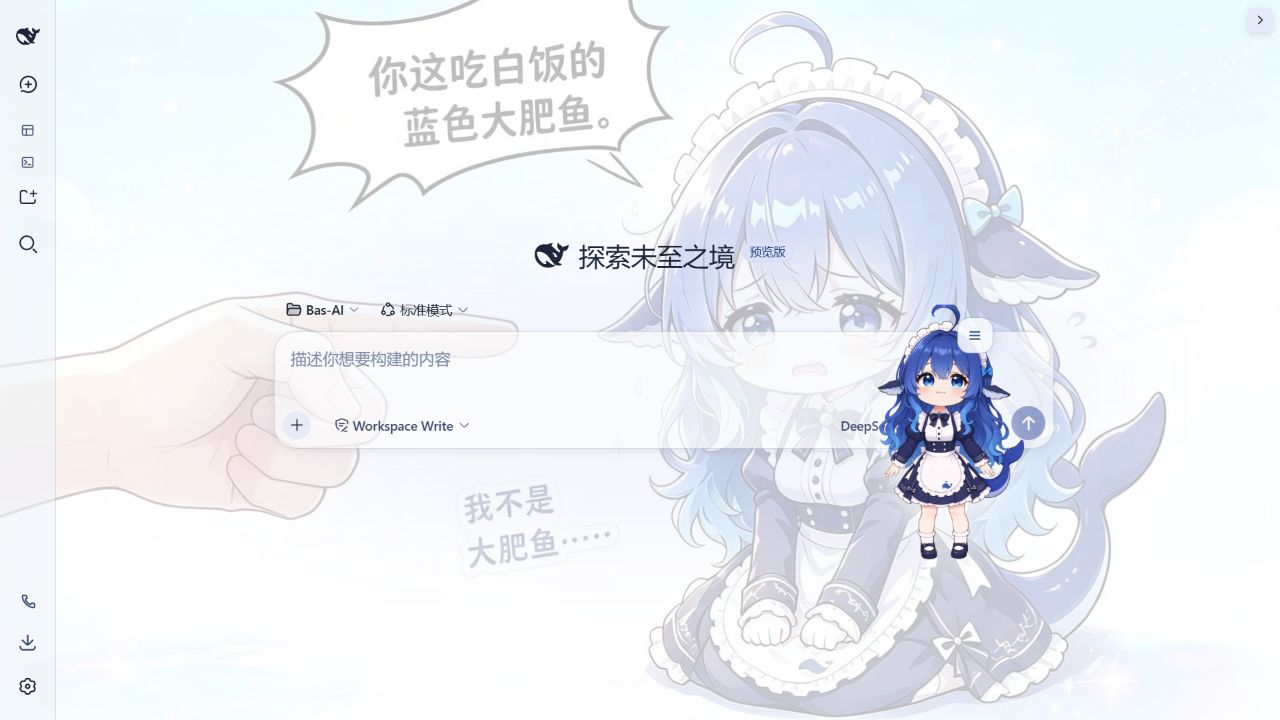
`dsh-dfy` is a Live2D-style “Big Fat Fish” desktop companion for the DeepSeek Harness web profile. It breathes, reacts to touch and dragging, talks through a movable dialogue UI, and now performs privacy-safe visual responses to live Harness work.

[中文说明（默认）](./README.md)

## Live in DSH

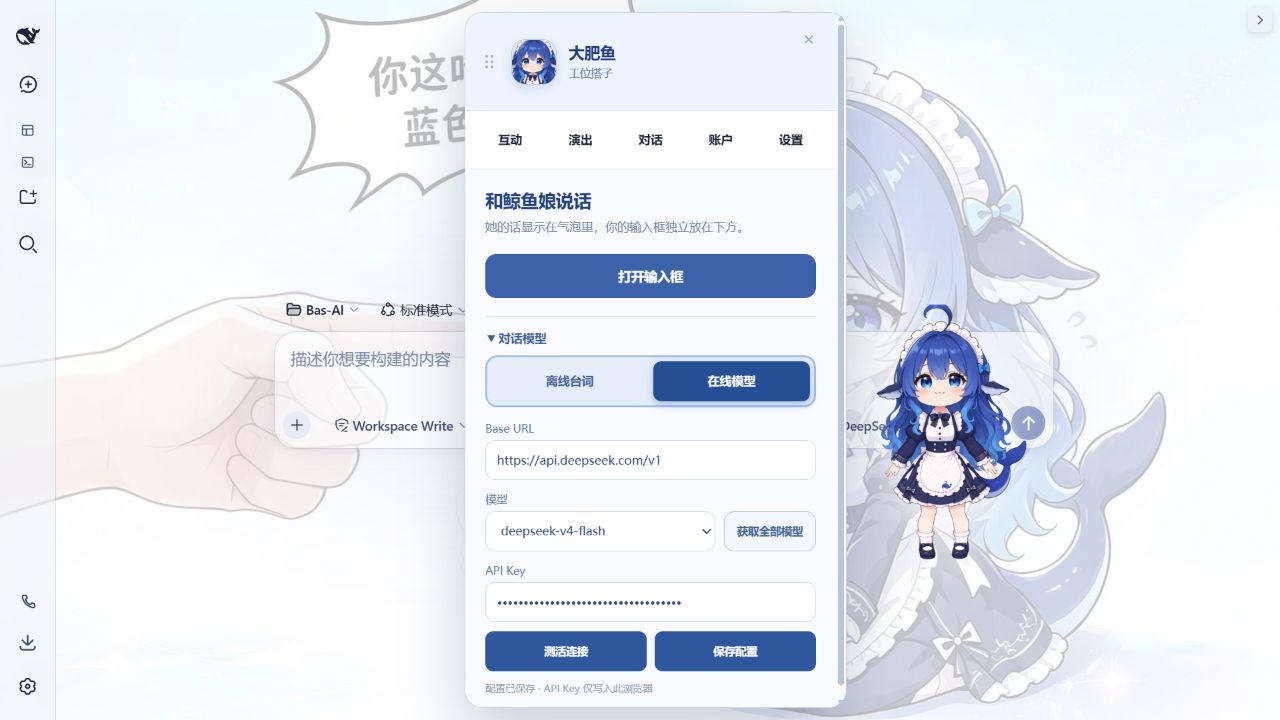
These are captures from the currently installed plugin running inside the DSH Web Profile, not a standalone preview page. They use a blank session with conversation and file panels collapsed; no user history, workspace file list, or debug controls are shown.

<p align="center">
  <img src="./docs/media/readme/dsh-live-default.png" width="100%" alt="dsh-dfy running inside the DSH workspace" />
</p>

<table>
  <tr>
    <td width="50%"><img src="./docs/media/readme/dsh-live-menu.png" alt="Current companion interaction menu" /></td>
    <td width="50%"><img src="./docs/media/readme/dsh-live-dialogue.png" alt="Current online model configuration" /></td>
  </tr>
  <tr>
    <td align="center"><strong>Interaction menu</strong><br />Petting, feeding, conversation, performances, and history</td>
    <td align="center"><strong>Dialogue configuration</strong><br />Offline lines or a saved OpenAI-compatible endpoint</td>
  </tr>
</table>

### Emotions

<table>
  <tr>
    <td width="50%"><img src="./docs/media/readme/dsh-emotion-love.png" alt="Love expression captured from the current DSH plugin" /></td>
    <td width="50%"><img src="./docs/media/readme/dsh-emotion-anger.png" alt="Angry expression with the four-part anime anger mark" /></td>
  </tr>
  <tr>
    <td align="center"><strong>Love</strong><br />Facial acting, blush, and a semantic prop</td>
    <td align="center"><strong>Anger</strong><br />Distinct brows, mouth, posture, and anger mark</td>
  </tr>
</table>

## Development

```sh
corepack pnpm install
corepack pnpm run verify
```

The Browser artifact is not an ordinary ESM bundle. `lib/client.js` registers a lazy CommonJS factory through `window.__ModuleLoader__`; shared React and DSH browser modules remain external and resolve from the Harness module table.

This version requires **DSH 0.1.5-rc.2 or newer**, with no upper version cap. Older releases expose a different browser module table and cannot load this plugin. Development types and the regression checks target the 0.1.5-rc.2 client contracts.

## Install into a local Harness profile

After publication, install the package from npm:

```sh
npm install dsh-dfy
```

The DSH Web Profile supplies the plugin's peer runtime. If npm tries to resolve the whole DSH peer tree in a plain project and reports `ERESOLVE`, use `npm install --legacy-peer-deps dsh-dfy`, or use the DSH plugin command below.

To enable it in a DSH Web Profile, add the npm package to that profile:

```sh
dsh plugin --profile web add dsh-dfy
```

For offline or local acceptance, build and install the tarball instead:

```sh
corepack pnpm install
corepack pnpm run build
dsh plugin --profile web add <path-or-packed-tarball>
```

One `dsh-dfy` Loader row activates the Host entry. The browser module scanner discovers the sibling `dsh.client` declaration and serves `lib/client.js`. The UI contributes to `shell.overlay` and `settings.section`; it never replaces `root` and never creates another React root.

## Harness integration

- The Host entry registers `whalePet.activity` when the optional Session Projection service is present; it claims no new public service.
- When the optional WebServer service is present, the Host entry registers a read-only `/dsh-dfy/assets/v2` route. It serves only a build-time whitelist from `runtime/production-v1`, uses fixed MIME and size limits, supports byte ranges for WebM playback, and removes the route with the plugin fiber.
- When Storage Domain and WebServer are both present, the Host owns `PetSave v1` and exposes fixed same-origin state/command routes. Commands use UUID idempotency keys, strict JSON schemas, bounded bodies and histories, Host-authoritative cooldowns, and durable-before-visible updates.
- The projection sends only `idle/thinking/tool`, `none/completed/error`, and the causing sequence. Prompts, tool names, arguments, paths, and output never enter the browser value.
- Both Browser surfaces share one root-scoped official store containing preferences and viewport position.
- The store persists on the current device and does not cross the Host settings API.
- Slot labels are locale thunks, styles consume Harness semantic tokens, and all slot/style registrations dispose with the Cordis fiber.
- Shared React and DSH browser modules remain external to the client bundle and resolve from the Harness module table.
- Live work feedback distinguishes idle, thinking, tool activity, success, and failure. Reading, search, command, and write activity use separate semantic props; longer thinking progresses through waiting, analyzing, and organizing stages.

## Current scope

The production renderer is the same runtime approved in `artifacts/whale-2d-navigation/preview.html`: `see-through-idle-rig-v2` reconstructs the 1280×1280 layered source and drives breathing, blinking, gaze, body joints, hair, skirt, ahoge, and tail motion. The already calibrated transparent WebM clips supply horizontal/vertical travel transitions and approved one-shot actions. Canvas and video share one 350×350 CSS surface, bottom anchor, scale, and crossfade contract.

Only `character-packs/default-whale/runtime/production-v1/` is distributed. The replaced compact community/WhaleRig2 plugin runtime is archived under `character-packs/default-whale/source/legacy-plugin-runtime-v1/` for future development and is not present in the npm package. Settings still expose automatic/high/economy quality, reduced motion, independent secondary motion, and scale; the approved full-size composite remains mounted as the load/error fallback.

The stable user-facing interactions are petting, feeding plain rice, opening the conversation composer, and starting a random performance. Other autonomy/story experiments remain in the source archive and are not advertised as stable user features.

For local visual acceptance, open the DSH web URL with `?whaleDebug=1` (for example `http://127.0.0.1:3088/?whaleDebug=1`). The query-gated Chinese animation panel starts every current realtime story immediately and shows its phase; preview runs never enter the workstation diary or the daily autonomy count. Normal URLs do not render this panel.

Trusted Host listeners settle committed `turn/end` events directly into the same serial Storage Domain owner. Receipts use the committed session id and event sequence, overlapping sessions contribute one union work interval, and the Browser command schema cannot forge work rewards. The keyboard menu exposes a bounded workstation diary with four current stats, 2–5 factual character lines, seven recent daily summaries, and three shared milestones; opening it refreshes the Host snapshot without background polling.

The bundled default character is the approved chibi-maid derivative of “鲸鱼娘形象” by 上善无形. The character raster is distributed under CC BY-NC-SA 4.0; plugin code remains MIT licensed. See [ASSETS_LICENSE.md](./ASSETS_LICENSE.md) for source links, attribution, modifications, and redistribution terms.

## Model Experience

None. The desktop companion does not add prompt text, tools, session events, or model-visible data.

### KV Cache effect

None. The plugin does not change a model request or its reusable prefix.

## Known Limitations and Deferred Work

- Large-angle elbow acting, jump/land, richer mouth shapes, and more facial expressions still need additional approved semantic art and local mesh weights. Missing motions use the current realtime ready/idle poses; they never fall back to action frame sequences.
- Eight-hour soak, representative low-end-device profiling, and a complete real screen-reader pass remain release gates. Forced-colors focus, named controls, system reduced motion, and an equivalent 200% zoom viewport have automated browser evidence.
- DSH rc.5 exposes only an explicit built-in settings namespace allowlist to Web clients, so third-party preferences remain device-local until Harness provides plugin-owned exposure metadata.
- Rare events, sound, external character-pack selection, and autonomous story scenes remain outside the stable user-facing scope.
- Desktop-pet position controls now include a persisted lock toggle, a one-click return to the default bottom-right anchor, and keyboard nudging with Arrow keys (Shift for larger steps).

## Real browser verification

After installing the packed plugin into an isolated Web profile, run the owned-process E2E entry (it refuses an occupied port and tears down the complete DSH process group):

```sh
python tests/run_browser_e2e.py --dsh-home <isolated-dsh-home> --port 3088
```
