dsh-connect-workbuddy
Connect locally signed-in WorkBuddy models to DeepSeek Harness, with a read-only credits overview and model management.


[English](README.en.md) | 中文
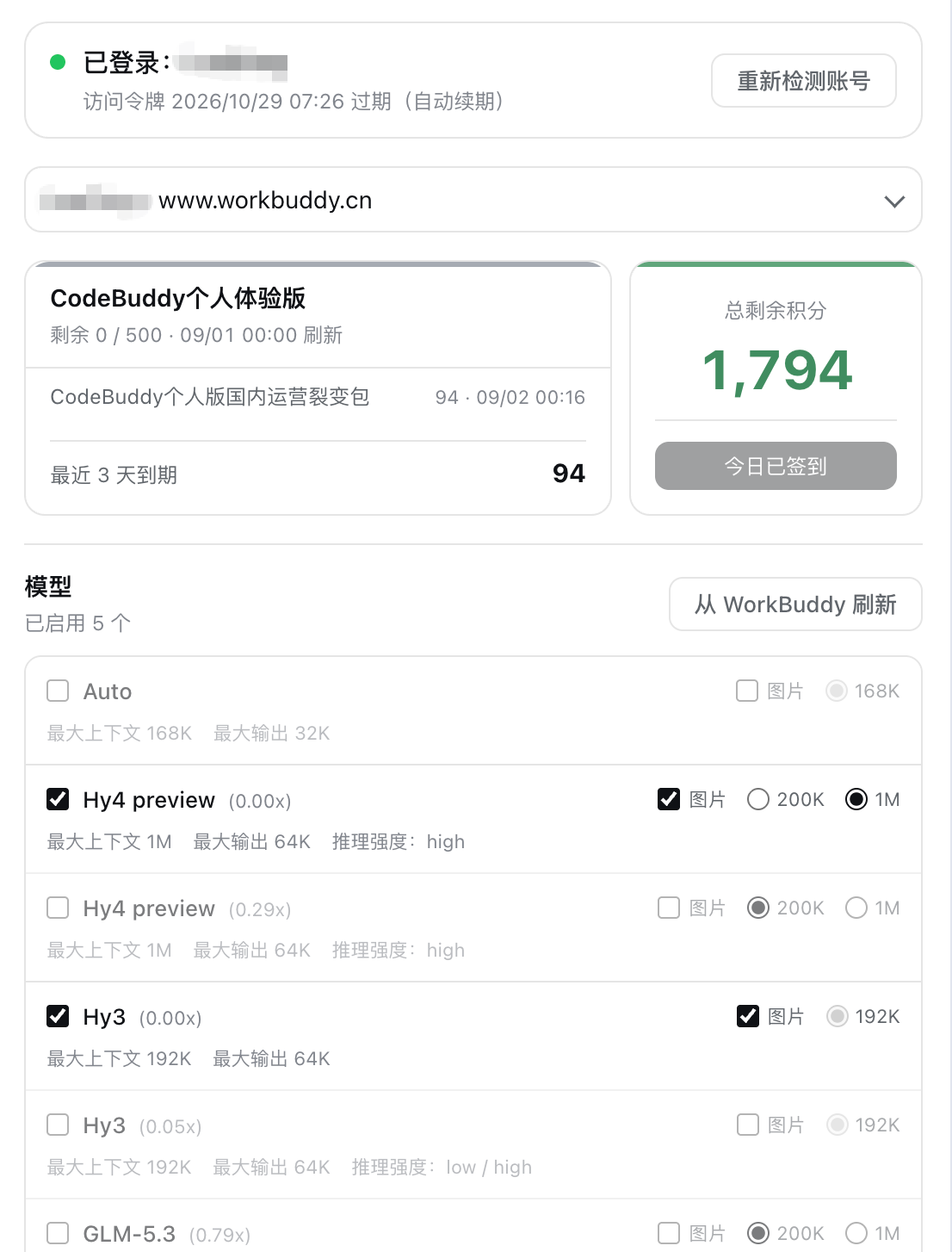
A [DeepSeek Harness (DSH)](https://github.com/deepseek-ai/deepseek-harness) bundle plugin that connects locally signed-in WorkBuddy models to the DSH model picker — **both the CN app and the international WorkBuddy AI app are supported** — with a read-only credits overview and selectable model management. **The CN and international sides are two parallel providers (`workbuddy` / `workbuddy-global`) that can be used at the same time**; the settings card separates them with tabs for convenient management.
## Features
- **Dual parallel providers (CN + international)** — the CN side registers as the `workbuddy` provider (`GLM-5.3`, `DeepSeek-V4-Pro`, `Kimi-K3`, `MiniMax-M3`, `Hy3`, etc.), the international side as `workbuddy-global` (`GPT-5.6`, `Gemini-3.5-Flash`, `GLM-5.3`, `Kimi-K3`, etc.), and **both rosters appear in the DSH model picker simultaneously**: different sessions can each pick a side without interfering. Model names carry the upstream credit multiplier (e.g. `GLM-5.3 · x0.79`), matching WorkBuddy's own model menu.
- **Tabbed settings card** — the card's top carries a "Domestic / Global" tab bar; each tab holds its own account picker, credits overview, and model management. Account, directory, selection, and unsaved drafts are fully isolated per tab — switching accounts or refreshing models on one tab never touches the other side's runtime catalog or sessions.
- **Model management** — refresh the full catalog from upstream and enable or disable each model individually; refresh is a draft operation that only takes effect on save. Upstream also reports credit multiplier, context/output limits, and reasoning efforts; image input is opted in per model manually (off by default).
- **Local account switching** — discovers the multiple sign-in credentials WorkBuddy's desktop app leaves behind and lets you switch per region. Tokens are never written to DSH settings.
- **Read-only credits overview** — remaining credit aggregated per package, plus each model's credit multiplier. Queries consume no credits.
- **Multi-candidate credential paths** — probes the platform defaults for macOS / Windows / Linux in turn, overridable by environment variable or directly in the card.
- **Secure loopback shim** — one random port + in-process random secret per region; the real WorkBuddy token is never handed to pi-ai.
- **Command-line diagnostics** — `status` / `doctor` / `logout`, reporting sign-in and credits per region, without a browser.
## How it works
```text
DSH PiAiAdapter (one stack per provider)
-> secure loopback shim (one random port + in-process random secret per region)
-> WorkBuddyUpstreamClient
-> CN: https://copilot.tencent.com/v2/chat/completions
-> Global: https://www.workbuddy.ai/v2/chat/completions
-> WorkBuddy SSE
-> DSH executes local tools and returns their results
```
The CN and international sides each own a complete runtime stack — credential store, model catalog, loopback shim, adapter — with visibility filtered by credential domain (`workbuddy.ai` / `codebuddy.ai` → international, anything else → CN), so **both regions' accounts can be signed in and used by different sessions at the same time**. The international product has two brand domains: the desktop app signs in at `workbuddy.ai`, while the CodeBuddy CLI signs in at `codebuddy.ai` — both are international.
The model catalog comes from each region's correct source: CN reads `/v2/enterprises/personal/models`, while international reads `/v3/config` — the config service serves a different roster per client channel, and only the desktop user agent yields the account's real 20-model list (including the free `deepseek-v4.1-flash`). The credits overview comes from `https://www.codebuddy.cn/v2/billing/meter/get-user-resource` (international accounts auto-route to the global gateway their credential belongs to, `workbuddy.ai` or `codebuddy.ai` — tokens are not interchangeable across the two brand domains); all are read-only.
Credentials are read (read-only) from the WorkBuddy desktop app's own auth file. Refreshed tokens are kept per region in `$DSH_HOME/.workbuddy-auth.cn.json` and `$DSH_HOME/.workbuddy-auth.global.json` (two simultaneously signed-in accounts never overwrite each other; the legacy single file `.workbuddy-auth.json` is still read as a migration source); the desktop app's file is never written.
## Install
Prerequisite: the WorkBuddy desktop app is installed and signed in (the plugin reuses the app's sign-in state).
```sh
dsh plugin --profile desktop add dsh-connect-workbuddy
```
Or directly via npm:
```sh
npm install dsh-connect-workbuddy
```
Restart the DSH process after install/update/uninstall.
The plugin also runs under **Web** and **TUI**; pick the command matching your profile:
```sh
dsh plugin --profile web add dsh-connect-workbuddy # Web
dsh plugin --profile dsh-tui add dsh-connect-workbuddy # TUI
```
## Command line
```sh
dsh plugin --profile exec dsh-connect-workbuddy status # sign-in state and remaining credit
dsh plugin --profile exec dsh-connect-workbuddy doctor # credential paths and host diagnostics
dsh plugin --profile exec dsh-connect-workbuddy logout # clear the plugin-held credential copy
```
`status` and `doctor` accept `--json` for machine-readable output.
## Development
```sh
pnpm install
pnpm run check # typecheck + test + build
```
Local dev via a `link:` install to the desktop profile (restart DSH Desktop after editing):
```sh
dsh plugin --profile desktop add /Users/dmh2002/DshProject/dsh-connect-workbuddy
```
## Marketplace listing
The plugin ships an installable `dsh.bundle` manifest and is published to npm. Community marketplaces generally sync entries from the [Awesome DSH Plugin](https://github.com/awesome-dsh-plugin/awesome-dsh-plugin) registry; the submission draft lives at [`awesome-dsh-plugin-submission/dingminhua__dsh-connect-workbuddy.yml`](awesome-dsh-plugin-submission/dingminhua__dsh-connect-workbuddy.yml), and the formal submission is PR [#3812](https://github.com/awesome-dsh-plugin/awesome-dsh-plugin/pull/3812) (`data/plugins/dingminhua__dsh-connect-workbuddy.yml`, CI and Submission gate green, awaiting maintainer merge).
**Listing directory rules** (per [contributing.md](https://github.com/awesome-dsh-plugin/awesome-dsh-plugin/blob/main/contributing.md)):
- One YAML per plugin: `data/plugins/__.yml` with `url` (exactly matching the repo), `name` (`owner/repo`), `category` (one of the valid values; this project uses `model`), and `description.en` (required, ending with a period) / `description.zh` (optional); a description containing `: ` must be quoted.
- The repo must declare a `dsh.bundle` manifest (here `dsh.bundle.patch: ./cordis.patch.yml`) and carry the `dsh-plugin` topic; the ≥ 10 commits and ≥ 1 day age are checked automatically by CI.
- Both READMEs (`README.md` / `README.zh.md`) are generated — never edit by hand; after changing the YAML, regenerate with `node scripts/generate-readme.mjs`.
- At most 3 entries per PR; change only your own entry, never touch other plugins.
Marketplace screenshots and GitHub README badges are two separate mechanisms:
- **GitHub badges** are produced by the Shields/dshfind image links at the top of this README.
- **Marketplace screenshots** follow the current convention and are declared in the plugin's own root [`screenshots.json`](screenshots.json) (this project declares its usage-card screenshot there). The registry's `data/screenshots.json` is a legacy fallback and **no longer accepts new keys** (this project removed its edit before submitting).
- **Marketplace icons/placeholders** follow each marketplace's own display rules; they are not a generic npm `package.json` field nor a README badge.
## Known limitations
- The plugin depends on WorkBuddy client endpoints (not an official public API), so a WorkBuddy update may require adjustments.
- **Account switching** relies on the historical auth files the WorkBuddy desktop app leaves behind (the app's own backups), not an official multi-account API. Following the app's current sign-in remains the default; switching is an explicit opt-in, and historical credentials can be invalidated by the app's cleanup or sign-out.
- Windows and Linux credential paths are derived from platform conventions and are not verified on real hardware; set `WORKBUDDY_AUTH_FILE` if yours lives elsewhere.
## Disclaimer
- This project is **for personal study and research only**. It drives only your own WorkBuddy account locally; do not use it commercially or beyond reasonable personal use.
- You must comply with WorkBuddy's terms of service. Any consequence of using this project (including account restriction, quota depletion, or service interruption) is your own responsibility.
- The author is not liable for any direct or indirect loss arising from the use or misuse of this project.
- This project is unaffiliated with and unendorsed by Tencent, WorkBuddy, or DeepSeek. Names appear solely to describe compatibility; their trademarks belong to their respective owners.
## Acknowledgements
This project builds on work others have published. Sources and licenses are credited honestly below; we hold that in genuine respect.
### Reference for the connection core
- [corrinehu/dsh-workbuddy-connect](https://github.com/corrinehu/dsh-workbuddy-connect) (MIT, Copyright (c) 2026 Corrine Hu) — **the principal reference for this project.** That project first validated a working WorkBuddy-to-DSH integration: desktop credential discovery and refresh, the upstream protocol and header conventions, loopback shim hardening, pi-ai provider assembly, and the status CLI were all studied from it. This project reimplements those proven capabilities while focusing on improving the experience.
- [Sliverkiss/workbuddy2api](https://github.com/Sliverkiss/workbuddy2api) (MIT) — reference implementation of the WorkBuddy upstream protocol (the `copilot.tencent.com` wire behavior), referenced via `dsh-workbuddy-connect`.
### Baseline for the plugin presentation and structure
- [dingminhua/dsh-connect-trae](https://github.com/dingminhua/dsh-connect-trae) (MIT, Copyright (c) 2026 LaoDing) — the plugin's presentation is kept consistent with it: the settings-card structure and interaction, the model-management (refresh → select → save) and account-selection model, the read-only host↔client route shape, and the npm release engineering.
- [dingminhua/dsh-subagent-default-model](https://github.com/dingminhua/dsh-subagent-default-model) (MIT, Copyright (c) 2026 LaoDing) — source of the `dsm-*` card style system, the `row.*` bilingual copy-key convention, and the brand icon, referenced via `dsh-connect-trae`.
- [franksong2702/dsh-codex-connect](https://github.com/franksong2702/dsh-codex-connect) (Apache-2.0) — reference for the DSH plugin structure and provider registration, referenced via `dsh-workbuddy-connect`. Its Apache-2.0 obligations are discharged separately in [THIRD_PARTY_NOTICES.md](THIRD_PARTY_NOTICES.md).
### Note
Copyright in each project above belongs to its respective author. This project follows a **learn-the-design, write-our-own-code** approach and does not copy any reference project's source wholesale; key modules are written independently and each file's header comment names the specific project and pattern it draws on. If you find an attribution missing or incorrect, please open an issue and we will correct it promptly.
## Third-party open-source dependencies
The open-source projects referenced here, together with their licenses and compliance notes, are recorded in full in [THIRD_PARTY_NOTICES.md](THIRD_PARTY_NOTICES.md). When introducing new WorkBuddy-related external dependencies or reusing code from other projects, update that file and honor the upstream licenses.
## License
This project is licensed under the [MIT License](LICENSE). Copyright: **Copyright (c) 2026 LaoDing**.