# Configuration, diagnostics, and recovery
English | [中文](reference.zh.md)
For installation and the verified release pairing, start with the [user guide](../README.md). This reference covers account behavior, optional capabilities, configuration, and diagnostic commands.
## Accounts, models, and quota
OAuth credentials are stored on the DSH host and used there to authenticate and send requests to OpenAI. The Models card and the Plugin configuration page share the same account state; selecting an account is not a per-session binding. **Manage accounts** can add, select, or remove accounts. Browser responses expose only plugin-generated account keys and masked labels, never OAuth tokens or raw OpenAI account ids.
Choose an `openai-codex` model in the normal Harness model picker. Model names remain canonical in every UI language. **More settings → Models** controls which models appear in discovery; hiding a model does not disable routing by its exact id.
The Codex catalog comes from the installed `@earendil-works/pi-ai` package, not a live query of the account's available models. DSH `0.1.2-rc.1` uses pi-ai `^0.84.2`, which lacks `gpt-6-astra`; Codex Connect supplies that definition. Published Alpha 4.35 is also verified with each exact DSH `0.1.5-alpha.1`, `0.1.5-rc.1`, and `0.1.5-rc.2` pairing using pi-ai `0.85.1`. Mixed host package versions and other DSH/pi-ai combinations remain unverified. With a native Astra entry, the plugin preserves its metadata and retains Low, Medium, High, Xhigh, and Max reasoning choices without modifying the installed catalog. Users do not need to upgrade pi-ai separately to select Astra. The exact verified pairs and acceptance limits are recorded in the release notes; dependency declarations alone do not establish verification. Neither catalog source proves account access.
- Adding an account leaves the current account usable while authorization is pending.
- Cancelling or timing out a new authorization preserves every existing account and closes accepted callback connections, including incomplete HTTP requests. After cancellation, the browser reads account labels and quota together before updating the view. Pending authorization expires after 10 minutes by default; `oauthTimeoutMs` accepts 1,000–1,800,000 milliseconds and is applied when the plugin loads.
- Switching accounts affects subsequent requests. A request captures its account before resolving authentication, so a concurrent switch cannot mix credentials. If that account becomes unavailable during authentication, the request fails and requires an explicit retry with the selected account.
- Quota, search, image generation and Auto-review keep that same account through token refresh. Each quota response pairs its usage and account labels from one snapshot; a concurrent switch may leave an older snapshot visible until the next refresh, but does not relabel its quota as another account's.
- Removing the active account requires selecting a replacement when another account remains. Removing the last account signs out; **Sign out all accounts** deletes all locally stored Codex credentials.
- Codex Connect does not rotate accounts automatically or fail over when a request is rejected.
Credential changes wait up to 20 seconds for the writer lock, allowing an in-progress token refresh to finish. A lock timeout fails the operation without deleting another writer's lock or changing stored accounts. A lock left behind by a crashed process requires operator recovery after confirming that no writer is running.
Request authentication failures use fixed messages without upstream response bodies or nested provider errors. A failed refresh preserves the stored credentials.
An explicit OAuth `invalid_grant` rejection during refresh shows the reauthorization prompt. Network failures, timeouts and server errors keep the account selected and show a quota error so you can retry; they do not delete credentials or start a new login.
For GPT Codex conversations, the Composer shows Fast Mode and quota:
**Source change, not yet published:** exact Codex `gpt-6-astra` and `gpt-6.1-sol` conversations have mutually exclusive Standard, Fast and Ultrafast choices. Ultrafast sends `service_tier: 'ultrafast'` after an explicit conversation choice or an explicitly configured startup preference, with unchanged model, reasoning and SSE transport. It starts off when the new preferences are omitted; legacy Fast booleans cannot seed Ultrafast. Other models show Ultrafast disabled. Model changes (including away/back), login/logout and account commands invalidate the paid choice; captured requests recheck their actual account, model and live selection before dispatch. Auxiliary compaction/title requests do not inherit Ultrafast. The old boolean Fast endpoint and saved Fast preferences remain supported; a legacy GET returns 409 while Ultrafast is selected rather than misreporting it as Standard.
**Source follow-up, not yet published:** the Composer renders this three-way choice as a single compact lightning-bolt button (the legacy Fast Mode button style) opening a Standard/Fast/Ultrafast menu built on the same anchored menu primitive as the Read Only/Workspace Write/Full Access permission toggle, instead of crowding the row with inline segmented buttons. The portaled list opens upward above the bottom Composer row, stays inside the viewport, and follows resizing and scrolling while open. The bolt and its hover title reflect the current mode; a small orange dot stands next to the bolt while Ultrafast is active. The menu marks the active choice without a standing text footer. A separate 32×32 information button beside Ultrafast toggles the full, unchanged quota disclosure above the choices; its explicitly bounded paragraph wraps without widening the approximately 144px card, which grows upward while keeping the bottom row in place. The disclosure remains linked to Ultrafast for screen readers even while visually hidden; the information button works with touch, Enter and Space without selecting a speed, remains available when Ultrafast is disabled, and collapses when the menu closes. Arrow keys include the information button, and Escape, Tab or an outside click closes the menu without selecting. A visually hidden status region announces the speed read and each write outcome. The button itself is disabled only while a read or write is in flight; while the shared account is busy or signed out only the Ultrafast entry is disabled with a short reason, so Fast and Standard remain selectable and account gating matches the previous Ultrafast-only behavior. Speed routes and request behavior are unchanged.
Ultrafast consumes more quota. Official documentation distinguishes eligible Pro500 and Enterprise/Edu accounts from Pro100/200; this plugin does not infer entitlement from a plan name or cached catalog. Account eligibility and the actual served tier remain **unverified**, even after a successful response. A selected button is a request preference, not billing, speed or server acceptance proof. No private eligibility endpoint, additional OAuth permission, paid probe or entitlement cache is added. Generic 403/429/network failures do not establish ineligibility. The selector neither falls back nor replays failed requests; existing provider/Host retry policies continue to apply to the same requested tier. An uncertain control mutation can only be recovered through an explicit read, never an automatic POST replay. See [implementation and acceptance boundaries](agent-notes/ultrafast-conversation-speed.md).
- **Fast Mode** requests priority service (`service_tier: 'priority'`) for that conversation only. It is off by default and does not change the model or lower reasoning effort. The new-session and new-subagent Fast Mode defaults also leave effort unchanged. Actual speed and quota consumption depend on the service; a fixed speed multiplier is not guaranteed.
- The profile's **Fast Mode for new conversations** and **Fast Mode for new subagent conversations** settings are independent and both off by default. Each is applied only when a new session starts; changing either setting does not retroactively alter existing sessions or override a Composer choice. Per-conversation Fast Mode state is process-local, so resuming after a plugin restart returns that conversation to Standard speed; subsequent new sessions still use the saved profile defaults.
- **Source follow-up, not yet published:** `newSessionSpeedMode` and `newSubagentSpeedMode` independently accept `standard`, `fast` or `ultrafast`. An explicit value overrides the corresponding legacy Fast boolean; omission or `null` uses that preserved legacy preference. More settings offers both selectors and disables the corresponding legacy toggle while an explicit value is active. Each preference is captured only for a new startup session, never a resumed/existing session or a later profile edit. Ultrafast requires signing in before creating the session and applies only to the exact supported Codex models; other initial routes use Standard. It does not infer paid entitlement. A model or account change, including away/back, retires the old startup intent; manual Composer choices win even while an account read is pending. The first admitted Host route or the Composer's existing speed read binds the startup preference without an extra provider request. Missing sign-in on an eligible request fails explicitly and remains an error on retry until a manual/lifecycle change. See [startup default details](agent-notes/new-session-speed-defaults.md).
- **Quota bars** normally refresh every 60 seconds while signed in and the tab is visible (hidden tabs pause; failures back off) and show only the `5h` and `7d` windows returned by the server, with the exact remaining percentage and reset time. `gpt-5.3-codex-spark` uses its separate Spark bucket. Codex Connect never invents missing windows or suppresses returned windows based on a plan name.

## Optional profile reasoning default
**Source change, not yet published:** set `reasoningEffort: max` (or another supported effort) on the Codex Connect plugin row, or use **Default reasoning effort** in More settings. This is a fallback only: an explicit Host request's reasoning effort wins. Omission preserves provider behavior, and `null` masks an inherited default. Saving a change affects newly prepared requests; a request already prepared keeps its profile snapshot. Fast/Ultrafast service tier, output limits and the chat model are unchanged.
`GET /plugins/dsh-codex-connect/models` now includes each model's actual Host `reasoning.efforts` and optional `reasoning.defaultEffort`, without reading credentials or querying account access. This metadata comes from the installed adapter, including supported additions to the static catalog. An unsupported configured effort does not hide a model: dispatch fails with `UNSUPPORTED_REASONING_EFFORT` before credential resolution or network activity. An explicit supported request effort can override that default. The profile accepts `off`, `minimal`, `low`, `medium`, `high`, `xhigh`, and `max`; availability depends on the selected model. The Workflow `agent()` parameter allowlist is Host-owned and is not expanded by this plugin setting.
## Reasoning effort for ordinary subagents
With DSH `0.2.0-rc.2` or `0.2.1-alpha.1`, ordinary Harness subagents can request an explicit reasoning effort. Enable the Host's subagent model-selection setting, authorize the exact `openai-codex` / `gpt-6.1-sol` route, and start a fresh top-level conversation so it records that policy. The subagent tool must use a backend with `agentOptions` support, such as an in-process Harness backend or DSH SDK, and have `modelSelectionSettings: true`. External Codex, Claude Code and ACP backends do not support this selection interface.
Use `list_subagent_models` to inspect the authorized routes and advertised efforts, then pass `provider: "openai-codex"`, `model: "gpt-6.1-sol"`, and `reasoning_effort: "max"` in the ordinary `subagent` tool call, alongside its required task arguments. The allowed-model list contains provider/model pairs; effort is a separate per-call field validated against the selected model. The plugin's `/models` account-card response is not the Host's reasoning discovery interface. This does not enable the frozen Adaptive Task feature or require a plugin-wide effort default.
Workflow `agent()` is a separate Host interface: these exact DSH versions accept only `label`, `phase`, `schema`, `provider`, and `model`. They do not accept `reasoningEffort` or `reasoning_effort`; the ordinary subagent setting does not add those Workflow options. Model metadata and local route validation do not prove account entitlement.
## Request retry policy
The source configuration accepts an optional startup-only `retryPolicy` in the Codex Connect plugin row. This is not a new control in **More settings**. Reload the plugin through the Host after editing its configuration. Omit the key to retain the Host's current normal policy: five retries after the initial attempt, retryable codes `EMPTY_RESPONSE`, `RATE_LIMIT`, `SERVER`, `TIMEOUT`, and `TRANSPORT`, and backoff of 500 ms initially, capped at 10,000 ms, with a 0.1 jitter ratio.
```yaml
retryPolicy:
mode: normal
maxRetries: 10
retryableCodes: [EMPTY_RESPONSE, RATE_LIMIT, SERVER, TIMEOUT, TRANSPORT]
backoff:
initialDelayMs: 1000
maxDelayMs: 20000
jitterRatio: 0.1
```
This uses the installed Host's `RetryPolicySchema` and resolver. In `normal` mode, `maxRetries` is a nonnegative safe integer; zero disables policy retries. Codes must be a nonempty list of distinct nonempty strings. Backoff delays must be positive finite numbers no greater than 2,147,483,647 ms, with `initialDelayMs <= maxDelayMs`, and jitter must be between 0 and 1. Unknown policy/backoff keys and invalid active values fail loading rather than being silently ignored. Remove the key to restore defaults; do not use `null` as a policy.
The Host also supports explicit `mode: always` with `backoff`, which retries every model-request failure without a count limit until success, cancellation or disposal; it is never the default. In layered configurations, the Host ignores retained normal-only fields in `always` mode; they do not impose a retry limit. The Host retry plugin executes the registered policy. This setting neither installs/enables that plugin nor changes retries for OAuth, quota, Search, images or Auto-review. It does not bypass caller cancellation, request accounting, preflight deadlines or other Host limits. The policy is captured when the adapter is created; already prepared calls retain their captured policy.
More retries can produce more billable attempts and consume additional quota. A backoff schedule is not a total request deadline or a guaranteed outage-recovery window: request durations, provider delays, jitter, cancellation and other limits still apply. This source change is not included retroactively in the immutable Alpha 7 npm package, and synthetic checks do not establish live proxy/account recovery.
## Optional capabilities
Fresh installations register the model provider and leave every additional capability disabled:
```yaml
- id: llm-openai-codex
config:
enableProxy: false
enableSearch: false
enableReserveFallback: false
enableImageTool: false
enableImageGeneration: false
enableAutoReview: false
```
Edit these options under **Settings → Plugins → Plugin configuration → Codex Connect** or **Settings → Models → Openai-Codex → More settings**. Changes are staged until **Save changes**. Saving commits edited fields together and preserves concurrent changes to untouched fields. A conflicting edit or failed save keeps your draft; discard it to reload the latest settings. Most settings affect only this plugin; enabling Codex Search also selects it as the active profile-wide search route.
### Proxy
Disabling the proxy or unloading the plugin gives active proxy operations one second to finish, then destroys this instance's pools with a further one-second completion limit. New proxy operations are rejected during shutdown; interrupted requests are not retried directly. Arbitrary application callbacks cannot be forcibly terminated by the proxy manager. The scoped dispatcher remains until late callbacks settle, so they cannot bypass their destroyed proxy; unrelated traffic still uses the host dispatcher.
Direct connection is the default. An enabled credential-free HTTP(S) proxy applies only to this plugin's model, OAuth, refresh, quota, search, image, and Auto-review traffic. Detection checks standard proxy environment variables and documented loopback candidates without making a model call, consuming quota, or saving settings. A failed proxy request never silently retries through a direct connection. Loading Codex Connect does not replace Node's environment-proxy dispatcher, so unrelated Harness requests continue using the process's existing proxy policy.
### Luna Reserve fallback
Published Alpha 4.35 includes this default-off experiment; Alpha 4.34 does not include it. Real-account Reserve entry and recovery remain unverified. See the [publication and installation evidence](../.github/ALPHA_435_RELEASE_READINESS.md).
`enableReserveFallback: true` opts agent requests into backend-authorized Luna Reserve fallback. The account UI and routing share an in-memory account/user-bound quota snapshot; concurrent reads coalesce and fresh reads do not issue another quota `GET`. A cold or stale read waits for refresh. After a successful fetch, background refresh runs at 60/30/15/5 seconds for usage below 75%, at least 75%, at least 90%, and at least 99%, using the highest consumption across ordinary and relevant model windows. Future reset times shorten the next refresh to reset plus one second; they never establish recovery. Cache reads do not postpone that deadline. Transient failures discard cached decisions and use exponential backoff starting at 60 seconds, with up to 10% positive jitter and a 15-minute local cap; a longer valid `Retry-After` takes precedence. Authentication rejections and non-retryable 4xx errors stop automatic usage requests for that credential until credentials/state change. Delays beyond the timer range stop automatic retry rather than overflowing. Background GETs stop after two minutes without a foreground quota consumer; stale routing authority still expires. Account mutations, settings changes, and plugin disposal invalidate the state; UI receives only the public quota projection.
A valid shared decision issues a private one-shot permit for the next `gpt-reserve` dispatch in that session/account. This local dispatch guard is not a server-side per-call authorization requirement. Cancellation, replacement, an agent error, turn stopping, quota invalidation, snapshot refresh, or cache eviction revokes an unused permit. Return-target I/O rechecks that authority before restoring an ordinary model. Direct and auxiliary Reserve calls fail before a model request. With fallback disabled, ordinary agent steps do not query quota and there is no background quota poller; account UI reads share a 60-second credential-bound cache, concurrent GET coalescing, and failure cooldowns. An already-Reserve session requires an explicitly selected ordinary model.
The access token must contain non-empty `chatgpt_account_id` and `chatgpt_user_id` (or `user_id`) claims under `https://api.openai.com/auth`, and `chatgpt_account_is_fedramp` must be absent or `false`. Missing, partial, FedRAMP, changed, or response-mismatched identity disables fallback for that step. The plugin does not guess identity from an email address or subscription plan.
The plugin routes to the hidden model only when the quota response matches both the captured account and user and supplies a valid Luna Reserve authorization banner for the applicable model. A generic HTTP `429`, a rounded quota percentage, a reset time, or a Reserve model name is not authorization and is never retried as Reserve. This version accepts only the known `gpt-5.6-luna` Reserve metadata; other metadata is not inferred. The server decides eligibility and whether `5h`, weekly, or another backend limit causes Reserve authorization.
Before entering Reserve, the plugin atomically saves the session's ordinary model request controls in a private `codex-connect-reserve/.json` file beside the Codex credential file. The record contains a hash of the account/user pair and the ordinary model, reasoning effort, temperature, output limit, and stop sequences; it does not contain a bearer token or raw account and user ids. The Reserve request omits those ordinary controls and uses Luna's own defaults. A later identity-matched quota response must explicitly allow ordinary usage before the complete saved request configuration is restored. A missing, corrupt, oversized, wrong-account, or fork-without-its-own return record is never guessed or inherited: select an ordinary model explicitly to continue.
Reserve is not exposed in model discovery and does not modify profile-wide defaults. Its allowance is separate from ordinary usage, not unlimited. When both are explicitly exhausted, routing stops with a usage-exhausted message. If a model request reports Harness's typed account-quota failure, the plugin invalidates cached state and allows at most one fresh, authorized entry or recovery retry per turn. Generic rate-limit failures never trigger this path.
Reserve uses Luna's 272,000-token catalog context window, not the previous model's larger window. This release does not authorize automatic or manual compaction calls through Reserve. Switching a long conversation can therefore exceed Luna's context limit; compact before ordinary usage runs out or configure a separate, available summarization model. The plugin does not claim a cross-host exact token preflight or automatic long-context recovery.
Automated coverage uses synthetic tokens and quota responses. It verifies local routing and restoration rules without contacting a real account, and therefore does not establish live account eligibility, available quota, or current server policy.
### Search and image tools
- `enableSearch: true` registers Codex as an available search provider and selects it for profile-wide searches. Disabling it unregisters the provider and restores the underlying Host route. A newer Host route selection is preserved; on the rc.2 source candidate, live Host selections take precedence without restarting the service.
- Search has a 30-second total deadline covering authentication, response headers and body reading. Responses larger than 1 MiB are rejected, and unfinished response bodies are cancelled on failure. Caller cancellation can end a search sooner.
- `enableImageTool: true` registers `view_image` on vision-capable models. Remote reads accept credential-free public HTTP(S) only and revalidate DNS and redirects.
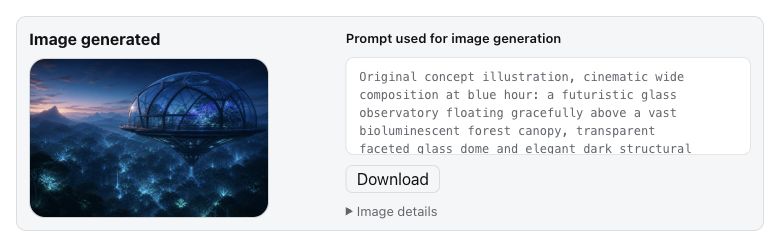
- `enableImageGeneration: true` registers GPT Image generation and, in Alpha 4.48 builds, editing of explicitly selected session images. Prompt-only generation remains supported. Availability, dimensions, and quota remain account- and service-controlled.
- `imageModelHint` is an optional profile-scoped setting in Plugin configuration or the profile config. Empty uses `gpt-image-2`; a custom value accepts 1–128 ASCII letters, digits, dots, underscores, or hyphens and must start with a letter or digit. Saving changes the `model` field of subsequent requests to the fixed generation or edit endpoint; clearing restores the default. Alpha 4.47 accepts only `prompt`; Alpha 4.48 also accepts explicit editing inputs. This is an unverified route hint: the service may ignore or reject it, and it does not guarantee the returned model.
Generated originals are stored under `$DSH_HOME/dsh-codex-connect/images/v1`; the conversation receives a separate DSH attachment preview. The result card reports dimensions and file sizes and can download either representation. Originals are owner-only, integrity-checked, and available only to the creating session and forks that inherited the result. Disabling or uninstalling the plugin does not delete those files automatically.
**Development change, not yet released:** keep your current chat model, including DeepSeek, when using the enabled image tool. If the original is saved but its conversation preview cannot be saved, the result reports that condition and keeps **Download original** and **Modify this image** available. Continue from that stored result; regenerating is not required to retrieve it. Originals still require host image validation and session ownership. Cancellation and failed original persistence do not return a recoverable result. Existing installed releases keep their previous behavior.
#### Image editing in Alpha 4.49
**Post-release review:** published Alpha 4.48 has two confirmed defects: a re-uploaded preview can select a historical original, and safe edit failure details are hidden. The fixes below apply to Alpha 4.49; the published 4.48 package is not changed or republished.
In Alpha 4.49, a complete `attachment` selector matched to an actual user upload selects that copy's bytes, even when its ID, filename and dimensions match a generated preview. A bare `attachmentId` shared by uploads and generated results fails with an ambiguity message; `assetId` continues to select the exact stored original. Re-uploaded copies remain usable after the historical original is deleted. The model receives the complete bounded reference next to each image; no user lookup of opaque IDs is required. Failed input selections display only fixed, allowlisted reasons and recovery guidance and do not offer an unchanged retry. Unrecognized service errors stay hidden behind a generic explanation.
With the existing image capability enabled, attach a target and optional references and describe their roles, for example: “Edit the first image; use only the colors of the second image and keep the subject.” You can also choose **Edit based on this image** on a previous result. The form waits for your instructions before submitting.
The tool `codex_connect_image_generate` accepts `{"operation":"edit","prompt":"change the background","target":{"attachmentId":""},"references":[]}`. Each optional reference is `{"image":{"attachmentId":""},"purpose":"colors only"}`. Stored original results can instead use `{"assetId":""}`. These placeholders are illustrative, not usable IDs or permission grants. Normal conversation users do not need to look up IDs: the model receives stable image handles.
Every edit preserves the old image and stores a new original, preview and source relation. Continue from the new result or select an older result to branch. Missing, inaccessible or ambiguous inputs fail without quietly dropping references or generating a replacement. Preview-only history requires an explicit lower-resolution choice. Editing sends only the selected images to the image service; the existing capability remains disabled by default.
The plugin accepts PNG, JPEG and WebP, with at most five inputs and stricter host limits where applicable. These are defensive limits, not a promise of backend entitlement. Output dimensions and preservation quality are service-controlled. Lost or uncertain requests are not automatically repeated; retrying can consume additional quota. See [the detailed contract and acceptance limits](experiments/issue-270-image-edit.md).
### Auto-review
`enableAutoReview: true` lets the Codex reviewer assess eligible Harness approval requests after DSH policy has determined that approval is required. First enablement requires confirmation because bounded recent approval context, tool arguments, working directory, and the planned action are sent to `chatgpt.com`. Hidden reasoning and stored credentials are excluded. Only a complete structured allow result authorizes one execution; ambiguity, malformed output, transport failure, and timeout return to human approval. See [Auto-review](auto-review.md) for the full decision and retry rules.
## Routing and configuration
Installing Codex Connect does not select a default model or search provider. Enabling Codex Search selects it while the capability remains enabled; select a default model separately only when intended. The equivalent configuration is:
```yaml
- id: agent-default-model
config:
provider: openai-codex
model: gpt-5.6-sol
- id: llm-openai-codex
config:
enableSearch: true
searchMode: live
searchContextSize: medium
```
The main plugin options are:
| Field | Default | Meaning |
|---|---:|---|
| `models` | full catalog | Visible Codex model ids; an empty array hides all entries |
| `enableProxy` | `false` | Use `proxyUrl` for Codex Connect traffic |
| `proxyUrl` | `http://127.0.0.1:7890` | Credential-free HTTP(S) proxy origin; inactive until enabled |
| `contextWindowOverrides` | none | Per-model client context-budget overrides |
| `enableSearch` | `false` | Register Codex search and select it when the setting is saved |
| `enableReserveFallback` | `false` | Follow identity-matched, backend-authorized Luna Reserve transitions for agent requests |
| `enableImageTool` | `false` | Register `view_image` |
| `enableImageGeneration` | `false` | Register GPT Image generation and explicit editing in Alpha 4.48 |
| `imageModelHint` | empty | Optional unverified image route hint; empty keeps the default request |
| `enableAutoReview` | `false` | Review eligible approval requests with Codex |
| `searchModel` | `gpt-5.6-sol` | Model used by standalone search |
| `searchMode` | `cached` | `cached`, `indexed`, or `live` |
| `searchContextSize` | `medium` | `low`, `medium`, or `high` |
| `searchMaxOutputTokens` | `10000` | Positive integer output budget for search |
| `requestMetricsDirectory` | absent / off | Startup-only private absolute directory for [local request evidence](request-metrics.md); no telemetry upload |
| `enableQuotaTool` | `false` | Startup-only read-only `codex_connect_quota` tool; reload after editing profile configuration. See [quota observation](quota-tool.md). |
| `requestMetricsMaxBytes` | `16777216` | Startup-only per-process journal cap, integer `4096`–`67108864`; no directory means no collection |
Sol61 (`gpt-6.1-sol`) uses a 500,000-token base default for its missing entry or known stale bundled-static metadata. Explicit provider metadata and then user overrides take precedence; a reset returns to the effective base default. Its 872,000 local override ceiling and output limit are unchanged. This follows the [official Work/Codex product default](https://help.openai.com/en/articles/20001275-chatgpt-work-and-codex), not an endpoint capacity measurement. See the [source-calibration boundary](agent-notes/sol61-context-default.md). Host compression policy is unchanged, although its calculated budgets can reflect the larger context input.
`contextWindowOverrides` changes the client budget, not OpenAI's server capacity. Unknown model ids and values above the plugin's documented configuration ceiling fail explicitly. Use `null` for the whole field to mask inherited overrides, or `null` for one model to restore its catalog default while preserving other entries. Leave room for output and protocol overhead, and treat larger values as deployment-specific experiments rather than entitlement evidence. [Alpha design](design.md) documents the ownership and persistence rules.
## Diagnostics and recovery
### Local installation diagnostics
Published Alpha 4.33 can fail to list or prepare Codex models on DSH `0.1.5-rc.1` with `Cannot read properties of undefined (reading 'get')`. That host requires a per-model error index absent from the older plugin profile. Builds containing [the Issue #178 fix](https://github.com/franksong2702/dsh-codex-connect/issues/178) initialize the index; re-authorizing does not supply it. Choose an exact plugin release verified with your host version, not merely one with the same Alpha series.
Use the [direct installed-bin recipe](runtime-identity.md#direct-standalone-doctor) for package-manager-free `doctor --json`; `dsh plugin exec` itself may reconcile dependencies. Doctor reads local metadata without network access, not another process's live identity. Compatibility statuses mean: `compatible` matches the declared version requirements, not a behavioral test; `unverified` identifies undeclared/mixed versions, including peers disagreeing with an explicit DSH anchor; `unknown` means required version metadata is missing or unreadable; `incompatible` identifies a Node version outside the declared engine requirement. The aggregate prioritizes `incompatible`, then `unknown`, then `unverified`. Doctor exits `1` for non-compatible results, unsafe credential-file metadata, or unknown/mismatched plugin identity; missing credentials alone is not a failure. This does not authorize or recommend changing DSH.
For DSH `0.1.7-rc.1`, `plugin exec` starts a separate process without exposing the host's peer packages to ordinary module resolution. Alpha 4.43's CLI is self-contained, so all commands can start in that process. To make `doctor` assess the exact host package versions, pass `--install-anchor` with the absolute path to that DSH installation's `@deepseek-ai/dsh/package.json`; the flag reads package metadata only and does not print the path. Without an anchor, `doctor` reports `unknown` if it cannot resolve those versions; that is not evidence of runtime incompatibility. The installed-runtime checker independently starts DSH's own profile resolver before importing the plugin, preserving host package identity.
The normal update card checks only Codex Connect releases. It reuses successful plugin-version checks for up to 24 hours and retries unavailable checks every five minutes while mounted; a manual check bypasses the cache. It neither queries host compatibility nor recommends host upgrades or downgrades. An unlisted DSH/plugin combination requires verification, not an assumption of failure.
### Capability probes
The local capability report performs no network request. With valid local credentials and a supported invocation, `capabilities --probe` sends one fixed short request and may consume quota. `auto-review-probe` checks the OAuth reviewer route and its structured response only; it does not exercise the full Harness approval integration or execute the reviewed action. It may also send a request and consume quota when its preconditions are met:
```sh
dsh plugin --profile web exec dsh-codex-connect capabilities --model gpt-5.6-sol --json
dsh plugin --profile web exec dsh-codex-connect capabilities --model gpt-5.6-sol --probe --json
dsh plugin --profile web exec dsh-codex-connect auto-review-probe --json
```
Probes use a direct connection unless `--proxy ` is supplied. `--timeout-ms <1..60000>` overrides the 30-second deadline. They do not follow redirects or retry, cap responses at 64 KiB, and do not refresh credentials. Results label each check `supported`, `rejected`, or `unknown`; a catalog entry alone never proves entitlement. Exit `0` means the command's required checks were supported, `1` means at least one was rejected, and `2` means evidence was unknown or the invocation was invalid. Reports omit credentials, account ids, paths, proxy origins, response ids, headers, and generated text.
### Remote browser authorization
OAuth routes accept loopback browsers by default. If DSH runs on another device in a trusted network, add the exact origin from the browser address bar on the DSH host:
```sh
dsh plugin --profile web exec dsh-codex-connect trust-origin http://192.168.1.20:3080
dsh plugin --profile web exec dsh-codex-connect trusted-origins
dsh plugin --profile web exec dsh-codex-connect untrust-origin http://192.168.1.20:3080
```
Include the scheme and port, never a path, query, or fragment. Do not expose the OAuth route to the public Internet; use an SSH tunnel when the network is not trusted. The Web client displays these commands but never edits the allowlist.
The origin allowlist controls access to DSH; it does not forward OpenAI's localhost callback from your browser device to the DSH host. To finish a pending login without forwarding port 1455:
1. Start **Authorize** (or **Add account**) in the Models or plugin account settings and complete approval in the opened browser tab.
2. When redirected to `http://localhost:1455/auth/callback`, the remote browser may show a connection error. Copy the **complete URL from its address bar**, including the query string. Do not copy the initial authorization link or only the code.
3. Return to the same DSH account view, expand the optional manual callback form, paste the URL into its callback URL field, and submit it. The form is collapsed by default; normal automatic callback login is unchanged.
4. Wait for the account status to update. An invalid URL does not cancel the pending login; paste the correct current callback and retry. If authorization expired or was cancelled, start again and use the new flow's callback. After reloading the DSH page, use **Continue authorization** to rejoin a still-pending login.
The callback must match the pending flow's redirect URI and OAuth state; code-only input, missing or mismatched state, duplicate parameters, and reused callbacks are rejected. Submission uses the existing same-origin/trusted-origin checks and a bounded JSON POST. The pasted URL is not fetched, logged, or persisted by the plugin, and the input is cleared on submission. Tokens remain on the DSH host. Only paste into this dedicated field: the URL contains a short-lived credential and must not be shared in chat, issues, logs, or configuration. Use an SSH tunnel for untrusted networks; manual callback entry does not make an unauthenticated public DSH deployment safe or relax its origin policy.
### Migration and conflicts
If startup reports an `openai-codex` collision, inspect the effective configuration and remove only the confirmed legacy `dsh-codex` bundle or manual provider row. Do not delete credentials or unrelated providers. See [MIGRATION.md](../MIGRATION.md) for package migration and repair of Alpha 4.10 search histories.
OAuth is stored separately at `$DSH_HOME/.openai-codex-auth.json` (`~/.dsh` by default); `~/.codex/auth.json` is never copied or modified. Removing the package does not remove OAuth state. Run `logout` only when deleting credentials is intentional.