# DSH Claude Style
**A theme plugin that brings the look and feel of Claude Code Desktop to the DeepSeek Harness Web GUI.**
> **Claude Code Desktop, right inside DSH.**
[](README.en.md) [](README.md)
[](https://www.npmjs.com/package/dsh-claude-style)
[](https://www.npmjs.com/package/dsh-claude-style)
[](https://github.com/Nwflower/dsh-claude-style)
[](https://www.dsh.so/artifact/dsh-claude-style/)
[](LICENSE)
## Preview
 |
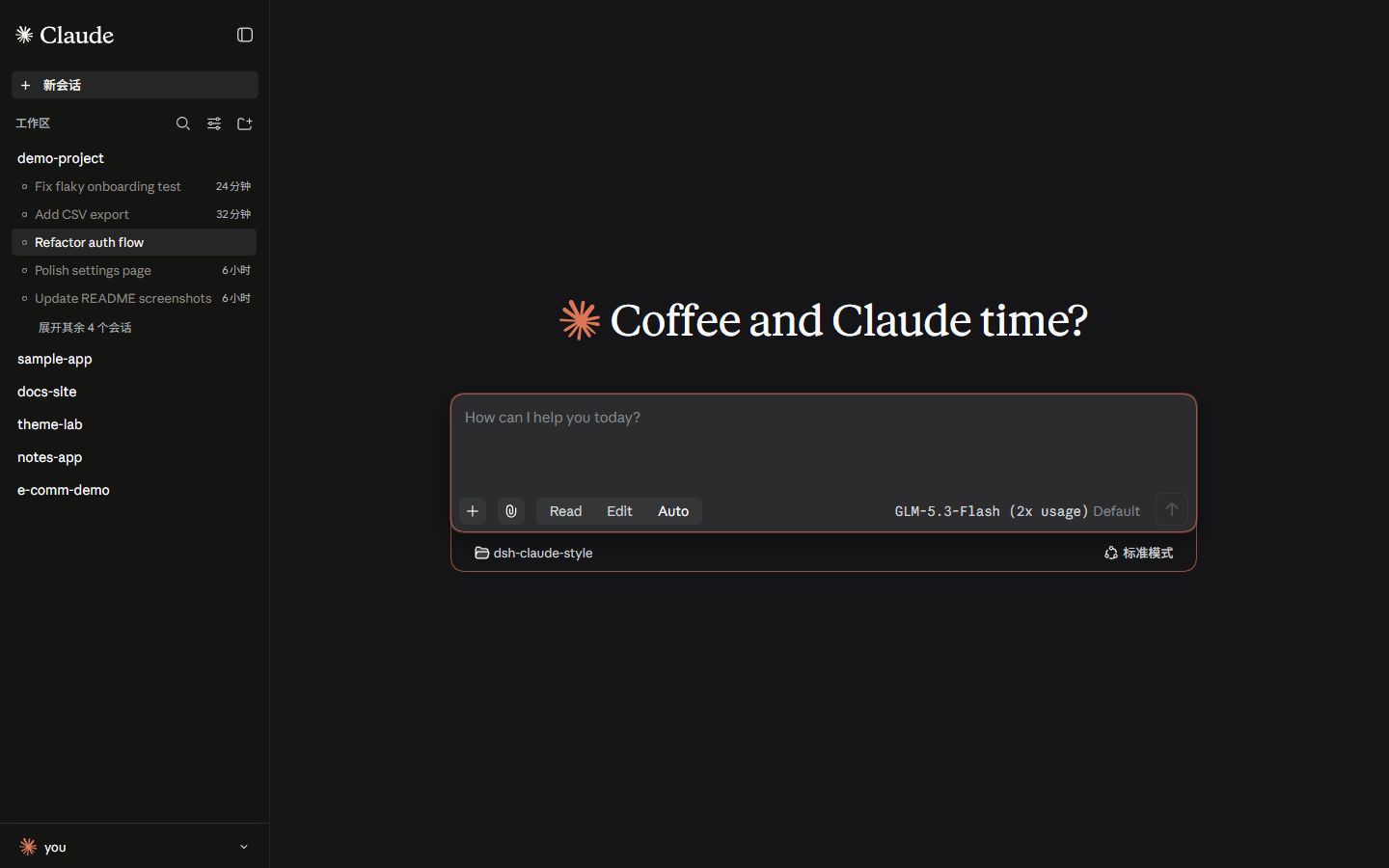 |
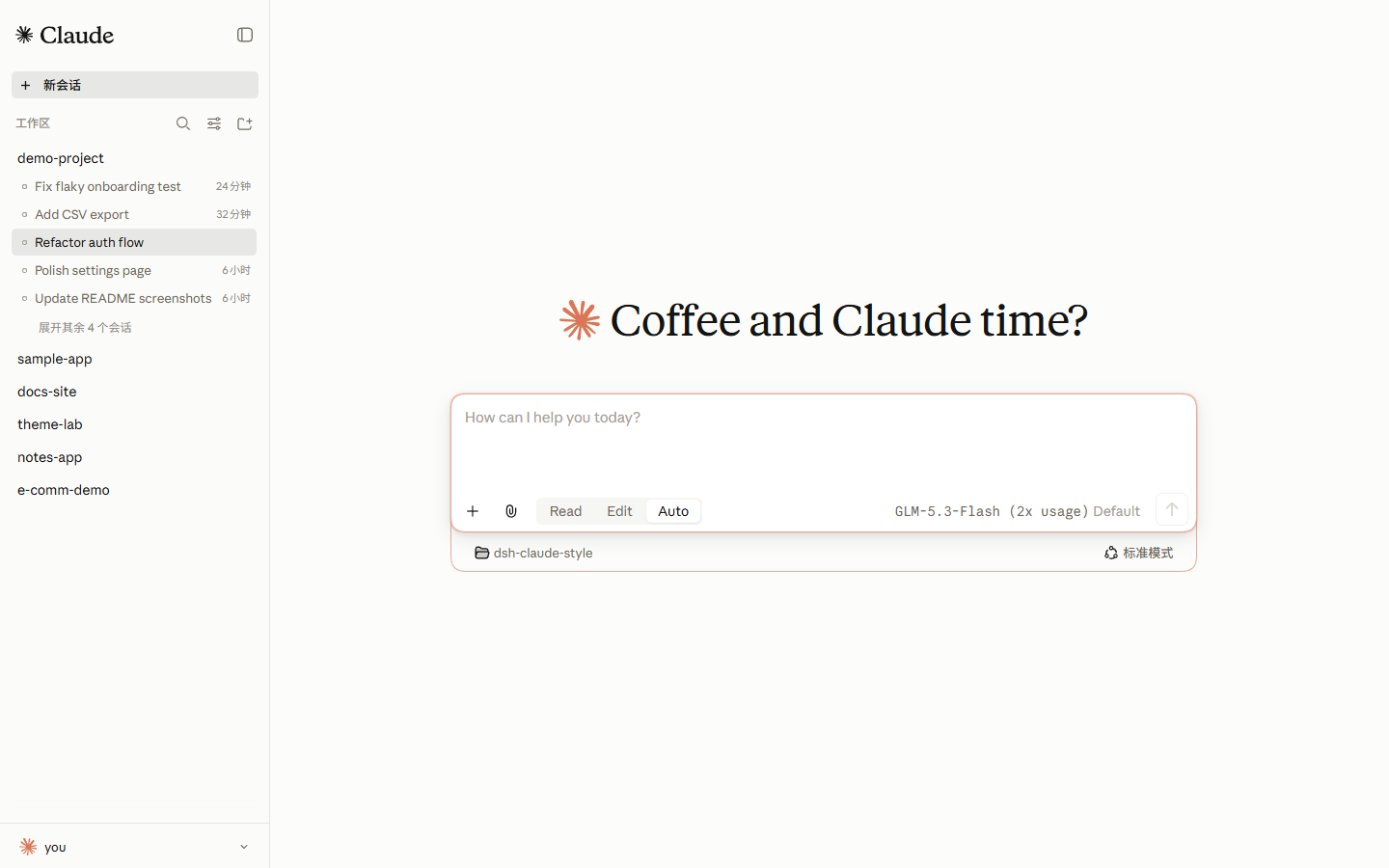
> Light mode pairs an ivory canvas `#FCFCFB` with a pale sidebar `#FBFBF9`; dark mode uses warm black `#141413`. The theme follows your system's light/dark setting, and ember orange `#D97757` is the single action accent across both canvases.
## Fonts
> **Important: the Anthropic fonts are not bundled with the npm package.** They are available for download in this repository under [`fonts/`](fonts/). You can either install them on your system, or skip the install entirely — drop the two `.ttf` files into the plugin package's `fonts/` directory and the host will serve them as webfonts (the files are identical, so the result is the same). Either way, refresh or restart the web UI for the fonts to take effect.
| Font | Used for | File |
|---|---|---|
| Anthropic Sans Web Text | Interface / UI | [`fonts/AnthropicSansWebText.ttf`](https://github.com/Nwflower/dsh-claude-style/raw/main/fonts/AnthropicSansWebText.ttf) |
| Anthropic Serif Web Text | Conversation body / Markdown | [`fonts/AnthropicSerifWebText.ttf`](https://github.com/Nwflower/dsh-claude-style/raw/main/fonts/AnthropicSerifWebText.ttf) |
| JetBrains Mono Variable | Code / code blocks | [`fonts/JetBrainsMonoVariable.ttf`](https://github.com/Nwflower/dsh-claude-style/raw/main/fonts/JetBrainsMonoVariable.ttf), [`fonts/JetBrainsMonoItalicVariable.ttf`](https://github.com/Nwflower/dsh-claude-style/raw/main/fonts/JetBrainsMonoItalicVariable.ttf) |
To enable the Anthropic fonts, choose one of the following:
① Install them on your system — on Windows, double-click each `.ttf` and choose "Install"; on macOS, import them with Font Book.
② Skip the install — copy the `.ttf` files into the plugin package's `fonts/` directory, then refresh the page.
> The Anthropic Sans and Serif fonts are the property of Anthropic, licensed for personal use only, and are not covered by this project's MIT license.
## Installation
> Requires dsh ≥ 0.1.7
1. From a terminal:
```bash
dsh plugin --profile web add dsh-claude-style # npm package (recommended)
dsh plugin --profile web add Nwflower/dsh-claude-style # GitHub source
```
2. From the [plugin market](https://github.com/dsh-market/dsh-market)
Keep only one theme enabled at a time. After installation, **restart `dsh web`** and refresh the page.
## Features
1. **Theme** — applies globally the moment it is installed, with nothing to configure. Light mode uses ivory `#FCFCFB`, dark mode warm black `#141413`, and both share the same ember orange `#D97757` action accent; light/dark follows the system color mode.
2. **Composer** — the input box is rebuilt from the ground up: a permission segmented control (Read / Edit / Auto / Yolo) with its tier list under it, a model trigger carrying the vendor lockup, and the toolbar and status stats laid out on a single line, with the send and stop buttons unified into 7px rounded rectangles. The stats sentence and the model trigger share the same font size and color. The permission tiers come from the host's own catalog: a deployment draws exactly the tiers it configures, and a tier a third-party plugin registers (the auto mode plugin's `auto-mode`, say) appears in the list and takes the Auto slot; the list stays text-only, so a tier's declared glyph is not drawn. Switching tiers slides the highlight from the old tier to the new one, and every segmented control on the settings page does the same.
3. **Model picker** — a new two-level popover. The first level lists the official service plus the quick providers selected in settings; "More models" opens a second level grouped by provider. Every row carries its vendor lockup and a description, and the footer holds the reasoning-effort slider (stepless — it snaps to the nearest level on release) together with the "More models" entry. The second level aligns its bottom edge with the first, providers already shown on the first level are not repeated, and models without thinking support get no slider. Hovering opens the popover after a 100 ms dwell and closes it after 150 ms; the gap between the two cards does not count as leaving.
4. **Workspace** — the sidebar's "Workspace" heading becomes an **Active / Archived** segmented control. Active keeps the host's session tree, while Archived is the skin's own flat list (title, time, and per-row unarchive and delete icon buttons). Rows match the host's session rows measurement for measurement (row x=12 / width 251 / height 28 / title x=36). Switching between the two views slides the highlight from one segment to the other.
5. **Sidebar** — the New session and Plugins rows take Claude's real shape: no background at rest, a background on hover, the "+" of New session set inside a circular chip, and both icons rotating 90° clockwise on hover (four-fold symmetric glyphs, so they land back on themselves). The account drawer and the ban-screen easter egg remain as they were. On the desktop the brand row sits 10px higher than the host draws it, level with the web build. While the pointer is over the sidebar, the brand mark at its top left fades into a search box (the collapsed rail has none); pressing it, or the host's search shortcut (Ctrl+K on the desktop, Ctrl+Alt+K on the web), fades in a search palette near the top of the window, and the Workspace heading's own search icon is gone: it searches past sessions (by title, workspace name and what was said in them: every message between you and the model counts, a few Chinese characters from the middle of a sentence match, case does not matter, and the matching line shows under the row with the match in bold; the first time the palette opens after the host starts, every session is read once, which takes a dozen seconds or so), projects, plugins, the skills the current session offers and keyboard shortcuts, with All / Sessions / Projects / Plugins / Skills / Shortcuts across the top, and with the box empty it lists the five most recent sessions and the New session, Plugins, Settings and Keyboard shortcuts actions. ↑↓ moves, Enter opens, Tab and Shift+Tab switch the category, Esc closes; a session opens, a project starts a new session in that workspace, a plugin opens its details on the plugins page, a skill puts `/name ` at the head of the current session's input, and a shortcut opens the host's shortcut list filtered to that entry.
6. **Account area** — the nickname and the picture each follow one fixed order. Nickname: the custom nickname → the signed-in account's name → the HDSL launcher's account name → the last probed system user → the freshly probed system user → `User`. Picture: the signed-in account's avatar → the HDSL launcher's avatar → the Claude mark. The account profile is fetched from the server only at startup, on hot reload, and on sign-in and sign-out — never polled. The HDSL contract is read once by the host half and forwarded over two read-only routes (`GET /dsh-claude-style/hdsl` for the metadata, `GET /dsh-claude-style/hdsl-skin.png` for the avatar image; neither carries the avatar file's absolute path, and both sit behind the host's request fence). A contract version that is missing or unknown voids the whole group, and a deleted avatar file falls back to the mark. What the launcher publishes is a skin sheet rather than a finished avatar, so that picture is cropped into the head first — the face's 8×8 texel block inset by 1/18 of the box with the hat layer over the whole box, drawn square so no rounding shaves its pixels. The account popover remains the host's own: the host's account row is the entry point, and the popover lists the account header, the other plugins' footer entries, and the host's own Settings / Feedback / Sign out, each keeping its original copy, order, and click behavior. On hosts without an account area (Web), the plugin builds a popover with the same look. The card uses the main canvas's ivory background and spans the sidebar's width.
7. **Conversation views** — in the desktop Windows titlebar mode, the Conversation / Trajectory control sits centered and always visible on the titlebar row (the same row as the New session button). On wide windows with a short title it stays on the title's row; otherwise it keeps its own row below the title. Switching views slides the highlight from the old tab to the new one. For running, stopped and failed turns the status line follows the end of the turn's work (the footer and queued messages sit below it) and looks like Claude Code's: while running, a turning spark, then elapsed time · output tokens · what the model is doing (waiting for the model, thinking, thought for N s, writing, preparing a tool call, running tools); once stopped or failed, a still spark and "Stopped / Failed · duration · output tokens". A turn that finishes normally keeps the host's own look and place.
8. **Home layouts** — the new-conversation page comes in two layouts, Studio by default and switchable in the settings page at any time: **Classic** is the centered headline over the composer card, the headline drawn from a pool of greetings for the time of day (a few each for morning, midday, afternoon, evening and night, plus a few for any hour) and redrawn each time the new-conversation page comes back; **Studio** pins the greeting to the top left as one fixed line ("What's up next, ?"), docks the composer in the conversation's single-line form at the window's bottom edge with a row of hairline context chips above it, and sets the greeting and a 480px usage panel against the composer's left edge: an Overview tab with six stat cells (sessions, messages, total tokens, active days, peak hour, favorite model) and a twenty-six-week per-day heat grid of square cells in equal columns, a Models tab stacking each day's per-model tokens into one bar over a ranked model list (swatch, name, input and output, share; past six rows it folds behind a "show more" row, and the open list folds back with "show less"), and All / 30d / 7d range pills at the top right, which the peak hour and the multiplier line follow too; once the picked range's total passes one book, a multiplier line appears under the grid, naming one of sixty-five books (Tao Te Ching to In Search of Lost Time) drawn afresh each time the new-conversation page comes back. The numbers are rolled up by the plugin's host half: with `dsh-cost-meter` installed it reads that plugin's ledger cache directly (read-only — their file is never written), and without it the host half folds the local session logs itself, caching per log by size and modification time. Both sources answer each model's four buckets and each day's per-model tokens, with one model served by several providers counted as one row; the ledger keeps no hours, so the peak hour is always folded per day from the local session logs; when the roll-up cannot answer, the panel falls back to the projection block each host session row carries. The panel draws its skeleton first and does not shift when the numbers land. Before a workspace is picked (a fresh start, no session yet), the usage panel and the Read / Edit / Auto / Yolo permission segments still show; the segments rest on the preset a new session starts in, and pressing them opens the workspace picker, the same as pressing the input box, whose dashed "pick a workspace" ring now outlines the single-line input box alone. When the window is too short for the whole panel, the panel scrolls between the greeting and the composer with its bottom edge fading out, and the page no longer runs past the window. The workspace picker is drawn as Claude Code's folder menu: a narrow card of plain text rows set closer together, with no folder glyph in front of each folder and no plus sign on "Add workspace…"; the current workspace keeps the accent check.
9. **The pixel crab** — in the Studio layout, Claude Code's pixel crab stands on the new-conversation composer card's top edge, near its right end (the Classic layout has none). When it is clicked or the pointer leaves it (and on its own every half minute or so while the page is open), it plays Claude Code's fishing routine, frame for frame from Claude Code's own animation: a blink, the rod raised and cast down past the card's edge, a hop into a side-on stance for a spell of fishing, and the rod reeled in as it turns back — about three and a half seconds. With reduced motion requested (Windows' "Show animations in Windows" turned off, for one), it moves only when clicked.
## Disabling and uninstalling
To pause the theme without uninstalling it, add the following to the profile's `cordis.patch.yml` (`~/.dsh/profiles/web/cordis.patch.yml`):
```yaml
- id: ui-skin-claude-style
disabled: true
```
The change takes effect within about a second — refresh the page to restore the stock appearance.
```bash
dsh plugin --profile web remove dsh-claude-style # uninstall
```
Then restart `dsh web`. If you previously added this theme's entry to `cordis.patch.yml` by hand, remove it as well.
## Documentation
| Document | Contents |
| --- | --- |
| [Design tokens](docs/STYLE.md) | Palette, typography, shapes, source layout, and host-selector discipline (in English) |
| [Architecture decisions](docs/architecture.md) | Single-file bundling, the single-scheduler rule, the feature contract, the account surface, and their trade-offs |
| [Changelog](CHANGELOG.md) | Version history |
| [Contributing](CONTRIBUTING.md) | Building from `src/`, commit conventions, and the screenshot and regression tooling (in English) |
## Related projects
> Running several themes at once? Try [dsh-skin-manager](https://github.com/xiaoyangcheng84-svg/dsh-skin-manager) — it switches between all installed themes from a single settings page.
> Want to import your Claude Code / Codex session history into DSH and keep the conversation going? Try the author's other plugin, [dsh-chat-import](https://github.com/Nwflower/dsh-chat-import).
## Star History
[](https://star-history.com/#Nwflower/dsh-claude-style&Date)