# DSH Chat Manager
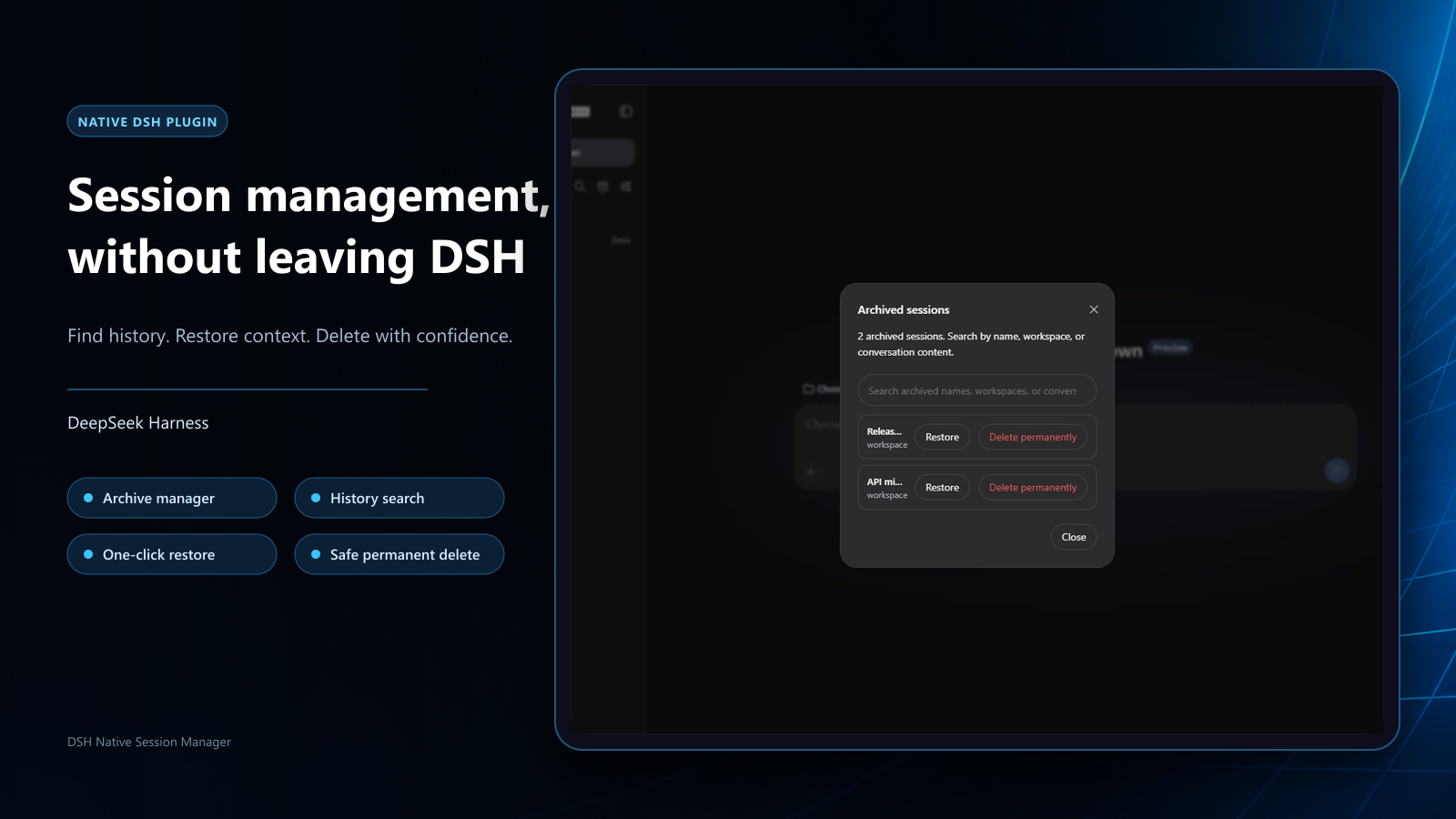
**Manage DeepSeek Harness chat history from the native sidebar: search archives, restore sessions, and delete safely.**
[](https://github.com/WSL043/dsh-chat-manager/releases/latest)
[](https://github.com/WSL043/dsh-chat-manager/actions/workflows/ci.yml)
[](https://www.npmjs.com/package/dsh-chat-manager)
[](https://www.npmjs.com/package/dsh-chat-manager)
[](#compatibility)
[](LICENSE)
[](https://github.com/WSL043/dsh-chat-manager/stargazers)
[](https://awesome-dsh-plugin.com)
[中文](README.md) · [Install](#install) · [Use](#use) · [Safety](#safety-boundary)
## Install
**DSH-Portable ships with this plugin preinstalled.** Enable or uninstall it on the Plugins page; other DSH users can install it below. ([About DSH-Portable](https://github.com/WSL043/DSH-Portable))
### Official plugin page (recommended)
1. Open **Plugins → Add plugin** in DSH.
2. Paste this line into **Package name or address**, then select Install:
```text
dsh-chat-manager@1.5.21
```
3. Follow the page result; refresh or restart only when requested.
See [Compatibility](#compatibility) for supported DSH cores.
### Terminal (optional)
For official DSH Desktop, register its bundled command through **Manage dsh Command…** and launch it once to initialize the profile; fully quit the app before using `desktop`. DSH-Portable 0.x and the Web profile use `web`:
```sh
dsh plugin --profile desktop add dsh-chat-manager@1.5.21
dsh plugin --profile web add dsh-chat-manager@1.5.21
```
For Agent installation, use the fixed-version [AGENTS.md](https://raw.githubusercontent.com/WSL043/dsh-chat-manager/v1.5.21/AGENTS.md).
## Use
### Browse, search, and restore archives
Select the archive icon in the sidebar header to browse archived sessions, search by name, workspace, or conversation, and select **Restore** to return a session to its original workspace. Search is limited to current user and assistant messages in archived sessions.
The archive settings page groups sessions in cards with a short introduction. Action buttons wrap in narrow windows to leave room for session titles.
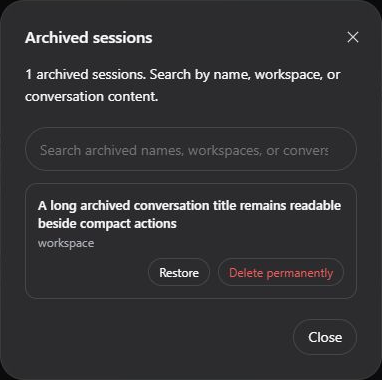
Native DSH archive page
Stock DSH keeps its official archive page and adds the Delete permanently menu action. DSH-Portable's settings extension also adds archive search, restore, and permanent deletion; disabling the plugin restores the official views.
### Delete permanently
Click **⋯** beside a session in the sidebar and choose the red **Delete permanently**; check the session name in the dialog, then click **Confirm permanent deletion**—or cancel.
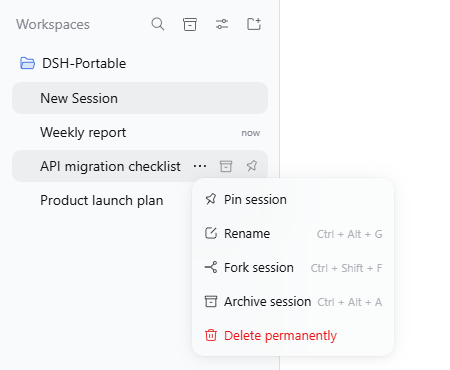
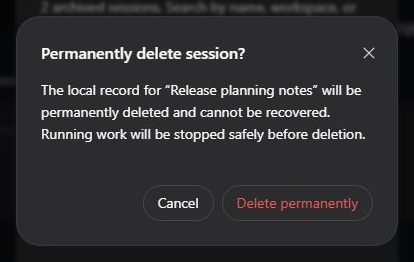
Permanent deletion cannot be undone; the dialog identifies the target session.
Running work is stopped and allowed to settle before deletion. On success, the session list updates without reloading the whole DSH page.
## Safety boundary
> [!WARNING]
> Permanent deletion cannot be undone. Check the session name and back up anything you need to keep.
The plugin validates and removes only the explicitly confirmed session directory within DSH's default per-session JSONL store and lifecycle boundary. DSH exposes no public deletion API; a second confirmation is mandatory, and cancelling sends no deletion request.
Deletion does not cover other sessions, plugin data, external attachments, caches, logs, backups, or cloud copies. Non-JSONL storage or hosts without a safe way to stop work are refused; operating-system cleanup failures are reported rather than treated as success.
This unofficial community plugin is not affiliated with or endorsed by DeepSeek. It is provided under the [MIT License](LICENSE), without warranty.
## Compatibility
This release supports DeepSeek Harness `0.2.2-alpha.3`, `0.2.2-alpha.2`, `0.2.1-rc.5`, `0.2.1-rc.4`, `0.2.1-rc.3`.
## Update and uninstall
Use the official **Plugins** page to update or uninstall. If no update action is offered, enter the target `package@version` under **Add plugin**. For terminal updates, install the target version; uninstall with:
```sh
dsh plugin --profile web remove dsh-chat-manager
```
DSH-Portable 0.x and Web use the `web` profile. For official DSH Desktop, fully quit the app and use the `desktop` profile as described above. Uninstall removes only this plugin and leaves existing sessions untouched.
## Support and license
Use the [bug report form](https://github.com/WSL043/dsh-chat-manager/issues/new?template=bug-report.yml) for reproducible problems or the [feature request form](https://github.com/WSL043/dsh-chat-manager/issues/new?template=feature-request.yml) for suggestions. Report security issues privately as described in [SECURITY.md](SECURITY.md).
MIT. See [THIRD_PARTY_NOTICES.md](THIRD_PARTY_NOTICES.md) for the modified upstream client and license notice.
## Quality
Each declared supported core is checked in the live interface.
[中文](README.md)