dsh-chat-locator
Turn-rail settings for DSH: tick thickness, rail side, and a curved length gradient anchored on the hovered tick — plus a plain-text hover preview whose line count, font size, and width you control.
[](LICENSE)

[](https://nodejs.org)
[](https://github.com/hawkongz/dsh-chat-locator)
[](https://www.npmjs.com/package/dsh-chat-locator)
[](https://awesome-dsh-plugin.com/p/hawkongz/dsh-chat-locator/)
[](https://github.com/deepseek-ai/deepseek-harness)
Language: 简体中文 | English
---
## 📋 Table of Contents
- [Features](#-features)
- [Quick Start](#-quick-start)
- [Installation](#-installation)
- [Usage](#-usage)
- [How It Works](#-how-it-works)
- [Topics](#-topics)
- [Contributing](#-contributing)
- [License](#-license)
---
DSH draws a turn rail down the edge of every conversation: one tick per turn, so you can see where you are in a long session and jump between turns. It is a good rail with three opinions baked into it. Ticks are always 2px. The rail always sits on the right. And pointing at a tick tells you nothing about what that turn contains, so finding a specific turn in a long conversation means hovering ticks one at a time.
None of that is configurable. The rail is rendered directly by `ChatView` inside `@deepseek-ai/dsh-client-ui-chat`; the Slot system gives it no seat, and no setting for thickness or side is exposed anywhere.
`dsh-chat-locator` is a persistent DSH plugin that turns those fixed opinions into settings. It does not replace the rail — it claims the rail's styles at runtime, so the built-in jump-to-turn, unloaded-turn paging, and active-turn following all keep working exactly as before.
## ✨ Features
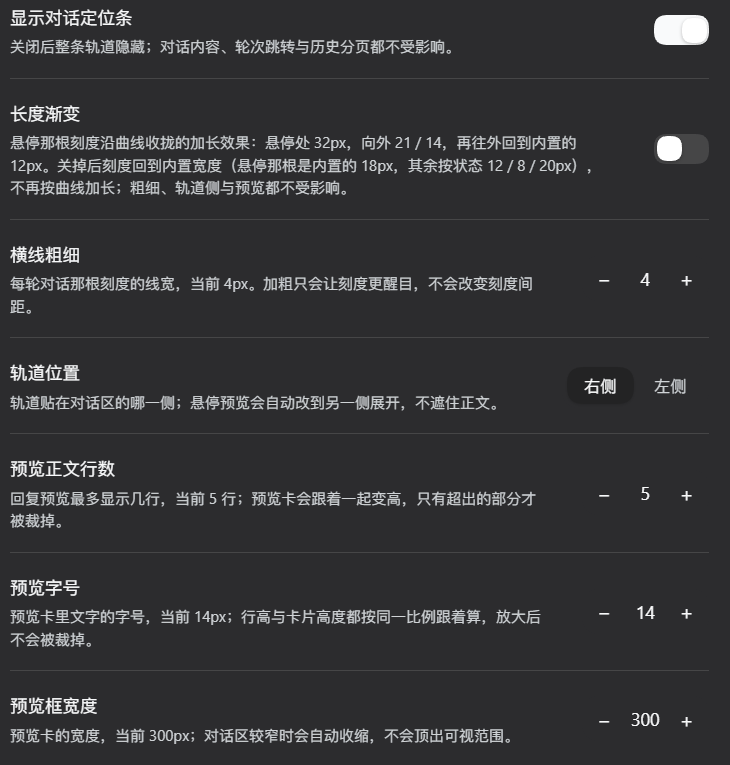
- **Tick thickness (横线粗细):** 1–8px instead of a fixed 2px. Only the line width changes; the 10px tick spacing stays put.
- **Rail side (轨道位置):** Left or right. The hover preview automatically opens on the opposite side, so it never covers the text you are reading.
- **Hover preview:** The built-in plain-text card showing that turn's prompt and response. The plugin does not build it and never reads the text — it only styles the card: line count, font size, width, how tall it may grow, and which side it opens to. The built-in plain-text rendering (which never includes thinking content) is left alone.
- **Preview line count (预览正文行数):** 1–6 lines. The card really grows — only the overflow is clipped.
- **Preview font size and width (预览字号 / 预览框宽度):** 10–18px and 200–420px. Font size and line height scale as a pair, so enlarging the text never crowds or clips it.
- **A curved length gradient:** The tick under the pointer grows to 32px and its neighbours taper back along a curve — `21 / 14 / 12` — so the rail reads as a hook pointing at where you are, not as a straight diagonal.
The hovered tick is the anchor even when it is the active turn, and the neighbour rules skip the active tick, so an active turn one or two ticks away keeps its built-in width. The gradient has its own switch: off returns the ticks to their built-in lengths (12px normally, 18px on the hovered tick) and changes nothing else.
- **Restore defaults (恢复默认):** All seven settings back to factory values in one click. Only deviations from the factory values are stored, so the button is greyed out exactly when there is nothing to clear; clearing takes one write and also drops keys left behind by older versions.
- **A dedicated settings page:** Settings → Conversation locator (对话定位条 in the Chinese UI), with a live sample rail and sample preview card that redraw as you change each value.
- **No bundled dependencies, no build step.** Both halves are plain ESM loaded directly by Node and the browser; React, Cordis, and the DSH client modules come from the host, and the only dependency declarations are optional peer dependencies.
## 🚀 Quick Start
> **What you need:** a working DSH installation (the `dsh` command) with a profile, plus Node.js 20 or newer. The plugin itself has nothing extra to install.
**Step 1 — Open a terminal**
- macOS / Linux: open Terminal.
- Windows: press `Win + R`, type `powershell`, and press Enter.
**Step 2 — Install the bundle into your profile**
`dsh plugin` forwards its arguments to pnpm inside the profile directory, so this installs the package from npm and DSH picks up its patch automatically. Replace `web` with your own profile name if it differs.
```bash
dsh plugin --profile web add dsh-chat-locator
```
To pin an exact version instead of tracking new releases, append it: `dsh plugin --profile web add dsh-chat-locator@1.5.1`
That is the whole install. A DSH plugin bundle is four files:
| File | Role |
| :--- | :--- |
| `package.json` | Declares the bundle and the browser half |
| `index.js` | Host half — a no-op stub since 1.4.0 |
| `client.js` | Browser half — all the behaviour |
| `cordis.patch.yml` | The patch that adds the plugin row |
There is nothing to compile and no bundled dependency to install. The published package also ships this English README and the [Chinese `README.md`](README.md), `docs/design-notes.md` and its `zh-CN/docs/design-notes.md` translation, the screenshots in `docs/images/`, `CONTRIBUTING.md`, `SECURITY.md`, and `test/`.
**Step 3 — Restart the host**
```bash
dsh web
```
The host process caches imported modules, so a newly installed or removed bundle is not mounted until the host restarts once — restarting is the reliable path. Current DSH builds can hot-compose client entries, so re-enabling an already-installed bundle sometimes takes effect after a page refresh; installing a new one still needs the restart.
**Step 4 — Done.** With DSH open at `http://127.0.0.1:3080`, you are finished if:
- **Settings → Conversation locator** (对话定位条 in the Chinese UI) appears in the settings sidebar, and
- in the browser console, this returns `railFound: true` on a conversation with at least two turns:
```js
__dshChatLocator.state()
```
Open a conversation and slide the pointer up and down the rail: the tick under the pointer grows and its neighbours taper.
> To update: run `dsh plugin --profile web update dsh-chat-locator`, then restart the host. To uninstall: `dsh plugin --profile web remove dsh-chat-locator`, then restart the host.
>
> **Want the newest unreleased commit, a local copy you can edit, or an offline install?** See [Install methods](#install-methods).
## 📦 Installation
### Requirements
| Requirement | Version | Notes |
| :--- | :--- | :--- |
| DSH | 0.2.x (verified on 0.2.1-rc.2) | Provides the `dsh` command and the profile you install into. The rail selector contract has been stable since 0.1.7, but 1.5.0 was developed and verified against DSH 0.2.1-rc.2. The browser half needs the host-provided `@deepseek-ai/dsh-client-store` module (declared in `dsh.client`). |
| Node.js | 20 or newer | Used by the host half and the test suite. |
| A modern browser | current Chromium, Firefox, or Safari | The gradient uses `:is()` and `:has()`. Without `:has()` only the half of the taper *above* the pointer is lost — the hovered tick still lengthens and the ticks below it still taper. Everything else works. |
### Install methods
| Method | Best for |
| :--- | :--- |
| `dsh plugin --profile web add dsh-chat-locator` | Most users. Installs the released version from npm; append `@1.5.1` to pin an exact one. |
| `dsh plugin --profile web add github:hawkongz/dsh-chat-locator` | The newest commit on `main`, without cloning by hand. Locks a commit rather than a version. |
| [From a git clone](#install-from-a-git-clone) | Working on the plugin itself. |
| [From four downloaded files](#install-without-git) | No network access to npm or GitHub, or an offline machine. |
### Install from a git clone
Use this if you would rather update with `git pull` than by re-downloading files.
```bash
git clone https://github.com/hawkongz/dsh-chat-locator.git
cd dsh-chat-locator
dsh plugin --profile web add "$(pwd)"
dsh web
```
### Install without git
A bundle is four files. Download them into a folder, install the folder, and restart the host — nothing else is needed.
macOS / Linux:
```bash
mkdir -p ~/.dsh/plugin-src/dsh-chat-locator
cd ~/.dsh/plugin-src/dsh-chat-locator
curl -fsSLO https://raw.githubusercontent.com/hawkongz/dsh-chat-locator/main/package.json
curl -fsSLO https://raw.githubusercontent.com/hawkongz/dsh-chat-locator/main/index.js
curl -fsSLO https://raw.githubusercontent.com/hawkongz/dsh-chat-locator/main/client.js
curl -fsSLO https://raw.githubusercontent.com/hawkongz/dsh-chat-locator/main/cordis.patch.yml
dsh plugin --profile web add ~/.dsh/plugin-src/dsh-chat-locator
```
Windows (PowerShell):
```powershell
$dir = "$env:USERPROFILE\.dsh\plugin-src\dsh-chat-locator"
$base = "https://raw.githubusercontent.com/hawkongz/dsh-chat-locator/main"
New-Item -ItemType Directory -Force -Path $dir | Out-Null
foreach ($file in "package.json", "index.js", "client.js", "cordis.patch.yml") {
Invoke-WebRequest -Uri "$base/$file" -OutFile "$dir\$file"
}
dsh plugin --profile web add "$dir"
```
Then restart the host:
```bash
dsh web
```
### Notes on installation
- **DSH registers the bundle for you.** A package that declares `dsh.bundle.patch` is added to your profile's `dsh.profile.bundles` list automatically, so `dsh plugin add` is the only step.
- **There is no build step.** pnpm may print a note about blocked build scripts for git-hosted packages; this plugin has no `prepare` script and no bundled dependencies, so there is nothing to allow.
- **Restart the host after installing or removing.** See [How It Works](#-how-it-works) for why.
- **Installation is per profile.** `--profile web` is the profile this plugin was developed against; substitute your own.
## 📖 Usage
Everything lives on one settings page: **Settings → Conversation locator** (对话定位条 in the Chinese UI). The table below lists each control with its default and range.