<div align="center">

<img src="./assets/dci-promo.png" alt="DSH Chat Import 宣传图" width="100%" />

# DSH Chat Import

**基于 DeepSeek Harness 构建的会话导入插件：把其他 Agent 的聊天历史一键导入，接着在 DeepSeek Harness 里继续对话。**

> **所有会话，尽续于此。**

[![English](https://img.shields.io/badge/lang-English-blue.svg)](README.md) [![简体中文](https://img.shields.io/badge/lang-%E7%AE%80%E4%BD%93%E4%B8%AD%E6%96%87-red.svg)](README.zh-CN.md)

[![version](https://img.shields.io/npm/v/dsh-chat-import?style=flat&label=version&color=4D6BFE)](https://www.npmjs.com/package/dsh-chat-import)
[![downloads](https://img.shields.io/npm/dm/dsh-chat-import?style=flat&label=downloads&color=4D6BFE)](https://www.npmjs.com/package/dsh-chat-import)

[![GitHub stars](https://img.shields.io/github/stars/Nwflower/dsh-chat-import?style=flat&label=%E2%98%85&color=08C)](https://github.com/Nwflower/dsh-chat-import)
[![GitCode](https://img.shields.io/badge/GitCode-%E9%95%9C%E5%83%8F-4D6BFE?style=flat)](https://gitcode.com/Nwflower/dsh-chat-import)
[![license](https://img.shields.io/badge/license-MIT-2EA44F?style=flat)](LICENSE)
[![Awesome DSH Plugin](https://awesome-dsh-plugin.com/badge.svg)](https://awesome-dsh-plugin.com)
[![dsh.so install](https://www.dsh.so/badge/install/dsh-chat-import.svg)](https://www.dsh.so/artifact/dsh-chat-import/)

</div>


## 支持数据源

<table>
  <tr>
    <td align="center" width="20%"><a href="https://github.com/anthropics/claude-code"><img src="./assets/agents/claude.svg" width="56" height="56" alt="Claude Code" /><br /><b>Claude Code</b></a></td>
    <td align="center" width="20%"><a href="https://github.com/openai/codex"><img src="./assets/agents/codex.svg" width="56" height="56" alt="Codex" /><br /><b>Codex</b></a></td>
    <td align="center" width="20%"><a href="https://github.com/google-gemini/gemini-cli"><img src="./assets/agents/gemini.svg" width="56" height="56" alt="Gemini CLI" /><br /><b>Gemini CLI</b></a></td>
    <td align="center" width="20%"><a href="https://github.com/aaif-goose/goose"><img src="./assets/agents/goose.svg" width="56" height="56" alt="Goose" /><br /><b>Goose</b></a></td>
    <td align="center" width="20%"><a href="https://github.com/charmbracelet/crush"><img src="./assets/agents/crush.svg" width="56" height="56" alt="Crush" /><br /><b>Crush</b></a></td>
  </tr>
  <tr>
    <td align="center" width="20%"><a href="https://github.com/qoderAI/qoder-cli"><img src="./assets/agents/qoder.svg" width="56" height="56" alt="Qoder CLI" /><br /><b>Qoder CLI</b></a></td>
    <td align="center" width="20%"><a href="https://github.com/MoonshotAI/kimi-cli"><img src="./assets/agents/kimi.svg" width="56" height="56" alt="Kimi CLI" /><br /><b>Kimi CLI</b></a></td>
    <td align="center" width="20%"><a href="https://github.com/MoonshotAI/kimi-code"><img src="./assets/agents/kimi.svg" width="56" height="56" alt="Kimi Code" /><br /><b>Kimi Code</b></a></td>
    <td align="center" width="20%"><a href="https://github.com/esengine/DeepSeek-Reasonix"><img src="./assets/agents/reasonix.svg" width="56" height="56" alt="Reasonix" /><br /><b>Reasonix</b></a></td>
    <td align="center" width="20%"><a href="https://github.com/anomalyco/opencode"><img src="./assets/agents/opencode.svg" width="56" height="56" alt="OpenCode" /><br /><b>OpenCode</b></a></td>
  </tr>
  <tr>
    <td align="center" width="20%"><a href="https://github.com/XiaomiMiMo/MiMo-Code"><img src="./assets/agents/mimocode.svg" width="56" height="56" alt="MiMo Code" /><br /><b>MiMo Code</b></a></td>
    <td align="center" width="20%"><a href="https://z.ai"><img src="./assets/agents/zcode.svg" width="56" height="56" alt="ZCode" /><br /><b>ZCode</b></a></td>
    <td align="center" width="20%"><a href="https://github.com/xai-org/grok-build"><img src="./assets/agents/grokbuild.svg" width="56" height="56" alt="Grok Build" /><br /><b>Grok Build</b></a></td>
    <td align="center" width="20%"><a href="https://github.com/openclaw/openclaw"><img src="./assets/agents/openclaw.svg" width="56" height="56" alt="OpenClaw" /><br /><b>OpenClaw</b></a></td>
    <td align="center" width="20%"><a href="https://github.com/Kilo-Org/kilocode"><img src="./assets/agents/kilocode.svg" width="56" height="56" alt="Kilo Code" /><br /><b>Kilo Code</b></a></td>
  </tr>
  <tr>
    <td align="center" width="20%"><a href="https://github.com/badlogic/pi-mono"><img src="./assets/agents/pi.svg" width="56" height="56" alt="Pi Coding Agent" /><br /><b>Pi Coding Agent</b></a></td>
    <td align="center" width="20%"><a href="https://github.com/can1357/oh-my-pi"><img src="./assets/agents/omp.svg" width="56" height="56" alt="oh-my-pi" /><br /><b>oh-my-pi</b></a></td>
    <td align="center" width="20%"><a href="https://github.com/NousResearch/hermes-agent"><img src="./assets/agents/hermes.svg" width="56" height="56" alt="Hermes" /><br /><b>Hermes</b></a></td>
    <td align="center" width="20%"><a href="https://cursor.com"><img src="./assets/agents/cursor.svg" width="56" height="56" alt="Cursor" /><br /><b>Cursor</b></a></td>
    <td align="center" width="20%"><a href="https://github.com/cline/cline"><img src="./assets/agents/cline.svg" width="56" height="56" alt="Cline" /><br /><b>Cline</b></a></td>
  </tr>
  <tr>
    <td align="center" width="20%"><a href="https://github.com/continuedev/continue"><img src="./assets/agents/continue.svg" width="56" height="56" alt="Continue" /><br /><b>Continue</b></a></td>
    <td align="center" width="20%"><a href="https://github.com/zed-industries/zed"><img src="./assets/agents/zed.svg" width="56" height="56" alt="Zed" /><br /><b>Zed</b></a></td>
    <td align="center" width="20%"><a href="https://antigravity.google"><img src="./assets/agents/antigravity.svg" width="56" height="56" alt="Antigravity" /><br /><b>Antigravity</b></a></td>
    <td align="center" width="20%"><a href="https://chatgpt.com"><img src="./assets/agents/chatgpt.svg" width="56" height="56" alt="ChatGPT" /><br /><b>ChatGPT</b></a></td>
    <td align="center" width="20%"><a href="https://github.com/gabotechs/workbuddy"><img src="./assets/agents/workbuddy.svg" width="56" height="56" alt="WorkBuddy" /><br /><b>WorkBuddy</b></a></td>
  </tr>
  <tr>
    <td align="center" width="20%"><a href="https://github.com/QwenLM/qwen-code"><img src="./assets/agents/qwen.svg" width="56" height="56" alt="Qwen" /><br /><b>Qwen</b></a></td>
    <td align="center" width="20%"><a href="https://github.com/deepseek-ai/deepseek-harness"><img src="./assets/agents/dsh.svg" width="56" height="56" alt="DSH" /><br /><b>DSH</b></a></td>
    <td align="center" width="20%"><a href="https://www.teleai.com.cn/product/super-agent"><img src="./assets/agents/teleagent.svg" width="56" height="56" alt="TeleAgent" /><br /><b>TeleAgent</b></a></td>
    <td align="center" width="20%"><a href="https://www.trae.ai/"><img src="./assets/agents/trae.svg" width="56" height="56" alt="Trae Work" /><br /><b>Trae Work</b></a></td>
    <td align="center" width="20%"><a href="https://www.doubao.com/download/desktop"><img src="./assets/agents/doubao.svg" width="56" height="56" alt="豆包" /><br /><b>豆包</b></a></td>
    <td align="center" width="20%"><a href="https://github.com/mistralai/mistral-vibe"><img src="./assets/agents/vibe.svg" width="56" height="56" alt="Mistral Vibe" /><br /><b>Mistral Vibe</b></a></td>
    <td align="center" width="20%"><a href="https://codearts.huaweicloud.com/"><img src="./assets/agents/codearts.svg" width="56" height="56" alt="CodeArts Desktop" /><br /><b>CodeArts Desktop</b></a></td>
    <td align="center" width="20%"><a href="https://copilot.tencent.com/"><img src="./assets/agents/codebuddy.svg" width="56" height="56" alt="CodeBuddy Code" /><br /><b>CodeBuddy Code</b></a></td>
  </tr>
  <tr>
    <td align="center" width="20%"><a href="#使用"><img src="./assets/agents/local-jsonl.svg" width="56" height="56" alt="本地 JSONL" /><br /><b>本地 JSONL</b></a></td>
    <td align="center" width="20%"><a href="https://github.com/microsoft/vscode"><img src="./assets/agents/copilot.svg" width="56" height="56" alt="Copilot VS Code" /><br /><b>Copilot VS Code</b></a></td>
    <td align="center" width="20%"><a href="https://github.com/github/copilot-cli"><img src="./assets/agents/copilot.svg" width="56" height="56" alt="Copilot CLI" /><br /><b>Copilot CLI</b></a></td>
  </tr>
</table>

## 安装

> 插件要求 dsh 0.1.5-rc.1 及以上。已在 0.1.x 与 0.2.x 上验证过，其中 dsh-tools 需满足 `>=0.1.0-rc.6 <0.3.0`。

1. 用终端安装

```bash
dsh plugin --profile web add dsh-chat-import                    # npm 包
```

2. 或者从[插件市场](https://github.com/dsh-market/dsh-market)安装

## 使用

1. 通过 GUI 导入会话

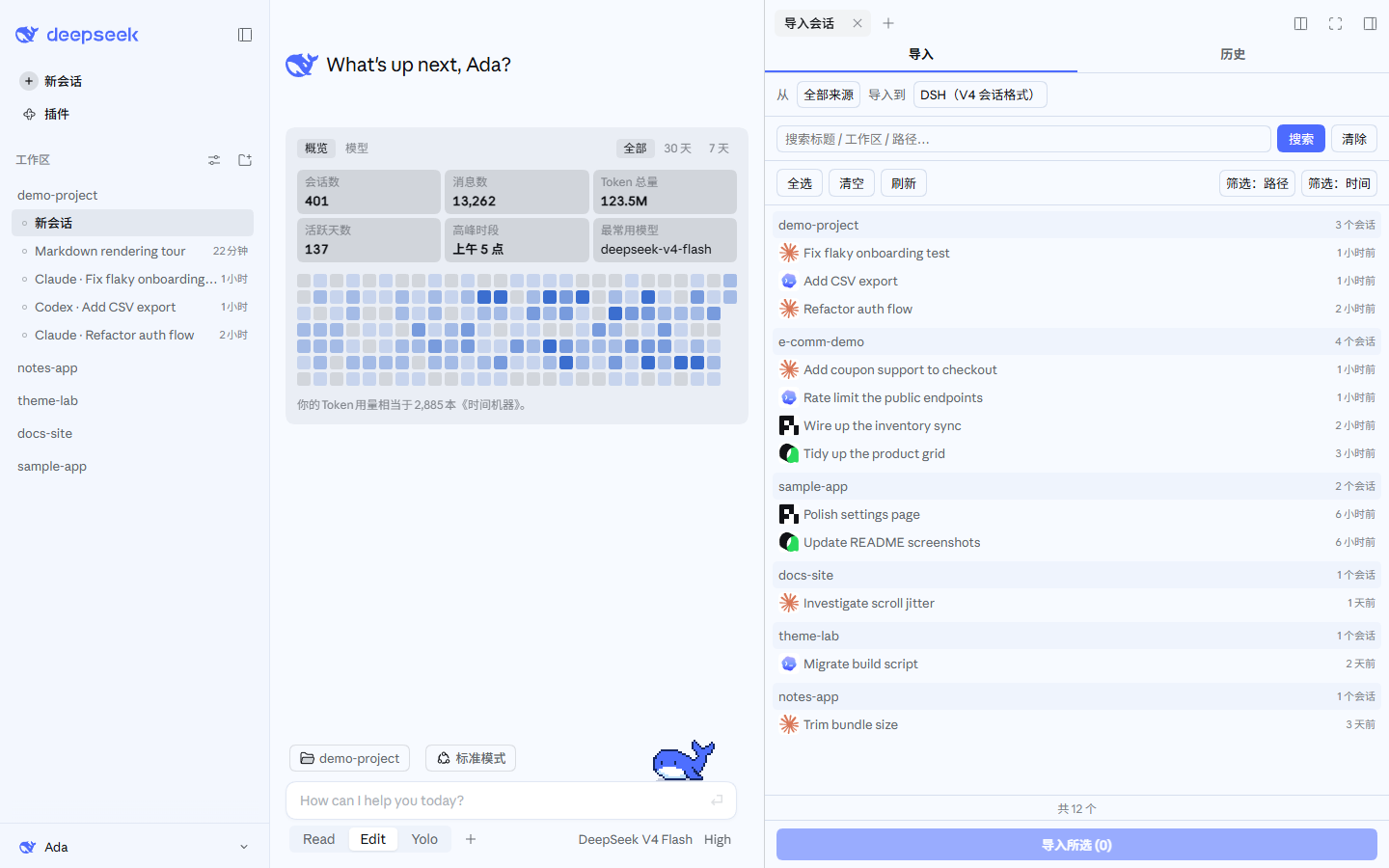
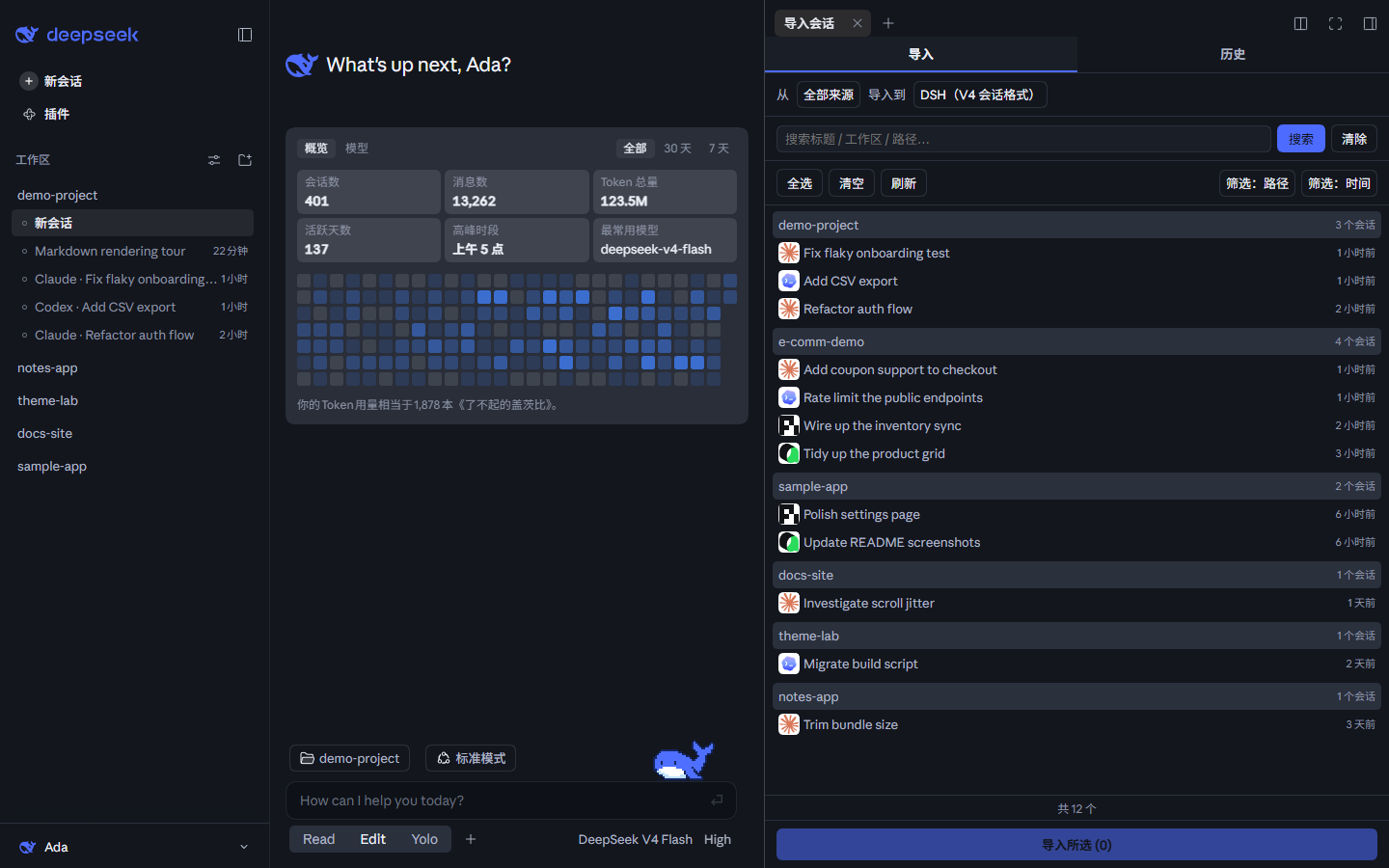
  点左侧栏底部的「导入会话」按钮打开导入窗口（用 DSH Claude Style 主题时，这个按钮收在左下角的账号菜单里），选好要导入的会话，一键导入。

  会话行自带工具：**双击**行打开只读预览（跑的是导入的 dry-run，插件注入的消息不出现，工具调用折成一行）；搜索框可切到「**搜内容**」按正文检索；可以把行**隐藏**（可撤销）；可以把单会话来源的文件移进回收站；也可以把行**拖到左侧栏的工作区**上，导入到那个工作区并把时间轴平移到「现在」，让它排在最上面。规则细节见 [docs/USAGE.zh-CN.md](docs/USAGE.zh-CN.md)。

  手上是别的工具导出的文件（网页版导出、自己写的脚本、列表里没有的工具）时，用同一个窗口顶部的「**从文件导入**」：填本机路径后回车，或者点「**选择…**」挑文件。路径是目录时会先问你要不要搜索子文件夹。预览确认之后再导入。识别不出格式时，会逐个列出候选解析器的失败原因，并给出把该格式转换过来的 Skill 指引。

  <table>
    <tr>
      <td align="center" width="50%"><img src="./docs/panel-light.png" alt="导入会话面板 —— 亮色" /></td>
      <td align="center" width="50%"><img src="./docs/panel-dark.png" alt="导入会话面板 —— 暗色" /></td>
    </tr>
  </table>

  > 截图界面用的是作者另一个主题插件 [DSH Claude Style](https://github.com/Nwflower/dsh-claude-style) 的 DeepSeek 配色。它在 DSH 里复刻了 Claude Code Desktop 的视觉与交互，提供 Claude、DeepSeek 两套配色；看惯了默认主题的话可以试试。截图里的工作区与会话都是示例数据。

2. 让 Agent 调用工具导入

```
# 参考调用格式
import_chat({ format: "claude", path: "~/.claude/projects" })
import_chat({ format: "chatgpt", path: "~/Downloads/chatgpt-export/conversations.json" })
import_chat({ format: "local-jsonl", path: "D:\downloads\session.jsonl" })
```

Cursor 的工作区分组与导入优先按对话 id 查询本机 Cursor 工作区登记册，只采用现存目录。导入始终重新读取，发现缓存成功结果并在 DB/WAL 变化时失效；畸形 JSON 与文件系统读取失败会在诊断告警中计数。没有可用登记时，仍回退转录所在项目目录名的解码。

## 配置

为了照顾 TUI 用户，插件提供的工具默认会注入上下文。你可以在设置页里把它们设成**不注入**或**只注入一部分**，这样能省下不少 token。

每个工具、每条命令的完整用法见 **[docs/USAGE.zh-CN.md](docs/USAGE.zh-CN.md)**。

第三方插件可以通过可选的 `chatImport` Host Service 调用 `scanDiscover()`、`importPath()`、`importAll()` 和 `resumeSummary()`。这四个方法复用与工具、命令相同的发现、导入、批量导入与交接摘要管线；单会话导入的返回值带 `sessionId`。服务不存在时，调用方要自己降级。

## 功能一览

| 能力 | 入口 | 说明 |
| --- | --- | --- |
| 导入 | 侧边栏面板的「导入」页 | 从其他 Agent 导入对话，保留推理过程、工具调用结果和系统提示词（可选） |
| 文件导入 | 面板「从文件导入」/ `/import auto <path>` | 任意本地文件或目录：三级探测（显式格式 > 内容标记 > 逐格式试跑）、预览先行、目录会问要不要搜索子文件夹。识别失败时摊开各解析器的原因，一键复制可直接发给 Agent 的任务模板，并注册 `dsh-chat-import-convert` 转换 skill |
| 撤回导入 | 侧边栏面板的「历史」页 | 查看导入记录，一键删除本插件创建的会话 |
| 导出 | 上下文工具 | 把 DSH 会话序列化回外部 Agent 的格式 |
| 忽略 | 自动登记 + `/ignores` 命令 | 归档、删除、删工作区时自动登记源，重扫时跳过；用 `/ignore`、`/unignore` 管理忽略表 |

Codex 的会话标题优先取 `session_index.jsonl` 里保存的标题（`thread_name`），所以 Codex 里改过的名字也能显示。没有索引标题时，才按与导入共用的提取逻辑回退到首条真实提问，并排除注入的页面上下文。标题索引按行流式读取，同一会话取最后一条有效记录。

Codex 的活动时间取日志头尾有界窗口里最新的有效时间戳，并合并所有 rollout 分页的结果。只有日志里完全没有时间时才回退文件修改时间，所以宿主文件服务不提供修改时间也能取到活动时间。被窗口截断的记录里的时间戳可能漏掉。

Claude Code 的 fork 会话（新版桌面端会话菜单与 `--fork-session`）同样会被发现并导入。fork 转录把父会话的记录逐字拷贝在文件开头，自己的记录从 fork 点开始追加。所以判定主转录时看文件的两端：文件名 stem 出现在头部或尾部，就算这个文件自己的会话。会话身份取转录里最后出现的 `sessionId`。以前这类文件被整类当成子代理辅助转录跳过，一条都扫不到。拷贝过来的父会话历史会留在日志里，因为 fork 的上下文本来就有它，于是父会话与 fork 会话会重叠一段历史。

Hermes 在 Windows 上默认扫描 `%LOCALAPPDATA%\hermes` 与 `~/.hermes`；`LOCALAPPDATA` 没有设置时，回退到 `~/AppData/Local/hermes`。macOS 与 Linux 默认扫描 `~/.hermes`。

## 文档

| 文档 | 说明 |
| --- | --- |
| [使用详解](docs/USAGE.zh-CN.md) | 每个工具、每条命令的完整参数、示例与边界行为 |
| [互转协议](docs/INTERCHANGE.md) | Interchange v1 协议与 bundle 格式 |
| [转换指南](docs/INTERCHANGE-GUIDE.zh-CN.md) | 给 Agent 的 Skill 指令：把任意转录转成可导入的 interchange v1 文档 |
| [导入指南](docs/IMPORT-GUIDE.zh-CN.md) | 给 Agent 的 Skill 指令：`import_chat` 的来源格式表、参数详解与重导规则 |
| [设置页迁移](docs/SETTINGS-MIGRATION.zh-CN.md) | DSH 0.1.5 → 0.1.7 插件设置页迁移（实测报错、兼容写法） |
| [更新日志](CHANGELOG.md) | 版本历史（英文） |
| [路线图](docs/ROADMAP.md) | 未完成、计划与明确不做的事项 |
| [贡献指南](docs/CONTRIBUTING.md) | 开发环境、提交规范、安全与隐私 |

## 友链

> 只需要迁移**配置**（技能、hooks、全局设置等）、不需要会话历史的话，推荐用 [dsh-movein](https://github.com/sjh9714/dsh-movein)。

## Star History

[![Star History Chart](https://api.star-history.com/chart?repos=Nwflower/dsh-chat-import&type=date&legend=top-left&sealed_token=sAq09Z4DmwD843pzhg7azZtfXs8zW_Xij3fvCo3Ns1BGAgNeP_Zl1xU9YiUacS74_EzDXKHFpW3Bfj13ClcEMRzAhh4mVrl4a20ijURAGU_Oz6RROQYDYw)](https://www.star-history.com/?type=date&repos=Nwflower%2Fdsh-chat-import)