
# dsh-auth-gateway

<p align="center">
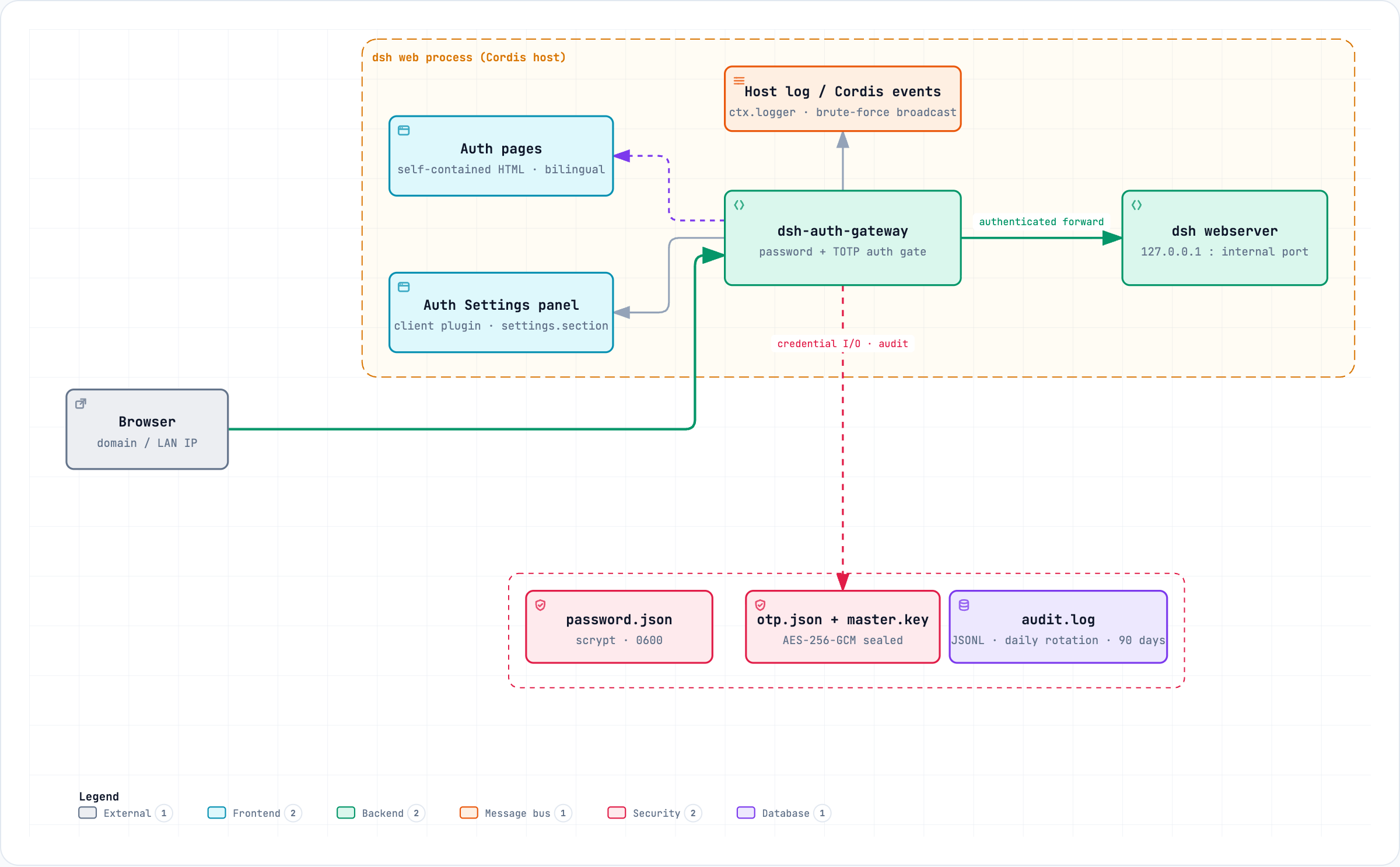
  <img src="https://raw.githubusercontent.com/xbzbing/dsh-auth-gateway/main/docs/assets/architecture-en.png" alt="dsh-auth-gateway architecture" width="720">
</p>

<p align="center">
<a href="https://www.npmjs.com/package/dsh-auth-gateway"><img src="https://img.shields.io/npm/v/dsh-auth-gateway.svg" alt="npm version"></a>
<a href="https://www.npmjs.com/package/dsh-auth-gateway"><img src="https://img.shields.io/npm/dt/dsh-auth-gateway.svg" alt="npm total downloads"></a>
<a href="LICENSE"><img src="https://img.shields.io/npm/l/dsh-auth-gateway.svg" alt="npm license"></a>
</p>

<p align="center"><b>Language: <a href="README.md">简体中文</a> | English</b></p>

A Cordis plugin that puts an authentication gate in front of the [DeepSeek Harness](https://github.com/deepseek-ai/deepseek-harness) Web UI: **password auth + TOTP two-factor authentication + layered brute-force protection + session management + login audit**, with **real interception of every request** (HTTP and WebSocket) at the gateway layer — unauthenticated traffic never reaches the backend.

`dsh web`'s official authentication targets the local loopback only: since dsh 0.1.2 the internal webserver enforces built-in browser authentication (BrowserAuth), yet its design note states explicitly *"There is no logout operation or reverse-proxy-specific handling"* and the CLI still rejects `--host 0.0.0.0` — **dsh never envisioned or supports remote access, and reserved no integration channel for putting another gateway in front of it**. This plugin fills that role itself, as an in-process gateway: the gateway exclusively owns the external port, the bundle patch pins the internal webserver to the loopback address, and the gateway is the only way in.

This project supports the latest dsh 0.1.6-alpha.2 release. Starting with dsh 0.1.2, the internal webserver enforces built-in browser authentication (BrowserAuth): the gateway reads the upstream session secret through the official `credentials` service and automatically mints an upstream cookie for loopback forwarding — transparent to the browser and to your deployment (see [docs/en/SECURITY.md](docs/en/SECURITY.md) for the mechanism). Both the 0.1.5 and 0.1.6 lines are verified compatible: every extension point this plugin relies on (`webServer.tapIndex`, the `dsh.bundle` patch, the `settings.section` slot, the `credentials` record and the BrowserAuth cookie format) is unchanged in 0.1.6-alpha.2 (the settings panel gained official sections up to order 25; this plugin's 100 still ranks strictly last), and both the endless WebSocket reconnects and streaming file uploads forward correctly through the gateway. Since 0.1.6, profile config HMR (`dsh-hmr`) is on by default; the plugin's own changes still take effect through the existing deploy flow.

## Installation and Uninstallation

```bash
# Install (from npm registry)
dsh plugin --profile web add dsh-auth-gateway

# Start (external port 8080, internal webserver auto-moves to 8081)
dsh web --port 8080

# Uninstall (clean credentials first, then remove)
~/.dsh/profiles/web/node_modules/.bin/dsh-auth-gateway-uninstall
dsh plugin --profile web remove dsh-auth-gateway
```

- Supports installation from GitHub / local directory — see [docs/en/INSTALL.md](docs/en/INSTALL.md);
- Forgot your password? Use `dsh-auth-gateway-reset` to reset (restart prints a new initial password to the console);
- Deployment guide: [docs/en/DEPLOYMENT.md](docs/en/DEPLOYMENT.md)

## Features

- **Password auth**: on first deployment an initial password is auto-generated and printed to the console (one-time credential); after login you are guided to set a personal password (scrypt-hashed), and every subsequent visit requires login;
- **Two-factor authentication (TOTP)**: optional; works with Google Authenticator, Authy, 1Password and other mainstream authenticators; ships with one-time backup codes (scrypt-hashed, single-use) for recovery when a device is lost; **the OTP secret is stored encrypted at rest with AES-256-GCM** (master key from the `DSH_AUTH_GATEWAY_MASTER_KEY` env var or an auto-generated `auth-gateway/otp-master.key`), so a disk disclosure no longer exposes the second-factor root key;
- **Real request interception**: unauthenticated `/api/*` returns 401, page paths 302 to the login page, WebSocket upgrades are rejected outright; authenticated traffic is forwarded transparently (Host/Origin normalization, compatible with the internal trust fence);
- **Login audit**: login success / failure / logout / password change and brute-force alerts (lockouts / rate limits) are logged via `ctx.logger.info`/`warn` (with source IP and failure reason — never any credentials) and **persisted** to `$DSH_HOME/auth-gateway/log/audit.log` (JSONL, rotated daily, 90-day retention), forming a complete audit trail;
- **Layered brute-force protection**: per-source lockout on password failures (default 5 failures / 5 min) + global rate limit (default 60 attempts/min) + per-source OTP/backup-code limit (default 10/min); scrypt runs asynchronously on the libuv thread pool, so login floods never block the event loop;
- **Session management**: in-memory 256-bit tokens (30 days), HttpOnly + SameSite=Strict cookies; changing the password or disabling OTP revokes all sessions;
- **About card**: the settings panel shows the running version and a repository link (read from the local `package.json`, works offline) plus a **check for updates** button — automatic checks are **off by default**, so a fresh install makes no outbound request; pressing the button is what makes the gateway query the public npm registry once for the `latest` tag (the plugin's only outbound request, see the [security model](docs/en/SECURITY.md)). An unreachable registry shows "update check unavailable" and never disturbs auth or forwarding;
- **Compliant shape**: a host-only plugin (zero build, zero runtime dependencies) plus an optional client half (settings panel, source-built); the bulk goes through official dsh extension points (`ctx.effect`, `webServer.tapIndex`, `ctx.slots`) — with one recorded security exception: LAN trust (minimal interception of the connection registration so the Models settings page works on domain/reverse-proxy access; see [TROUBLESHOOTING §1](docs/en/TROUBLESHOOTING.md)).

## What this plugin does not do

The following requirements **cannot truly be delivered on a single instance** — they presuppose process/OS-enforced execution and storage isolation (separate OS accounts, containers, or a sandbox), and this plugin, an authentication gateway running inside the dsh process, cannot provide that layer. They are listed here so expectations stay honest:

- **Multi-account login / multi-tenancy**: dsh is a single-user tool — one Home, one set of model credentials, and every session and data file (`sessions/`, `workspace/`, `.credentials.yaml`) lives on local disk under the authority of the OS account running dsh. An account layer on top of the gateway can only distinguish *who is logging in* (access control + audit); it cannot isolate *who can see what*: any authenticated user can read every session and credential of the same Home through dsh's tool execution. **Without OS/container/sandbox isolation there is no real multi-tenancy** — this plugin does not and cannot do it.
- **Role-based permission limits (user/admin)**: likewise, roles can only take effect at the gateway's own HTTP routing layer (e.g. restricting gateway-admin features); they cannot constrain dsh's internal capability surface — once a normal user passes the authentication gate, they hold the full power of that instance (tool execution, session read/write, configuration and credential access). For scenarios that need "restricted users", deploy OS-isolated instances and manage accounts yourself. This plugin's job is: **the authentication gate (who may enter) + interception and audit (who did what) — it does not and cannot implement authorization or isolation models**.

## How it works

```
Browser ──> dsh-auth-gateway gateway (external port, inside the dsh process)
               │  every request passes the auth check first (O(1) session table)
               ├─ unauthenticated ─> /api/*: 401 ｜ pages: 302 /login ｜ WS: rejected
               ├─ 2FA not passed ─> /otp/verify
               └─ authenticated ─> forward (Host/Origin rewritten to loopback) ──> dsh webserver (127.0.0.1:internal port)
```

- The gateway's lifecycle is bound to dsh: it starts/stops with dsh, no separate process;
- The bundle patch moves the webserver to a loopback port (external = `--port`, internal = external + 1), so remote clients cannot bypass the gateway and reach the backend directly;
- The gateway establishes client-side loopback trust while dsh's `__ModuleLoader__` loads the connection module, before Settings consumers start — this is the **single recorded security exception** (it intercepts only the connection registration; every other plugin passes through untouched). This compatibility layer does not replace login, the HTTP/WebSocket gates, or the server-side fence; see [TROUBLESHOOTING §1](docs/en/TROUBLESHOOTING.md);
- Auth state machine: `first deploy → initial-password login → onboarding (set a personal password) → login → (optional) OTP verification → session`; sessions that have not finished onboarding or 2FA can only reach their verification endpoints.

## Screenshots

<table>
<tr>
<td align="center"><img src="docs/assets/onboarding.png" width="480" alt="Onboarding page (set a personal password)"><br/>Onboarding (after initial-password login)</td>
<td align="center"><img src="docs/assets/login.png" width="480" alt="Login (with 2FA code)"><br/>Login (with 2FA code)</td>
</tr>
<tr>
<td align="center"><img src="docs/assets/login-success.png" width="480" alt="2FA login success"><br/>2FA login success</td>
<td align="center"><img src="docs/assets/otp-setup.png" width="480" alt="OTP setup (QR code)"><br/>OTP setup (QR code)</td>
</tr>
<tr>
<td align="center"><img src="docs/assets/settings-menu.png" width="480" alt="Settings menu (with Auth Settings entry)"><br/>Settings menu ("Auth Settings" entry)</td>
<td align="center"><img src="docs/assets/settings-auth.png" width="480" alt="Auth settings panel"><br/>Auth settings panel</td>
</tr>
</table>

## Quick start

1. Start `dsh web`: on first deployment an **initial password** is auto-generated and printed to the console (a prominent notice block); copy it and keep it safe;
2. Open the Web UI and log in with the initial password — you land on the **onboarding page**: set your own access password (at least 8 characters, mixed case or a special character; **mandatory** — all functionality stays locked until it is set). The initial password is one-time and invalidated once set;
3. After login you can visit `/otp/setup` to enable TOTP (scan the QR code or enter the secret manually, confirm with a verification code; backup codes are generated at the same time — store them safely);
4. Once OTP is enabled, login requires password + verification code (or a backup code);
5. Change password: visit `/login` (shows the change form when logged in), or use the "Auth Settings" panel.

## Configuration

The fields below are the `config` of the `dsh-auth-gateway` row in the bundle patch / profile patch (validated by Standard Schema):

| Field | Default | Meaning |
|---|---|---|
| `listenHost` / `listenPort` | `0.0.0.0` / `3080` | Gateway external listen address and port |
| `upstreamHost` / `upstreamPort` | `127.0.0.1` / `3081` | Internal webserver address and port |
| `basePath` | `/` | Reverse-proxy sub-path prefix (e.g. `/dsh`); **default `/` (root path)**. Charset is limited to `A-Za-z0-9._~/-`: `..`, `//`, quotes, whitespace and angle brackets are rejected (the value is embedded into page scripts and links, so it is allowlist-validated; a non-conforming value is refused at load). For sub-path deployment, set in the **deployer's profile patch**, not shipped with the plugin |
| `cookieSecure` | `auto` | Whether the session cookie carries the `Secure` attribute. `auto` (the default; backwards-compatible): the attribute is added once the connection is TLS — a reverse proxy that terminates TLS and forwards `X-Forwarded-Proto: https`, or the gateway itself serving TLS — so fronting HTTPS arms it with no config change; `true`: force the attribute (deployments behind a TLS proxy that does not forward the protocol header); `false`: opt out explicitly (trusted LAN only). Note Secure only works over HTTPS — on a plain-HTTP link forcing it makes browsers refuse the cookie and logins fail loudly instead of downgrading silently. **The panel can change it at runtime** (Auth Settings → Cookie Security → Save / Restore deployment config): the panel override persists in the credential record (the record write API verified on dsh 0.1.5-rc.2+; on older versions without it the panel degrades to read-only) and takes precedence over the deployment config until restored
| `minPasswordLength` | `8` | Minimum password length (4–128) |
| `requireMixedCase` / `requireSpecial` | `true` / `true` | Password complexity: mixed case OR special character |
| `maxLoginFailures` / `lockMinutes` | `5` / `5` | Password-failure lockout threshold and duration |
| `maxGlobalAuthAttemptsPerMinute` | `60` | Global auth-attempt rate cap |
| `maxOtpAttemptsPerMinute` | `10` | Per-source OTP/backup-code verification rate cap |
| `otpEnabled` (deprecated) | `false` | No longer a switch — 2FA is bound and activated by the user from the Auth Settings panel; kept only for config compatibility |
| `otpRequired` | `false` | Require verification at every login once 2FA is active (no config needed) |
| `otpIssuer` / `otpPeriod` / `otpDigits` / `otpWindow` | `dsh-auth-gateway` / `30` / `6` / `1` | TOTP parameters (display name, period, digits, window) |
| `backupCodeCount` / `backupCodeLength` | `10` / `8` | Backup-code count and length |
| `updateCheck` | `false` | **Automatically** check for a new version when Auth Settings → About opens. Off by default: a fresh install makes no outbound request. Set `true` to also query the public npm registry's `latest` on open (the plugin's only outbound request — 6h success / 15min failure cache, 3s timeout, no credentials). Whatever this is set to, the panel's **check for updates** button can run a check on demand |

## Security model

Authentication-state changes (enable/disable OTP, change password) always require a fully verified session: disabling OTP while 2FA is active additionally requires the current password plus a verification code or an unused backup code; sessions that have not completed 2FA cannot reach sensitive endpoints. OTP verification is replay-protected (accepted time-steps are recorded) and spoof-resistant (`x-forwarded-for` never counts toward the source). **The OTP secret is sealed with AES-256-GCM before it is written to disk** and can only be read with the master key — by default an auto-generated `auth-gateway/otp-master.key` (0600), or injected via `DSH_AUTH_GATEWAY_MASTER_KEY` (hex/base64, 32 bytes) to isolate disk disclosure. Login audit records only event kind, source IP and failure reason — never any credentials. The full threat model, known limitations and recovery paths are in [docs/en/SECURITY.md](docs/en/SECURITY.md).

## Documentation

| Doc | Content |
|---|---|
| [docs/en/INSTALL.md](docs/en/INSTALL.md)（[简体中文](docs/zh/INSTALL.md)） | Install, update, uninstall, credential reset — full step-by-step |
| [docs/en/NGINX-DEPLOYMENT.md](docs/en/NGINX-DEPLOYMENT.md)（[简体中文](docs/zh/NGINX-DEPLOYMENT.md)） | nginx deployment: bare-metal / subdomain / sub-path / Docker nginx container — four topologies with full config examples |
| [docs/en/SECURITY.md](docs/en/SECURITY.md)（[简体中文](docs/zh/SECURITY.md)） | Threat model, OTP security design, known limitations, recovery paths |
| [docs/en/DEPLOYMENT.md](docs/en/DEPLOYMENT.md)（[简体中文](docs/zh/DEPLOYMENT.md)） | Ports & listening, LAN deployment, HTTPS advice, nginx reverse proxy, troubleshooting |
| [docs/en/TROUBLESHOOTING.md](docs/en/TROUBLESHOOTING.md)（[简体中文](docs/zh/TROUBLESHOOTING.md)） | Real-world cases: Models page over domain, blocked native builds, bundle load failures, version-line credentials, cross-border tuning |
| [docs/en/TESTING.md](docs/en/TESTING.md)（[简体中文](docs/zh/TESTING.md)） | Unit tests, end-to-end (Playwright), API/WebSocket gate verification |
| [docs/en/DEVELOPMENT.md](docs/en/DEVELOPMENT.md)（[简体中文](docs/zh/DEVELOPMENT.md)） | Architecture, build, development stats |

All docs are bilingual (简体中文 / English).

## Acknowledgements

- **@adra2n** — implemented OTP two-factor authentication ([PR #1](https://github.com/xbzbing/dsh-auth-gateway/pull/1)) and added AES-256-GCM encryption at rest for the OTP secret with error classification ([PR #6](https://github.com/xbzbing/dsh-auth-gateway/pull/6));
- **@meowtech** — reported and initially implemented a fix for LAN browser settings becoming unavailable on newer dsh releases (rc8+ moved the configuration plane to loopback) ([PR #7](https://github.com/xbzbing/dsh-auth-gateway/pull/7)); that implementation (loader wrapping + provide hijacking) was later proven to break coexisting plugins, so this repository rewrote it with a minimal-intervention approach.
- **@LuckVd** — fixed the forwarded-request 401s caused by dsh ≥ 0.1.2 upstream browser authentication (BrowserAuth) ([PR #12](https://github.com/xbzbing/dsh-auth-gateway/pull/12)): reading the secret through the official `credentials` channel and minting an identical cookie for the loopback hop; after review, merged with the official-channel read, immediate re-mint on rotation, the deploy manifest and bilingual docs in place.

## Verification overview

- Unit & contract tests: `npm test` (covering basePath route/redirect/forward, PWA metadata pass-through, login audit, audit-log rotation/pruning, OTP security regressions, client contract, patch port derivation)
- Deploy pipeline: `npm run deploy` (syntax check → full test suite → sync to DSH install dir → post-install verification)
- End-to-end against a real instance: `node scripts/e2e.mjs` (Playwright; login/2FA/password-change flows)
- Gate verification: `./scripts/verify.sh` (curl; 401/302/WS rejection/lockout)

See [docs/en/TESTING.md](docs/en/TESTING.md) for details.

## Model Experience

None — this package is an authentication carrier between the browser and the internal dsh webserver; it never enters any model request.

#### KV Cache effect

None — this package neither assembles nor sends provider requests.

## License

MIT
