
dsh-ai4scholar
# AI4Scholar × DeepSeek Harness
[English](README.md) | 中文
[](https://www.npmjs.com/package/dsh-ai4scholar) [](https://github.com/literaf/dsh-ai4scholar/actions/workflows/ci.yml) [](https://github.com/topics/dsh-plugin) 
为 [DeepSeek Harness](https://github.com/deepseek-ai/deepseek-harness)(`dsh`)提供学术文献能力的插件:38 个原生 agent 工具,覆盖面与 AI4Scholar 的 OpenClaw / Codex / Hermes 插件一致。由 [ai4scholar.net](https://ai4scholar.net?src=dsh) 提供数据服务。
| 家族 | 工具 | 计费 |
|---|---|---|
| **一次全查** | `search_papers`——一次调用查 Semantic Scholar + PubMed(可选 arXiv、Google Scholar),按 DOI / arXiv id / PMID / 标题去重合并,多平台同时命中的排前面 | 按平台计 |
| **Semantic Scholar**(2 亿+ 论文,全学科) | `search_semantic`、`search_semantic_bulk`、`search_semantic_snippets`(全文片段)、`search_semantic_paper_match`(标题→论文)、`get_semantic_paper_detail`、`get_semantic_paper_batch`、`get_semantic_citations`、`get_semantic_references`、`get_semantic_paper_authors`、`search_semantic_authors`、`get_semantic_author_detail`、`get_semantic_author_batch`、`get_semantic_author_papers`、`get_semantic_recommendations`、`get_semantic_recommendations_for_paper`、`download_semantic`、`read_semantic_paper` | 积分 |
| **PubMed**(生物医学) | `search_pubmed`、`get_pubmed_paper_detail`、`get_pubmed_paper_batch`、`get_pubmed_citations`、`get_pubmed_related` | 积分 |
| **Google Scholar**(覆盖面最广,含被引数) | `search_google_scholar` | 积分 |
| **arXiv** | `search_arxiv`、`download_arxiv`、`read_arxiv_paper` | 免费 |
| **bioRxiv / medRxiv** | `search_biorxiv`、`search_medrxiv`、`download_biorxiv`、`download_medrxiv`、`read_biorxiv_paper`、`read_medrxiv_paper` | 免费 |
| **任意 DOI** | `download_by_doi`、`read_by_doi`(开放获取随处可用;付费期刊需校园网/机构权限) | 免费 |
| **写作与绘图** | `auto_cite`(自动插入真实引用 + 参考文献 + BibTeX)、`sci_draw`(生成 / 编辑 / 风格 / 合成 / 点评 / SVG / 矢量化科研图) | 积分 |
| **账户** | `get_ai4scholar_credits`,以及斜杠命令 `/ai4scholar` | 免费 |
所有论文列表类工具返回统一的结构——标题、作者、年份、期刊/会议、被引数、DOI/PMID/arXiv 等标识、链接、开放获取 PDF、摘要——模型(以及 Code Mode 程序)可以跨平台链式调用而无需特判。结果在 dsh Web UI 中渲染为引用卡片;全文类工具按片段返回(`offset` / `max_chars`),40 页的论文不会一次冲爆上下文。
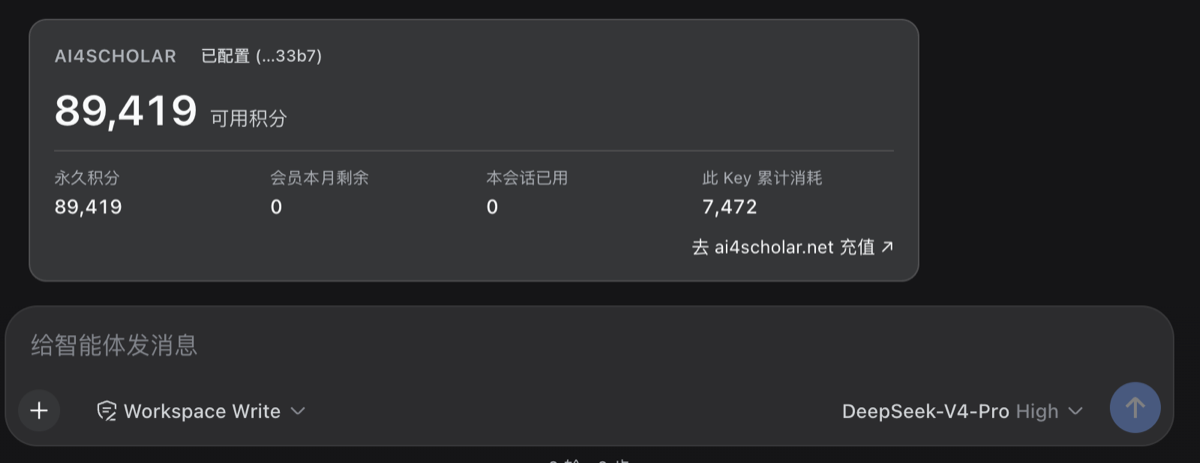
**积分看得见。** 对话里每张计费工具卡片的标题都带本次消耗(`Semantic Scholar: protein folding · 10 credits · 4,990 left`);模型看到的结果末尾有 `AI4Scholar credits — this call: 10 · this session: 40 · remaining: 4,960`(来自 API 的 `X-Credits-*` 响应头),并且提示词要求模型在用了计费工具的回合结尾用一句话汇报本轮消耗与余额;`/ai4scholar` 渲染成余额卡片(可用积分、明细、会员、Key 状态、本会话消耗),`get_ai4scholar_credits` 给模型同样的数字。免费源(arXiv、bioRxiv/medRxiv、DOI)不带积分行。
## 截图
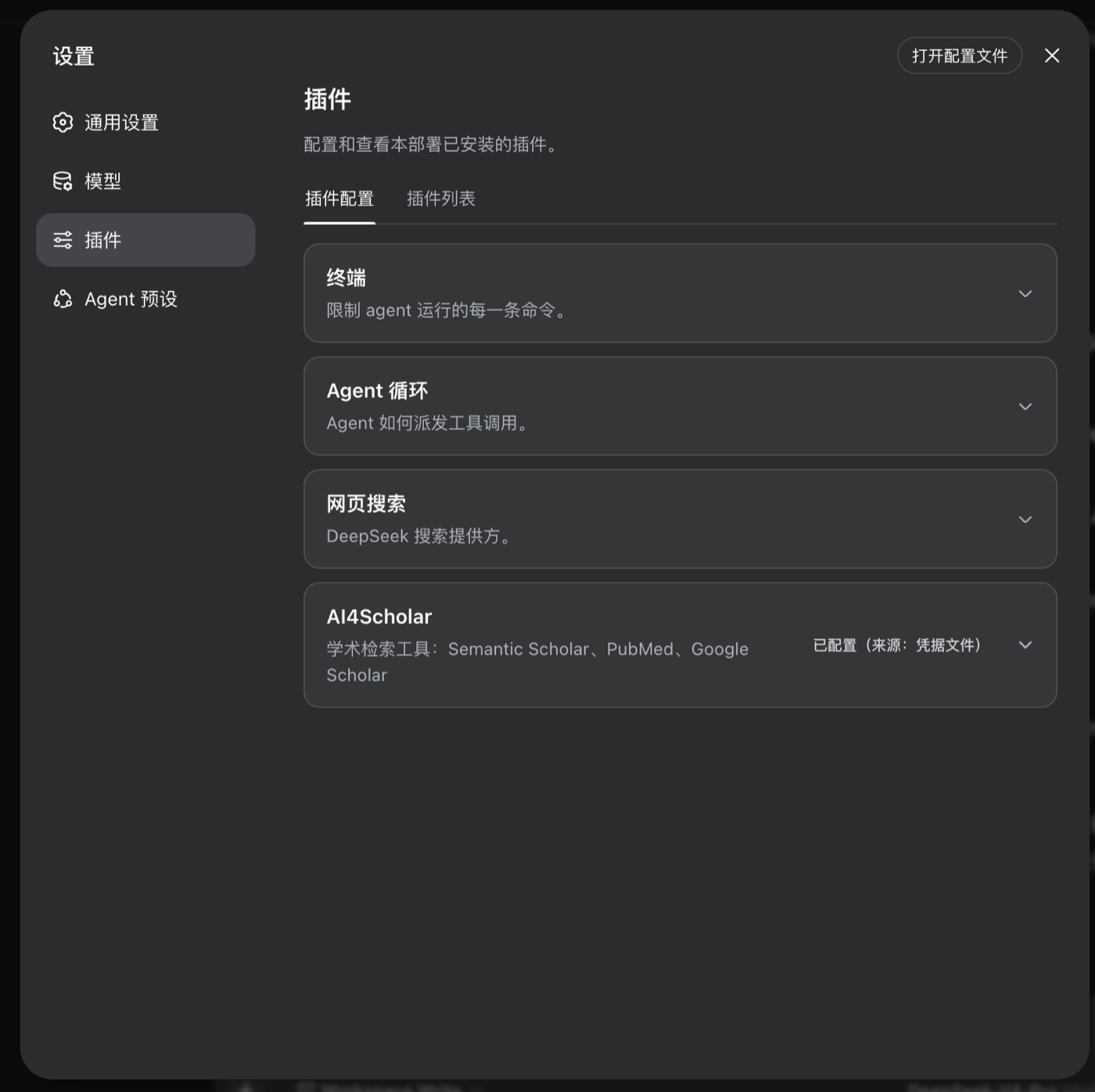
| 设置 → 插件 卡片 | `/ai4scholar` 余额卡 |
|---|---|
|  |  |
## 安装
**快速开始**(macOS / Linux;Windows 用 PowerShell 同理):
```sh
# 0. 前置:Node.js ≥ 22.19(或 ≥ 24)和 pnpm(dsh 用 pnpm 管理插件)
node -v
npm i -g pnpm # 已有可跳过
# 1. 安装 DeepSeek Harness
npm i -g @deepseek-ai/dsh
dsh --version
# 2. 安装本插件(装进 web profile;命令行一次性任务用 --profile headless)
dsh plugin --profile web add dsh-ai4scholar
# 3. 启动
dsh web # 打印 http://127.0.0.1:3080
```
然后在网页里配置一次:
1. **设置 → 模型**:填 DeepSeek API Key([platform.deepseek.com](https://platform.deepseek.com) 获取)。
2. **设置 → 插件 → AI4Scholar**:粘贴 AI4Scholar API Key([ai4scholar.net](https://ai4scholar.net?src=dsh) 获取),点 **保存**。卡片会把它存进 dsh 的凭据存储(`$DSH_HOME/.credentials.yaml`,权限 0600,和模型页保存 DeepSeek Key 是同一个地方),立刻测试(`✓ Key 有效 · 可用积分 89,419`),下一次工具调用即生效,无需重启;「刷新」可随时再测。浏览器始终拿不到 Key——检测走的是插件在宿主上的 `GET /ai4scholar/balance` 路由。
选一个工作区目录就可以直接提问了。升级:`dsh plugin --profile web add dsh-ai4scholar@latest`,然后重启 `dsh web`。
更喜欢文件或 CI 方式?插件解析的是凭据引用 `AI4SCHOLAR_API_KEY`,以下途径同样有效(优先级从高到低):启动 dsh 的 shell 里 `export AI4SCHOLAR_API_KEY=…` · `$DSH_HOME/.credentials.yaml` 中一行 · 项目目录或 `$DSH_HOME` 下的 `.env` 中一行。卡片会显示当前 Key 来自哪一层;来自环境变量时卡片变为只读。headless 没有设置页,请用其中一种。
每次发布后会自动触发 npmmirror 同步,国内默认源一分钟内也能装到新版本。
不启动也能验证配置层:`dsh --profile web --dump-config` 会打印出 `# == dsh-ai4scholar` 一节。
然后直接对话:
> 帮我找 2023 年以来 CRISPR 碱基编辑治疗镰状细胞病的论文,比较它们的递送方式。
> 在 PubMed 上按日期搜索 2022 年后 GLP-1 受体激动剂与心血管结局的研究。
> "Attention Is All You Need" 这篇论文的 DOI 和被引数是多少?
## 配置
组合包只插入一行(`id: ai4scholar`),默认值如下。在你 profile 的 `cordis.patch.yml` 中覆盖(patch 会整体替换 `config`,请把要保留的键一起写上):
```yaml
- id: ai4scholar
config:
apiKeyEnv: AI4SCHOLAR_API_KEY # 凭据引用名;Key 本身永远不写进配置
baseUrl: https://ai4scholar.net
# 工具家族开关
semanticScholar: true
pubmed: true
googleScholar: true
arxiv: true
biorxiv: true # bioRxiv + medRxiv
doi: true
fullText: true # read_* 全文工具(下载 PDF + 抽取文本)
autoCite: true
sciDraw: true
creditsTool: true # get_ai4scholar_credits
command: true # /ai4scholar 斜杠命令
balanceRoute: true # 设置卡片测试 Key 用的 GET /ai4scholar/balance 路由
showCredits: true # 计费结果末尾的积分行
promptGuidance: true # 注入一小段 system prompt 说明何时用哪个工具
promptOrder: 150
# 条数与长度
defaultMaxResults: 10 # 模型未指定 max_results 时的条数
maxResultsCap: 50 # 单次调用上限
abstractMaxChars: 600 # 每篇论文展示给模型的摘要字符数;0 表示不展示
readMaxChars: 60000 # 全文每片字符数
# 超时与重试
requestTimeoutMs: 30000 # 单次 HTTP 请求
pdfTimeoutMs: 120000 # 单次 PDF 下载
generationTimeoutMs: 300000 # auto_cite / sci_draw
maxRetries: 3 # 429 / 网络错误的尝试次数
retryBackoffMs: 2000 # 退避基数,逐次翻倍
toolTimeoutMs: 180000 # dsh 强制执行的单次工具调用预算
```
API Key 通过 `ctx.credentials` **按调用**解析:新存入或轮换的 Key 在下一次工具调用即生效,无需重启。若组合中没有凭据服务(自定义组装),插件回退读取 `process.env[apiKeyEnv]`。
设置卡片固定编辑 `AI4SCHOLAR_API_KEY`(浏览器半侧拿不到行配置);覆盖了 `apiKeyEnv` 的部署请改用环境变量或凭据文件管理该引用。会话累计消耗是进程内计数(dsh 重启后归零);余额本身始终来自 API。
## 与 dsh 的契合方式
- 一个包、两个半侧:Node 半侧注册工具;浏览器半侧(`exports["./client"]`,由 `dsh.client` 声明)通过 `settings.plugin.item` slot 贡献设置卡片,只经由凭据 wire API 与宿主通信——Key 明文不会出现在任何响应里,也不会到达模型。
- 工具通过 `defineTool` 注册到 `ctx.tools`:参数有类型且经 schema 校验;每次调用返回规范 JSON 值(`{ source, query, total, papers[], truncated, nextOffset? }`);给模型看的是 Markdown 渲染;给 Web UI 的是 `web` 结果卡片(结构化来源)。
- 一段 `tool:ai4scholar` system prompt 告诉模型何时用哪个平台、如何用 DOI/链接引用。
- 一切皆 effect:卸载插件(或修改其配置触发 HMR)会同时撤销全部工具和提示词片段。
- 除工具结果外不新增任何模型可见输入,会话仍可从日志完整回放。
## 开发
```sh
pnpm install
pnpm test # 先构建 lib/(Node 半侧 tsc,浏览器 bundle tsdown),再跑:单元测试、
# 针对真实 ToolRuntime 的冒烟测试、以及在 jsdom 里按 dsh 模块宿主契约加载
# 构建好的客户端 bundle 并驱动卡片的测试
pnpm typecheck
# 不发布也能在 dsh profile 中试用:
dsh plugin --profile web add /absolute/path/to/dsh-ai4scholar
```
也支持 `dsh plugin add github:/dsh-ai4scholar`:`prepare` 脚本会从源码构建 `lib/`,pnpm 会要求你在 profile 的 `pnpm-workspace.yaml` 中通过 `allowBuilds` 授权一次。
## 说明
- `download_by_doi` / `read_by_doi` 经 doi.org 解析并尝试已知出版商的 PDF 路径(Elsevier、Springer/Nature、Wiley、T&F、MDPI、IEEE、ACM、ACS、RSC、PLOS、Frontiers、bioRxiv/medRxiv、arXiv)。付费文章只有当 dsh 运行在有机构权限的网络上才能下载;失败时会给出落地页链接,方便用户手动获取。
- 全文抽取使用进程内的 `pdf-parse`(pdf.js);扫描版/纯图片 PDF 会明确报错而不是返回空文本。
- 同一套工具已提供 [OpenClaw](https://github.com/literaf/ai4scholar-plugin-openclaw)、[Codex](https://github.com/literaf/ai4scholar-plugin-codex) 和 [Hermes](https://github.com/literaf/ai4scholar-plugin-hermes) 版本。
## 许可证
MIT