# dom-iterator
Feature-rich, well-tested Iterator for traversing DOM nodes. A better version of [NodeIterator](https://developer.mozilla.org/en-US/docs/Web/API/NodeIterator). Travels in both directions.
Can be used in node.js with [mini-html-parser](http://github.com/matthewmueller/mini-html-parser).
## Installation
Install with [component(1)](http://component.io):
$ component install matthewmueller/dom-iterator
With node.js:
$ npm install dom-iterator
## Example
```js
var it = iterator(node);
var next;
while (next = it.next(Node.TEXT_NODE)) {
console.log(next.nodeValue) // next textnodes after node
}
```
## API
### `iterator(node, root)`
Initialize an iterator starting on the `node`. Optionally you can
specify a `root` to limit your traversal to a particular subtree.
`root` must be either a parent or an ancestor of `node`.
```js
var it = iterator(el.firstChild, el)
```
### `iterator#next([expr], [n])`
Gets the next DOM `node`. If no `node` exists, return `null`.
You may pass an expression `expr`, to grab the first node that
matches `expr`.
Additionally, you can pass a number to select the `nth` node.
Defaults to `1` or the `1st` node.
```js
var node = it.next()
// select the 2nd element node we come across
var next = it.next(Node.ELEMENT_NODE, 2)
```
Here's a look at how the DOM is traversed:
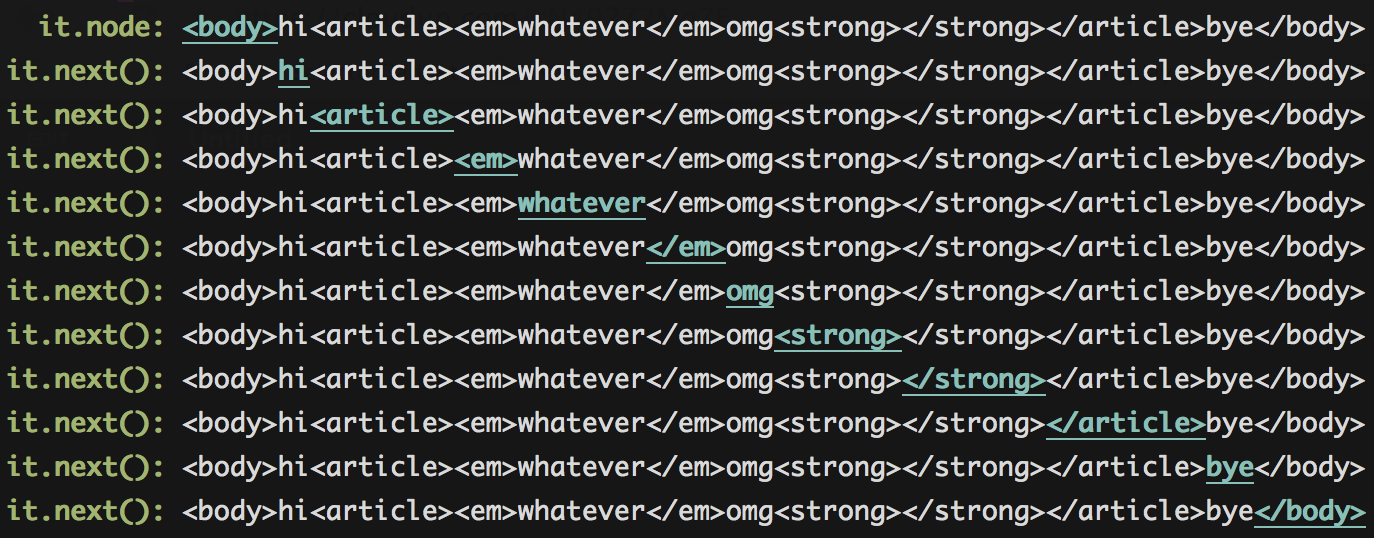
### `iterator#prev()`, `iterator#previous()`
Gets the previous DOM `node`. If no `node` exists, return `null`.
You may pass an expression `expr`, to grab the first node that
matches `expr`.
Additionally, you can pass a number to select the `nth` node.
Defaults to `1` or the `1st` node.
```js
var node = it.prev()
// select the 2nd element node we come across
var prev = it.prev(Node.ELEMENT_NODE, 2)
```
Here's a look at how the DOM is traversed:
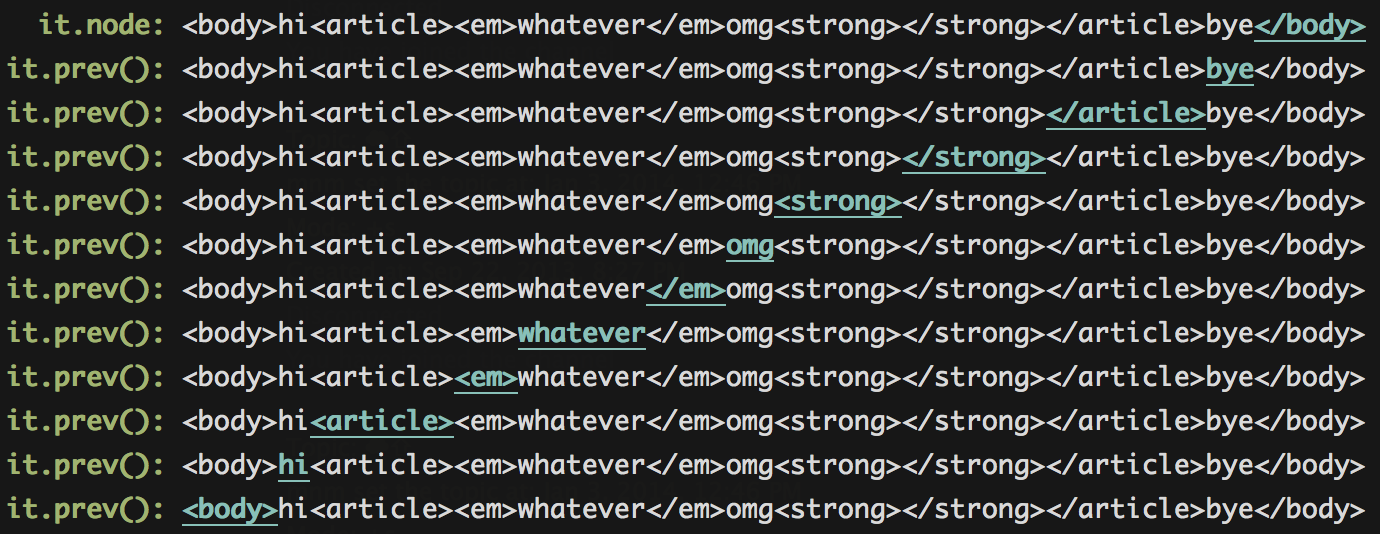
### `iterator.select(expr)`
iterate over nodes that pass the expression `expr`. The `expr` can be an
enum, number, string or function. If it's a number, the `nodeType` is compared.
This function can be chained where all expressions are OR-ed.
```js
it.select(Node.ELEMENT_NODE)
.select(8)
.select('nodeValue == "sloth"')
.select(fn)
```
This is saying:
> select all element nodes or comment nodes
> or nodes with the nodeValue "sloth" or
> nodes that pass the function `fn`.
### `iterator.reject(expr)`
iterate over nodes that do not pass the expression `expr`. The `expr` can be an
enum, number, string or function. If it's a number, the `nodeType` is compared.
This function can be chained where all expressions are AND-ed.
```js
it.reject(Node.ELEMENT_NODE)
.reject(8)
.reject('nodeValue == "sloth"')
.reject(fn)
```
This is saying:
> reject all element nodes and comment nodes
> and nodes with the nodeValue sloth and
> nodes that pass the function `fn`".
### `iterator.revisit(revisit)`
You can also skip over elements you already visited, by setting `revisit` to false. By default, `revisit` is set to `true`.
```js
it.revisit(false);
```
Here's how that would change the iterator:
**it.next():**
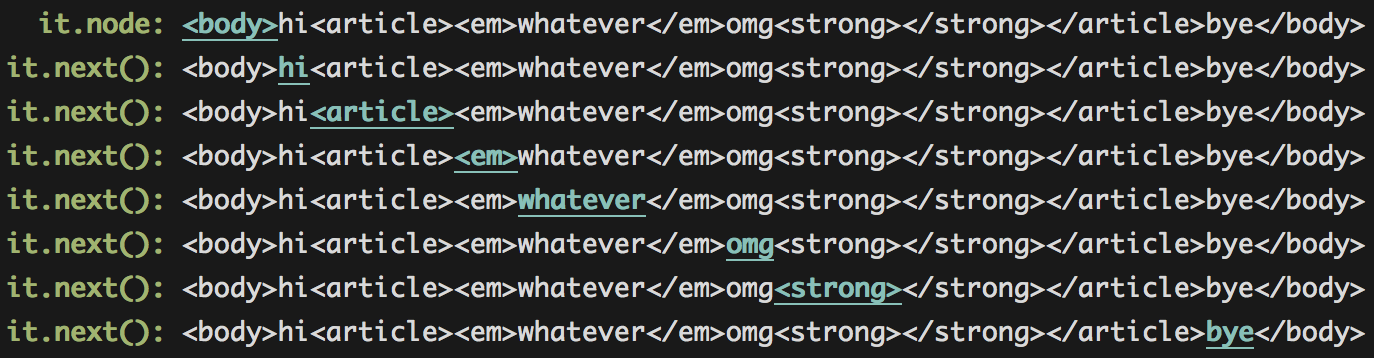
**it.prev()**
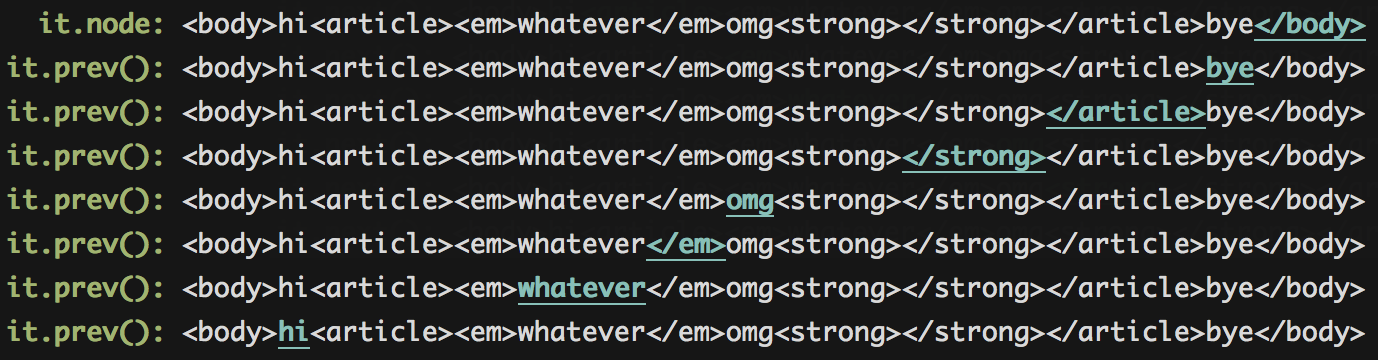
### `iterator.opening()`
Jump to the opening tag of an element. This is the default.
```js
var dom = domify('hi');
var it = it(dom).opening()
it.next() // 'hi'
```
### `iterator.closing()`
Jump to the closing tag of an element
```js
var dom = domify('hi');
var it = it(dom).closing()
it.prev() // 'hi'
```
### `iterator.peek([expr], [n])`
Sometimes you want to peek on the following or previous node without actually visiting it. With `peek` you can peek forward or backwards `n` steps. If no `n` is given, peek forward 1 step.
Peaking forward:
```js
it.peek(); // peek forward 1
it.peek(3); // peek forward 3 steps
```
Peaking backwards:
```js
it.peek(Node.ELEMENT_NODE, -3) // peek backwards 3 steps, only selecting element nodes
```
### `iterator.reset([newNode])`
Reset the iterator to the original `node`. Optionally pass a `newNode` to start at.
```js
it.reset();
```
### `iterator.use(fn)`
Add a plugin to the iterator.
## Run Tests
On the server:
```js
npm install
make test
```
Or in the browser:
```js
npm install
make test-browser
```
## License
MIT