 DetectRTC.js
# DetectRTC | Is WebRTC Supported In Your Browser?
[](https://npmjs.org/package/detectrtc) [](https://npmjs.org/package/detectrtc) [](https://travis-ci.org/muaz-khan/DetectRTC)
DetectRTC.js
# DetectRTC | Is WebRTC Supported In Your Browser?
[](https://npmjs.org/package/detectrtc) [](https://npmjs.org/package/detectrtc) [](https://travis-ci.org/muaz-khan/DetectRTC)  ### Live Demo: https://www.webrtc-experiment.com/DetectRTC/
```javascript
if (DetectRTC.isWebRTCSupported === false) {
alert('Please use Chrome or Firefox.');
}
if (DetectRTC.hasWebcam === false) {
alert('Please install an external webcam device.');
}
if (DetectRTC.hasMicrophone === false) {
alert('Please install an external microphone device.');
}
if (DetectRTC.hasSpeakers === false && (DetectRTC.browser.name === 'Chrome' || DetectRTC.browser.name === 'Edge')) {
alert('Oops, your system can not play audios.');
}
```
## What is this?
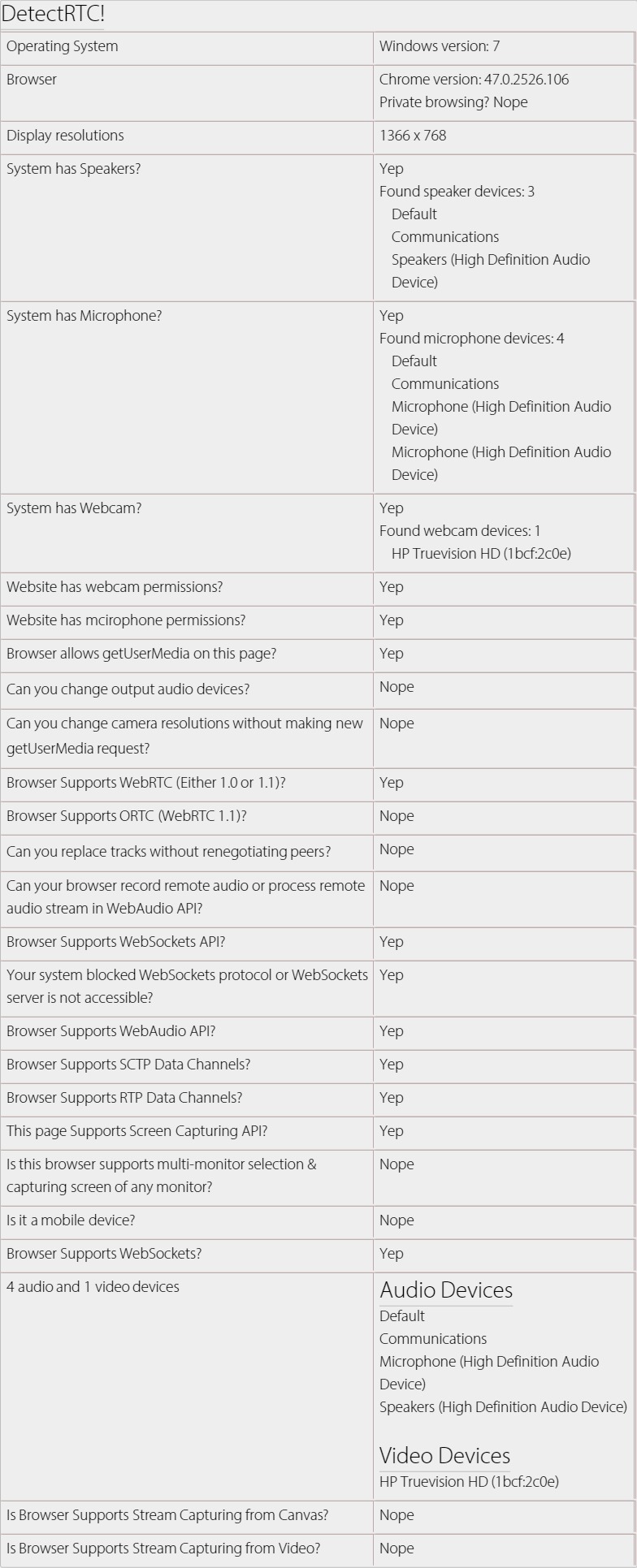
A tiny JavaScript library that can be used to detect WebRTC features e.g. system having speakers, microphone or webcam, screen capturing is supported, number of audio/video devices etc.
## Free?
It is MIT Licenced, which means that you can use it in any commercial/non-commercial product, free of cost.
## Tests?
* https://travis-ci.org/muaz-khan/DetectRTC
## Releases?
* https://github.com/muaz-khan/DetectRTC/releases
## How to install?
```
npm install detectrtc --production
# or via "bower"
bower install detectrtc
```
# Proposed NEW API
```javascript
DetectRTC.isSetSinkIdSupported // (implemented)
DetectRTC.isRTPSenderReplaceTracksSupported // (implemented)
DetectRTC.isORTCSupported // (implemented)
DetectRTC.isRemoteStreamProcessingSupported // (implemented)
DetectRTC.isWebsiteHasWebcamPermissions // (implemented)
DetectRTC.isWebsiteHasMicrophonePermissions // (implemented)
DetectRTC.audioInputDevices // (implemented)
DetectRTC.audioOutputDevices // (implemented)
DetectRTC.videoInputDevices // (implemented)
// Below API are NOT implemented yet
DetectRTC.browser.googSupportedFlags.googDAEEchoCancellation
DetecRTC.browser.googSupportedFlags.echoCancellation
DetectRTC.isMediaHintsSupportsNewSyntax
```
# LocalHost
```sh
node server.js
# or
npm start
# and open:
http://127.0.0.1:9001
# or
http://localhost:9001
```
# NPM
```javascript
var DetectRTC = require('detectrtc');
console.log(DetectRTC.browser);
DetectRTC.load(function() {
console.log(DetectRTC);
});
```
* Live NPM test: https://tonicdev.com/npm/detectrtc
Or try `npm-test.js`:
```sh
cd node_modules
cd detectrtc
# npm test
# or
node npm-test.js
```
# How to link the script?
```html
```
You can even link specific versions:
```html
```
### Live Demo: https://www.webrtc-experiment.com/DetectRTC/
```javascript
if (DetectRTC.isWebRTCSupported === false) {
alert('Please use Chrome or Firefox.');
}
if (DetectRTC.hasWebcam === false) {
alert('Please install an external webcam device.');
}
if (DetectRTC.hasMicrophone === false) {
alert('Please install an external microphone device.');
}
if (DetectRTC.hasSpeakers === false && (DetectRTC.browser.name === 'Chrome' || DetectRTC.browser.name === 'Edge')) {
alert('Oops, your system can not play audios.');
}
```
## What is this?
A tiny JavaScript library that can be used to detect WebRTC features e.g. system having speakers, microphone or webcam, screen capturing is supported, number of audio/video devices etc.
## Free?
It is MIT Licenced, which means that you can use it in any commercial/non-commercial product, free of cost.
## Tests?
* https://travis-ci.org/muaz-khan/DetectRTC
## Releases?
* https://github.com/muaz-khan/DetectRTC/releases
## How to install?
```
npm install detectrtc --production
# or via "bower"
bower install detectrtc
```
# Proposed NEW API
```javascript
DetectRTC.isSetSinkIdSupported // (implemented)
DetectRTC.isRTPSenderReplaceTracksSupported // (implemented)
DetectRTC.isORTCSupported // (implemented)
DetectRTC.isRemoteStreamProcessingSupported // (implemented)
DetectRTC.isWebsiteHasWebcamPermissions // (implemented)
DetectRTC.isWebsiteHasMicrophonePermissions // (implemented)
DetectRTC.audioInputDevices // (implemented)
DetectRTC.audioOutputDevices // (implemented)
DetectRTC.videoInputDevices // (implemented)
// Below API are NOT implemented yet
DetectRTC.browser.googSupportedFlags.googDAEEchoCancellation
DetecRTC.browser.googSupportedFlags.echoCancellation
DetectRTC.isMediaHintsSupportsNewSyntax
```
# LocalHost
```sh
node server.js
# or
npm start
# and open:
http://127.0.0.1:9001
# or
http://localhost:9001
```
# NPM
```javascript
var DetectRTC = require('detectrtc');
console.log(DetectRTC.browser);
DetectRTC.load(function() {
console.log(DetectRTC);
});
```
* Live NPM test: https://tonicdev.com/npm/detectrtc
Or try `npm-test.js`:
```sh
cd node_modules
cd detectrtc
# npm test
# or
node npm-test.js
```
# How to link the script?
```html
```
You can even link specific versions:
```html
```
 # How to use it?
```javascript
// for node.js users
var DetectRTC = require('detectrtc');
// non-nodejs users can skip above line
// below code will work for all users
DetectRTC.load(function() {
DetectRTC.hasWebcam; // (has webcam device!)
DetectRTC.hasMicrophone; // (has microphone device!)
DetectRTC.hasSpeakers; // (has speakers!)
DetectRTC.isScreenCapturingSupported; // Chrome, Firefox, Opera, Edge and Android
DetectRTC.isSctpDataChannelsSupported;
DetectRTC.isRtpDataChannelsSupported;
DetectRTC.isAudioContextSupported;
DetectRTC.isWebRTCSupported;
DetectRTC.isDesktopCapturingSupported;
DetectRTC.isMobileDevice;
DetectRTC.isWebSocketsSupported;
DetectRTC.isWebSocketsBlocked;
DetectRTC.checkWebSocketsSupport(callback);
DetectRTC.isWebsiteHasWebcamPermissions; // getUserMedia allowed for HTTPs domain in Chrome?
DetectRTC.isWebsiteHasMicrophonePermissions; // getUserMedia allowed for HTTPs domain in Chrome?
DetectRTC.audioInputDevices; // microphones
DetectRTC.audioOutputDevices; // speakers
DetectRTC.videoInputDevices; // cameras
DetectRTC.osName;
DetectRTC.osVersion;
DetectRTC.browser.name === 'Edge' || 'Chrome' || 'Firefox';
DetectRTC.browser.version;
DetectRTC.browser.isChrome;
DetectRTC.browser.isFirefox;
DetectRTC.browser.isOpera;
DetectRTC.browser.isIE;
DetectRTC.browser.isSafari;
DetectRTC.browser.isEdge;
DetectRTC.browser.isPrivateBrowsing; // incognito or private modes
DetectRTC.isCanvasSupportsStreamCapturing;
DetectRTC.isVideoSupportsStreamCapturing;
DetectRTC.DetectLocalIPAddress(callback);
});
```
# `DetectRTC.version`
DetectRTC is supporting `version` property since `1.4.1`.
```javascript
if(DetectRTC.version === '1.4.1') {
alert('We are using DetectRTC version 1.4.1');
}
```
# Why `load` method?
If you're not detecting audio/video input/output devices then you can skip this method.
`DetectRTC.load` simply makes sure that all devices are captured and valid result is set for relevant properties.
# How to fix devices' labels?
You need to check for `device.isCustomLabel` boolean. If this boolean is `true` then assume that DetectRTC given a custom label to the device.
You must getUserMedia request whenever you find `isCustomLabel===true`. getUserMedia request will return valid device labels.
```javascript
if (DetectRTC.MediaDevices[0] && DetectRTC.MediaDevices[0].isCustomLabel) {
// it seems that we did not make getUserMedia request yet
navigator.mediaDevices.getUserMedia({
audio: true,
video: true
}).then(function(stream) {
var video;
try {
video = document.createElement('video');
video.muted = true;
video.src = URL.createObjectURL(stream);
video.style.display = 'none';
(document.body || document.documentElement).appendChild(vide);
} catch (e) {}
DetectRTC.load(function() {
DetectRTC.videoInputDevices.forEach(function(device, idx) {
// ------------------------------
// now you get valid label here
console.log(device.label);
// ------------------------------
});
// release camera
stream.getTracks().forEach(function(track) {
track.stop();
});
if (video && video.parentNode) {
video.parentNode.removeChild(video);
}
});
});
} else {
DetectRTC.videoInputDevices.forEach(function(device, idx) {
console.log(device.label);
});
}
```
# How to select specific camera?
Demo: [https://jsfiddle.net/cf90az9q/](https://jsfiddle.net/cf90az9q/)
```html
```
For further tricks & usages:
* https://www.webrtc-experiment.com/webrtcpedia/#modify-streams
# Rules to Contribute
```sh
mkdir DetectRTC
cd DetectRTC
git clone git://github.com/muaz-khan/DetectRTC.git ./
# install grunt for code style verifications
npm install grunt-cli
# install all dependencies
npm install --save-dev
# verify your changes
# npm test # or "grunt"
grunt
# Success? Make a pull request!
```
# Github
* https://github.com/muaz-khan/DetectRTC
# Tests powered by
**Check tests here:** https://travis-ci.org/muaz-khan/DetectRTC
# License
[DetectRTC.js](https://github.com/muaz-khan/DetectRTC) is released under [MIT licence](https://www.webrtc-experiment.com/licence/) . Copyright (c) [Muaz Khan](http://www.MuazKhan.com/).
# How to use it?
```javascript
// for node.js users
var DetectRTC = require('detectrtc');
// non-nodejs users can skip above line
// below code will work for all users
DetectRTC.load(function() {
DetectRTC.hasWebcam; // (has webcam device!)
DetectRTC.hasMicrophone; // (has microphone device!)
DetectRTC.hasSpeakers; // (has speakers!)
DetectRTC.isScreenCapturingSupported; // Chrome, Firefox, Opera, Edge and Android
DetectRTC.isSctpDataChannelsSupported;
DetectRTC.isRtpDataChannelsSupported;
DetectRTC.isAudioContextSupported;
DetectRTC.isWebRTCSupported;
DetectRTC.isDesktopCapturingSupported;
DetectRTC.isMobileDevice;
DetectRTC.isWebSocketsSupported;
DetectRTC.isWebSocketsBlocked;
DetectRTC.checkWebSocketsSupport(callback);
DetectRTC.isWebsiteHasWebcamPermissions; // getUserMedia allowed for HTTPs domain in Chrome?
DetectRTC.isWebsiteHasMicrophonePermissions; // getUserMedia allowed for HTTPs domain in Chrome?
DetectRTC.audioInputDevices; // microphones
DetectRTC.audioOutputDevices; // speakers
DetectRTC.videoInputDevices; // cameras
DetectRTC.osName;
DetectRTC.osVersion;
DetectRTC.browser.name === 'Edge' || 'Chrome' || 'Firefox';
DetectRTC.browser.version;
DetectRTC.browser.isChrome;
DetectRTC.browser.isFirefox;
DetectRTC.browser.isOpera;
DetectRTC.browser.isIE;
DetectRTC.browser.isSafari;
DetectRTC.browser.isEdge;
DetectRTC.browser.isPrivateBrowsing; // incognito or private modes
DetectRTC.isCanvasSupportsStreamCapturing;
DetectRTC.isVideoSupportsStreamCapturing;
DetectRTC.DetectLocalIPAddress(callback);
});
```
# `DetectRTC.version`
DetectRTC is supporting `version` property since `1.4.1`.
```javascript
if(DetectRTC.version === '1.4.1') {
alert('We are using DetectRTC version 1.4.1');
}
```
# Why `load` method?
If you're not detecting audio/video input/output devices then you can skip this method.
`DetectRTC.load` simply makes sure that all devices are captured and valid result is set for relevant properties.
# How to fix devices' labels?
You need to check for `device.isCustomLabel` boolean. If this boolean is `true` then assume that DetectRTC given a custom label to the device.
You must getUserMedia request whenever you find `isCustomLabel===true`. getUserMedia request will return valid device labels.
```javascript
if (DetectRTC.MediaDevices[0] && DetectRTC.MediaDevices[0].isCustomLabel) {
// it seems that we did not make getUserMedia request yet
navigator.mediaDevices.getUserMedia({
audio: true,
video: true
}).then(function(stream) {
var video;
try {
video = document.createElement('video');
video.muted = true;
video.src = URL.createObjectURL(stream);
video.style.display = 'none';
(document.body || document.documentElement).appendChild(vide);
} catch (e) {}
DetectRTC.load(function() {
DetectRTC.videoInputDevices.forEach(function(device, idx) {
// ------------------------------
// now you get valid label here
console.log(device.label);
// ------------------------------
});
// release camera
stream.getTracks().forEach(function(track) {
track.stop();
});
if (video && video.parentNode) {
video.parentNode.removeChild(video);
}
});
});
} else {
DetectRTC.videoInputDevices.forEach(function(device, idx) {
console.log(device.label);
});
}
```
# How to select specific camera?
Demo: [https://jsfiddle.net/cf90az9q/](https://jsfiddle.net/cf90az9q/)
```html
```
For further tricks & usages:
* https://www.webrtc-experiment.com/webrtcpedia/#modify-streams
# Rules to Contribute
```sh
mkdir DetectRTC
cd DetectRTC
git clone git://github.com/muaz-khan/DetectRTC.git ./
# install grunt for code style verifications
npm install grunt-cli
# install all dependencies
npm install --save-dev
# verify your changes
# npm test # or "grunt"
grunt
# Success? Make a pull request!
```
# Github
* https://github.com/muaz-khan/DetectRTC
# Tests powered by
**Check tests here:** https://travis-ci.org/muaz-khan/DetectRTC
# License
[DetectRTC.js](https://github.com/muaz-khan/DetectRTC) is released under [MIT licence](https://www.webrtc-experiment.com/licence/) . Copyright (c) [Muaz Khan](http://www.MuazKhan.com/).