Forms/SearchButton
==================
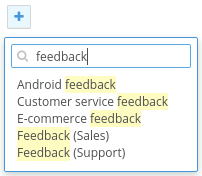
Renders a button which opens a search form.
```jsx
No results found
```
### Props
**results={array}**
List of search results.
**emptyPlaceholder={string}**
Displayed in the drop down before a value is entered.
**closeOnClickOutside={bool}**
Close the search box when the user clicks outside of it.
**onSelect={function}**
Called when a search result is clicked. Receives the result value and index as arguments.
See also `Forms/Input` for more props.
### CSS
Adds `dp-search-button` to the root element.
### Examples
This example uses the Javascript `fetch` API to grab a list of terms from a json file. A real app would fetch results from a backend service.
_results.json_
```json
[
"Android feedback",
"Customer service feedback",
"E-commerce feedback",
"Feedback (Sales)"
]
```
_index.js_
```jsx
import React from 'react';
import ReactDOM from 'react-dom';
/**
* Displays a button which, when clicked, opens a search form. The search form uses
* the fetch API to make ajax requests to a backend service which returns a list
* of terms matching the given search term.
*/
class App extends React.Component {
/**
* Constructor
*
* @param {*} props
*/
constructor(props) {
super(props);
this.state = {
value: '',
results: []
};
}
/**
* Callback for the SearchButton.onSelect event
*
* The SearchButton.onSelect event is triggered when the user selects a value from
* the search results. Either by clicking on the item or highlighting it and pressing
* the ENTER key.
*
* @param {string} value Current input value
*/
handleSelect = (value) => {
console.log(value);
};
/**
* Callback for the SearchButton.onChange event
*
* Triggered each time the input value changes, the method will fetch search results
* matching the current value using the fetch API.
*
* @param {string} value Current input value
*/
handleChange = (value) => {
if (value.length === 0) {
this.setState({ value, results: [] });
} else {
fetch('/results.json')
.then((res) => {
return res.json();
})
.then((results) => {
this.setState({ value, results });
});
}
};
/**
* Renders the search button
*
* @returns {XML}
*/
render() {
const { value, results } = this.state;
return (
);
}
}
ReactDOM.render(, document.getElementById('mount'));
```