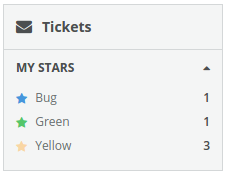
Columns/Item
==================
Standard drawer item which may display and number.
```jsx
-
Bug
-
Green
-
Yellow
```
### Props
**count={number}**
Number value to display inside the item.
**selected={bool}**
Indicates whether the item is selected.
**onClick={func}**
Called when the item is clicked.
**onSelect={func}**
Called when the item is selected.
### CSS
Adds the `dp-column-item` class to the element.
Adds the `dp-drawer-item--selected` class to the element when it's in a "selected" state.
### Examples
```jsx
import React from 'react';
import { render } from 'react-dom';
import {
Column,
Heading,
DrawerList,
Drawer,
ItemList,
Item
} from 'Components/Columns';
const styles = {
iconBlue: {
color: '#4696DC'
},
iconGreen: {
color: '#54c66a'
},
iconYellow: {
color: '#f9d6a4'
}
};
const App = () => (
Tickets
My Stars
-
Bug
-
Green
-
Yellow
);
render(, document.getElementById('mount');
```