---
layout: doc
title: deliteful/ViewStack
---
# deliteful/ViewStack
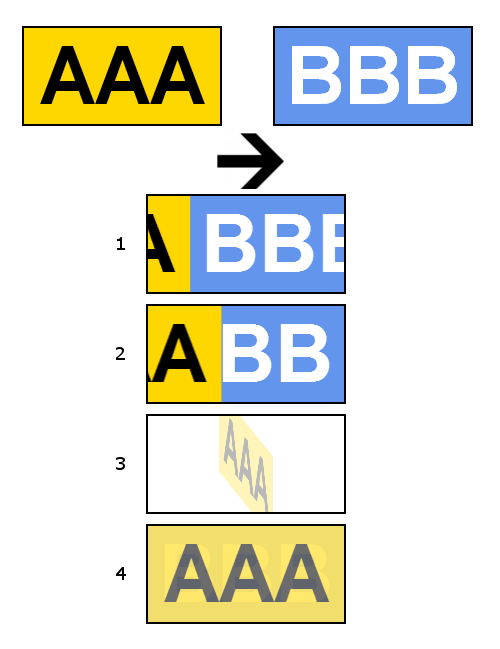
`deliteful/ViewStack` is a container that has multiple children, but shows only one child at a time. Moving from one child to another is accomplished via a transition.
This container supports 8 transition types: `slide`, `slidev`, `reveal`, `revealv`, `cover`, `coverv`, `fade`, `flip`.
Some of the transition types are described in the following picture:
1. Slide
2. Reveal
3. Flip
4. Fade
##### Table of Contents
[Element Instantiation](#instantiation)
[Element Configuration](#configuration)
[Element Styling](#styling)
[Enterprise Use](#enterprise)
## Element Instantiation
See [`delite/Widget`](/delite/docs/master/Widget.md) for full details on how instantiation lifecycle is working.
### Declarative Instantiation
```js
require(["deliteful/ViewStack", "requirejs-domready/domReady!"], function () {
});
```
```html
Child 1 (Default visible child)
Child 2
Child 3
```
### Programmatic Instantiation
```js
require(["deliteful/ViewStack", "requirejs-domready/domReady!"], function (ViewStack) {
var vs = new ViewStack({width:"100%, height: 200px"});
var child1 = document.createElement("div");
var child2 = document.createElement("div");
var child3 = document.createElement("div");
vs.addChild(child1);
vs.addChild(child2);
vs.addChild(child3);
vs.placeAt(document.body);
});
```
### Loading additional transition types
The ViewStack container include by default 2 transition types: "slide" and "reveal". To use another transition type, you must require it:
Example: Load all additional transition types
```js
require(["requirejs-dplugins/css!deliteful/ViewStack/transitions/cover.css",
"requirejs-dplugins/css!deliteful/ViewStack/transitions/coverv.css",
"requirejs-dplugins/css!deliteful/ViewStack/transitions/fade.css",
"requirejs-dplugins/css!deliteful/ViewStack/transitions/flip.css",
"requirejs-dplugins/css!deliteful/ViewStack/transitions/slidev.css",
"requirejs-dplugins/css!deliteful/ViewStack/transitions/revealv.css"],...);
```
## Element Configuration
`deliteful/ViewStack` support `delite` display infrastructure by inheriting from `delite/DisplayContainer`. For more informations, see [`delite/DisplayContainer`](/delite/docs/master/DisplayContainer.md) documentation.
### Displaying a child
To display a child of the container, call the `show` method.
Example:
```js
vs.show(child2, {transition: "reveal", reverse: true});
```
The `show` method takes as first argument a DOM node instance or id. The second argument is optional. Available properties are `transition` and/or `reverse`.
The `reverse` property applies only to Slide and Reveal transitions.
Set `transition` to `"none"` for disabling animated transition.
### Properties
If `show` method is called without a second argument, the transition is controlled by the `transition` and `reverse` properties.
Default values are `{transition: "slide", reverse: false}`.
## Element Styling
`deliteful/ViewStack` has no visual appearance, it does not provide any CSS class for styling.
The default height of a `deliteful/ViewStack` is ``100%``. When the height of a ViewStack is expressed as a percentage, you must ensure that the height of its parent is defined.
If the height of the parent is also defined as a percentage, you must recursively apply the same rule, up to ```` and ```` elements if needed.
An HTML full-screen application has its ```` and ```` elements height set to ``100%``.
You can read this [external article](http://webdesign.about.com/od/csstutorials/f/set-css-height-100-percent.htm) for more information.
You can set height of ```` and ```` to ``100%`` by including [`defaultapp.css`](/delite/docs/master/defaultapp.md)
The `position` CSS attribute of this element must be set to `absolute` or `relative` (default).
The following CSS layout attributes must **NOT** be changed. They are explicitly set by the container and are required for a correct behaviour of it.
- ViewStack node: `display`, `box-sizing`, `overflow-x`
- ViewStack children: `box-sizing`, `width`
Note: In some circumstances the animated transition between two children can be broken, for example if a deliteful/List is a direct child of ViewStack.
To fix this wrong behaviour, wrap the child into a block level element.
## Enterprise Use
### Accessibility
Relies on browser.
### Globalization
`deliteful/ViewStack` does not provide any internationalizable bundle.
Right to left orientation is supported by setting the `dir` attribute to `rtl` on the `deliteful/ViewStack` element. It affects Slide and Reveal transitions.
### Security
This widget has no specific security concern. Refer to [`delite/Widget`](/delite/docs/master/Widget.md) for general security advice on this base class that `deliteful/ViewStack` is using.
### Browser Support
This widget supports all supported browsers. On Internet Explorer 9, transitions are not animated.